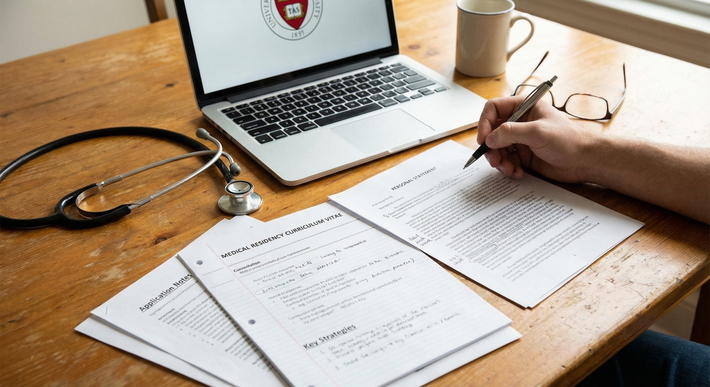
The hidden professionalism signals in your application will quietly help or quietly damage you long before anyone reads your personal statement.
Everyone obsesses over Step scores and letters. Meanwhile, you are sending programs emails from a joke address, your voicemail is full, and your Zoom name still says “iPhone (Mom’s)”. That is how you get silently downgraded from “maybe” to “no” without a single discussion in the selection meeting.
Let me break this down specifically.
The Unspoken Rule: You Are Being Evaluated All the Time
Program coordinators and PDs notice the small stuff. Not because they are petty. Because residency is essentially a multi‑year professionalism stress test, and early signals predict future headaches.
They are asking three questions every time they interact with you, even for 20 seconds:
- Can this person be trusted to represent our program to patients and other services?
- Will this person create work for us or reduce it?
- Does this person understand basic professional norms?
Your emails, voicemail, text replies, and virtual presence answer those questions before your CV has a chance.
/no greeting, Late / last-minute changes, Sloppy or rude email tone](https://cdn.residencyadvisor.com/images/articles_svg/chart-common-communication-red-flags-reported-by-program-9227.svg "Common Communication Red Flags Reported by Program Coordinators")
| Category | Value |
|---|---|
| No response to emails | 65 |
| Unprofessional email address | 40 |
| [Voicemail full](https://residencyadvisor.com/resources/strong-residency-application/how-pds-secretly-rank-applicants-before-interview-day-even-starts)/no greeting | 55 |
| Late / last-minute changes | 50 |
| Sloppy or rude email tone | 60 |
I have watched coordinators pull up an application, sigh, and say, “This is the one whose voicemail has been full for two weeks,” and then quietly move them down the rank list. No drama. No warning. Just done.
You will not get an email saying, “We did not rank you because your voicemail greeting said ‘Yo, you know what to do.’” But that is exactly how you lose ground.
Email: Your Primary Professional Interface
Your email is the front door to your professional identity. Most applicants underestimate how much signal is packed into a few lines of text.
Your Email Address: Stop Being Cute
If your current address is anything like:
Fix it. Today.
You want:
- Some version of: first.last@…
- Or: first_m_last@…
- Or: f.lastname@…
Ideally on a stable provider (Gmail, Outlook). Avoid:
- School addresses that might expire soon
- Shared family accounts
- Anything with nicknames, hobbies, or jokes
Here is the standard I use: If a chief resident read just your address aloud in an M&M conference, would you feel embarrassed? If yes, change it.
Subject Lines: Specific, Searchable, Not Vague
Coordinators live in Outlook all day. They search by name, date, and purpose. Help them.
Bad subject lines:
- “Question”
- “Update”
- “ERAS”
Better examples:
- “ERAS ID ####### – Interview Day Question – [Your Name]”
- “[Your Name] – Thank you for Interview on 10/15 – [Program Name]”
- “[Your Name], ERAS ####### – Step 2 CK Score Update”
You want keywords: your name, ERAS ID, program name, specific purpose.
Greeting and Salutation: Get the Hierarchy Right
Sloppy greetings signal that you do not understand professional hierarchy or basic courtesy.
Safe default greeting:
- “Dear Dr Smith,”
- “Dear Dr Smith and Residency Selection Committee,”
- “Dear Ms Johnson,” (for coordinators; yes, you can say Ms if unsure)
Avoid:
- “Hi!” with no name
- First-name-only for PDs you have never met (“Hi John,”)
- “To whom it may concern” when the coordinator’s name is right there in the email below
Closing lines that work:
- “Sincerely,”
- “Best regards,”
- “Respectfully,”
Then your full name, medical school, email, phone.
Tone: Concise, Polite, Neutral
Program staff are allergic to three things in email:
- Entitled tone (“I expect a response asap”)
- Overly casual writing (“Hey guys, just checking in lol”)
- Wall-of-text paragraphs
Aim for 3–8 sentence emails, short paragraphs, and direct language. Example of a solid email to a coordinator:
Subject: [Your Name], ERAS ####### – Interview Day Logistics Question
Dear Ms Johnson,
Thank you again for the opportunity to interview with [Program Name] on November 3rd.
I wanted to confirm whether the pre-interview social on November 2nd is mandatory or optional, as I am arranging travel from out of state.
Thank you very much for your time and help.
Sincerely,
[Full Name], MS4
[Medical School]
[Phone Number]
[Email]
No drama. No fluff. Clear ask.
Response Time: This Is Part of Professionalism
If you reply to program emails 3–4 days late, you look disorganized or disinterested.
Reasonable standards during application season:
- Business hours reply target: within 24 hours
- Nights/weekends: within 24–36 hours unless it is clearly urgent
- Time-sensitive items (interview invites, preference forms): as soon as you reasonably can
If you need time to think, acknowledge:
Dear Dr Patel,
Thank you very much for your email and for considering my request. I will review my schedule and respond with a final answer by tomorrow afternoon.
Best regards,
[Name]
That single holding email can be the difference between “organized, respectful” and “ghosted us.”
Formatting and Errors: Yes, They Notice
You do not need a novel. But you do need:
- Capitalization
- Periods
- No texting abbreviations
- Spell the program’s name correctly
I have seen an email to “Dear Dr. Johnson” when the PD’s last name is actually “Johnston” and is printed in the signature line below. The PD forwarded it to me with one word: “Nope.”
Run your eyes over the email once. Two minutes of proofreading is cheap insurance.
Voicemail: The Most Underestimated Red Flag
Your voicemail setup is either silently working for you or silently killing you.
The Coordinator Reality
Coordinators call you for:
- Interview offers
- Schedule changes when something falls through
- Waitlist movement
- Missing documents
- Occasionally, last-minute emergency shifts in logistics
If they hear:
- “The voicemail box is full”
- A generic robotic greeting with no name
- A chaotic background with jokes and shouting
- Or nothing because you never set it up
They do not think, “This person is busy.” They think, “This person cannot be reached reliably.”

And they move to the next person on the list.
What Your Voicemail Must Have
Non-negotiables:
- Your name, spoken clearly
- A professional, neutral greeting
- Confirmation that callers reached the right number
A template you can literally read:
“Hello, you have reached [Your Full Name]. I am unable to take your call right now. Please leave your name, phone number, and a brief message, and I will return your call as soon as I can. Thank you.”
Record it in a quiet room, no roommates laughing, no TV blaring, no music.
Keep the Mailbox Empty Enough
Check your voicemail daily during application and interview season. Delete old messages once you have recorded the information. A “mailbox full” message is the digital equivalent of never answering your pager.
If your school’s hospital or health system uses voicemail through an app (e.g., Cisco Jabber, VoIP systems), double-check both your personal cell and your institutional voicemail. PDs will sometimes use whichever number looks more official.
Returning Calls
Decent rule of thumb:
- If you miss a call from a program during business hours, return it within 1–2 hours when possible
- If you see it later, call back the same day or early next morning
If you cannot call back quickly, send a brief email:
Dear Ms Johnson,
I saw that I missed your call this afternoon. I am currently on a clinical shift and will be available to return your call after 5 PM Eastern today, or any time tomorrow morning before 10 AM.
Thank you,
[Name]
That is how you turn a miss into a professionalism signal in your favor.
Text, Messaging, and Portals: The New Gray Zone
Programs are increasingly using text or messaging through ERAS, Thalamus, or institution portals for quick coordination. Treat every one of those like a quasi-formal communication channel.

| Step | Description |
|---|---|
| Step 1 | Program Reaches Out |
| Step 2 | |
| Step 3 | Phone Call |
| Step 4 | Text/Portal Msg |
| Step 5 | Professional Tone & Format |
| Step 6 | Voicemail & Call Back |
| Step 7 | Brief, Clear, Still Professional |
| Step 8 | Channel |
Text Messages From Coordinators
You do not respond to those with “k” or emoji strings.
Example appropriate reply:
Thank you for the update, Ms Johnson. I confirm that I will attend the interview on November 14th at 8:00 AM. – [Name]
Short, clear, no fluff, no abbreviations.
If you are unsure whether it is appropriate to text back or call, mirror their choice. If they texted you, texting a brief, professional reply is acceptable.
ERAS / Thalamus / Program Portal Messages
Do not ignore these for days. Some coordinators assume you are seeing them as promptly as email.
Check:
- ERAS messages at least once daily during peak season
- Thalamus or equivalent app daily once you are in interview scheduling mode
And respond using the same tone rules as email: greeting, complete sentences, clear confirmation or question, brief closing.
Video and Virtual Professionalism (Yes, It Starts Before Interview Day)
Your residency brand extends to how you appear in any virtual interaction, even a quick “tech check” or optional social.

Display Name: Fix It Everywhere
I have sat in interview rooms labeled:
- “iPhone”
- “Galaxy S22”
- “Mom’s iPad”
- “Johnny 😊”
That is a problem.
Your display name on Zoom/Webex/etc. should be:
- “First Last, MD Candidate” or
- “First Last – [Med School Short Name]”
Before interview season, test all your devices. Change the default name in the settings. Do not assume it will carry over.
Background, Lighting, and Noise
Yes, you have heard this before. Most people still fail basic execution.
Bare minimum:
- Neutral, non-distracting background (blank wall, bookshelf, office)
- Light source in front of you, not behind
- Head and shoulders visible, not at a weird angle
And for the love of all that is holy, mute yourself when not speaking in group sessions.
Joining on Time
Virtual professionalism sins include:
- Joining 5–10 minutes late to an info session with no explanation
- Dropping in and out repeatedly because of “Wi-Fi” (which you never tested)
- Logging in from your car in the dark on audio only
Programs remember this. They may be understanding once, but they remember.
If something real happens (illness, genuine tech failure), send a brief apology email with a clear explanation and ownership, not excuses.
Written Professionalism Across Platforms: Consistency Matters
You are not three separate people: one in ERAS, one in email, one in LinkedIn. Programs can and do cross-reference.
| Element | What Programs Expect |
|---|---|
| Email address | Simple, name-based, professional |
| Voicemail greeting | Clear, named, neutral, functional |
| Zoom display name | Full name, school or MD candidate |
| Signature block | Name, school, contact, consistent form |
| ERAS name usage | Same spelling across all materials |
If your ERAS email says “john.m.smith,” your CV header says “J. Michael Smith,” and your Zoom name says “Mike Smith,” it is mildly confusing. Not fatal. But why give them any friction at all?
Standardize:
- Same version of your name across ERAS, CV, personal statement, emails, Zoom, and even LinkedIn if you use it
- Same phone number everywhere
- Same email on ERAS and in your signature block
The Signature Block: Small Detail, Big Signal
You do not need a graphic design masterpiece. You do need something that says: “I made a minimal effort to present myself professionally.”
Example:
[Full Name], MS4
[Medical School Name]
ERAS ID: #######
Email: [youremail]
Mobile: (xxx) xxx-xxxx
Do not add:
- Inspirational quotes
- Weird fonts or colors
- Logos you do not own rights to
- Overly long titles
Concise. Boring. Correct.
Follow-Up, Thank-You Emails, and Boundaries
PDs and faculty do not have a unified stance on thank-you emails. Some appreciate them. Some ignore them. Some mildly dislike them. What they do agree on: unprofessional or overbearing messages are a turnoff.
Thank-You Emails After Interviews
If you choose to send them (and it is still fine to do so in many specialties):
- Send within 24–72 hours
- Keep it to 4–7 sentences
- Avoid trying to “sell” yourself aggressively
- No promises you cannot keep (“I will rank your program #1”) unless you mean it and it is allowed by NRMP guidelines
A reasonable template:
Dear Dr Lee,
Thank you again for the opportunity to interview for the [Specialty] residency position at [Program Name] on October 12th. I appreciated our discussion about the program’s emphasis on resident autonomy and your work in [specific topic].
Our conversation reinforced my strong interest in [Program Name] and its fit with my goals in [brief mention – academic medicine, community practice, etc.].
Thank you again for your time and consideration.
Sincerely,
[Name]
That is it. No attachment. No life story.
Do Not Pester
Red flags:
- Repeatedly emailing a program to ask, “Where am I on your rank list?”
- Demanding to know why you did not get an interview
- Sending programs every new minor publication or presentation unsolicited
If you have a genuinely significant update (Step 2 score, major award, AOA, high-impact publication) and the program is a top choice, one concise update email can be appropriate. One. Not five.
How This All Looks from the Program Side
You need to understand why small communication details trigger strong reactions.
Residency programs spend years undoing the damage of one chronically disorganized or unprofessional resident:
- Missed pages
- No-shows to clinic
- Not replying to critical emails for days
- Angry families because “the doctor never called back”
So when they see:
- Voicemail full
- Late responses to scheduling
- Sloppy, rude, or chaotic communications
They see future problems. They have zero appetite for that.
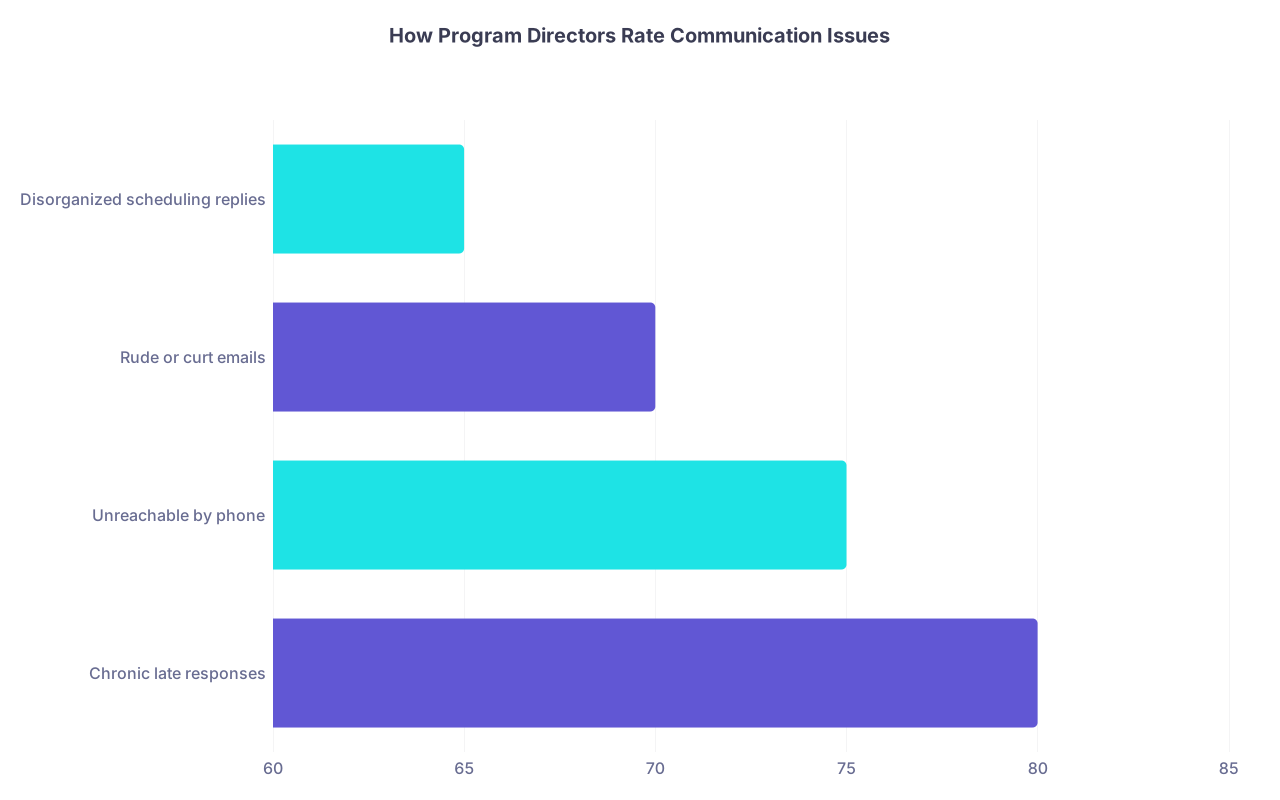
| Category | Value |
|---|---|
| Chronic late responses | 80 |
| Unreachable by phone | 75 |
| Rude or curt emails | 70 |
| Disorganized scheduling replies | 65 |
Most PDs would rather take a slightly lower Step score with flawless professionalism signals than the opposite.
Quick Self-Audit: Fix These 10 Things This Week
If you want a punch list, here it is. No fluff.
- Create or confirm a professional email address.
- Standardize your name and contact info across ERAS, CV, email, Zoom.
- Rewrite your voicemail greeting to clearly state your full name.
- Clear your voicemail box; set a reminder to check it daily.
- Create a simple, clean email signature block.
- Fix your Zoom/Webex display name on all devices.
- Test your video background, lighting, and audio once on each device.
- Draft 2–3 email templates for: thank-you, update, and logistics questions.
- Set up email filters so program emails do not land in spam or “Promotions.”
- Decide on your policy for thank-you and update emails so you are consistent.
Do these once, properly, and you immediately look like someone who understands what being a resident actually demands.
Common Screw-Ups I Have Actually Seen
Just so you know this is not hypothetical, here are real patterns I have seen sink people quietly:
- A candidate whose voicemail greeting was a rap snippet with explicit lyrics. Coordinator called twice. Never called again.
- A student who used a joint couple’s email address with their partner’s name first. PD asked: “If I email them feedback, who is reading it?”
- An applicant who replied to an interview invite 3 days later saying, “Sorry, was on vacation.” The slot was long gone.
- Thank-you email that opened with: “Dear Dr Patel, I have decided your program is my top choice because I believe I will be the best resident you have ever had.” It was forwarded around like a meme. That applicant was not ranked highly.
- An interviewee whose Zoom name on the social was “BigMike 🍻”. Residents mentioned it in the debrief. Not favorably.
Every one of these was fixable. None of them was fixed in time.
Final Point: Professionalism Signals Are the Easy Wins
You cannot control your Step scores retroactively. You cannot invent research you never did. But you can control every single professionalism signal in your application ecosystem within a week.
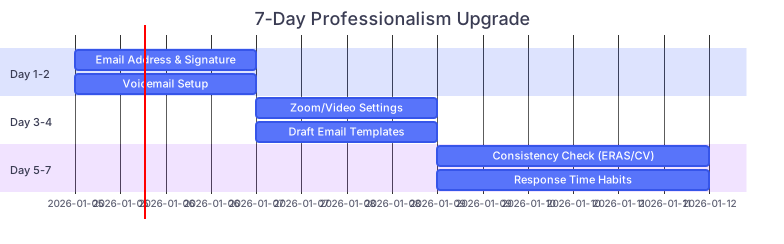
| Task | Details |
|---|---|
| Day 1-2: Email Address & Signature | a1, 2026-01-05, 2d |
| Day 1-2: Voicemail Setup | a2, 2026-01-05, 2d |
| Day 3-4: Zoom/Video Settings | a3, 2026-01-07, 2d |
| Day 3-4: Draft Email Templates | a4, 2026-01-07, 2d |
| Day 5-7: Consistency Check (ERAS/CV) | a5, 2026-01-09, 3d |
| Day 5-7: Response Time Habits | a6, 2026-01-09, 3d |
Fix these, and you remove a whole category of reasons for a program to quietly downgrade you. You also send a clear, consistent message: “I am already behaving like a resident, not a student.”
With that foundation in place, you are ready to focus on the more complex parts of signaling—letters, away rotations, and fit. But that is the next layer of the application game, and it deserves its own deep dive.