
The way most people budget around student loans is backwards—and it is costing them real money and real stress.
You should not be guessing what is “left over” after rent and groceries, then hoping your loans fit into that mess. You build the month around your loan due dates, then slot everything else in. Like clockwork.
Here is exactly how to do that.
Step 1: Map Your Cash Flow Around Paydays and Due Dates
You cannot build a useful monthly budget template until you understand one simple thing:
When money actually arrives, and when it actually leaves.
Not “roughly mid‑month” or “sometime around the 15th.” Exact dates.
Do this once and you never wing it again.
List all income with dates
- Paychecks: “$1,800 – 1st and 15th”
- Side gigs: “~$400 on the 25th”
- Any stipends, child support, etc.
List every recurring bill with due dates
- Rent: “$1,100 – due 1st”
- Utilities: “varies – autopay on 12th”
- Insurance, subscriptions, phone, internet.
List all loans with due dates and minimums
- Federal servicer A: “$220 – due 7th”
- Federal servicer B: “$150 – due 21st”
- Private lender: “$315 – due 14th”
Now you convert this chaos into a visual.
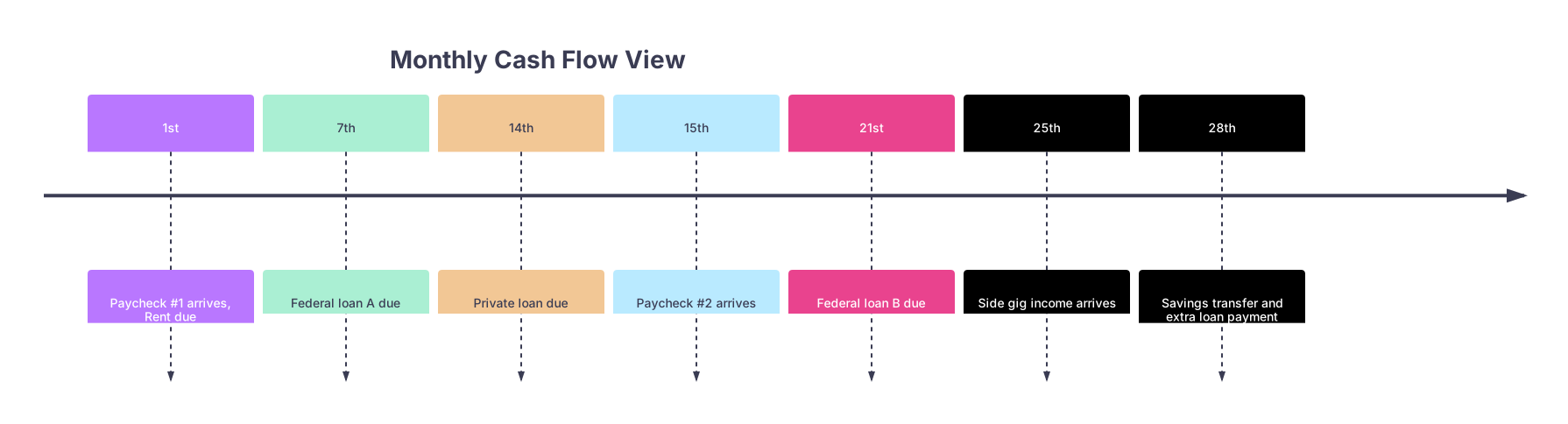
| Period | Event |
|---|---|
| 1st | Paycheck #1 arrives, Rent due |
| 7th | Federal loan A due |
| 14th | Private loan due |
| 15th | Paycheck #2 arrives |
| 21st | Federal loan B due |
| 25th | Side gig income arrives |
| 28th | Savings transfer and extra loan payment |
Two things usually jump out when people do this:
- There is a “tight” week where too many bills stack up against one paycheck.
- There is a “loose” week where money just sits, unassigned.
Your template will fix that by assigning every paycheck to specific bills and loans. No more “I will just see what is in the account.”
Step 2: Build the Skeleton of the Monthly Budget Template
You want one simple page (or tab) you can reuse every month. If it takes you 45 minutes and five calculators, you will not do it.
Here is the structure I recommend:
Columns:
- Date
- Item (paycheck, bill, loan, savings)
- Amount
- Cash Before
- Cash After
- Status (Planned / Paid)
Sections:
- Starting cash balance
- Each paycheck as a positive entry
- Each expense/loan as a negative entry
- Running balance line by line
Think of it as a checkbook built around due dates, not some vague “spending categories” pie chart.
| Section | Purpose |
|---|---|
| Starting Balance | Cash in account on Day 1 |
| Income Entries | All paychecks and side income |
| Fixed Expenses | Rent, utilities, insurance |
| Loan Payments | Each loan on its due date |
| Variable Spending | Groceries, gas, misc |
Set this up once in Excel, Google Sheets, or Notion. Then each month is just a copy‑paste and update of the dates.
You are going to use the loan due dates as anchor points. Everything else fits around them.
Step 3: Assign Each Loan Payment to a Specific Paycheck
This is where most people fail. They treat all income as one mushy pile of money.
Instead, you will tell each paycheck what it is responsible for.
Here is the rule:
Every loan payment must be “owned” by a specific paycheck before the month starts.
Example scenario:
- Paycheck 1 (1st of month): $1,800
- Paycheck 2 (15th of month): $1,800
- Starting account balance on the 1st: $300
Loans:
- Federal A – $220 due 7th
- Private – $315 due 14th
- Federal B – $150 due 21st
Here is how you assign:
From Paycheck 1 (on the 1st):
- Cover rent and any bills due before the 15th
- Assign:
- Federal A – due 7th
- Private – due 14th
From Paycheck 2 (on the 15th):
- Cover bills due from 15th to end of month
- Assign:
- Federal B – due 21st
- Any extra loan payment you want at month end
If the math does not work—if Paycheck 1 cannot support all early‑month bills—then you do not shrug. You fix it by:
- Shifting a loan due date later in the month (many servicers allow this).
- Adjusting autopay dates for utilities/credit cards.
- Temporarily using a buffer (planned, not accidental).
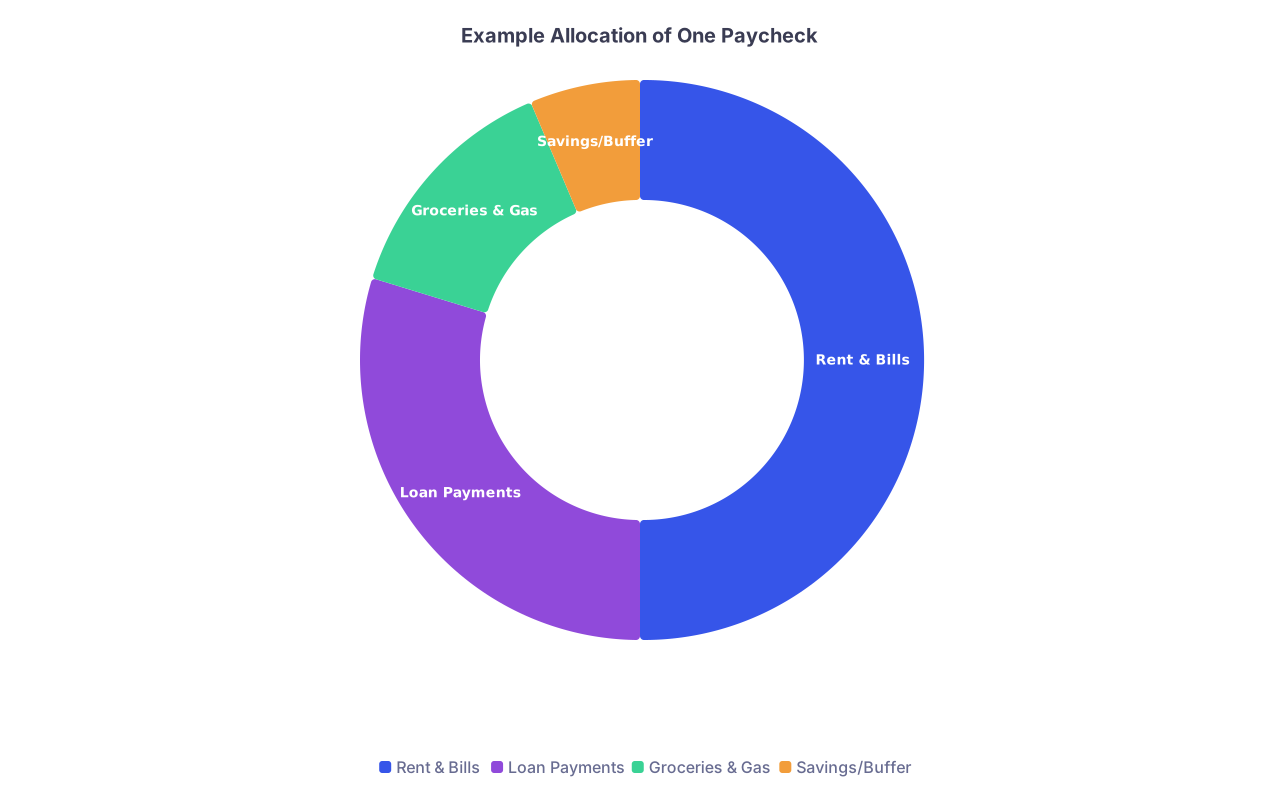
| Category | Value |
|---|---|
| Rent & Bills | 900 |
| Loan Payments | 535 |
| Groceries & Gas | 250 |
| Savings/Buffer | 115 |
Once each loan due date is tied to a paycheck, you stop being surprised by them. They are scheduled obligations, not sudden emergencies.
Step 4: Build the Month Line‑by‑Line
Now you plug everything into your template by date, not by category.
Your skeleton for the month might look like this (simplified):
- Starting balance: $300
- 1st – Paycheck 1: +$1,800
Balance: $2,100 - 1st – Rent: -$1,100
Balance: $1,000 - 3rd – Phone + Internet: -$120
Balance: $880 - 5th – Groceries (1st half): -$150
Balance: $730 - 7th – Federal Loan A: -$220
Balance: $510 - 10th – Utilities: -$90
Balance: $420 - 12th – Gas + Transit: -$80
Balance: $340 - 14th – Private Loan: -$315
Balance: $25 ← tight
Then:
- 15th – Paycheck 2: +$1,800
Balance: $1,825 - 16th – Insurance: -$95
Balance: $1,730 - 18th – Groceries (2nd half): -$150
Balance: $1,580 - 21st – Federal Loan B: -$150
Balance: $1,430 - 25th – Side gig income: +$400
Balance: $1,830 - 28th – Extra Loan Payment: -$300
Balance: $1,530 - 30th – Savings / Buffer: -$200
Balance: $1,330
This is the monthly budget template in action:
- You see on paper where you are cutting it close (between the 1st and 15th).
- You see how much room you actually have for an extra loan payment.
- You see whether your savings target is fantasy or realistic.
Most “budgeting apps” hide this clarity behind colorful charts. Do not let them. The running balance is where the truth lives.
Step 5: Fix Mismatches Between Paydays and Due Dates
If your due dates are fighting your paycheck schedule, you solve that. Not next year. Now.
You have four tools:
Change loan due dates (yes, you probably can)
Most federal loan servicers and many private lenders let you move the due date once or twice a year. You call or go online and say:“I get paid on the 15th and 30th. I need my due date moved to after the 15th.”
Do this until your loans cluster just after your paydays, not just before.
Adjust autopay dates on other bills
- Credit cards
- Utilities
- Some insurance policies
Push non‑loan bills away from your tightest window.
Create a 2‑week “loan buffer” fund
Set a target: one full month of total loan payments sitting in a separate savings account.Then, even if a paycheck is late or smaller, your template still works because the loan bucket is already loaded.
Split large payments across paychecks
If you have a $600 private loan, but your servicer allows multiple payments per month, you can:- Pay $300 right after Paycheck 1.
- Pay $300 right after Paycheck 2.
Your internal schedule can differ from the official due date, as long as you clear the total before the deadline.
People ignore these levers, then complain that budgeting “does not work.” It works fine once the calendar is on your side.
Step 6: Lock in Autopay Without Losing Control
Yes, you want autopay. No, you do not want it running out of a random checking account that you also use for impulse Amazon orders.
The cleanest structure I have seen work repeatedly:
Primary checking (Payday Account)
- All paychecks land here.
- From here you push:
- Fixed transfers to “Bills & Loans” account
- Fixed transfer to savings
- Personal spending allowance to your normal debit account (if you separate it)
Bills & Loans account
- All autopays for:
- Rent
- Utilities
- Insurance
- Every loan
- You do not swipe this debit card at restaurants.
- All autopays for:
-
- Separate bank is ideal so you do not casually raid it.
Here is how it ties to your template:
- Your monthly sheet shows how much must be sitting in the Bills & Loans account before each due date cluster.
- Right after each paycheck, you move that exact amount from Payday Account → Bills & Loans.
You have turned your monthly budget into a funding schedule:
- Not “I hope there is enough.”
- “I transferred $X on the 1st and $Y on the 15th; all loans and bills are covered.”

Step 7: Slot Extra Loan Payments into the Template Without Breaking It
Aggressive payoff is great. Random aggressive payoff is not.
The template forces you to answer a non‑negotiable question:
How much can I send extra to loans this month without cutting into next month’s rent or minimums?
Process:
Run the entire month in your sheet
- Include minimum loan payments.
- Include realistic groceries/transportation.
- Include your actual fun spending, not some fantasy where you never go out.
Look at the lowest balance point during the month
- That is your “danger zone” number.
- If the lowest you ever get is $250, and you want at least a $200 buffer, you have $50 of true margin.
Decide on a conservative buffer
- I like one week of basic expenses + one month of total loan minimums, parked in checking.
- Anything above that is available for extra payments.
Schedule the extra payment
- Put a line on the template: “28th – Extra Federal Loan B: -$___”.
- Watch how it affects your end‑of‑month balance. Adjust if necessary.
This stops the classic move: sending a big extra payment on the 5th, then putting groceries on a credit card on the 20th because you are short. That is not payoff. That is rotation.
Step 8: Turn the Template into a Reusable System
One month is an experiment. Three months is a system.
Here is how you make it reusable with minimal effort:
Create a “Master Month” tab
- All bills, all loans, standard paydays laid out by date.
- Use generic dates (1–31) rather than specific months.
Each new month:
- Duplicate the tab.
- Change the name (e.g., “Feb 2026”).
- Update:
- Starting balance.
- Any one‑off expenses (trips, annual fees).
- Any changed loan payments.
Review two things at the end of each month:
- Did any day’s actual balance go below what your template predicted? Why?
- Did you have more surplus than expected? Lock in a higher extra payment for next month.
Do not rebuild the system every time. You are adjusting, not reinventing.
Step 9: A Simple Template Layout You Can Replicate
Here is a bare‑bones structure you can drop into a spreadsheet today.
Row 1: Headers
- A: Date
- B: Description
- C: Category (Income, Loan, Bill, Variable, Transfer)
- D: Amount (positive for income, negative for expenses)
- E: Running Balance (formula)
- F: Status (Planned / Paid)
Row 2: Starting Balance
- Date: 0
- Description: Starting Balance
- Amount: your actual balance
- Running Balance: same as Amount
Rows 3+ : Chronological entries
You fill it like this:
- Put all paychecks in on their dates (positive).
- Put all loans on their due dates (negative).
- Put all fixed bills on their due dates.
- Estimate and place variable items (groceries, gas) on likely days.
Then use a simple running balance formula in E3 and drag down:
E3 = E2 + D3- Each row:
Previous balance + this row’s amount
As you drag the formula, the balance updates after each event. You have a time‑series of your cash, not just a static budget.
| Date | Description | Category | Amount | Running Balance | Status |
|---|---|---|---|---|---|
| 0 | Starting Cash | Balance | 300 | 300 | Actual |
| 1 | Paycheck 1 | Income | 1800 | 2100 | Planned |
| 1 | Rent | Bill | -1100 | 1000 | Planned |
| 7 | Federal Loan A | Loan | -220 | 780 | Planned |
| 14 | Private Loan | Loan | -315 | 465 | Planned |
Once you have this skeleton, you are no longer budgeting “monthly.” You are budgeting by the calendar, which is what your bank account cares about.
Step 10: Watch These Three Failure Modes
I have seen the same mistakes over and over when people try to budget around loans. You might recognize yourself.
Treating minimums as “suggestions”
- Skipping or underpaying minimums to “free up cash” is how you get late fees, damaged credit, and eventually wage garnishment.
- In your template, minimums are fixed, non‑negotiable lines. Your flexibility is in everything else.
Ignoring irregular expenses
- Car registration, annual subscriptions, holiday travel.
- The template solves this if you simply add “Monthly sinking fund – Car / Travel / Gifts” as fixed lines. Small hits every month beat landmines twice a year.
Relying only on memory
- “I think my loan is around $300, due mid‑month.”
- That is how people end up surprised when servicers adjust amounts or when IDR recertification changes things.
- Once a quarter, sit down for 20 minutes and verify:
- Current minimums
- Current due dates
- Any interest capitalization or changes
The template is not magic. It is a mirror. If you feed it sloppy data, it will reflect sloppy outcomes.
Quick Example: Two‑Paycheck, Three‑Loan Setup
Let me pull it all together in one concrete scenario.
Profile:
- Paid: 5th and 20th
- Net per paycheck: $1,600
- Starting balance: $200
Loans:
- Fed Loan 1: $180 due 10th
- Fed Loan 2: $130 due 15th
- Private Loan: $260 due 25th
Bills:
- Rent: $1,000 due 1st (already paid from last month’s 20th paycheck + buffer)
- Utilities: $90 due 12th
- Phone: $60 due 18th
- Insurance: $110 due 22nd
- Groceries: $320 total per month
- Gas: $120 total per month
Step 1: Assign loans to paychecks
- Paycheck 1 (5th): Fed Loan 1 (10th), Fed Loan 2 (15th), Utilities (12th)
- Paycheck 2 (20th): Private Loan (25th), Insurance (22nd), Phone (18th)
Step 2: Run the template
You will see quickly:
- How tight you are between the 5th and 20th.
- How much room exists after the 25th.
- Whether an extra $100 toward Private Loan on the 28th is safe or reckless.
Step 3: Fix any crunch
Maybe you move Fed Loan 2’s due date to the 18th, so both federal loans hit after you have covered utilities. Or you move Private Loan from 25th to 27th to line up better with side income.
You are not hoping. You are engineering.