
What happens when a board audit hits, your hospital recredentialing is due, and you suddenly realize your CME certificates are scattered across email, random portals, and a drawer in your office?
Here’s the answer you’re looking for: long-term CME storage is a systems problem, not a “be more careful” problem. You need a simple, repeatable setup that works every year, on autopilot.
Let me walk you through exactly how to build that.
The Core Rule: One Source of Truth
If you remember nothing else, remember this: you must have one master location that you treat as your official record of CME.
Not “mostly here, but also some in email.” Not “the hospital probably has it.” That’s how people get burned in audits.
Your master record can be:
- A cloud folder (Google Drive, OneDrive, Dropbox, iCloud)
- A dedicated CME tracking app
- A robust password-protected local folder with backup (less ideal)
Cloud solution with a clear folder structure is the sweet spot for most physicians. It’s cheap, accessible from anywhere, and easy to share during audits.
The CME providers, state portals, board dashboards — they’re secondary. You copy from them into your system, not the other way around.
Step 1: Choose and Lock in Your Storage Platform
Do this once, then stop thinking about it for 10 years.
Here’s how the options stack up:
| Option | Best For | Main Risk |
|---|---|---|
| Google Drive | Simple, cheap, cross-platform | Needs organized structure |
| OneDrive | Users in Microsoft ecosystem | Sync conflicts if messy |
| Dropbox | People used to old-school sync | Cost if large storage |
| CME-specific app | Heavy CME users, multiple boards | Vendor longevity, export |
| Local-only storage | Very secure environments | Device loss, backup issues |
My blunt advice:
- If you’re not already locked into Microsoft: use Google Drive.
- If your institution lives in Microsoft 365: use OneDrive.
- If you’re in a highly regulated environment with strong IT support: work with IT for a secure cloud or network solution; don’t freelance PHI-containing files.
Make one primary folder and never rename it. For example:
/CME_Records_DR_LASTNAME/
Everything goes there. Forever.
Step 2: Use a Simple, Boring Folder Structure
Complicated systems die; boring systems survive.
Here’s a structure that works for basically everyone and is friendly to audits:
- Top-level:
01_Active_Cycle(your current licensure/board cycle)02_Past_Cycles03_Reference_and_Policy(board/state requirements PDFs, etc.)
Inside 01_Active_Cycle, break it down like this:
Year_2024Year_2025Year_2026Summary_Trackers
Inside each year folder:
Certificates_and_TranscriptsSelf_Study_and_Journal_CMEConferences_and_Live_EventsMOC_Activities(if relevant)Other_Documentation
That’s it. Simple, predictable, auditable.
Step 3: Standardize Your File Naming (This Is Where Most People Fail)
You can have the best folders in the world. If your files are named “Scan123.pdf” and “download (7).pdf,” you will hate yourself three years from now.
Use this naming convention:
YYYY-MM-DD_ProviderName_ActivityShortTitle_CreditHours_Type.pdf
Examples:
2024-03-15_UpToDate_COVID19_Management_0-5_AMA-PRA1.pdf2025-09-21_AMA_Annual_Meeting_CME_12-0_Live.pdf2024-11-02_NEJM_Journal_CME_Article_Oncology_1-0_Journal.pdf
If the credit hours are unknown at the time of download, use X-X and fix later:
2024-06-10_ACC_HeartFailureWebinar_X-X_AMA-PRA1.pdf
Do this consistently and you can find anything in seconds by date, provider, or activity.
Step 4: Build a One-Page CME Master Tracker
You should not have to dig through 60 PDFs to answer a simple question like, “Do I have enough risk management hours for this state?”
You solve that with one spreadsheet. That’s your dashboard.
Bare minimum columns:
- Date completed
- Year (for sorting by license cycle year)
- Provider (ACC, AAFP, NEJM, UpToDate, etc.)
- Activity title
- Credit hours (numeric)
- Credit type (AMA PRA Category 1, MOC Part II, AAFP Prescribed, etc.)
- Topic category (Patient Safety, Opioid/Risk, Ethics, General, etc.)
- Specialty board relevance (ABIM, ABFM, etc., if applicable)
- File name / link (to the stored certificate)
- Notes (e.g., “counts for state X opioid requirement”)
Store this spreadsheet in:
/CME_Records_DR_LASTNAME/01_Active_Cycle/Summary_Trackers/CME_Master.xlsx
And every time you earn CME, you:
- Save the certificate to the correct folder.
- Log it as a new row right away.
Takes 60 seconds. Saves hours later.
Step 5: Automate the Intake as Much as You Can
You earn CME in five main ways:
- Email links to certificates
- Portals you log into (ACC, AMA, specialty societies)
- Printed conference certificates
- Journal CME (online or paper)
- Hospital/institution education systems
If you rely on “I’ll handle it later,” you lose things. So build a simple, automated intake.
For email-based CME
Set up an email rule:
- If “CME,” “certificate,” or “continuing medical education” appears in the subject or body
- And sender is one of your usual CME providers
- Then forward or auto-label/move to a folder:
CME_Receipts
Once a week (or twice a month), clear that inbox:
- Download the certificate
- Rename using your convention
- Save to the correct year/folder
- Log it in the tracker
- Archive the email
For portal-based CME
Once a quarter, put 10–15 minutes on your calendar:
- Log into your main CME portals (specialty society, major vendors)
- Export transcripts or certificates for that period
- Save them as multi-activity transcripts and individual certificates if available
- Log them to your tracker in batches
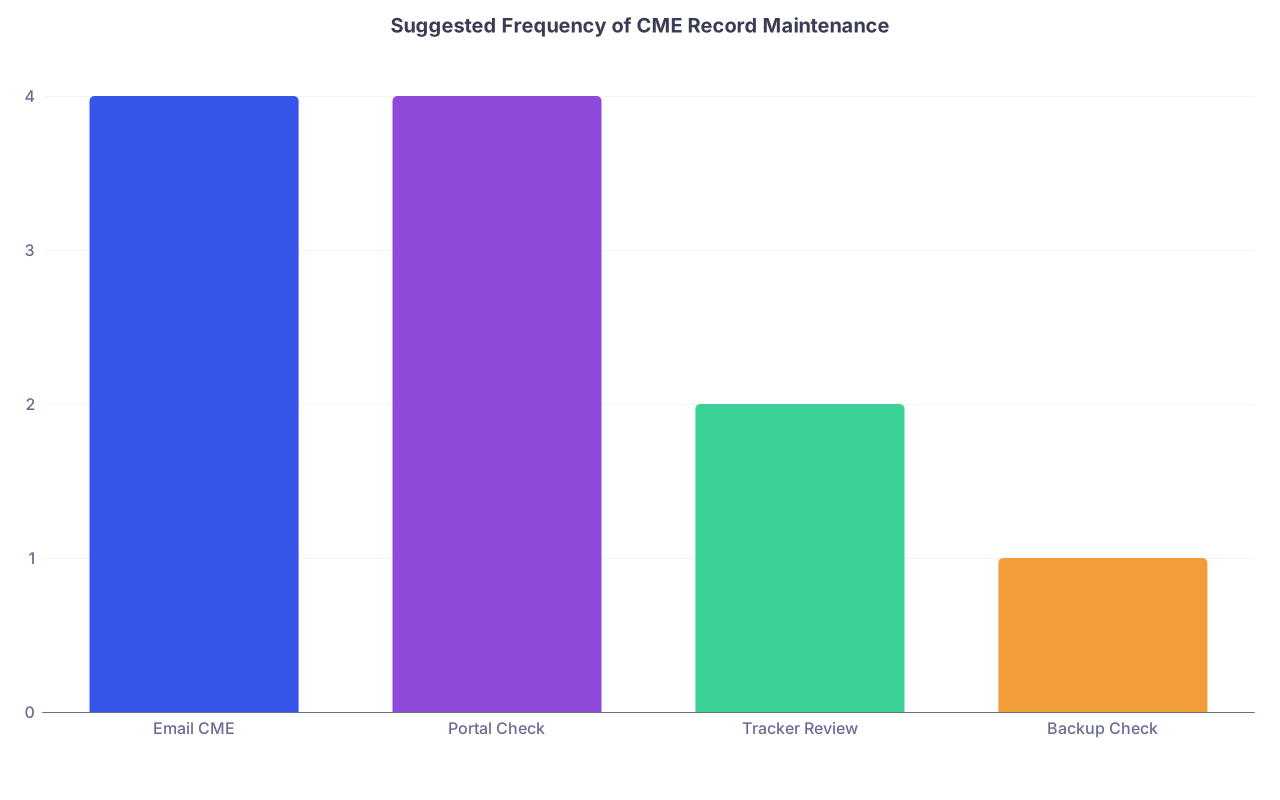
| Category | Value |
|---|---|
| Email CME | 4 |
| Portal Check | 4 |
| Tracker Review | 2 |
| Backup Check | 1 |
Think of it like reconciling a bank account. Not fun, but painful if you skip it.
For paper/printed certificates
Do not rely on paper. Ever.
- Snap a clear photo or, ideally, use a scanner app (Adobe Scan, Microsoft Lens, etc.)
- Export as PDF, rename according to your convention, file it
- Throw the original in a simple “CME Originals – Current Cycle” folder or binder if you like, but your digital copy is the official one
Step 6: Make It Audit-Proof
Audits and recredentialing do not care how many places you’ve done CME. They care whether you can produce:
- A clean summary of what you’ve done and how many hours
- Supporting documentation, quickly, when requested
Here’s how to make your life easy:
In your
Summary_Trackersfolder, keep:- The master tracker
- A separate “Board Cycle Summary” tab or file per board/licensure cycle
On that summary tab:
- Total hours by year
- Total hours by category (e.g., Opioid prescribing, Ethics, Patient Safety)
- What the requirement is vs what you have
When you finish a cycle:
- Freeze the tracker for that cycle
- Move the whole
01_Active_Cyclefolder into02_Past_Cyclesunder a name like:Cycle_2023-2025_StateLicenseCycle_2024-2026_ABIM_MOC
For reappointment packets or audits:
- Export the relevant tab as PDF
- Attach or upload that plus a zipped folder of certificates only if requested
You don’t need a gorgeous portfolio. You need something coherent and verifiable.
Step 7: Don’t Ignore Backup and Access Issues
Losing 6 years of CME records because a laptop died or your institution changed email systems is a real thing. I’ve seen it. It’s ugly.
So:
- Use cloud storage with version history (Google Drive, OneDrive, Dropbox all qualify).
- Turn on two-factor authentication.
- At least once a year, create a zipped backup of your entire CME folder structure and store it in:
- A secondary cloud provider, or
- An encrypted external drive you actually keep track of
And for access, make a simple “break glass” plan:
- Document where your CME records live and how they’re organized in a simple text file:
READ_ME_CME_SYSTEM.txtin the top folder
- If you unexpectedly change jobs or devices, that file tells future-you (or credentialing, with your help) how to understand what they’re looking at.
Step 8: Decide If You Need a Dedicated CME Tracking App
You do not have to use a CME app. The system I described works purely with folders + spreadsheet and is plenty for most physicians.
However, a dedicated CME or certification management tool can help if:
- You’re maintaining multiple licenses in multiple states with different requirements.
- You’re juggling several board certifications with staggered cycles and MOC rules.
- Your employer or group uses a shared system and will pull reports for you.
- You really, truly hate spreadsheets.
If you go the app route, check three things before committing:
Exportability
Can you export your entire record as CSV and get all certificates as files? If not, pass.Longevity and cost
If the company dies or you stop paying, do you lose access? Make sure you can get a complete offline backup.Mapping to your actual requirements
Fancy dashboards are useless if they don’t clearly track what your state board or specialty board actually asks for.
Even if you do use an app, I’d still keep a simple folder + file backup in parallel. Redundancy here is cheap insurance.
Simple Example: A Normal Year in Practice
Let me paint what this looks like when it’s actually working.
You’re a hospitalist in 2025:
- March: You finish a NEJM journal CME article. The site emails you a certificate. Your Gmail filter tags it into
CME_Receipts. That evening, you:- Download:
download (2).pdf - Rename:
2025-03-18_NEJM_Journal_Sepsis_1-0_Journal.pdf - Save into:
CME_Records_DR_SMITH/01_Active_Cycle/Year_2025/Journal_CME/ - Add a row to your tracker, linking the file.
- Download:
Total time: 2 minutes.
September: You attend ACC’s annual meeting.
- After the conference, ACC’s site generates a transcript with 16.5 hours.
- You download that transcript as
2025-09-23_ACC_Annual_Meeting_Transcript_16-5.pdf - Save it under
Conferences_and_Live_Events. - In your tracker, you either:
- Log a single row summarizing the meeting, or
- If required, log per-day or per-session (depends on your board/state expectations).
December: State license renewal. You open your CME Master spreadsheet.
- Check total CME hours for the license period and specific categories (e.g., Opioid, Ethics).
- You’re above the requirement.
- You submit the attestation, and if they ask for documentation, you export your summary tab as PDF and attach selected certificates.
No panic. No hunting through ancient portals. No calls to conference organizers from three years ago.
Common Mistakes That Cause Future Headaches
Let me be blunt about a few things that do not work long-term:
Relying only on email search for “CME”
Half your providers don’t even put “CME” in the subject. And hospital systems purge email.Assuming your hospital or practice is your record
They care about their compliance, not your multi-state license, board MOC, or side telemed gig.Keeping things only on your work computer
IT reimages machines. People get locked out. New EMR, new rules, old records vanish.Letting conference bags and paper certificates pile up
You will never scan them “later.” Scan them now or at least once a quarter.Not tracking credit type and category
You can hit 150 total hours and still be noncompliant if you’re missing 2 hours of targeted opioid education or risk management.
Be more systematic now so you can be forgetful later. That’s the point.

| Step | Description |
|---|---|
| Step 1 | CME Completed |
| Step 2 | Filtered to CME inbox |
| Step 3 | Quarterly portal check |
| Step 4 | Scan to PDF |
| Step 5 | Rename file |
| Step 6 | Save to CME folder |
| Step 7 | Log in CME tracker |
| Step 8 | Ready for audit or renewal |
| Step 9 | Certificate Received |

Quick Reference: What You Actually Need Long-Term
To sanity check yourself, ask: “If I left my job tomorrow and my email was wiped, would I still have…?”
You should be able to say yes to:
- The last 2+ full license cycles of CME records (varies by state/board, but 6–10 years is safe).
- A master tracker that clearly shows:
- Total hours earned per cycle
- Required subcategories (opioid, ethics, safety, etc.)
- Which activities map to which requirement.
- Digital copies of every certificate or transcript supporting those hours.
- A simple written description of your system (folder structure, naming convention) so you can explain it during an audit or to future-you.
If you can say yes to those, your system is in good shape.
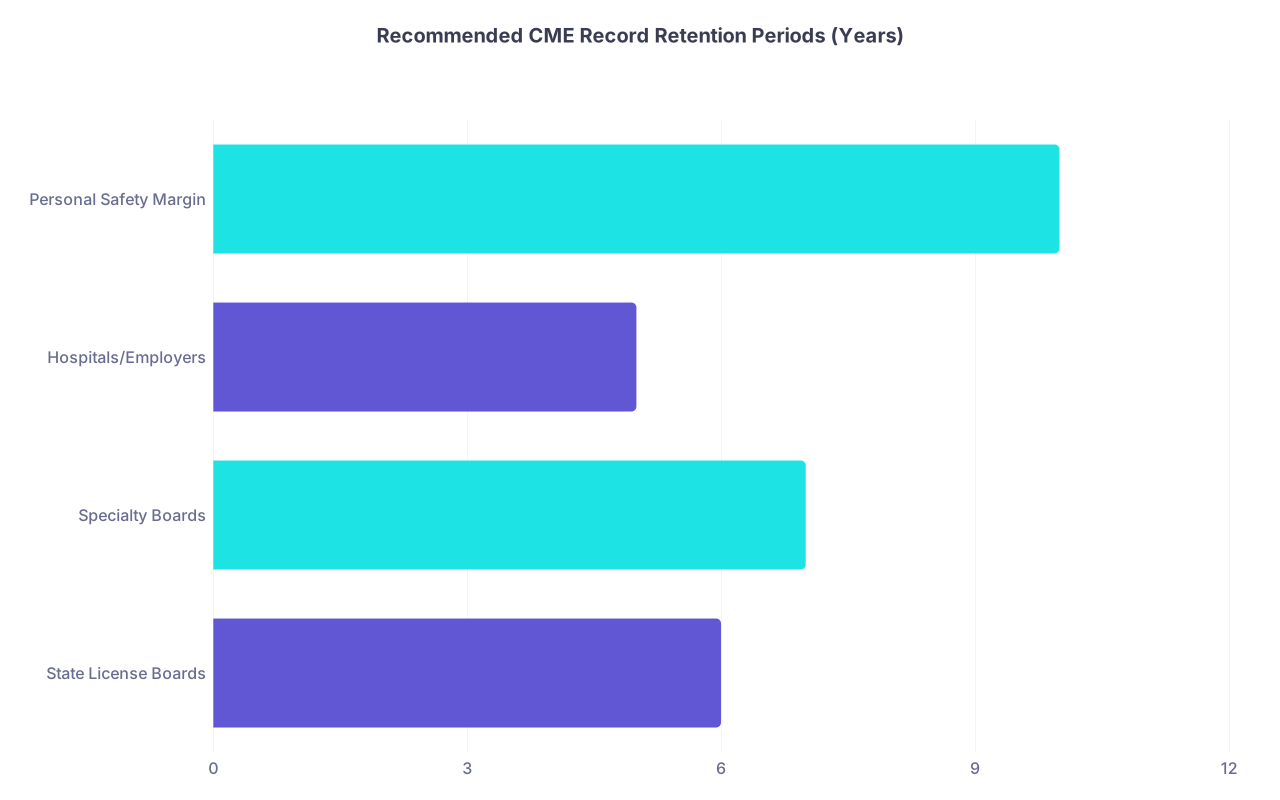
| Category | Value |
|---|---|
| State License Boards | 6 |
| Specialty Boards | 7 |
| Hospitals/Employers | 5 |
| Personal Safety Margin | 10 |
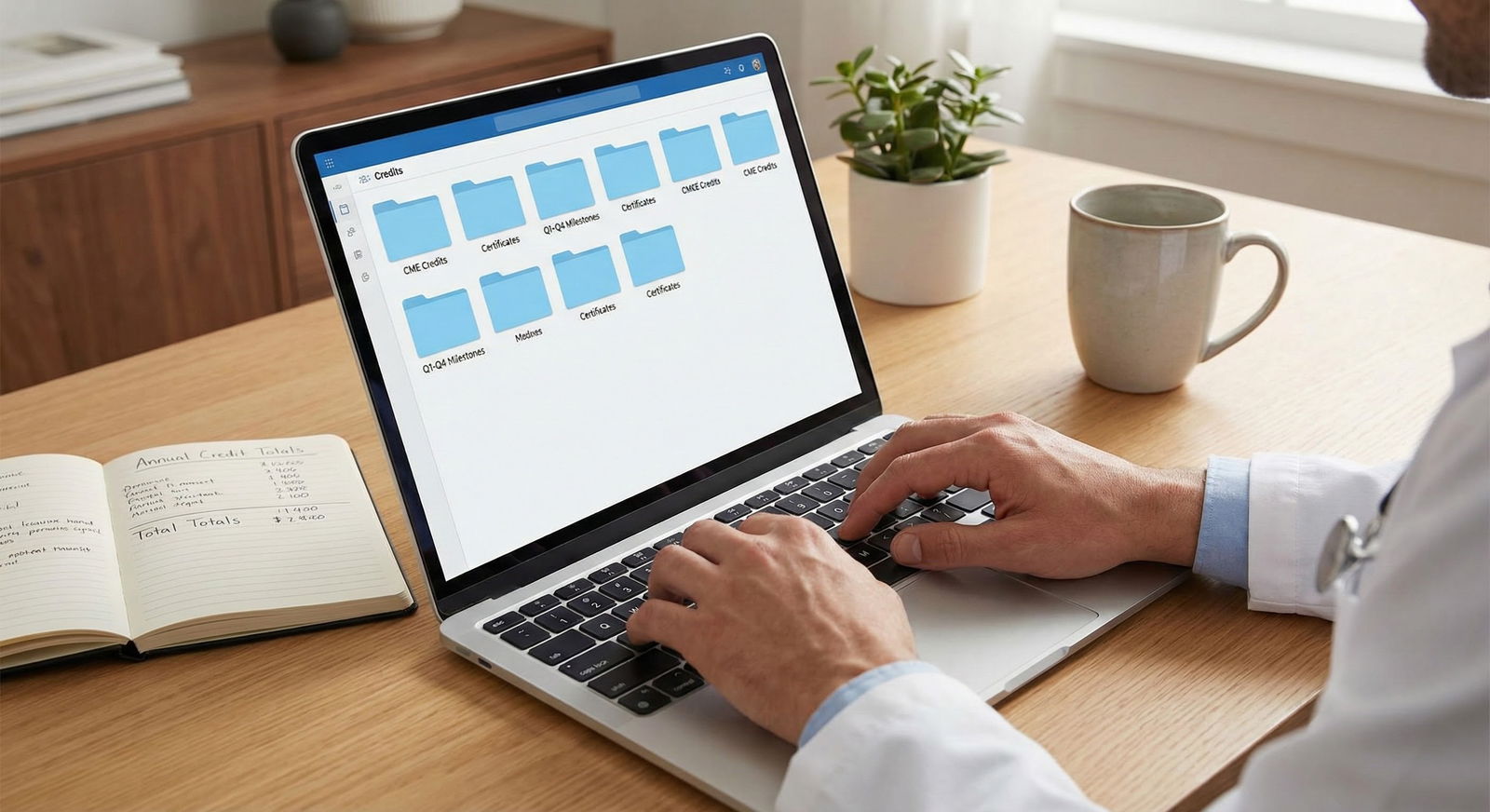
FAQ: CME Certificate Storage and Organization
1. Is it safe to rely only on the CME transcripts from my specialty board or state license portal?
No. Those portals are partial views, not full archives. They often show what they accepted, not every activity you did, and they can change vendors or formats. Keep your own full record with certificates and a tracker. Use board/state portals as verification, not as your only source.
2. How long should I keep CME certificates and records?
Plan on keeping at least 6–10 years of records. Many state boards require documentation for the most recent renewal period and can audit a prior period. Some specialty boards suggest 6–7 years. Ten years is a safe “I never want to think about reconstruction” number, and digital storage is cheap.
3. Do I really need a spreadsheet, or can I just keep PDFs in folders?
You can survive with just PDFs, but you’ll hate life during renewals, especially if you need specific types of CME (opioid, ethics, risk management, etc.). A simple spreadsheet lets you see totals and categories at a glance. Think of it as your CME dashboard—a 1-page summary beats hunting through 50 certificates.
4. What should I do if I’ve been disorganized for years and my records are a mess?
Start with the current cycle and work forward. Create your folder structure and tracker now. Then, when you have a quiet weekend or a rainy call night, backfill the last cycle from what you can find in email, portals, and paper files. You do not need to perfectly reconstruct your entire career—focus on what boards and licenses could actually audit.
5. Are photos of certificates (e.g., from my phone) acceptable, or do they need to be high-quality scans?
Photos are generally acceptable if they’re clear, legible, and show the full certificate (name, provider, date, credit hours, and type). That said, using a scanner app that exports to PDF looks more professional and is easier to manage. If a board or hospital ever questions legibility, you’ll be glad you used good-quality scans.
Key points:
One, choose a single digital home for all CME and stick with it: cloud folder + spreadsheet is enough. Two, standardize file naming and intake so every new certificate takes under two minutes to file and log. Do that, and audits, renewals, and recredentialing turn from a scramble into a non-event.