

The way most couples build their joint rank list is chaotic and inefficient. You can do much better.
If you are couples matching and you are not using a structured spreadsheet method, you are gambling with your sanity and your outcome. Handwritten lists, random group texts, and “we’ll just see what feels right” conversations are how people end up with mismatched expectations and last‑minute panic the day before the deadline.
You need a system. Not vibes.
Here is the system I recommend, step by step: a spreadsheet‑driven method that forces clarity, exposes disagreement early, and produces a defensible, logical joint rank list you can both live with.
Step 1: Define Non‑Negotiables Before You Touch a Spreadsheet
Do not open Excel or Google Sheets yet. If you skip this step, you will fight later.
Each partner answers these separately first, then you compare:
Geography
- Regions you absolutely will not live in
- Regions you strongly prefer
- Max distance you consider “close enough” (e.g., same city only, within 30 miles, within 1 hour drive, within 3 hours, “same state is fine”)
Program Tier / Competitiveness
- How hard you are willing to push for prestige vs. security
- Which matters more to each of you:
- Name recognition
- Fellowship opportunities
- Lifestyle and call schedule
- Family support / childcare nearby
Personal Constraints
- Partner or family with health issues requiring specific hospitals or cities
- Visa constraints
- Financial constraints (HCOL vs LCOL cities)
- Kids in school, co‑parenting, other real‑world anchors
Dealbreakers Examples:
- “I will not live more than 3 hours away from you under any scenario.”
- “I will not move to City X.”
- “I will not accept a preliminary year in Y without a categorical plan.”
Write these as hard statements, not mushy preferences.
Then sit down together and create a joint list of non‑negotiables. Anything you disagree on goes into the “We need to talk more” pile. You resolve that before moving on.
Step 2: Build the Base Spreadsheet (Structure Matters)
Now you earn your organization points.
Use Google Sheets or Excel. Google Sheets has the advantage of real‑time collaboration.
Create one master spreadsheet with at least three tabs:
- Tab 1:
All Programs – Raw Data - Tab 2:
Scoring + Fit - Tab 3:
Joint Rank Scenarios
You can merge these later. But start clean.
Tab 1: All Programs – Raw Data
This is the factual stuff. No opinions yet. Just what you interviewed at and where they are.
| Column | Description |
|---|---|
| A: Couple ID | Simple pair index (1, 2, 3...) |
| B: Partner | A or B (or names) |
| C: Program Name | Official program name |
| D: Specialty | IM, EM, Peds, etc. |
| E: City | City |
| F: State/Region | State or region |
| G: Program Type | Categorical, Prelim, Advanced |
Now populate this with both of your interview lists:
- Each partner gets multiple rows (one per interview program)
- Example:
- A – University Hospital IM – Chicago – IL
- B – County Hospital EM – Chicago – IL
You can later use filters to sort by city, state, or specialty.
If you want to shortcut initial data entry, copy/paste from ERAS or your own app tracker and clean it up.
Step 3: Add Structured Fit Scoring (Separate for Each Partner)
This is where people get lazy and rely on “I just liked that place.” That is how you get into circular arguments.
You are going to force structure.
Create Fit Columns (Tab 2 or same tab continued)
For each partner’s program row, add columns like:
- A: Partner
- B: Program Name
- C: City
- D: State
- E: Geographic Fit (1–5)
- F: Program Fit (1–5)
- G: Lifestyle / Call (1–5)
- H: Training / Fellowship Prospects (1–5)
- I: Gut Feel (1–5)
- J: Red Flags (Yes/No or 0/1)
- K: Total Score (formula)
- L: Rank Within Partner List (formula or manual after sorting)
Define your scaling rule up front. For example:
- 5 = Excellent
- 4 = Strong
- 3 = Acceptable / Neutral
- 2 = Weak
- 1 = Poor
Red flags can be weighted heavily (more on that in a second).
Set up a Total Score formula, something like:
=IF(J2=1, 0, (E2*1 + F2*2 + G2*1 + H2*1.5 + I2*1))
Adjust weights to match your priorities.
Personally, I weight:
- Program fit and training more heavily than gut feel
- Red flags drop the program to near zero unless you are absolutely desperate
Once you enter scores for all programs for each partner, sort within each partner’s list by Total Score, highest to lowest.
Now you have individual ranked lists based on structured criteria, not vibes.
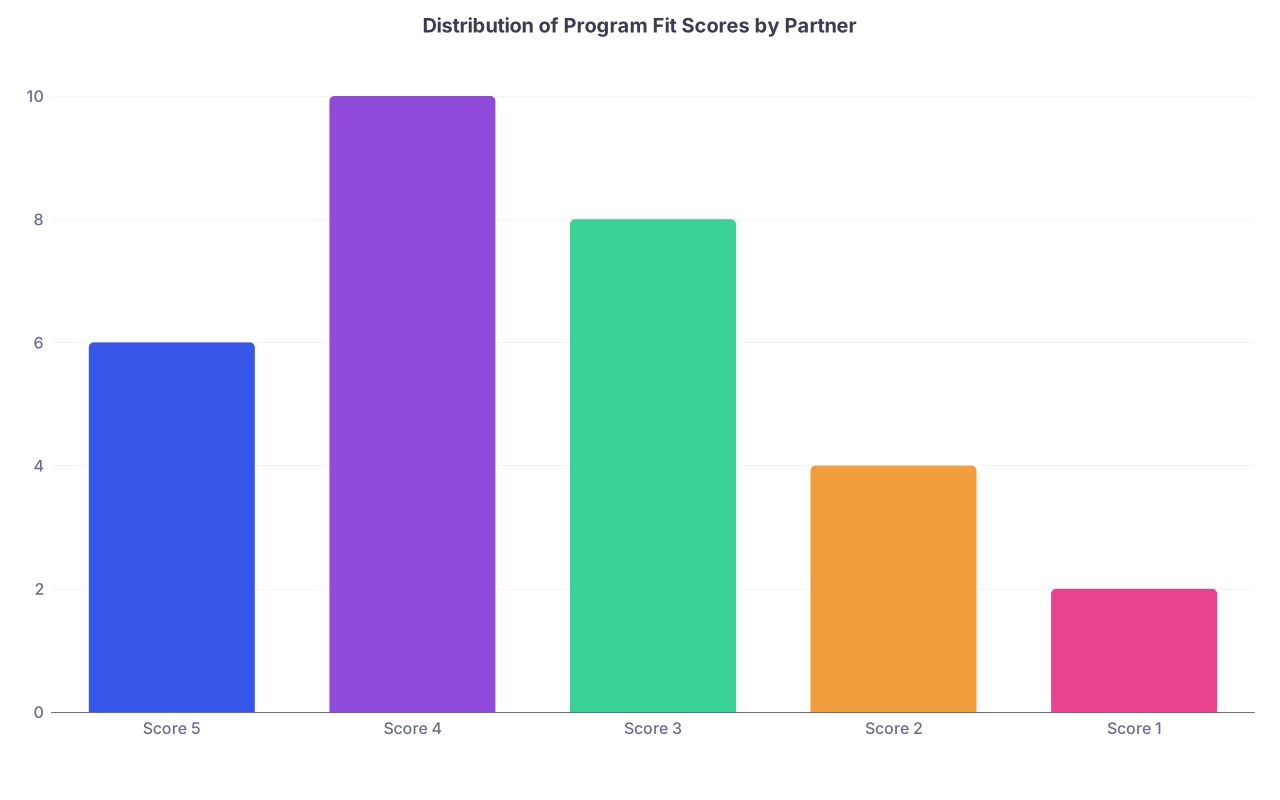
To see where your time/energy is going, you can even visualize how your scores distribute.
| Category | Value |
|---|---|
| Score 5 | 6 |
| Score 4 | 10 |
| Score 3 | 8 |
| Score 2 | 4 |
| Score 1 | 2 |
(This could represent one partner’s spread of Program Fit scores—if everything is a 4–5, you are not being honest.)
Step 4: Map Overlaps – The Core of Couples Matching
Now the real couples match work begins.
You need to know:
- Where you both have programs in the same city
- Where you both have programs in nearby cities you are willing to count as “together”
- Where one of you has a strong option and the other has a weaker but acceptable option
Create a City‑Pair View
Create a new tab: City Pairs.
Your goal: each row = one city or “metro area”, with both partners’ options listed.
Columns:
- City / Metro
- State / Region
- Partner A: Program list in that city
- Partner B: Program list in that city
- Distance Category (Same Hospital / Same City / Nearby Cities / Long Distance)
- City Priority (1–5) for the couple
Manually group suburbs or nearby towns into a “metro area” if you would actually live together there. Example:
- Boston / Cambridge / Somerville → “Boston Metro”
- SF / Oakland / Berkeley → “Bay Area”
Then, for each metro, list:
- Partner A:
[Mass General IM, BIDMC IM] - Partner B:
[BWH Anesthesia, Tufts Anesthesia]
If you have cities where only one partner interviewed, list those too. They matter later for “backup asymmetry” scenarios.
Step 5: Understand How the Couples Algorithm Actually Works
You cannot build a smart joint list if you do not understand what the NRMP couples match is actually doing.
It does not simply match your top combination if both programs like you. It runs through your ordered list of combinations one by one until it finds the highest pair where you both could match.
Each row in the couples rank list is:
- (Partner A Program X, Partner B Program Y)
- Example:
- Row 1: (A – MGH IM, B – BWH Anesthesia)
- Row 2: (A – BIDMC IM, B – BWH Anesthesia)
- Row 3: (A – MGH IM, B – Tufts Anesthesia)
- etc.
If you rank it, the algorithm treats it as a real option. It does not care if you think it is “unlikely.”
So your spreadsheet must produce actual ordered pairs, not just two parallel lists.
Step 6: Build the Combination Generator (The Smart Way)
You could sit down and manually create:
- A’s #1 with B’s #1
- A’s #1 with B’s #2
- A’s #2 with B’s #1
- …
Then want to throw your laptop out the window.
Do this in a controlled way.
Step 6A: Define Tiers Within Each Partner’s List
On your Fit Scoring tab, after sorting by Total Score, add:
- A “Tier” column for each partner:
- Tier 1: dream / ideal
- Tier 2: strong / realistic
- Tier 3: solid / acceptable
- Tier 4: backup / safety
You can do this by:
- Manually assigning after you see your scores
- Or setting cutoffs (e.g., Total Score ≥ 22 → Tier 1, 18–21 → Tier 2, etc.)
This tiering matters. You will not treat Tier 1 + Tier 1 combos the same as Tier 3 + Tier 4.
Step 6B: Pair by City and Tier
Create a new tab: Combos – Same City.
For each city / metro from your City Pairs tab where both have at least one program:
- List all combinations of A’s programs in that city with B’s programs in that city.
Columns might look like:
- City
- A Program
- A Tier
- A Rank
- B Program
- B Tier
- B Rank
- Combo Quality Score
- Combo Category (Ideal / Good / Acceptable / Only if desperate)
- Include? (Y/N)
- Final Joint Rank Position (to be filled later)
You can compute a simple Combo Quality Score, for example:
= (Weight_A * (MaxRankA - RankA + 1)) + (Weight_B * (MaxRankB - RankB + 1))
Or more straightforward:
= (Score_A_Total + Score_B_Total)
If you want to go more visual about how tiers map into realistic combinations, diagram your decision logic.

| Step | Description |
|---|---|
| Step 1 | Start Combo |
| Step 2 | Skip or Backup Tab |
| Step 3 | Mark as Ideal Combo |
| Step 4 | Mark as Acceptable Combo |
| Step 5 | Mark as Low Priority/Desperate |
| Step 6 | Same City? |
| Step 7 | Both Tier 1-2? |
| Step 8 | One Tier 1-2, One Tier 3? |
Then filter:
- Start by including all “Ideal” combos
- Then add “Good / Acceptable”
- Only consider “Desperate” if you truly want to avoid separation at all costs
Step 6C: Add “Nearby City” and “Long Distance” Combos Separately
You do not want these mixing in with your same‑city combos. They should be clearly inferior in your eyes, or you should not be couples matching.
Create two more tabs:
Combos – NearbyCombos – Long Distance
Rules:
- Nearby = cities you both agree would still allow reasonable weekend commuting (define that)
- LongDistance = anything else you are still willing to consider if everything else fails
Use the same structure, but include a Distance Penalty in your Combo Score.
Example:
- Same City: Distance Score = 5
- Nearby: Distance Score = 3
- Long Distance: Distance Score = 1
Then:
Combo Score = A_TotalScore + B_TotalScore + (DistanceWeight * DistanceScore)
Use that to deprioritize non‑same‑city pairs automatically.
Step 7: Convert Combo Scores into an Ordered Joint Rank List
Now you have:
- Same‑city combos
- Nearby combos
- Long‑distance / asymmetric combos
And for each combo, you have:
- A program, tier, and rank
- B program, tier, and rank
- A combo score
Step 7A: Enforce Global Priority Rules
Decide on a few core rules:
Rule 1: Same city trumps distance
Any same‑city combo that is:- Tier 1–2 + Tier 1–2, or
- Tier 1–2 + Tier 3
Should almost always rank ahead of a long‑distance scenario where one partner is at their dream and the other is miserable.
Rule 2: No invisible sacrifices
Neither partner should find out after the match that they gave up their #1 city for the other’s #5.Rule 3: Cap the sacrifice
Define the worst program tier each partner is willing to accept in order to stay together:- “I will not go below Tier 3 just to stay in the same city.”
- “I am willing to drop to Tier 4 in these 2 geographic areas only.”
Write these rules at the top of your Joint Rank Scenarios tab. Refer back when ranking.
Step 7B: Assign Final Rank Numbers
Create your final tab: Final Joint Rank List.
Columns:
- Joint Rank Number
- Partner A Program
- Partner B Program
- City / Distance Category
- A Tier / Rank
- B Tier / Rank
- Combo Score
- Notes / Rationale
Now you actually number the rows in the order you want to submit.
Process:
- Filter
Combos – Same Cityto show only “Ideal / Good” combos. - Sort by Combo Score descending.
- Manually review the top 10–20 and see if the order matches your real‑world gut feel and rules.
- Copy the top set (maybe 10–30 combos) into the
Final Joint Rank Listtab and assign 1, 2, 3… down the column.
Repeat for:
- Remaining same‑city combos you are still willing to consider.
- Then “Nearby” combos you find acceptable as fallbacks.
- Then “Long Distance / Backup” combos (if you truly want those).
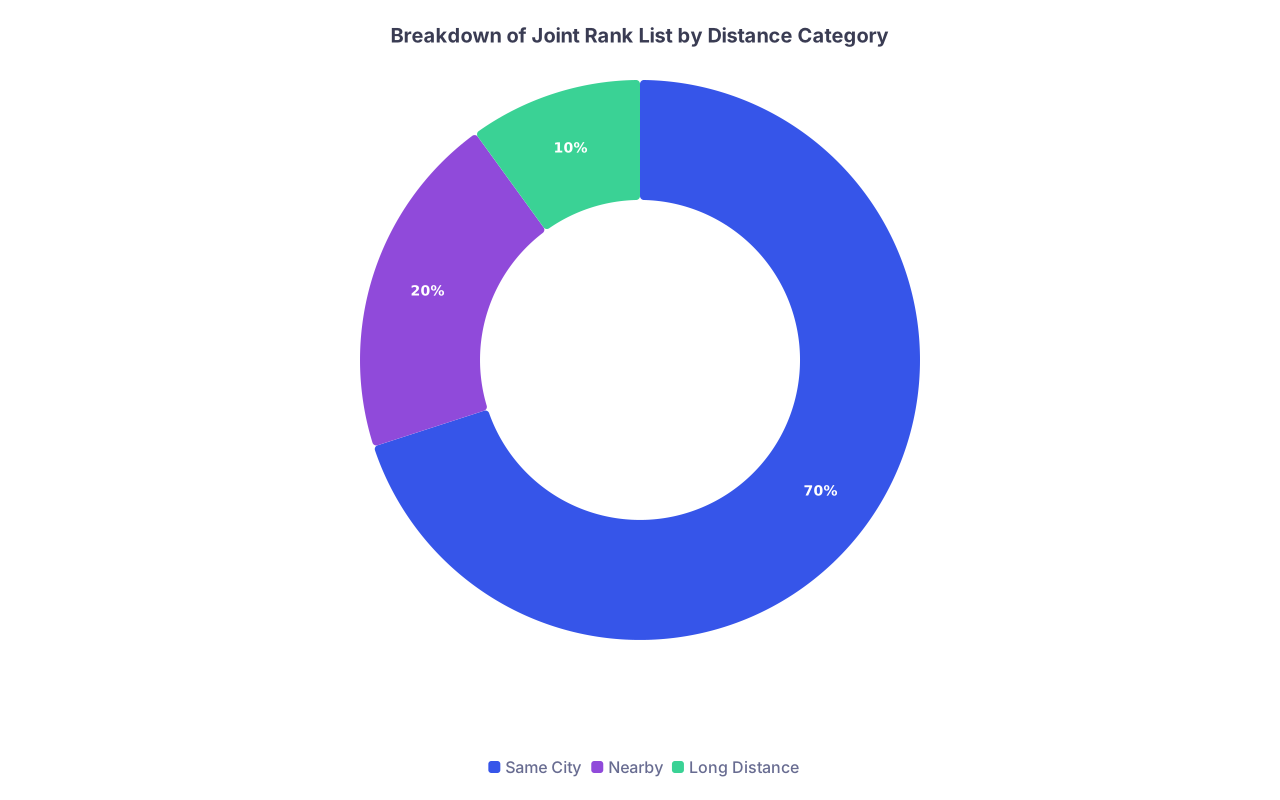
If you want to see how much of your list is dominated by different distance categories, chart it.
| Category | Value |
|---|---|
| Same City | 70 |
| Nearby | 20 |
| Long Distance | 10 |
If you notice that 60–70% of your top 20 are long‑distance combinations, something is off. Either you are not aligned on geography, or you should question whether couples matching is actually serving your goals.
Step 8: Stress‑Test Your List Together
Once you have a numbered joint list, do a brutal reality check. Out loud. Together.
Pick random points in your list and ask:
- “If we end up at #7 (reads the pair aloud), are we both content with this? Not thrilled. Content.”
- “What about #12? #20?”
You are looking for:
- Rows where one partner secretly hates the option
- Rows that violate your written non‑negotiables
- Options where a partner is taking a Tier 4 they never agreed to
If either of you answers, “Honestly, I would be pretty upset with that,” that combo should:
- Move down
- Be deleted
- Or be explicitly acknowledged as “we accept this risk”
Do not lie to yourselves “just to be done.”
I have seen couples who “did not want to rock the boat” end up locked into three years in a city one of them hates. The resentment bleeds into everything.
Do the uncomfortable conversation before submission, not after Match Day.
Step 9: Translate the Spreadsheet into NRMP Format Without Errors
The NRMP couples interface is not designed for clarity. It is easy to mis‑click and mis‑order pairs.
Before you touch NRMP:
- Print or export your
Final Joint Rank Listtab to PDF. - Use that as your “source of truth” while entering.
When entering into NRMP:
- Make sure you are in Couples Mode.
- Each row must match your spreadsheet:
- Row 1 in NRMP = Joint Rank 1 in your sheet
- Partner A program code correct
- Partner B program code correct
This is where a checklist saves you.
| Step | Task |
|---|---|
| 1 | Verify both accounts are linked in NRMP as a couple |
| 2 | Confirm both have identical number of rank list rows |
| 3 | Cross-check program codes against spreadsheet names |
| 4 | Print preview of rank lists and compare line by line |
After both lists are entered:
- Download / print your lists from NRMP.
- Compare them side‑by‑side with your spreadsheet.
- Check every single row. Yes, it takes time. Do it anyway.
Then both of you sign off:
- Date
- “We have reviewed every row and agree this is our final list.”
You will thank yourselves for that formality when anxiety hits in the last 12 hours.
Step 10: Decide Your Personal Backup Strategy (Separation vs Staying Unmatched)
Some couples want any way to stay physically together. Others prioritize each person getting some categorical spot, even if separated.
There is no moral high ground here. There are only tradeoffs.
Two specific scenarios you must think through:
One Partner Unmatched vs. Both in Long‑Distance
- Are you willing to rank combos where:
- A matches at a solid program
- B is in a prelim / weak backup / or unmatched?
- Or do you prefer:
- A at dream program, B at okay but distant program?
- Are you willing to rank combos where:
Geographic Imbalance
- Are you willing to cluster many ranks in one geographic area heavily favoring one partner’s preference?
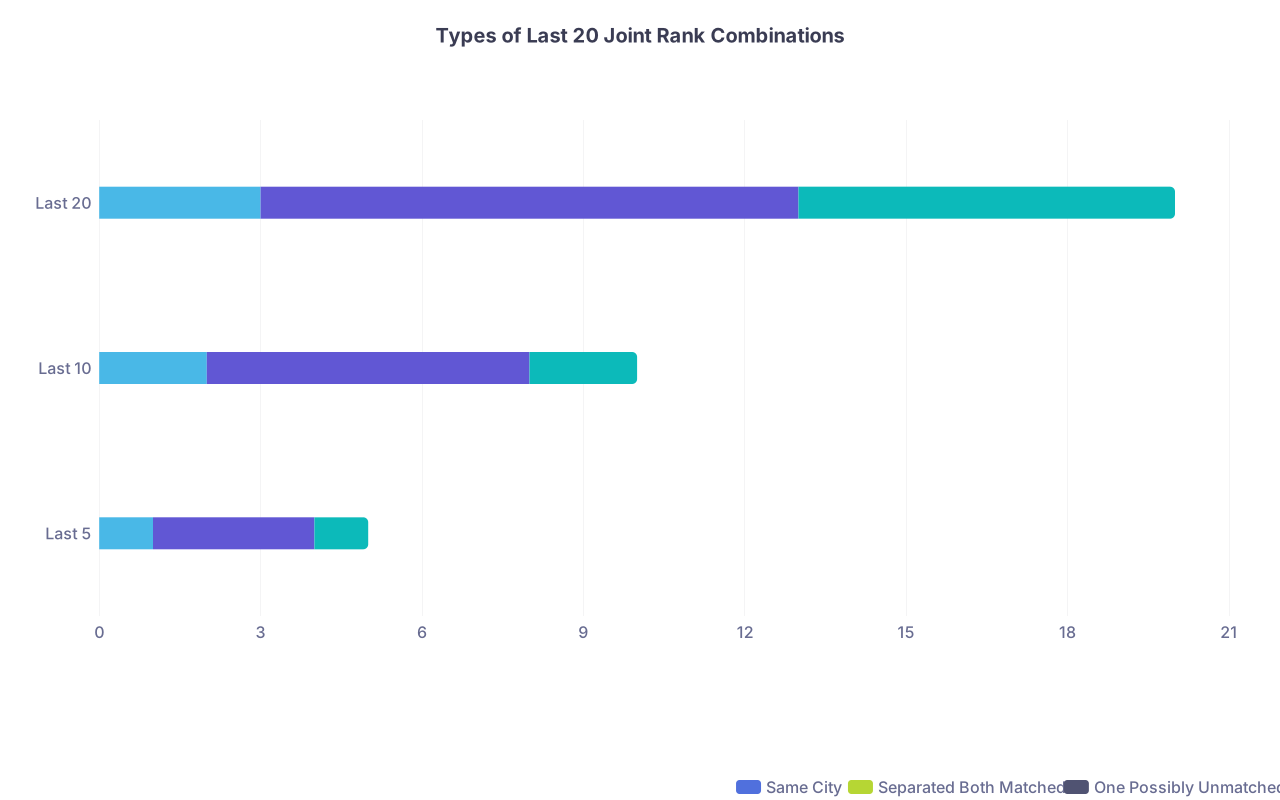
Use the spreadsheet to make these decisions explicit. For your last 10–20 ranks:
- Label combos as:
- “Separation but both matched”
- “One unmatched, one matched”
- “Both matched, but one at undesirable program”
Then sit down and ask:
- Which of these categories are we actually willing to accept?
- In what order?
You can even model how many ranks fall into each end‑of‑list category.
| Category | Same City | Separated Both Matched | One Possibly Unmatched |
|---|---|---|---|
| Last 5 | 1 | 3 | 1 |
| Last 10 | 2 | 6 | 2 |
| Last 20 | 3 | 10 | 7 |
If you are stacking too many “one possibly unmatched” at the end, stop and reconsider.
A Simple Example: How This Looks in Practice
Imagine:
- Partner A: Internal Medicine
- Partner B: Psychiatry
- Both have interviews in:
- Boston, Chicago, New Haven, St. Louis
- A also has NYC, B also has Durham
You might end up with something like:
- (A – MGH IM, B – MGH Psych) – Same city, both Tier 1
- (A – BIDMC IM, B – MGH Psych) – Same city, A Tier 1, B Tier 1
- (A – MGH IM, B – BIDMC Psych) – Same city, both Tier 1–2
- (A – U Chicago IM, B – U Chicago Psych) – Same city, both Tier 1–2
- (A – Northwestern IM, B – U Chicago Psych) – Same city, slightly lower for A
- (A – Yale IM, B – Yale Psych) – Same city
- (A – WashU IM, B – WashU Psych) – Same city
- (A – Columbia IM, B – Yale Psych) – Nearby (NYC–New Haven)
- (A – Cornell IM, B – Yale Psych) – Nearby
- (A – Columbia IM, B – Duke Psych) – Long distance but both Tier 1
And so on.
Your spreadsheet lets you see:
- Where you are heavily weighting B’s preferences over A’s
- Where you are starting to accept a separation
- How many “dream + okay but far” scenarios are ranked
You can tweak until the sequence matches your actual priorities.
Practical Tips So You Do Not Lose Your Minds
A few hard‑earned lessons I have seen repeatedly:
- Do this early. Start the spreadsheet method right after interview season slows, not the week of the deadline.
- Schedule at least two dedicated sessions. One 2–3 hour session to build the base and scoring. Another to finalize joint combinations and ranking.
- No multitasking. Phones away. No call, no text, no clinic notes. This is your next 3–7 years.
- Use comments for disagreements. In Google Sheets, comment cells where you disagree and move on. Resolve in a dedicated “conflict pass.”
- Protect the relationship. Remind each other: the algorithm is not out to get you; you are trying to beat randomness with a plan. You are on the same side.
And most importantly: once submitted and checked, walk away. Stop re‑running what‑ifs until Match Week. That way lies madness.




Key Takeaways
- A structured spreadsheet method forces clarity, exposes silent disagreements, and turns a terrifying couples match decision into a series of manageable, logical steps.
- You are not just ranking programs; you are ranking combinations. The only sane way to do that is to score individual fit, tier cities, generate combinations, and then stress‑test them together.
- The goal is not perfection. The goal is a joint list that both of you understand, consent to, and can emotionally live with—no surprises after the match.


