
The biggest financial mistake new doctors make in their first year isn’t a bad investment. It’s having no system at all.
You go from $0 to $60K–$75K overnight, your time evaporates, and money just… leaks. Random checking account. No separation of goals. No plan for your first real paycheck. I’ve watched PGY-1s lose tens of thousands in their first year just by drifting.
You are not doing that.
This is the exact, time‑based playbook from Match Day to your first paycheck to get every core account opened and pointed in the right direction—without needing a second residency in personal finance.
Match Day to Match + 2 Weeks: Set Your Financial “Command Center”
At this point you should freeze lifestyle decisions and build the basic structure everything else will run through.
Step 1: Lock down your main checking account (Week 0–1)
If you already have a checking account, you might be able to keep it. But residency changes the game:
By the end of Week 1 post‑Match, you should:
Choose your “primary checking” for residency pay
- Prefer a national bank or online bank with:
- No (or easily waived) monthly fee
- Free ATM network or ATM fee refunds
- Decent mobile app / mobile check deposit
- Many residents I’ve worked with use:
- Ally, Capital One 360, SoFi, Chase (especially with big footprint near academic centers), or your local credit union
- Prefer a national bank or online bank with:
Decide: keep or replace your current bank
- Keep your old bank only if:
- It has a branch/ATM in your new city or good online features
- No annoying minimums or fees
- Otherwise, open the new one now and plan to:
- Move all activity over by June
- Keep the old account open for 3–6 months as a “catch all” for stray debits and autopays
- Keep your old bank only if:
Set this as your future direct deposit hub
- You likely will not have HR forms yet, but:
- Save your new routing + account numbers
- Create a secure note or password manager entry labeled “Residency Pay – Direct Deposit”
- You likely will not have HR forms yet, but:
Checkpoint: By the end of Week 1 you should have:
- One chosen bank for residency pay
- Online access set up
- Debit card on the way or in hand
Match + 2 to +4 Weeks: Build Your Buckets (Checking + Savings Structure)
At this point you should separate “today money” from “future money” so residency doesn’t become one big blur of spending.
Step 2: Create a simple, labeled account structure (Week 2–3)
You need one checking + at least two savings buckets before your first paycheck.
Here’s the minimum setup:
Account 1 – Operating Checking (Everyday Money)
- All paychecks land here
- Rent, food, utilities, subscriptions come out of here
- Target: Keep roughly 1 month of take‑home pay in this account once you’re rolling
Account 2 – Emergency Savings
- High‑yield savings (online preferred)
- Goal: Reach $3,000–$5,000 as fast as possible, then 3–6 months of expenses over time
- This is not for vacations. This is for “car died, AC blew up, exam fee due.”
Account 3 – Short‑Term Goals / Sinking Fund
- Same bank as Emergency or another high‑yield account
- Label it clearly:
- “Board Exams + Conferences”
- “Moving + Furniture”
- Use for:
- Step 3/Level 3, board fees, specialty board exams
- Interviews for fellowship later
- Moving costs, deposits, basic furniture
If your bank allows sub‑accounts or “buckets”, use them instead of separate logins. Less headache.
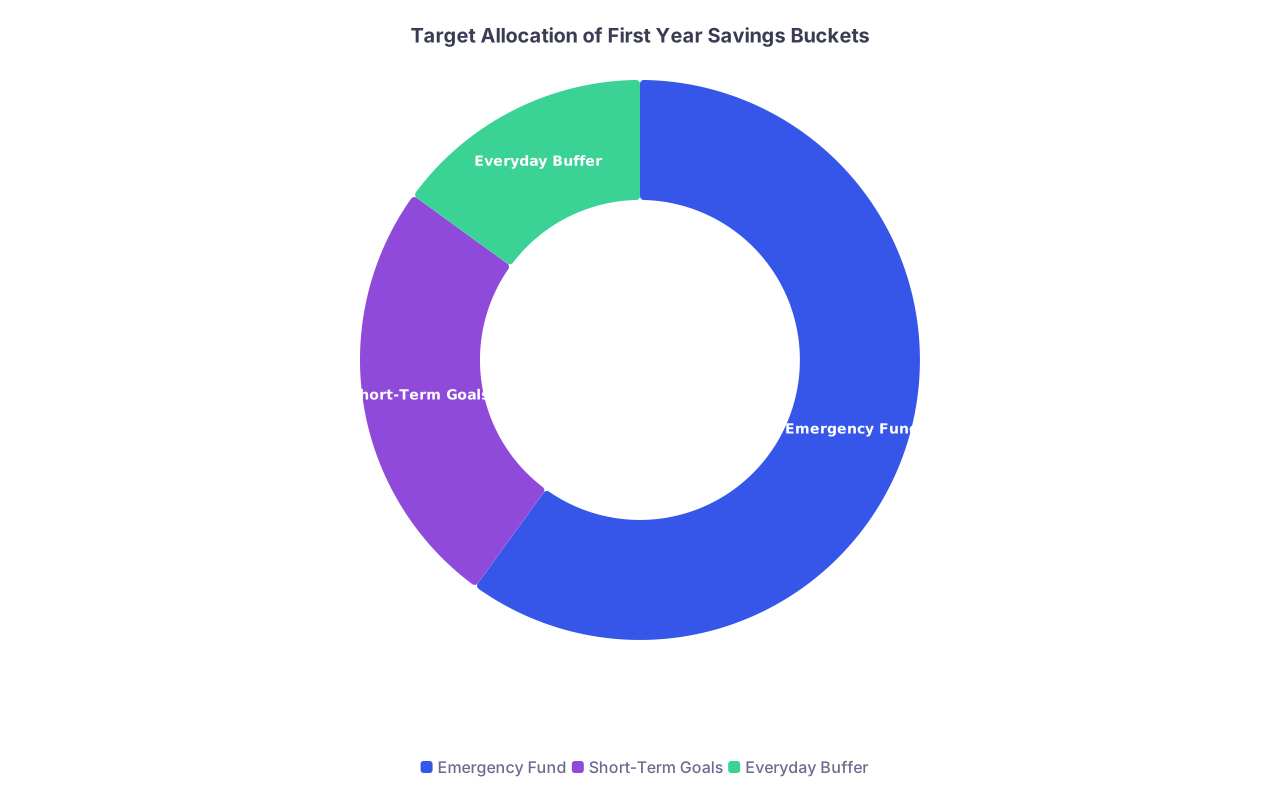
| Category | Value |
|---|---|
| Emergency Fund | 60 |
| Short-Term Goals | 25 |
| Everyday Buffer | 15 |
Checkpoint: By the end of Week 3 you should have:
- 1 checking account
- 2 separate labeled savings buckets (emergency + goals)
- Online transfers tested between them
6–8 Weeks Pre‑Orientation: Sweep Up Old Accounts and Debt Info
Now you build the map. You can’t direct cash flow if you don’t know where it’s currently leaking.
Step 3: Create a one‑page financial snapshot (Week 4–6)
At this point you should collect every account login and balance. One evening. No more.
Do this in a single Google Sheet / Excel file or a secure note:
- Bank accounts
- Bank name, account type, balance
- Credit cards
- Issuer, credit limit, balance, interest rate, due date
- Student loans
- Servicer (MOHELA, Nelnet, etc.), balance, interest rate, status
- Any existing investments
- Old Roth IRA or brokerage
- 403(b)/401(k) from past jobs
| Category | What to List |
|---|---|
| Banking | Checking, savings, credit unions |
| Credit Cards | Issuer, limit, rate, due date |
| Student Loans | Servicer, balance, rate |
| Investments | Roth IRA, 401k/403b, brokerage |
This isn’t busywork. When you start opening new investment accounts, this sheet stops you from:
- Opening duplicate or wrong‑type IRAs
- Missing a high‑interest card that should be paid first
- Ignoring an old 403(b) that needs rolling over later
Checkpoint: By the end of Week 6 you should have:
- A single document listing every existing account
- A clear view of total student loans and minimum payments
- All logins saved in a password manager
4–6 Weeks Before Residency Start: Insurance & Legal Foundation
You can open investment accounts without this step. You shouldn’t.
At this point, before any serious investing, you need basic asset protection. Otherwise you’re building on sand.
Step 4: Get your safety net in place (Week 6–8)
Disability insurance (resident‑appropriate policy)
- Target: an own‑occupation, long‑term disability policy tailored to physicians
- Start the quote process in this window; underwriting can take weeks
- Use a physician‑focused broker, not the random person who cold‑emailed your med school account
- You want:
- True own‑occupation definition
- Non‑cancelable, guaranteed renewable
- Future increase options
Life insurance (only if needed)
- If you have a spouse/partner or children relying on your income:
- Get term life (20–30 year level term)
- Avoid whole life / universal life at this stage. Wrong tool, wrong time.
- If you have a spouse/partner or children relying on your income:
Basic legal documents
- At minimum:
- Healthcare proxy / medical power of attorney
- HIPAA release
- Consider a simple will (especially if you have dependents)
- Many residency GME offices or state bar associations have low‑cost templates or clinics
- At minimum:

Checkpoint: Ideally before orientation you should have:
- Disability insurance application submitted (or in underwriting)
- Life insurance in process if someone depends on your income
- Basic health care proxy done and stored
Orientation Month: Employer Accounts & Tax Setup
This is where most residents zone out in HR presentations. You will not.
At this point you should capture every employer benefit you can and decide what investment accounts you’ll actually use.
Step 5: During HR / Orientation Week
Walk into orientation with a checklist. You’ll be tired, they’ll be boring, and your future self will thank you.
During orientation, make sure you:
Get the official direct deposit form
- Fill out with your primary checking account info from Step 1
- Confirm first pay date and pay frequency (biweekly vs monthly)
Identify retirement plan options
- Ask or look for:
- 401(k), 403(b), or 457(b)? (Academic hospitals often use 403(b)/457(b))
- Do they allow Roth contributions?
- Is there an employer match for residents? (Often no, but sometimes yes)
- Write down:
- Plan provider (Fidelity, TIAA, Vanguard, etc.)
- Default contribution percentage (auto‑enroll?)
- Default investment (often a target date fund)
- Ask or look for:
Get access to the benefits portal
- Don’t trust the email you’ll “get later”
- Log in once during orientation week and:
- Confirm your direct deposit info saved correctly
- Find the “Retirement” section and bookmark it

| Step | Description |
|---|---|
| Step 1 | Orientation Week |
| Step 2 | Set Direct Deposit |
| Step 3 | Review Benefits Portal |
| Step 4 | Decide Contribution % |
| Step 5 | Plan IRA Route |
| Step 6 | Set Roth or Pre Tax Choice |
| Step 7 | Ready for First Paycheck |
| Step 8 | Retirement Plan Offered |
Checkpoint: By end of orientation week you should:
- Have direct deposit set to the right checking account
- Know exactly:
- What retirement plans exist
- Whether Roth is allowed
- Whether any match exists
2–3 Weeks Before First Paycheck: Choose Your Investment Account Order
Now you finally decide which investment accounts to open first. Not everything, not forever. The next 12 months.
At this point you should assume:
- Resident salary ~ $60K–$75K
- You’re in a relatively low tax bracket compared to your attending years
- Cash is tight but you can invest something (even $100/month)
Step 6: Decide your “account priority stack”
For most residents, this is the sane order:
Employer Roth 401(k)/403(b/457) up to any match
- If your program offers a match (rare but golden), contribute at least enough to get 100% of that free money.
- Choose Roth contributions during residency if available. Your tax rate is low now; it won’t be later.
Roth IRA (outside employer)
- If no match or after getting it, priority usually shifts to a Roth IRA at a low‑cost custodian:
- Vanguard, Fidelity, Schwab, or similar
- 2024 contribution limit: $7,000 (under 50). You do not need to max it as a PGY‑1. But opening it matters.
- If no match or after getting it, priority usually shifts to a Roth IRA at a low‑cost custodian:
Back to employer Roth 401(k)/403(b/457)
- If you still have room in your budget, increase employer plan contributions up to whatever % you can handle.
Taxable brokerage account
- Not urgent in PGY‑1 unless:
- You already max Roth IRA and any match
- You still have surplus cash monthly
- Not urgent in PGY‑1 unless:
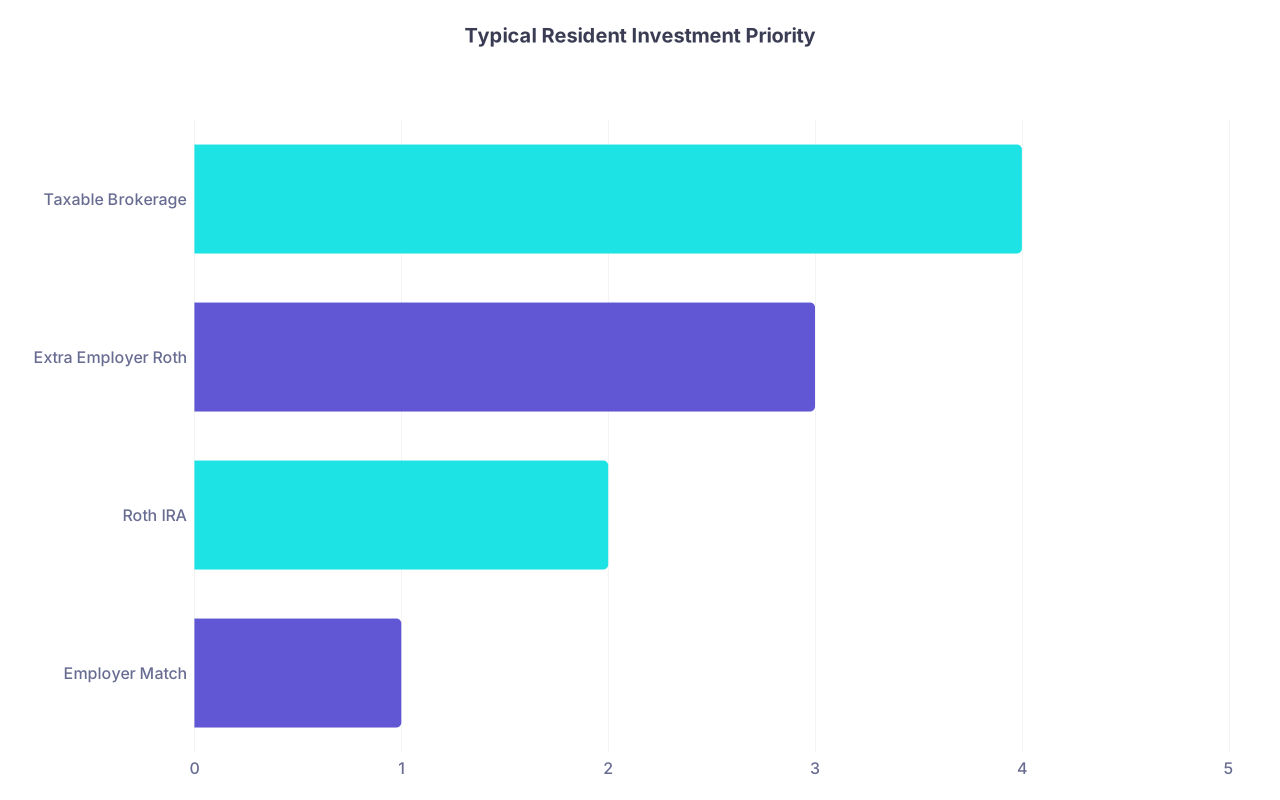
| Category | Value |
|---|---|
| Employer Match | 1 |
| Roth IRA | 2 |
| Extra Employer Roth | 3 |
| Taxable Brokerage | 4 |
Checkpoint: Before your first paycheck you should have:
- Decided: Roth vs pre‑tax in your employer plan (usually Roth as a resident)
- Chosen where you’ll open your Roth IRA (which company)
- A target contribution:
- Example: 4% to employer Roth 403(b), $100/month to external Roth IRA
First Paycheck Month: Actually Open the Investment Accounts
Money is about to start moving. Systems need to be in place before lifestyle creeps up.
Step 7: First 48 hours after your first paycheck hits
At this point you should confirm income and install automation.
In the first 2 days after payday:
Verify the paycheck
- Net pay amount
- Health/dental insurance correctly deducted
- Retirement contribution (if you already set it up)
- Direct deposit landed in the right checking account
Set up automatic transfers to savings buckets
- From checking to:
- Emergency fund (e.g., $150 per pay period)
- Short‑term goals (e.g., $50 per pay period)
- Schedule them for the day after each payday
- From checking to:
Set up autopay for all credit cards
- At least statement balance every month from your checking account
Step 8: Open your Roth IRA (Weeks 1–2 of getting paid)
Now you create your first real investment account outside work.
In a single 30–45 minute block:
Pick your custodian
- Any of these are fine:
- Vanguard
- Fidelity
- Charles Schwab
- I strongly prefer one of the big three for residents: low fees, simple index funds, not trying to sell you junk.
- Any of these are fine:
Open a Roth IRA online
- Account type: Roth IRA
- Funding source: your primary checking account
- Set up:
- Initial contribution (even $50–$100)
- Recurring monthly contribution (auto‑draft on payday + 1)
Choose a simple investment inside the Roth IRA
- If you don’t want to pick funds:
- Choose a Target Retirement Fund roughly matching age ~ 65–70 (e.g., Target 2060)
- If you want to be extra simple:
- Single broad index fund such as:
- Total US stock market index
- Or a global stock index
- Single broad index fund such as:
- If you don’t want to pick funds:

Checkpoint: By the end of your second paycheck cycle you should have:
- A Roth IRA opened
- At least one automatic monthly contribution scheduled
- A simple, diversified fund chosen (no day‑trading, no stock picking)
4–8 Weeks After First Paycheck: Tune Your Employer Retirement Plan
Now you clean up the default decisions your hospital made for you.
Step 9: Log into your employer retirement plan and optimize it
At this point you should:
Confirm contribution type and percentage
- Make sure contributions are:
- Roth as a resident (unless your tax situation is very unusual)
- Set contribution level:
- If there’s a match: at least enough to get the full match
- If no match: choose a % that still lets you fund your Roth IRA (e.g., 3–5%)
- Make sure contributions are:
Pick a reasonable investment option
- If available, a Target Date Retirement Fund is usually fine during residency
- Or use the same “total stock market” style index fund as your Roth IRA
- Ignore the noise of 40+ options and performance charts
Turn off anything sketchy
- If they auto‑enrolled you in:
- High‑fee actively managed funds
- Insurance‑wrapped products
- Move money into a low‑cost index or target date fund instead
- If they auto‑enrolled you in:

| Step | Description |
|---|---|
| Step 1 | Login to Plan |
| Step 2 | Check Contribution Type |
| Step 3 | Set Contribution Percent |
| Step 4 | Select Investment Fund |
| Step 5 | Review Fees |
| Step 6 | Confirm and Save |
Checkpoint: Within 2 months of starting residency you should:
- Be contributing something to an employer retirement plan if offered
- Have moved default investments into low‑cost, diversified funds
- Know exactly what % of your gross pay is being invested
Month 3–6: Consider a Simple Taxable Brokerage (Optional)
Once your core system is running, then (and only then) you think about a taxable brokerage.
At this point you should only open this if:
- You have:
- A funded starter emergency fund (at least $2,000+)
- Ongoing Roth IRA contributions
- Any employer match captured
- And you still have consistent leftover monthly cash
Step 10: Open a taxable brokerage for flexible goals
Use the same custodian as your Roth IRA to keep things simple.
In one session:
Open a standard individual brokerage account
- Name: “[Your Name] – Brokerage”
- Link it to the same checking account
Use the same investment philosophy
- Low‑cost, broad index funds
- No need to add complexity just because it’s “taxable”
Tag it mentally for medium‑term goals
- Future house down payment
- Fellowship transition
- Bigger emergency buffer
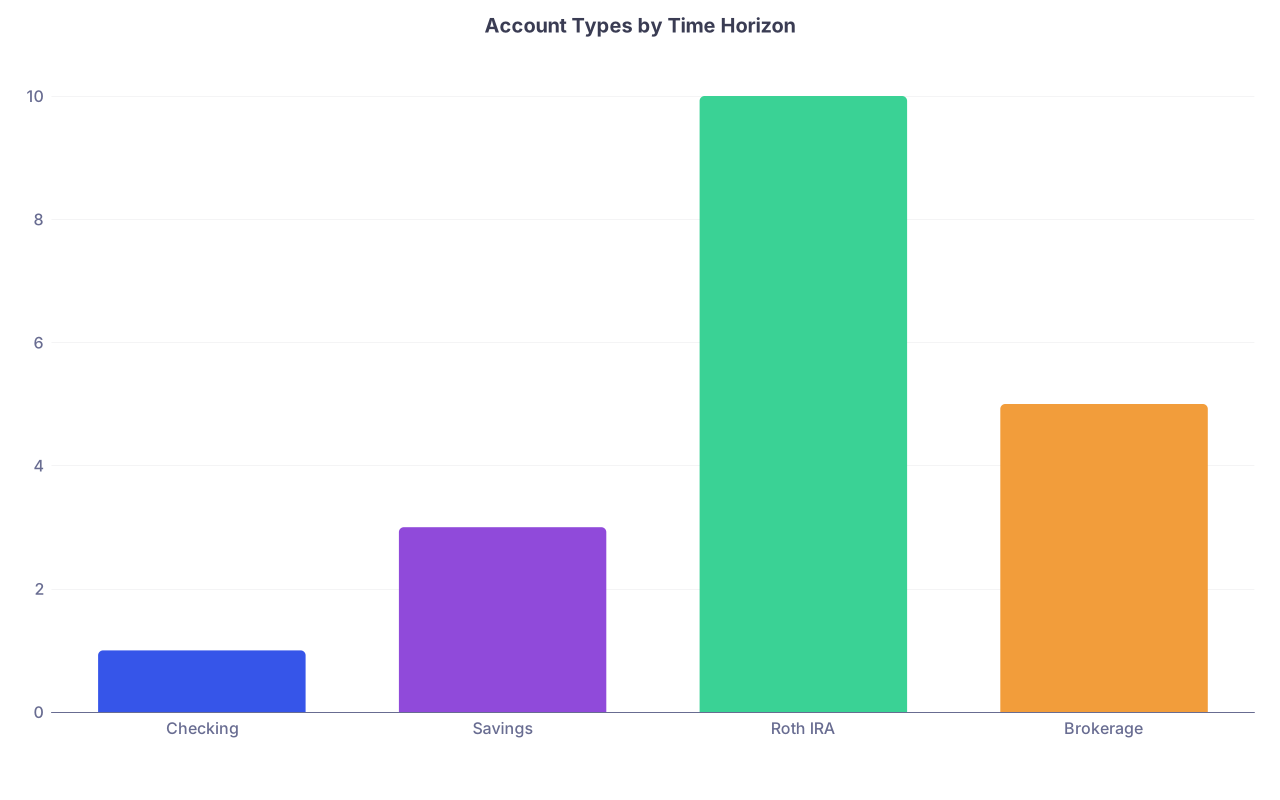
| Category | Value |
|---|---|
| Checking | 1 |
| Savings | 3 |
| Roth IRA | 10 |
| Brokerage | 5 |
(Values represent rough year horizons: 1 = current year money, 3 = 1–3 years, 5 = 3–7 years, 10 = retirement.)
Checkpoint: By end of PGY‑1 you should have:
- Core banking structure functioning on autopilot
- Roth IRA humming in the background
- Employer retirement plan configured
- Optional brokerage opened if you’re consistently surplus‑positive
Quick Chronological Checklist: From Match Day to First Paycheck
Use this as your stripped‑down “do this now” guide.
Match Day to +2 Weeks
- Pick primary checking for residency pay
- Decide whether to keep or close old bank over time
- Set up online access, debit card
Weeks 2–4
- Open:
- Emergency savings account (high‑yield)
- Short‑term goal savings account
- Build a one‑page financial snapshot of all current accounts and debts
Weeks 4–8 (Pre‑Orientation)
- Start disability insurance application
- Get term life if you have dependents
- Execute basic legal docs (healthcare proxy, maybe will)
Orientation Week
- Complete direct deposit form → primary checking
- Confirm:
- Employer retirement plan type (401k/403b/457)
- Whether Roth contributions allowed
- Any employer match for residents
- Log into benefits portal once and bookmark retirement page
2 Weeks Before First Paycheck
- Decide:
- Roth vs pre‑tax in employer plan (usually Roth)
- Percent contribution (e.g., 3–6%)
- Pick Roth IRA custodian (Vanguard/Fidelity/Schwab)
First Paycheck Month
- Verify direct deposit and paycheck details
- Set automatic transfers:
- Checking → emergency savings
- Checking → short‑term goals
- Set autopay for credit cards (statement balance)
- Open Roth IRA and:
- Link checking
- Choose simple index or target date fund
- Start automatic monthly contribution
Months 1–2 After First Paycheck
- Log into employer retirement plan:
- Confirm contribution % and Roth status
- Move investments to low‑cost index/target date fund
- Adjust contributions if needed to stay cash‑flow positive
Months 3–6
- If surplus cash remains consistently:
- Open taxable brokerage (same custodian as Roth)
- Invest with same simple index strategy
Open your banking app right now and rename or create two savings buckets: “Emergency Fund” and “Residency Goals.” Once those are visible, set a $25 automatic transfer into each starting next payday. The accounts don’t become real until money starts moving.