The biggest red flags in virtual interviews are almost never about your answers. They’re about your setup, your behavior on camera, and the impression you don’t realize you’re sending.
If you treat a virtual interview like a casual Zoom chat, you’re handing the committee a reason to screen you out. Not because they’re evil. Because they have 5–10 equally qualified applicants for every seat, and sloppy professionalism is the easiest tiebreaker.
Let me walk you through the most common red flags I’ve seen tank otherwise strong applicants—and exactly how to avoid joining them.
Red Flag #1: Treating Virtual Like “Less Real” Than In-Person
This is the root mistake. Everything else grows out of this.
I’ve watched applicants log on to medical school interviews in hoodies, earbuds half in, sitting on their bed with laundry in the background. When their rejections come, they’re “shocked.” The committee is not.
The mindset error: “It’s online, so it’s more relaxed.”
No. It’s a professional, high-stakes interview that just happens to use a webcam. If you mentally downshift even one gear because it’s virtual, you will start stacking red flags.
Here’s what this mindset looks like in practice:
- Casual or half-finished attire (blazer on top, gym shorts below, visible when they stand up).
- Logging in from random locations (dorm common room, car, coffee shop).
- Multitasking between windows during the interview.
- Not bothering to test anything “because Zoom always works.”
How to avoid it:
- Treat the virtual interview exactly like an in-person interview:
- Same level of dress.
- Same preparation.
- Same sleep schedule and pre-game routine.
- Put it on your calendar as if you’re physically traveling there. Build in “commute” time—just replace the commute with setup and tech checks.
- Ask yourself a blunt question the day before: “If this were in person tomorrow, what would I do differently?” Then do those things anyway.
If you fix this mindset, half the other red flags never appear.
Red Flag #2: Tech Issues That Scream “Unprepared”
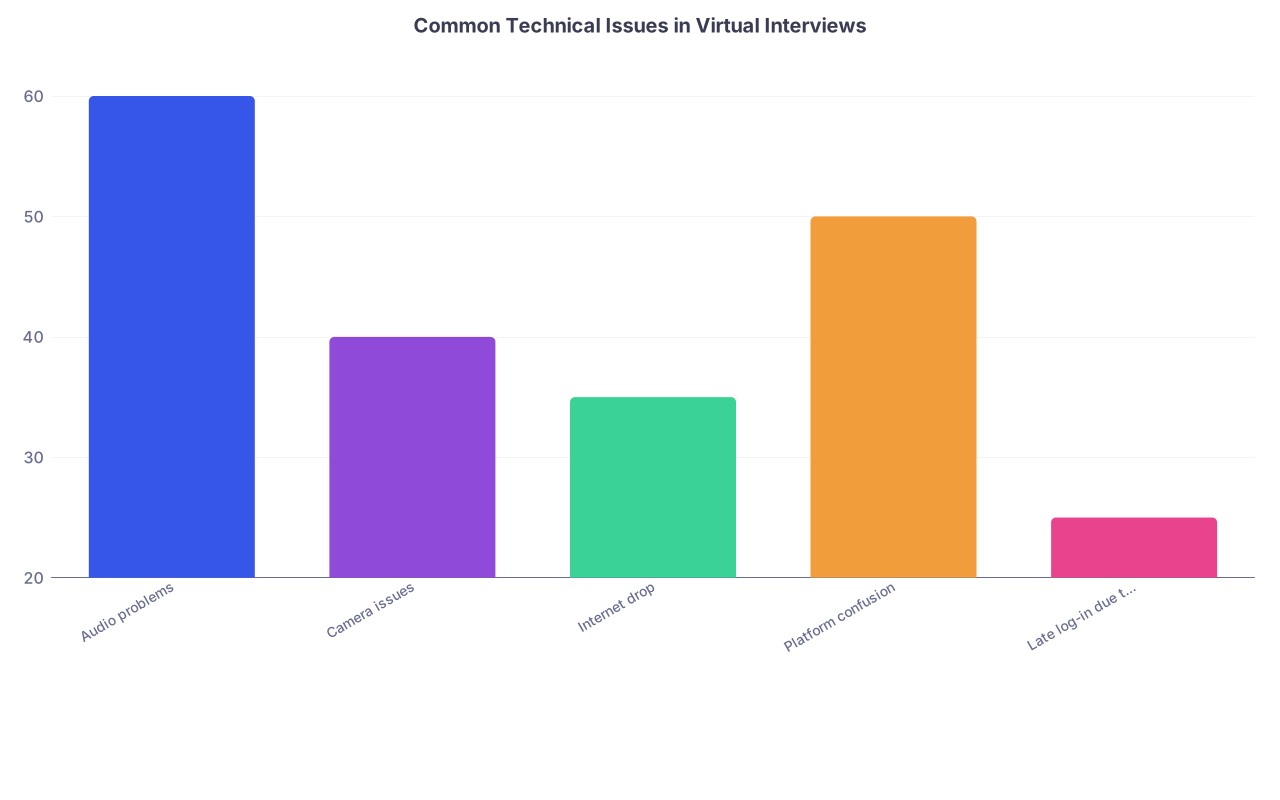
| Category | Value |
|---|---|
| Audio problems | 60 |
| Camera issues | 40 |
| Internet drop | 35 |
| Platform confusion | 50 |
| Late log-in due to tech | 25 |
One or two glitches can happen to anyone. But there’s a line between “unlucky” and “you clearly did zero prep.”
The committee won’t say this out loud, but here’s what they think when tech issues pile up: “If this is you on a scheduled, high-stakes call, what will you be like on a 5 am rounds page or with a critical patient in the ED?”
Red flag tech behaviors:
- Logging in late because you’re downloading Zoom/Teams/WebEx during the interview time.
- Taking the interview on your phone, handheld, bouncing around.
- Audio cutting in and out because you’re on shaky Wi-Fi with no backup plan.
- Struggling for several minutes to unmute or share your screen for an MMI station.
- Device dying mid-interview because you assumed 10% battery was “fine.”
Do not comfort yourself with “they’ll understand.” They might sympathize. But they’ll still rank you lower.
How to avoid it (the non-lazy version):
Full tech rehearsal at least 48 hours before
- On the exact device you’ll use.
- On the same platform (Zoom vs Teams vs proprietary school system).
- At roughly the same time of day (so you know what your lighting and internet are like).
Backup everything
- Laptop plugged in. Not “fully charged,” actually plugged in.
- Phone fully charged nearby as emergency backup with app installed and account ready.
- A hotspot option (phone hotspot or second network) if your Wi-Fi fails.
Don’t use your phone unless you absolutely must
- If you’re forced to (e.g., computer meltdown day of), stabilize it with:
- A stand.
- Landscape orientation.
- Plugged into power.
- But really, fix your computer situation ahead of time.
- If you’re forced to (e.g., computer meltdown day of), stabilize it with:
Login timing
- Aim to be in the “lobby” or waiting room 15–20 minutes early.
- If there’s a tech check offering, take it. Declining is a cute flex until something breaks.
One ugly pattern: The “smart” applicants are often the worst offenders here, because they assume they can wing the tech. Don’t be that stereotype.
Red Flag #3: Distracting Backgrounds and Amateur Camera Framing
You might think they’re evaluating your answers. They are. But they’re also subconsciously judging everything they see in your frame.
I’ve seen:
- Open closets stuffed with clothes behind applicants.
- Unmade beds with personal items that should never be on camera.
- Posters with… let’s say “controversial” content.
- Roommates walking through half-dressed behind them.
None of that says “future physician.”
Red flag setups:
- Messy, cluttered, or overly personal background.
- Backlit by a window so your face is in shadow (you look like a silhouette on a crime show).
- Camera angled up your nose, or down from above like a selfie.
- You sitting on a bed or couch instead of at a desk/table.
How to avoid it:
- Use the simplest professional setup you can:
- Plain wall behind you, or at most:
- A small bookshelf.
- Neutral artwork.
- A couple of academic items (textbooks, a plant).
- Plain wall behind you, or at most:
- If your space is chaotic:
- Rotate your desk/chair to face a blank wall.
- Use a physical room divider.
- As a last resort, use a subtle virtual background or blur. Not a beach. Not the Golden Gate Bridge. Neutral office or solid color only.
Camera framing:
- Center your head and upper torso. Not just your forehead.
- Eye level. Put your laptop on books if you have to.
- Leave a little space above your head, not a giant void or a cropped top.
Lighting:
- Light source in front of you, not behind.
- If you have only a window, face it, don’t sit with your back to it.
- Check on camera: can they see your eyes clearly? If not, fix it.
One pro move: Take a screenshot of your setup from the actual interview platform, then ask a brutally honest friend: “Does this look like someone you’d trust as your doctor?”
Red Flag #4: Audio Problems That Make You Hard to Talk To
Bad video is annoying. Bad audio kills the conversation.
I’ve watched committees struggle through:
- Applicants with constant echo from tiled, empty rooms.
- Microphones rubbing on collars or hair.
- Background TV or siblings yelling.
- Keyboard clacking or mouse clicking picked up as loud as their voice.
They’ll be polite about it. They’ll smile and nod. But afterward, comments like “hard to communicate with” and “unclear at times” show up in the evaluation.
Red flag audio issues:
- Using your laptop mic from 3 feet away with a loud fan.
- Using noisy Bluetooth earbuds with frequent dropouts.
- Joining from echo chambers (empty kitchen, tiled bathroom, stairwell).
- Not muting notifications: message dings, alarms, Slack, email, WhatsApp.
How to avoid it:
- Use either:
- Wired earbuds with mic.
- Or a decent USB mic if you have one.
- Test your audio on the same platform:
- Say a few sentences.
- Play it back if you can.
- Have a friend/advisor do a mock call and rate clarity.
Control your environment:
- Choose the quietest room. Shut doors and windows.
- Tell everyone in your space the exact times you can’t be disturbed. Write it down and tape it to the door if you have to.
- Silence your phone. Turn off all notification sounds and desktop alerts.
This is basic, but it’s astounding how many applicants skip it and then blame “bad luck” when their audio is garbage.
Red Flag #5: Looking Everywhere Except at the Interviewer
Virtual interviews magnify where your eyes go. If you’re staring at yourself, looking off-screen, or obviously reading something, they notice.
I’ve seen interviewers write:
- “Seemed distracted.”
- “Possibly reading responses?”
- “Limited eye contact.”
That’s not how you want to be remembered.
Red flag eye/attention behaviors:
- Talking to the image of the interviewer on your screen instead of the camera, so your gaze is always slightly down.
- Continually glancing to the side where you’ve parked “notes.”
- Looking down at your phone or another monitor.
- Obviously scanning text on your screen during complex questions.
It feels subtle from your side. It’s not.
How to avoid it:
- Position the video window as close to your camera as possible, top-center.
- When you respond, look directly into the camera for most of your answer.
- You can glance down or to the side briefly as you think, but come back to the camera as your default.
- Do not put your notes in a second monitor off to the side. If you must have something:
- One small sticky note with 3–5 keywords.
- Or a very short bullet list under the camera, not paragraphs.
The other trap: overusing the mute button and camera off/on. This is not a lecture. It’s a conversation. Stay present, on screen, fully engaged.
Red Flag #6: “Scripted Robot” Answers (Made Worse by the Screen)
Virtual format already reduces warmth. If you sound memorized on top of that, you come across as stiff, inauthentic, and high-risk for poor bedside manner.
I’ve seen applicants with perfect content get dinged because they delivered it like they were reading from a teleprompter. That’s a red flag for any patient-facing profession.
Classic signs:
- Every answer starts with the same templated opening: “That’s a great question” (don’t).
- Long monologues with zero pauses for breath or interaction.
- Jargon-stuffed responses that sound like ChatGPT wrote them.
- Identical phrasing to their personal statement or secondary essays.
On camera, this is amplified. You can’t lean into the room, use your whole body, or build the same rapport. So robotic delivery stands out even more.
How to avoid it:
- Stop writing full scripts. Write talking points instead:
- 3–5 bullets per common question.
- A few key phrases or stories you want to hit.
- Practice speaking from bullets, not reading from text.
- Record yourself answering:
- “Tell me about yourself.”
- “Why medicine?”
- “Why our school?”
- One ethics scenario.
- One failure/challenge story.
- Watch the recording. If you’d be bored to talk to you, they will be too.
Also: virtual doesn’t mean you should sit frozen. Use natural facial expressions. Nod. Lean in slightly when listening. Look like you’re in a real conversation, not an oral exam from the 1800s.
Red Flag #7: Background People, Pets, and Phones
No, your cat walking across the keyboard is not “cute” in this context. Your little brother yelling in the hallway is not “relatable.” Your roommate barging in is not “understandable.”
It’s a red flag about boundaries and professionalism. Medical training requires both.
I’ve seen:
- Parents hovering just off camera and whispering “reminders.”
- Partners walking behind repeatedly.
- Phones buzzing on the desk every 30 seconds.
- Doorbells ringing with food deliveries mid-interview.
How to avoid it:
- Tell every person you live with:
- The exact date and time.
- That this is the most important hour of your application.
- That for that hour, it’s like you don’t exist.
- Put a sign on the door: “Interview in progress. Do not knock.”
- Put your phone:
- In another room.
- On Do Not Disturb.
- Disable notifications on your computer:
- Email.
- Text relays.
- Messaging apps.
If your home situation is chaotic and you truly can’t control it, then move:
- Reserve a private room at your university library.
- Ask a trusted friend if you can borrow a quiet room.
- Use a campus office or advising center that has offered space for interviews.
Anything is better than “sorry, that’s my roommate.”
Red Flag #8: Casual Language and Over-Familiar Demeanor
Virtual space tricks people into informality. You’re used to FaceTiming friends on the same device. But this is not that.
What I’ve heard in actual interviews:
- “Yeah, so like, I totally freaked out about Orgo but it was whatever.”
- “Honestly, that was such a trash semester.”
- Calling the interviewer by their first name uninvited.
- Swearing, even mildly (“that was a hell of a time”).
These things read fine in a group chat. In a med school interview? Sloppy.
Red flag behavior:
- Overusing slang and filler (“like,” “you know,” “literally,” “OMG, I was dying”).
- Over-sharing personal issues with no filter.
- Making jokes too early before reading the interviewer’s tone.
How to avoid it:
- Treat it like a professional meeting with a future attending, not a peer.
- Default to titles: “Dr. Smith,” “Professor Lee,” unless they explicitly say “Call me John.”
- Record a mock interview and do a crude but effective count:
- How many times you say “like.”
- How many “uh” and “um.”
- You don’t need formal speech, but you do need controlled, intentional speech.
And let me be clear: this is not about faking a personality you don’t have. It’s about showing that you understand context. Which is exactly what you’ll be expected to do with patients, families, and staff.
Red Flag #9: Awkward Starts and Chaotic Ends
You’re judged from the moment your camera turns on until it goes off. If you bungle the first 30 seconds or the last 30, that’s what sticks.
Common early mistakes:
- Logging in with display name “iphone_5678” or “medkid123.”
- Fumbling with mute/camera while they’re greeting you.
- Starting with “Can you hear me? Can you see me?” instead of a normal greeting.
Common exit mistakes:
- Abruptly hanging up without a closing.
- Lengthy, rambling final comments.
- Multiple “okay I’ll go now… oh, wait…” moments.
Fix your display name:
- First name + last name, capitalized. That’s it.
Opening sequence (rehearse this):
- Camera on.
- Unmuted.
- Simple: “Good morning, Dr. Patel. Thank you for taking the time to speak with me today.”
Closing sequence:
- When they say you’re nearing the end, have a clean closer ready:
- “Thank you again for your time and for sharing more about the program. I really appreciate the opportunity to interview.”
- Pause. Let them sign off first.
- Then click leave. No scrambling, no muttering to yourself as you find the button.
This sounds trivial. It’s not. Committees remember smooth, composed interactions.
Red Flag #10: Sloppy Time Management Across a Virtual Interview Day
Many schools now run full or partial virtual “interview days” with multiple sessions: info sessions, student panels, MMI circuits, individual interviews.
People make dangerous assumptions:
- “Only the formal interview counts.”
- “If my camera is off, I can half-listen.”
- “A few minutes late between sessions is fine; it’s just Zoom.”
No.
Some programs explicitly tell interviewers and students to note:
- Who showed up on time.
- Who stayed engaged.
- Who asked respectful, thoughtful questions in group settings.
Red flags:
- Arriving late to any part of the day.
- Not returning from breaks on time.
- Seeming checked out or multitasking in student panels.
- Skipping optional sessions without a good reason.

| Step | Description |
|---|---|
| Step 1 | Login & Tech Check |
| Step 2 | Welcome Session |
| Step 3 | Faculty or MMI Interviews |
| Step 4 | Student Panel |
| Step 5 | Wrap-up/Q&A |
How to avoid it:
- Build a written schedule with:
- Exact times.
- Zoom links.
- Contact info in case of emergency tech issues.
- Set alarms 5–10 minutes before each segment.
- Treat every interaction—even with students—as “on the record.” Because it often is.
I’ve seen applicants tank themselves by being charming in the formal interview and openly complaining or checking out in the student panel. Students talk.
Quick Comparison: Green-Flag vs Red-Flag Virtual Interview Habits
| Area | Red Flag Behavior | Green Flag Behavior |
|---|---|---|
| Tech Prep | Testing nothing, logging in late | Full tech run-through, early log-in |
| Environment | Messy room, noise, people walking by | Quiet, neutral, controlled space |
| Camera & Audio | Poor framing, echo, dropouts | Eye-level camera, clear audio |
| Professionalism | Casual clothes, slang, distractions | Interview attire, focused, respectful |
| Engagement | Looking off-screen, scripted tone | Camera-focused, natural, conversational |
Use that table as a mirror. If you recognize yourself in the red column, fix it now—not the night before your first interview.
What You Should Do Today
Do not wait until you get an interview invite to clean this up. By then, you’ll be panicking and cutting corners.
Your next step today is simple and non-negotiable:
Set up a 20-minute mock virtual interview for yourself and record it.
- Use the platform most schools use (usually Zoom).
- Wear exactly what you’d wear for the real thing.
- Sit where you plan to sit for actual interviews.
- Answer five standard questions out loud.
Then watch the recording and be brutally honest:
- Does anything in the frame look unprofessional?
- Can they hear you clearly the whole time?
- Would you trust this person to walk into a patient room?
Fix at least one thing you don’t like before you go to bed tonight—whether it’s your background, your audio, or your robotic delivery.
Because the virtual format isn’t forgiving. It magnifies every small mistake. Your job is to make sure those mistakes are gone before the admissions committee ever sees you.