
Clinic Workflow Fixes When Telehealth Tech Keeps Failing You
You are in clinic on a Tuesday afternoon. Four in‑person patients are waiting. Two telehealth visits are “in the room” according to the EHR. One of them has been sitting in a frozen video lobby for eleven minutes. The MA is at your door whispering, “Zoom is down again. Do you want me to cancel or call them?”
You feel that familiar mix of frustration and guilt. You are wasting patients’ time. You are falling behind. And yet admin keeps sending emails about “leveraging digital health innovation.”
Here is the truth: the problem is not just the tech. It is that your workflow assumes the tech will behave perfectly. It will not. So you need a workflow that assumes failure and still works.
I am going to walk through concrete, clinic‑level fixes so that:
- When telehealth works, it is smooth.
- When telehealth fails, your day does not collapse.
- Patients are not punished because your platform had a bad day.
No hand‑waving. Just specific protocols, phrases, and templates you can actually use.
Step 1: Redesign Your Default Telehealth Workflow Around Failure
Most clinics bolt telehealth onto an in‑person workflow. That is why it breaks everything when the platform glitches.
You need a telehealth‑aware workflow with explicit branches for when tech fails.
Build a simple decision tree for every telehealth visit
This is your new mental model and something you can literally tape next to your monitor.

| Step | Description |
|---|---|
| Step 1 | Telehealth visit start time |
| Step 2 | Proceed with video visit |
| Step 3 | Staff attempts contact |
| Step 4 | Offer video troubleshoot or switch to phone |
| Step 5 | Mark no show, send follow up |
| Step 6 | Convert to phone visit |
| Step 7 | Reschedule in person or video |
| Step 8 | Patient connected by +3 min |
| Step 9 | Reach patient by phone by +7 min |
| Step 10 | Issue appropriate for phone |
That is the skeleton. Now you put skin on it: time limits, roles, exact actions.
Institute strict time rules
Do this, or you will bleed minutes one micro‑delay at a time.
- +3 minutes: If the patient is not visibly connected, staff must act.
- +7 minutes: If tech is still not functional, you pivot to plan B (phone or reschedule) instead of “just a few more minutes.”
- +10 minutes: Hard stop for that encounter unless it is clinically urgent.
Those time marks go into:
- MA scripts
- Scheduling templates
- Your own habits
You are training the system to move instead of stall.
Step 2: Create a Tiered Backup System (Video → Phone → Asynchronous → In‑Person)
You should never be stuck in “we cannot connect so I guess we cancel.” For non‑emergent outpatient care, that is lazy design.
You need tiers. Think of it as degrading gracefully when the tech fails.
| Tier | Modality | When to Use |
|---|---|---|
| 1 | Video visit | Default if platform works |
| 2 | Phone visit | Video fails but non-visual issues |
| 3 | Asynchronous | Simple follow-ups, refills |
| 4 | In-person | Visual exam required / safety concern |
Tier 1 → Tier 2: Video to Phone
Protocol when video is not connecting by +7 minutes:
- Staff calls the patient.
- Confirms identity (2 identifiers).
- Offers conversion to phone visit for this appointment if clinically safe.
- Documents consent for phone care if required by your jurisdiction.
Suggested staff script:
“Dr. Lee is ready for you, but our video system is not working. If it is acceptable to you and appropriate for your medical issue today, we can continue this visit by telephone now. If you prefer video or we need to see you in person, we can also reschedule. What would you prefer?”
You are honoring patient autonomy, respecting clinical limits, and not wasting half your afternoon.
Tier 2 → Tier 3: Phone to Asynchronous
There are visits that should never have needed synchronous anything. Medication refill with stable labs. Simple documentation letters. Reviewing a result that says “unchanged, continue current plan.”
For these:
- Convert to secure messaging or portal‑based follow up.
- Use structured templates so you do not reinvent text each time.
- Batch these tasks in your day instead of clogging visit slots.
Examples that are often safe for asynchronous care:
- Stable hypertension with recent labs and BP log submitted
- Simple test result review (“mammogram normal, repeat in 1 year”)
- Administrative letters if no new clinical decision needed
Tier 3 → Tier 4: Escalate to In‑Person
You should have predefined no‑phone and no‑asynchronous categories. When one of these shows up and telehealth is failing, the answer is simple: reschedule in‑person or urgent care/ED as appropriate.
No‑phone examples:
- New severe abdominal pain
- Shortness of breath at rest
- New neurologic deficit
- Complex mental health crisis (suicidality, psychosis)
If your clinic tolerates these on phone “just because the schedule is full,” that is not innovation. That is risk.
Step 3: Redesign Roles – Stop Making the Clinician the IT Help Desk
If you are the one walking patients through “click the camera icon on the bottom right,” your workflow is already broken.
You need pre‑visit tech screening and live tech support handled by staff, not you.
Pre‑visit tech screening process
The day before (or morning of) telehealth visits, your MAs or call center should run a quick screen. Not a five‑minute interrogation. A 60–90 second checklist.
Core questions:
- “Will you be using a smartphone, tablet, or computer?”
- “Have you used this video system with us before?”
- “Are you able to receive text messages / emails at this number / address right now?”
- “Do you have a private, quiet place for the visit?”
If red flags appear (no device, no privacy, no internet), you solve it before it hits your schedule:
- Convert to phone if appropriate
- Help them install or test the app
- Reschedule to in‑person if telehealth just is not workable for them
Standardize MA actions when tech fails
At visit start, your MA or telehealth coordinator is the first line, not you. Here is a basic protocol:
- At scheduled time, MA checks if patient is in the virtual waiting room.
- If not there by +3 min: MA calls the patient.
- MA spends no more than 4 minutes on tech troubleshooting.
- At +7 minutes, MA triggers the branch: phone conversion or reschedule based on your preset rules, and notifies you.
You are notified with one line in chat or EHR message:
“Telehealth 2: video fail, converted to phone, patient on line now”
or
“Telehealth 4: no contact after call, marked no show, message sent.”
You are not trying to debug routers.
Step 4: Write and Use Fast, Legally Sound Documentation Templates
When telehealth goes sideways, documentation often goes with it. You end up typing “video failed, switched to phone” fifteen times a day.
Fix this with smartphrases/macros.
Core snippets you should build
Video failure → Phone conversion note
- “Planned video visit. Unable to establish stable video connection due to [platform / patient device / connectivity]. Identity confirmed via [2 identifiers]. Risks and limitations of telephone visit discussed. Patient agreed to proceed by audio only.”
No‑show vs technical no‑show
- No‑show: “Patient did not connect to video and did not answer phone at listed number despite 2 attempts at [times]. No contact established. Marked as no show.”
- Technical no‑show (system fault): “Clinic unable to establish telehealth connection due to system failure affecting multiple visits. Patient contacted by phone, visit rescheduled. Not billed.”
Conversion to in‑person
- “Attempted telehealth visit. Due to [need for physical exam / safety concern / tech failure], patient advised to be seen in person. Appointment scheduled on [date] / directed to ED / urgent care. Patient voiced understanding.”
These are not for compliance theater. They protect you ethically and legally and make insurance audits less painful.
Step 5: Protect Ethics and Equity While You Streamline
Telehealth can quietly amplify inequities if you are not paying attention. Tech failures hit some patients harder than others.
You have to bake ethics into your workflow, not bolt it on.
Do not penalize patients for your tech failures
If your platform melts down mid‑clinic, here is the ethical baseline:
- Do not charge a no‑show fee.
- Offer an expedited reschedule or phone alternative.
- Acknowledge the clinic’s failure, explicitly.
Example phrase:
“Our system failed you today, and that is on us. We will get you rescheduled quickly and you will not be charged for this missed telehealth visit.”
That one sentence repairs a lot of trust.
Watch who keeps having “tech problems”
Patients who:
- Have prepaid phones with limited data
- Live in rural areas with weak broadband
- Are older, visually impaired, or have low digital literacy
- Rely on shared devices or public Wi‑Fi
These patients will show up disproportionately in your “telehealth failure” bucket.
You should track that and adjust.
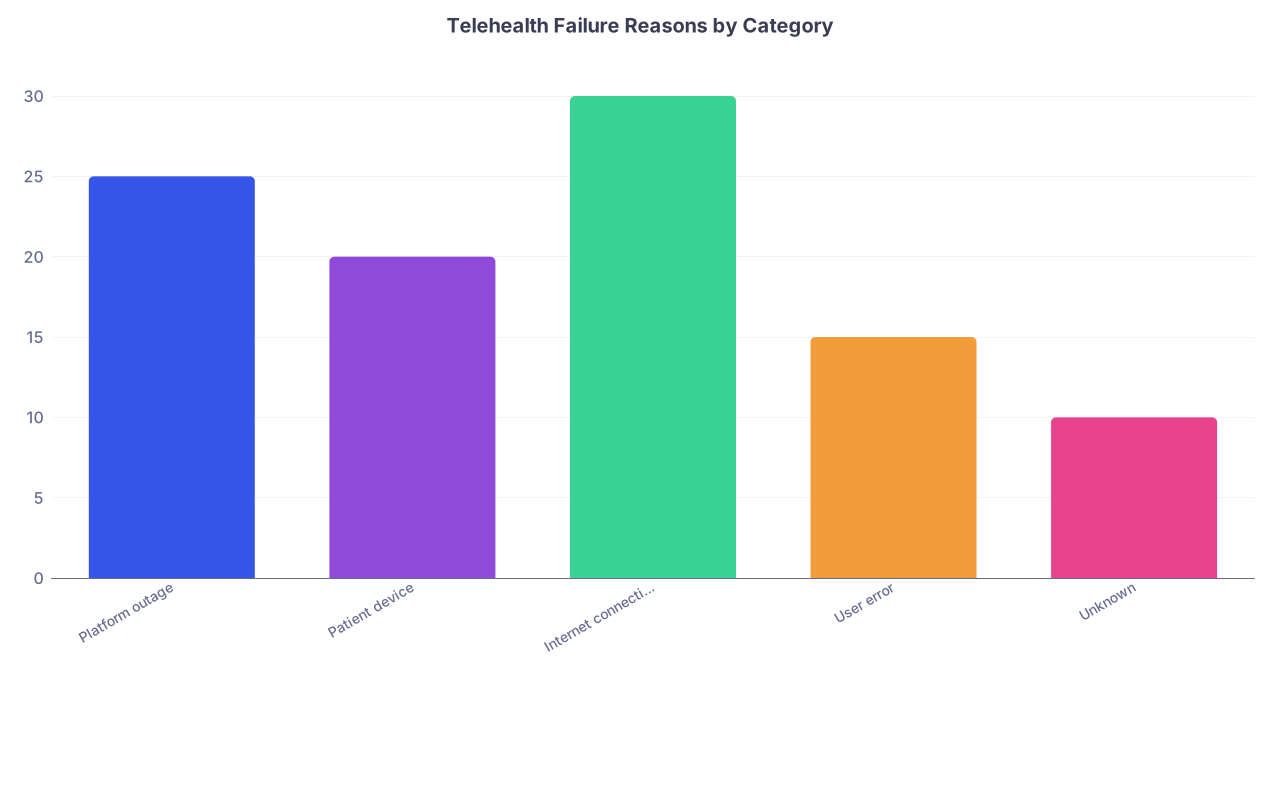
| Category | Value |
|---|---|
| Platform outage | 25 |
| Patient device | 20 |
| Internet connectivity | 30 |
| User error | 15 |
| Unknown | 10 |
If you see that a particular group is constantly getting bumped or converted to phone at the last second, that is inequitable care, dressed up as workflow noise.
Fixes:
- Flag high‑risk patients for default in‑person booking unless telehealth is clearly appropriate and supported.
- Provide printed step‑by‑step instructions in the language they actually speak.
- Offer short pre‑visit tech “dress rehearsals” for first‑time telehealth users.
Be honest about clinical limits
Telehealth is overused in some clinics because it looks efficient on paper. Then you end up managing chest pain, suicidal ideation, or evolving stroke by video or phone “because the schedule was full.”
You need explicit “must see in person” or “must escalate” criteria decided at the clinic level:
- Acute chest pain, dyspnea
- New focal neurologic symptoms
- Active suicidality or harm to others
- Unstable vitals reported at home
- New vaginal bleeding in pregnancy after X weeks (per your protocol)
When these appear and telehealth is failing, there is no debate. The workflow jumps to escalation.
This is not just medico‑legal; it is basic ethics.
Step 6: Adjust Scheduling Templates – Stop Mixing Oil and Water
Many clinics jam telehealth visits between in‑person ones with no structure. It is chaos even when the tech works.
You want scheduling that assumes:
- Telehealth has a higher failure/transition rate
- You need buffer to pivot
- Some visit types are more fragile than others
Use blocks, not random scattering
Cluster telehealth into defined blocks:
- Example: 9–11 telehealth, 11–1 in‑person, 2–3 telehealth, 3–5 in‑person.
That way:
- If the telehealth platform dies from 9:30–10:30, your in‑person afternoon is intact.
- Staff can focus on either managing the physical waiting room or the virtual one, not both at once every five minutes.
Shorten and sequence intelligently
Some visit types break more often on telehealth:
- New patients with complex issues
- Multi‑participant family conferences
- Patients with obvious tech barriers
Put those earlier in a block and leave flexible time at the end of the telehealth block for spillover.
Reserving a 10–15 minute “buffer” at the end of each telehealth block is not a luxury. It is a containment strategy.
Step 7: Train the Team Like This Is a New Clinical Procedure
Most clinics treat telehealth like “just another visit, but with a screen.” That is why everyone improvises when it fails.
You would never roll out a new invasive procedure with this level of training. Apply the same discipline here.
Run short, focused drills
Once a month, pick one scenario and walk through it as a team:
- “Platform down for 60 minutes starting now.”
- “Half the afternoon telehealth schedule cannot connect due to patient‑side issues.”
- “Emergency announced in telehealth visit – patient says they are about to faint.”
Then debrief:
- Did we know who does what?
- How many clicks did it take to send bulk reschedule messages?
- Where did we stall?
Those 20‑minute drills pay off the first time your vendor has a regional outage.
Give staff scripts instead of vague “we’ll figure it out”
Staff hate improvising around tech failures. They feel blamed and exposed. They overcompensate and burn time.
Give them exact phrases.
For reschedule after tech failure:
“We are having technical problems on our side today and cannot complete your video visit. We are sorry for the inconvenience. We can either: 1) Schedule a phone visit later today if that works for your health issue, or 2) Schedule an in‑person or video visit in the next available slot. Which works better for you?”
For patient‑side tech barrier that has become chronic:
“I see the video has been difficult to use the last few times. To make this easier and safer, I recommend we schedule your next visit in person unless there is a clear reason you prefer telehealth. We want to avoid repeated frustrations for you.”
Respectful. Direct. Clear plan.
Step 8: Monitor Telehealth Failures Like They Are Vital Signs
You cannot fix what you do not measure. And no, “it feels like a lot of visits fail” is not data.
You want simple, trackable metrics.
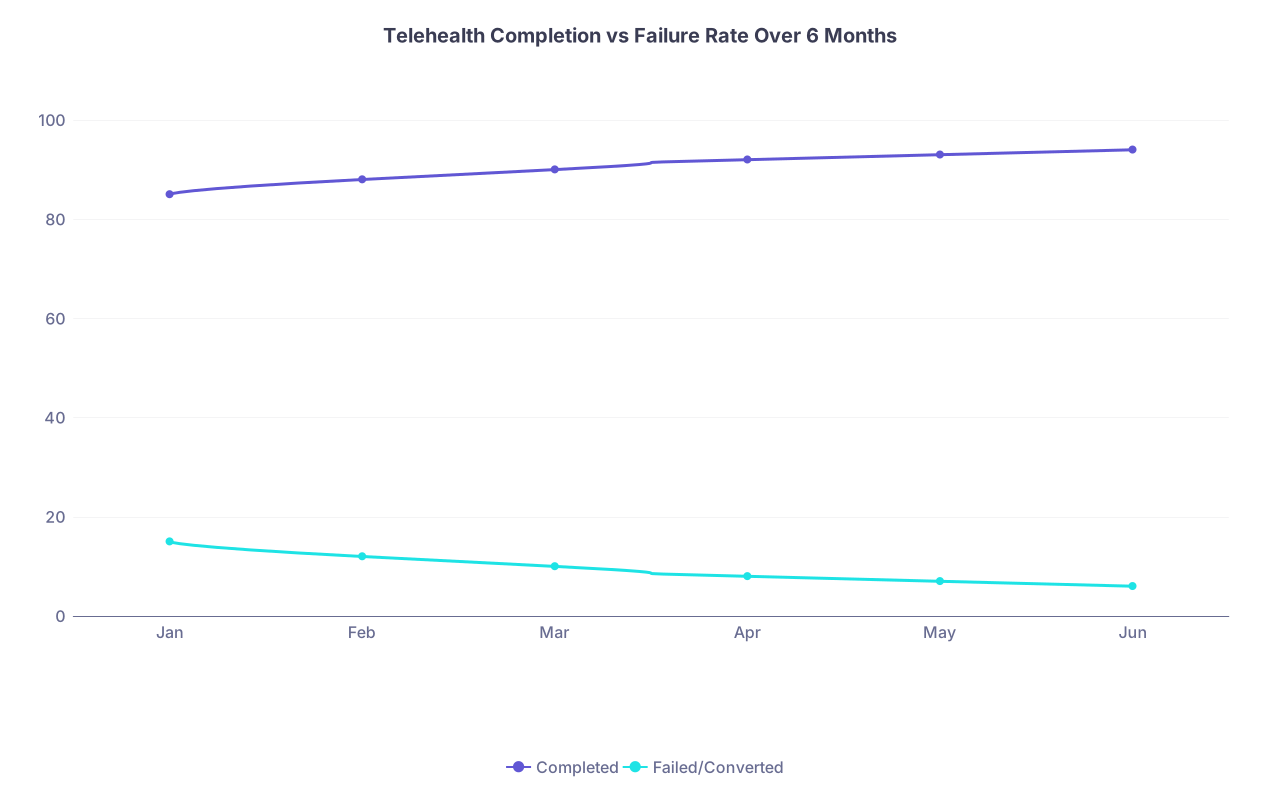
| Category | Completed | Failed/Converted |
|---|---|---|
| Jan | 85 | 15 |
| Feb | 88 | 12 |
| Mar | 90 | 10 |
| Apr | 92 | 8 |
| May | 93 | 7 |
| Jun | 94 | 6 |
Core numbers to track monthly:
- Telehealth completion rate (video as planned)
- Conversion rate (to phone or in‑person at the last minute)
- True no‑show rate (no contact despite outreach)
- Platform failure events (clinic‑side outages) vs patient‑side issues
- Time lost per failure (rough estimate is fine)
You do not need a research database. A basic dashboard or spreadsheet works.
Goal is not perfection. It is trend:
- Are failures dropping as you implement protocols?
- Are certain clinicians or time slots associated with more failures?
- Are you overusing telehealth for visit types that frequently require conversion?
Then you refine.
Step 9: Protect Yourself and the Patient with Clear Boundaries
Telehealth creates weird boundary problems when tech fails.
Example: The video drops at minute 17 of a complex visit. The patient calls your cell (because you called them once from it during COVID). Do you finish the visit off the record? Do you document? Do you bill?
You need rules.
Set communication channels and stick to them
Your clinic should have:
- Approved phone numbers / extensions for patient contact
- Approved secure messaging platform
- Explicit policy: no clinical care via personal text / personal email
So when tech fails:
- You or staff call from clinic number, not your cell.
- If you are offsite and must use your phone, you document and use *67 or a masking tool, and you log it as an exception, not a habit.
Decide in advance when you bill
Ethically and practically:
- If no clinical interaction happened (could not connect at all): do not bill.
- If substantial clinical work was done via phone due to video failure: bill appropriately as phone visit if payer rules allow.
- If system failure prevented care and you spent significant time anyway: document clearly. Many clinics choose not to bill in this scenario as a matter of fairness.
Your goal is not to squeeze every cent out of chaos. It is to have consistent, defensible practice.
Step 10: Make Telehealth Optional, Not a Trap
Last point, and it matters. Patients should not feel forced into a broken tool because “that is how the system schedules now.” Nor should clinicians.
Telehealth is a tool. When the tech keeps failing, you step back and reassess its fit for:
- That patient
- That clinical scenario
- That specific clinic
Some clinics I have worked with ultimately decided:
- Telehealth is excellent for stable chronic disease follow‑up with tech‑savvy patients.
- It is terrible for initial complex workups.
- It is actively dangerous for acute high‑risk complaints.
So they changed templates, stopped trying to do everything on video, and their “failure” rate and stress plummeted.
You are allowed to say: “For this clinic, for this population, we will use telehealth here and not there.”
That is not anti‑innovation. That is mature design.

Putting It All Together: A Sample “Bad Day” Protocol
Let me walk through a specific scenario so you can see how these pieces work in practice.
Scenario: 9–11 AM telehealth block. At 9:25, your video platform crashes clinic‑wide.
What happens under the new system?
- MA notices two patients stuck in the lobby, cannot connect new ones.
- By protocol, MA alerts front desk: “Telehealth platform down, time 9:25.”
- Front desk sends a prewritten mass text:
- “We are experiencing telehealth technical problems this morning. We are contacting you now with alternate options. We apologize for the inconvenience.”
- MAs and call center start working the list in order:
- Identify visit type.
- For visits safe by phone: offer same‑time phone conversion.
- For visits that need visual exam or in‑person: reschedule, or direct to urgent care/ED if acute.
- You switch to phone for appropriate patients, with prebuilt documentation macros for “platform failure, converted to phone.”
- Billing follow policy: phone visits billed according to payer rules; visits not completed due to pure system failure are not billed.
- Clinic manager logs the outage, notifies IT and vendor, and records downtime + impact.
- Team debriefs at lunch: what went smoothly, what did not, what to tweak.
The morning was still annoying. But you did not waste 45 minutes per hour, you did not put patients at risk, and you treated people fairly.

Three Things to Remember
- Assume telehealth will fail and design around that. Hard time limits, backup tiers (video → phone → asynchronous → in‑person), and clear escalation rules keep your day from imploding.
- Shift the burden off you. Trained staff handle tech screening, first‑line troubleshooting, outreach, and scripts. You make clinical decisions, not IT guesses.
- Protect ethics and equity. Do not punish patients for your tech problems, track who is being left behind by telehealth, and be honest about which clinical situations simply do not belong on a shaky video platform.
You are not going to fix the vendor’s code. But you can absolutely fix your clinic’s workflow so that when the tech keeps failing you, you and your patients do not pay the price twice.