
The fastest way to hurt patients in 2026 is to blindly trust a hospital’s shiny new AI tool.
You’re not paranoid if you don’t trust it. You’re awake.
Admin loves AI right now: “efficiency,” “innovation,” “strategic initiative,” “our competitors are already using this.” You’re the one whose name goes in the chart, whose license is on the line, whose patient is in the bed. So when leadership pushes a new AI system you don’t trust—CDS, imaging triage, “note assistant,” predictive risk scoring—your job is not to be “a team player.”
Your job is to be safe, informed, and very, very deliberate.
Let’s walk through what to actually do when this happens in real life.
1. First: Get Specific About What This AI Actually Does
Vague distrust is hard to act on. Specific distrust is powerful.
Day one, before you touch the tool, you need crisp answers to three questions:
- What decisions is this AI influencing?
- Where in the workflow does it show up?
- Who thinks they’re responsible when it’s wrong?
If you can’t answer those, you have no business relying on it.
Start by mapping the tool in your actual day:
- Is it giving diagnostic suggestions based on symptoms and labs?
- Is it auto-drafting notes or orders?
- Is it risk stratifying—sepsis alerts, readmission scores, deterioration predictions?
- Is it suggesting radiology reads or pathology interpretations?
- Is it “prioritizing” your inbox or triage list?
Then ask a more uncomfortable question: “If I follow this AI suggestion and it harms a patient, who will be blamed?”
If the answer from admin is basically, “Well, you’re the clinician…” that tells you how cautious you need to be.
Do this in writing if you can. Email your supervisor or the rollout lead something like:
“For clarity, can you specify:
- What clinical tasks the AI tool is intended to support,
- Whether its outputs are recommendations vs. directives,
- And how clinicians should document when they accept or override AI suggestions?”
You’re not being difficult. You’re defining the terrain.
2. Assume It’s a Junior Intern You’ve Never Met
The safest default mental model: treat the AI like a PGY-1 who rotated in from an outside hospital.
- Potentially smart.
- Sometimes very helpful.
- Also occasionally dangerous, overconfident, and weirdly wrong.
That means 3 things in practice:
You never accept a recommendation without your own mental check.
If you don’t have time to sanity-check the AI’s conclusion, you don’t have time to use the AI.You’re extra cautious in edge cases.
Unusual presentations, rare diseases, complex social situations, pregnant patients, pediatrics, language barriers, very old, very sick, very frail—this is exactly where many AI models break.You assume the AI has no context unless proven otherwise.
It might not know:- What happened at another hospital
- That the lab is notoriously unreliable with a particular test
- That this patient always overstates pain but never wants opioids
- That last week’s note was auto-generated garbage
If this tool is being sold as “almost like having another attending in the room,” mentally downgrade it. To intern level. Where you still check everything.
3. Do a Quick, Personal “Red Flag” Assessment
Before you build it into your practice, you do a 15–30 minute structured test on your own. Not a full validation study. A practical gut-check.
Pick 5–10 recent patients across different scenarios:
- One straightforward, guideline-driven case (e.g., uncomplicated pneumonia)
- One complex, multi-morbidity medicine case
- One case where the diagnosis was initially missed
- One where social factors drove management
- One very high-stakes scenario (e.g., chest pain, sepsis, pediatric fever)
Then:
- Run the AI on those charts if possible (ask for a sandbox/test mode; if they don’t have one, that’s a problem).
- Write down:
- What did it recommend or highlight?
- What did you actually do?
- Where did it miss something important?
- Where did it hallucinate or overstate certainty?
You’re looking for patterns:
- Always over-calling sepsis?
- Under-calling atypical MI?
- Ignoring language barriers or lack of follow-up capacity?
- Suggesting more imaging in every other case?
Now you’re not saying “I just don’t trust it.” You’re saying, “In 3 of 8 test cases, it recommended unsafe or clearly suboptimal actions.” That lands differently.
4. Know Your Ethical Non‑Negotiables Before You Use It
You need a personal line in the sand. Ideally before the 3 am sepsis alert that “the AI recommends ICU transfer” when you know the patient is stable.
Here are four non-negotiables I’d argue you should have:
Final clinical responsibility stays with you.
If anyone says “the AI decided” or “the system doesn’t allow you to override,” that’s a bright red line. You never let a black-box tool be the actual decision-maker for diagnosis, treatment, or disposition.You never follow AI over your well-reasoned clinical judgment just to comply.
“The AI says discharge, but everything in my gut and reasoning says admit?” You admit. And you document.You don’t use AI when you cannot explain your decision to a patient without lying.
If you’d have to say, “Well, I’m following this tool I don’t really understand and don’t trust,” then don’t use it.You refuse to let AI decrease the standard of care for vulnerable groups.
Many models underperform for minorities, those with rare diseases, or those underrepresented in training data. If you notice worse suggestions in these patients, you step back, not forward.
Your mental script should be something like:
“I may use AI as a tool. I will not outsource my ethical obligations, my reasoning, or my responsibility to it. When in doubt, I default to human judgment, not algorithm output.”
That’s not being “anti-tech.” That’s how you stay professionally alive.
5. How to Document AI Use So It Does Not Burn You Later
If your institution is pushing the tool, at some point a lawyer will care about how you used it.
You want your chart to show three things:
- You considered the patient’s specific context.
- You did not blindly follow automation.
- Your reasoning stands on its own, with or without AI.
Some practical documentation habits:
When you agree with the AI:
Don’t just write “as per AI recommendation.” Instead:“Admitted to telemetry for NSTEMI based on troponin trend, EKG changes, and TIMI score. The AI risk tool also classified as high risk, consistent with clinical assessment.”
When you override the AI:
This is where many people get lazy. Don’t.“AI sepsis alert triggered based on SIRS criteria. On evaluation, patient afebrile, hemodynamically stable, lactate normal, alternative explanation for tachycardia (pain, anxiety). Sepsis not suspected; will monitor closely with repeat vitals and labs.”
When you ignore or disable it in a case:
If there’s pressure to use it, a short note can protect you:“AI discharge summary assistant not used for this encounter due to complex medical and social history requiring detailed manual documentation.”
Key point: You’re not documenting “I obeyed the AI” or “I rebelled.” You’re documenting “I thought.”
6. Push Back Without Getting Labeled “Anti‑Innovation”
You’re going to hear things like:
- “This is a system priority.”
- “Everyone else is using it.”
- “The vendor has great validation data.”
You don’t want to be the person yelling “Skynet” in the staff meeting. You do want to be the person who forces real safety discussion.
Use this play:
Lead with alignment, then pivot to specifics.
“I’m all for reducing burnout and improving consistency. My concern is the specific failure modes here, especially in X and Y patients.”Ask targeted, technical questions nobody else is asking. For example:
- “On what population was this model trained? Does it include our demographic mix and payer mix?”
- “How does performance vary across race, age, language, or comorbidities?”
- “What’s the false positive and false negative rate in the validation data, and how will we monitor that locally?”
- “When clinicians disagree with the AI, how is that captured and fed back?”
Request a clear escalation path.
“If I believe the AI is making unsafe suggestions repeatedly, who exactly do I report that to, and what changes from there?”Insist on a defined ‘monitoring and sunset’ plan.
Any responsible AI deployment should include dates and metrics for:- Ongoing performance review
- Safety event tracking
- A mechanism to pause or retire the tool if harms emerge
Admins hate unbounded liability. Frame your pushback as: “I’m trying to protect both our patients and the institution from preventable errors due to overtrust in a new system.”
7. Spot the Red Flags That Mean “Do Not Rely on This”
If you see more than a couple of these, treat the AI as an optional suggestion generator, not a serious clinical partner.

Major red flags:
No one can show you local validation data.
Only vendor slide decks, nothing on how it performs on your population, your workflows.The tool is “locked in” to the EHR with no clear way to override or opt out.
They can’t or won’t explain model limitations.
Generic lines like “the model performs well across populations” with no specifics.They market it as replacing clinician judgment, not supporting it.
There’s no clear process for clinicians to report issues.
Or you’ve reported something and nothing happened.It pressures you to order more high-revenue services.
“AI recommends advanced imaging” in half the patients, with no strong clinical justification.
If one of these is present, be cautious. If several are present, seriously limit your use and document your concerns in writing to your department leadership.
8. Protect Yourself Legally and Professionally
You cannot practice medicine in 2026 without thinking about liability around AI. You just can’t.
Here’s the basic reality: right now, most legal systems still view you as the decision-maker, regardless of tools. Vendors and hospitals may share some liability, but your name is still at the top of the note.
Concrete steps:
Keep evidence that you raised concerns early.
Short email after a scary AI suggestion:“During today’s shift, the AI tool recommended discharging a patient with high-risk chest pain despite concerning features. I admitted the patient and documented my reasoning. I’m concerned about potential patient safety risks if clinicians over-rely on this tool.”
You’re not ranting. You’re creating a trail that you were not passive.
Ask for written institutional guidance.
If they want you to use the tool, request:- A policy or guideline describing appropriate use
- Documentation recommendations
- Clarification about whether use is mandatory or optional
Do not let “the system” force you into a standard of care you believe is unsafe.
If local practice becomes “we always follow the AI,” you still have to make individual calls. Standard of care is what a reasonable clinician would do, not what a software tool outputs.Talk to your risk management or malpractice carrier if something serious happens.
If a harm event involves AI influence, document factually:- What the AI recommended
- What you decided and why
- Whether there was time pressure or systemic nudging to follow the AI
Do not dramatize. Do not minimize. Just write the truth.
9. Ethically Using AI Without Getting Cynical or Naive
There’s a trap on both sides here.
Some clinicians swing to: “AI is garbage; I’ll never touch it.” That’s lazy. Some of these tools genuinely catch errors and save lives.
Others swing to: “The AI probably knows more than I do; I’ll use it for everything.” That’s dangerous.
Here’s a more adult approach:
Use AI for what it’s actually good at.
- Pattern recognition in big data (e.g., imaging triage, subtle EKG changes)
- Tedious clerical tasks (note drafting, prior auth letters)
- Highlighting outliers or trends you might overlook
Don’t use it for what humans are still clearly better at.
- Nuanced goals-of-care and end-of-life decisions
- Interpreting family dynamics, capacity, trust
- Balancing medical facts with cultural, financial, or social realities
Treat AI as one input among many.
You wouldn’t base an entire management plan solely on one lab or one radiology read. You don’t base it solely on AI either.Be explicit with patients when it matters.
You don’t have to give a lecture on algorithms. But if the AI is visibly part of their care:“Our system has a tool that flags patients at risk of getting sicker quickly. It’s suggesting we watch you more closely. I agree because of X, Y, Z in your labs and exam.”
Or:
“The software is suggesting discharge today, but with your social situation and what I’m seeing, I’m concerned you’re not ready. So we’re keeping you another day.”
That is ethically solid. You’re using tech, not hiding behind it.
10. Turn Your Skepticism Into Real Influence
If you’re the one worrying about this, you’re already more thoughtful than many people involved in deployment. Use that.
There are a few roles you can step into:
Local “AI safety” voice in your department.
You informally track:- Weird AI suggestions
- Cases where tech helped
- Cases where it nearly harmed
Once a month, you bring it up in a department meeting with real examples (de-identified).
Join (or help create) the AI governance committee.
Most hospitals now have some combination of:- Clinical informatics group
- Data governance or AI oversight board
- Safety and quality committees
Ask to join as a front-line clinician. Your main job: keep them honest about workflow reality.
Push for structured feedback loops.
For every AI tool, there should be:- Clinician feedback channels
- Regular review of override patterns
- Formal incident reviews when AI is implicated
If they invite clinicians to a vendor demo, don’t just nod. Ask the questions nobody else is.

| Step | Description |
|---|---|
| Step 1 | Admin announces new AI tool |
| Step 2 | Clarify what it does |
| Step 3 | Test on past cases |
| Step 4 | Limit use and document concerns |
| Step 5 | Use cautiously with oversight |
| Step 6 | Document reasoning with or without AI |
| Step 7 | Provide feedback to leadership |
| Step 8 | Do you trust it? |
| Step 9 | Unsafe patterns? |
11. Quick Reality Check: If You’re a Student or Resident
You have less power on paper. You still have responsibilities.
A few ground rules:
You do not let attendings or admin pressure you into using AI in a way that feels dishonest or unsafe. You can say:
“I’m not comfortable relying on this tool without understanding its limitations better. Can we walk through this case without it first?”
You document your reasoning in notes, even if the AI wrote the initial draft. Edit aggressively. Remove any language you don’t actually stand behind.
If something feels really off, talk to:
- Your program director
- A trusted faculty member
- Or, if needed, your institutional ombuds / GME office
You’re in training, but you’re not a bystander.
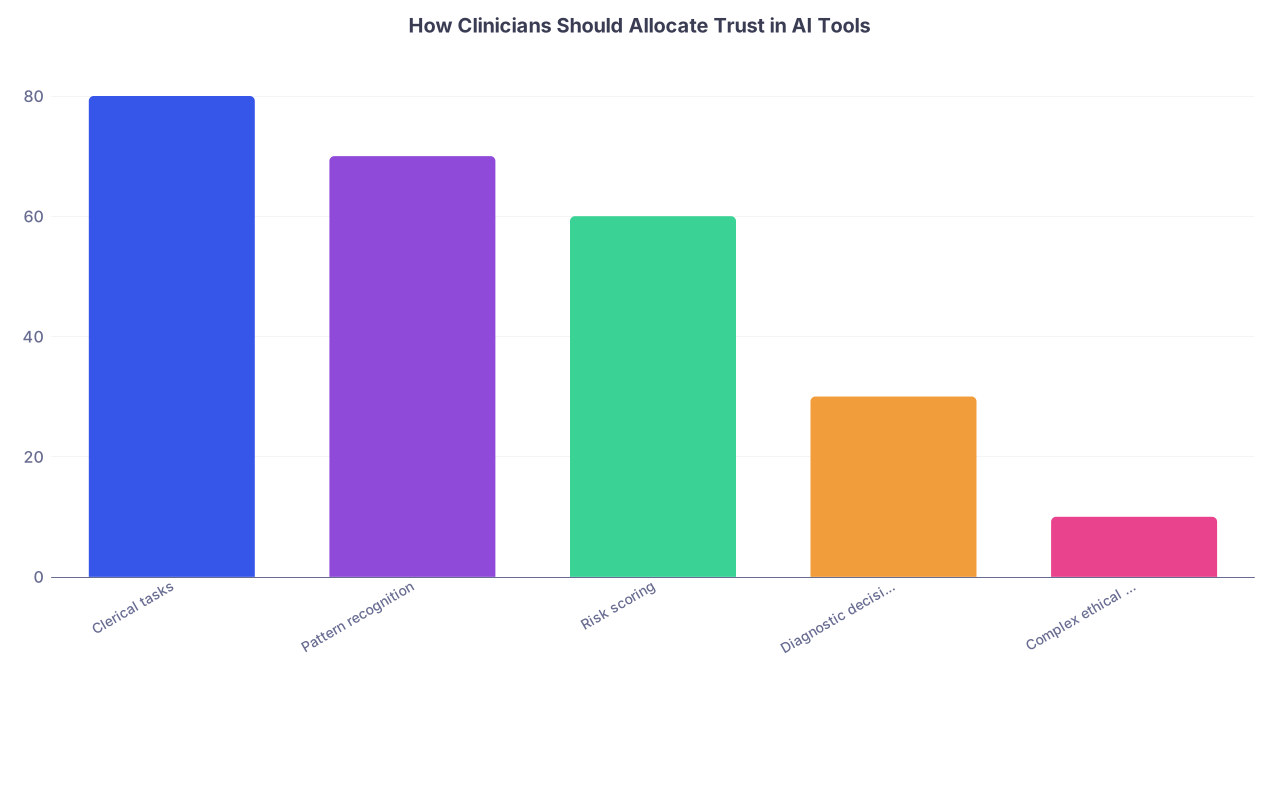
| Category | Value |
|---|---|
| Clerical tasks | 80 |
| Pattern recognition | 70 |
| Risk scoring | 60 |
| Diagnostic decisions | 30 |
| Complex ethical decisions | 10 |


Here’s your next move:
Pick one recent case where an AI tool influenced (or could have influenced) care. Open that chart today and write out, on paper or in a note to yourself, the reasoning you used independent of the AI. Then ask: “If the AI had strongly disagreed with me, would I have changed my decision—and why?”
That single exercise will tell you exactly how much control you’ve already handed over, and how much you need to take back.