
What do you do when the hospital just rolled out a brand‑new app, everyone else is confused or hostile, and you’re suddenly the unofficial “tech person” on top of your actual job?
Welcome to being early adopter and unpaid IT support. On a clinical team that may already be skeptical of “another damn system.”
Let’s walk through what to do this week, this month, and over the next 3–6 months so you do not burn out, do not become a crutch, and actually turn this into a professional asset instead of a time sink.
1. First, Get Clear On the Situation You’re Actually In
You’re not “just good with tech.” You’re in a specific scenario with three moving parts:
- A new tool (usually EHR module, mobile app, order set system, or patient communication platform).
- A clinical team under pressure.
- An administration that wants the tool adopted but often underestimates the front‑line pain.
Your reality:
- People are asking you questions in the hallway: “How did you pull that lab graph?” “Wait, how’d you send that message?”
- Work slows down every time someone else tries to use it, so they either:
- Avoid it completely, or
- Dump the “tech steps” on you.
And you’re torn:
- You want patients to benefit from this tool.
- You don’t want to be stuck doing 20 extra minutes of tech work per patient.
- You also don’t want to be the annoying resident/med student lecturing everyone about “the future.”
So the mission is simple:
Turn your skill into a shared system, not a personal burden.
And do it without becoming the hospital’s volunteer superuser for free.
2. Stabilize the Chaos: What to Do This Week
This week is about one thing: Stop being the single point of failure.
You can be helpful without becoming the only way the team gets things done.
A. Set boundaries without sounding difficult
When a nurse or attending says:
“Hey, can you just put that order in the app for me? You’re faster.”
You answer:
- “I can walk you through it once so you can do it next time. It’s actually pretty quick once you’ve done it once.”
- If you’re slammed: “I’m buried with notes right now. Let me finish these, then I can show you. You’ll be able to use it on your next patient.”
The key words: “show you” and “next time you can do it yourself.”
You’re framing yourself as a trainer, not a permanent clerk.
B. Identify the top 3–5 “high‑yield” actions
You don’t need to teach the entire app. That’s how people shut down.
Figure out:
- Which features actually save time or improve care:
- e.g., a mobile app that allows reviewing labs quickly during rounds
- A smart order set that cuts 15 clicks to 3
- A secure messaging function that replaces 5 phone calls
- Which ones your team must know this week to function safely.
Write those 3–5 items on a sticky note or your phone. That’s your short‑list. For now, forget the rest of the features.
C. Create ultra‑simple, no‑design “micro guides”
You’re not making a training manual. You’re making friction‑reducers.
Examples:
- One‑pager taped to the workstation:
- “To message PT:
- Open Patient → Care Team
- Click ‘Message’
- Choose ‘PT – Inpatient’ group
- Type. Hit Send.”
- “To message PT:
- Screenshot with arrows (cropped, 10 seconds on your phone/desktop):
- Circle where to click
- Add 2–3 numbers: 1, 2, 3. That’s it.
Do not overengineer this. Ugly but clear beats pretty but unused.
3. Run “Micro‑Teaching” On the Fly (Without Becoming Annoying)
Formal workshops are nice. Your real leverage is in the micro‑moments on the floor.
A. Use the “You drive, I talk” rule
If someone needs help and there’s time:
- You: “You sit at the keyboard; I’ll just tell you where to click.”
- They perform each step.
- You literally keep your hands off the mouse.
Why? Because:
- Muscle memory > Watching a screen share.
- They’re forced to learn the path.
- You avoid training them to just hand you the problem.
If they try to slide the chair over:
“Stay there, I’ll just talk you through it. You’ll remember it way better.”
B. Teach exactly one thing at a time
Do not stack features. Do not give them a tour.
Wrong approach:
“While I’m here, let me also show you how to adjust notifications and create a template and set up…”
Better:
“Today just focus on sending a secure message. Next time, I’ll show you how to favorite frequent orders.”
Most clinicians are at cognitive overload already. Respect their bandwidth.
C. Use language they actually care about
You’re not selling a tech feature. You’re selling:
- Saved time
- Fewer clicks
- Fewer phone calls
- Less chasing consults
Instead of: “This app can integrate order sets dynamically.”
Say: “This button cuts this order from 10 clicks down to 3. Want to see?”
When they feel the payoff in 30 seconds, you’ve got buy‑in.
4. Turn This Into a Structured Role (So It Helps Your Career)
If you stay in ad‑hoc support mode, you burn out and you get zero formal credit.
You want to flip this into a mini‑leadership role in “clinical innovation” or “physician‑builder” territory. This is how that usually looks over 3–6 months.
A. Talk to the right people — early
People you want on your side:
- Your program director (if you’re a resident)
- Clerkship director (if you’re a student)
- Unit manager / nurse manager
- CMIO / informatics‑minded attending (there is always one)
You do not need a polished proposal. Just a short, direct update:
“I’ve ended up as the person everyone asks about the new ___ app. I’m happy to help, but it’s taking a lot of random time. Could we set up a short, structured teaching session or a quick standard guide so the whole unit can get up to speed? I’d like to help make this smoother for the team.”
Notice what you’re doing:
- You’re describing a real need.
- You’re offering a solution.
- You’re signalling you care about workflow and systems, not just gadgets.
B. Propose one small, realistic project
Not a 20‑page QI project. A single, pilot‑size intervention.
Examples:
- 20‑minute lunch‑and‑learn on:
- Sending secure messages
- Using a standard order set
- Reviewing labs on mobile during rounds
- A “Quick Start” guide:
- One double‑sided page, 3–5 workflows, large font
- A simple before/after micro‑study:
- Time spent calling consults before vs after using secure messaging
- Percentage of missed results before vs after mobile alerts
You can formalize it later into QI or an abstract. For now, pilot something tiny but real.
C. Track impact like an adult, not a fanboy
If you can show that your teaching and workflow tweaks actually improved care or efficiency, that’s gold.
Start writing down:
- How many people you’ve trained (rough numbers)
- Clear outcomes like:
- “Average time to get PT to respond dropped from ~2 hours to ~30 minutes after the unit started using messaging for consults.”
- “Number of ‘lost’ imaging reports decreased once everyone learned how to set result alerts.”
You do not need perfect data. Directional numbers + clear story is enough.
| Metric Type | Concrete Example |
|---|---|
| Time saved | Minutes saved per consult response |
| Error reduction | Fewer missed or delayed lab follow-ups |
| Adoption rate | % of team using the app by month 2 |
| User satisfaction | Brief survey: easier / same / harder |
| Workload shift | Fewer “Can you do this for me?” requests |
This becomes:
- A CV line (clinical informatics / innovation)
- Talking material for fellowship or job interviews
- Evidence you can lead change without being obnoxious
5. Watch the Ethical Line: Support vs Unsafe Dependence
Let’s talk ethics. Because hidden in all this tech stuff are some real landmines.
A. Scope creep into unsafe territory
You know the app. That does not magically give you authority to:
- Change orders without proper sign‑off
- Override workflows established by your service
- Design new processes with no attending or nursing leadership input
Classic sketchy scenario:
“You know this better than me — just pick whatever antibiotic is on that new order set.”
(See also: What Actually Happens in Hospital Innovation Committee Meetings for guidance.)
Absolutely not.
Your answer:
“I can show you how to access the order set and where the options are, but you should decide which antibiotic to choose.”
Tech skill does not equal clinical authority. If you’re a student or junior, you respect chain of responsibility.
B. Patient privacy and data security
New app = usually more data moving around faster. That’s a risk.
You absolutely do not:
- Share screenshots of real patient data in group chats, even for teaching
- Log in on someone else’s credentials “just this once”
- Show people shortcuts that bypass safety checks
(Related: Red Flags When Pitching New Tech)
If you’re teaching:
- Use a test patient or de‑identified example when possible.
- If your institution has explicit app policies, know them and follow them.
When someone asks you to “just do it the fast way,” you can blame policy, not your personality.
“We’re actually not allowed to send patient info that way — let me show you how to do it in the app instead.”
Ethical and safe. And you’re reinforcing professional standards, not just tech features.
C. Equity: Who gets left behind?
There’s a subtle equity issue too. Often:
- Younger clinicians, residents, students, tech‑comfortable nurses adopt quickly.
- Older staff, those with less digital experience, those for whom the EHR is a second or third language, get labeled as “difficult.”
You can either feed that dynamic or do something more responsible.
Best move:
- Offer 1:1 or small‑group help to the folks struggling most.
- Never roll your eyes or say “It’s easy, you just click here.”
- Say: “Let’s sit down and do this slowly once. Then if you want, we can repeat it tomorrow.”
Ethical innovation means bringing the whole team forward, not just the keen residents and attendings who already like new toys.
6. Protect Your Time and Your Sanity
You are not IT. You are a clinician or trainee who happens to have an extra skill. If you let this eat your time, it will.
A. Put a “container” around your app help
Examples that actually work:
- “I’m around after rounds for 15–20 minutes if anyone wants me to walk them through one thing in the app.”
- “If you keep a list during the day, we can batch them and I’ll try to hit them all between 4:30 and 5:00.”
That’s wildly better than 12 random interruptions per day.
You’re not being selfish. You’re preserving your ability to:
- See patients
- Learn medicine
- Not stay two extra hours every night “helping” while your own notes pile up
B. Share resources, not yourself, every single time
When you help someone with a workflow, end with:
- “Here’s the one‑pager taped by the workstation.”
- “I put screenshots in that shared drive folder called ‘App Tips – Unit A.’”
- “Here’s the step list I wrote out; keep it at your workstation.”
You’re building systems, not dependence.
Over time, your answer to some requests becomes:
“That exact workflow is in the little guide at the front desk — if it still doesn’t make sense, grab me later and we’ll do it together.”
That’s fair. And healthy.
C. Know when to escalate, not fix
Some problems are not user error. They’re just bad design or broken installs.
Red flags:
- The app is crashing repeatedly
- Logins keep failing
- A workflow does not exist for something clinically essential
- A safety issue (like orders not saving) appears
Do not “hack around” those. Document them and kick them upstream:
“I’ve had several people struggle with X, and in trying to help them I’ve seen the same issue myself. Can we submit a ticket or route this to the IT/EHR team?”
That’s not you being difficult. That’s you refusing to normalize broken tools in a clinical environment.
7. Turn This Into a Long‑Term Asset (If You Want To)
If you like this work — the intersection of clinical care and tech — you can absolutely turn it into something bigger:
- QI projects on workflow and time savings
- A short workshop for incoming interns or students
- A poster or abstract at an informatics or education conference
- Shadowing or elective time with your hospital’s informatics team
But even if you don’t want a career in “medical innovation,” you’re still building:
- A reputation as someone who can lead change without alienating people
- Experience in training adults and managing resistance
- Credibility with leadership beyond just “good clinician”
Those things matter much more than mastering one specific app. Tools come and go. The skill of guiding humans through change sticks.
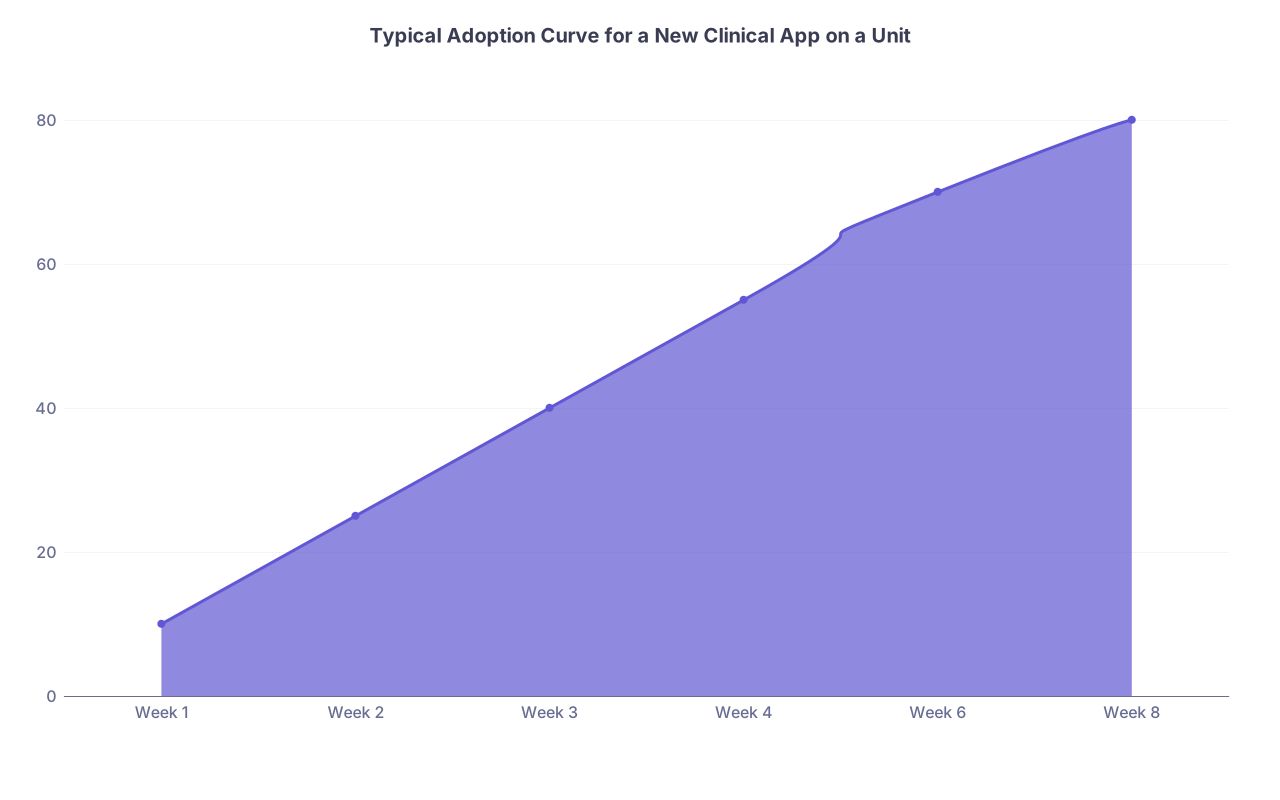
| Category | Value |
|---|---|
| Week 1 | 10 |
| Week 2 | 25 |
| Week 3 | 40 |
| Week 4 | 55 |
| Week 6 | 70 |
| Week 8 | 80 |

| Step | Description |
|---|---|
| Step 1 | Colleague asks for help |
| Step 2 | You drive I talk |
| Step 3 | Schedule later time |
| Step 4 | Teach one workflow |
| Step 5 | Point to quick guide |
| Step 6 | Done |
| Step 7 | Escalate to IT or leadership |
| Step 8 | Am I free now |
| Step 9 | System problem |



FAQs
1. What if my attending doesn’t care about the app and tells me to stop wasting time on it?
You align with safety and efficiency, not the tech itself. Say:
“I’m using it mainly because it lets me see labs and imaging faster, and secure messaging has sped up a few consults. If you’d rather I don’t use it on rounds, I can switch back, but I’ve found it actually helps me get information to you faster.”
If they still say “Drop it,” then drop it on that rotation. You’re not there to fight a crusade on one service. Keep your notes on what worked; use it when you’re with more receptive teams.
2. How do I avoid being pigeonholed as ‘the tech person’ and not taken seriously clinically?
You don’t let tech be the only thing you’re good at publicly. Round prepared, know your patients cold, and only bring tech in as a way to support your already solid clinical work. Also, when someone praises your help, casually redirect part of that to clinical: “Glad that helped — it’s really just a faster way for me to track her labs and meds so we can make better decisions.” The message: you’re a clinician first, tech‑capable second.
3. Can I put this experience on my CV or residency application?
Yes, and you should. But not as “I liked the app.” Frame it as: “Led micro‑training on new secure messaging platform for inpatient team; created quick‑start guide; contributed to improved adoption and reduced consult response times.” If you’ve got numbers, even approximate, include them. It goes under Quality Improvement, Leadership, or Clinical Innovation, depending on context.
4. What if some staff get angry or embarrassed when I try to help them learn?
You lower the threat level. Offer help quietly, 1:1, not in front of their peers. Use language like, “I struggled with this at first too, but someone showed me this trick” instead of “It’s actually really easy.” If they’re clearly not receptive, back off: “No problem, if you ever want to run through it together, I’m around after 4.” You’re not there to “fix” anyone. You offer, you respect their autonomy, you move on.
5. At what point should I say no and stop helping entirely?
When it’s clearly harming your core responsibilities or being exploited. Signs: your notes are consistently late, you stay 1–2 hours extra most days because of tech help, or people are asking you to do things they absolutely should be doing themselves. At that point, you reset: “I want to focus on my clinical work, so I’m cutting back on ad‑hoc tech help. I’ve put the main workflows in that one‑pager, and if there’s a bigger issue we should probably ask IT or leadership to address it.” You’re allowed to protect your training and your time.
Key points:
- Do not become the permanent workaround. Teach, don’t just do.
- Turn your early adopter role into structured, documented help with clear boundaries.
- Protect ethics, safety, and your own time — tech should serve care, not consume you.