
What if your new job secretly thinks you’re lazy or unsafe because of some EHR dashboard you’ve never even seen?
Yeah. That’s the fear, right?
You sign your first attending contract, everyone congratulates you, and in the back of your head you’re thinking: “Exactly how much are they watching me? Is every click being logged? Are they timing my bathroom breaks? Can they tell if I stayed late but didn’t document until the next morning?”
Let me be blunt: you are being tracked. Not in the Black Mirror way you’re imagining, but also… not as little as some people try to tell you. There’s a lot of nonsense fear, but there’s also some very real stuff that can bite you if you ignore it.
Let’s walk through what actually shows up on the other side of that EHR screen.
The Big Categories of EHR Metrics They Actually Look At
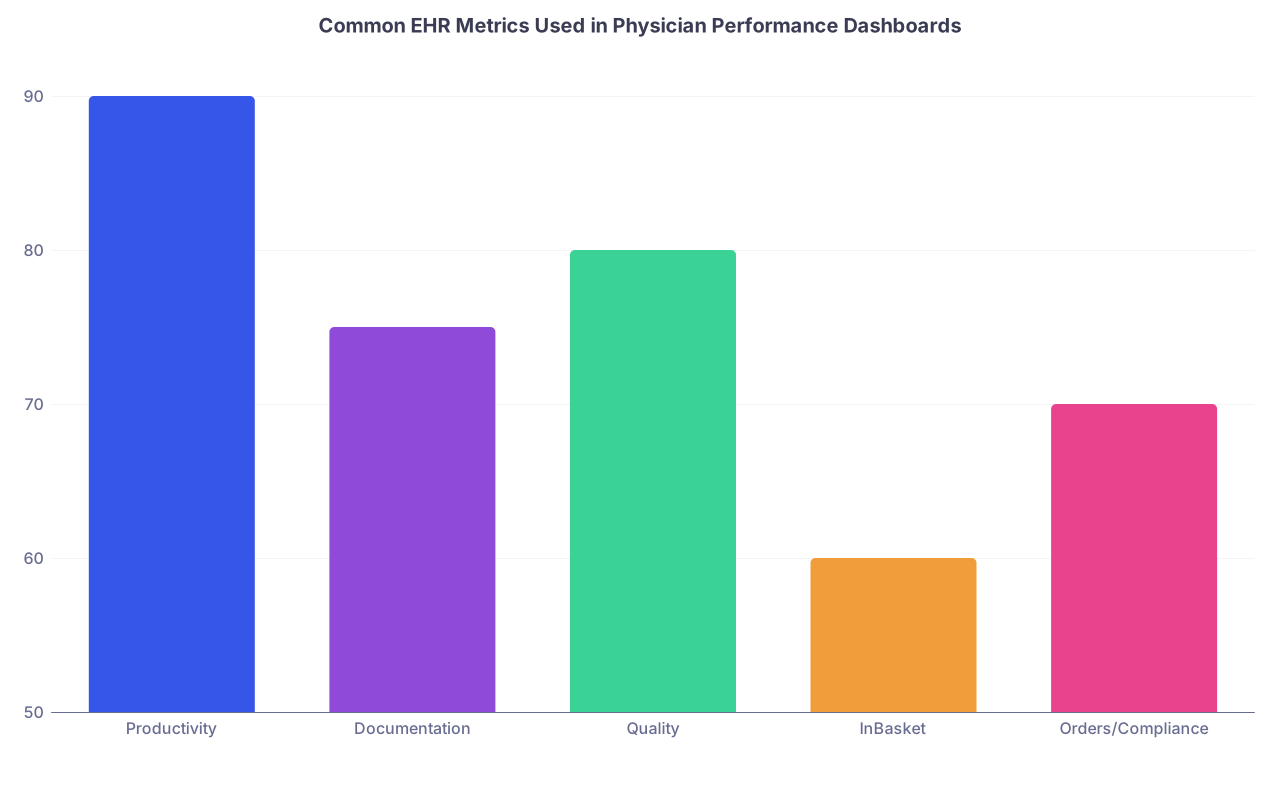
| Category | Value |
|---|---|
| Productivity | 90 |
| Documentation | 75 |
| Quality | 80 |
| InBasket | 60 |
| Orders/Compliance | 70 |
Hospitals and groups don’t look at every random log entry. They focus on patterns they can tie to “productivity,” “quality,” “compliance,” and “patient satisfaction.”
Here’s the stuff that commonly hits dashboards that your chair, service line director, or CMIO might pull up in a meeting:
1. RVUs and encounter volume
This is the obvious one. They see:
- Total RVUs per month / quarter / year
- RVUs per encounter
- Number of patients seen per clinic session / per day / per shift
- New vs established patients
This gets sliced and diced endlessly. You versus your group. You versus MGMA benchmarks. You versus “top decile performers.”
Is it fair? Not really. It almost never accounts for patient complexity the way you’d hope. But if you’re on a productivity-based contract, they’re definitely watching this.
2. Visit lag and note completion
This is where people get blindsided.
Most systems track:
- Time from visit to note completion
- Percentage of notes closed same-day, within 24 hours, 72 hours, etc.
- How many encounters remain “open” after a certain timeframe
Your clinic director can pull a report and say, “You have 73 open encounters older than 7 days.” And they will.
A lot of places now have specific policies like “85–90% of notes closed within 24 hours.” Those metrics are absolutely visible to leadership.
3. Orders and result follow-up
They monitor whether you:
- Sign labs/imaging results within X days
- Address abnormal results
- Have unsigned orders / unsigned verbal orders
- Have results sitting in your queue for too long
Why? Risk management. Malpractice lawyers love delayed results. So do regulators.
So yes, your “inbox slacking” is visible. Not line-by-line, but as numbers like “average days to complete result review” and “open results older than 3 days.”
4. InBasket / messaging performance
This one is becoming a huge deal, especially in primary care.
Typical metrics:
- Number of patient messages per day / week
- Average response time
- Messages delegated vs handled directly
- After-hours message activity
I’ve literally seen dashboards with “average time to open MyChart message” and color-coding if it’s over 48 hours. Admins love this kind of thing because they can pretend it’s “patient-centered.”
5. “Efficiency” metrics (the creepy ones)
This is where it starts to feel like surveillance.
Things commonly tracked:
- Time spent in chart per patient
- Percent of notes using templates or “smart phrases”
- Time in EHR after scheduled clinic hours
- “Work outside of work” – minutes in chart after 6 pm or on weekends
- Clicks per order set, sometimes even number of clicks per encounter
Most of this is aggregated, but yes, you can be compared to others on “time per chart” or “after-hours EHR time.” Some systems promote this as “helping reduce burnout,” but in practice it can be used as, “Why are you so much slower than your colleagues?”
Who Sees What (And How Personal It Really Gets)

Here’s the part that feels sketchy: you often don’t know who can pull your metrics.
In most systems, access looks something like this:
- You can see your own basic productivity and maybe some efficiency data
- Your department leadership (chair, division chief, practice manager) can see your detailed metrics, often side by side with your peers
- Quality / compliance / risk teams can see flagged behaviors (delayed results, unsigned notes, overdue charts)
- **IT / CMIO** types can see the raw logs and deeper analytics, though they usually care about system-level patterns, not whether you took 12 minutes vs 8 minutes on a follow-up visit
Your colleagues? They usually can’t see your specific numbers, unless leadership decides to show “de-identified” data in a meeting that’s… not as de-identified as they think.
In private practice or smaller groups, the owner or managing partners may have even more direct visibility. I’ve seen practice partners pull a report during breakfast and say:
“Why are you 20% below the group average RVUs per session?”
Casual. Over scrambled eggs.
So yes, real people, with power over your job, are looking.
What They Probably Aren’t Watching (Despite Your Worst Fears)
There’s a difference between what the system technically logs and what anyone actually reviews.
Almost every EHR logs insane detail:
- Every click
- Every open chart
- How long a chart is technically “open”
- Every time you look at your own record or a colleague’s record
But 99% of that lives in the background unless:
- There’s a compliance/privacy audit (e.g., you looked at a celebrity’s chart)
- There’s an investigation (bad outcome, complaint, lawsuit)
- They’re doing some big systemwide study on “efficiency” or burnout
No one is sitting there watching a live feed of your clicks.
They aren’t typically tracking seat-by-seat “minutes at workstation” to call you out for stepping away. They aren’t going to HR because you spent 3 minutes in a chart that could’ve been 2.5.
The scary part is less about a human watching your every click and more about:
- Automated reports flagging you as an “outlier”
- Aggregate metrics being used to label you “slow,” “inefficient,” or “low producer” without context
So the nightmare of some guy in IT watching you scroll? No. The risk of some VP staring at a bar chart and thinking you’re a problem? Much more real.
When EHR Metrics Become a Problem for You
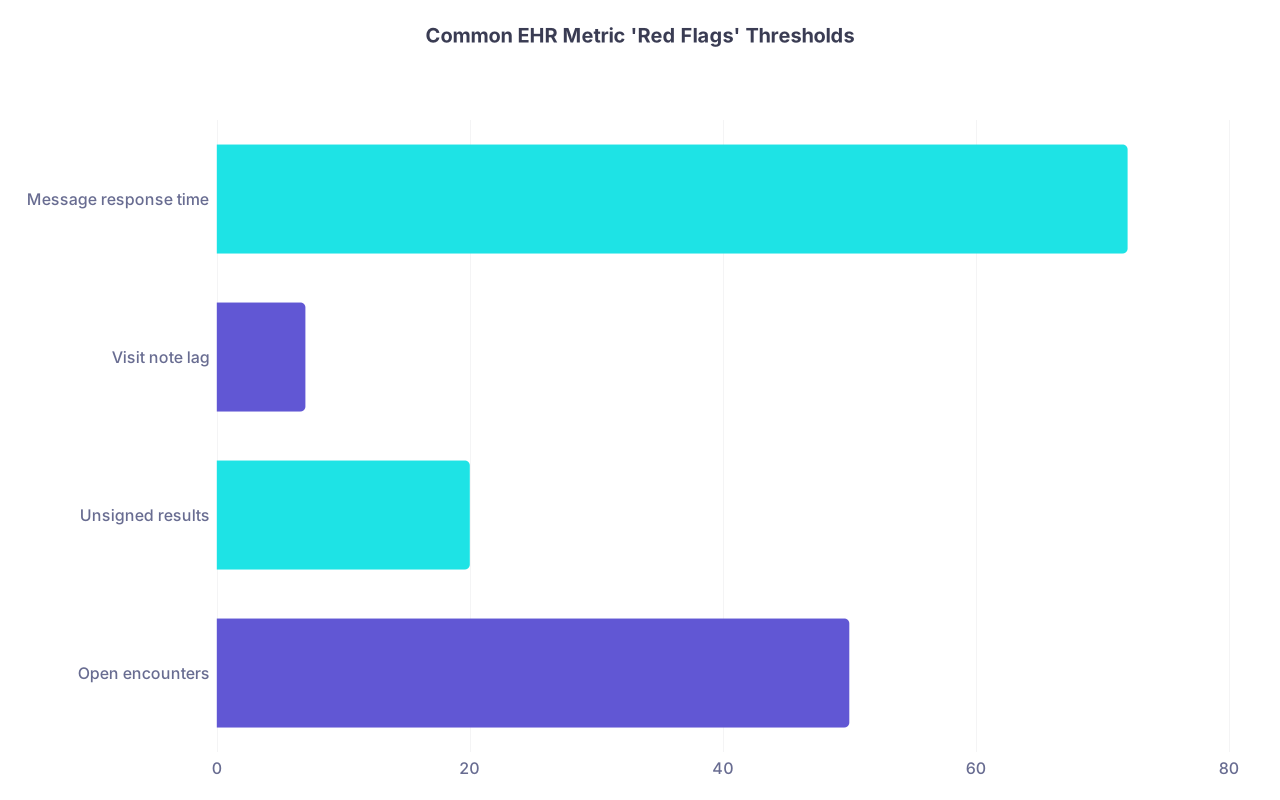
| Category | Value |
|---|---|
| Open encounters | 50 |
| Unsigned results | 20 |
| Visit note lag | 7 |
| Message response time | 72 |
Let’s talk worst-case scenarios, since that’s probably where your brain lives anyway. Mine too.
Common “red flags” that actually get people called into an office:
1. Chronic late notes / open encounters
If you consistently have:
- Dozens of open encounters more than 7–14 days old
- A measurable pattern of visit note lag outside group policy
You risk:
- “Coaching” talks
- Formal PIPs (performance improvement plans)
- Delays in billing / revenue, which leadership cares about deeply
- In extreme cases, professionalism concerns on evaluations or reappointment
2. Delayed result follow-up
This one is serious, both clinically and legally.
If reports show:
- Results not signed for 7+ days
- Critical results not acted on promptly
- Large backlog of unsigned results in your inbox
You can trigger:
- Risk management involvement
- Chart reviews
- Allegations of unsafe practice if something bad happens
3. Outlier inbox / messaging performance
If:
- You’re significantly slower than peers in responding to messages
- Complaints start rolling in: “My doctor never messages back”
You might not get formally disciplined right away, but it will absolutely show up in:
- Patient satisfaction scores
- Leadership “concerns”
- Subtle comments in your annual review
4. Productivity far below group expectation (when you’re on a productivity model)
If RVUs / volume are way below what’s written in your contract or what’s considered “reasonable” for your FTE:
- You may get pushed to add more clinic sessions
- Your pay might be lower than you anticipated if it’s RVU-driven
- Long term, they may question fit or “clinic utilization”
Is that always fair? No. Maybe your template is overbooked with complex cases or admin tasks. But the spreadsheet doesn’t care about nuance.
How To Protect Yourself (Without Turning Into a Robot)

You can’t control that they track you. You can control how naked you are in front of their metrics.
I’d focus on a few practical moves:
1. Ask directly what dashboards leadership uses
You’re allowed to ask. Something like:
“Can you show me what performance dashboards you use for physicians so I can understand how I’m being evaluated?”
If they dodge that, that’s its own data point about the culture.
2. Find out your group’s “unwritten rules”
Ask trusted colleagues:
- What do they care about most?
- What actually gets people in trouble here?
- What’s considered acceptable note lag / inbox turnaround?
There’s always a gap between the official policy and what they actually enforce.
3. Keep your truly risky metrics clean
If you’re overwhelmed, prioritize:
- Signing critical results quickly
- Not letting open encounters age out to weeks
- Keeping inbox messages from going totally stale
You can be “average” on efficiency and still be completely safe professionally.
4. Document your context
If your numbers look bad for a reason, don’t assume anyone will connect the dots.
Examples:
- “My patient panel is 70% high complexity and heavily uninsured; visit times are longer.”
- “I cover more after-hours call, which shifts my messaging & EHR time.”
- “I have extra teaching / admin duties that reduce my patient volume.”
Keep emails, workload descriptions, anything that explains why your metrics look off. If you ever have to defend yourself, this matters.
5. Know your boundaries with after-hours EHR time
Some systems now show “work outside of work” as a supposed wellness metric. Ironically, leadership may guilt you for late-night charting. But they also want the notes done.
So you have to decide:
- Do you finish everything same-day but stay late?
- Do you accept some lag but protect your evenings?
- Can you negotiate protected admin time to handle documentation?
Whatever you choose, be intentional. Don’t just drown silently.
What About Legal / Privacy Concerns?

| Step | Description |
|---|---|
| Step 1 | Raw EHR logs |
| Step 2 | IT and CMIO |
| Step 3 | Aggregated dashboards |
| Step 4 | Department leadership |
| Step 5 | Quality and risk teams |
| Step 6 | Productivity and performance reviews |
| Step 7 | Safety and compliance actions |
You’re probably also thinking: isn’t this… creepy from a privacy angle?
Here’s the harsh truth:
- Anything you do inside the EHR is part of the medical record environment
- Your activity is considered “operational data”
- HIPAA is about patient privacy, not provider privacy
So your EHR click history is not private in the way a personal email is. It’s auditable.
Where privacy does matter:
- Accessing charts you have no clinical reason to see (celebrity, ex, neighbor)
- Looking up your own record improperly instead of through patient portal
- Snooping around family members’ charts
Those are the things that trigger real HIPAA audits and can absolutely show up in HR and licensure trouble.
The regular “how many clicks per day” stuff? Legally, they’re pretty safe using it internally, as long as they’re not publicly shaming you or misusing data in some wildly discriminatory way.
Quick Reality Check: Are You Being Judged All The Time?

Here’s the uncomfortable but honest middle ground:
- No, there isn’t a person staring at a live “you” feed of every EHR move.
- Yes, your name can be pulled up on a report next to your colleagues with color-coded bars.
- No, one bad month of inbox lag doesn’t usually end your career.
- Yes, sustained patterns that look bad on paper can make your life harder.
If you’re conscientious enough to even be reading this, you’re probably not the terrifying outlier they’re going after. The real disasters are:
- People ignoring abnormal results for weeks
- Doctors with hundreds of unsigned notes
- Folks who routinely don’t answer messages at all
If that’s not you, you’re already ahead.
Does that mean you can relax completely? No. But you can shift from “they’re watching my every click” to “I should understand my numbers and keep the safety-critical stuff clean.”
That’s a lot more manageable than whatever disaster scenario your brain’s been looping.
| Category | Example Metric |
|---|---|
| Productivity | RVUs per month, visits per clinic |
| Documentation | Note completion time, open encounters |
| Results | Days to result sign-off |
| Messaging | Average inbox response time |
| Efficiency | Time in chart after hours |
FAQ (Exactly 6 Questions)
1. Can my employer see exactly how long I spend on each patient’s chart?
Yes, technically. Most big EHRs record time-in-chart per encounter and total “EHR time” per day. In practice, they usually look at summary metrics like “average charting time per visit” or “work outside work hours,” not a line-by-line stopwatch. But if they wanted to audit you for some reason, that data exists.
2. Can these EHR metrics be used to fire me or not renew my contract?
They usually won’t outright say, “We’re firing you because your clicks per encounter are too high.” What actually happens is softer: they use metrics as “evidence” of low productivity, poor documentation habits, or unsafe delay in results. Those patterns can absolutely contribute to decisions about contract renewal or partnership if leadership wants a reason.
3. Are my colleagues able to see my EHR performance numbers?
Typically, no. Individual-level dashboards are usually limited to you, your direct leadership, and sometimes quality/risk teams. But I’ve seen chairs show anonymized or semi-anonymized graphs in meetings (“Here’s our group’s note lag, notice some outliers”). So your numbers might be shown in aggregate, just not with your name splashed on a projector. Usually.
4. Can I see my own EHR efficiency dashboard?
Often yes, but no one tells you. Many systems (Epic especially) have built-in “Provider Efficiency” or similar tools you can access through the EHR. Ask your IT educator, superuser, or CMIO: “How do I access my own performance/efficiency reports?” It’s better to see what they see than guess.
5. Will taking notes at home or after hours make me look bad?
It depends on the culture. Some places are starting to use “after-hours EHR time” as a burnout metric and may actually worry if yours is too high. Others quietly like that you’re cleaning things up on your own time. If you’re concerned, ask your leadership how they interpret “work outside work hours.” And if you’re constantly charting late at night, that’s also data for you that your workload or support is unsustainable.
6. What’s the one thing I should absolutely not mess up with EHR metrics?
Result follow-up. Hands down. If you’re going to be imperfect somewhere, do not let it be critical labs/imaging and abnormal results sitting for days. That’s where patient harm and lawsuits live. Keep your results queue as clean as you reasonably can, even if it means your notes are sometimes a little behind or less beautifully written than you’d like.
Key points:
- Yes, your EHR use is tracked and summarized — mostly around productivity, documentation timeliness, results, and messaging.
- The nightmare isn’t someone watching every click; it’s being labeled an “outlier” on a dashboard without context.
- Focus on staying safe on the high-risk metrics (results, open encounters), learn what your local dashboards look like, and don’t be afraid to ask what you’re being judged on.