
What pattern in your EMR billing would make a compliance officer pull your charts tomorrow morning without telling you?
If you do not have an immediate answer, you’re exactly who compliance algorithms are quietly watching.
Let me be blunt: modern EMRs are not just documentation tools. They are surveillance systems with billing patterns as their primary sensor. Compliance, payers, and sometimes the DOJ are using those data trails to decide who to scrutinize, audit, or prosecute.
This is not about “don’t commit fraud.” That’s obvious. The real danger is the physician who thinks, “I’m honest, so I’m safe,” while their EMR silently makes them look like a cheat.
Do not be that physician.
1. The “Too Perfect” E/M Pattern That Screams Audit
The classic red flag: your evaluation and management (E/M) levels look algorithmically generated instead of human.
Patterns that get noticed fast
These will get you flagged by internal analytics at large health systems and by payers’ outlier reports:
- Excessive clustering at 99214 or 99204
- Almost no 99213 or 99203 despite a busy clinic
- Very low use of low-level codes in any setting
- Sharp shift in coding level right after:
- a new EMR template
- a “coding education” session
- a new employer
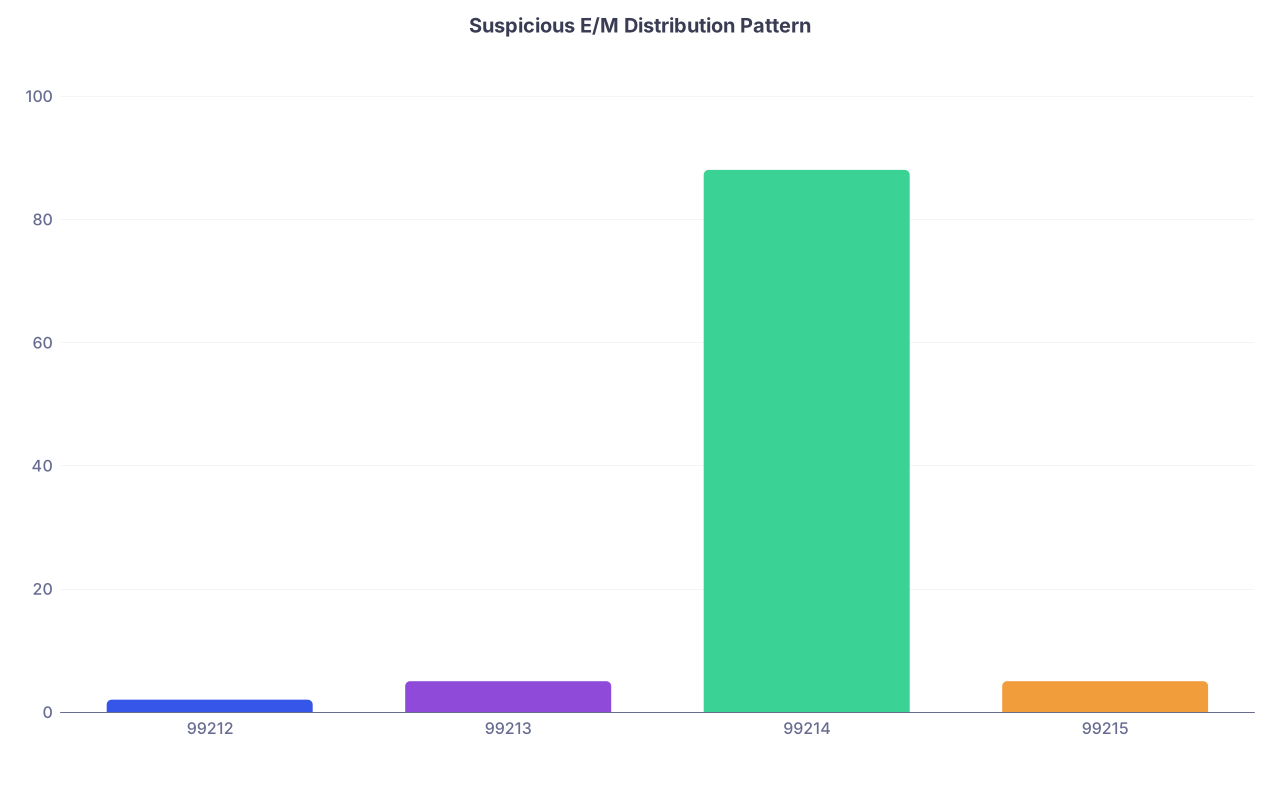
| Category | Value |
|---|---|
| 99212 | 2 |
| 99213 | 5 |
| 99214 | 88 |
| 99215 | 5 |
That distribution above? That is the audit bait profile. I’ve seen compliance teams run this exact chart, then spend the afternoon pulling charts from the outlier physician.
EMR trap: auto-populated complexity
(See also: AI documentation tools for common misuses.)
Common mistake: letting the EMR decide your level of service through “smart” templates and auto-calculated MDM.
Red flags:
- Every chronic condition is auto-imported into the assessment/plan even if not addressed
- Problem lists automatically pulled into the note body
- All sections prefilled as “reviewed” for every visit
- “High complexity” generated because of box-checking rather than actual medical decision making
What this looks like in practice:
- Simple refill visit documented as “Extensive problem list addressed,” “high risk,” coded as 99215 because your template toggled every MDM element to “high”
- Stable HTN/hyperlipidemia patient: same documentation, same level, every 3 months, every time
A compliance analyst sees:
- Identical E/M levels
- Identical MDM language
- Identical “complexity” for wildly different clinical scenarios
The message: manufactured documentation to justify higher billing.
How to stop falling into this trap
Do not:
- Let templates auto-populate every diagnosis “addressed”
- Accept the EMR’s suggested level blindly
- Click every risk/complexity box “just in case”
Do:
- Turn off or minimize auto-selected MDM checkboxes when possible
- Manually adjust the final E/M level to match reality, not template fluff
- Maintain a normal distribution of low-, moderate-, and high-level codes over time
If your pattern is “every visit is complex,” compliance assumes either:
- You’re documenting dishonestly, or
- You don’t understand E/M and are dangerous to the organization
Both land you on the radar.
2. Copy-Paste Abuse: The Lazy Habit That Looks Like Intentional Fraud
Everyone copies forward notes. Everyone. That is not the issue.
The issue is when your copied text and cloned documentation create a paper trail that looks deliberately deceptive.
What gets you in trouble
Here’s what compliance flags as serious red zones:
(Related: Voice dictation pitfalls)
- Identical HPI for multiple visits months apart
- Same physical exam for every patient, every day
- Old symptoms documented as present when they resolved long ago
- Systems “reviewed and negative” for conditions that are obviously positive
- Time-based codes with recycled time statements across several dates
Specific examples I’ve seen pulled in audits:
- “Patient denies SOB or chest pain” in a note where the chief complaint is “shortness of breath”
- “No cognitive deficit” in a patient with moderate dementia documented elsewhere
- “No leg edema” in a CHF patient who clearly has 2+ edema in nursing notes and consult notes
When auditors see this, they do not think “busy doctor.” They think “pattern of falsified documentation to justify billing.”
EMR features that make this worse
- “Copy forward entire note” or “clone previous note” buttons
- Default ROS templates that auto-check everything as negative
- Physical exam macros with 12-system normal exams used indiscriminately
- SmartPhrases that auto-generate medically impossible combinations

How to avoid looking like you’re lying
Do not:
- Copy forward HPI or physical exam without editing to match this encounter
- Use a 12-system “normal” exam for a 4-minute BP check
- Reuse exactly the same time statement for multiple dates (“I spent 35 minutes today…” word-for-word)
Do:
- Copy forward structure, not content: keep the layout, rewrite specifics
- Update ROS/PE realistically; if you didn’t examine something, do not document it
- Keep your notes shorter and accurate rather than long and boilerplate
Remember: short, honest, clearly supported documentation is safer than long, cloned, “thorough” notes that conflict with reality.
3. Time-Based Billing: The New Favorite Target
With time-based coding becoming more common, especially post-2021 E/M changes, you’re walking into a minefield if you are sloppy.
Red flags in time documentation
These are patterns that scream “audit me” to payers and internal compliance:
- Repeated identical time entries:
- “Total time spent: 40 minutes” in 80% of your office visits
- “I spent 75 minutes in critical care” for every ICU patient
- Impossible day structures:
- 10+ hours of billable time plus clinic, procedures, and meetings all in the same day
- Time documented but not plausibly reflected in the content:
- 60-minute visit with a 6-line note and no actual complex decision making
- Time that does not match scheduling patterns:
- 15-minute appointment slots, but almost every patient billed as 30–40+ minute visits
If you generate a time audit report and your graph of billed time per visit looks like a barcode (20, 20, 20, 40, 40, 40, 60, 60, 60…), you’re in trouble.
EMR features that set you up to fail
- Automatic “time statement” SmartPhrases that fill in high time defaults
- Workflows that nudge you toward time-based coding when MDM is easier/cleaner
- Templates such as:
- “I spent 40 minutes today in total time including review, counseling, coordination of care…”
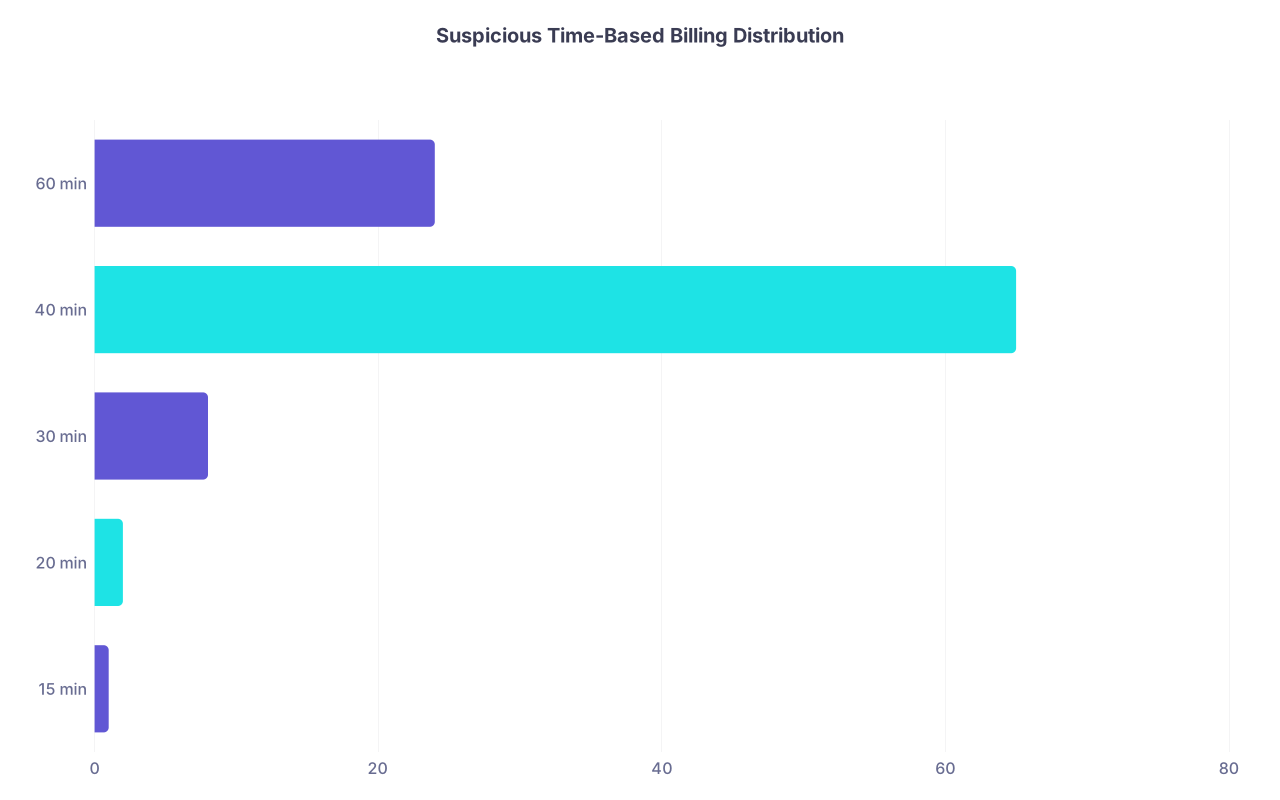
| Category | Value |
|---|---|
| 15 min | 1 |
| 20 min | 2 |
| 30 min | 8 |
| 40 min | 65 |
| 60 min | 24 |
That chart? Classic profile for a physician using one or two canned time SmartPhrases for everything.
Safe practices for time-based coding
Do:
- Use time-based coding sparingly and only when:
- Counseling/coordination dominates
- The note content clearly reflects the effort
- Vary documented time realistically:
- 21, 28, 33 minutes – actual times, not round numbers every visit
- Make sure:
- The EMR log-in/log-out times and schedule make your claimed time at least plausible
Do not:
- Default to the maximum time that justifies the highest E/M code
- Assume “no one checks the exact number anyway”
- Use the same phrasing and time for every visit
Because people do check. Especially payers combing for low-effort, high-yield fraud cases.
4. Modifier Misuse and Overuse: Tiny Codes, Big Suspicion
You can tank your risk profile with a two-character modifier.
Modifiers tell payers “Yes, this code looks like it might be bundled or denied, but trust me, this case is special.” Overusing them is like constantly telling TSA, “My bag is unusual, but it’s fine.”
High-risk modifiers
Some of the big ones that draw attention:
- -25 (significant, separately identifiable E/M on same day as procedure)
- -59 (distinct procedural service)
- -24 (unrelated E/M during post-op)
- -50 (bilateral procedure)
- -76/-77 (repeat procedure)
Payers and compliance will absolutely run utilization reports by provider for these.
| Modifier | Normal Use Pattern | Red Flag Pattern |
|---|---|---|
| -25 | Occasional, specific cases | Attached to most E/M + procedure visits |
| -59 | Rare, clearly distinct | Used to unbundle nearly every denial risk |
| -24 | Occasional post-op visits | Most post-op visits labeled 'unrelated' |
| -50 | True bilateral procedures | Used when documentation shows unilateral |
EMR workflows that push you off the cliff
- Order sets that auto-add E/M and procedures in same visit
- Default macros that always drop a -25 when a minor procedure is billed
- Billing staff trained to “just add a modifier to get it paid”
You might not even know these modifiers are being attached until an audit memo has your name at the top.
Protect yourself
Do:
- Review your own billing patterns quarterly:
- “How often is -25/-59/-24 used under my NPI?”
- Ask your coder:
- “Do we automatically add any modifiers to my typical visits?”
- Check that your note actually supports:
- A separate, substantial problem evaluation in addition to the procedure
Do not:
- Let workflow defaults attach modifiers you do not understand
- Assume “billing takes care of that stuff” and walk away
You’re the one whose name is on the claim. You’re the one compliance will interview.
5. Volume, Timing, and “Superhuman” Productivity Flags
You think RVU-based comp only matters for bonuses. Compliance thinks it’s a risk indicator.
Patterns that look impossible
Red flags:
- Extremely high RVUs compared to peers in your specialty
- Many more encounters per day than comparable clinicians in your group
- Spikes in productivity right after switching jobs or EMRs
- Large numbers of:
- telehealth visits
- short “follow-ups”
- billable phone/portal interactions
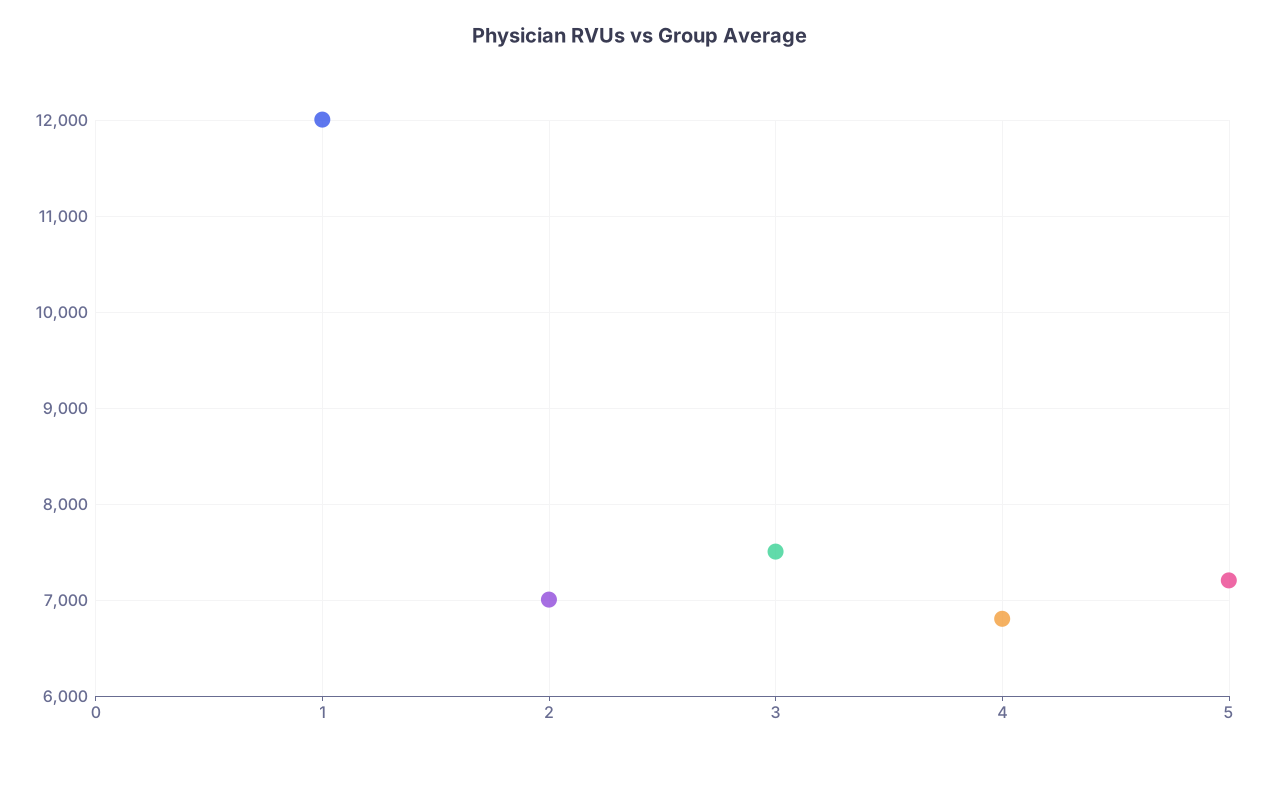
| Category | Value |
|---|---|
| You | 1,12000 |
| Colleague A | 2,7000 |
| Colleague B | 3,7500 |
| Colleague C | 4,6800 |
| Colleague D | 5,7200 |
If you’re that lone dot way above everyone else? You’re on a list somewhere.
Telehealth and async care pitfalls
Telehealth, e-visits, and portal billing codes are being watched aggressively.
Red flags:
- Very high number of same-day telehealth codes for short interactions
- Portal message billing every time a patient sends anything
- Minimal documentation to support billed time or complexity
- Overuse of high-level codes for camera-on visits that barely lasted 5 minutes
And yes, EMR logs and video platform logs can and do get pulled in investigations.
6. “Template Fraud”: When Your EMR Makes You Look Like a Liar
Some EMR templates are almost designed to create contradictions:
- Defaulting to “No known allergies” when allergies exist in another section
- Auto-populated “reviewed medication list” when clearly outdated
- Social history automatically copied from 5 years ago, unchanged
Auditors love finding:
- Conflicts between your note and:
- Nursing documentation
- Pharmacy records
- Prior specialist notes
- Impossible statements like:
- “Lungs clear to auscultation” in a telehealth audio-only visit
- “Normal gait” in a bedbound patient never seen walking

The subtle EMR-driven mistakes
Danger zones you probably ignore on busy days:
- Signing a pre-populated ROS that says “All systems negative” on a patient with active symptoms
- Leaving default checkboxes as-is because “it’s faster”
- Not updating copied physical exams for virtual visits
This doesn’t merely look lazy. In a legal context, it looks like knowingly false statements in support of billing.
Safe habits that take 30 seconds
- For telehealth:
- Delete physical exam elements you did not actually perform
- For ROS:
- Remove obviously untrue negatives (“no GI symptoms” for diarrhea visit)
- For allergies and meds:
- Actually glance at them and correct the most obvious errors
You do not need perfection. You need plausible, consistent, reality-based documentation.
7. How to Quietly Audit Yourself Before Someone Else Does
If you’re employed, your risk is tied to your organization’s data mining. If you’re independent, it’s payers. Either way, the metrics are the same.
Run or request these basic reports
Ask your practice analyst, coder, or admin for:
- E/M distribution by code over the past 6–12 months
- Comparison of your:
- E/M mix vs specialty peers
- Total RVUs vs peers
- Frequency of key modifiers under your NPI:
- -25, -59, -24, -76
- Volume of:
- telehealth codes
- portal/e-visit codes
- prolonged service codes
- Average documented time per visit when using time-based coding

| Step | Description |
|---|---|
| Step 1 | Request Billing Reports |
| Step 2 | Review Templates and Time Use |
| Step 3 | Adjust Documentation Habits |
| Step 4 | Meet With Coder |
| Step 5 | Discuss With Compliance Early |
| Step 6 | Continue Periodic Self Audit |
| Step 7 | E/M Pattern Reasonable |
| Step 8 | Modifier Use Normal |
| Step 9 | RVUs vs Peers |
What to do if you see alarming patterns
If you find:
- Extreme clustering at high E/M levels
- Very high modifier use
- Wildly above-average RVUs
Do not ignore it.
Instead:
- Meet with your coder or billing specialist
- Ask for 10–20 random charts underlying those patterns
- Fix documentation and template issues going forward
- Document (for yourself) that you identified and corrected the problem
Showing you were proactive can be the difference between:
- “Negligent pattern, possible fraud” vs
- “Recognized and remediated issue”
Compliance people notice which physicians cooperate early and which stonewall.
FAQs
1. I’m not intentionally upcoding. Can I still get in serious trouble just from bad EMR habits?
Yes. Intent matters for criminal cases, but civil penalties, repayment demands, and employment actions often hinge on patterns, not your subjective intent. If your documentation repeatedly overstates complexity or time because of lazy template use, you can absolutely be treated as having submitted false claims. “The EMR did it” and “I was busy” are terrible defenses.
2. How different can my coding pattern be from peers before it becomes a red flag?
There’s no magic number, but if your percentage of high-level codes (99214/99215) is more than roughly 1.5–2x your specialty peers, someone will eventually look. Same with RVUs: being top performer is fine; being an outlier 50–70% higher than the group with no clear explanation (unique case mix, special clinic) is asking for a review. Assume anything extreme will at least be questioned.
3. Are short notes safer than long detailed ones from a compliance perspective?
Short and accurate beats long and contradictory every time. Long notes are not inherently safer. In fact, bloated copy-paste notes often contain internal inconsistencies that auditors love: normal exams for obviously sick patients, impossible time claims, and outdated information. A concise note that clearly supports the level billed and matches the clinical reality is ideal.
4. What’s one EMR change I can make this week to reduce my billing risk immediately?
Turn off or drastically limit auto-population of problem lists, ROS, and physical exam macros—especially anything that fills in “normal” findings or “reviewed” boxes by default. Then, audit 20 recent notes where you billed higher-level E/M or used time-based coding; ask yourself: “If an auditor read only this note, would the level and time claim make sense?” If the answer is no, start adjusting your templates and habits now.
Open your EMR and pull your last 20 office visits where you billed 99214 or higher. Scan just the HPI, MDM, and (if used) time statement. Does each note clearly earn that level on its own—or are you leaning on templates and wishful thinking? Fix the worst three notes’ templates today.