
Most residents do call wrong: they try to live a “normal week” on a completely abnormal schedule.
You cannot “fit” a standard week into a heavy call block. You have to design a different weekly template. On purpose. Hour by hour.
I am going to walk you through exactly how to do that—chronologically. First by phase (before the block, during a typical week, and during post‑call recovery weeks), then by day and even by time blocks.
2 Weeks Before the Heavy Call Block: Build the Skeleton
At this point you should stop thinking in days and start thinking in cycles: pre‑call, call, and post‑call. Your weekly schedule template will repeat those cycles.
Step 1: Map your actual call pattern
Sit down with your call calendar and identify:
- Call days (in‑house nights or 24‑hour calls)
- Post‑call days
- “Heavy” clinic / floor days
- Guaranteed lighter days (if any)
On paper or a digital calendar, color‑code:
- Red: Call
- Orange: Post‑call
- Blue: Regular long day
- Green: Short day / golden day
Now, overlay a standard week. You will usually see something like:
- 1–2 in‑house calls per week
- 1–2 true post‑call days (often ruined by meetings or “just one quick discharge”)
- 2–3 “fake normal” days that run 11–13 hours
That is the reality you are designing around.
Step 2: Decide your week type
Your template depends heavily on call pattern. At this point you should decide which of these you are in:
| Week Type | Pattern Example |
|---|---|
| Q3 24-hr Call | Call every 3rd day |
| Q4 24-hr Call | Call every 4th day |
| Night Float | 6–7 consecutive nights |
| Long Day + Home | 1–2 late home calls |
You will not use the same schedule template for Q3 24‑hour call as for a 6‑night float. That is how people burn out: they copy someone else’s rhythm.
1 Week Before: Lock in Your Core Non‑Negotiables
At this point you should protect the 3 things that keep you functioning:
- Sleep blocks
- Food / grocery infrastructure
- One or two “mental health anchors” per week
Sleep blocks
You do not schedule “bedtime.” You schedule protected sleep windows. They are different on:
- Pre‑call days
- Call days
- Post‑call days
- Non‑call days
Minimum rule: design the week so that, averaged over 7 days, you can reasonably hit 6–7 hours per 24 hours. Some days will be 3–4. Others should be 9–10.
Designing the Template: By Week Type
I will walk through three heavy‑call scenarios and give you a time‑blocked weekly template you can adjust.
Scenario 1: q4 24‑Hour In‑House Call (Classic Floor Month)
Assume:
- Call: Monday, Friday (24‑hour, 7:00–7:00)
- Post‑call: Tuesday, Saturday
- Non‑call: Wednesday, Thursday, Sunday
Global rules for this month
At this point you should:
- Accept that Monday and Friday are “lost” to everything but work, 1–2 life tasks, and survival.
- Use Tuesday and Saturday as recovery + low‑cognitive tasks only.
- Use Wednesday, Thursday, and Sunday for anything that requires real brainpower.
Weekly time‑block template
Think in fixed blocks:
- 05:00–07:00 – Pre‑work block
- 07:00–18:00 – Work core
- 18:00–22:00 – Evening / commute / buffer
- 22:00–05:00 – Sleep block
Now let us lay out a repeatable template.
Sunday (Pre‑call Prep Day)
At this point you should be setting up the week, not catching up on everything you missed.
- 07:00–09:00 – Wake, light movement, breakfast
- 09:00–11:00 – Groceries / batch cooking for 3–4 days
- 11:00–13:00 – Laundry, reset your backpack (stethoscope, chargers, snacks)
- 13:00–15:00 – Deep rest (nap or low‑stimulation downtime; no big social plans)
- 15:00–17:00 – Admin: bills, scheduling, email, residency paperwork
- 17:00–19:00 – Early dinner, prep lunch/snacks for Monday call
- 19:00–21:00 – Wind down, pack call bag, set alarms
- 21:00–05:00 – Sleep
Non‑negotiable: treat Sunday night like a flight the next morning. No wild plans. No “I’ll just watch one more episode”.
Monday (24‑hr Call)
- 05:00–05:45 – Wake, light breakfast, caffeine
- 05:45–06:45 – Commute, mentally review sign‑out
- 07:00–18:00 – Day shift + admissions
- 18:00–00:00 – Night work, cross‑cover, consults
- 00:00–05:00 – You try to get 1–3 hours of broken sleep
- 05:00–07:00 – Pre‑signout work, wrap ups
Template rule: during call, your only “extras” are:
- 10 minutes for food every 4–6 hours
- 2 minutes to text your emergency contact that you are alive
Nothing else goes here. You do not “fit in” studying on a brutal call, you just stop bleeding time.
Tuesday (Post‑call)
This is where residents destroy their week by pretending they are normal humans.
At this point you should do three things: get home, sleep, then do 1–2 simple life tasks.
- 07:30–08:30 – Commute, light snack
- 08:30–13:00 – Sleep (dark room, phone on Do Not Disturb)
- 13:00–14:00 – Food + hydration
- 14:00–16:00 – Very low‑demand tasks:
- Toss laundry in
- Pay a bill
- Short walk outside
- 16:00–18:00 – Optional nap
- 18:00–20:00 – Light social contact (call someone, short dinner)
- 20:00–22:00 – Wind down, screen‑free where possible
- 22:00–05:30 – Sleep
Template rule: no studying, no big errands, no “just one meeting” on post‑call days. Those destroy the next 48 hours.
Wednesday–Thursday (Regular Long Days)
These are where you put anything that resembles “self‑improvement”.
For each:
- 05:30–06:15 – Wake, snack, maybe 15–20 minutes of Anki / reading
- 06:15–07:00 – Commute + sign‑out review
- 07:00–18:00 – Work
- 18:00–19:30 – Commute + dinner
- 19:30–20:30 – Light studying or reading (Step 2, board questions, skim primary literature)
- 20:30–22:00 – Wind down, prepare food / clothes for next day
- 22:00–05:30 – Sleep
Key point: the only reason you can do 60–90 minutes of productive work here is because you did not overstuff post‑call Tuesday.
Friday (Second 24‑hr Call)
Same as Monday. The difference is your Thursday night needs to be disciplined:
- No late screens.
- No big social plans.
- Call clothes and food prepped by 21:00.
Saturday (Post‑call 2)
Run a slightly lighter version of Tuesday, but you can afford some social or personal time later in the day:
- 08:00–13:00 – Sleep
- 13:00–14:00 – Brunch / food
- 14:00–17:00 – Very light social plans or a hobby that does not require sharp thinking
- 17:00–19:00 – Groceries top‑up, prep for Sunday reset
- 21:00–23:00 – Relax, aim for sleep by 23:00
Scenario 2: 6‑Night Consecutive Night Float
Night float requires a completely different weekly template. The mistake I keep seeing: people try to “flip” back to days every off‑day. That trashes their sleep and cognition.
Assume:
- Nights: Sunday–Friday, 20:00–08:00
- Off: Saturday
Global rules
At this point you should:
- Commit to being essentially nocturnal for 6 days.
- Protect a 13:00–19:00 sleep block.
- Schedule errands and workouts in a tight pre‑shift window.
Weekly template (Sunday–Friday)
For each night:
- 08:00–08:30 – Get home, small snack, shower
- 08:30–13:00 – First sleep block (dark, quiet, eye mask, white noise)
- 13:00–13:30 – Light meal
- 13:30–16:00 – Errands / workout / life admin window
- 16:00–17:00 – Nap (anchor for the upcoming night)
- 17:00–18:00 – Dinner
- 18:00–19:15 – Study 45–60 minutes (questions, reading)
- 19:15–19:45 – Commute
- 20:00–08:00 – Night shift
Notice what is missing: social life. Long streaming binges. “Quick trips” that eat your time.
Your template here is about repetition. Your body adjusts better when every day looks nearly identical.
Saturday (Off after Friday night)
This is the tricky one. At this point you should decide: keep a semi‑nocturnal pattern or fully flip to days for 1–1.5 days.
For one day off, I recommend a partial flip:
- 08:00–12:00 – Short sleep
- 12:00–13:00 – Brunch
- 13:00–17:00 – Social / errands / normal‑life tasks
- 17:00–19:00 – Nap
- 19:00–23:00 – Evening with friends / partner
- 23:00–02:00 – Light activity or wind down
- 02:00–08:00 – Sleep
You stay partly nocturnal so Sunday night’s shift does not feel like a brick wall.
Scenario 3: “Heavy” Weeks with Home Call + Long Days
These are insidious: your schedule looks normal on paper, but the pager keeps you up half the night.
Assume:
- Home call: 3 weeknights + 1 weekend day
- Workdays: 07:00–18:00 in hospital
- Calls often: 22:00–02:00 bursts, occasionally later
Your template here is about micro‑recovery and planned naps.
Weekly micro‑structure
At this point you should carve your days into these blocks:
- 05:30–06:30 – Wake, med check, light food
- 06:30–18:00 – Hospital
- 18:00–19:00 – Commute + decompress
- 19:00–20:00 – Dinner
- 20:00–21:00 – Short walk, reset bag, quick admin
- 21:00–22:00 – Nap (yes, preemptive)
- 22:00–02:00 – Likely pager activity
- 02:00–05:30 – Back‑to‑sleep window
On non‑call nights, you keep the same 21:00–22:00 wind‑down, then sleep 22:00–05:30.
Your weekly template must explicitly mark:
- Which nights you protect as pager‑off in your personal life (tell family/friends: this is the night we can actually connect).
- Which mornings after bad nights will be “lower brain” mornings—no extra responsibilities, no morning exercise that will wreck your day.
Visualizing the Weekly Rhythm
Here is a simple chart of how your time typically shakes out in a q4 24‑hour call week when you design it intentionally.
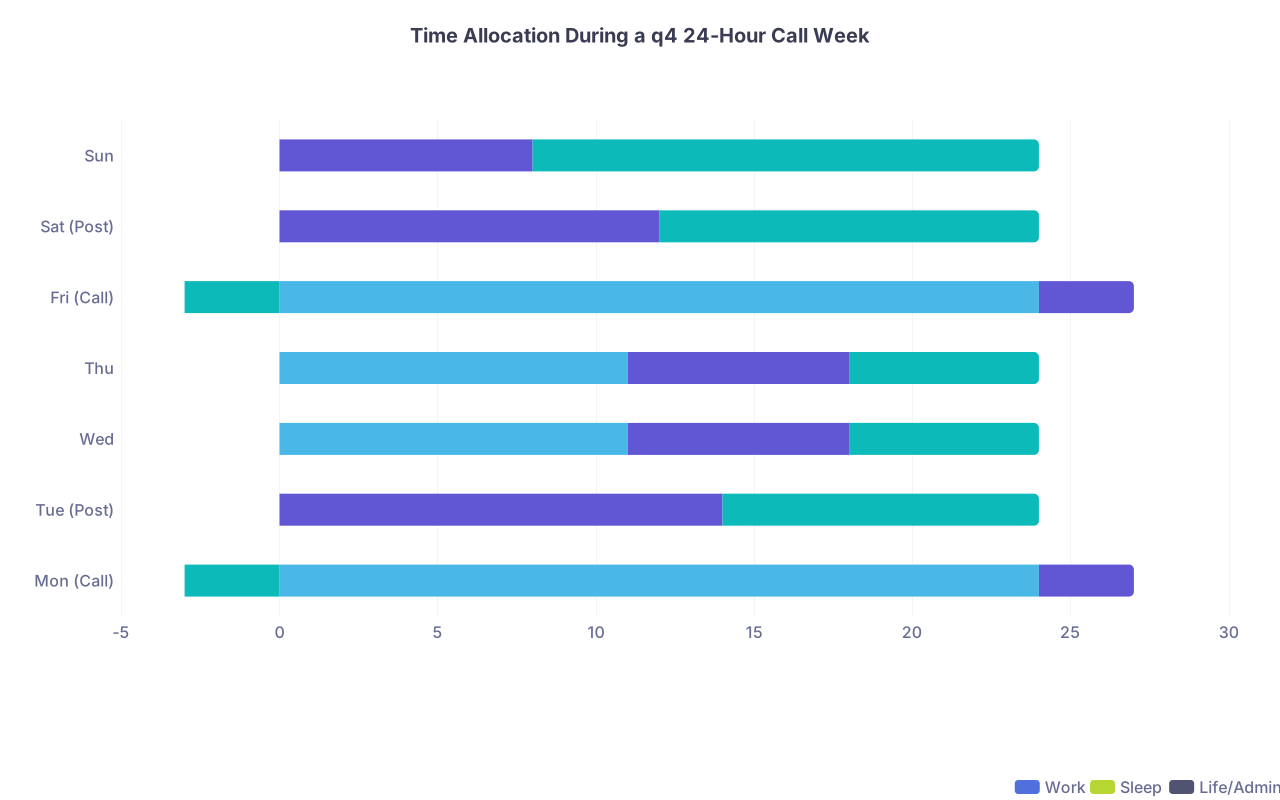
| Category | Work | Sleep | Life/Admin |
|---|---|---|---|
| Mon (Call) | 24 | 3 | -3 |
| Tue (Post) | 0 | 14 | 10 |
| Wed | 11 | 7 | 6 |
| Thu | 11 | 7 | 6 |
| Fri (Call) | 24 | 3 | -3 |
| Sat (Post) | 0 | 12 | 12 |
| Sun | 0 | 8 | 16 |
(Those negative “life/admin” hours on call days are the hours you thought you would have but do not.)
Stepwise Timeline: Building Your Personal Template
Let us put this together as a chronological checklist.
7 Days Before Block Starts
At this point you should:
- Print or open a weekly calendar with hour blocks.
- Mark every call, post‑call, and night float day for the entire month.
- Choose your week type template (q4, night float, home call, etc.).
- Decide:
- Your default wake window on non‑call days
- Your default longest sleep block on call / post‑call days
3–4 Days Before
Now you layer in life.
Choose:
- 1 “admin block” (2–3 hours) per week for bills, emails, logistics
- 1 “anchor social block” (2–4 hours) where you see actual humans
- 2–3 workout slots (even if just 20–30 minutes)
Place them only on:
- Non‑call days
- Second half of post‑call days if you reliably sleep in the morning
Delete anything that lands on:
- Call days
- Pre‑call evenings after 20:00
- First half of post‑call days
If your calendar looks sad and empty? That is correct. You are in a heavy call block. The whole trick is accepting that early instead of pretending otherwise.
1 Day Before
At this point you should:
- Prepare 24–48 hours of food that can be eaten one‑handed while walking.
- Set your sleep environment: blackout, earplugs, white noise.
- Pack:
- Extra socks, snacks, chargers, backup scrubs
- Small notebook with a printed mini‑version of your weekly template
You are setting up frictionless execution. You will not have energy to “decide” these things in the middle.
Daily Execution: “At This Point You Should…” Prompts
Here is a mental script you can run through on each type of day.
On a Pre‑Call Day
- Morning: “At this point I should prioritize tasks that require focus—notes, studying, any crucial life admin.”
- Afternoon: “At this point I should stop adding new commitments. Tomorrow is call.”
- Evening: “At this point I should be winding down, not scrolling or going out. Pack, prep, and sleep.”
On a Call Day
- 10:00: “At this point I should have eaten once and drunk water.”
- 17:00: “At this point I should finish notes that cannot wait and set up for the night.”
- 23:00: “At this point I should ask myself: can I safely close my eyes for 30–60 minutes?”
On a Post‑Call Day
- 09:00: “At this point I should be in bed, not answering emails.”
- 14:00: “At this point I should pick 1–2 tiny life tasks. Not 10.”
- 20:00: “At this point I should commit to an early sleep to reset.”
Tools: Turning This Into a Real Template
You do not want this to live only in your head. Turn it into something you can see.
Option 1: Time‑blocked digital calendar
- Create recurring events:
- “Post‑call sleep block”
- “Admin block”
- “Workout – 20 min walk”
- “Study – 45 min questions”
Color them differently from work. Make sure you can see a “shape” to your week at a glance.
Option 2: Laminated weekly card

- Front: your standard week template by hour for this rotation.
- Back: emergency rules:
- No commitments on call/post‑call mornings.
- Minimum sleep targets.
- Max number of social events per week.
You can literally tape this inside your call room locker.
Example: 1‑Week Template Snapshot (q4 Call)
Here is a compact view of one week so you can see the pattern.
| Day | 05–07 | 07–18 | 18–22 | 22–05 |
|---|---|---|---|---|
| Mon | Pre‑call prep | 24‑hr call | 24‑hr call | 24‑hr call |
| Tue | Post‑call commute | Sleep | Light admin/social | Sleep |
| Wed | Light study | Work | Study / light exercise | Sleep |
| Thu | Light study | Work | Social or workout | Sleep |
| Fri | Pre‑call prep | 24‑hr call | 24‑hr call | 24‑hr call |
| Sat | Post‑call commute | Sleep | Errands / social | Sleep |
| Sun | Reset / admin | Off | Meal prep / relax | Sleep |
Stick this somewhere visible. On day 4, when your brain is mush, you are following a template, not making decisions from scratch.
Reality Check: What You Cut
Designing a weekly schedule for heavy call is not about optimization. It is about triage.

Here is what usually needs to go during these blocks:
- Extra committees and optional meetings
- Ambitious workout plans
- Frequent late‑night social events
- “Catching up” on every email the same day
You cycle these back in during lighter blocks. Heavy call weeks are maintenance mode, not growth mode.
Adjusting Across the Month
One more timeline to keep in mind:
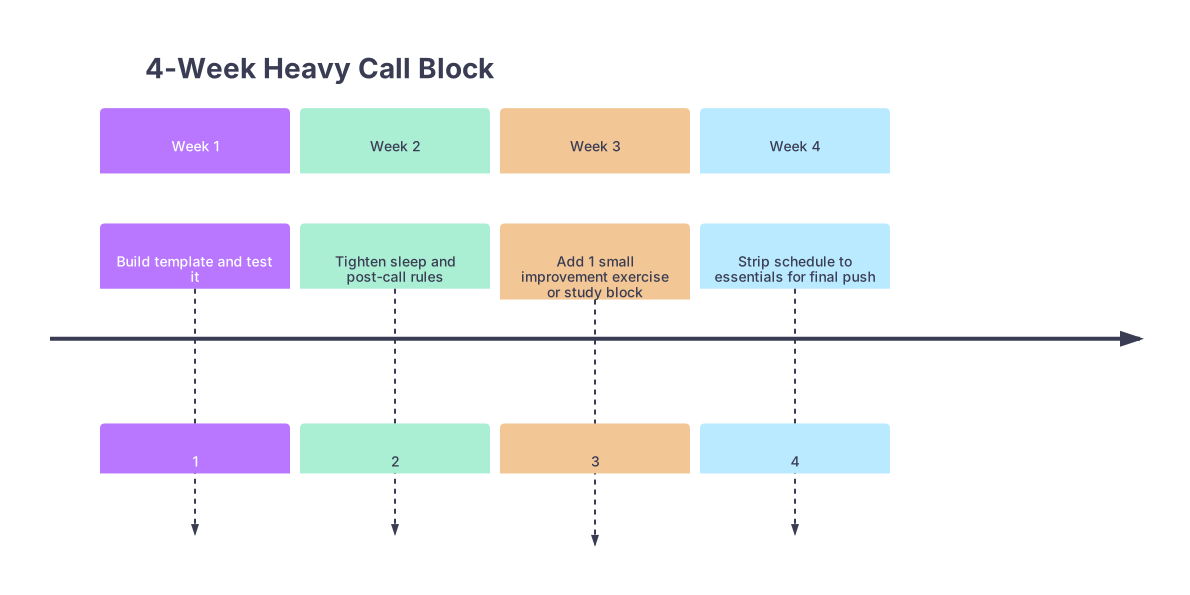
| Period | Event |
|---|---|
| Week 1 - Build template and test it | 1 |
| Week 2 - Tighten sleep and post-call rules | 2 |
| Week 3 - Add 1 small improvement exercise or study block | 3 |
| Week 4 - Strip schedule to essentials for final push | 4 |
- Week 1: You are figuring out your real energy levels. At this point you should be observing more than changing.
- Week 2: You fix the obvious errors (too many plans on post‑call, bedtime drifting later).
- Week 3: If you are stable, you add one thing (maybe 2 short workouts or 2 extra study blocks).
- Week 4: You prune again so you survive the finish.
Two Final Moves That Separate Survivors From Zombies

At this point, if you want this to actually work:
Show your template to someone 1–2 years ahead of you.
Have them mark what is unrealistic. They will be blunt: “You will not study on that post‑call” or “You need a bigger sleep block here.” Listen.Commit to the template for one full rotation.
Do not reinvent your week every 48 hours. Adjust only once a week unless something is truly failing.
Core Takeaways
- Heavy call blocks demand a different weekly template, built around call / post‑call cycles, not around a fantasy of “normal” days.
- You design from the ground up: sleep blocks first, then work, then minimal life and study blocks slotted only on non‑call and late post‑call periods.
- The residents who stay functional do not “power through.” They follow a boring, repeatable weekly schedule that protects sleep, limits decisions, and accepts trade‑offs upfront.