
You are here
It’s 2:17 a.m. You’re on night float. The ED just paged you about a crashing patient, your pager won’t shut up, and then every computer on the unit throws the same lovely message:
“System unavailable. EHR offline. Contact IT.”
Nurses are standing up from their stations. Someone says, “Is it just me?” Another: “Is this hospital-wide?” Your intern looks at you like you’re the captain of a plane that just lost both engines.
You’re on call during a full EHR outage. Orders, meds, notes, labs—everything you normally touch is suddenly dead.
Here’s what to do. Step by step. No fluff.
First 15 Minutes: Stop the Panic, Establish Control
You don’t have time to “figure it out later.” The first 15 minutes determine whether tonight is controlled chaos or a slow-motion disaster.
1. Confirm it’s real and hospital-wide
Do not waste time rebooting three times on five different machines.
Walk to the nearest nurse’s station and ask directly: “Are you all down too?”
Check another floor if you have to. Usually someone will say, “Yep, IT just emailed downtime is in effect.”
If there’s a downtime hotline, call it. Some systems have:
- Planned downtime (you should have gotten a warning email—often ignored)
- Unplanned downtime (everything’s on fire)
You need to know which, and an ETA if anyone has one.
2. Find the downtime kit and paper forms
Every semi-competent hospital has a downtime plan and a physical location where:
- Downtime forms
- Labels
- Paper MARs
- Paper requisitions (lab/imaging)
are stored.
Say out loud: “Where is the downtime kit?” If nobody knows, that’s a systems problem, not your problem—but you’ll still suffer for it.
Go to:
- Unit clerk desk / charge nurse station
- The “downtime binder” (often a red binder)
- Central supply / nursing manager’s office if needed
You’re looking for pre-printed:
- Physician order sheets
- Progress note templates
- Lab and radiology requisition forms
- Downtime MARs (medication administration records)
- Temporary downtime patient census / tracking sheets
Grab a stack. Do not assume “we have enough.” You never do.
3. Clarify the rules: what’s allowed, what’s not
Ask the charge nurse or supervisor directly:
“Are we on full downtime per policy? Paper orders for everything? Verbal ok for emergencies with read back?”
Some hospitals go half-measure: meds still in Pyxis but no orders, or labs can be placed via phone but not visible in EHR. You need to know:
- Are new admissions allowed during the outage?
- Is CPOE entirely unavailable, or just orders not displaying?
- How are labs and imaging handling requests? (Fax, phone, courier?)
If nobody knows, you default to standard downtime protocol: everything on paper, phone calls for urgent tasks, and meticulous documentation.
Running Your Service on Paper: Orders and Communication
Once you accept this is now a 1980s hospital, you need to convert everything in your head to: “How do I do this on paper so people can safely act on it?”

| Step | Description |
|---|---|
| Step 1 | Notice EHR outage |
| Step 2 | Confirm unit and hospital wide |
| Step 3 | Find downtime kit and forms |
| Step 4 | Clarify downtime rules with charge |
| Step 5 | Start paper orders and communication |
4. Paper orders: how to write them so they actually get done
On paper, vague orders kill people. Literally. You don’t get the guardrails the EHR usually gives you.
Use this structure:
- Patient identifiers: Name, MRN, DOB, unit/room
- Date and time
- CLINICALLY CLEAR order with dose, route, frequency, indication if relevant
- Your name printed, signature, pager
For example:
“2/13/26 02:28
John Smith, MRN 123456, 6E-612
Start piperacillin-tazobactam 4.5 g IV q8h for sepsis, first dose now.
Draw blood cultures x2 sets from separate sites prior to antibiotics if possible.
Lactate level now.
— Jane Doe, MD (PGY-2) pager 1234”
Do not write “continue home meds.” You don’t have an accurate med rec right now. That’s how you restart something unsafe.
Do not write “per protocol” unless your institution has a defined, written protocol nurses know and use regularly.
Always tell the nurse verbally: “I just wrote paper orders for Mr. Smith—Zosyn and labs. Can you grab them now so they don’t sit in the chart?” Paper orders sitting in a chart might as well not exist.
5. Verbal orders: when and how to use them
During a real downtime, verbal orders are unavoidable. But they’re a massive source of errors.
Use them when:
- The patient is unstable
- You’re not physically at the bedside yet
- Every minute matters (pressors, antibiotics, seizure meds, rapid transfusion)
Structure the verbal order like this:
You: “Verbal order: Give 1 mg IV lorazepam now for active seizure.”
Nurse: “Read back: 1 mg IV lorazepam now for active seizure.”
You: “Correct. That’s a verbal order.”
Later—ASAP—you write the corresponding paper order and sign it. Do not just assume someone will “backfill.” That’s how you get destroyed in QA and M&M.
If the nurse is slammed, at least jot a timestamped note: “02:42 – Verbal order to RN Smith for lorazepam 1 mg IV now for active seizure, to be documented on paper order sheet ASAP. — J. Doe, MD”
Medication Safety Without an EHR
This is where people die during outages: medications. You lost your drug–drug interaction checks, allergy pop-ups, duplicate therapy alerts. You’re now the safety net.
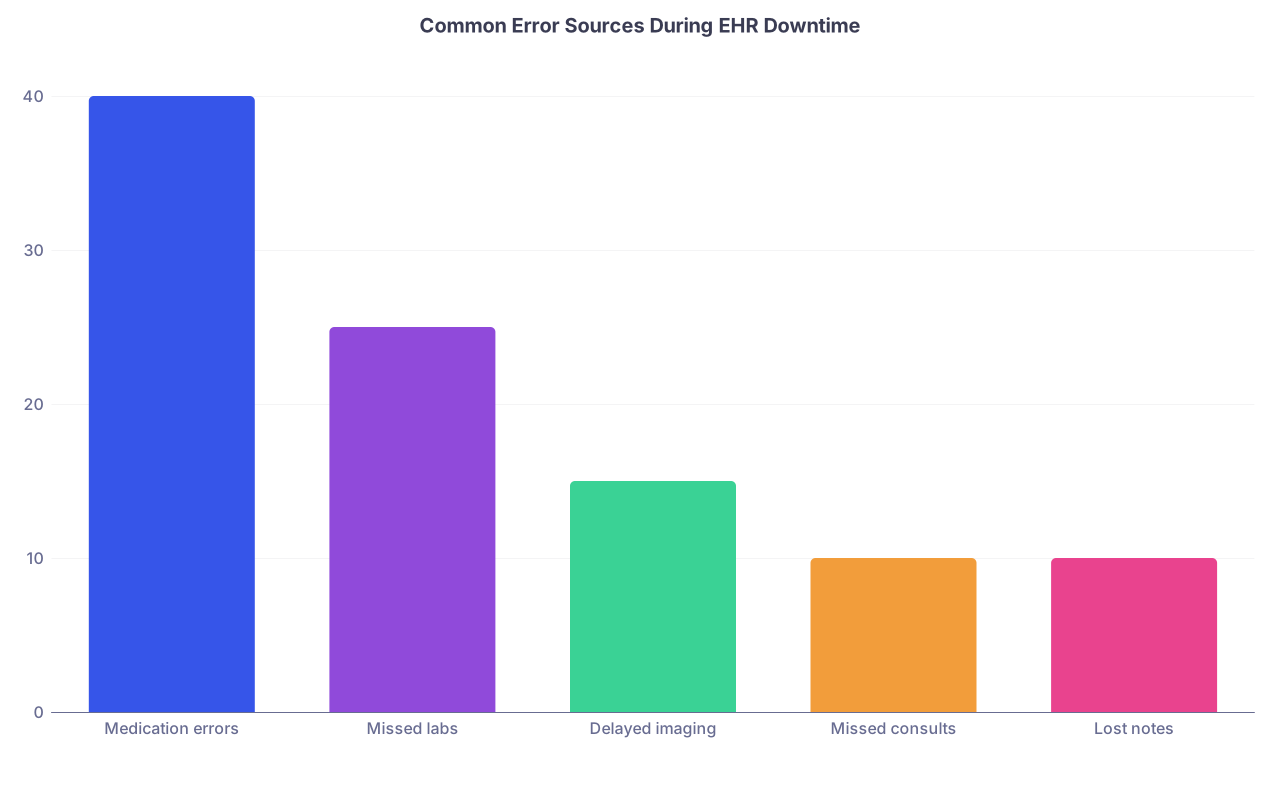
| Category | Value |
|---|---|
| Medication errors | 40 |
| Missed labs | 25 |
| Delayed imaging | 15 |
| Missed consults | 10 |
| Lost notes | 10 |
6. Do not trust your memory: allergies and home meds
Ask the nurse for the most recent printed MAR or downtime summary if your hospital does that.
If that’s not available:
- Ask the patient or family directly: “Any medication allergies? What happens when you take it?”
- Write those on the front of the downtime order sheet or on a brightly visible sticker on the chart
If you’re guessing on home meds (which happens a lot during outages), be conservative:
- Restart life-sustaining meds you’re reasonably sure of: insulin, anti-epileptics, beta-blocker in someone with recent MI, etc.
- Hold “nice to have” meds until you can confirm: PPIs, statins, vitamins, PRNs for vague reasons
Write something like: “Restarted home carvedilol 12.5 mg PO BID per patient report. Will reconcile fully when EHR available.”
7. Double-check every high-risk drug
High-risk drugs on downtime:
- Insulin
- Anticoagulants (heparin, warfarin, DOACs)
- Opioids
- Electrolyte replacements (especially K and Mg)
- Pressors
On paper, write explicitly:
- Exact dose, route, and max rate
- Target parameters if needed (MAP goal, glucose range)
- Whether nurse-driven titration is allowed
Example: “Start heparin IV per standard DVT protocol; nurse may titrate per hospital protocol, goal anti-Xa 0.3–0.7. Get anti-Xa 6 hours after bolus.”
You need to know your hospital actually has a standard protocol and that the nurse knows it. If not, write the dosing explicitly or call pharmacy.
If your clinical gut feels “this is weirdly high” or “this seems off,” pause. Ask the nurse or pharmacy: “Walk me through how you’re going to administer this.”
8. Pyxis and paper: keeping them in sync
Common downtime failure: med given from Pyxis with no matching paper order. Or order written, med never pulled.
Your job:
- Every time you write a significant order, say, “Can you please pull that now from Pyxis and document on the downtime MAR?”
- For critical meds, confirm: “Has that insulin actually been given?” Do not assume.
If there’s a unit-based downtime MAR, nurses will be checking boxes and times by hand. Respect how much they’re juggling. Make your orders legible, specific, and not 12 lines jammed into 1 a.m.
Labs, Imaging, and Results When Nothing Flows Automatically
You’re used to clicking “CBC, BMP, lactate, blood cultures.” Now it’s a scavenger hunt.
9. Ordering labs on paper (and making sure they happen)
Find the lab requisition forms. There’s usually one per specimen type:
- Blood (CBC, chemistry, coag)
- Microbiology (cultures)
- Urine, CSF, other fluids
Fill out:
- Patient identifiers
- Tests needed, clearly written
- Priority: STAT vs routine
- Ordering provider name and pager
- Location of patient (unit, room, bed)
Then do something most residents hate: call the lab for true emergencies.
“Hi, this is Dr. X on 6E. We’re on downtime. I just sent a STAT lactate and CBC on John Smith, MRN 123456. Can you watch for that sample and run it as soon as it comes down?”
Do not do this for every chemistry panel. Do it for the few that matter: sepsis, GI bleed, hyperK, etc.
When you want serial labs (like q6h CBC for a GI bleed), don’t write “CBC q6h” and assume. Spell out timing: “CBC at 04:00 and 10:00.” Nurses and phlebotomy need clear times, not vibes.
10. Imaging: paper plus phone
Radiology usually has its own downtime workflow. Ask the unit clerk or charge nurse how they’re getting imaging done.
Typical process:
- Fill out paper imaging requisition
- Include clear indication (they’ll triage based on this)
- Mark urgency: STAT, urgent, routine
- Send via fax or courier
- Call reading room for truly emergent studies
For a sick patient, you say:
“Hi, this is Dr. X in the ED. We’re on EHR downtime. I just sent a STAT CT head for acute neuro deficit, MRN 123456. Can you confirm you received the requisition and give me a call with the read?”
Then you physically write the preliminary report in your note or downtime sheet:
“03:12 – Spoke with Dr. Radiologist. CT head: no acute bleed, no mass effect, chronic small vessel changes. Official report pending. — J. Doe, MD”
That line protects you. And it helps you remember what they said at 3 a.m. when you’re half delirious.
Managing Your List and Handoffs Without the EHR
This is the part people underestimate. You lost your automatically updating census, tasks list, and everything that keeps your brain stitched together at 4 a.m.
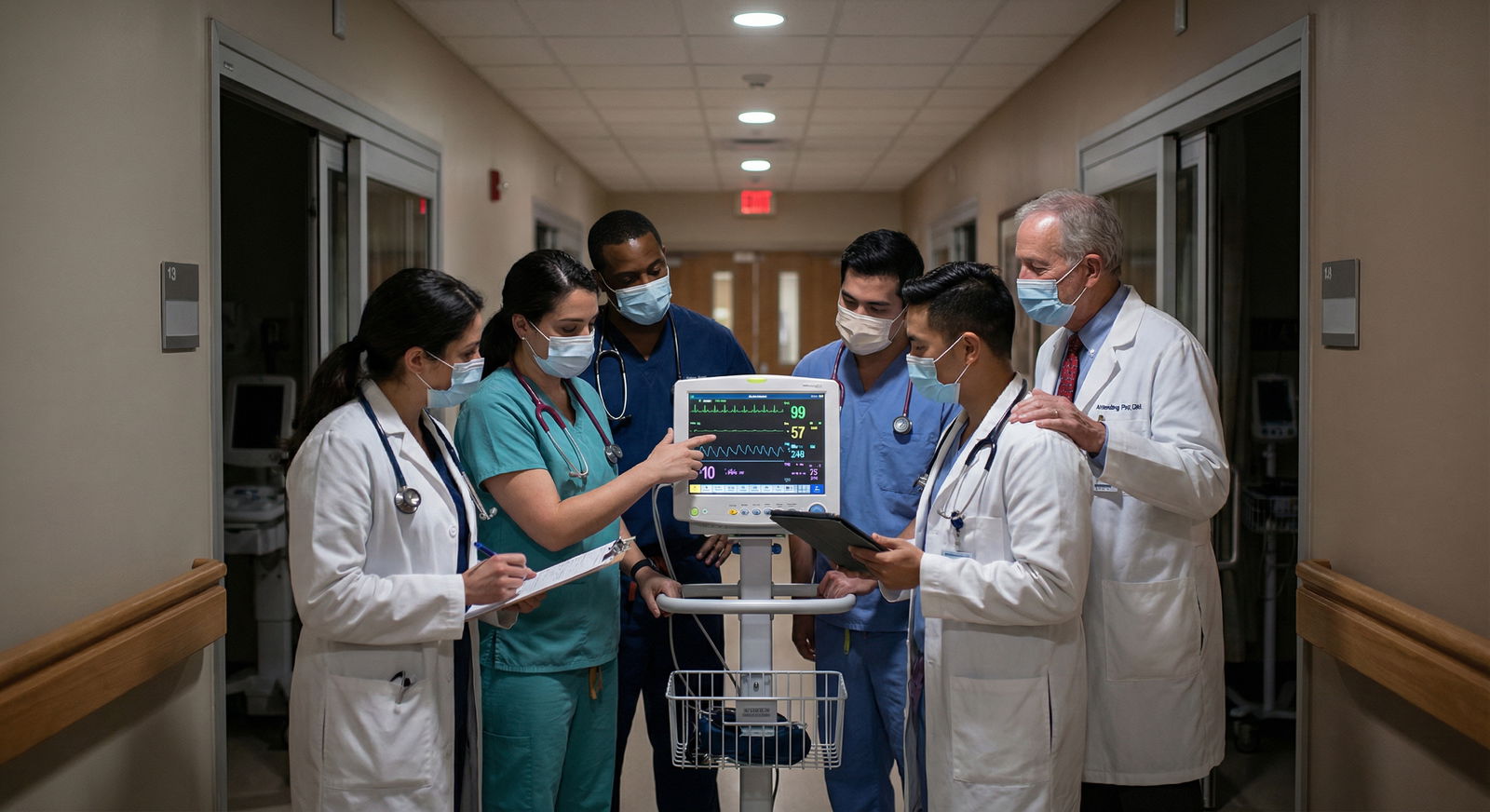
11. Build a temporary paper census
If your hospital prints a downtime census, grab it. If not, make your own.
For each patient, list:
- Name, MRN, bed
- Primary service
- Code status (if you know it)
- Key diagnoses
- Must-know orders (pressors, insulin drip, isolation status)
- Time-sensitive tasks (next antibiotics, labs, transfusions)
Rough, fast, ugly is fine. This is your brain backup.
Keep this census with you. Update in pen throughout the night. When the system comes back, this becomes your roadmap to reconcile.
12. Handoff in downtime mode
Sign-out is now verbal plus paper, not “it’s all in the chart.”
When handing off, say:
“Systems were down from 02:15 to 05:45. Orders during that window are on paper in the chart/downtime binder. Labs and imaging were requested via paper requisition; some results may not be in the EHR yet even if they were done. Key things to reconcile this morning: [list 3–5 per patient].”
For high-risk patients, write a brief summary on your census or on a sticky note that stays with the paper chart.
Example:
“Mr. Rodriguez – septic shock, on norepi 0.08, goal MAP >65, next lactate due ~06:00 (paper req sent), blood cultures from ~02:30, CT abd pelvis requested STAT for source.”
That’s what the day team needs. Not a novella.
Safety Net: Simple Rules That Prevent Catastrophe
With all the structure ripped away, you lean on a few simple, rigid habits. These matter more than being “efficient.”
| Area | Simple Safeguard |
|---|---|
| Medications | Read-back for all verbal orders |
| Labs | Call lab for truly STAT tests |
| Imaging | Document verbal prelim reads with time/name |
| Handoffs | Mention outage window and unresolved items |
| Documentation | Timestamp and sign every critical action |
13. Time-stamp everything
On paper orders, notes, and random scrap documentation:
- Always include date and time
- Initial or sign them
“03:07 – ordered 1 unit pRBC for Hgb 5.9, paper req sent, blood bank notified.” That’s a simple line that saves you when someone asks, “Why was transfusion delayed?”
14. Use the phone more than you like
You’re probably under-calling in downtime.
You should be calling:
- Charge nurse for unit-level issues
- Lab for critical STAT tests
- Radiology for emergent reads
- Pharmacy for dosing questions on high-risk meds
- Your senior or attending if you’re getting overwhelmed
You are not expected to “hero” your way through a mass-systems failure alone. Good attendings would rather you wake them up than silently let things slide because the computers were down.
15. Slow down one notch on big decisions
It’s 4 a.m. You’re tired. EHR is down. The nurse asks if you want to restart all home cardiac meds for a patient in borderline hypotension.
This is where you back off the autopilot and ask yourself:
- Do I have enough information?
- Is this reversible later with low harm if I temporarily hold?
- What’s the worst thing that happens if I wait until EHR is back?
Restarting carvedilol in a borderline hypotensive patient based on “I think he takes it” is stupid. Don’t do that. Write “holding home cardiac meds until med list verified when EHR restored” and own it.
When the EHR Comes Back: The Clean-Up Operation
Sometimes the cruelest part is 6 a.m., when the system sputters back to life and you now have 90 minutes to reconcile all the chaos before rounds.
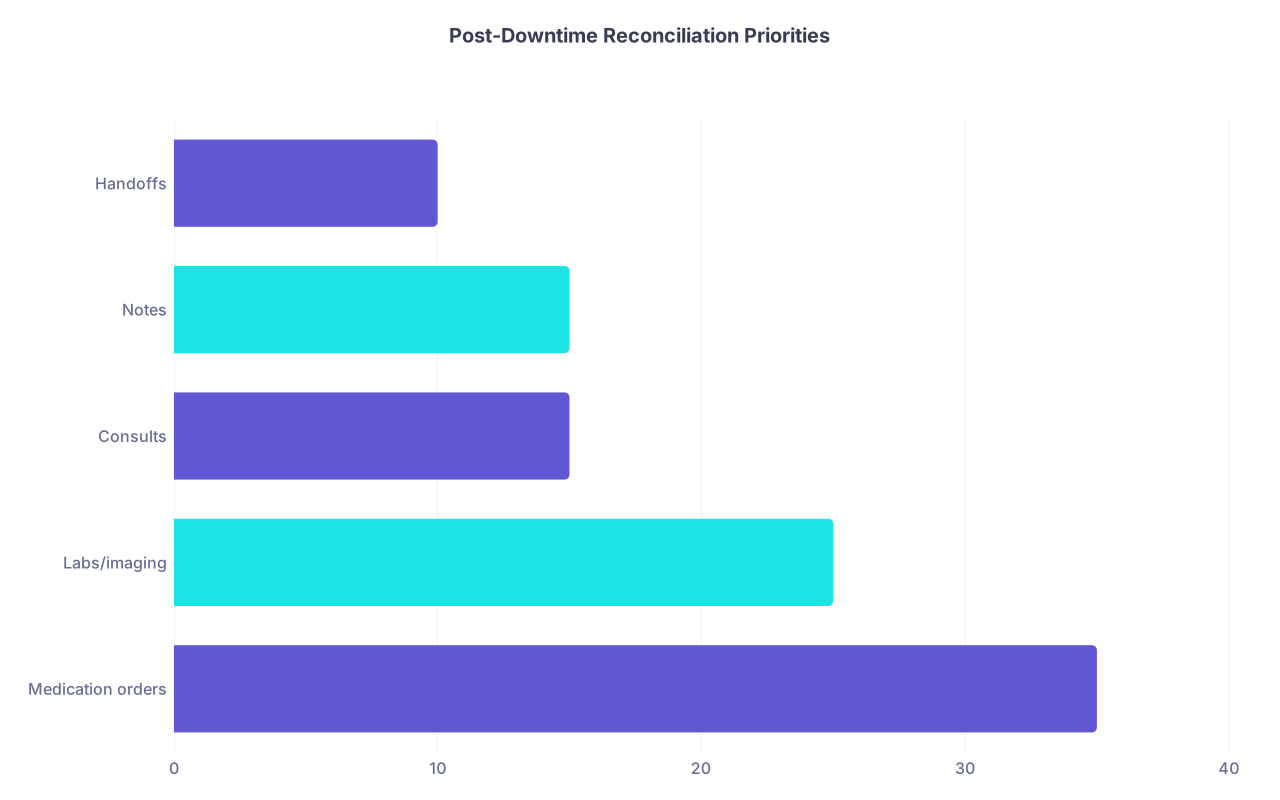
| Category | Value |
|---|---|
| Medication orders | 35 |
| Labs/imaging | 25 |
| Consults | 15 |
| Notes | 15 |
| Handoffs | 10 |
16. Reconcile meds first
Start with the highest-risk patients:
- ICU
- Those on drips
- Those who got new antibiotics, anticoag, or high-risk meds during downtime
Compare:
- Downtime MAR / paper orders
- What is currently active in EHR (which might be missing downtime changes)
You might find:
- A heparin drip that was started on paper and never entered in EHR
- An old insulin regimen still active in EHR that does not match what actually happened
- “PRN” morphine orders given multiple times on paper but EHR shows zero doses
Fix it. Enter actual active meds with correct start times as best you can reconstruct. If you’re not sure, ask the nurse: “What did we actually give from 02:00 to 05:00?”
Document briefly in your progress note:
“From 02:15–05:30, EHR was unavailable. Medications, labs, and orders during that time were placed and administered via downtime paper forms. Orders entered now reflect those clinical decisions as accurately as possible based on nursing and physician documentation.”
That protects everyone.
17. Enter key orders and results retroactively
For labs and imaging done during downtime:
- Enter appropriate “acknowledgement” in your notes once the results appear
- If something critical was acted on before it showed in EHR, write that sequence
Example:
“03:20 – Critical K 6.5 from downtime result, given insulin/D50 and calcium per paper orders; repeat K pending at time of this note.”
You’re anchoring the timeline.
18. Close the loop on consults and communication
If you requested a consult during downtime, confirm in EHR that:
- The consult is actually placed
- The consultant saw the patient or at least documented a plan
If a consultant gave you advice over the phone with no formal note yet, write in your own note:
“03:45 – Discussed case with Cardiology fellow Dr. X by phone during downtime. Recommendation: hold beta-blocker overnight, give 20 mg IV furosemide now, re-evaluate volume status in AM. Formal consult note to follow.”
You’d be surprised how many times those calls vanish without a trace otherwise.
How to Not Completely Fall Apart Next Time
You’re not going to prevent outages. But you can be less wrecked by them.

19. Before your next call block, do this once
On a calmer day:
- Ask a charge nurse: “If the EHR goes down, where is the downtime binder and forms?”
- Skim the downtime policy—not all 40 pages, just key parts: orders, meds, labs, imaging, documentation
- Physically find the downtime kits on your usual units
- Learn how your lab and radiology prefer downtime communication
Ten minutes on a Tuesday afternoon can save you an hour of chaos at 3 a.m.
20. After a disaster shift, debrief and improve
When you survive one of these nights:
- Jot a quick list of what went wrong: “Nobody knew where forms were, no clear plan for STAT labs, Pyxis mismatch.”
- Bring it up (briefly, calmly) at resident meeting or to your chief / quality rep.
- Ask for a short in-service or laminated quick guide at the nurse’s station.
You’re not whining; you’re preventing harm—for the next resident and the next patient.
Quick Reality Check
You will not do this perfectly. Nobody does. The goal during an EHR outage isn’t perfection; it’s to:
- Keep patients safe with clear, specific paper orders and verbal communication
- Protect against the biggest risks: medication errors, missed time-sensitive tests, and dropped handoffs
- Leave a paper and electronic trail that shows what you did, when, and why
If you remember nothing else:
- Grab the downtime forms and write orders that are crystal clear. Speak them out loud to nurses for anything urgent.
- Obsess over medications and a few key labs/imaging; let the low-stakes stuff wait.
- When systems come back, reconcile meds and critical results first, and document the downtime window explicitly.
Do those, and you’ll get through the outage without your name headlining M&M.