
The fastest way to burn out in your first year of private practice is to treat vendor selection like online shopping. Click, compare prices, skim reviews, sign. That is how people lock themselves into three-year disasters.
You need a framework. Not a vibe.
You are not picking apps for your phone. You are picking the infrastructure your entire practice will sit on for the next 3–7 years: EHR, billing, phone, clearinghouse, lab, imaging, transcription, IT, website, marketing…the list grows fast. The chaos you are feeling is normal. But it is fixable.
Here is how to make vendor choices sane, systematic, and hard to screw up.
Step 1: Decide What Actually Matters (Before You Talk to Anyone)
Most physicians do this backwards. They let vendors tell them what is important. “Our AI-powered documentation! Our world-class analytics!” None of that helps when claims are stuck, your MA cannot figure out the EHR, and your phones drop every third call.
You define the rules first. Then you judge vendors against your rules.
1.1 Categorize your vendor needs
For a typical small outpatient practice starting from scratch, your main buckets:
Clinical & documentation
- EHR / practice management (PM)
- E-prescribing
- Dictation / scribe (optional at the start)
-
- Billing solution (in-house software or outsourced RCM)
- Clearinghouse (sometimes bundled with EHR/PM)
- Credit card processing / patient payments
- Eligibility / benefits verification
Patient access & communication
- Phone system (VoIP)
- Fax (yes, still reality)
- Texting / reminders / online scheduling
- Telehealth (if relevant)
Diagnostics and ancillary services
- Lab
- Imaging (if applicable)
- Pathology (for certain specialties)
Infrastructure
- IT support (on-site or remote)
- Hardware (computers, printers, scanners)
- Website / hosting / domain
- Cybersecurity / backups
That list looks overwhelming. Good. Better to see the monster than pretend it is not there. You will not buy all of this at once, but it helps to see the full landscape.
1.2 Define your top decision criteria
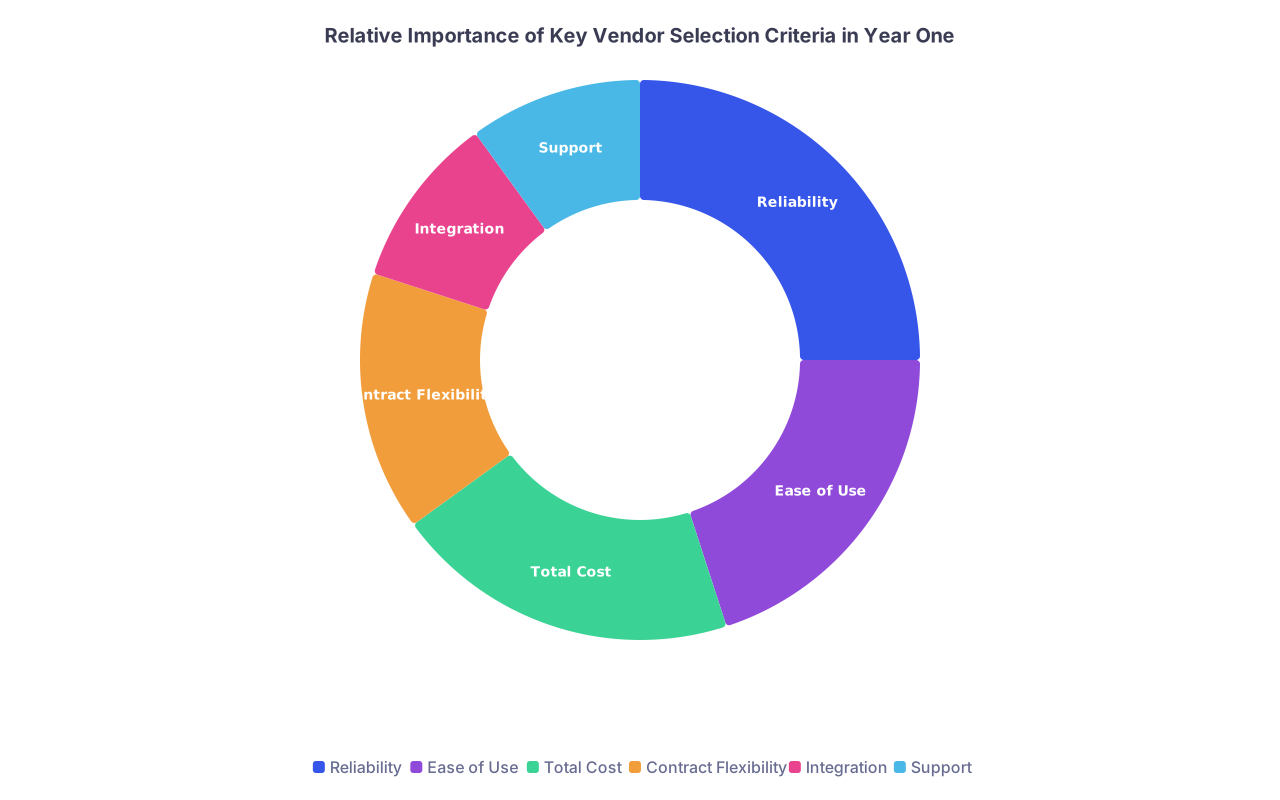
You cannot optimize for everything. Pick 4–6 criteria that matter most to you for this phase of practice.
Typical high-yield criteria:
- Reliability / stability
- Ease of use for staff and you
- Total cost (including hidden fees and time)
- Contract flexibility (length, exit terms)
- Integration with your other systems
- Support responsiveness and quality
You will weight these differently by category. Example: For phones you care more about uptime and support. For EHR you care more about usability and billing integration.
Do this on paper or a simple spreadsheet. Literally write:
- “For EHR, my top priorities (in order) are: 1) Billing/RCM integration, 2) Ease of documentation, 3) Reliability, 4) Reporting, 5) Cost.”
You will use this as your anchor when the demo person starts trying to impress you with stuff you did not ask for.
Step 2: Use a Shortlist, Not the Whole Internet
The biggest mistake: starting with a blank Google search and “best medical EHR 2025.” You will drown in sponsored lists and fake “top 10” blogs.
You need 3–5 options per major category. Not 15.
2.1 How to build a real shortlist quickly
Use these sources in this order:
Colleagues in similar practices
- Same specialty
- Similar size (solo vs small group)
- Similar payer mix (commercial vs Medicaid-heavy vs Medicare)
Ask them very specific questions: - “What do you use for EHR + billing?”
- “If you had to choose again, would you pick them?”
- “Biggest headache with them right now?”
Local medical society / hospital medical staff office
- They often know which systems local practices use and which ones always have “issues.”
- They may have recommended lab/IT/phone vendors they see work consistently.
Specialty societies and private practice groups
- Many have “preferred vendors” or at least commonly used platforms.
- Yes, some of those are sponsored, so treat them as leads, not gospel.
Targeted search, not broad search
- Search “solo family medicine EHR X city forum” not “best EHR.”
- Look for real threads from physicians, not glossy review sites.
Your goal: For each critical category (EHR/PM, billing, phone, lab, IT), end up with 3–5 realistic names.
To make this concrete:
| Category | Option 1 | Option 2 | Option 3 |
|---|---|---|---|
| EHR/PM | Athenahealth | Elation + Kareo | DrChrono |
| Billing | In-house + PM | Third-party RCM | Hybrid model |
| Phones | RingCentral | Vonage Business | Local VoIP MSP |
| Lab | Quest | Labcorp | Regional Lab |
| IT/Support | Local MSP A | Local MSP B | Remote IT firm |
This is not about picking “the best” in the country. You want “works reliably for practices like mine.”
Step 3: The Simple Scoring Framework (That Actually Works)
Now you have options and criteria. Time to score them, not “feel” them.
You are going to build a basic scoring grid. Nothing fancy.
3.1 Create a 10-point scoring grid
Open Excel/Sheets. Make columns:
- Vendor name
- Reliability
- Ease of use
- Cost
- Contract / flexibility
- Integration
- Support
- Total score
Rate each from 1–10. You can weight some criteria more heavily, but to start, just keep it simple.
You end up with something like this:
| Vendor | Reliability (10) | Ease of Use (10) | Cost (10) | Contract (10) | Integration (10) | Support (10) | Total (60) |
|---|---|---|---|---|---|---|---|
| Athenahealth | 9 | 7 | 6 | 7 | 9 | 8 | 46 |
| Elation+Kareo | 8 | 9 | 8 | 8 | 7 | 7 | 47 |
| DrChrono | 7 | 8 | 9 | 8 | 7 | 6 | 45 |
You will not get perfect data. That is fine. You are forcing your brain to quantify what you already know or suspect.
3.2 How to actually score vendors
Use these sources:
- Demos (but filtered through your checklist, not their script)
- Customer references they provide (yes, call them)
- Colleagues using the system
- Contract / proposal docs
For each criterion, ask 2–3 targeted questions.
Examples:
Reliability
- “What was your last 12 months of uptime?”
- “Do you publish a status page?”
- “What happens when your system goes down—do you have downtime workflows?”
Ease of use
- “Show me how to: create a new patient, document a common visit, send a prescription, and send a claim. Do not skip steps.”
- “How long is your typical implementation training?”
- “How do you train new staff when I hire them?”
Cost
- “List every recurring fee I will pay in month 6 of using your system, assuming 2 providers and 3 staff.”
- “What are your per-claim or per-transaction fees?”
- “Any fees for interfaces (lab, imaging, e-prescribing)?”
Contract / flexibility
- “What is the minimum contract length?”
- “What are the termination terms—how much notice, what penalties?”
- “How do I get my data out if I leave? In what format? At what cost?”
Integration
- “Which labs are already integrated? Any extra cost?”
- “How do you connect with my chosen clearinghouse / RCM vendor?”
- “Is your telehealth native or a third-party plug-in?”
Support
- “What is your average first-response time for tickets?”
- “Do you offer live support by phone? During what hours?”
- “Do I have a dedicated account manager?”
You are not looking for perfection. You are looking for glaring red flags.
Step 4: Match Vendor Complexity to Practice Maturity
This is where many new owners make a mess. They buy what they think they will need in five years instead of what they actually need in year one.
Result: They are paying for features they never use, drowning in configuration, and still cannot get clean claims out the door.
Use this rule: Buy for the next 18–24 months, not the next decade.
4.1 Phased vendor decisions: what to lock in, what to keep flexible
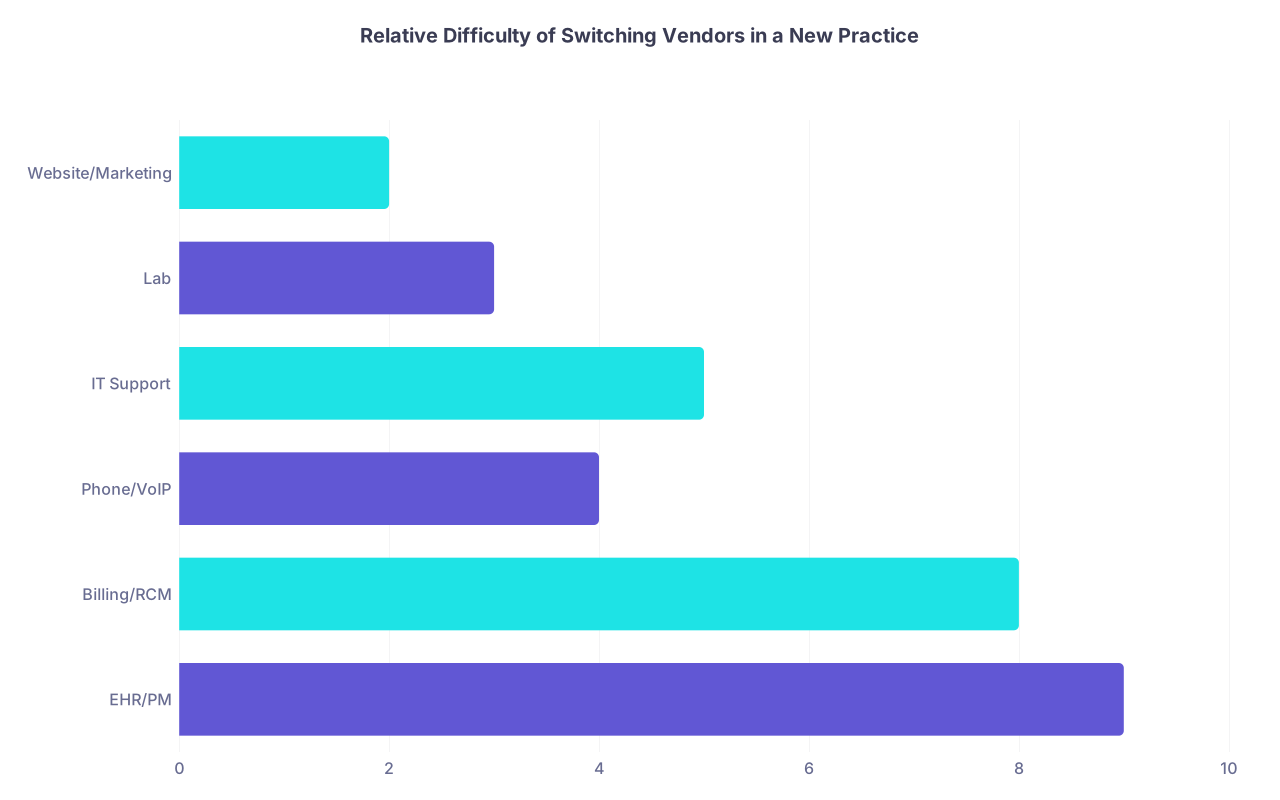
Some vendor categories are hard and expensive to switch. Others you can swap out later with minimal pain.
| Category | Value |
|---|---|
| EHR/PM | 9 |
| Billing/RCM | 8 |
| Phone/VoIP | 4 |
| IT Support | 5 |
| Lab | 3 |
| Website/Marketing | 2 |
Basic rule of thumb:
Hard to switch (choose carefully, even if it takes extra time):
- EHR / Practice Management
- Billing / RCM partner
- Clearinghouse (if separate from EHR)
Moderate to switch (still annoying, but doable):
- Phone/VoIP
- IT support vendor
- Lab (depends on contracts, but usually manageable)
Easy to switch (opt for low commitment early):
- Website / hosting
- Marketing / SEO
- Transcription / scribe services
- Patient reminders / texting platforms
This means:
- Spend extra time and scrutiny on EHR/PM and billing/RCM.
- For phones, IT, website—keep contract length short early on. Go month-to-month or 1-year max if possible. Expect that you might change once you understand your real workflow.
Step 5: Model the Money (Properly)
Vendor choices are financial decisions. Not tech decisions. Not “doctor preference” decisions.
You must look at total cost of ownership (TCO), not just the monthly subscription.
5.1 Break down the real cost
For each serious vendor option, estimate the yearly cost in 3 buckets:
Direct fees
- Subscription / licensing
- Per-transaction fees (clearinghouse, credit cards, SMS, fax pages)
- Setup / implementation fees
- Interface fees (lab, eRx, etc.)
Indirect cost (time):
- Staff time to use the system (click-heavy EHRs cost you staff and your own time)
- Training time for new hires
- Time lost when the system is down or when support is slow
Revenue impact (positive or negative):
- Denial rates and clean claim rates with a given billing setup
- Payment velocity (days in A/R)
- Patient no-shows with or without reminders
You do not need perfect numbers. You want directional clarity.
If one vendor is $300/month cheaper but leads to one additional denied claim per day that never gets fixed, you made a bad decision.
5.2 Simple revenue impact example
Say you are comparing two EHR + billing setups:
- Option A: $900/month
- Option B: $1,400/month
At first glance, Option A looks better. But:
- Option A’s users report 15% denial rates, with 30% of denials never resolved.
- Option B’s users report 8% denial rates, with 10% never resolved.
You plan to bill about $80,000/month in gross charges. Rough math:
Option A lost revenue:
- 15% of $80,000 = $12,000 denied
- 30% of $12,000 = $3,600 never recovered monthly
Option B lost revenue:
- 8% of $80,000 = $6,400 denied
- 10% of $6,400 = $640 never recovered monthly
So:
- Option A: $900 fee + $3,600 lost revenue = $4,500 “all-in” monthly hit
- Option B: $1,400 fee + $640 lost revenue = $2,040 “all-in” monthly hit
Option B is more than twice as good financially, despite being “more expensive.”
This is why you ask other practices about denial rates, collection percentages, and days in A/R when you evaluate billing-related vendors.
Step 6: Structure the Decision Process (So You Don’t Live in Demo Hell)
Physicians get stuck in the endless demo loop. “Let’s schedule one more demo. Maybe that will make it obvious.” It will not.
You need a simple, time-boxed process.
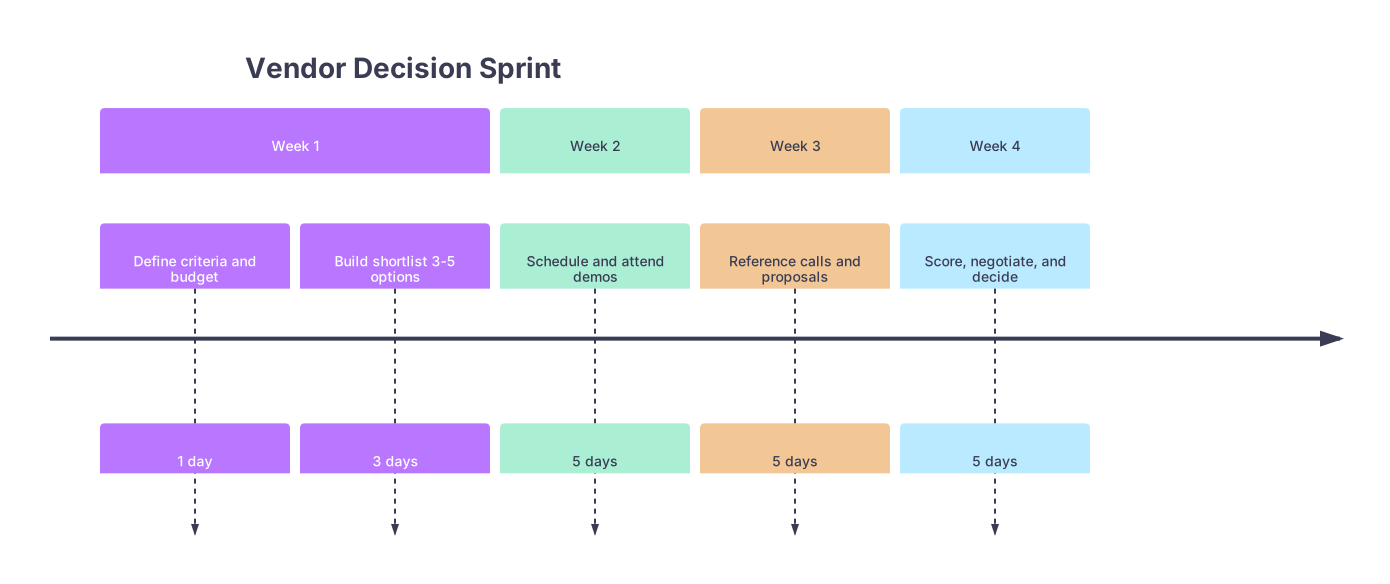
6.1 A practical 4-week vendor decision sprint
Use this timeline for a major category like EHR/PM or billing.
| Period | Event |
|---|---|
| Week 1 - Define criteria and budget | 1 day |
| Week 1 - Build shortlist 3-5 options | 3 days |
| Week 2 - Schedule and attend demos | 5 days |
| Week 3 - Reference calls and proposals | 5 days |
| Week 4 - Score, negotiate, and decide | 5 days |
High level:
Week 1
- Finalize your criteria and scoring grid.
- Build your shortlist and book demos.
Week 2
- Do the demos. Same scenario each time (e.g., “new patient visit + chronic follow-up + billing that claim”).
- Capture notes straight into your scoring grid immediately after each demo.
Week 3
- Ask each vendor for 2–3 current customers similar to you. Call them.
- Request detailed proposals with all fees spelled out.
Week 4
- Score each option.
- Pick the top 1–2 and negotiate contract terms.
- Decide and sign. Stop shopping.
You cannot afford to spend 4 months on one decision. Set deadlines.
Step 7: Contract Rules That Save You From Future Headaches
Vendor sales reps are nice until you sign. Then you see the real company. So you need to protect yourself up front.
There are a few non-negotiables.
7.1 Contract length and termination
- Avoid contracts longer than 3 years early in your practice. 1–2 years is ideal.
- Insist on without-cause termination with reasonable notice (60–90 days) and minimal penalties.
- Avoid “evergreen” auto-renewals for long terms. If they insist, cap the renewal term at 1 year and guarantee rate increase limits (e.g., 3–5% per year).
7.2 Data ownership and exit process
You want explicit language stating:
- You own your data.
- You can get a full export of structured data (not just PDFs) upon termination.
- The format is usable (CSV, HL7, CCD, etc.).
- The cost of that export is either:
- Included, or
- Fixed and reasonable (not “we’ll quote it then”).
Ask directly:
- “If I leave you, what exactly do I get, and how much will it cost me to get my data?”
If they cannot answer clearly, that is a red flag.
7.3 Hidden fees and “gotchas”
Scan for:
- Interface fees per lab, per eRx connection, per clearinghouse
- Per-claim fees on top of subscriptions
- SMS / fax overage charges
- Support tiers (extra cost for “premium” support)
- Price increases baked into the contract after year 1
If a vendor dances around price specifics, assume they will nickel-and-dime you.
Step 8: Prioritize Your First 5 Vendor Decisions
You do not need to solve everything at once. In fact, you should not.
Your first 5 vendor choices matter the most. Get these right, and the rest is noise.
8.1 The core five for most outpatient practices
In order:
EHR + Practice Management
- Foundation for scheduling, documentation, claims, payments.
- Try to bundle EHR and PM unless you have a strong reason to separate.
Billing solution (in-house vs outsourced RCM)
- Decide early if you want to:
- Hire your own biller and use the PM system, or
- Outsource to a revenue cycle company.
- Hybrid models exist, but do not overcomplicate this in year one.
- Decide early if you want to:
Clearinghouse (if not embedded in your EHR/PM)
- If your EHR has a built-in clearinghouse, verify which payers are supported and the per-claim cost.
- If separate, pick one that plays nicely with your EHR.
-
- Patients cannot reach you? The rest is irrelevant.
- Look for: call queues, voicemail to email, basic reporting, and redundancy.
Lab partner
- Especially important if a significant portion of your work requires quick turnaround or specific panels.
- Consider logistics, courier pickup, EMR integration, and patient access to results.
Once these are locked in, everything else can follow more slowly: IT support, website, telehealth, marketing.
Step 9: Build a Minimal Vendor Map (So You Stay in Control)
As you add vendors over the first 6–12 months, it is easy to lose track of who does what. Then something breaks, fingers point everywhere, and you are stuck mediating.
You need a basic vendor map: what they do, how they connect, and who to call.

| Step | Description |
|---|---|
| Step 1 | Practice |
| Step 2 | EHR/PM |
| Step 3 | Clearinghouse |
| Step 4 | Lab Interface |
| Step 5 | Billing/RCM Vendor |
| Step 6 | VoIP Phone System |
| Step 7 | IT Support |
| Step 8 | Website/Hosting |
| Step 9 | Telehealth Platform |
For each vendor, track:
- Primary function
- Key integrations (with which systems)
- Account manager / support contact
- Contract start / end dates
- Key SLAs (uptime, response time)
Keep this in a one-page document or simple spreadsheet. Update it quarterly. This alone will make troubleshooting and renegotiating much easier later.
Step 10: Watch These Early Warning Signs (And Act Fast)
Even with a good framework, you may pick a vendor that looks good on paper and fails in reality. That is normal. The mistake is waiting two years to fix it.
Watch for these in the first 3–6 months:
- Consistent downtime or major performance issues
- Support tickets ignored or bounced around for weeks
- Denial rates climbing with no clear explanation
- Staff constantly complaining about the system slowing them down
- Surprise invoices and unexplained charges
If you see two or more of these persist beyond the initial go-live chaos, do not “hope” it gets better.
What to do:
- Document the issues with dates and screenshots.
- Escalate formally to your account manager.
- Give them a clear, time-bound remediation expectation (e.g., “I need X fixed within 30 days”).
- If your contract allows, start quietly researching alternatives before your patience runs out.
You do not need to be loyal to bad vendors. You need to be loyal to your patients, your staff, and your own sanity.

A Simple Framework You Can Reuse for Every Vendor
Let me make this even more concrete. Here is a repeatable checklist you can pull out every time you face another vendor decision.
Clarify need
- What problem am I solving?
- Is this a “now” problem or a “later” problem?
Define criteria (4–6 max)
- Rank them. Do not pretend they are all equal.
Shortlist 3–5 options
- Use colleagues and local context, not just Google.
Score vendors on a 10-point grid
- Reliability, ease of use, cost, contract, integration, support.
Model the money
- Direct fees + indirect time cost + revenue impact.
Match complexity to stage
- Buy for 18–24 months, not forever.
- Lock in carefully for EHR/billing; keep others flexible.
Protect yourself in contracts
- Reasonable term, clear exit, clean data export, transparent fees.
Map vendors and integrations
- Keep a one-page view of who does what and how they connect.
Monitor early and ruthlessly
- Act on warning signs in the first 3–6 months, not the third year.
| Category | Value |
|---|---|
| Reliability | 25 |
| Ease of Use | 20 |
| Total Cost | 20 |
| Contract Flexibility | 15 |
| Integration | 10 |
| Support | 10 |

The Bottom Line
You do not need to become a tech expert to pick good vendors. You need a clear framework and the discipline to use it.
Three key points:
- Decide your criteria and build a small, realistic shortlist before you talk to sales reps.
- Use a simple scoring grid and total cost lens to separate “shiny” from “solid.”
- Lock in carefully on EHR and billing; keep everything else as flexible and short-term as you can in the first couple of years.
Do that, and vendor selection stops being a guessing game and becomes just another clinical-style decision: structured, evidence-based, and much harder to screw up.