
The most dangerous phase of a new practice is not opening day. It is the first 6 months when bad patterns harden into your “normal.”
You cannot afford to “see how it goes.” You need a post‑opening audit schedule. At 30, 60, and 180 days, there are specific numbers you must pull, question, and act on. If you skip them, you will spend the next two years fixing avoidable mistakes.
Below is the timeline I push new private practice owners to follow.
Overview: Your 6‑Month Audit Timeline
At this point you should stop thinking like “a new attending” and start acting like a small business owner with a clinical license.
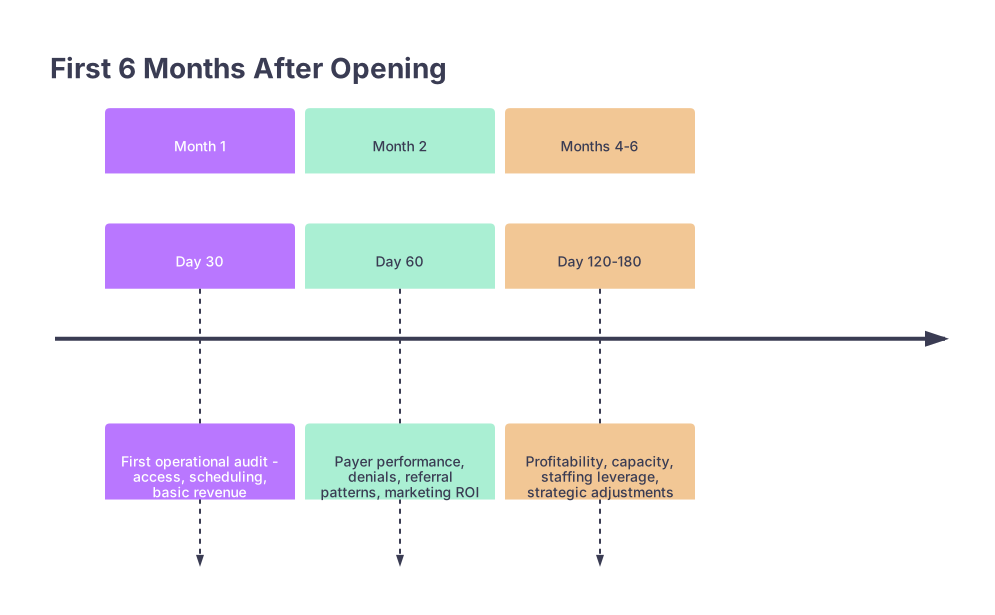
Here is the cadence:
| Period | Event |
|---|---|
| Month 1 - Day 30 | First operational audit - access, scheduling, basic revenue |
| Month 2 - Day 60 | Payer performance, denials, referral patterns, marketing ROI |
| Months 4-6 - Day 120-180 | Profitability, capacity, staffing leverage, strategic adjustments |
And at each checkpoint, you focus on different questions:
| Milestone | Primary Focus |
|---|---|
| Day 30 | Access, workflows, cash |
| Day 60 | Payers, referrals, growth |
| Day 180 | Profitability, scale |
Let me walk you through what you should be measuring and adjusting, in order.
At 30 Days: Access, Flow, and Cash on the Table
At one month, you are not optimizing profit. You are stabilizing survival. The goal: confirm that patients can get in, staff can get work done, and money is actually moving from claims to your bank.
By Week 2–4 (leading into Day 30), you should pull:
- Access and Schedule Metrics
You want to know if your schedule template is realistic or fantasy.
Track for the first 30 days:
- Average days to third next available new‑patient appointment
- Average days to third next available follow‑up
- Daily no‑show rate (% of scheduled visits that did not arrive)
- Same‑day cancellation rate
- Number of unused slots per day (broken out by “left empty” vs “blocked”)
If your third next available new‑patient slot is:
- 0–3 days: under‑demand or too many new slots
- 4–10 days: about right for early growth
- 11+ days: you are already becoming “hard to access”
At this point you should:
- Shorten visit lengths if every day ends on time with empty charts
- Lengthen visit lengths if you are constantly running >20 minutes behind
- Add one or two same‑day “urgent” slots if you are refilling meds in chaos
- Visit Volume and Mix
Track the basics:
- Number of clinic days actually open
- Total visits completed
- Visits per clinic day
- New vs established visit count
For a solo outpatient practice, ballpark at 30 days:
- 6–10 patients/day: low but typical for a cold start
- 10–14 patients/day: strong start or good pre‑opening marketing
- <5 patients/day: you have an access, referral, or awareness problem
Also check your visit mix: if you are >60% new patients at 30 days, visit volume will feel “busy” but revenue may lag (new visits often pay better per unit but slow everything down).
- Revenue and Collections (Early Snapshot)
You will not have a full revenue cycle picture at 30 days. But you can absolutely see if the pipeline is working.
You want:
- Total charges submitted (gross charges)
- Payments posted (total cash collected so far)
- Days in A/R (even early, your billing system can calculate)
- % of claims rejected/denied on first pass
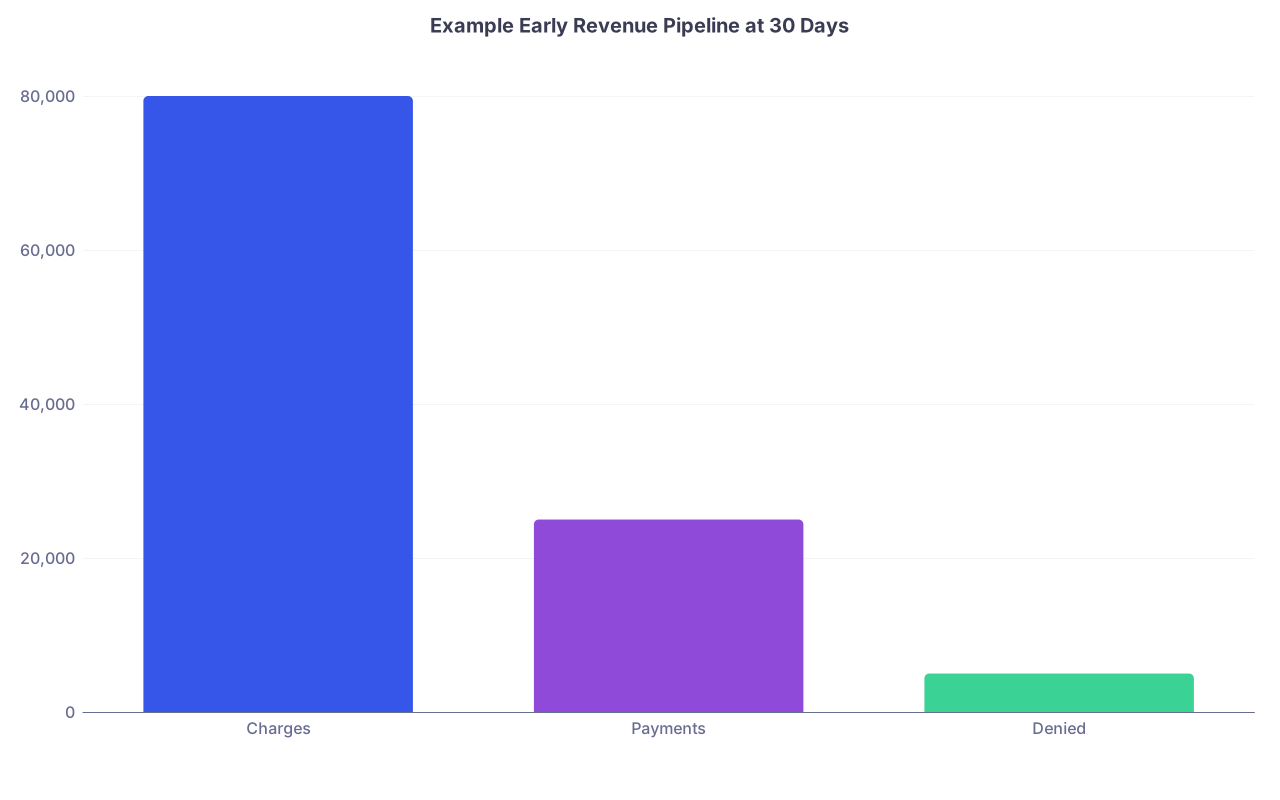
A simple sanity check:
| Category | Value |
|---|---|
| Charges | 80000 |
| Payments | 25000 |
| Denied | 5000 |
At this point you should:
- Verify that every encounter generated a charge on the same day or next day
- Audit a small random sample: visit note → code → claim → clearinghouse status
- Identify top 3 denial reasons by frequency (bad insurance data, coding, NPI issues)
If >15% of your first claims are getting kicked back, fix that now. Not at 6 months.
- Front Desk and Intake Accuracy
Day 30 is the right time to be ruthless about front‑end errors.
Pull:
- % of new patients with missing insurance data at check‑in
- % of patients with incorrect insurance loaded (wrong plan, old card)
- % of claims with registration errors (wrong DOB, name mismatch, etc.)
Sit down with your front desk and literally walk the process:
- How they verify insurance (real system demo, not “we check it”)
- How they collect copays and outstanding balances
- Exactly what they say when a patient “forgot their card”
At this point you should re‑write any intake scripts that result in you providing free care because “we will just bill you later and see what happens.”
- Operational Stress Test: One Day Deep Dive
Pick one random clinic day from weeks 3–4. Then:
- Track time of each arrival vs scheduled time
- Check time roomed vs time seen vs time checked out
- Compare documented diagnoses/procedures to billed codes
- Confirm all labs/imaging ordered that day are tracked somewhere (log, EMR list)
You will see patterns: chronic 10‑minute check‑in delays, MA bottlenecks, or missing orders. This is where you fix daily pain.
At 60 Days: Payers, Referrals, and Growth Levers
By 60 days, you should have enough data to see how payers treat you, how patients find you, and where money is leaking. Now you are past survival and into deliberate growth.
At this point you should schedule a half‑day “business review” session, away from clinic, with your biller and your core staff.
1. Payer Mix and Reimbursement Reality
You need to know who is actually paying your bills.
Pull a 60‑day summary:
- Visits by payer (count and %)
- Charges by payer (dollars and %)
- Payments by payer (dollars and %)
- Average payment per visit by payer
| Payer | % of Visits | Avg Payment/Visit |
|---|---|---|
| Blue Cross | 35% | $145 |
| Medicare | 25% | $115 |
| Medicaid | 20% | $70 |
| United | 10% | $130 |
| Self-pay | 10% | $90 |
Now you can answer basic questions:
- Are you accidentally becoming a Medicaid‑heavy practice when your pro forma assumed 10%?
- Is one commercial payer systematically underpaying contracted rates?
- Is your self‑pay policy coherent or random discounts at the front desk?
At this point you should:
- Adjust your marketing and referral outreach to tilt away from unprofitable payers
- Start a written underpayment log if payers are not following contracted fee schedules
- Tighten your financial policy for self‑pay and high‑deductible patients
2. Denials, Rejections, and Time to Payment
At 60 days, denial management stops being theoretical.
You want:
- Clean claim rate (claims paid on first submission)
- Top 5 denial reasons, by count and dollar amount
- Average days from DOS to claim submission
- Average days from claim submission to payment, by payer
If your clean claim rate is below 90%, you are burning cash.
At this point you should:
- Pick the single most common denial reason and design a specific prevention step (e.g., mandatory insurance eligibility check 48 hours pre‑visit)
- Build a weekly 30‑minute denial meeting between you and your biller until clean claim rate improves
- Check whether your documentation habit is causing issues (e.g., never including laterality on ortho codes, not linking diagnoses correctly)
3. Referral Sources and Patient Acquisition
You cannot fix what you cannot see. You must know how patients are finding you.
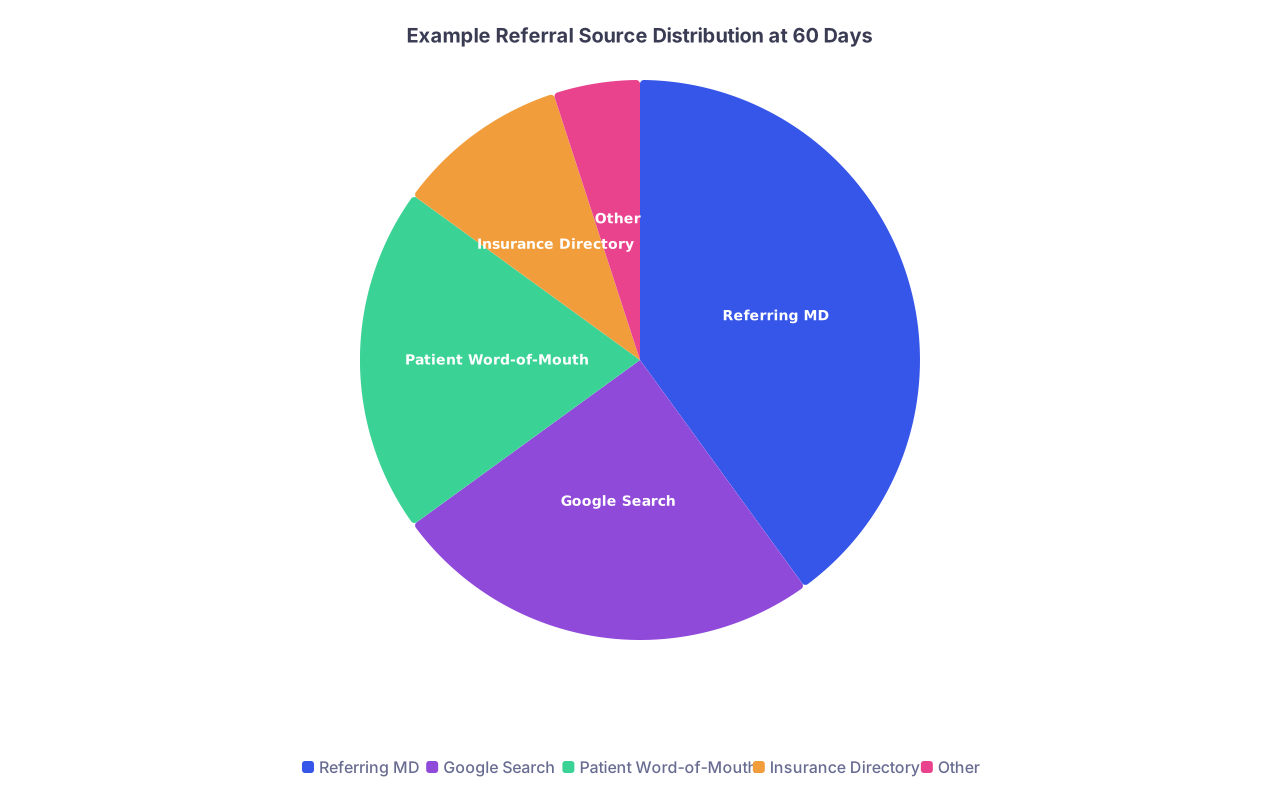
Pull a 60‑day report that includes the “referral source” field. Then categorize:
- Referring physicians / clinics
- Hospital or health system referrals
- Existing patient word of mouth
- Online search (Google, maps)
- Insurance directory find
- Social media / website / other
If your EMR does not make this easy, build a simple tracker spreadsheet and have staff capture this at check‑in from now on.
At this point you should:
- Identify your top 5 referring clinicians and personally thank them (call, handwritten card, or both)
- Notice any “ghost” marketing spends that did nothing (e.g., $800 on print ads that produced zero visits)
- Double down on channels that clearly work (e.g., primary care referrals + Google reviews)
| Category | Value |
|---|---|
| Referring MD | 40 |
| Google Search | 25 |
| Patient Word-of-Mouth | 20 |
| Insurance Directory | 10 |
| Other | 5 |
4. Schedule Design and Provider Capacity
By 60 days, your calendar has real patterns. You should not still be using the same naive template you built before opening.
Look at:
- Average patients per day, by weekday
- No‑show rate and cancellation patterns by day and time
- New vs established visit distribution by session (AM vs PM)
- Slots consistently going unused
At this point you should:
- Tighten same‑day confirmation processes for chronic no‑show time blocks
- Convert perpetually empty late‑day slots into telehealth or admin/documentation time
- Gradually ratchet your target visits per day upward if demand and workflow allow
A simple rule: if you are consistently finishing early with no backlog and your third next available new visit is under 3 days, your capacity is underutilized. Add 1–2 visits per session and reassess in 2 weeks.
5. Staff Utilization and Pain Points
This is when staff may start to burn out quietly or, worse, disengage.
Have each staff member list:
- 3 tasks that feel like a waste of time
- 3 recurring problems or bottlenecks
- 3 things that would make their day easier
Then compare that to your metrics:
- Phone abandonment rate (calls not answered / voicemails not returned)
- Average check‑in and check‑out time
- Time from referral received to patient contacted
At this point you should make one or two concrete workflow changes. For example:
- Centralize refill requests into set time blocks instead of constant interruptions
- Use templates and smart phrases to cut your note time per patient
- Shift some tasks (e.g., scanning, faxing, routine outreach) to part‑time support or virtual assistants
At 180 Days: Profitability, Scale, and Strategic Corrections
At the 6‑month mark, you stop blaming “we just opened” and start owning your numbers. You now have enough data to decide whether you are building the practice you actually want.
This is not a 30‑minute review. Block half a day. No patients. Just you, your data, and ideally your accountant or practice consultant if you have one.
1. Financial Health and Profitability
First, stop guessing. Pull:
- Total revenue (collections) for 6 months
- Total operating expenses (by category)
- Net income (profit) before owner compensation
- Owner draws / salary
- Month‑to‑month revenue trend
You want to see whether revenue is trending upward, flat, or erratic.

Typical patterns I see:
- Revenue up each month, expenses relatively stable → healthy growth curve
- Revenue flat, slowly rising expenses → you are feeding a cost structure that your volume cannot support
- Chaotic swings month to month → scheduling and billing processes not stable
You should also look at collections per visit:
- Total collections in 6 months ÷ total visits in 6 months
If this number is far below what your contracted rates would predict, you have leakage: under‑coding, poor collections, or denials.
At this point you should decide:
- Are you still in planned “ramp‑up” loss territory or already supposed to be breaking even?
- Do you need to cut a cost category (e.g., fancy office space, unused software) now?
- Or do you need to increase volume / payer quality, because costs are already lean?
2. Capacity, Productivity, and Burnout Risk
Next, confront your personal capacity and whether it is being used intelligently.
Pull:
- Average patients per day, by month
- Total clinical days worked
- Total visits in 6 months
- Hours per week spent on:
- Direct patient care
- Documentation
- Admin / inbox / refills
You are looking for two things:
- Under‑utilization: low visits per day and lots of unused slots
- Unsustainable grind: full days plus 2–3 hours of charting at night
At this point you should:
- Adjust visit length templates based on actual charting time (many physicians cling to 30‑minute new visits forever when 25 or 20 is workable with better templates)
- Plan a clearly defined max clinic volume (e.g., 18–20/day) that does not push you into chronic after‑hours work
- Decide when to hire next: additional MA, front desk, or part‑time NP/PA
3. Payer Strategy: Keep, Grow, or Cut
By 6 months, you will know which payers are worth the hassle.
Update your payer metrics:
- Visits, charges, and payments by payer across 6 months
- Average payment per visit by payer
- Denial rate and hassle factor by payer
Now you can make real decisions:
- Do you want more of this payer? If so, make sure you are correctly listed in their directories and PCPs know you are in‑network.
- Do you want less? Then you quietly stop marketing to that population and, in time, consider closing to new patients from that payer.
- Is a payer systematically under‑reimbursing or abusive in denials? Start the renegotiation or exit conversation.
4. Referral Network and Reputation
At 180 days you should know your core referral spine.
Pull:
- Referral counts by source (clinicians, hospitals, patient word of mouth, online)
- New vs returning patients by referral source
- Repeat referral behavior (which clinicians have sent multiple patients)
Rank your top 10 referrers and ask:
- Have you communicated with them at all beyond the EMR note?
- Have you given them feedback about availability, what you do and do not do, and how you can make their life easier?
At this point you should:
- Schedule brief check‑ins (coffee, phone, lunch) with top 3–5 referring clinicians
- Create a one‑page handout or email summarizing:
- What conditions you manage
- How quickly you can see new patients
- How you communicate back
Also scan your online footprint:
- Number and quality of Google reviews
- Any pattern in patient comments (access, friendliness, wait times, billing anger)
You are starting to see your reputation form. Fix the ugly patterns now.
5. Service Mix and Alignment With Your Goals
By 6 months, you have a decent feel for what your days actually look like. Time to ask a hard question: is this the practice you wanted?
Look at:
- Visit types by category (complex chronic, procedures, acute visits, telehealth)
- Revenue by service line (e.g., procedures vs office visits)
- Time spent per type of visit
If you find that 70% of your time is on low‑revenue, low‑satisfaction encounters, you either:
- Need to reprice (where possible), or
- Need to re‑shape who and what you are seeing
At this point you should:
- Consider developing or expanding higher‑value services that fit your training (e.g., in‑office procedures, diagnostics, group visits, ancillary services within legal/ethical bounds)
- Gently redirect referrals that do not fit your niche to colleagues, while deepening the ones that do
- Update your website and outreach materials so they reflect the practice you are actually building, not your vague pre‑opening wish list
6. Strategic Adjustments and 12‑Month Plan
Finally, use the 180‑day review to set concrete targets for the next 6 months.
Pick a few core metrics to own:
- Visits per day (target range)
- Collections per visit
- Clean claim rate
- Denial rate
- No‑show rate
- Days to third next new appointment
Then set specific 6‑month goals, for example:
- Raise average patients per day from 10 to 15 while keeping no‑show rate under 8%
- Increase collections per visit by 15% by improving coding accuracy and reducing denials
- Reduce days in A/R from 50 to 35
Write them down. Review them monthly with your biller and key staff.
Two Quick Checklists: What to Pull at Each Milestone
You do not need a consulting firm. You need a short, ruthless list.
Day 30 – Stabilize the Basics
- Days to third next available new and follow‑up
- Daily visits and visit mix (new vs established)
- No‑show and cancellation rates
- Charges submitted vs payments posted
- First‑pass denial rate and top reasons
- One‑day deep dive on workflow from check‑in to check‑out
Day 60 – Fix the Leaks and Aim Growth
- Payer mix (visits, charges, payments)
- Average payment per visit by payer
- Clean claim rate and detailed denial report
- Referral source breakdown
- Schedule utilization and unused slot analysis
- Staff task pain points, with 1–2 workflow changes implemented
Day 180 – Decide on Direction
- Full 6‑month P&L: revenue, expenses, net income
- Collections per visit and revenue trend by month
- Provider capacity metrics and charting time reality
- Payer profitability and strategy (grow, keep, or cut)
- Referral network map and online reputation review
- Service mix analysis and 6‑month concrete targets
The Bottom Line
Three points and then you get back to clinic:
- The 30‑day audit is about stability: access, workflow, and basic cash flow. If those are broken, nothing else matters.
- The 60‑day audit is about direction: which payers, referrals, and processes deserve your attention and which deserve to be cut or fixed.
- The 180‑day audit is about strategy: confirming whether the practice you are building is financially viable and aligned with the work you actually want to do.
Run these audits on schedule. Adjust hard. That is how a new practice becomes a stable, sane, and profitable one instead of a slow‑motion crisis.