
It is 10:45 p.m. You just scrubbed out at Hospital B, your “away” site. The attending is asking if you logged the case already. Your phone is buzzing with Epic messages from Hospital A. Your residency uses ACGME case logs, the home hospital uses its own internal system, and the away site wants your cases in their QI database.
You open your phone and realize the nightmare:
This laparoscopic cholecystectomy with IOC might end up:
- logged in ACGME
- logged in the home hospital database
- logged in the away hospital’s “resident cases” system
- or… not logged anywhere, because you are exhausted and driving home.
If you’re splitting time between two hospitals—or worse, three systems—it’s very easy to either lose cases or double count them. Both are a problem. Lost cases can burn you on graduation requirements. Duplicates can get flagged on audits and make you look sloppy at best and dishonest at worst.
Let’s fix that.
Step 1: Map Out Your Actual Case-Logging Universe
Before you try to “be more organized,” you need to know what you’re up against. Most residents are operating in chaos because no one ever sat them down and said, “Here are the three places your cases live.”
You’re likely dealing with some combination of:
- ACGME case log
- Institution-specific log (for billing/productivity/credentialing)
- Rotation-specific or site-specific Google Sheet, Excel, or web form
- Your own personal log (spreadsheet, Notion, notebook, phone app)
You need a master view. Today.
Do this in the next 24 hours
Sit down for 20–30 minutes and literally list every system that ever asks you for cases.
| System Type | Example / Where It Lives |
|---|---|
| Official ACGME Log | ACGME website or app |
| Home Hospital System | Epic report, MedHub, New Innovations |
| Away Site Log | Local web form, Excel, paper |
| Program Spreadsheet | Shared drive, Dropbox, email |
| Personal Tracking | Excel, Notion, phone app |
Now answer, for each system:
- Is this required for graduation or board eligibility?
- Is this required by my program/hospital?
- Is this just nice to have or temporary?
Most of the time:
- ACGME = mandatory
- One institutional system = mandatory for hospital/business reasons
- Everything else = optional / duplicative / admin noise
If you do not know which are mandatory, email your coordinator and PD:
“Can you confirm which case-logging systems are required for graduation and which are just for local QI or data collection?”
Get that in writing. Save it.
Step 2: Choose One “Source of Truth” and Lock It In
You cannot prevent lost and duplicate cases if everything is equally important. It is not. You need one system that is the truth, and everything else is either fed from it or ignored.
Most of the time, that “source of truth” should be either:
- ACGME case log (for surgical specialties that use it)
- Or, if your program doesn’t use ACGME logs, the single system your PD says is used for graduation and credentialing
Everything else? Treated as output, not origin. Meaning: data flows from your master list to other places, not the other way around.
My bias
If your specialty uses ACGME case logs, that should be your master. Period.
You can export it, sort it, and it’s what matters for minimum numbers and board review.
So your rule becomes:
“Every case I care about exists in my master log first.”
If an away site wants a separate sheet? Fine. That sheet is derived from your master, not built separately from memory.
Step 3: Build a Simple, Bulletproof Case ID System
The main reason cases get duplicated or lost when you’re at two hospitals is this:
- You log them in one system with one naming convention
- Someone later asks for “your cases at Hospital B”
- You rebuild the list by memory, creating either missing or duplicate entries
You need a patient-blinded but unique case ID you control and reuse everywhere.
How to create a private, unique Case ID
Right after each case, write down:
- Date (YYYYMMDD)
- Hospital code (one letter)
- Room or service code (one letter/number)
- Sequence number of your cases that day (01, 02, 03…)
Format like this:20260108-B-R2-03
Where:
- 20260108 = January 8, 2026
- B = Hospital B
- R2 = Room 2 (or “G” for gen surg, “V” for vascular, etc.)
- 03 = third case you did that day
This ID is yours. It does not contain PHI. It links the same operation across every system:
- ACGME log comments: “CaseID 20260108-B-R2-03”
- Hospital A internal log: same ID in a comments field
- Hospital B away-site log: same ID
- Your personal spreadsheet: same ID
Now if you’re filling a new form two months later and someone says “enter all Hospital B gallbladders from January,” you don’t guess. You filter your master file for cases where:
- Hospital = B
- Date in January
- Procedure contains “lap chole”
You copy those exact cases, with their IDs, into whatever silly spreadsheet they gave you. Same ID, same case. No duplicates.
Step 4: Set a Rigid Logging Routine That Survives Chaos
The worst approach is: “I’ll log when I have time.” That’s how you end up at the end of the month trying to reconstruct 40 cases across two hospitals and three EMRs.
You want a habit so small and rigid that you can do it even post-call and half-functional.
Pick one of these two routines and stick to it
The “Right After the Case” Method
- As soon as you scrub out and finish the note, you take 30–60 seconds
- You open your master system or personal scratchpad
- You log four core items:
- Case ID
- Date
- Hospital
- Basic procedure name (e.g., “Lap appy,” “ORIF tibia,” “C-section”)
- Full formal logging into ACGME can wait, but this minimal record is done immediately.
The “Twice Daily” Method
- Morning: no logging
- Midday break or post-cases: you log every case since last session in your master file
- Bedtime: quick check that all today’s cases exist in the master record
The core non-negotiable:
No day ends without every single case being represented in your “master list” in at least stub form.
That’s how you break the “I think I did four gallbladders last week but maybe it was five” problem.
Step 5: Use a Scratchpad That Travels With You
When you’re walking between OR 4 at Hospital A and the trauma bay at Hospital B, you’re not going to open the ACGME website on mobile and log a multi-field case. That’s fantasy.
You need a frictionless capture tool and then a transfer routine.
Here’s the setup that actually works:
- One running note on your phone (Apple Notes, Google Keep, Notion, OneNote, whatever) titled “Cases – Scratchpad”
- Or a tiny paper notebook you keep in your white coat / scrub pocket
- For each case, write:
- CaseID
- Very short description (“Lap appy,” “Primary ventral hernia repair,” “Carotid endarterectomy”)
- Role (S, R, A or whatever your log uses)
- Attending initials
- Hospital
Example entry in your phone note:
20260108-B-R2-01 – Lap chole – A – JS – B
20260108-B-R2-02 – Lap appy – S – JS – B
20260108-A-TH-03 – Ex lap trauma – A – ML – A
Then, once daily or every other day, you sit down at a computer with ACGME / main system and transfer the scratchpad line by line. Delete or archive the entries as you log them, so that note is always “to be logged,” not historical.
Step 6: Stop Double Logging Where You Don’t Have To
A mistake I see all the time: residents dutifully logging every case three times “just to be safe,” then ending up with mismatched totals, annoyed PDs, and wasted hours.
You should only be doing primary data entry into one system. Everything else is copy/paste or export.
How to minimize extra work
- Ask: “Does this system let me export to CSV/Excel?”
- ACGME: yes
- Many institutional systems: yes
- Use those exports to satisfy annoying requests like “Send me all cases you did at Hospital B from Jan–Mar.”
Create a simple personal spreadsheet (your parallel master) with:
- Date
- CaseID
- Hospital
- Procedure
- Role
- ACGME category / CPT or however detailed you want
- Logged in ACGME? (Y/N)
- Logged in Hospital A system? (Y/N)
- Logged in Hospital B system? (Y/N)
You can fill part of this directly from ACGME export, then just add a column for hospital when needed. Or you make this your manual master and use it to populate ACGME and others.
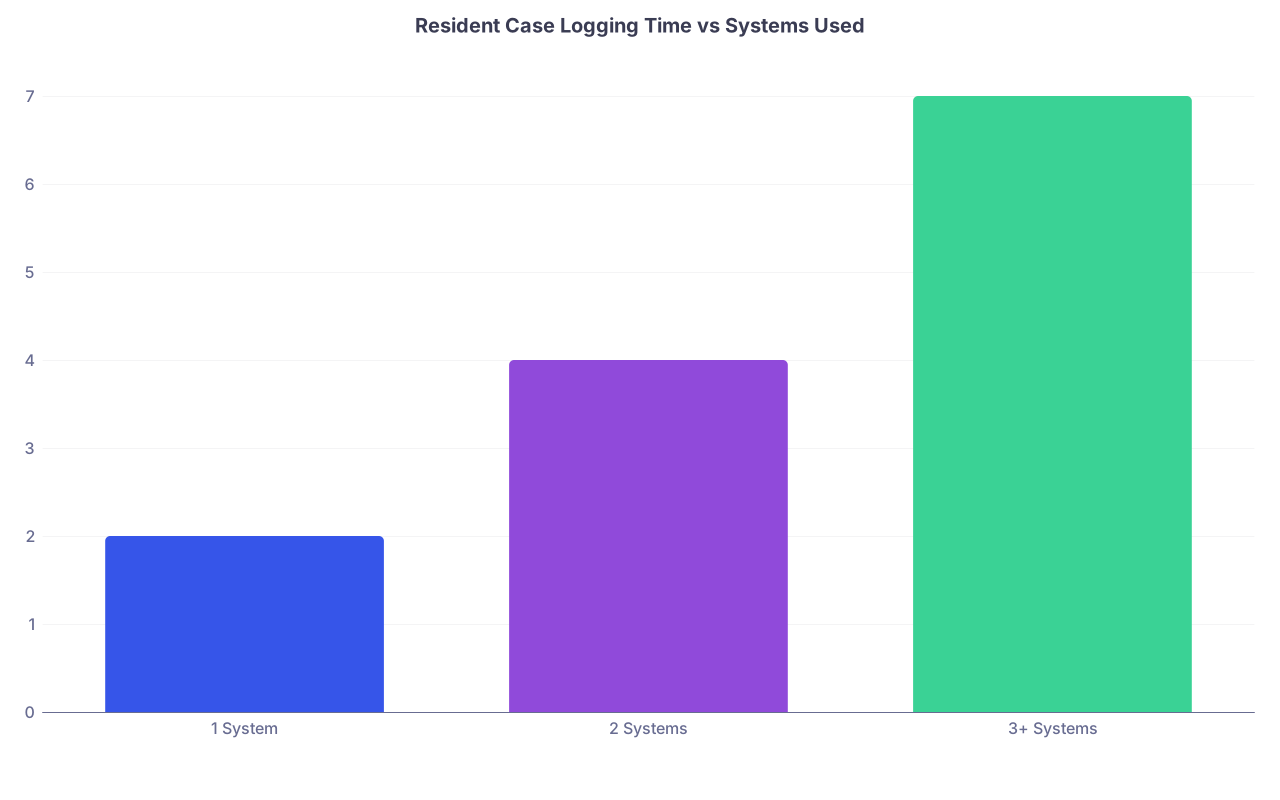
| Category | Value |
|---|---|
| 1 System | 2 |
| 2 Systems | 4 |
| 3+ Systems | 7 |
(That’s hours per month people waste, roughly, once you get past two systems.)
Step 7: Handle Two-Hospital Specific Headaches
You’re not just logging more. You’re dealing with different cultures, EMRs, and expectations.
Situation: Different definitions of “primary” vs “assistant”
Hospital A: “If you did most of the case, log as surgeon.”
Hospital B: “Only the fellow logs as primary; residents are assistant.”
You cannot fix their politics. What you can do:
- In ACGME, log according to ACGME definitions and your PD’s guidance, not some random away-site rule.
- In any local or away-site log, follow their rules there.
Your CaseID ties the two together. If there’s ever a question, you can show:
“Yes, that carotid I did at Hospital B on 2025-11-03 is CaseID 20251103-B-V1-02. I logged that as surgeon in ACGME because I ran the case, but as assistant in Hospital B’s database because that’s their policy.”
Honest. Defensible. Documented.
Situation: You rotate through Hospital B only once, and they want “their own” logging system
Do not reinvent your workflow for a 4–8 week block.
- Keep your usual master logging routine
- Once a week, sit down and push the relevant cases into Hospital B’s system, using a filter:
- Hospital = B
- Date = within that week
- Use your CaseID, so no case gets logged twice there by mistake.
If their system is awful (paper forms, clunky web app), batch your entries. Once a week. Done.
Step 8: Audit Yourself Before Someone Else Does
If you’re splitting time between hospitals, the risk isn’t just “a few missing appendectomies.” It’s a structural mismatch: Hospital A’s OR reports say you did 150 major cases this year and your ACGME log has 107.
Once or twice a year—more if you’re senior and numbers matter—you should reconcile.
Simple self-audit plan (half a day on a weekend)
- Export last 6–12 months from ACGME.
- Export whatever you can from Hospital A (OR logs by provider).
- If Hospital B won’t give you reports, at least pull your schedule and any OR assignment logs they do allow.
- Throw both into Excel or Google Sheets.
- Standardize date formats and hospital labels.
- Create a pivot table or simple count of cases per month per hospital.
You’re not aiming for perfect one-to-one reconciliation with OR billing (you’ll never get there). You just want:
- No obvious gaps (e.g., you remember doing 2–3 cases nearly every day at Hospital B for a month, but you logged 8 total)
- No absurd mismatches (logged 40 cases at Hospital B, but their OR system shows you assigned to 70+)
If you catch issues early as a PGY-2 or PGY-3, you can course-correct. If you catch it in March of your chief year, you’re in trouble.
Step 9: What To Do If You Realize You’ve Already Screwed This Up
Let’s say you’re a PGY-4, you’ve floated between two hospitals for years, and now your total case numbers look suspiciously low.
Do not panic quietly. Fix it loudly and methodically.
First: Tell someone
Email your PD and coordinator:
“I’ve realized my case logging between Hospital A and Hospital B has likely been incomplete or inconsistent. I’d like to review and reconcile now so that my numbers are accurate well before graduation. Can we meet to discuss the best way to do this with available OR data?”
You’ll feel exposed. Do it anyway. Directors would rather hear this now than at CCC or RBC review.
Second: Mine the data
Ask for:
- OR assignment reports by your name for those rotations
- Any rotation-specific spreadsheets that attendings kept
- Old schedules (to remind you of dates/blocks)
Use that to reconstruct at least:
- Approximate counts per month and type (e.g., you know you did about 2–3 hernias per week that block)
- Any big index cases you remember clearly
Be honest. Don’t inflate just because no one can check every detail. Estimating is fine if you’re transparent with your PD and stay within what’s reasonable for your rotation volume.
Third: Fix your system going forward
The moment you realize it’s messy, that’s the day you implement:
- CaseID
- Daily or twice daily capture
- One source of truth
From that day forward, you’re solid. Past you was sloppy; present you does not have to be.
Step 10: Protect Future You (Fellowship, Jobs, Credentials)
Fast forward. You’re finishing residency. You’re applying for fellowship or a hospital credentialing committee is asking for case logs by category, date range, and hospital.
If you’ve done the work above, future you will be very grateful.
You’ll be able to:
- Filter by hospital to show “Cases at Hospital B during trauma rotation 2025”
- Count index cases precisely (e.g., “25 carotids, 80 lap choles, 15 Whipples as surgeon/assistant split out properly”)
- Port data into whatever insane credentialing form your new hospital uses without reinventing the wheel.

| Step | Description |
|---|---|
| Step 1 | Finish OR Case |
| Step 2 | Create CaseID |
| Step 3 | Capture in Scratchpad |
| Step 4 | Enter into Master Log |
| Step 5 | Update ACGME Log |
| Step 6 | Copy to Hospital A System |
| Step 7 | Copy to Hospital B System |
| Step 8 | End of Day? |
Also, if you ever need to prove experience—say you’re joining a group that wants to see specific case counts—you won’t be digging through old, inconsistent exports from two different hospitals. You’ll pull one clean file, filtered by CaseID and hospital.
Specific Tools and Formats That Actually Work
If you want an almost plug-and-play structure, steal this and modify to suit:
Your personal “Master Cases” spreadsheet columns
- CaseID
- Date (YYYY-MM-DD)
- Hospital (A/B)
- Service (Gen, Vasc, Trauma, OB, etc.)
- Procedure (free text short)
- Role (S/R/A)
- Attending initials
- ACGME category / CPT
- Logged in ACGME? (Y/N)
- Logged in Hosp A system? (Y/N)
- Logged in Hosp B system? (Y/N)
- Notes (complications, unusual aspects, etc.)
Keep this in a secure, backed-up location (encrypted if on personal device, compliant with your institution’s rules—but remember, you’re not putting PHI here).
Minimal viable daily workflow
Morning: nothing.
After last case at Hospital A: 1–2 minutes to jot new cases in scratchpad if you haven’t already.
After last case at Hospital B or at night: transfer scratchpad → master spreadsheet → ACGME (or at least do spreadsheet daily, ACGME every 2–3 days).
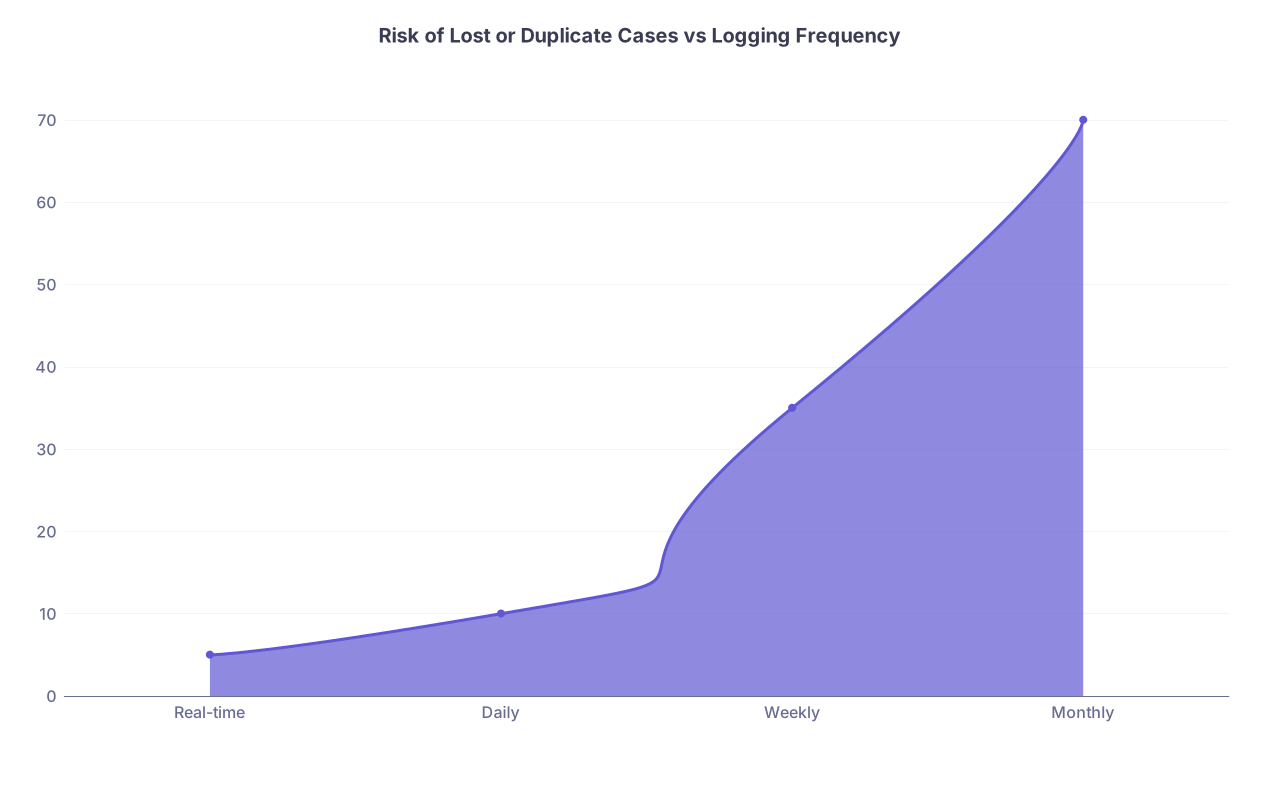
| Category | Value |
|---|---|
| Real-time | 5 |
| Daily | 10 |
| Weekly | 35 |
| Monthly | 70 |
(Lower is better; monthly reconstruction is where chaos lives.)
A Word About Culture and Pushback
Sometimes you’ll have an attending or admin person say, “Why do you need your own system? Just use ours.” They’re not the ones getting boarded or credentialed later.
Your stance should be calm and firm:
- “I keep a master log that ties all my systems together. I’m happy to fill yours out, but I won’t rely on it as my only source.”
You don’t need permission to be competent.
Final Check: If You’re Between Two Hospitals Right Now
If you’re actively splitting time between two sites, here’s what I’d do tonight:
- List all current logging systems and mark which are truly required.
- Choose your master (ACGME or your own spreadsheet). Commit.
- Create a CaseID format and use it starting with tomorrow’s first case.
- Set up a simple scratchpad on your phone or a small notebook.
- Decide: are you a “right after the case” logger or a “twice daily” logger? Pick one.
- Schedule a 30–60 minute block this weekend to clean up the last 2 weeks of cases into your new system.
That is enough to stop the bleeding.
Key Takeaways
- You need one master source of truth for your cases, tied together with a simple, unique CaseID that you control.
- Logging must be small and daily, using a scratchpad plus a short transfer routine, or you will absolutely lose or duplicate cases across hospitals.
- Do periodic self-audits against OR data and fix problems early; your future self (and your board application) will thank you.