
You have just started your first US clinical observership. It is 7:15 AM. The resident says, “Can you pull up Epic and check this patient’s last creatinine and home meds?”
You sit at the computer. Epic login screen. Your brain: completely blank. You used paper charts and a basic local EMR back home.
Now you are realizing something uncomfortable: EMR skills can make you look competent. Or clueless. Very quickly.
Let me walk you through what actually matters for IMGs in USCE on Epic and Cerner—what attendings and residents quietly judge, what PDs read between the lines in your letters, and what you should practice long before you start residency.
Why EMR Skills Matter for IMGs in USCE
US programs assume one thing: you can function in a US electronic environment. Or at least adapt to it fast. They are not looking for you to be an Epic super-user as an observer. But they are absolutely watching how you:
- Move around the chart without getting lost
- Find data without asking every 30 seconds
- Communicate clearly about what you saw in the EMR
- Respect privacy and HIPAA rules without being weird or scared
I have watched IMGs sink strong rotations because they were constantly “fighting the computer.” Slow chart navigation, confusion about orders, panic when asked to “trend labs” or “check what the ED did.” That stuff looks like poor clinical reasoning, even if the real problem is just EMR inexperience.
On the flip side, I have seen IMGs get “phenomenal” comments in letters because they:
- Pulled up the right chart in seconds
- Knew where to click to get vitals, meds, labs, and imaging
- Could answer simple EMR questions during prerounds without drama
- Helped slower students/residents find things
So the bar for USCE is not “write perfect Epic notes.” The bar is: you do not slow the team down, you do not break privacy rules, and you look like someone who will learn quickly once you have ordering privileges.
Core EMR Mindset for IMGs
Before we get specific with Epic vs Cerner, get this straight:
- Your goal in USCE is observational + data-retrieval, not independent ordering.
- Speed matters, but accuracy and safety matter more.
- You are always being evaluated on how you use the EMR, even if nobody says so.
Think of EMR skills in three tiers:
- Tier 1: Basic navigation (must have in week 1)
- Tier 2: Efficient information retrieval (must have by week 2–3)
- Tier 3: Documentation / templates / order review (big plus but not always required as a visiting IMG)
We will walk through both Epic and Cerner with that structure.
Epic for IMGs: What You Actually Need To Know
Epic is the 800-pound gorilla in US hospitals. If you are going into internal medicine, EM, peds, or most specialties, you will probably use Epic somewhere.
1. Getting Your Bearings in Epic
Day 1 on Epic, your main job: do not get lost on the main screen.
Key concepts:
- Patient Lists: Where you see “your” patients
- Storyboard / Sidebar: Demographics, allergies, code status, isolation quickly visible
- Tabs: “Summary,” “Chart Review,” “Results,” “Notes,” “Medications,” “Orders,” “Imaging”
For USCE, you should be able to:
- Open the right patient from the team list without clicking around aimlessly
- Quickly confirm: name, MRN, age, sex, location (room), attending
- See if they are inpatient, observation, ED, or outpatient
If you cannot confidently open and verify a patient within 10–15 seconds, you look inexperienced. Fix that first.
2. Where Everything Lives in Epic
Let me break it down the way interns quietly teach each other.
Vitals
- Often under “Flowsheets” or a Vitals tab on the left
- Many systems also show last vitals on the patient “Summary” page
- Practice: find temp trend for last 72 hours; find highest HR in 24 hours
Labs
- “Results” tab or “Chart Review” → “Labs”
- Display options:
- By type (chemistry, CBC, coag, etc.)
- By date/time sequence
- Learn to:
- Click a lab and see trend (e.g., creatinine over last week)
- Filter by “last 24 hours” or “all results from this encounter”
Medications
- “Medications” or “MAR” (Medication Administration Record)
- Two views:
- Active in-hospital meds
- Home meds / outpatient meds
- Learn to find:
- Home medications list (often in “Med Rec,” “Prior to Admission Meds,” or “Outpatient Meds”)
- Latest administration time of critical meds (insulin, anticoagulation, antibiotics)
Notes
- “Notes” tab or “Chart Review” → “Notes”
- Learn to:
- Filter by provider type (ED, consultant, primary team, discharge summaries)
- Find the ED note, most recent progress note, consult note, and discharge summary
- Identify H&P vs daily progress note vs procedure note quickly
Imaging & Procedures
- “Imaging” / “Radiology” section or in “Chart Review” → “Imaging”
- Learn to:
- Open reports quickly
- Recognize preliminary vs final report
- Check if the study was actually done vs just ordered
Orders
- “Orders” tab
- Even if you cannot place orders as an observer, you must see:
- What is ordered now (labs, imaging, meds, nursing orders)
- Status: pending, in process, completed
3. Efficient Workflows in Epic During USCE
Your biggest day-to-day job in USCE: preround and present. EMR is central.
Here is a very standard Epic prerounding sequence you should practice until it is automatic:
- Open patient from list
- Check overnight events quickly
- Review nursing notes, overnight vitals, and any overnight orders
- Scroll through new labs and imaging since yesterday
- Vitals
- Scan 24-hour trend: highest temp, HR, BP patterns, O2 requirements
- Labs
- Compare today vs yesterday: WBC, Hgb, Plt, Na, K, Cl, CO₂, BUN, Cr, Glucose
- Check any key labs specific to case (troponins, LFTs, CRP, cultures)
- Intake/Output
- Found typically in flowsheets or I/O tab
- Current meds
- Especially antibiotics, anticoagulation, vasopressors, insulin, pain meds
Now imagine attending asks: “What are his last three creatinine values and trend in sodium since admission?”
You should be able to answer after 5–10 seconds of clicking, not 2 minutes of confusion.
4. Epic: Common IMG Weak Points (And Fixes)
Problem: Losing track of where you are
- You open labs, then accidentally close the patient, then open a different chart
Fix: Always glance at name + MRN before speaking about data. Verbalize to yourself: “This is Mr. Smith, 54-year-old male.” That habit prevents catastrophic confusion.
- You open labs, then accidentally close the patient, then open a different chart
Problem: Not using filters/search
- Scrolling through 200 notes instead of filtering to “H&P” or “Consult”
Fix: Use filters aggressively. Search within notes for keywords (e.g., “Assessment”, “Plan”, “Code Status”).
- Scrolling through 200 notes instead of filtering to “H&P” or “Consult”
Problem: Slow chart review
- You click randomly, not systematically
Fix: Use a fixed pattern: Summary → Vitals → Labs → Imaging → Notes → Meds. Same order every time. Muscle memory beats confusion.
- You click randomly, not systematically
Problem: Panic when asked to “trend” something
- Staring at numbers without comparing dates
Fix: Learn the “graph” or “trend” function for labs. In Epic, clicking the lab name often opens a graph over time.
- Staring at numbers without comparing dates
5. Documentation in Epic (for IMGs)
In some USCE setups (subinternships, externships), you are allowed to write notes that are “for teaching” or “to be co-signed.” In others, you are not allowed to document at all.
If you can write in Epic:
- Ask for a template or “smart phrases/smart texts” used by residents
- Stick to standard structure: HPI, PMH, Meds, Allergies, Physical, Labs, Assessment, Plan
- Do not invent your own exotic format
- Be concise—Epic notes are already bloated; adding long narratives is not impressive
If you cannot write in Epic:
- You can still create your own SOAP or problem list in a notebook or Word document based on EMR data
- Present this verbally; mention that you used the EMR to confirm meds, labs, imaging
Cerner for IMGs: What Changes and What Does Not
Cerner (now Oracle Health) feels different visually from Epic, but the core logic is almost identical: patient lists, results, orders, notes, meds. The biggest trap: IMGs convince themselves Cerner is “totally different” and freeze. It is not.
1. Basic Layout in Cerner
Common elements you will see:
- Patient List / Organizer: Similar to Epic’s patient list
- PowerChart: Where you actually open a patient chart
- Tabs / Components: Results, Orders, MAR, Documents, I/O, Flowsheets
The mental map is the same:
- One area to pick the patient
- One area to see vitals, labs, imaging
- One area to read notes and discharge summaries
- One area to look at meds and orders
The first hour you see Cerner at a new hospital, you should ask explicitly:
- “Which tab do you use to see vitals trend?”
- “Where do you check home meds vs inpatient meds?”
- “Where are consult notes usually documented?”
Ten minutes of guided orientation will save you many hours of silent floundering.
2. Key Cerner Tasks You Must Master
Again, think in specific tasks, not in vague “know the EMR.”
You should be able to:
- Open the correct patient from the team list reliably
- Pull up:
- Last 24 hours of vitals
- Last 3 sets of basic labs (CBC, BMP)
- All current meds, with distinction between scheduled vs PRN
- Most recent imaging reports (CT, CXR, US, MRI)
- Find:
- ED provider note
- Admission H&P
- Latest progress note from primary team
- Latest consultant note (e.g., cardiology, nephro)
- Discharge summary if they have been admitted before
Exactly the same functional goals as in Epic. Different clicks, same logic.
3. Cerner Weak Points for IMGs
Patterns I have seen over and over:
Confusing “Orders” vs “Results”
- IMGs keep looking in the orders tab expecting the final report
Fix: Orders = what was requested. Results / Radiology / Pathology = what came back.
- IMGs keep looking in the orders tab expecting the final report
Cannot find home medications
- They only see active inpatient meds
Fix: Ask how that hospital documents “Medication Reconciliation” or “Prior to Admission Meds.” Often found in a dedicated reconciliation section or in initial nursing documents.
- They only see active inpatient meds
Scrolling endlessly
- Going through big, unfiltered lists of labs or notes
Fix: Use date filters and category filters (only CBC, only chemistries, only consult notes, etc.).
- Going through big, unfiltered lists of labs or notes
4. Epic vs Cerner: Practical Comparison for IMGs
| Feature/Task | Epic (Typical) | Cerner (Typical) |
|---|---|---|
| Patient list | On login/home screen | Organizer / tracking list |
| Labs | Results / Chart Review | Results / Labs component |
| Vitals | Summary / Flowsheets | Flowsheets / Vitals tab |
| Medications | Meds / MAR | MAR / Meds tab |
| Notes / Documents | Notes / Chart Review | Documents / Notes |
| Orders vs Results | Clear separation | Often more confusing |
Do not obsess over cosmetic differences. Focus on function: where to click to answer a specific clinical question.
HIPAA, Privacy, and Not Getting Yourself Banned
Here is the part IMGs underestimate badly.
US hospitals are paranoid about privacy. Rightly so. One HIPAA complaint about “that visiting foreign student scrolling random charts” can kill not just your rotation but future opportunities at that institution.
Rules you follow strictly:
- Only open charts of patients you are directly involved with, assigned by your team.
- Never look up your own record, a friend, a celebrity, or a random interesting case.
- Never write down full names + MRNs in your personal notes. Use bed numbers or initials only if necessary and allowed.
- Never screenshot EMR content. Never. Not even “for studying later.”
If you need case details for your own learning:
- Ask if the institution has de-identified case export or teaching files
- Or write a de-identified summary in your own words, with no dates, MRNs, or specifics that can identify the patient
One HIPAA slip is far more damaging to your US chances than a weak letter. People forgive inexperience. They do not forgive privacy violations.
How to Prepare for EMRs Before You Even Start USCE
You cannot access Epic or Cerner from home to “practice.” That is fine. You can still train your brain for EMR-style thinking.
1. Learn the Common English Terms
Programs expect you to understand basic workflow words:
- “MAR” – Medication Administration Record
- “Flowsheets” – grid of repeated measurements (vitals, I/Os, neuro checks)
- “Order set” – bundle of commonly ordered items for a condition (e.g., CHF, sepsis)
- “Med rec” – medication reconciliation process
If you show up asking, “What is flowsheet?” in week 2, that is a red flag.
2. Use EMR Simulators or Training Videos
Several Epic and Cerner training videos exist on YouTube and institutional public demos. Some are generic, some from nursing schools, some from EHR training companies.
Your goal:
- Watch enough that the conceptual layout feels familiar
- Pause and ask yourself: “If my resident asked for X, where would I click?”
Focus on:
- Opening and closing charts
- Switching between patients
- Finding labs, meds, vitals, notes, imaging
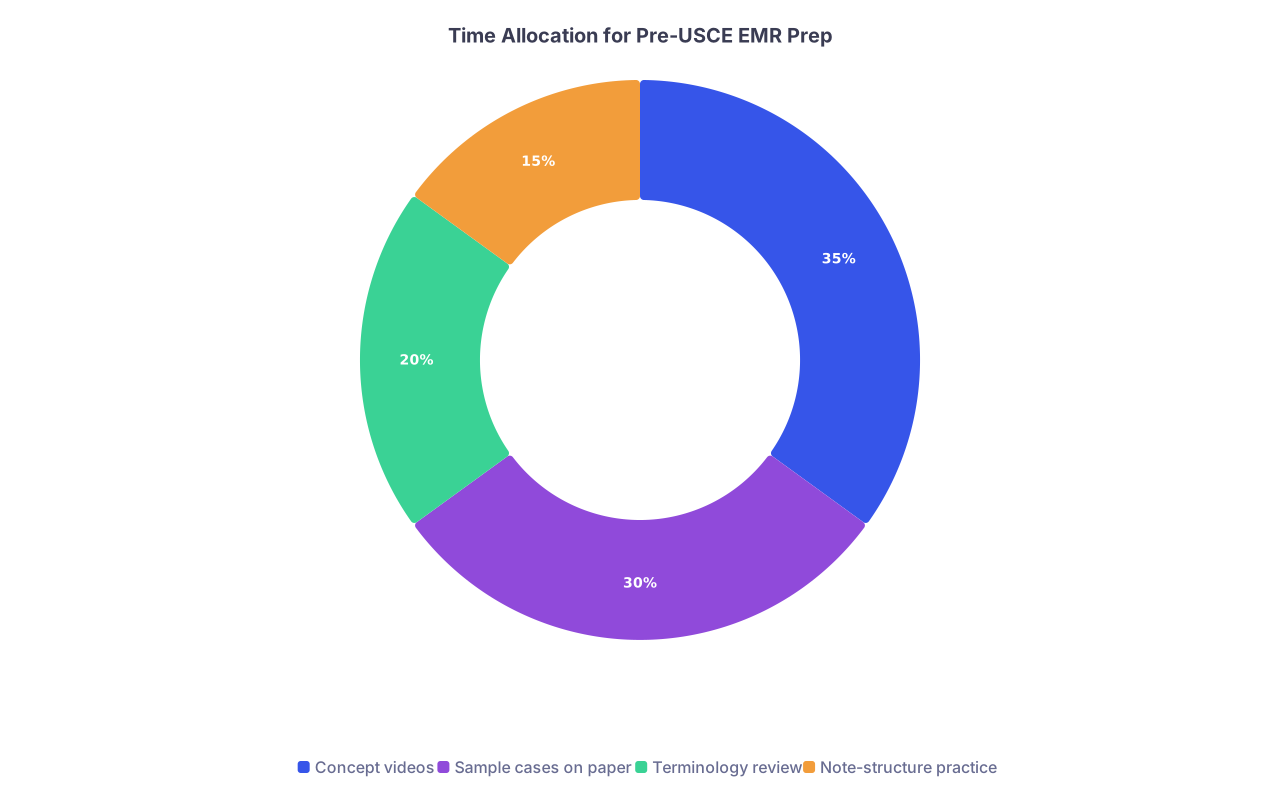
| Category | Value |
|---|---|
| Concept videos | 35 |
| Sample cases on paper | 30 |
| Terminology review | 20 |
| Note-structure practice | 15 |
3. Practice with Paper “Fake Charts”
Take a notebook or Word file. Create mock “patient charts”:
- Tab 1: “Progress Notes”
- Tab 2: “Labs”
- Tab 3: “Imaging”
- Tab 4: “Medications”
- Tab 5: “Vitals / I&O”
Then practice answering:
- “What is this patient’s creatinine trend?”
- “When was the last dose of heparin given?”
- “What did the cardiology consult say?”
You are training your brain to think in terms of structured data retrieval. That transfers directly to EMR use.
Making EMR Usage Work For You in Letters and Interviews
Here is where this all feeds directly into your residency application.
Attendings writing your LORs rarely say, “This student is highly skilled in Epic.” But they absolutely say things like:
- “Quickly adapted to our electronic medical record system.”
- “Independently reviewed notes, labs, and imaging before rounds.”
- “Functioned at the level of an intern in terms of daily patient data review.”
Those comments translate to “low training cost” in PD language.
In interviews, you can weave EMR competence into your answers without sounding like a scribe:
- “During my USCE at [Hospital], I became comfortable using Epic to review patient data, including trending labs and reviewing prior imaging and consult notes.”
- “I do not have independent ordering privileges yet, but I have experience reviewing orders, verifying MARs, and checking for medication changes through Epic/Cerner.”
Keep it grounded. Do not overclaim. But make clear: you understand this environment, you are not scared of it, and you take data reliability seriously.
Concrete “Do This, Not That” for EMR Use in USCE
Let me be blunt and specific.
Do this:
- On day 1, politely ask: “Can someone spend 10 minutes showing me your typical workflow in Epic/Cerner for prerounding?”
- Build your own consistent click-path for chart review. Same order, every patient.
- Before presentations, double-check names, MRNs, room numbers, and key values.
- When you cannot find something, ask targeted questions: “Where in this system do you usually see the prior to admission medications?”
Not that:
- Do not randomly explore other patients “just to learn.”
- Do not pretend you know how to find something and then flail for 5 minutes in front of an attending.
- Do not copy-paste EMR text into your own notes with identifiers still attached.
- Do not say, “Our EMR in my home country is totally different, so I am struggling.” That sounds like an excuse.
Putting It All Together: A Simple EMR Routine for IMGs
Here is a daily routine that works in both Epic and Cerner.
For each patient, before rounds:
- Open the correct patient, confirm name, age, MRN, bed.
- Vitals: trend last 24 hours; note Tmax, HR, BP pattern, O₂ needs.
- Labs: compare today vs yesterday; note key abnormal and trending values.
- Imaging: check for any new results; read impression section carefully.
- Medications: list major active meds (antibiotics, anticoagulation, insulin, steroids, vasopressors, antiarrhythmics).
- I/O: especially in heart failure, AKI, sepsis, post-op.
- Notes: skim last progress note and latest consult note.
Now you walk into rounds with concrete data, not guesses. You will sound like someone who has already lived inside a US EMR, even if this is your first month.
To visualize that workflow:

| Step | Description |
|---|---|
| Step 1 | Open Patient Chart |
| Step 2 | Confirm ID & Location |
| Step 3 | Review Vitals Trend |
| Step 4 | Check Labs & Trends |
| Step 5 | Review Imaging Reports |
| Step 6 | Review Medications & MAR |
| Step 7 | Check I/O & Flowsheets |
| Step 8 | Skim Latest Notes |
| Step 9 | Prepare Presentation |
FAQ (Exactly 4 Questions)
1. Do I need prior Epic or Cerner experience to match into a US residency?
No, you do not need formal prior Epic or Cerner experience to match, and programs know most international schools do not use these systems. What you do need is demonstrated ability to adapt quickly to a US-style EMR environment. That is usually inferred from your USCE performance and letters: comments about your ability to review charts independently, use the EMR safely, and not slow the team down. You can make up for zero prior exposure by being very intentional and fast to learn once you arrive.
2. As an observer/extern, will I be allowed to place orders or write notes in Epic/Cerner?
Usually not as an observer; sometimes yes as an extern or subintern. Observers typically have “read-only” or highly restricted access. Externs, especially in structured programs, may be allowed to enter notes and even “pend” orders that residents/attendings sign. Regardless, your main evaluated skill is chart review: finding vitals, labs, imaging, meds, and prior documentation. If you do get documentation privileges, treat them as a privilege: short, structured, accurate notes with clear attribution to supervising physicians.
3. How long does it take to become comfortable with Epic or Cerner during USCE?
If you are focused and ask good questions, you can be basically functional within 3–5 days and reasonably efficient within 2–3 weeks. The mistake IMGs make is trying to “figure it out alone” silently. Spend the first two days asking residents to show you their click-path: how they preround, where they find each data type. Then repeat that pattern yourself for every patient. That repetition accelerates your comfort level dramatically.
4. Can I list Epic or Cerner on my CV or ERAS application if I only used them in observerships?
Yes, you can list “Epic (basic user)” or “Cerner (basic user)” under technical skills if you had legitimate, structured exposure where you used them for clinical data review. Do not overstate your role—do not imply you were independently entering orders if you were not. In interviews or personal statements, keep it specific and honest: “Used Epic daily during US clinical experience to review labs, imaging, consult notes, and MARs for assigned patients.” That level of detail sounds credible and tells programs you understand what the work actually looks like.
Key takeaways:
- EMR competence during USCE is mostly about fast, reliable data retrieval in Epic or Cerner, not fancy order entry.
- Build a consistent, repeatable workflow for chart review—vitals, labs, imaging, meds, I/O, notes—so you never look lost.
- Protect privacy obsessively, ask targeted questions early, and let your EMR skills quietly prove that you are ready to function in a US residency.