
The fastest way to lose credibility at a new hospital is to show up with sloppy, incomplete CME records.
If you’re changing hospitals this year, your CME trail is either going to make your onboarding painless—or turn it into a slow, bureaucratic mess. There’s no middle ground.
Let me walk you through exactly what to do so your CME transfers cleanly, matches your new hospital’s requirements, and does not come back to bite you at recredentialing time.
Step 1: Get Clear on Who Actually Cares About Your CME
People assume “CME is CME.” Wrong. Different entities care about different pieces.
Here’s who’s watching your CME when you change hospitals:
- Your new hospital’s medical staff office / credentialing team
- Your ** malpractice carrier** (sometimes)
- Your state medical board(s)
- Your certifying board (ABIM, ABEM, ABS, etc.)
- Occasionally your employer/health system (for contract or bonus reasons)
They don’t all want the same thing. Before you start emailing random certificates, you need a short map of who requires what.
| Stakeholder | What They Usually Want |
|---|---|
| New Hospital | Total hours + recent period detail |
| State Medical Board | Hours by category for license |
| Certifying Board | Specialty-specific, multi-year |
| Malpractice Carrier | Proof of “active CME participation” |
| Employer/Group | Contractual minimums, sometimes |
If you’re smart, you’ll build your CME package once in a way that satisfies all of them, then reuse it.
Action for you today:
Email or call the new hospital’s medical staff office and ask one specific question:
“For credentialing, what format of CME documentation do you prefer? A consolidated transcript from my main CME provider, individual certificates, or both?”
Get a real answer, not a vague “whatever you have.” That answer will dictate how you organize the rest.
Step 2: Download Everything Before You Lose Access
You’d be shocked how many physicians leave a hospital or group and then discover half their CME proof was tied to an internal LMS (learning management system) they no longer can log into.
Do not wait until after you leave.
You need to pull:
CME transcripts from major providers:
- ACCME-accredited platforms (e.g., CMECalifornia, Pri-Med, audio digest platforms)
- Specialty society portals (ACP, ACEP, ACOG, ACR, etc.)
- Board portals (some track CME/MOC automatically)
Certificates and records from:
- Old hospital mandatory CME modules (EMR training, infection control, safety)
- Quality and patient safety courses
- Risk management courses (often required by insurers or states)
- Live conferences and workshops
Attendance verification for:
- Grand rounds
- Morbidity and mortality (if they grant CME)
- Journal clubs with CME credit
Download everything as PDFs. Not screenshots. Not emails buried in your inbox.
Create a local folder structure that doesn’t suck:
- CME/
- 2023/
- 2024/
- By Provider/
- Conference Certificates/
- Safety & Risk Management/
You do this once; future you will thank you every time you change jobs or go through recredentialing.
Step 3: Build a Master CME Spreadsheet That Actually Works
You need one source of truth. Not twenty.
Set up a simple spreadsheet (Excel, Google Sheets, whatever) with these columns:
- Date completed
- Activity title
- Provider / organization
- Accreditation type (AMA PRA Category 1, 2, etc.)
- Number of credits
- Topic category (clinical, ethics, risk management, opioid prescribing, patient safety, etc.)
- Format (online, live, enduring material, grand rounds)
- Location (for live events)
- Proof file name / link
Once this is built, it becomes your personal CME dashboard.
Now, go through your certificates and transcripts and log them. It’s tedious the first time. After that, you just add as you go.
You’re doing this because different people will later say things like:
- “We need proof of 25 hours in the last 12 months.”
- “State board wants 2 hours of opioid prescribing and 1 hour of ethics.”
- “Board requires X hours of MOC Part II this cycle.”
When you have a clean spreadsheet, filling these requests takes minutes instead of days.
Step 4: Align With Your New Hospital’s CME Expectations
Here’s where people get burned: they assume if they met CME requirements at Hospital A, they’re automatically fine at Hospital B. Sometimes true. Sometimes dead wrong.
Common differences between hospitals:
- Time frame they care about (last 12 months vs. last 24 vs. full board cycle)
- Specific mandatory topics (e.g., sepsis, EMTALA, domestic violence, suicide prevention)
- Format requirements (must include some live CME, not just online)
You want to know this before your credentialing packet is reviewed.
Ask the new hospital:
- “Do you have a minimum CME hour requirement for credentialing or reappointment beyond the state/license requirement?”
- “Are there mandatory topics or modules you expect me to have done before start, or can those be done during orientation?”
- “Do you require any in-person or live CME or is online fine?”
Then compare their answers to what’s in your spreadsheet. That comparison will tell you whether you’re already aligned or if you need to knock out a few targeted modules quickly.
Step 5: Make Sure Your State License and Hospital Requirements Match Reality
This is where a lot of confusion happens. Your license has one set of CME requirements. Your hospital might have another. Your board might have a third.
You don’t want to guess. You want to see the numbers side by side.
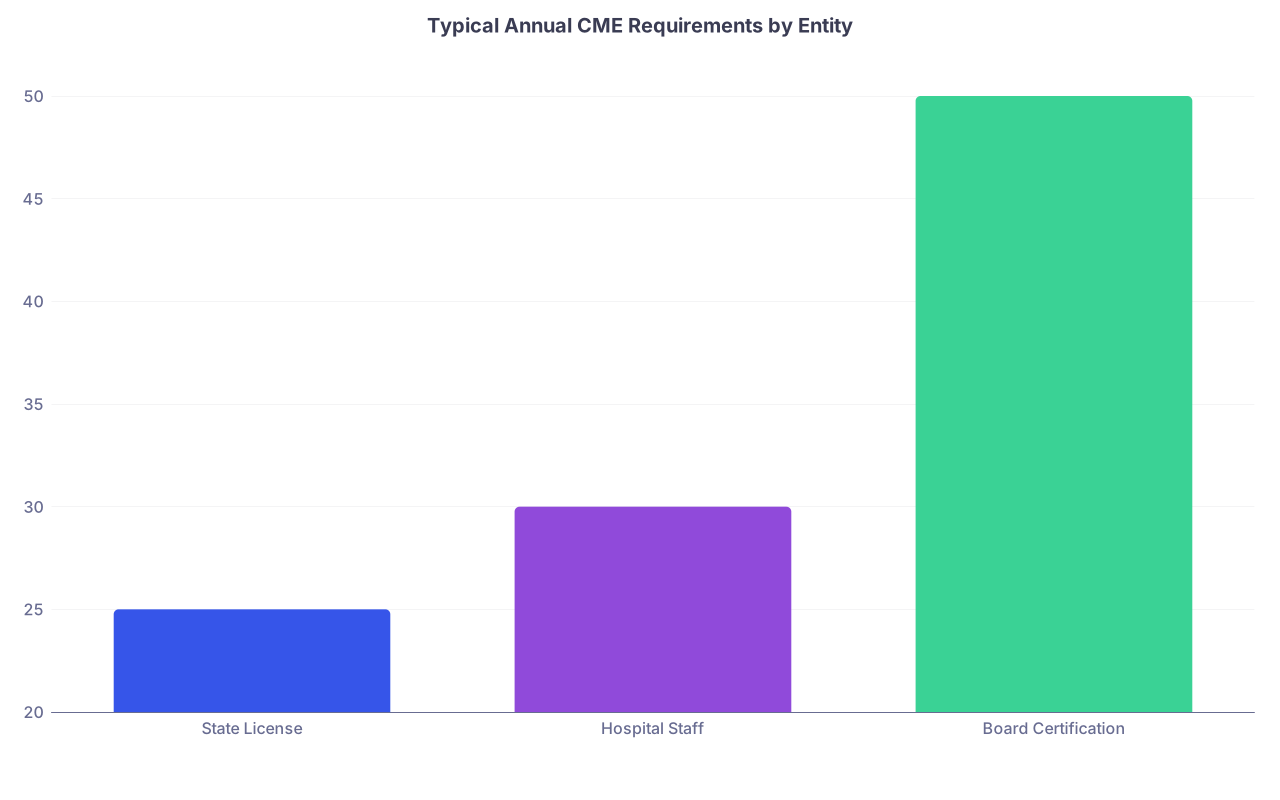
| Category | Value |
|---|---|
| State License | 25 |
| Hospital Staff | 30 |
| Board Certification | 50 |
(Those numbers are illustrative, not universal. Check your specific entities.)
Your checklist:
Look up your primary state medical board CME rules:
- Total hours per renewal period
- Required topics (opioids, ethics, pain management, cultural competency, etc.)
- Any special requirements for telemedicine, controlled substances, etc.
If you have multiple state licenses, do this for each. You have to meet the strictest set that actually applies to you.
Verify your board certification CME/MOC requirements:
- Total hours per cycle
- Required types (self-assessment, performance improvement, etc.)
- Reporting deadlines
Confirm if your new hospital:
- Has its own minimum hours
- Expects proof during initial credentialing or only at reappointment
Align all three. If your last couple of years have been light on certain topics (opioids, risk management, patient safety), now’s the time to fix that gap—before someone questions it.
Step 6: Transfer CME Records Intelligently, Not Haphazardly
Do not just zip every CME certificate you have and dump it in the credentialing portal. That screams disorganized.
You want to give the new hospital exactly what they need plus a little extra structure that makes their life easier.
Here’s what I’ve seen work extremely well:
Create a concise CME summary document (1–2 pages max) that includes:
- Your name, specialty, license number(s)
- CME total hours in the last 12 and 24 months
- Breakdown by category if relevant (e.g., clinical vs. risk vs. ethics)
- A note that full detail and certificates are available on request
Attach your master spreadsheet (filtered to just the last credentialing cycle or last 2 years, depending on what they want).
Provide supporting PDFs organized in a single folder, named cleanly:
01_CME_SummaryLastname.pdf02_CME_SpreadsheetLastname.xlsxCertificates_2023_Lastname.pdfCertificates_2024_Lastname.pdf
Upload or send them according to their instructions. Don’t improvise your own method if they have a portal.
Step 7: Watch Out for Hospital-Specific CME That Won’t Transfer
Some CME is portable and universal. Some is basically “house training” for a specific institution and won’t count for much elsewhere.
Common examples of CME that usually does NOT travel well:
- EMR-specific trainings for a particular build at the old hospital
- Facility-specific safety or fire training tied to one building or system
- Local quality initiatives that aren’t accredited for broad CME
The new hospital may consider it irrelevant, even if an old LMS labeled it as “CME.” Expect to repeat:
- EMR onboarding
- Local policies on restraints, consent, seclusion
- Facility-specific emergency protocols
That’s normal. Don’t fight that battle. Your goal is to show a solid general CME pattern and then accept that some hyper-local stuff just resets when you change systems.
Step 8: Dealing With Gaps or Weak CME Years
Let’s be honest. Some of you are reading this because you’re switching hospitals and your CME the last year or two has been…thin.
You’re not doomed. But you should be proactive.
Scenario A: You’re short on total hours
– Identify how many hours you’re missing to comfortably meet:
- State license requirements
- New hospital expectations
Then immediately knock out high-yield, accredited online CME that:
- Is AMA PRA Category 1
- Offers downloadable certificates instantly
- Covers topics your boards and states like (chronic disease, quality, opioids, risk management)
Scenario B: You have hours, but all in one narrow area
If everything you’ve done is COVID or EMR-related, add variety:
- A few ethics or professionalism modules
- A risk management course from your insurer or a major system
- Specialty-specific updates from your professional society
Scenario C: You cannot prove what you did
This is the real problem. If you know you attended a live course but cannot locate proof, contact the provider. Most legitimate CME providers can resend certificates if you give them:
- Your name
- Email used
- Approximate dates
- Course title or location
If they truly cannot, that activity might be lost. Do not “guess” credits on a spreadsheet without backup. That’s how you end up in trouble during an audit.
Step 9: Sync Your CME With Your Board and Licenses Now, Not Later
Your new hospital doesn’t just care about raw CME—it cares that you’re:
- Licensed
- In good standing
- Board-certified or board-eligible, as advertised
Boards and state licenses are increasingly syncing directly with CME providers and larger systems. You want all that data aligned before someone cross-checks it.

| Step | Description |
|---|---|
| Step 1 | Collect CME Docs |
| Step 2 | Update Master Spreadsheet |
| Step 3 | Check State License Requirements |
| Step 4 | Check Board Requirements |
| Step 5 | Identify Gaps |
| Step 6 | Complete Missing CME |
| Step 7 | Prepare Summary for New Hospital |
| Step 8 | Submit with Credentialing Packet |
Practical steps:
Log into your board portal. Verify:
- They’re showing the right number of CME/MOC points
- Your cycle dates match what your hospital will see
- Any “overdue” flags are resolved
Log into your state license portals:
- Confirm next renewal date
- Check if they require reporting CME at renewal or ongoing attestation
If necessary, manually enter CME into board systems that don’t auto-pull data. Do it now while your documentation is all open, not six months later when you’ve forgotten what was what.
Step 10: Track CME Going Forward So the Next Transfer Is Easy
You’re not going to retire at this new hospital. Maybe you think you are, but careers change. You don’t want to rebuild your CME story from scratch every time.
From your first month at the new place:
- Keep using your master spreadsheet. Update it as you complete new CME.
- Store new certificates in that same folder system—do not let them rot in your email.
- Ask if the new hospital’s CME office or LMS can export a transcript. If yes, confirm:
- How long they store records
- Whether they’ll be accessible if/when you leave
And one more subtle thing: watch how the new hospital’s credentialing staff reacts to your CME package. If they tell you “This is the cleanest documentation we’ve seen all week,” believe them. That structure is now your default for every future move.
A Quick Timeline If You’re 3–6 Months From Starting
If your new job start date is in the next 3–6 months, here’s your no-nonsense sequence.
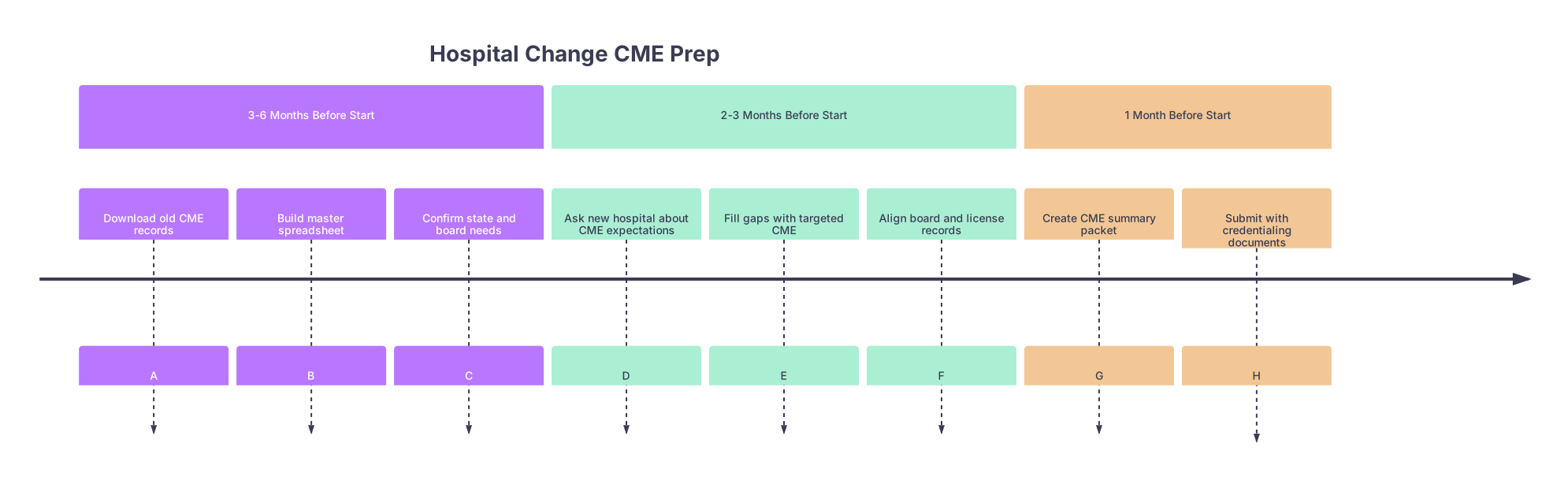
| Period | Event |
|---|---|
| 3-6 Months Before Start - Download old CME records | A |
| 3-6 Months Before Start - Build master spreadsheet | B |
| 3-6 Months Before Start - Confirm state and board needs | C |
| 2-3 Months Before Start - Ask new hospital about CME expectations | D |
| 2-3 Months Before Start - Fill gaps with targeted CME | E |
| 2-3 Months Before Start - Align board and license records | F |
| 1 Month Before Start - Create CME summary packet | G |
| 1 Month Before Start - Submit with credentialing documents | H |
If you’re closer than that—say you start next month—compress the timeline:
- Same steps, less time.
- Prioritize: downloading records, building the spreadsheet, then plugging the most obvious gaps.
The Bottom Line
Three takeaways if you’re changing hospitals and want your CME to help you, not hurt you:
Centralize and control your CME story. One spreadsheet, one folder of PDFs, one concise summary. You hand that to any hospital, board, or state with confidence.
Align requirements proactively. Do not assume your old hospital’s CME habits match your new hospital, your board, or your licenses. Check each, find gaps, fix them before anyone asks.
Think like your credentialing office. They want clear, recent, well-documented CME that proves you’re current and safe. Make their job easy once, and your future reappointments and job changes get dramatically simpler.