
Most physicians waste their on‑call weeks for CME. Not because they are lazy. Because the system is designed badly.
The traditional model—“do your CME on a day off or at a conference”—is dead for anyone with a real call schedule. If you are waiting for a full free afternoon to knock out CME, you will either (a) fall behind, or (b) burn yourself out trying.
The fix is simple but non‑negotiable: you turn call into a structured micro‑learning environment. You weaponize 5–15 minute gaps. You pre‑load, pre-filter, and pre-plan. Then you just execute.
Let me show you exactly how to do that.
Step 1: Redefine What “Counts” as CME on Call
You will never optimize CME on call weeks if you think CME has to look like a 60‑minute lecture with slides and a post‑test.
On call, your usable blocks are small, unpredictable, and constantly threatened by interruptions. So you need CME that:
- Works in 5–15 minute slices
- Syncs across devices (phone, tablet, laptop)
- Can survive interruptions without losing the thread
- Produces credit reliably (ACCME, specialty board, MOC where relevant)
You are looking for:
- Question banks with CME/MOC credit
- Short-form video modules (5–15 minutes)
- Rapid‑review articles with quick post‑tests
- Audio CME you can pause at a second’s notice
| Format Type | Ideal Session Length | Interrupt-Friendly | CME/MOC Available |
|---|---|---|---|
| Qbank questions | 5–10 minutes | Excellent | Often |
| Short video modules | 10–15 minutes | Good | Common |
| Audio CME | 10–20 minutes | Good | Variable |
| Rapid articles | 10–15 minutes | Fair | Common |
If your current CME setup does not fit into that table, it is the wrong tool for call weeks. Use it on a post‑call day off, not between consults.
Step 2: Build a “Call Week CME Kit” Before You Start
On day 1 of a call week is the wrong time to be hunting down logins and figuring out which course you want. That is how you end up scrolling email instead of earning credit.
You want a pre‑built “CME kit” that lives on your devices and is ready to fire.
2.1. Pick 2–3 CME Sources, Not 10
Too many sources will paralyze you in short windows.
Choose:
- One primary question bank with CME credit (e.g., NEJM Knowledge+, UWorld with CME add‑on if applicable, specialty‑specific QBanks)
- One short‑form CME platform (e.g., AudioDigest, UpToDate‑linked CME, specialty society micro‑modules)
- One offline‑capable backup (downloaded PDFs, offline videos, or an app that caches content)
2.2. Pre‑Download Content for Weak Coverage Areas
You know where your knowledge is soft. You do not need a needs assessment. You need a file list.
Example: You are a hospitalist. Your weak spots:
- Anticoagulation in CKD
- New heart failure meds
- Noninvasive ventilation troubleshooting
The week before a heavy call block:
- Log into your CME platforms.
- Search those topics.
- Bookmark or download:
- 2–3 micro‑modules per topic
- A handful of related board‑style questions
Put them into folders or playlists labeled clearly: “Call Week – Anticoag,” “Call Week – HF Updates,” etc.
2.3. Make Logins and Access Frictionless
Lost minutes on passwords are CME killers.
- Store logins in a secure password manager that works on phone + desktop.
- Make sure all CME apps are updated and logged in before call starts.
- Turn on offline mode or content caching where possible.
You want to be able to pull out your phone, tap an app, and be in a question within 10 seconds. If it takes longer, you will default to texting or doomscrolling.
Step 3: Map CME to the Real Rhythm of Your Call
Call is not random. It feels random, but if you watch yourself for a week you will find patterns.
Start with a blunt assessment of your call:
- Are you in‑house or home call?
- Do you have predictable lulls (e.g., 6–7 pm, 2–3 am)?
- How often are you interrupted in a typical 10 minute window?
Now you match the task to the time block.
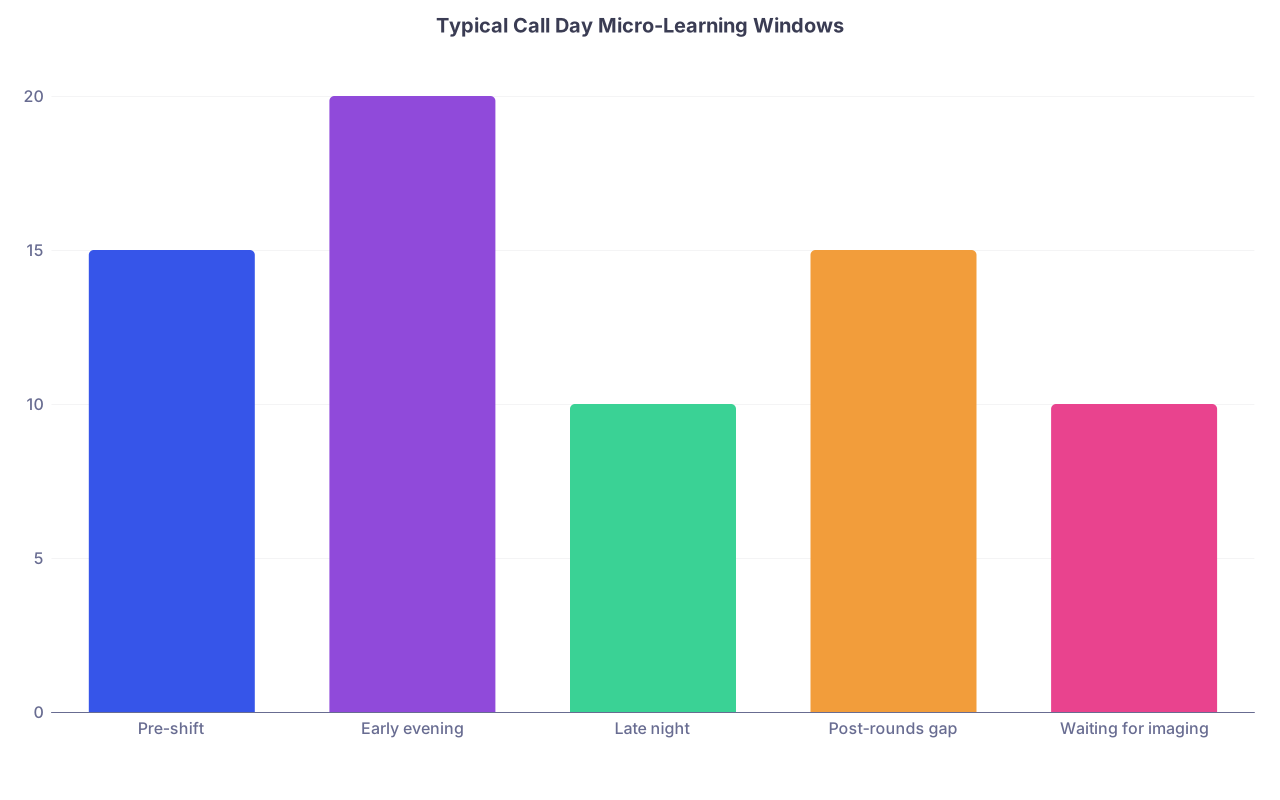
| Category | Value |
|---|---|
| Pre-shift | 15 |
| Early evening | 20 |
| Late night | 10 |
| Post-rounds gap | 15 |
| Waiting for imaging | 10 |
3.1. What to Do in 3–5 Minutes
Use for: single‑question bursts or quick flash reviews.
- One or two board‑style questions on your phone
- Reviewing a single clinical pearl you saved (from UpToDate, guidelines, etc.)
- Opening a CME article and skimming the abstract or key points
You will not finish a module here. The goal is touch frequency, not volume.
3.2. What to Do in 5–10 Minutes
This is your main micro‑learning window.
- 3–5 Qbank questions with explanations
- One short “clinical update” video at 1.25–1.5x speed
- 1–2 pages of a guideline summary plus a brief post‑test
You should be able to stop at any sentence and not ruin the learning.
3.3. What to Do in 10–20 Minutes
These are gold. Protect them.
Ideal use:
- A full short module with CME credit and a post‑test
- A focused board‑style block (e.g., 10 questions on AF management)
- A podcast or audio CME segment while you are walking to the ED or waiting on a CT
Do not burn these on unfocused browsing or long emails. This is high‑yield time.
Step 4: Use Micro‑Learning Tactics That Actually Work (Not Just Feel Busy)
Micro‑learning can become busywork. Ten random questions on ten random topics is not “optimized.” It is just fragmented.
You want tactics that convert tiny time blocks into real, testable knowledge and CME credits.
4.1. Theme Your Call Week
Pick 1–2 themes per call week. Everything you do for CME on that week bends toward those themes.
Examples:
- ICU call → shock, ARDS, ventilator management
- OB call → postpartum hemorrhage, hypertensive disorders, fetal monitoring
- Cards call → arrhythmias, ACS updates, heart failure meds
Why this works:
- Repetition across many small windows → stronger retention
- Easier mental “spin‑up” when you re‑enter a topic multiple times
- You see the same concepts from questions, audio, and references
You are not trying to cover all of medicine in one week. You are trying to meaningfully improve 1–2 domains.
4.2. Use “Tiny Blocks + One Anchor Card”
Every time you learn something during a micro‑session, capture it in a single, minimal anchor.
Options:
- Flashcard (Anki or similar)
- A “Call Week Pearls” note in your phone
- A small notebook in your white coat
The template:
- Scenario / cue (e.g., “AFib with RVR in decompensated HFrEF”)
- Decision point or rule (rate goal, med choice, contraindications)
- One killer pitfall (e.g., “Avoid NDHP CCB in decomp HF.”)
You are not writing essays. Think “one line you wish someone had told you during residency.”
Those anchor cards are what convert scattered CME into durable long‑term improvement. They also become a reference you can review post‑call for consolidation.
4.3. Run a “Question Sandwich”
For a 10–15 minute block, use this pattern:
- Do 3–5 questions cold.
- Read explanations carefully, not skimming.
- Quickly look up 1–2 key points in a reference (UpToDate, guidelines) for deeper context.
- Add 1–2 anchor cards.
That is it. You have covered recall, feedback, and reinforcement. No need to get fancy.

| Step | Description |
|---|---|
| Step 1 | Start 10-15 min block |
| Step 2 | Do 3-5 questions |
| Step 3 | Read explanations |
| Step 4 | Check key points in reference |
| Step 5 | Create 1-2 anchor cards |
| Step 6 | End session |
Step 5: Turn Clinical Cases into CME Credit
You are surrounded by cases during call that would make perfect CME content. Most of the time, you handle them, maybe look something up quickly, and move on. That is a lost opportunity.
You want to capture and convert.
5.1. The “Case to CME” Micro-Protocol
For any interesting or challenging case:
- Write down a one‑line case description somewhere you track learning:
- “52 M, septic shock, unclear source, lactate 6, on max NE.”
- Write one specific question that you did not feel rock solid about:
- “Best second‑line vasopressor choice after NE in septic shock?”
- During a 5–10 minute break:
- Look up the answer in a trusted source.
- Read just enough to answer the question with confidence.
- Turn the answer into an anchor card.
If your CME platform supports point‑of‑care learning CME (POC CME) or “internet point‑of‑care” credits, you can log this as credit:
- Document: clinical question, source used, impact on management.
- Many boards and societies accept this as multi‑purpose credit (CME + MOC).
This is where you stop separating “real medicine” and “CME.” They become the same activity.
5.2. Use Systems That Auto-Credit Point-of-Care Searches
Several platforms allow you to earn CME credit simply by doing what you already do during call:
- Searching clinical questions on their platform
- Recording whether the search influenced your management
Check:
- UpToDate CME tracking
- DynaMed / other evidence tools
- Specialty society point-of-care modules
Once configured, each on‑call search becomes a micro‑learning + micro‑CME event. You are already doing the searches. You might as well capture the credit.
Step 6: Make CME a Default, Not a Decision
Decision fatigue kills micro‑learning. If every time you get a 10‑minute window you have to decide what to do, you will do nothing.
The trick is to pre‑decide.
6.1. Create a Simple If–Then CME Script
Write it down. For example:
- If I have 3–5 minutes → I open Qbank app and do 1–2 questions from this week’s theme.
- If I have 5–10 minutes → I do a 5‑question block and add 1 anchor card.
- If I have 10–20 minutes → I complete one saved module or short video from my “Call Week” playlist.
No thinking. Just implement the script.
6.2. Arrange Your Phone Home Screen Like a CME Tool, Not a Casino
On call, your phone is either a weapon or a distraction.
- Put your CME apps on the first home screen.
- Move social media and non‑urgent apps off the first screen or into a “Post‑Call Only” folder.
- Use Focus / Do Not Disturb modes that mute non‑essential notifications during expected call lulls.
If Twitter, Instagram, or random news apps are one tap away and your CME is four taps away, you know which one your tired brain will choose at 2 am.
Step 7: Track CME Credits Without Administrative Pain
You can have the best micro‑learning habits in the world and still fail your CME requirements if you do not track and document properly. This is where people get burned near license renewal.
You want a streamlined tracking system.
7.1. Centralize Documentation
Options that work:
- A dedicated CME tracking app that pulls data from multiple sources
- A simple spreadsheet in your cloud drive
- A note in your phone with date, activity, hours, provider
Pick one. Use it religiously.
| Field | Example Entry |
|---|---|
| Date | 2026-01-05 |
| Activity | 10 Qs – AFib Management Module |
| Provider | NEJM Knowledge+ |
| Credits | 0.25 AMA PRA Cat 1 |
| Notes | Focus on decomp HF AFib cases |
Even if your platforms track credit, keep a personal log. Systems change. Exports fail. Licensure boards do not care whose fault it is.
7.2. Leverage Automatic Credit Sync Where Available
Many CME platforms:
- Track your hours
- Generate certificates
- Sync with portfolio services (e.g., CMEbank equivalents, specialty boards)
Before your call block:
- Confirm which activities auto‑sync and which require manual entry.
- Learn how to download a summary report.
Goal: you do not want to spend your post‑call weekend chasing certificates from three years ago.
Step 8: Protect Sleep and Sanity While Still Optimizing CME
There is a dumb version of this strategy: “Use every waking second on call for CME.” That is how you end up unsafe, resentful, and less effective clinically.
Micro‑learning must fit into a sane call structure.
8.1. Hard Rules to Avoid Overreach
Consider adopting rules like:
- No CME after 2 am unless you are stuck awake and alert already (e.g., waiting physically in CT with nothing else to do).
- No CME when you feel your concentration is shot (severe fatigue, emotionally draining case).
- At least one intentional “nothing” break per shift where you allow your brain to idle.
Your job is not to squeeze all life out of call. It is to turn wasted time into useful time without sacrificing performance or safety.
8.2. Use Audio CME Only When You Are Not Cognitive Maxed Out
Listening to a dense sepsis podcast while you are driving home post‑call is not learning. It is punishment.
Good times for audio:
- Commuting in to call when you are rested
- Walking between units
- Quiet room cleanup time when you are not doing complex cognitive tasks
Bad times:
- Driving home exhausted
- Right after a code or emotionally heavy family meeting
- When you are trying to fall asleep between pages
You want learning that sticks, not content that just washes over you.
Step 9: Run a 1‑Week Experiment and Audit the Results
Do not theorize this to death. Run a real‑world experiment on your next call week.
9.1. Before the Week
- Define 1–2 themes (“HF meds,” “vent management”).
- Build or update your “Call Week CME Kit.”
- Write your If–Then script and put it somewhere visible (phone wallpaper, note on your desk).
9.2. During the Week
Each day, quickly jot:
- Number of micro‑sessions
- Estimated minutes of CME
- Key topics covered
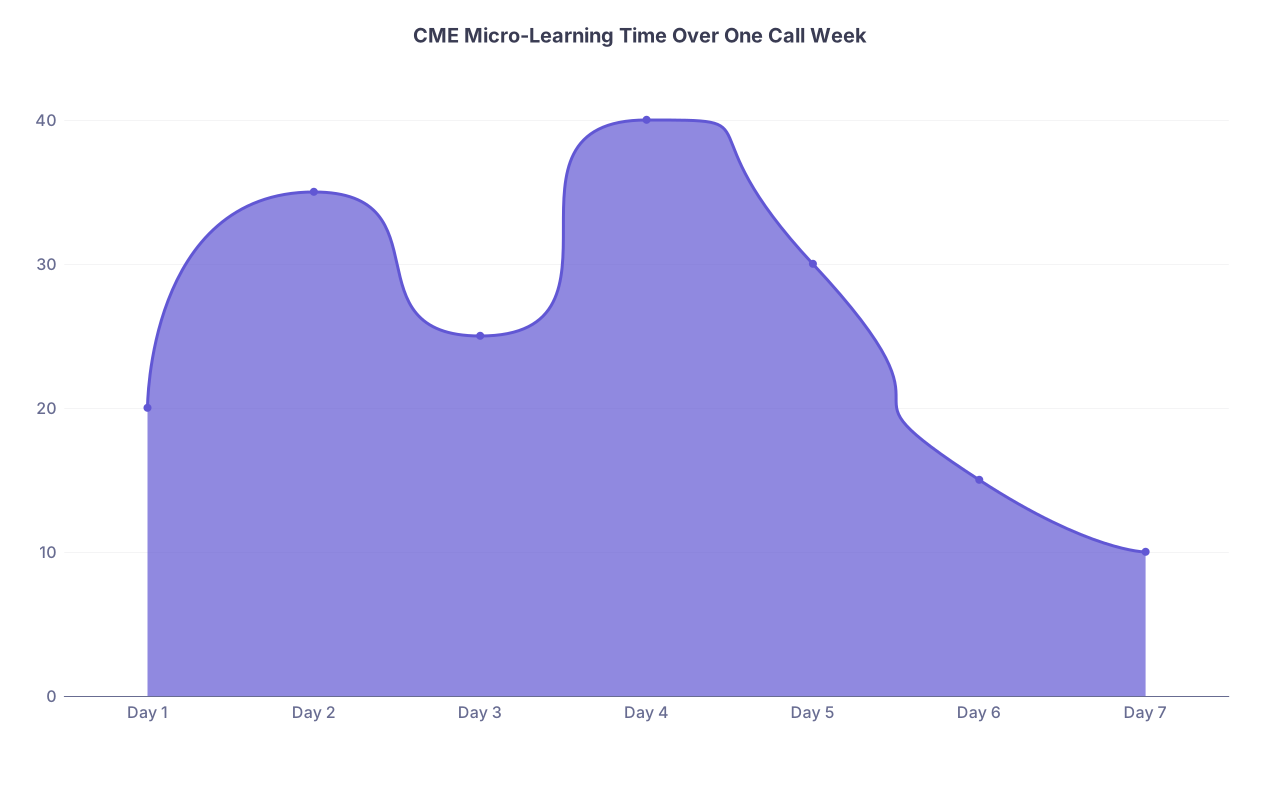
| Category | Value |
|---|---|
| Day 1 | 20 |
| Day 2 | 35 |
| Day 3 | 25 |
| Day 4 | 40 |
| Day 5 | 30 |
| Day 6 | 15 |
| Day 7 | 10 |
Even 15–30 minutes per day on average becomes:
- 1.75–3.5 hours of focused CME in a single week
- Do that across 10–15 call weeks per year and you are well past most CME minimums, with meaningful learning in core areas
9.3. After the Week
Ask three blunt questions:
- Did I earn measurable CME credit?
- Did I noticeably improve in the themes I chose?
- Did this feel sustainable, or did it feel like self‑flagellation?
Adjust:
- If it was too heavy, reduce your daily target or number of themes.
- If it was too light, lengthen some sessions or add one more structured module.
Then lock in the version that felt both effective and tolerable.
Step 10: Turn This Into an Institutional Advantage (Optional but Powerful)
If you are in a leadership role—chief, PD, CME director—you can scale this beyond yourself and make your group actually competent about CME on call.
Ideas that work in real groups:
- Create “Call Week CME Playlists” by specialty and share them.
- Standardize 2–3 recommended platforms that are mobile‑friendly and interruption‑tolerant.
- Integrate point‑of‑care documentation workflows into your EMR or intranet links.
- Recognize or reward residents / faculty who demonstrate consistent, targeted micro‑learning.

| Step | Description |
|---|---|
| Step 1 | Choose CME platforms |
| Step 2 | Create call week playlists |
| Step 3 | Distribute to staff |
| Step 4 | Encourage point of care CME |
| Step 5 | Central tracking and reporting |
Many programs talk a big game about “lifelong learning” then give residents 40‑minute no‑device “education hours” that get canceled half the time. A well‑designed micro‑CME structure for call weeks is more honest and often more effective.
Two Quick Visual Recaps
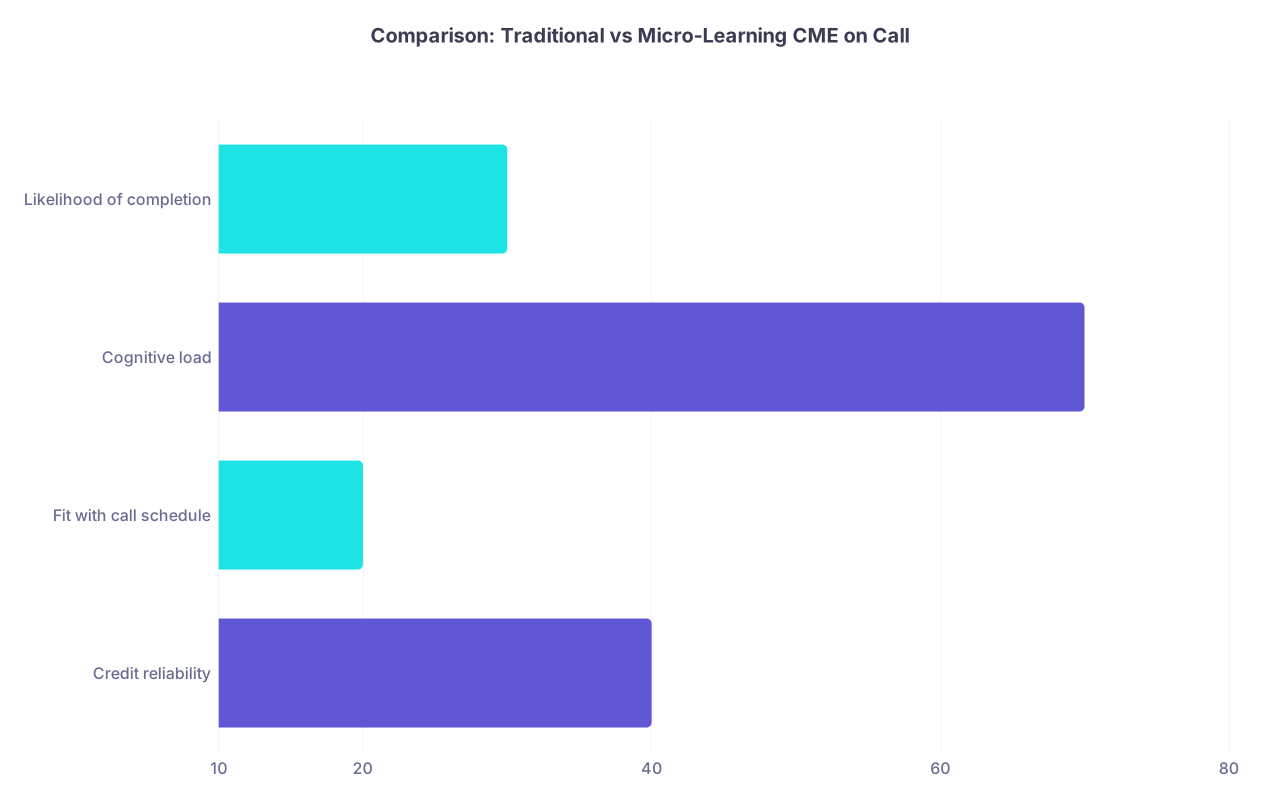
| Category | Value |
|---|---|
| Credit reliability | 40 |
| Fit with call schedule | 20 |
| Cognitive load | 70 |
| Likelihood of completion | 30 |
(Imagine the rest of each bar filled by a micro‑learning approach—higher fit, lower load, higher completion.)
Boil It Down
You can absolutely optimize CME on call weeks without wrecking your sanity. The core moves are:
- Redesign CME around micro‑learning: 5–20 minute, interruption‑proof units that live on your phone and tablet, with themes that match your actual call work.
- Turn clinical reality into credit: capture real cases and point‑of‑care questions, document them in systems that grant CME/MOC, and consolidate with anchor cards.
- Remove friction and overreach: pre‑build a call week CME kit, use simple If–Then rules, protect sleep, and track credit in one place so you never scramble at renewal.
Do those three consistently, and call stops being a barrier to CME. It becomes the engine that drives it.