
The biggest CME mistake new private practice owners make is thinking, “I’ll just keep doing what I’ve been doing.” That mindset gets people flagged in audits, scrambling before license renewal, and sometimes losing hospital credentials.
You’re not “just a doctor” anymore. You’re also your own compliance department.
Let me walk you through how to set up CME systems that run in the background while you see patients and run your practice—so you’re never hunting for certificates at 11:48 p.m. the night before license renewal.
1. Know Exactly What You Must Comply With (Not Optional)
First reality check: CME compliance in private practice is not one thing. It’s layers. You’re answering to at least four different entities:
- State medical board(s)
- Specialty board (ABIM, ABFM, ABS, ABEM, etc.) if you’re board-certified
- DEA (if you prescribe controlled substances)
- Hospitals/health systems/insurance panels you’re credentialed with
If you don’t map these out up front, you’ll have overlapping, conflicting, and last-minute CME tasks every year.
Step 1: Build a one-page requirement map
Sit down one evening and do this properly. Open a blank document or spreadsheet. Then for each category, fill it out.
| Category | Typical Interval | Common Requirements |
|---|---|---|
| State License | 1–3 years | Total CME hours, state-specific topics |
| Specialty Board | 1–10 years | MOC points, self-assessment, exams |
| DEA | Every 3 years | Opioid/controlled substance CME |
| Hospitals/Payers | 1–3 years | Risk, safety, ethics, QI, privileging |
Go to each actual website (not third-party blogs):
- Your state medical board CME page
- Your specialty board MOC/CME requirements page
- DEA requirements (or state-specific opioid training rules)
- Credentialing documents from your main hospital(s) and major payers
Then answer these questions per entity:
- How many hours/credits?
- What time window? (e.g., 50 hours every 2 years)
- Any specific topics required? (opioids, pain management, ethics, cultural competency, HIV, implicit bias, etc.)
- Do they require ACCME-accredited CME or just “relevant education”?
- Any format requirements? (live vs online, performance improvement, case-based, etc.)
- Documentation requirement: certificate? transcript? attestation only?
You want this in a table or simple cheat sheet you can skim in 30 seconds.
2. Decide Who Owns CME Compliance (Hint: Not “Future You”)
If you assume “I’ll remember this,” you’re already behind. Private practice is chaos. Half your brain is on billing and prior auths; the other half is on clinical care. CME will lose.
You need explicit ownership.
Choose a primary CME owner
You have three basic options:
- You (solo docs, micro-practices)
- Practice manager/administrator
- Designated CME/credentialing coordinator (in larger groups)
If it’s you, accept that you’re the “CME officer” and behave like it: scheduled reviews, centralized files, automation.
If it’s staff, spell it out in writing:
- Their role: tracking, reminders, collecting certificates
- What they don’t do: decide what content you learn (that’s your call), sit through courses for you (obviously), or submit false attestations
Document this in a short SOP (standard operating procedure). One page. Clear.
3. Build a Simple but Bulletproof Tracking System
You do not need an expensive CME platform to be compliant. You do need one place where everything lives and is updated consistently.
Think of this like a mini-EMR for your education.
Core components of your CME tracking system
You must track:
- Activity name
- Provider (institution/platform)
- Date completed
- Number of credits
- Credit type (Category 1, 2, MOC points, DEA requirement, etc.)
- Topic type (opioid, ethics, QI, etc.)
- Which requirement(s) this activity satisfies
- Where the certificate is stored
Easiest path: a spreadsheet + organized cloud folder.
| Column | Example Entry |
|---|---|
| Date Completed | 2026-03-15 |
| Activity Name | Opioid Prescribing in Chronic Pain |
| Provider | State Medical Society |
| Credits | 3.0 |
| Credit Type | AMA PRA Cat 1, DEA-opioid requirement |
| Requirement Tag | State opioid, DEA, Hospital pain requirement |
| Certificate File | /CME/2026/2026-03-15-opioid-course.pdf |
That “Requirement Tag” column is your secret weapon. One well-chosen course can often satisfy multiple entities’ requirements. Tag it once, benefit three times.
4. Set Up Storage: If It’s Not Saved, It Didn’t Happen
printouts in a manila folder aren’t enough anymore. Certificates get lost during office moves, water leaks, careless shredding. You want redundant storage.
Here’s the setup that works:
- Cloud storage (Google Drive, OneDrive, Dropbox, iCloud — pick one)
- Local backup (external drive or server, backed up automatically)
- Optional: physcial binder with yearly tab dividers (for the old-school auditors and your own visual brain)
Recommended folder structure
Use something you can navigate half-asleep:
- CME
- 2025
- 2025-02-10–State_Opioid_Webinar.pdf
- 2025-04-03–Hospital_QI_Conference.pdf
- 2026
- …
- 2025
Each time you complete CME:
- Download certificate immediately
- Rename it:
YYYY-MM-DD–Provider–ShortTitle.pdf - Save it to the right year folder
- Record it in your tracker
Takes 60 seconds if you build the habit. Saves hours during audits.
5. Put CME on a Maintenance Schedule (Not a Panic Schedule)
You already know what happens: license renewal hits, you’re short 8 hours, you find the worst online CME you can tolerate, and you curse your past self.
For a private practice owner, that kind of last-minute nonsense is dangerous. You miss a renewal window, and now your ability to bill and prescribe is suddenly on the line.
Use a simple recurring timeline
Set repeating calendar events for:
- Weekly: 15-minute “admin review” block
- Quarterly: 30-minute CME compliance check
- Annual: 1-hour “CME strategy and gaps” session
Use your calendar app, and actually mark them as busy like a patient visit.
Here’s what that might look like across a year:
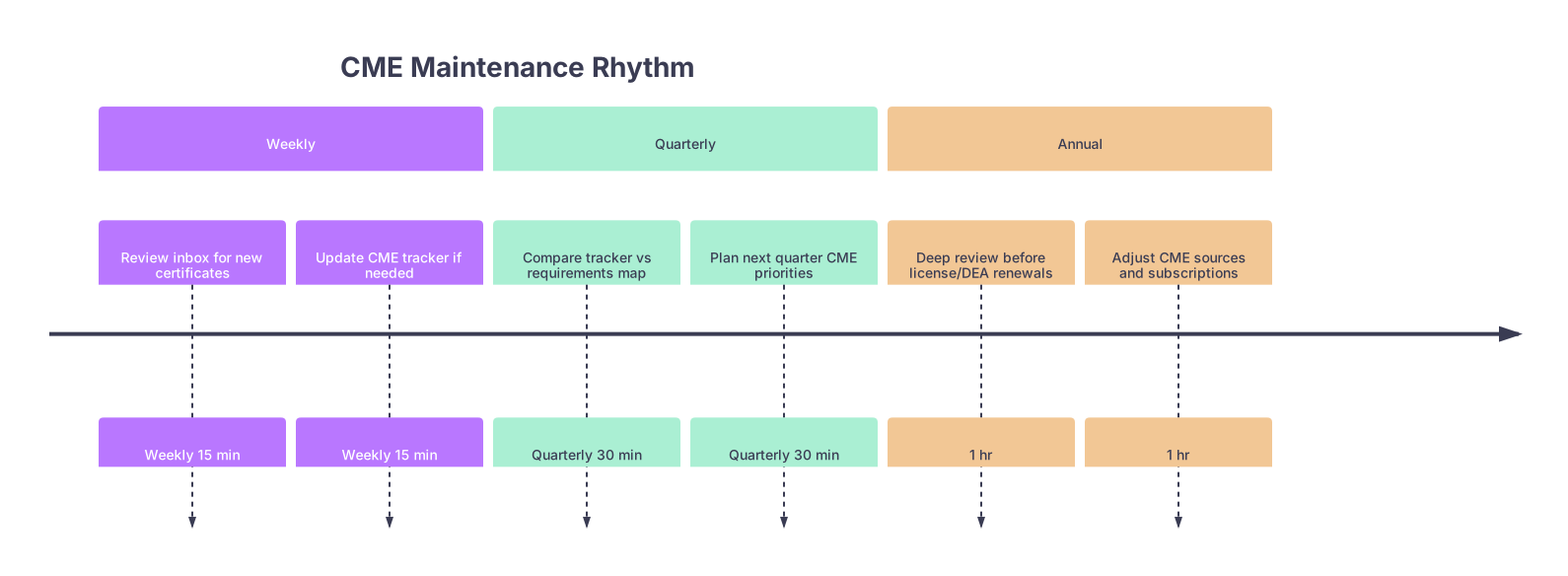
| Period | Event |
|---|---|
| Weekly - Review inbox for new certificates | Weekly 15 min |
| Weekly - Update CME tracker if needed | Weekly 15 min |
| Quarterly - Compare tracker vs requirements map | Quarterly 30 min |
| Quarterly - Plan next quarter CME priorities | Quarterly 30 min |
| Annual - Deep review before license/DEA renewals | 1 hr |
| Annual - Adjust CME sources and subscriptions | 1 hr |
The point is not to be obsessive. The point is to stop CME from becoming a crisis.
6. Align CME Choices With Multiple Requirements at Once
You don’t have time to waste on duplicative or irrelevant CME. The trick is choosing activities that check multiple boxes and actually help you clinically or financially.
Think in layers:
- Clinical relevance (does it help your practice?)
- Compliance overlap (how many requirements does it satisfy?)
- Format (can you do it without killing your schedule?)
Example: One course, three wins
Let’s say you find a 3-hour online course:
- Title: “Opioid Prescribing and Chronic Pain Management in Outpatient Settings”
- Provider: State medical society
- Credit: 3 AMA PRA Cat 1, tagged for opioid/controlled substance education
This single activity might:
- Satisfy your DEA opioid education requirement
- Complete your state board opioid/PMP requirement
- Check a box for hospital credentialing or payer pain management expectation
You record it once, tag it in the tracker for all three, and you’re done.
Now compare that with doing three different 1-hour activities that each cover one small requirement separately. Same time, more administrative chaos.
Use your tracker’s “Requirement Tag” column to drive these choices. Before signing up for something, ask: “What can this satisfy?” and tag accordingly.
7. Integrate CME Into Existing Systems, Not Parallel to Them
You already use:
- EHR
- Practice management/billing software
- A calendar
You don’t need a whole new ecosystem just for CME if you’re smart.
Simple integrations that actually help
Email rules:
Create a folder or label called “CME/Certificates”. Filter any email with “CME certificate,” “credit statement,” or certain provider names directly into it. Review this folder during your weekly admin block and file certificates.EHR messages or task list:
Add a recurring task in your EHR (if you use task lists personally) called “Quarterly CME check” assigned to yourself. It reminds you where you already live all day.Practice manager dashboard:
If you have a practice manager tracking license and credential expirations, CME status should live in the same spreadsheet or dashboard. One tab for “Licenses/Expirations,” another for “CME log.”Password manager:
Store login credentials for all CME platforms (UpToDate, specialty society, online platforms) in your password manager under a “CME” tag. The friction of “I forgot the password” is enough to make people procrastinate.
8. Prepare for Audits and Renewals Like They’re Guaranteed
People don’t take this seriously until they get the dreaded letter: “You have been selected for a CME audit. Please submit documentation of CME completed from [date range].”
If you plan like you will be audited, you’ll never panic.
Build an “audit packet” for each renewal cycle
For each major renewal (state license, DEA, board), have an internal mini-system:
Create a folder in your CME directory:
License_Renewal_2027Board_MOC_Cycle_2026-2036DEA_Renewal_2028
Export your tracker for the relevant dates as a PDF or Excel file.
Copy all relevant certificates into that folder.
(Optional but smart) Create a brief summary document inside:
- Total hours
- How many in required categories (opioid, ethics, etc.)
- Date range
- Statement: “All activities listed have supporting certificates attached.”
If an audit comes, you or your staff can send one neat package instead of digging through 6 years of files.
9. If You Have Partners or Employed Clinicians, Scale the System
Once you’re not solo, CME compliance becomes a risk to the business, not just the individual. One partner with a lapsed license or DEA problem can wreck contracts and reputation.
You need standardized expectations and shared tools.
Group practice must-haves
A written CME policy in your employee handbook or partner agreement:
- Minimum expectations (meeting all legal/board requirements + recommended extras)
- Who pays for CME and how much (stipend, days off)
- Documentation rules (when and how to submit certificates)
A shared but access-controlled tracker:
- One tab per clinician or one row per clinician with filters
- Admin can see everyone’s status; each clinician can at least see their own
Regular credentialing reviews:
- Twice a year, your credentialing/admin person runs a report:
- Who’s up for license renewal in the next 12 months
- Who’s behind on CME based on tracker
- Twice a year, your credentialing/admin person runs a report:
You do not want to find out Dr. X is short 20 hours a week before his license expires.
10. Common Pitfalls That Burn Private Practice Docs
I’ve watched people fall into the same traps again and again. Avoid these and you’re ahead of half the field.
Assuming “reading journals” will cover it
Category 2 credits are nice, but most boards and states expect a big chunk to be Category 1 from accredited sources. Don’t guess—check.Letting vendors keep the only record
“I can always log into the CME platform and re-download.” Until they update their site, merge systems, or you lose access. Always download your own copy.Not tracking topic-specific hours
States often require something like “2 hours in opioids every 2 years” or “1 hour in ethics per cycle.” If you don’t tag these in your tracker, you’ll be guessing during renewal.Forgetting about multi-state licensure
If you’re licensed in more than one state, your “hardest” state often drives your CME strategy. Design to meet the strictest rules; everyone else will usually be satisfied.Ignoring MOC integration
Many specialty board MOC activities also count as CME. Use programs where your credit automatically flows to your board and provides AMA Category 1 CME. Double-dipping is not cheating. It’s efficient.
11. A Quick Visual: Where Your CME Time Actually Goes
Here’s roughly how I see well-organized private docs allocating their CME efforts over a typical 2–3 year cycle:
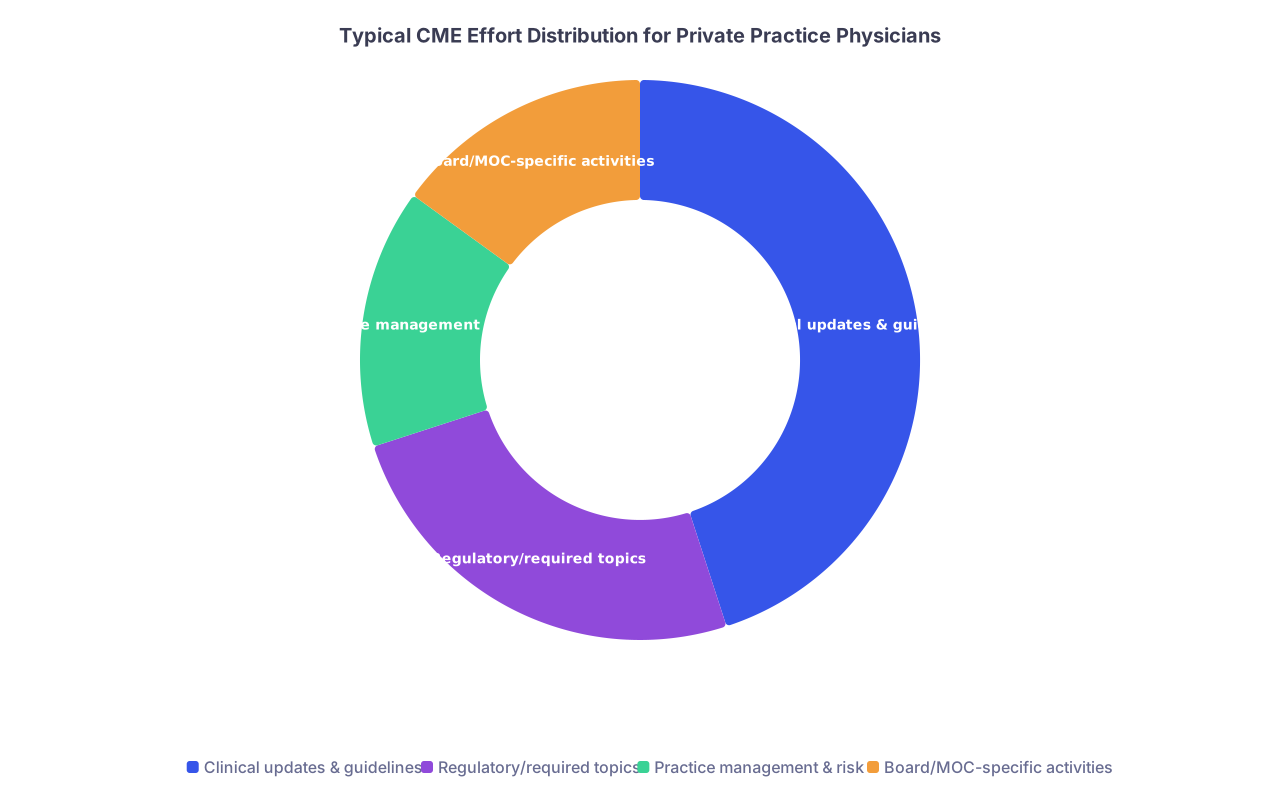
| Category | Value |
|---|---|
| Clinical updates & guidelines | 45 |
| Regulatory/required topics | 25 |
| Practice management & risk | 15 |
| Board/MOC-specific activities | 15 |
You don’t want 80% of your CME to be regulatory hoops. Do the minimum required there. Then spend the rest on things that actually improve your outcomes, revenue, or quality of life.
12. What To Do This Week if You’re Starting or Just Started Private Practice
Let’s boil it down into a one-week action plan. Block 2–3 hours total across the week.
Day 1 (30–45 minutes):
- Build your requirement map
- Open tabs: state board, specialty board, DEA rules, main hospital/payers
- Write down exact numbers and deadlines
Day 2 (30 minutes):
- Create your CME tracking spreadsheet with key columns
- Set up your cloud folder structure
- Create email rules to tag CME-related emails
Day 3 (15 minutes):
- Decide who is your CME owner (you vs staff)
- Document their responsibilities in 1 page
Day 4 (30 minutes):
- Add calendar reminders:
- Weekly 15-minute CME admin block
- Quarterly 30-minute compliance review
- Annual 1-hour pre-renewal review, scheduled ~6 months before renewals
Day 5 (30–45 minutes):
- Look at the next 12 months:
- Identify which required topics you still need (opioids, ethics, etc.)
- Find 2–3 high-yield CME offerings that hit multiple requirements
- Register or at least bookmark and list them in your tracker as “planned”
At that point, you’re more organized than many physicians who’ve been in private practice for a decade.

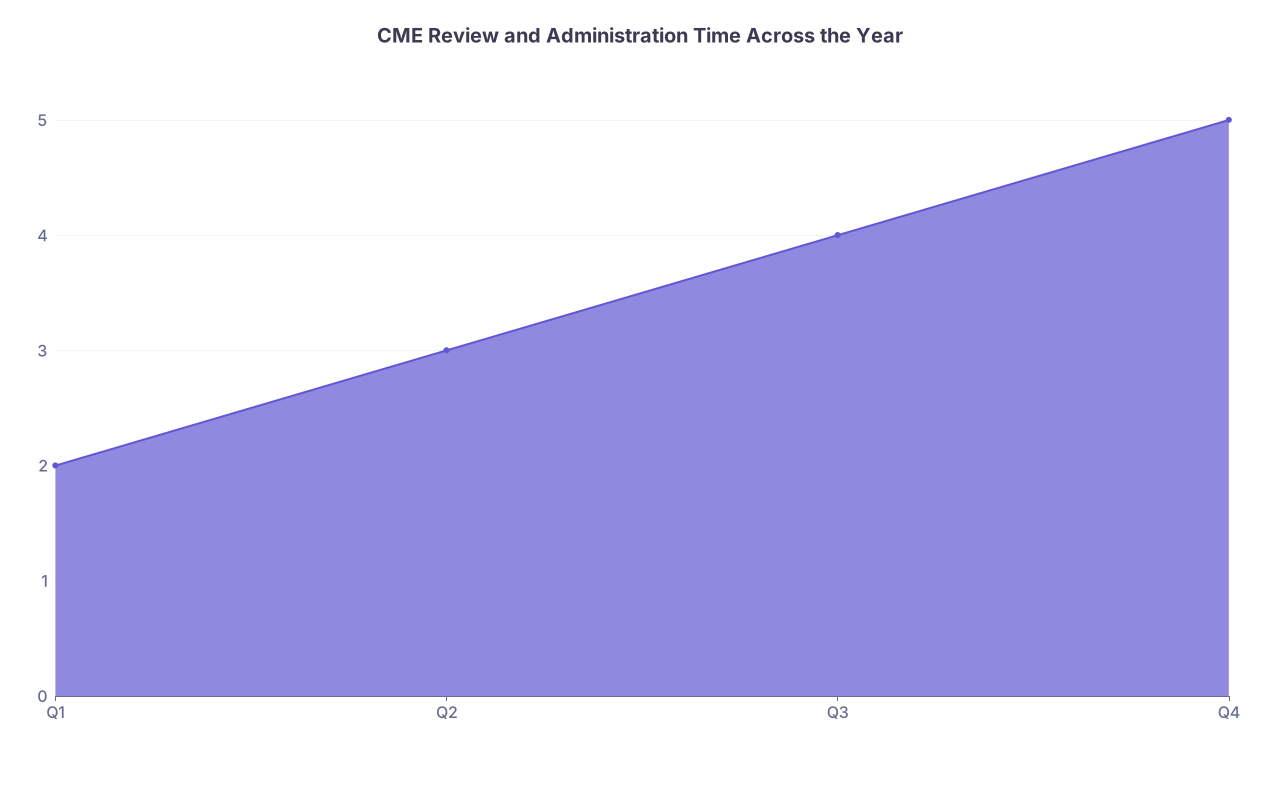
| Category | Value |
|---|---|
| Q1 | 2 |
| Q2 | 3 |
| Q3 | 4 |
| Q4 | 5 |

| Step | Description |
|---|---|
| Step 1 | Complete CME Activity |
| Step 2 | Download Certificate |
| Step 3 | Save to CME Year Folder |
| Step 4 | Log in CME Tracker |
| Step 5 | Tag with requirement label |
| Step 6 | Tag as General Clinical |
| Step 7 | Included in Audit Packet |
| Step 8 | Does it fulfill any requirement? |


FAQs
1. Do I really need a CME tracking spreadsheet if I use a big CME platform that tracks everything?
Yes. Those platforms do not capture all your CME (hospital grand rounds, local conferences, risk management courses, etc.), and they can change ownership or formats. Your spreadsheet is your master record that survives platform changes and consolidates everything in one place.
2. How often do state boards and other entities actually audit CME?
It varies, but random audits are common enough that “hoping you don’t get picked” is stupid. Some boards audit a fixed percentage of renewals each cycle. Hospitals and payers may request CME proof during credentialing or recredentialing, especially if there were any prior issues. Plan as if you will be audited at least once every few cycles.
3. What if I realize near renewal that I’m short on CME hours?
First, don’t lie or fudge dates. That can get you in much deeper trouble than a shortfall. Instead, look for accredited, on-demand CME that issues immediate certificates and focus on courses that satisfy multiple categories. You may need to adjust your schedule for a week or two to clear it. Then rebuild your system so you never end up that close to the edge again.
4. Are all CME credits interchangeable between my state, board, and hospital?
No. Most will accept AMA PRA Category 1 from accredited providers, but some require specific topics, formats, or board-specific MOC. That’s why the requirement map is step one. Always confirm that a course meets the specific rule you’re trying to satisfy, especially for opioid and state-specific mandates.
5. Can my practice manager or staff handle all CME compliance for me?
They can handle tracking, reminders, filing certificates, and preparing audit packets. They cannot choose every activity for you (it still needs to be relevant to your practice) or complete CME in your place. Think of them as your “CME operations” team, but you remain responsible for actually learning and meeting the requirements.
Key points to walk away with:
- Treat CME like any other compliance risk in your practice—map requirements, assign ownership, and document everything.
- Use one simple system (tracker + folders + calendar) and build small weekly and quarterly habits so renewal and audits are non-events, not emergencies.