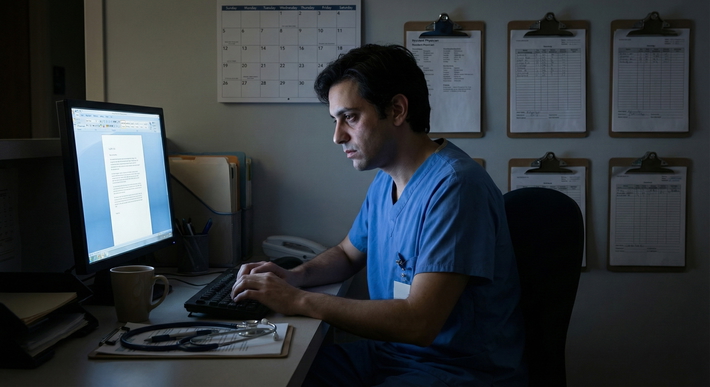
You are standing outside OSCE station 7. The timer above the door is flashing, but you cannot hear the audible beep that everyone else reacts to. You are waiting for a tactile cue on your smartwatch that tells you it is time to enter. Inside, the standardized patient encounter, exam equipment, and scoring checklist have all been deliberately modified so that your performance reflects your clinical skill, not your sensory disability.
That is what good design for OSCE and simulation accommodations looks like. Thoughtful. Quietly engineered. Invisible to everyone except the people who need it.
Let me break this down specifically.
1. Core Principles: What OSCE Accommodations Are (And Are Not)
OSCE and simulation accommodations for sensory disabilities are not “easier exams.” They are structural modifications that:
- Remove disability-related barriers that are irrelevant to the construct being assessed
- Preserve the core competencies and standards of the exam
- Are consistent, pre-planned, and documented (not improvised on exam day)
The most common failure I see from schools and programs is this: they only think in terms of “extra time.” That is lazy accommodation design for OSCEs. Time is sometimes part of the solution, but it is almost never enough for sensory disabilities. OSCEs are multi-layered: instructions, physical environment, equipment, interpersonal communication, scoring, emergency procedures. Every layer can either create or remove barriers.
Three baseline rules:
- If you are assessing a skill, do not let an unrelated sensory barrier contaminate that signal.
- If the sensory function is inherently part of the competency (e.g., auscultation), then design an equivalent accessible modality, not a loophole.
- All modifications must be specifiable in advance and repeatable across students and exam cycles.
We will walk through this by disability domain.
2. Designing OSCEs for Deaf and Hard-of-Hearing (DHH) Learners
Deaf and hard-of-hearing candidates face predictable barriers in OSCEs: auditory instructions, overheard announcements, stethoscope-dependent tasks, and rapid switching between communication modes. You can design around these systematically.
2.1 Instruction Delivery and Station Flow
Most OSCEs depend heavily on auditory directions and hallway announcements. That fails DHH students immediately.
You need a structured, multi-channel system:
- Written station instructions at every door with identical content to the spoken brief
- Visual/tactile timing cues instead of (or in addition to) audible bells
- Reliable access to interpreters or captioning when needed
| Modality | Example Tool | Best Use Case |
|---|---|---|
| Visual | Large LED countdown timer | DHH and all candidates |
| Tactile | Vibrating watch/bracelet | DHH, low-vision, noisy environments |
| Captioned Audio | Displayed announcements | Global exam updates, delays |
And then hard boundaries:
- Every station must have the entire instruction set available in writing. No “oh, the SP will also explain it inside.”
- Any last-minute changes (shortened station, extra questions) must be pushed via written notice and/or captioned display. No hallway shouting.
2.2 Use of Interpreters
The question that always comes up: “Can students use ASL interpreters in OSCEs?” Yes—if communication with patients is part of the competency, the interpreter becomes part of that communication ecosystem. You assess how effectively the candidate works through the interpreter.
Where programs screw this up:
- Randomly assigning interpreters who have no medical vocabulary
- Not training standardized patients and examiners how to interact in interpreted encounters
- Letting interpreters “help” with instructions or content
The minimum design standard:
- Use qualified interpreters with healthcare experience whenever possible
- Provide station scripts and anticipated vocabulary to interpreters in advance (under appropriate confidentiality rules)
- Train SPs that eye contact and direct responses go to the student, not to the interpreter
- Clarify to all parties: the interpreter’s role is language access only, not cueing or coaching
If you want to be serious about equity, you also document in your OSCE blueprint which stations must permit interpreters, and under what conditions.
2.3 Auscultation and Other Purely Auditory Tasks
This is where people get nervous. “How can a Deaf student perform a cardiac exam station?”
Two categories:
- Tasks where sound is the construct being assessed (e.g., distinguishing wheezes vs crackles).
- Tasks where interpretation and clinical reasoning are the construct, and the auditory input is just one data source.
For category 1 (purely auditory discrimination), you have legitimate questions about program-level technical standards. But at the OSCE level, you still need a rational, documented approach.
What I have seen work well:
- Electronic stethoscopes paired with bone-conduction or haptic-feedback devices for hard-of-hearing learners
- Visualized waveforms or phonocardiograms where the station’s goal is pattern recognition, not literal hearing
- Pre-encoded “findings” printed in the chart: the student must interpret, integrate, and act on them
If your curriculum accepts DHH learners—and it should—your OSCE design needs to be updated accordingly. You cannot hide behind “we have always done it with a standard stethoscope.”
2.4 Emergency Signals and Safety in Simulation
Simulation centers are loud. Alarms, overhead codes, mannequin sounds. Deaf candidates get left out of that information stream.
You must build parallel systems:
- Visual code alerts on monitors and walls
- Haptic devices or vibrating pagers for “code blue,” “time’s up,” or safety pauses
- Clear, written emergency exit routes posted in large print at multiple locations
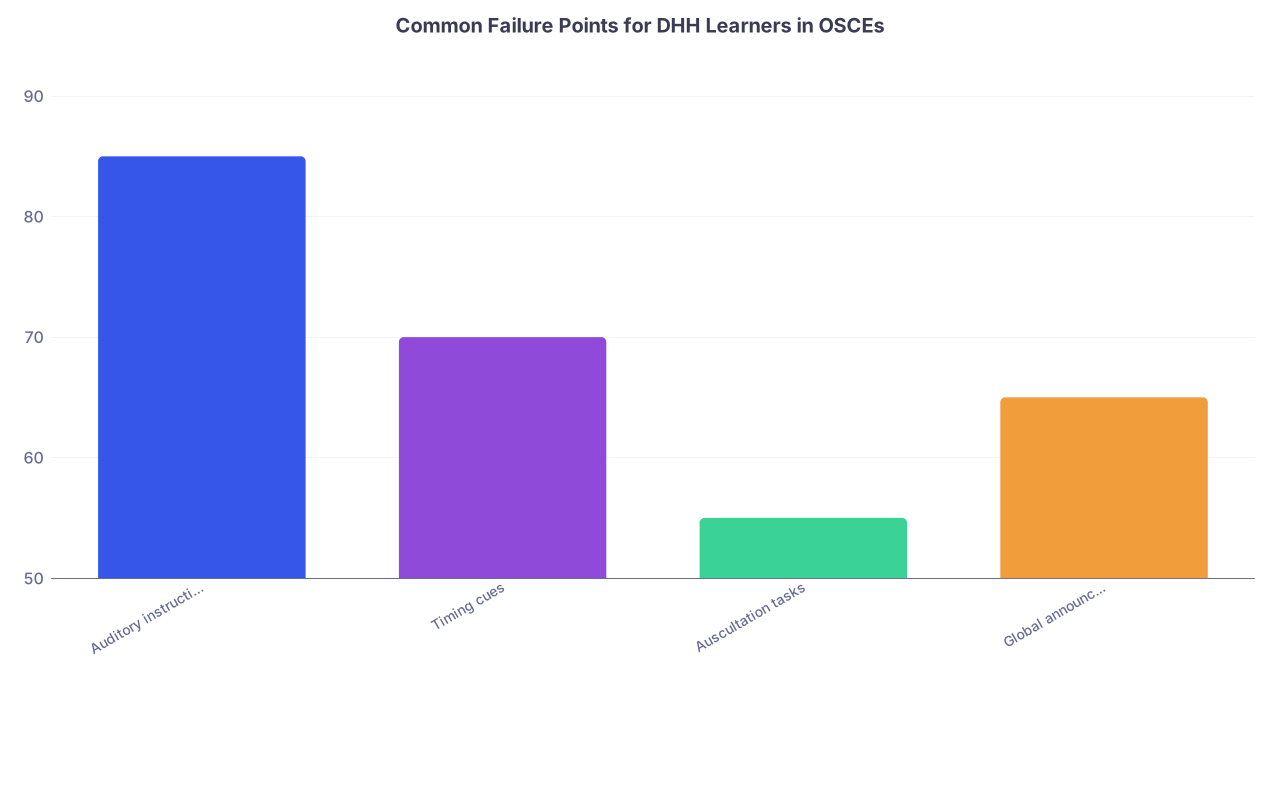
| Category | Value |
|---|---|
| Auditory instructions | 85 |
| Timing cues | 70 |
| Auscultation tasks | 55 |
| Global announcements | 65 |
Those percentages are not hypothetical; they are roughly what you see when you interview DHH trainees about where they lose points in OSCEs. Almost all of them are fixable with design, not heroics.
3. Designing OSCEs for Blind and Low-Vision Learners
Everyone panics about visual disabilities in OSCEs because the whole exam is built on visual cues: written instructions, patient facial expressions, monitors, exam tools. The panic is unwarranted. You just need discipline and planning.
3.1 Orientation, Layout, and Pre-Exposure
Most blind candidates do not want special treatment during the station. They want to not waste 90 seconds just finding the exam table.
Baseline practices:
- Provide pre-exam orientation to the physical OSCE or simulation space: hallway layout, door positions, standard station setup
- Use consistent room layouts across stations: bed location, supply cart location, hand sanitizer location
- Tactile labels on key areas and equipment that are standardized (e.g., raised dot on the bed rail, specific textured tape on supply drawers)
You are not “giving away” the station if you let the candidate explore room geometry the day before. You are just not grading them on their ability to stumble into furniture.
3.2 Accessible Instructions and Checklists
Stop handing 14-point font instructions to a student who reads braille or screen-reader output. You need format flexibility:
- Braille station instructions, provided either as a small booklet per station or via refreshable braille display connected to a secure device
- Screen-reader-compatible electronic instructions on a locked-down tablet with no external access
- Large-print instructions (often 18–22 point, high contrast) for low-vision candidates
The content must be identical. Any timing penalties from using adaptive tech should be compensated with additional station time.
Where blind/low-vision trainees get unfairly dinged is documentation tasks within OSCEs: “write a brief progress note,” “fill out this prescription.” Here, use:
- Accessible EMR simulation with screen-reader support
- Scribes following strict, pre-written protocols (“dictate exactly what the student says, no summarizing or correcting”)
- Electronic prescription templates compatible with screen magnification tools
3.3 Physical Exam Skills
The reflex assumption is that blind learners cannot perform visual parts of the physical exam. That is lazy thinking. You need to separate “visual-only” tasks from “multi-sensory” ones.
Many exams are inherently tactile and auditory: palpation, percussion, auscultation, range-of-motion assessment. OSCE stations can emphasize:
- Verbal description of what the learner is “looking for,” even when they cannot visually inspect (e.g., asking SPs about rashes, assessing jaundice via sclera description from an assistant)
- Structured use of assistants: the learner instructs a nurse or SP to perform visual inspection and report findings, then synthesizes that information
- Objective checklists that emphasize technique and reasoning, not just “did they look at the rash”
For inherently visual findings (fundoscopy, retinal hemorrhage patterns, subtle facial weakness), your accommodation design needs to answer a harder institutional question: is literal personal visualization a non-negotiable skill for this training program? If not, then you must design equivalent alternative competencies (interpreting described findings, using technology with accessibility features, team-based assessment).
3.4 Monitors, Vital Signs, and Sim Tech
Low-vision learners struggle with standard monitor displays. OSCE grading often silently assumes “the student correctly interprets the monitor,” but no one checks whether they can read it.
You should:
- Provide large-font, high-contrast monitor display modes
- Mirror vital signs to an accessible tablet with zoom and inverted colors
- Permit the learner to request verbal read-outs from a confederate nurse, and then assess how efficiently they integrate that data
Your exam is not testing monocular visual acuity. It is testing situational awareness and clinical decision-making. Design accordingly.
4. Designing OSCEs for Autistic and Sensory-Processing-Sensitive Learners
Here the disability is not about “deaf” or “blind,” but about how the brain handles sensory input—light, sound, touch, unpredictability. OSCEs are often a maximal assault on all of those.
The classic OSCE setup—crowded corridors, constant bells, multiple voices, harsh fluorescent lighting—is a sensory overload trap. You can reduce that without changing scoring standards at all.
4.1 Environment: Noise, Light, and Predictability
Simple changes with disproportionate impact:
- Replace shrill bells with softer chimes, paired with visual timers
- Reduce fluorescent flicker, allow use of tinted lenses or visors unless they conflict with a specific skill
- Control hallway volume; enforce “quiet corridors” with posted staff instructions
- Minimize last-minute station shuffling and chaotic schedule changes
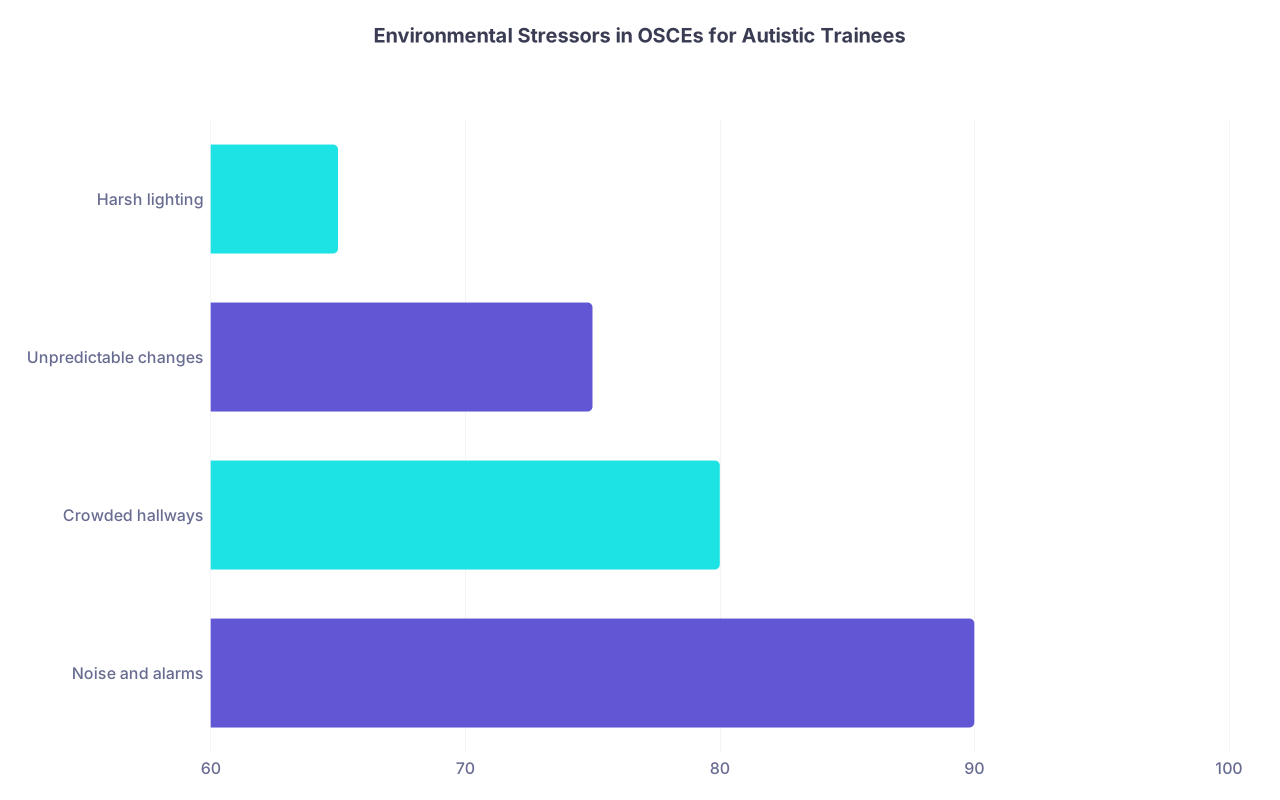
| Category | Value |
|---|---|
| Noise and alarms | 90 |
| Crowded hallways | 80 |
| Unpredictable changes | 75 |
| Harsh lighting | 65 |
You do not need to rebuild your sim center. You need to stop treating it like a train station.
4.2 Instructions and Transitions
Autistic candidates commonly report losing points not because they cannot do the task, but because they misinterpret vague instructions or struggle with rapid switching.
Your design should:
- Use explicit, concrete station instructions: “You have 10 minutes to take a focused history of chest pain” is better than “Assess this patient.”
- Clearly separate phases of a station (“First, history. Then a focused exam. Then explain your plan.”)
- Allow 1–2 extra transition minutes between stations, particularly when different communication styles are demanded (breaking bad news vs technical consent discussion)
Do not confuse this with “coaching.” It is just removing pointless ambiguity.
4.3 Social-Communication Stations
This is where faculty anxiety skyrockets: difficult conversations, empathy assessments, conflict resolution. For autistic learners, the problem is rarely a lack of empathy. It is often mismatch between expected and natural communication styles, compounded by performance pressure.
Your accommodation design can include:
- Clear rubrics that focus on content and effect (did the SP feel heard and informed) rather than rigid eye-contact or “small talk” metrics
- Allowing the candidate to use brief written prompts or scripts (for example, a stepwise SPIKES outline on a notecard)
- SP training that recognizes a variety of empathic expressions, not just one neurotypical template
None of that lowers the bar. It just acknowledges diversity in how competent clinicians communicate.
5. Operationalizing Accommodations: Process, Not Guesswork
The shining line between a serious program and a hand-wavy one is this: serious programs have a structured accommodation design and implementation pathway for OSCEs and simulation. They do not improvise 48 hours before the exam.
5.1 The Design Workflow
You need a repeatable process that looks something like this:

| Step | Description |
|---|---|
| Step 1 | Student submits accommodation request |
| Step 2 | Disability office reviews documentation |
| Step 3 | Define functional limitations |
| Step 4 | Map limitations to OSCE components |
| Step 5 | Draft accommodation package |
| Step 6 | Meet with student and OSCE lead |
| Step 7 | Finalize written plan |
| Step 8 | Train SPs and examiners |
| Step 9 | Implement during OSCE |
| Step 10 | Post-exam debrief and refine |
The important points:
- You define functional limitations, not just diagnoses (e.g., “cannot reliably detect high-pitched sounds,” “requires screen-reader access,” “overwhelmed by rapid multi-sensory input”).
- You map those to specific OSCE elements (instructions, timing, equipment, evaluation tasks).
- You document the final plan so that every station lead knows exactly what to do.
5.2 Role of the Disability Office vs Clinical Faculty
The disability office should bring expertise in accommodation law and access strategies. Clinical faculty bring OSCE content and assessment standards. If one group designs accommodations without the other, you get:
- Legally compliant but clinically nonsensical setups (e.g., allowing total bypass of core skills)
- Or clinically rigid, legally risky “we don’t do that here” stances
You need both in the room.
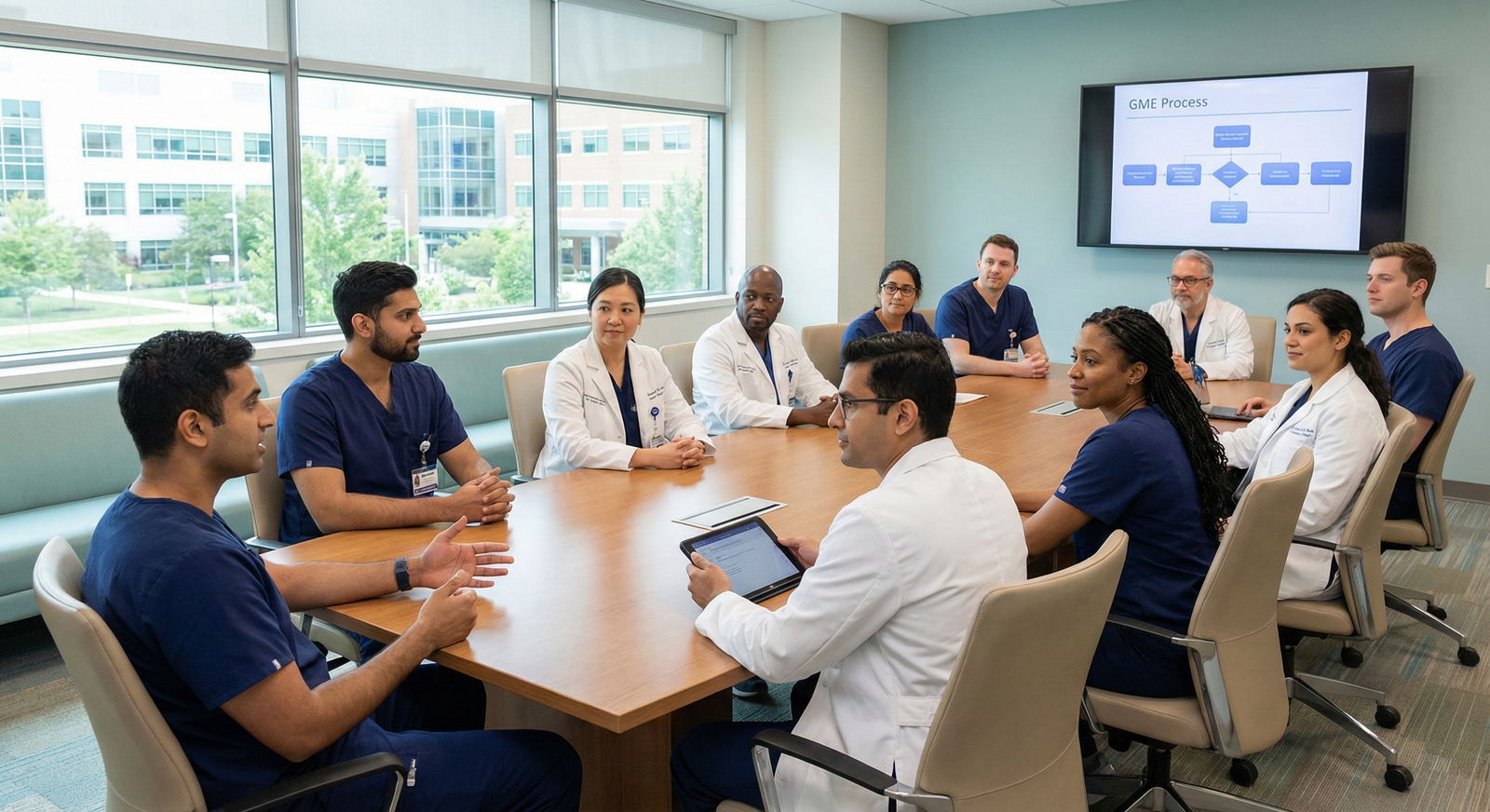
5.3 Standardized Patients and Raters: What to Tell Them
This part is underdeveloped in many programs. SPs and raters need explicit, practical guidance. For example:
- “This candidate is using an ASL interpreter. Maintain eye contact with the candidate. Wait for the interpreter to finish before responding.”
- “This candidate will read braille instructions. They have 2 extra minutes before timing starts.”
- “Do not give additional clarifying instructions unless the script calls for it. The written instructions are complete.”
You are not doing the candidate a favor when SPs “over-help.” You are destroying the validity of your own exam.
6. Technology: What You Should Already Be Using
If your simulation program still runs on paper, clipboards, and shouting, you are behind. Modern accessibility in OSCEs heavily leverages technology.
6.1 Core Tech Stack for Sensory Accessibility
At a minimum, you should have:
- Visual timing systems (large screens, per-hallway displays)
- Wearable haptic devices (simple vibration bands or smartwatches)
- Tablets at each station capable of displaying instructions in multiple formats
- Captioning tools for spoken group instructions
- Screen-reader-compatible EMR simulation environment
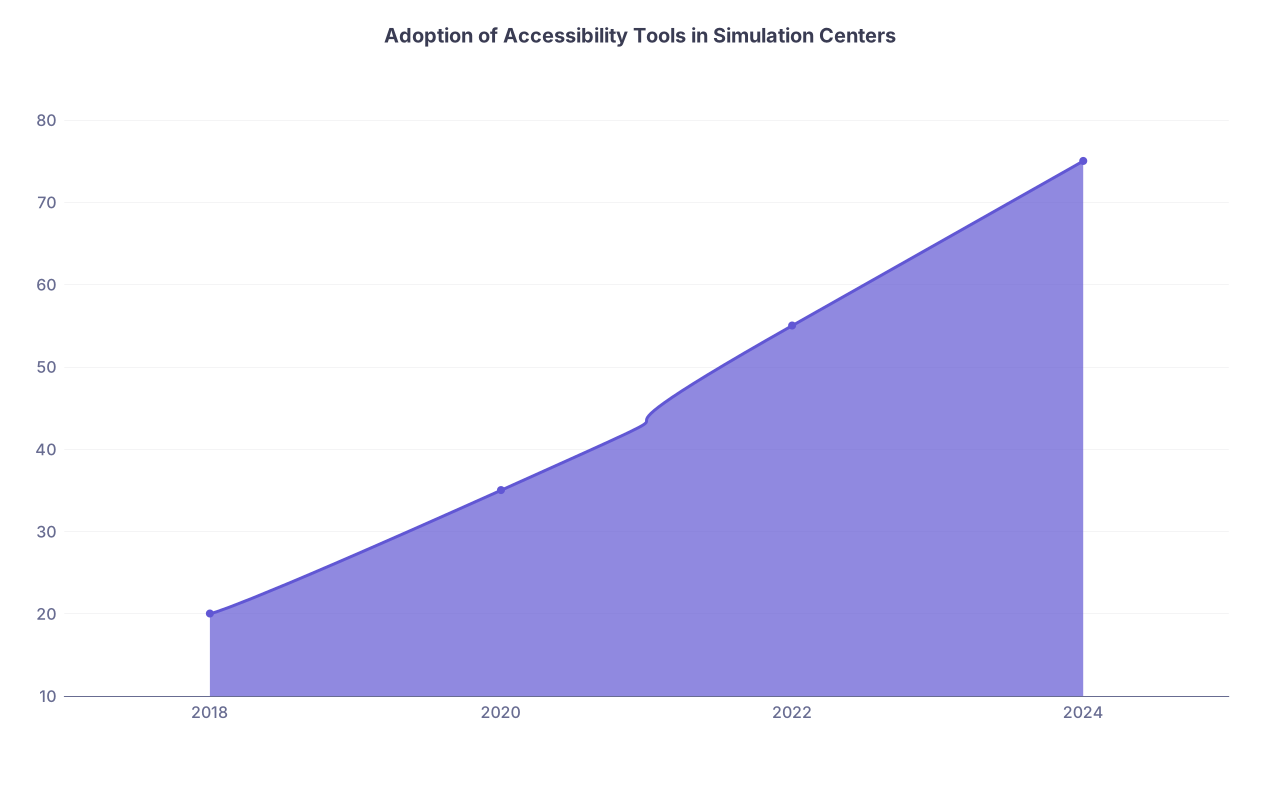
| Category | Value |
|---|---|
| 2018 | 20 |
| 2020 | 35 |
| 2022 | 55 |
| 2024 | 75 |
Most large centers are gradually moving there. Smaller schools lag. You do not have to buy everything at once. Start with timing and instructions, then move to EMR and alerting systems.
6.2 Low-Tech, High-Yield Modifications
Not everything needs a software contract:
- Laminated large-print instruction sets
- Color-coded station doors and tactile markers
- Simple vibrating kitchen timers repurposed as tactile cues
- Pretyped “core phrases” sheets for interpreters and SPs
The only unforgivable sin here is randomness. Whatever you implement must be standardized and repeatable.
7. The Future: Building Disability-Aware Simulation from the Ground Up
The better future is not “retrofit accommodations.” It is simulation and OSCE design that assumes a spectrum of sensory profiles from day one.
That looks like:
- Blueprinting OSCEs with built-in multi-modal information delivery (every station has written, visual, and audio briefing options)
- Designing common scenarios that explicitly feature DHH, blind, or autistic patients, so that all trainees learn to work effectively across sensory differences
- Building your exam rubrics to measure what you claim to care about: clinical reasoning, communication effectiveness, patient safety, teamwork—not arbitrary sensory conformity
The next generation of physicians and nurses will train and practice with colleagues and patients who use cochlear implants, screen readers, tinted lenses, noise-canceling headphones, interpreters, and communication devices. Your OSCEs should reflect that reality.
FAQ (Exactly 6 Questions)
1. Does providing extra time in OSCEs for sensory disabilities compromise exam validity?
Not if the extra time is specifically tied to the accommodation. For example, additional minutes to read braille instructions or to communicate through an interpreter compensates for the access pathway, not the underlying clinical skill. The key is to define precisely which parts of the station are time-neutral (access) and which parts are performance time. Vague, blanket “50% extra time everywhere” without rationale is sloppy; targeted time extensions are defensible.
2. Can a Deaf student using an interpreter be fairly assessed on communication skills?
Yes, if your rubric is designed correctly. You should assess whether the student provides clear, organized, empathetic content and whether they manage the interpreted interaction effectively: pausing appropriately, checking understanding, responding to patient emotions. You are not assessing accent or voice tone. You must also train SPs and raters so they do not unconsciously downgrade interpreted encounters.
3. How do you handle stations where visual inspection is the core skill for a blind student?
You have to distinguish between essential program requirements and exam design flexibility. If a program decides that direct visualization of specific findings is essential for graduation, accommodations cannot remove that requirement. However, many “visual” tasks can be reframed: the learner can direct a team member to inspect and report findings, then interpret and act. For truly non-delegable visual tasks, programs must be explicit in their technical standards and discuss options with the learner early.
4. Are noise-canceling headphones acceptable in OSCEs for autistic or sensory-sensitive students?
Often yes, with constraints. They can be invaluable during waiting periods and transitions. During stations, you need to ensure the candidate can still access critical auditory information (SP voices, codes, alarms) via alternative channels: visual cues, haptics, written prompts. You cannot block life-safety information, but you can dramatically reduce extraneous noise that serves no assessment purpose.
5. How do you prevent standardized patients from “over-accommodating” and altering station difficulty?
You script and train rigorously. SPs should receive written guidance about what level of help is allowed (for example, repeating a question exactly once if requested) and what is not (rephrasing instructions, giving hints, ignoring time limits). For students with accommodations, SP instructions should specify precise modifications—such as waiting for an interpreter or allowing an extra moment for tactile orientation—while keeping all other responses identical to the standard script.
6. What documentation should exist for OSCE accommodations in case of appeal or legal challenge?
You need a clear paper (or electronic) trail: the student’s approved accommodation plan, the functional limitations identified, the mapping from limitations to OSCE modifications, and the final station-by-station implementation plan. After the exam, keep records of any deviations, technical failures, or emergency adjustments. When a student appeals, you should be able to show that changes were pre-planned, standardized, and aligned with both disability law and your program’s educational objectives.
Two things to take away. First, OSCE and simulation accommodations for sensory disabilities are mainly a design problem, not a generosity problem—structure them once, then apply consistently. Second, if you are serious about fairness, you stop grading hearing, vision, and neurotypical tolerance and start grading the clinical skills you actually claim to value.