(See also: Accommodations for Inpatient Night Float for models that actually work.)
You are on night float in a level 1 trauma center. It is 2:17 a.m. The trauma bay is loud in that particular, chaotic way: vents cycling, overhead pages, monitors alarming, someone shouting for blood, someone else calling radiology. You are the trainee with hearing loss, straining to catch the attending’s instructions through your stethoscope, your hearing aids, your N95, and the hurricane of background noise.
You miss one word. Was that “push 50” or “flush it”? You ask them to repeat. Someone sighs. You feel it more than you hear it.
This is the environment everyone pretends is “just part of medicine.” It is also the environment that systematically punishes people with hearing loss unless someone has done the hard work of real accommodation design.
Let me break down how to accommodate trainees with hearing loss when the volume and chaos are not optional—OR, ED, trauma, ICU, busy inpatient wards, even some outpatient procedural suites.
We are not talking about feel‑good platitudes here. We are talking about specific, operational changes that let trainees with hearing loss be safe, effective, and fully integrated members of the team.
1. Start With Reality: What “High Noise” Actually Means in Clinical Training
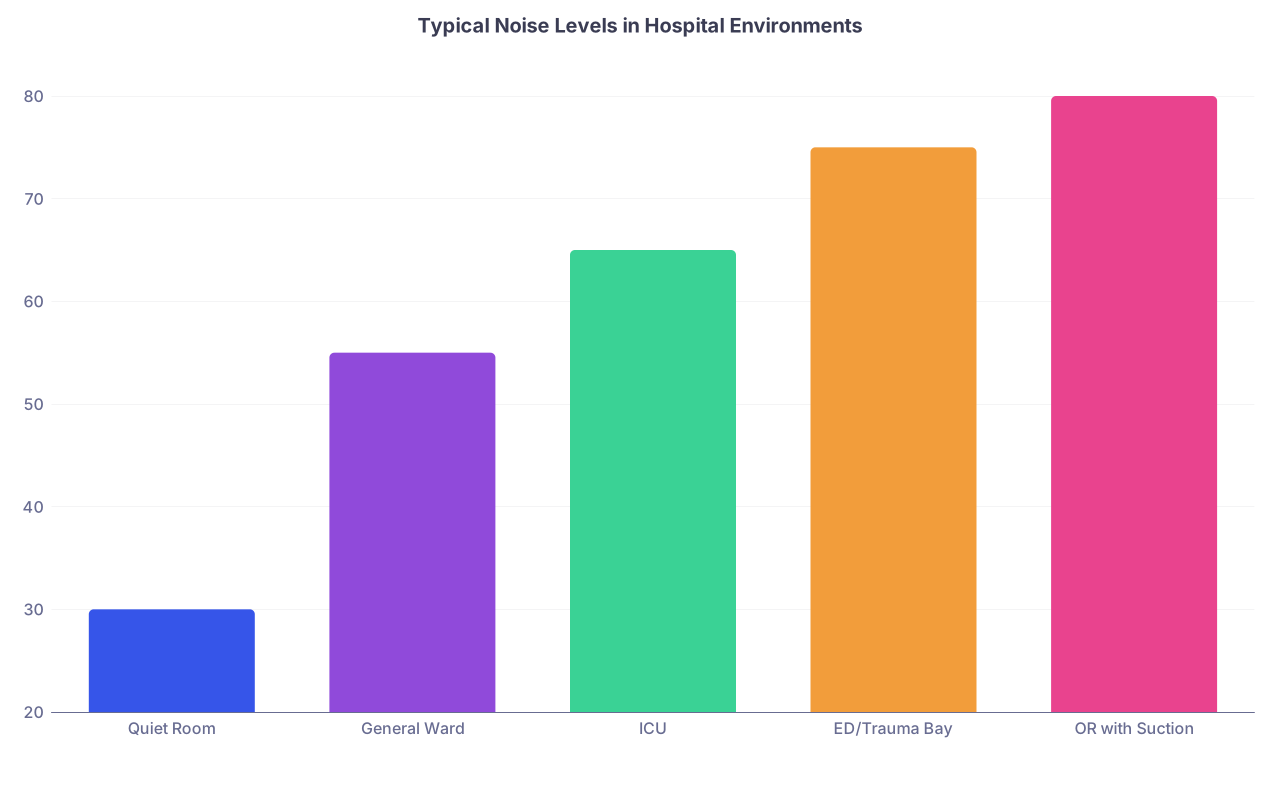
First, be honest about the soundscape. Most institutions underestimate how brutal it is.
| Category | Value |
|---|---|
| Quiet Room | 30 |
| General Ward | 55 |
| ICU | 65 |
| ED/Trauma Bay | 75 |
| OR with Suction | 80 |
Those numbers are not theoretical. I have seen ICU decibel readings sit in the mid‑60s all night. Add:
- Masking of speech consonants (the part of sound you need for clarity).
- People talking over each other.
- Critical information delivered as half‑mumbled side comments.
For someone with hearing loss, this is not just “harder.” It can turn speech into random noise fragments. And high noise disproportionately destroys exactly the frequencies most hearing devices are working to boost.
The typical setup:
- Behind‑the‑ear or in‑the‑ear hearing aids, cochlear implants, or bone‑anchored devices.
- Masks and face shields obscuring lips and facial cues.
- Attending talking while turned toward a monitor or the patient, not the trainee.
- Monitors and vents set to loud audible alarms with no visual prioritization.
Taken together, that is a system designed for failure. Not because anyone intended it. Because no one designed it at all.
Accommodation starts by admitting: the default environment is hostile to accurate auditory communication.
2. Core Principles: What “Reasonable Accommodation” Actually Looks Like Here
You do not fix this with one gadget or one “be supportive” email. You build around four non‑negotiable principles:
Redundancy of critical information
Never rely on one fragile communication channel (fast speech in high noise) for information that affects safety.Predictability and structure
The more structured and predictable the workflow, the fewer ad‑hoc, mumbled, side‑of-mouth instructions a trainee needs to decode in real time.Alignment of tech with task
Not every assistive device works in every environment. OR ≠ ED ≠ clinic. You match the tech to the actual acoustic and operational reality.Shared responsibility
The solution cannot be “the trainee must figure it out.” Attendings, program leadership, IT, and facilities have to do some work.
If your institution’s “plan” is a one‑line note in the trainee’s file saying “has hearing aids—speak clearly,” that is malpractice by policy.
3. Pre‑Rotation Planning: Do Not Wing This on Day 1 in the OR
The worst time to realize you cannot hear your attending is when you are scrubbed in, suction is roaring, the attending is masked, and anesthesia just turned on music.
You need a pre‑rotation plan. At minimum, a structured, explicit conversation that covers:

| Step | Description |
|---|---|
| Step 1 | Disclosure to GME or Program Director |
| Step 2 | Confidential needs meeting |
| Step 3 | Define high noise rotations |
| Step 4 | Select specific accommodations |
| Step 5 | Communicate plan to rotation leadership |
| Step 6 | First-day huddle to operationalize |
Who is in that meeting?
- Trainee.
- Program director or associate PD.
- GME disability / accessibility representative (if you have one; if you do not, that is its own problem).
- Sometimes OT/audiology if they are helping with device selection.
What you cover:
- Specific environments that have been problematic before (OR, trauma bay, code situations, rounds on loud wards).
- What devices the trainee already uses (and their limitations).
- Whether the trainee benefits from speech‑to‑text, FM/DM systems, loop systems, or visual supports.
- Their comfort with disclosing to peers/attendings and how they want that framed.
Then you document a concrete accommodation plan. Not vague. Not “faculty will be sensitive.”
Concrete reads like:
- “Attending surgeons will use wireless neck‑worn mic paired to trainee’s receiver for all cases where trainee is scrubbed.”
- “During ED shifts, critical orders to the trainee will be confirmed on the ED whiteboard or typed into chat when feasible.”
- “On rounds, the trainee will stand adjacent to the attending and will have permission to ask for repetition without negative evaluation.”
That plan then gets translated into rotation‑level operations.
4. Environment by Environment: What Actually Works
Let us get specific. I will go through the main “high noise” settings and tell you what I have seen either work well or fail spectacularly.
A. Operating Room
The OR is acoustically nasty. Masked faces, suction, cautery, vents, music, multiple simultaneous conversations.
Key tasks the trainee must do:
- Hear intra‑operative teaching and instructions.
- Hear time‑outs and safety checks.
- Respond to sudden requests (“Kelly clamp now”, “hold this retractor differently”, “cut”, “stop”).
Core accommodations:
Direct audio streaming from the attending’s mic to the trainee
This is the most powerful, consistently effective solution when it is set up correctly.
Common setups:
- Attending wears a small collar/neck‑worn Bluetooth or FM/DM microphone.
- Microphone pairs either:
- directly to the trainee’s hearing aids / cochlear implant processors (many modern devices support this), or
- to an intermediate receiver that relays the signal via telecoil / audio shoe to the trainee’s device.
Practical points most people miss:
- You need backup devices. Batteries die mid‑case. Bluetooth drops. Someone forgets to charge the mic. Keeping a second mic/receiver in the OR core saves days of frustration.
- You need pairing pre‑done. Do not make the trainee troubleshoot Bluetooth handshakes 10 minutes before incision.
- You must address infection control. Mic placement has to work with sterile fields. Neck‑worn or clipped to surgical cap strings usually works; lavalier on the gown often does not.
Structured verbal communication
Basic, but powerful:
- Attending (and team) faces the trainee when giving complex instructions.
- Minimize music when possible, especially for teaching parts of the case.
- Time‑outs are done with everyone facing inward in a way that lets the trainee see lips and facial expression. If the trainee uses speechreading, this matters.
Visual task cues
For teaching and minor instructions, use gesture + brief verbal cue:
- Point to instrument and then say the name.
- Tap where you want a hand moved before giving the detailed explanation.
- Use the overhead screen or room whiteboard to diagram anatomy rather than a long monologue the trainee must decode through noise.
Where things break:
- People crank up music and assume the mic will compensate. It will not.
- Attendings mumble into their mask without facing the mic. Direct streaming does not fix bad articulation.
- Tech not integrated into orientation. New scrub nurses and OR staff do not know where the mic is stored or how to put it on.
If you take nothing else from this section: pair a dedicated mic to the trainee’s devices, and treat it like any other required OR equipment. Not optional. Not “if we remember.”
B. Emergency Department and Trauma Bay
Noise, chaos, and multiple people talking at once. Also, information density is brutal.
Key communication points:
- Incoming EMS report.
- Primary and secondary survey instructions.
- Medication orders and procedures.
- Rapid status changes announced out loud (“BP dropping”, “sat 82”, “rhythm changed”).
What actually helps:
Structured huddle positions
Do not stick the trainee in a random corner.
- Assign the trainee a consistent physical location where they can see the team leader’s face and main monitor.
- Make it explicit: “You stand next to me, on my right, so you can hear and see me.”
One designated communicator
Trauma team leader role matters. But with a trainee with hearing loss, you must enforce it.
- One person gives the majority of the instructions.
- Others do not shout over them.
- Leader uses short, clear phrases. Then pauses. That pause is what allows processing in noise.
Use of visual and written supports
You are not going to type full paragraphs during a trauma, but you can:
- Jot doses/meds on the whiteboard (“TXA 1 g now”, “2U O‑neg”).
- Visually mark priorities (“CT after chest tube,” circled on the board).
- Use the ED tracking board to confirm bed assignments and dispo orders so the trainee is not dependent on overheard hallway comments.
Assistive listening tech with directionality
Overhead audio loops are usually useless in trauma (they catch too much background noise). What works better:
- Directional remote mic clipped to the attending’s collar or worn around their neck.
- Trainee adjusting their devices to a “directional” or “noise” program that emphasizes the front speaker and reduces sides/back.
This requires audiology involvement pre‑rotation. The trainee should have an ED/trauma‑specific program in their devices they can switch to.
Where failure happens:
- Attending moves around the room constantly. The mic ends up on the wrong side of the sterile field or under a gown.
- EMS report is given facing away, to the chart or computer. Trainee misses the whole thing.
- Other residents half‑shout suggestions or questions from behind masks, and the trainee is penalized for “not being engaged” when they simply did not catch the comments.
You fix this with leadership discipline. Not magical devices.
C. ICU and High‑Noise Inpatient Wards
Here, the challenge is chronic noise rather than acute chaos: vents, alarms, constant chatter, phones.
Use a different approach:
Alarm management with visual prioritization
Do not underestimate alarm chaos. It buries speech.
- Work with nursing leadership and biomed to optimize alarm volumes and durations.
- Encourage use of visual alarm systems on central monitors and hallway displays.
- Where possible, enable remote alarm dashboards on tablets/phones the team can glance at rather than relying on sound alone.
This helps the entire unit, not just the trainee with hearing loss.
Rounds structure
On rounds:
- Trainee with hearing loss stands near whoever is presenting and near the attending.
- Use the EHR on a shared computer-on-wheels so problem lists, plans, and new orders are visible while they are being discussed.
- For rapid‑fire questions or differential discussions, pause and summarize key points out loud, not just as a muttered side comment to the intern.
Team communication norms
You build a few simple ground rules:
- For new critical orders, repeat once, clearly, facing the person: “Start norepi at 5; titrate to MAP 65.” Not shouted while walking away.
- For consult calls, encourage the trainee to use speakerphone in a quieter side room with captions (more on that below) rather than trying to decode on a noisy unit.
D. Codes and Rapid Responses
This is the highest‑stakes environment. It is also where people are most resistant to changing their habits because “we need to move fast.”
Fast is not faster if half the team cannot hear you.
Accommodations:
Clear role assignment. If the trainee with hearing loss is on compressions or procedures, you do not also expect them to catch every shouted instruction. That is not realistic for anyone, hearing loss or not.
Face‑to‑face briefings. Quick, direct communication:
- Move close.
- Eye contact.
- “You handle meds. I will call them out clearly and point to you.”
- That 5‑second deliberate briefing can salvage the entire event.
Debrief with written summaries. Post‑code debrief includes a quick written or typed recap of key clinical decisions. This helps learning and closes gaps from anything that was missed in the noise.
5. Technology: What To Actually Use (And What To Skip)
People love to throw tech at disability. Most of it is poorly matched to the actual task. Let us separate what tends to work in high‑noise medical environments from what is mostly brochure‑ware.
| Tool / Tech | Best Setting | Typical Usefulness |
|---|---|---|
| Remote mic (BT/FM/DM) | OR, rounds, ED leader | High |
| Live speech-to-text (captioning) | Clinic, rounds, meetings | Medium-High |
| Loop/telecoil room systems | Lecture halls | High |
| Phone captioning apps | Consult calls | High |
| Generic sound amplification apps | ED, ward | Low |
Remote Microphones (Bluetooth, FM, DM systems)
This is your workhorse for OR and anywhere the trainee needs to focus on one primary speaker.
Pros:
- Direct signal‑to‑noise improvement.
- Integrates with many modern hearing aids/cochlear implants.
- Small, portable, easy to charge.
Cons:
- Pairing / tech support can be flaky if not standardized.
- Multiple attendings per day means multiple people need to learn to wear it properly.
- Some older implants/aids need adapters.
If you are serious, coordinate audiovisual / audiology and buy institution‑owned mics that are compatible with multiple brands or with receivers the trainee already has.
Live Speech‑to‑Text / Captioning
Automatic speech recognition has gotten better, but the OR and ED are still hostile environments for it. Where it shines:
- Case conferences.
- Didactics.
- Family meetings in private rooms.
- Rounds when you can park a tablet or laptop in a stable spot and the main speaker is relatively close.
Examples:
- Built‑in captions in platforms like Zoom/Teams for remote conferences.
- Dedicated apps (e.g., Otter, AVA, Google Live Transcribe) on a tablet or phone during discussions.
In the trauma bay? Usually not great. Too many overlapping voices and noise artifacts. Use it before and after, not during.
Captioned Phone Calls
If your trainee is expected to do consult call‑backs, this matters directly.
Options:
- Dual‑device setup: phone to ear + real‑time call captioning on a computer or tablet.
- Built‑in carrier captioning services where available.
- Institutional support for captioned softphone solutions on desktops.
Set it up before the rotation. Do not wait until they miss an important consult detail because someone refused to speak up or repeat.
Things That Sound Good but Rarely Help
- Generic “hearing booster” apps in the ED. They just amplify noise.
- One‑off personal amplifiers not integrated with the trainee’s devices.
- Assuming that turning up the volume in overhead speakers or pages helps. It rarely does; it just increases distortion and fatigue.
6. Teaching and Assessment: Stop Penalizing Disability as “Lack of Engagement”
This is where trainees get quietly crushed.
Classic pattern:
- Attending mumbles a question facing the monitor.
- Trainee with hearing loss does not respond or asks for repetition.
- Attending concludes they are slow, disengaged, or unprepared.
- That shows up in evaluations: “Needs to pay better attention,” “Seems hesitant,” “Slow to respond in high‑stress situations.”
The problem is not cognition. It is input.
Fixes, from the teaching side:
- Face the trainee when asking questions. This sounds basic, but in practice it changes everything.
- Accept “Can you repeat that?” without irritation. Make it explicit: this is allowed and not an evaluation ding.
- After giving a series of instructions, ask for closed‑loop confirmation: “Tell me what you heard.” That surfaces mis‑hears early, before they affect patient care.
From the program side:
- Train faculty about the accommodation plan. If they do not know the trainee has hearing loss and what tools they are using, they will misinterpret behavior.
- Adjust assessment rubrics so they separate “responsiveness” from “ability to decode poorly delivered verbal instructions in 75 dB of noise.”
If your evaluation system punishes someone for over‑using clarifying questions in high‑noise settings, you are punishing safety.
7. Psychological Load and Culture: Stop Making Trainees Choose Between Safety and Stigma
Hearing loss in training is not just an audiology problem. It is a stigma problem.
What I have seen:
- Trainees avoiding asking for clarification because they are tired of eye rolls.
- Residents “pre‑rounding” by overcompensating—staying extra late to read notes because they missed parts of rounds.
- People with hearing loss being subtly steered away from procedural specialties under the guise of “fit.”
Accommodations fail if the culture is hostile, even quietly.
You change this by:
- Explicit messaging from program leadership: “We have talented trainees with hearing loss. We will use tech and communication changes to make sure they thrive here. You will help.”
- Normalizing repetition. If everyone is allowed to say “one more time?” during rounds, the trainee with hearing loss is not the outlier.
- Celebrating solutions. The day an attending says, “This mic actually makes my teaching better for everyone,” you are winning.
I am not romanticizing this. Some faculty will resist. Some will quietly think hearing loss is incompatible with high‑noise specialties. They are wrong, but they exist. Your job as leadership is to make their opinion irrelevant to the implementation of accommodations.
8. Legal and Institutional Backbone: Turn “We’ll Try” into Policy
You cannot run this on vibes.
At the graduate medical education level, your institution should have:
- A formal disability accommodation process for residents and fellows, separate from ad‑hoc favors.
- A named ADA / accessibility coordinator who understands clinical workflows, not just office jobs.
- A budget line for assistive tech (remote mics, receivers, captioning licenses) that does not come out of the trainee’s pocket.
At the program level:
- Written accommodation plans that live somewhere more stable than one PD’s private email folder.
- Faculty development on working with trainees with sensory disabilities.
- A feedback loop: mid‑rotation check‑ins asking the trainee what is and is not working in the actual noise of the real environment.
If you are a trainee reading this and your institution’s response so far is “we’ve never really dealt with this before,” that is not a reason to accept unsafe conditions. It is a reason to force them to grow up as an organization.
9. Looking Forward: Designing High‑Noise Clinical Spaces for Diverse Brains and Bodies
Let me zoom out for a moment.
We built many of our high‑acuity spaces with one implicit assumption: the ideal clinician is young, fully hearing, fully sighted, neurotypical, and willing to endure any sensory assault as a badge of honor.
That ideal never matched reality. Now it is actively blocking talent.
Future‑proofing this looks like:
- ICU and ED redesigns that use more visual and haptic signaling, less random alarm audio.
- ORs with integrated, staff‑level communication systems—think intra‑OR comms that stream straight to hearing tech rather than shouted instruction across the table.
- Universal design principles for rounds: shared digital plans, visible problem lists, captioned virtual meetings, normalized repeats.
- Residency selection and promotion processes that judge what matters—clinical judgment, procedural skill, teamwork—not how easily someone can parse shouted instructions through a mask at 3 a.m.
We are heading into a workforce era where more clinicians will have chronic conditions, sensory differences, and disabilities—and will expect to keep practicing.
If you build systems now that allow a trainee with hearing loss to function at full capability in the loudest environments, you are not doing charity. You are building resilient, modern clinical operations.
With that, here is the bottom line.
You cannot silence the trauma bay or the OR. You should not. But you can stop pretending that the only way to practice in those spaces is with perfect hearing.
If you map the actual communication tasks, match them to specific tech, change a few entrenched behaviors, and back it with policy, a trainee with hearing loss can run a code, assist in a Whipple, or manage a crashing ICU patient as safely and effectively as anyone else.
Do that well, and the next time a resident with hearing loss scrubs into a case, their first thought will not be “Can I even hear them?” It will be the same as everyone else’s: “What am I going to learn today?”
And from there, the conversation shifts to a better question entirely: not “Can they be here?” but “What kind of specialist do they want to become next?”