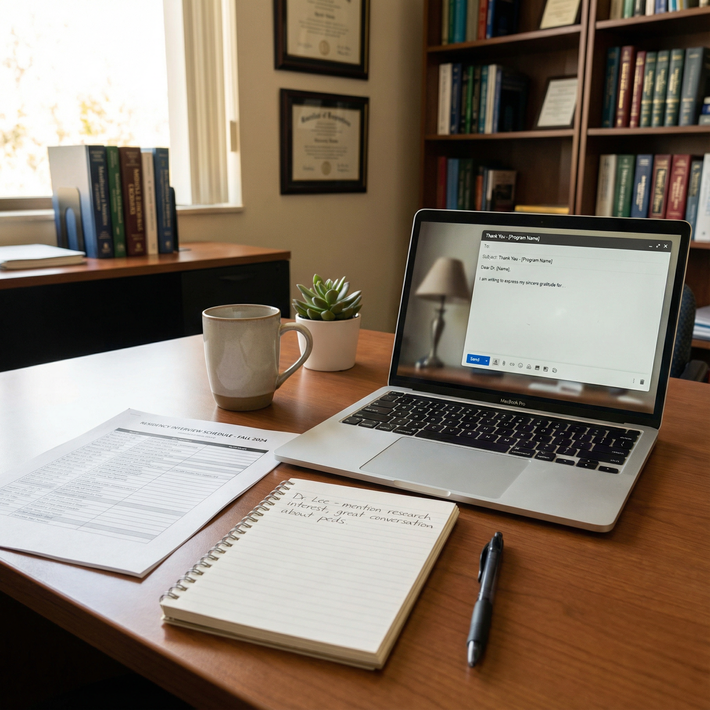
The way most applicants handle thank-you emails during interview season is unsustainable. When you are interviewing 5, 8, even 10 times a week, “I’ll just write them all at night” turns into burnout and sloppy, error-filled messages that programs actually remember.
You need a system. Day-by-day, week-by-week.
I am going to walk you through a concrete timeline so that by the time you hit that 5+ interviews per week schedule, your thank-you process is mostly automatic—templates ready, time blocks scheduled, tracking in place. You will not be that person at 1:37 a.m. misspelling the PD’s name.
4–6 Weeks Before Your First Interview: Build the Thank-You Infrastructure
At this point you should stop thinking about thank-you emails as “extra courtesy” and start treating them as a workflow.
Step 1: Decide Your Rules
Before the chaos starts, make three decisions and stick to them:
Who you will email
- Every faculty interviewer.
- The program director and APD if you met them in a meaningful way (talk, breakout room, pre-brief).
- Chief residents or residents only if:
- They interviewed you formally, or
- You had a substantial one-on-one conversation.
- You do not need to email every single resident from the social. That is how people drown.
When you will email
- Standard: within 24 hours of each interview.
- Hard upper limit: 48 hours.
Past that, the tone has to shift (“It was a pleasure speaking with you earlier this week…”). That is salvageable, but avoid it.
How long your emails will be
- 1 short paragraph + 1 specific reference + 1 closing sentence.
- Aim for 100–150 words. Anything much longer will not be read carefully.
Write these rules down. Pin them near your desk or add them to the first tab of your tracking sheet.
Step 2: Create a Tracking System
You will not keep this straight in your head. You should have a simple, brutal spreadsheet that does the thinking for you.
Create a sheet with these columns:
| Column | Purpose |
|---|---|
| Program | Official program name |
| Date of Interview | MM/DD |
| Interviewer Name/Role | One row per person to email |
| Email Address | Copy from invite/website/chat |
| Email Sent? | Yes/No |
| Date Sent | MM/DD & time if you care |
| Personalized Detail | 3–7 word memory cue |
Set filters so you can quickly see “Email Sent? = No” for the current day.
If you like tools: Notion, Airtable, even a locked note in your phone. Does not matter. What matters is that you can update it in real time on interview day.
Step 3: Build 2–3 Core Templates
You should not be writing from scratch every time. You need modular templates that you can personalize in 30 seconds.
Write at least:
- Faculty / Attending Template
- Program Director / APD Template
- Resident / Chief Template
Keep them in a note you can quickly copy-paste.
Example faculty template (short, efficient):
Subject: Thank you for today’s interview
Dear Dr. [Last Name],
Thank you for taking the time to speak with me today about the [Program Name] [Specialty] residency. I appreciated hearing your perspective on [specific topic you discussed] and how it shapes residents’ experience with [clinic / research / education, etc.].
Our conversation reinforced my interest in [Program Name], particularly the opportunity to [specific detail you liked—curriculum, patient population, niche track]. I would be honored to train in a program with such a strong commitment to [your angle: teaching, underserved care, research].
Sincerely,
[Your Name], [Your Medical School]
You can shorten this further for volume weeks, but this structure works.
Do not obsess over perfect prose now. You will revise once you test-drive one or two.
1–2 Weeks Before Interviews Start: Rehearse the System
At this point you should run a “mock interview day” for your thank-you workflow.
Step 1: Time Yourself
Pick one of your templates. Pretend you just finished an interview with:
- 2 faculty
- 1 resident
- 1 PD
Now:
- Fill in your tracking sheet for those four.
- Personalize and “send” (copy into a draft folder) four thank-you emails.
Time how long it takes. The goal is 15–20 minutes for four solid emails once you are used to it.
If it takes you 45 minutes, your templates are too long or you are over-customizing. Tighten them up.
Step 2: Polish Your Template Phrases
You want a few “stock phrases” you can drop in, so you are not staring at the cursor while exhausted.
Build a mini-phrase bank, like:
- “I particularly valued our discussion about…”
- “Your description of how residents are supported when…”
- “Hearing about your work in [X clinic / research area] was especially meaningful given my experience with…”
Have 5–10 of these ready. Store them under your templates.
During Interview Season: Weekly Structure When You Have 5+ Interviews
Now the real pace starts. At this point you should stop improvising and stick to a weekly pattern.
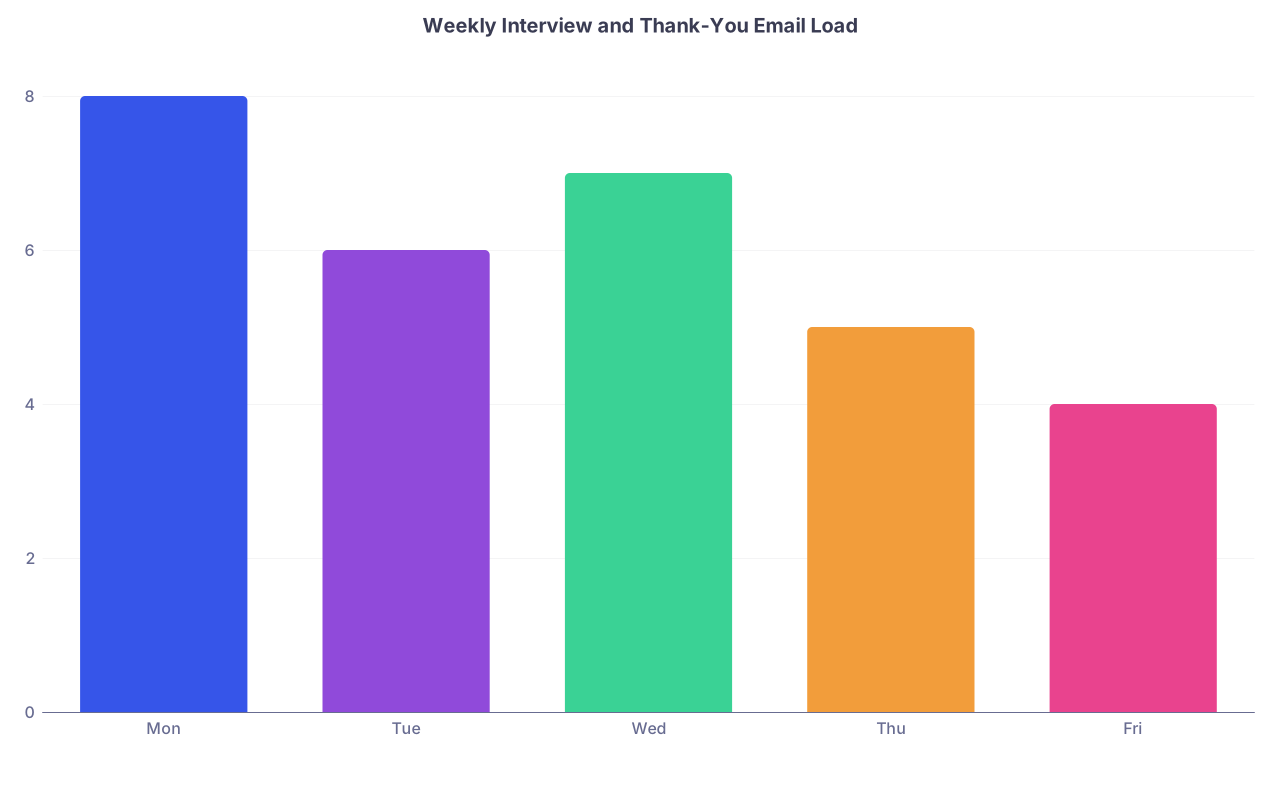
| Category | Value |
|---|---|
| Mon | 8 |
| Tue | 6 |
| Wed | 7 |
| Thu | 5 |
| Fri | 4 |
Think of your week as a repeating loop:
- Morning: Interview(s)
- Immediately after each block: 10–15 minute debrief
- Early evening block: Thank-you batch for that day
Monday–Friday: The Daily Cycle
Immediately After Each Interview (Same Day, Within 15–30 Minutes)
You are still on Zoom. The call just ended. Before you check your phone, before you eat, you do this:
Open your tracking sheet.
For each interviewer:
- Add/update:
- Full name and role
- Email (if given in invite / chat / slide; if not, leave blank for later)
- One specific detail from your conversation. Short phrases only:
- “Talked about FQHC clinic on Mondays”
- “Mentioned QI project on ED throughput”
- “Shared story about IMG support and mentorship”
- Add/update:
If they drop emails in the chat, copy immediately into your tracking sheet or a “To Email” note. Do not tell yourself “I’ll scroll back later.” Sometimes you cannot.
This 10–15 minute habit saves you hours of reconstructing details later.
Late Afternoon / Early Evening: Thank-You Power Block
Set a daily recurring block on your calendar, for example:
- 6:00–6:45 p.m. local time: “Thank-You Emails + Day Review”
In this block you:
Pull up today’s unsent entries in your sheet (filter by today’s date + Email Sent? = No).
Batch by template type.
- Do all faculty first.
- Then PD/APD.
- Then residents.
For each person:
- Paste the right template.
- Insert:
- Name
- Program name
- One specific conversation detail from your sheet
- Quick check:
- Names spelled correctly?
- Correct program name? (Yes, people send “Thank you for speaking with me about [wrong program]”. I have seen this more than once.)
- Hit send.
- Mark “Email Sent? = Yes” and timestamp.
You should be able to handle a day with 4–6 interviewers in 20–30 minutes once you are in rhythm.
If you are stacking multiple programs in a day (it happens more with virtual), separate your email blocks by program to avoid mixing names and anecdotes.
Handling Extreme Weeks: 8–10 Interviews, 30+ Emails
Some weeks are brutal. Three back-to-back days, socials at night, maybe a flight squeezing in. At this point you should simplify stance and avoid perfectionism.
Priority Rules for Overloaded Days
When you are overloaded, you apply this triage:
Must-send within 24 hours:
- Program Director / APD
- Faculty interviewers
Nice-to-send within 48 hours (if energy allows):
- Residents who formally interviewed you
- Chief residents with longer conversations
Optional:
- Residents from social hours unless you had a memorable, one-on-one connection that truly matters to you.
If time is tight:
- Use shorter variants of your template.
- Remove middle sentences, keep:
- 1 gratitude sentence
- 1 specific detail
- 1 line reaffirming interest
Example “compressed” faculty email:
Dear Dr. [Last Name],
Thank you for speaking with me today about the [Program Name] [Specialty] residency. I especially appreciated our conversation about [specific topic], and it highlighted for me how thoughtfully the program approaches [clinic/education/research/etc.].
I remain very interested in [Program Name] and would be grateful for the opportunity to train there.
Sincerely,
[Your Name]
That is under 90 words, still specific, and completely acceptable.
Day-By-Day Example: One Packed Interview Week
Let me lay this out like a real schedule. Assume 5 program interviews, mostly virtual, with one in-person.
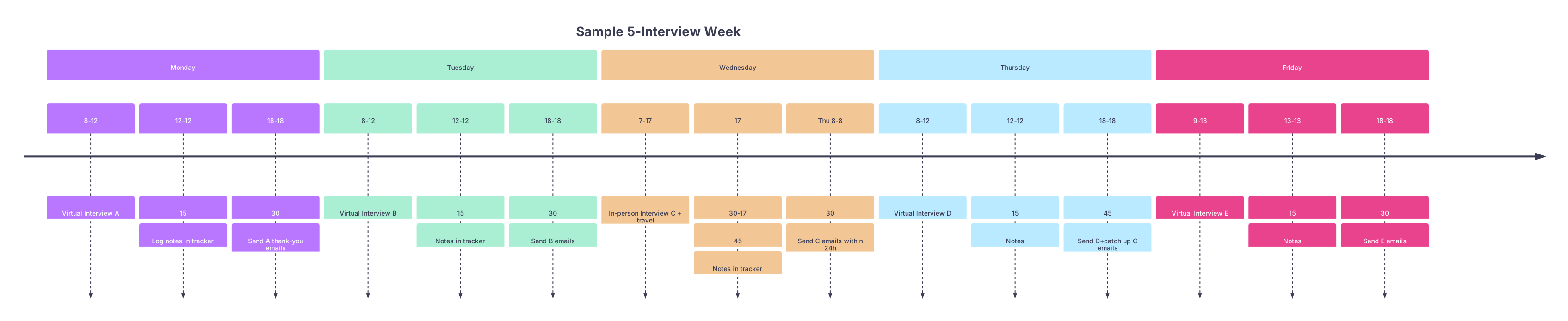
| Period | Event |
|---|---|
| Monday - 8-12 | Virtual Interview A |
| Monday - 12-12 | 15 |
| Monday - 18-18 | 30 |
| Tuesday - 8-12 | Virtual Interview B |
| Tuesday - 12-12 | 15 |
| Tuesday - 18-18 | 30 |
| Wednesday - 7-17 | In-person Interview C + travel |
| Wednesday - 17 | 30-17 |
| Wednesday - Thu 8-8 | 30 |
| Thursday - 8-12 | Virtual Interview D |
| Thursday - 12-12 | 15 |
| Thursday - 18-18 | 45 |
| Friday - 9-13 | Virtual Interview E |
| Friday - 13-13 | 15 |
| Friday - 18-18 | 30 |
Notice the key moves:
- Wednesday (travel-heavy): You log notes same day but push emails to Thursday morning within the 24-hour window.
- Thursday evening: You catch anything that slipped, still under 48 hours.
If you stay disciplined with note-taking, the emails themselves remain quick, even if slightly delayed.
Common Failure Points (And How to Prevent Them in Real Time)
At this point you should know where people usually screw this up. Learn from them.
1. Lost or Wrong Email Addresses
Problem: PD mentioned “feel free to reach out” but no email in the invite. You assume you will find it later; you cannot.
Prevention habits:
- During introductions or closing, if someone explicitly invites follow-up, jot down, “Need email – check website / coordinator.”
- If you do not have it by end-of-day:
- Check program’s website faculty page.
- If unclear, send a single thank-you to the program coordinator, addressed to the PD:
- “I would be grateful if you could forward this note to Dr. [Last Name].”
Do not spam three different guesses. One coordinator-forwarded note is fine.
2. Copy-Paste Disasters
Problem: “I really enjoyed learning more about [Wrong Program Name].” Programs notice this immediately.
Prevention:
- In your email block, only work on one program at a time.
- Do a final “Ctrl+F” search for the previous program’s name before sending the first email for a new program.
- Lock in a simple checklist before hitting send:
- Name
- Title (Dr./Ms./Mr.)
- Correct program name
- Detail actually from that conversation
3. Overly Generic Content
Problem: Every email sounds like, “Your program’s commitment to excellence really impressed me.”
Fix:
- The “Personalized Detail” column in your tracker is your lifeline.
- Force yourself to write at least one concrete detail for each interviewer as you log notes:
- “Rural rotation in R2 year”
- “Simulation-based ICU bootcamp”
- “Longitudinal clinic with same patient panel”
Even a single specific line upgrades the entire email from generic to credible.
Managing Thank-You Emails Across Multiple Rounds and Updates
Sometimes there is a second contact:
- Pre-interview social one week
- Interview the next
- Post-interview follow-up when you have new information (Step score, publication, etc.)
At this point you should avoid bombarding people while staying professional.
Second or Follow-Up Emails
Use a second email only when:
- You have a truly meaningful update (new Step 2 score, publication, major award, new leadership role).
- You are replying in an existing thread from your thank-you or their response.
Keep it simple:
Dear Dr. [Last Name],
I wanted to share a brief update since our interview on [date]. I recently [received my Step 2 CK score / had a manuscript accepted in X / was selected as Y], and this further aligns with my interest in [your earlier discussed interest].
I remain very enthusiastic about [Program Name] and am grateful again for the opportunity to have interviewed with you.
Sincerely,
[Your Name]
Do not send “I’m still very interested” every two weeks. That reads as desperate, not professional.
End-of-Season Volume: 30+ Programs, 100+ Emails
By late season you will have sent a lot of thank-you notes. The system still holds if you keep it simple.
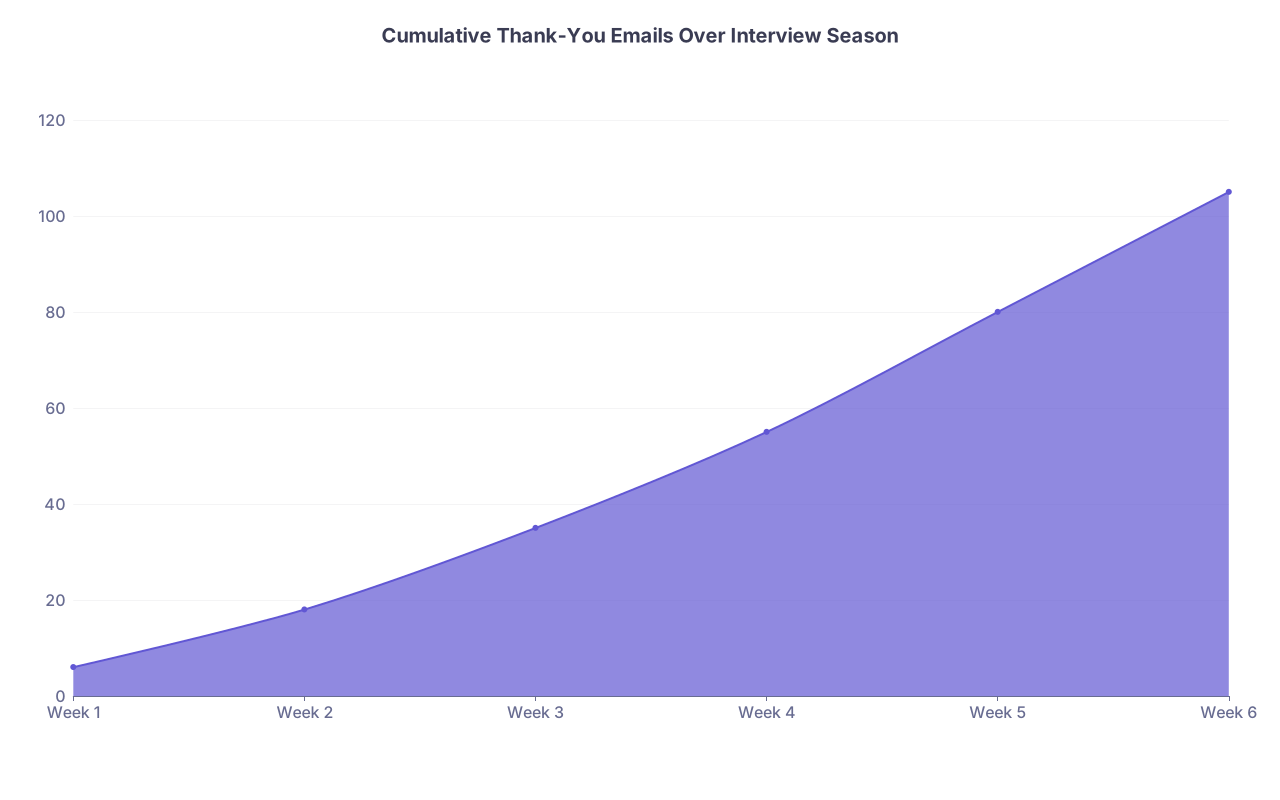
| Category | Value |
|---|---|
| Week 1 | 6 |
| Week 2 | 18 |
| Week 3 | 35 |
| Week 4 | 55 |
| Week 5 | 80 |
| Week 6 | 105 |
At this point you should:
- Keep your core templates unchanged. Do not rewrite them every week.
- Use your tracker as a memory aid when building your rank list:
- Add one more column: “Overall Impression / Notes”
- That column can pull directly from what stood out enough to mention in your thank-you.
Thank-you emails are not going to “save” a weak application. But memorable, specific, error-free notes can reinforce a positive impression and signal that you are organized and respectful. Sloppy, misaddressed, or obviously copied ones can quietly hurt you more than people admit.
Visualizing Your Daily Process
If you want it in one glance, this is your daily flow:

| Step | Description |
|---|---|
| Step 1 | Interview Block |
| Step 2 | 10-15 min: Log notes in tracker |
| Step 3 | Short break |
| Step 4 | 6-7pm Thank-You Email Block |
| Step 5 | Mark complete, relax |
| Step 6 | Schedule AM catch-up block next day |
| Step 7 | All today\s emails sent? |
That is the loop. Every interview day. No exceptions.
Your Next Concrete Step
Open a blank document or spreadsheet right now and build:
- Columns for program, interviewer, email, date, detail, sent status.
- Three basic templates: faculty, PD, resident.
Then time yourself personalizing 3 fake thank-you emails using those templates. If it takes more than 15 minutes, tighten them up.