What do you do when your Zoom interview freezes right as you’re answering, “So, why our program?”
You had your shot. You dressed right, your answers were tight, and then Zoom decided to die at the worst possible moment. Screen froze. Audio cut. Maybe your Wi‑Fi dropped, maybe their system glitched, maybe your laptop decided it was a great time to update.
Now you’re sitting there replaying every awkward second and wondering:
Did I just kill my chances?
Should I email them? What do I say without sounding desperate or blaming?
This is exactly the kind of mess I like to untangle. Let’s get you out of panic mode and into damage control mode.
We’ll walk through:
- How to quickly assess how bad the damage actually was
- When you should follow up (and when you shouldn’t)
- Exact email scripts for the most common technical disaster scenarios
- What to absolutely avoid saying
- How to quietly repair your image and move on to the next interview
You’re not the first applicant this has happened to. Programs have seen worse. What matters now is your recovery.
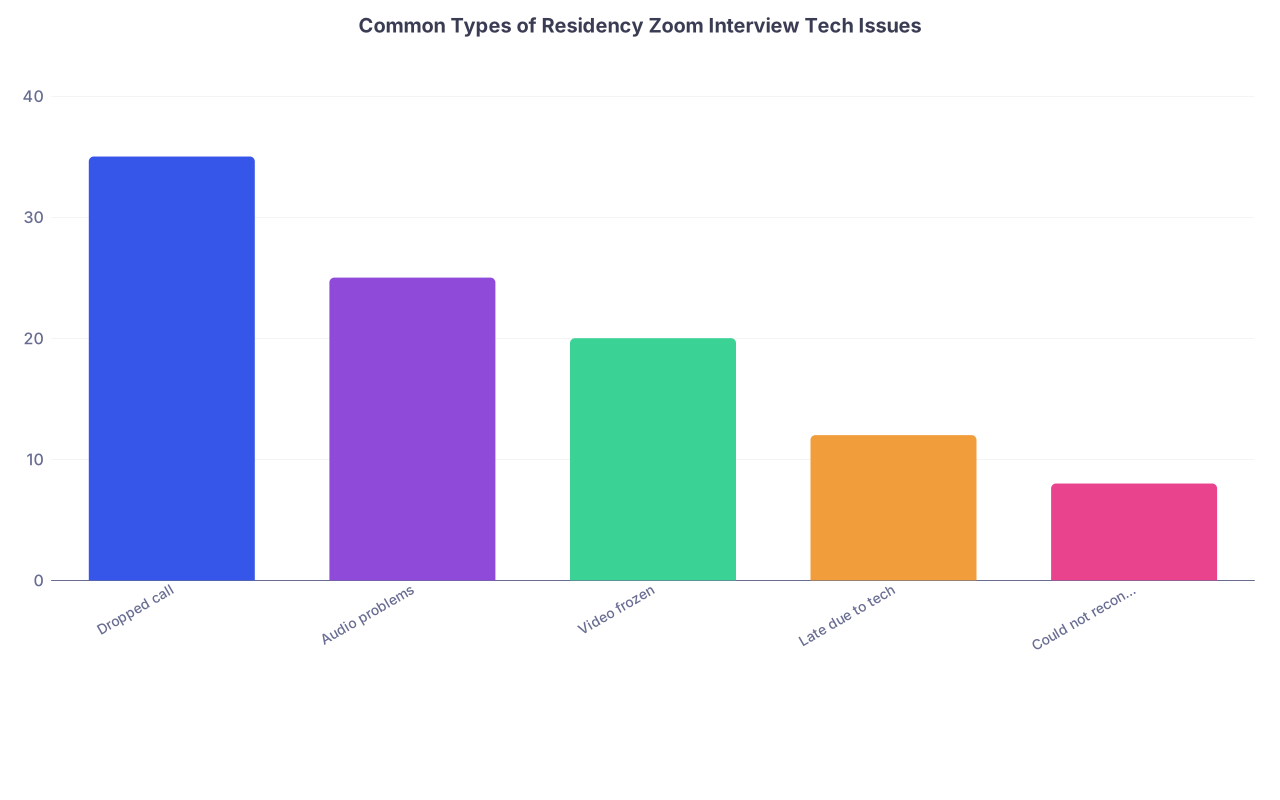
| Category | Value |
|---|---|
| Dropped call | 35 |
| Audio problems | 25 |
| Video frozen | 20 |
| Late due to tech | 12 |
| Could not reconnect | 8 |
Step 1: Figure out what actually happened (from the program’s point of view)
You lived the catastrophe from your side. But what did they see?
Run this mental checklist:
Did the interview continue at all after the issue?
- You rejoined and finished most or all of the time = minor to moderate issue.
- You never reconnected or only got ~5 minutes = major issue.
Did they acknowledge the problem during the call?
- “Don’t worry, this happens all the time.”
- “We’re running behind on our end too.”
Any sign they were sympathetic reduces the need for a long explanation later.
Did they seem annoyed or rushed?
- If you came in 10–15 minutes late because of tech and they looked visibly stressed or cut questions short, you need to follow up to reset the tone.
Did the problem clearly come from your setup?
- Your Wi‑Fi dropped, your laptop died, your mic didn’t work = you own it.
- They mentioned institutional issues (“Our Zoom is acting up today,” “We’re having server trouble”) = you still follow up, but more briefly and less apologetically.
Once you answer those questions, you can decide which path you’re on:
- Path A: “The interview mostly happened but was choppy/awkward”
- Path B: “We lost 5–15 minutes”
- Path C: “Interview basically didn’t happen / could not reconnect”
Each path gets a different kind of email and a different tone.

| Step | Description |
|---|---|
| Step 1 | Zoom tech disaster |
| Step 2 | Minor/Moderate Issue |
| Step 3 | Partial Interview |
| Step 4 | No Real Interview |
| Step 5 | Brief apology + gratitude email |
| Step 6 | Apology + clarify interest + offer makeup |
| Step 7 | Request to reschedule/alternative |
| Step 8 | Did interview mostly occur? |
| Step 9 | Did you reconnect at all? |
Step 2: Timing and general rules before you write anything
You don’t wait a week. You also don’t spam them.
Basic rules:
- Send your follow-up within 12–24 hours of the interview.
- If you already planned to send a thank‑you email, combine the apology + thank‑you. Don’t send two separate emails about the same interview unless something major changes.
- Email one central contact whenever possible:
- The program coordinator
- Or the shared residency office email listed in the invite
They can forward to interviewers or put it in your file.
Do not:
- Send five separate apology emails to each interviewer. Overkill.
- Blame your “terrible Wi‑Fi” in a way that makes you sound unprepared.
- Write a dramatic, self‑flagellating essay. You are not on trial.
Think: short, clear, accountable, and professional.
Step 3: Scripts for specific technical disaster scenarios
You’re here for the words. Let’s get into exact emails you can adapt today.
Scenario 1: You had glitches, but still completed most of the interview
Example: Your audio cut out briefly. You had to log out/in once. They repeated one or two questions. You still finished the interview on time.
You do not need to grovel. You just need to acknowledge briefly, show professionalism, and reinforce your interest.
Script 1A: Mild issue, email to program coordinator
Subject: Thank you for today’s interview
Dr. [Last Name] / [Program Coordinator Name],
Thank you again for the opportunity to interview with the [Program Name] residency today. I appreciated speaking with Dr. [Interviewer Last Name] about [specific thing you discussed – e.g., “the program’s approach to resident autonomy on the night float rotation”].
I also wanted to briefly acknowledge the technical issues on my end during the Zoom call and thank you and the team for your patience. I recognize how busy your interview days are and appreciate your flexibility while I reconnected.
Our discussion reinforced my strong interest in [Program Name], particularly [1–2 specific aspects of the program]. Please let me know if I can provide any additional information.
Best regards,
[Full Name], [Medical School]
AAMC ID: [Number]
Script 1B: Mild issue, email directly to individual interviewer
Use this if the coordinator isn’t the main point of contact or they encouraged direct follow-up.
Subject: Thank you for today’s interview
Dear Dr. [Last Name],
Thank you for taking the time to speak with me today as part of the [Program Name] residency interview. I especially enjoyed our conversation about [specific detail – e.g., “resident involvement in the quality improvement curriculum”].
I also want to acknowledge the brief technical difficulties on my end and thank you for your patience while I reconnected. I appreciate your flexibility.
Our conversation further confirmed my strong interest in [Program Name], particularly [1–2 specific elements you genuinely liked]. Please let me know if I can clarify anything we discussed.
Sincerely,
[Full Name]
[Medical School]
AAMC ID: [Number]
Notice what you’re not doing: you’re not writing a paragraph about your router, your landlord’s Wi‑Fi, or your ISP. You’re owning it and moving on.
Scenario 2: You lost 5–15 minutes or came in late because of tech
Example:
- You were in the waiting room but Zoom kept kicking you out.
- Your computer restarted and you joined 10 minutes late.
- They had to significantly shorten the interview.
This is big enough that you should clearly acknowledge it and gently offer a solution (without acting entitled to more time).
Script 2A: Major chunk lost, email to program coordinator
Subject: Follow‑up after today’s interview
Dear [Coordinator Name],
Thank you again for organizing today’s interview day for the [Program Name] residency. I appreciated the opportunity to learn more about the program and speak with Dr. [Interviewer Last Name].
I want to sincerely apologize for the technical problems on my end that delayed the start of my interview and shortened our time together. I understand how tightly scheduled your interview days are and regret any disruption this caused.
Despite the shortened interview, I left with a very strong impression of the program, particularly [specific features – e.g., “the structured mentorship for interns and the diverse patient population at [Hospital Name]”]. If it would be helpful for your review process, I would be happy to provide brief written responses to any questions we did not have time to cover, or to speak with a member of the team at a later time if that is an option.
Thank you again for your time and understanding.
Best regards,
[Full Name], [Medical School]
AAMC ID: [Number]
[Phone number – optional but useful here]
Key points:
- Clear apology.
- Respect for their schedule.
- Offer a solution without demanding it.
Script 2B: You were late but still had a normal-length interview afterward
Sometimes they just slide you down the schedule. You still need to acknowledge your late arrival.
Subject: Thank you and apology for delay
Dear Dr. [Last Name],
Thank you very much for the opportunity to interview for the [Program Name] residency today. I enjoyed our conversation, especially your insights about [specific item – e.g., “how residents transition from PGY‑1 to supervising PGY‑2 roles”].
I also want to apologize again for my delayed arrival due to the unexpected technical issues with my Zoom connection. I understand this made the schedule more complicated, and I appreciate you accommodating the change.
Speaking with you confirmed my strong interest in training at [Program Name]. The program’s emphasis on [specific features] aligns closely with what I’m seeking in residency.
Thank you again for your time.
Sincerely,
[Full Name]
[Medical School]
AAMC ID: [Number]
Scenario 3: Call dropped, you could not reconnect, interview basically didn’t happen
This is the worst version—and yes, it happens. I’ve seen candidates get a full reschedule and I’ve seen programs say no. Your job is to make it very easy for them to say yes.
You must email the coordinator (or central program email) promptly. Not the individual interviewer first.
Script 3A: Interview cut off and you never got back in
Subject: Request to reschedule interview due to technical failure
Dear [Coordinator Name],
I’m writing regarding my interview today for the [Program Name] residency scheduled at [time zone and time, e.g., “10:30 AM EST”].
Unfortunately, partway through the interview my connection to the Zoom meeting was lost, and despite multiple attempts I was unable to rejoin. I recognize how disruptive this may have been on a busy interview day, and I sincerely apologize for the inconvenience.
I remain very interested in [Program Name], particularly [1–2 specific program aspects]. If possible, I would be grateful for the opportunity to reschedule a brief interview or connect with a faculty member for a shorter conversation to complete my evaluation.
I understand if scheduling constraints make this difficult, but I wanted to express both my apology and my continued enthusiasm for the program. I’m happy to make myself available at your convenience and can provide an alternate phone number as a backup if helpful: [Your Phone Number].
Thank you for your time and consideration.
Best regards,
[Full Name], [Medical School]
AAMC ID: [Number]
[Best contact number]
You’re not saying, “I demand a new interview.” You’re saying, “If there is any way, I’d be grateful.”
Script 3B: The program’s tech clearly failed (their side crashed)
If they openly said the issue was on their end or the Zoom link was widely broken, you can tone down the apology and emphasize logistics.
Subject: Follow‑up on interrupted interview today
Dear [Coordinator Name],
Thank you again for organizing today’s interview day for the [Program Name] residency.
As you know, my interview with Dr. [Last Name] was interrupted when the program Zoom connection dropped, and we were not able to reconnect to complete the session. I completely understand that technical issues can occur and appreciate how challenging it is to coordinate so many interviews.
If there is an opportunity to reschedule a brief follow‑up interview or speak with a faculty member by phone, I would be very grateful. I am very interested in [Program Name], especially [1–2 specific aspects], and would welcome the chance to complete the interview process.
Thank you again for your help, and please let me know if any additional information from me would be useful.
Best regards,
[Full Name], [Medical School]
AAMC ID: [Number]
[Phone Number]
You’re polite, calm, and not blaming, even though it wasn’t your fault. That’s what they’ll remember.
Scenario 4: Your background, camera, or audio situation looked unprofessional
This isn’t strictly “technical malfunction,” but it often travels with it. Maybe:
- Your camera suddenly switched to the wrong angle (showing your messy bed).
- Your roommate walked through in the background.
- Your audio was full of loud background noise you couldn’t control.
If it was brief and they brushed it off, you can let it go. If it was prolonged or obviously distracting, a short acknowledgment can help clean it up.
Script 4A: Background / noise issue that was clearly disruptive
Subject: Thank you for today’s interview
Dear Dr. [Last Name],
Thank you again for speaking with me today as part of the [Program Name] residency interview day. I appreciated hearing about [specific topic you discussed].
I also want to briefly acknowledge and apologize for the background noise/visual distraction during our conversation. While it was unexpected, I recognize that it may have been distracting, and I appreciate your patience and flexibility.
Despite that interruption, I’m very grateful for the chance to learn more about [Program Name] and remain highly interested in the program’s [specific feature].
Sincerely,
[Full Name]
[Medical School]
AAMC ID: [Number]
Short. Simple. You don’t need to describe your neighbor’s dog or your building’s construction schedule.

Step 4: What not to do in your follow-up
People sabotage themselves more with overreacting than with the original glitch.
Avoid these common mistakes:
Over‑explaining technical details
Nobody needs to read: “My ISP’s DNS server went down, then my router needed a factory reset…”
One sentence is enough: “I had an unexpected connection failure and had to restart.”Blaming others (roommate, landlord, school, hospital)
You’re going into a culture where taking ownership matters. Even if it wasn’t “your fault,” you deal with it like a professional.Sending multiple apology emails
One consolidated, thoughtful email beats three anxious ones.
If you already sent a standard thank‑you, you can send one follow‑up about the tech failure if it was major. That’s it.Sounding like you think you’re doomed
Don’t write, “I understand if this completely ruins my chances” or “I know I may no longer be considered.”
That language makes you look emotionally volatile. Programs need residents who can stay level under pressure.Overselling your interest as compensation
“[Program Name] is my absolute number-one, top-of-the-top dream program and I will rank you first if given the chance”
Don’t go there. NRMP rules, plus it sounds manipulative and desperate. You can say “strong interest” or “very interested.” Leave it at that.
| Situation | Bad Phrase | Better Phrase |
|---|---|---|
| Explaining tech issue | "My stupid Wi‑Fi completely ruined everything." | "I had an unexpected connection failure during our call." |
| Owning disruption | "It wasn’t my fault, the building lost internet." | "I recognize this disrupted your schedule and I’m sorry." |
| Expressing interest | "You’re my #1 and I’ll rank you first." | "I remain very interested in training at [Program Name]." |
| Asking for another chance | "You owe me a second interview." | "If possible, I’d be grateful for the chance to reschedule." |
| Emotional reaction | "I’ve been crying all day over this disaster." | "I appreciate your patience and flexibility." |
Step 5: Quietly fix your setup so this doesn’t happen again
You can’t control everything, but you can stop repeating clearly preventable failures. Programs do compare notes. If multiple say “had tech issues,” that becomes your brand.
Bare minimum before your next interview:
- Redundant internet
- If your home Wi‑Fi is shaky, tether your phone as backup or go somewhere with stable internet (school, hospital office, friend’s place, even a rented co‑working room for one morning).
- Backup device
- If your laptop is old or flaky, have Zoom installed and tested on your phone or tablet. Leave it plugged in, nearby, logged in.
- Audio sanity check
- Use Zoom’s “Test speaker and microphone” before joining.
- Have wired earbuds handy. Bluetooth is infamous for randomly failing.
- Camera and background
- Log into the room 10–15 minutes early and check what they see.
- Simple wall, tidy background, good lighting. No pile of laundry, no kitchen chaos.
If you already had one disaster, tell yourself this: you don’t get to have the same one twice.
Step 6: How programs actually see this (and how much it hurts you)
Here’s the reality I’ve seen:
- One minor tech hiccup + composed follow‑through? Almost no impact. They barely remember by ranking time.
- One major failure, handled professionally with a solid email and (if granted) a rescheduled interview? It’s a data point, but not a death sentence. Especially in non‑super‑competitive programs.
- Repeated tech issues across multiple interviews? That starts to look like poor planning and judgment, not “bad luck.”
What they’re really judging isn’t your router. It’s your professionalism under mild chaos:
- Did you stay calm when things glitched?
- Did you communicate clearly in the moment? (“I’m having trouble hearing you; I’m going to log out and back in.”)
- Did you follow up appropriately afterward?
A lot of residency is exactly this: things go wrong, often, and you have to respond without panicking or making it worse. Your interview disaster is a tiny stress test.
Handle it like a future resident, not a panicked applicant.
Step 7: If you’re still spiraling mentally
If you’re reading this at 1:30 AM, heart pounding, replaying every frozen frame—let me cut through the noise.
Do these three things:
Write the email using the relevant script above.
Personalize 3–4 details (their name, one or two specific program features, your actual situation). Do not overthink every comma.Send it within 5–10 minutes of finishing the draft.
Don’t sit on it for three days tweaking adjectives. Timeliness > perfection.Make one concrete upgrade to your setup before your next interview.
- Buy a $10 Ethernet cable.
- Move your desk closer to the router.
- Borrow a friend’s office for the next Zoom.
I don’t care what it is, as long as it reduces the chance this repeats.
Then you stop punishing yourself and move on to preparing your next interview answers. Because that’s what’s actually going to move the needle for your Match.
Your next step:
Open your email right now and draft the follow-up using the script that best matches what happened. Set a 10‑minute timer, finish it, and send it before the timer goes off. Then open your calendar and block 30 minutes tomorrow to test your Zoom setup for the next interview—on a different network or device than you used today.