
The flood of paperwork after the Match is not a rite of passage. It is a systems problem. And you can beat it with a systems solution.
Most new interns do this wrong. They treat post‑Match paperwork as a pile to “chip away at” instead of a triage situation. That is how people miss licensing deadlines, show up without required immunization proof, or lose their signing bonus because they missed a form buried in an HR portal.
You are not overwhelmed. You are under‑organized.
Here is a week‑by‑week triage system to get you from “Match Day chaos” to “fully cleared, paid, and ready to start” without late‑night panic or frantic emails to GME.
The Core Rule: Triage Before You Touch Anything
Do not start mindlessly filling out forms.
Step one is always triage: identify what actually matters right now, what has a hard deadline, and what can safely wait. Think like an admitting resident in a busy ED:
- What is crashing (hard deadlines, license, contracts)?
- What is unstable (things that take time: background checks, immunizations, housing)?
- What is stable (optional surveys, voluntary sign‑ups, “whenever” modules)?
You will run this triage every week for 6–8 weeks. The details vary, but the logic does not.
(See also: First 72 Hours After Match Day for essential emails and forms.)
Week 0–1: Immediate Post‑Match – Build Your Control Center
This starts the day you get your Match email and program welcome packet. Do not let it sit.
1. Create a Single Command Center
You want one place where everything lives. If you skip this, you will chase PDFs through six email chains in June.
Do this:
- Create a dedicated email label/folder:
- Gmail: Label “Residency Onboarding”
- Outlook: Category “Residency” and a folder “Onboarding”
- Create a cloud folder (Google Drive, OneDrive, Dropbox):
- Subfolders:
- 01_Official_Documents
- 02_Licensing_and_Credentials
- 03_Health_Immunizations
- 04_HR_Employment
- 05_Hospital_Systems
- Subfolders:
- Create a tracking spreadsheet (this is non‑negotiable):
- Columns:
- Task
- Source (email, HR portal, GME, program coordinator)
- Category (License, HR, Health, Finance, IT, Housing, Misc)
- Due date
- Status (Not started / In progress / Submitted / Completed)
- Notes (links, who to contact, confirmation numbers)
- Columns:
| Category | Examples |
|---|---|
| License | Training license, DEA (later) |
| HR / Employment | Contract, I-9, tax forms, direct deposit |
| Health | TB test, titers, vaccines, drug screen |
| Credentials | Diploma, transcript, background check |
| IT / Learning | EMR training, online modules |
| Finance | Moving reimbursement, bonuses |
Every time you see a request, it goes into this spreadsheet within 24 hours.
2. First Triage: What Will Kill You If Late?
Go through your Match email, any attached PDFs, and your program’s onboarding portal.
Mark anything that has:
- A stated deadline (especially within 2–4 weeks)
- Legal/credentialing weight
- External processing time (fingerprints, background check, state boards)
Common “crash” items Week 0–1:
- Training/license application instructions
- Background check / fingerprint scheduling
- Drug screening orders
- Proof of immunizations requirements
- Employment paperwork deadlines (to get into payroll in time)
You are not completing everything this week. You are building your map and circling red‑flag items.
Week 2: Licensing, Background Checks, and Anything That Takes Weeks
By Week 2 you should be in execution mode on the slowest‑moving pieces. This is where many interns screw up and pay for it in June.
1. Training License Comes First
Do not wait for reminders from GME. Those reminders often come late, and state boards move slowly.
- Step 1: Carefully read the license instructions:
- Some states require:
- Notarized forms
- Official transcripts sent directly from your med school
- Program verification forms signed by your PD or GME
- Some states require:
- Step 2: Work backwards from the start date:
- If state board processing is “6–8 weeks,” your application must be in before that.
- Step 3: Request school‑side documents immediately:
- Transcript
- Diploma verification / Dean’s letter / verification form
- Notarization if needed (your school can often help)
Your triage move: anything that relies on another institution gets done first.
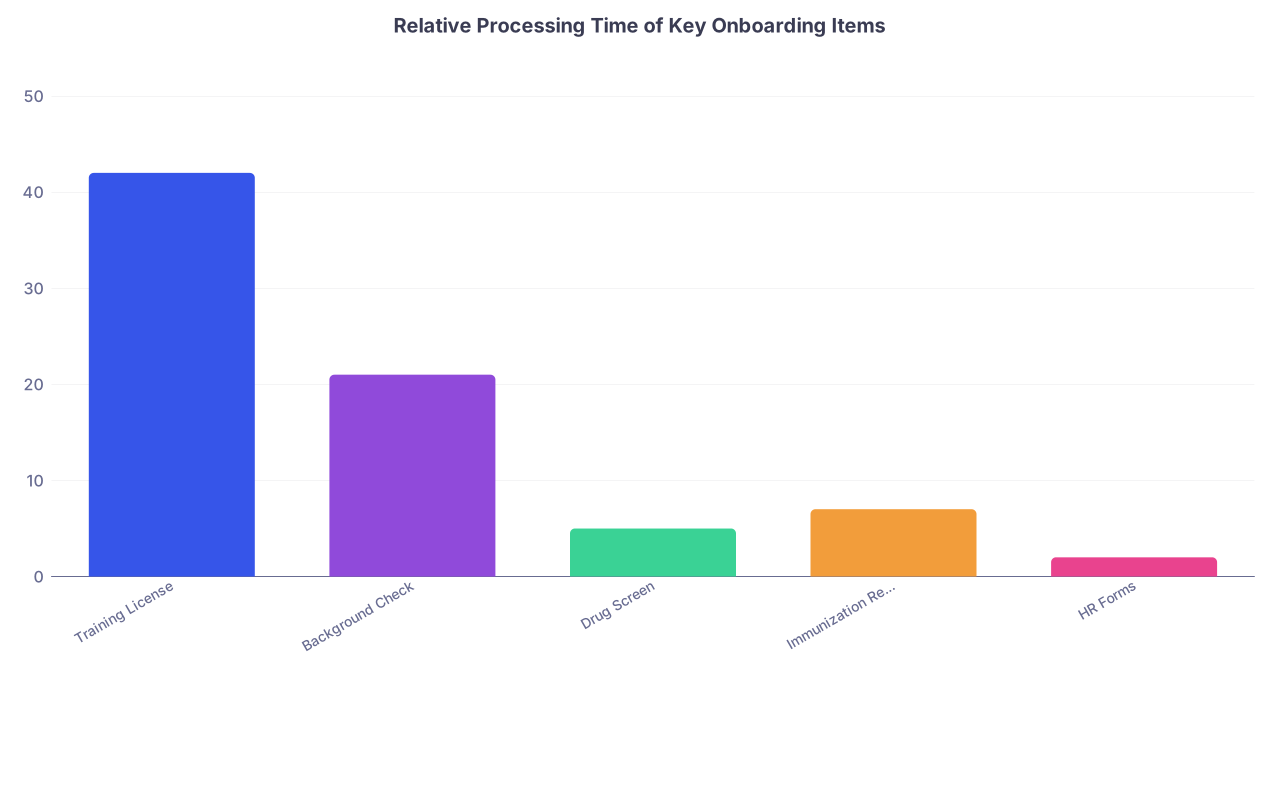
| Category | Value |
|---|---|
| Training License | 42 |
| Background Check | 21 |
| Drug Screen | 5 |
| Immunization Records | 7 |
| HR Forms | 2 |
(Values in days, rough reality I keep seeing.)
2. Background Check and Fingerprinting
Programs will often send a link to a third‑party vendor.
Protocol:
- Open the link that same day.
- Schedule fingerprinting at the earliest slot you can reasonably make.
- Screenshot or save the appointment confirmation in your “Credentials” folder.
- Log it in the spreadsheet with the appointment date and expected processing time.
If you have lived in multiple states or abroad, background checks can drag. That is why you do it now, not “once I have more time.”
3. Immunization and Drug Screen Triage
Do not assume your school health service will respond immediately. I have watched students wait three weeks for records.
Do this:
- Email student health (or your med school clinic) with a direct request:
- Subject: “Full Immunization Record and TB Test History – [Your Name, Grad Year]”
- Ask for:
- Complete vaccine record (Hep B series, MMR, Varicella, Tdap, COVID)
- TB tests (PPD/Quantiferon)
- Titers if available
If your program requires a new TB test or drug screen:
- Schedule both early in the day so you can get results processed sooner.
- Put the lab order, appointment, and final report into your Health folder.
- Immediately upload results to any portal requesting them. Same day.
You are front‑loading every process that does not depend solely on you.
Week 3: HR, Contract, and Money‑Related Tasks
Once the “slow stuff” is in motion, move to the tasks that affect your pay and benefits. This is where careless interns lose real money.
1. Secure and Understand Your Contract
Contracts are boring until they are not. Then you are stuck with a clause you wish you had noticed.
System:
- Save the contract PDF with a clear name:
- “Residency_Contract_[ProgramName]_2025–2026.pdf”
- Read it once end‑to‑end.
- Highlight:
- Start date and end date
- Salary and pay schedule
- Expected duty hours description
- Moonlighting policy
- Bonus conditions (sign‑on, relocation, retention)
- Penalties or repayment triggers (for bonuses, educational benefits)
- Flag any unclear parts and email GME or HR with concise questions.
Smart move: Pay particular attention to deadlines for signing to secure bonuses or housing priority.
2. HR Paperwork: Treat Like Code Blue
Many HR systems are clunky. Assume nothing autosaves.
Key forms to prioritize:
- I‑9 (you will need identity documents – passport or driver’s license + SS card)
- W‑4 and state tax forms
- Direct deposit setup
- Emergency contacts
- Benefit elections (if done pre‑start)
Protocol:
- Block a 1–2 hour uninterrupted window and do all HR forms together.
- Keep your documents physically nearby:
- Passport / Driver’s license / SSN card
- Bank routing + account number
- After submission:
- Download any confirmations.
- Take screenshots when confirmations are not downloadable.
- Save everything in HR_Employment folder.
- Mark “Submitted” + date in your spreadsheet.
Miss HR deadlines, and you risk:
- Delayed first paycheck
- Manual paper checks instead of direct deposit
- Late benefit enrollment
That is a brutal way to start intern year.
Week 4: Health, Occupational Requirements, and EMR Training
By Week 4, the big legal and HR components should be underway or done. Now you avoid the “not cleared to start” email that hits some interns in June.
1. Occupational Health Clearance
Most hospitals require you to be cleared by Occupational Health (Occ Health) before you touch a patient. That clearance can require:
- Immunization records
- TB test results
- Drug screen results
- Fit testing for N95s
- Possibly an in‑person visit
Your move:
- Find the clearance instructions (buried in a PDF, portal, or email).
- Make a mini‑checklist specifically for Occ Health:
- Upload vaccines
- Upload TB
- Upload drug screen
- Schedule fit testing / visit
- Complete all uploads in one sitting, then immediately schedule any required appointments.
Do not wait for Occ Health to chase you. Some departments are overloaded; they will simply mark you “not cleared.”
2. Online Learning Modules and EMR Training
Most interns underestimate how long mandatory modules take. They also underestimate how boring they are, which leads to procrastination.
Typical categories:
- General safety (fire, workplace safety)
- HIPAA / privacy
- Compliance and billing
- Infection prevention
- EMR introduction (Epic, Cerner, etc.)
Triage approach:
- Identify any modules that must be completed before in‑person EMR training.
- Schedule 2–3 module blocks on your calendar across the next 2 weeks:
- 60–90 minutes max per block so your brain does not melt.
- After each block:
- Mark completed modules in your spreadsheet.
- Screenshot completion pages if the system is glitchy.
You want these mostly done by early June. You will not have focus later.
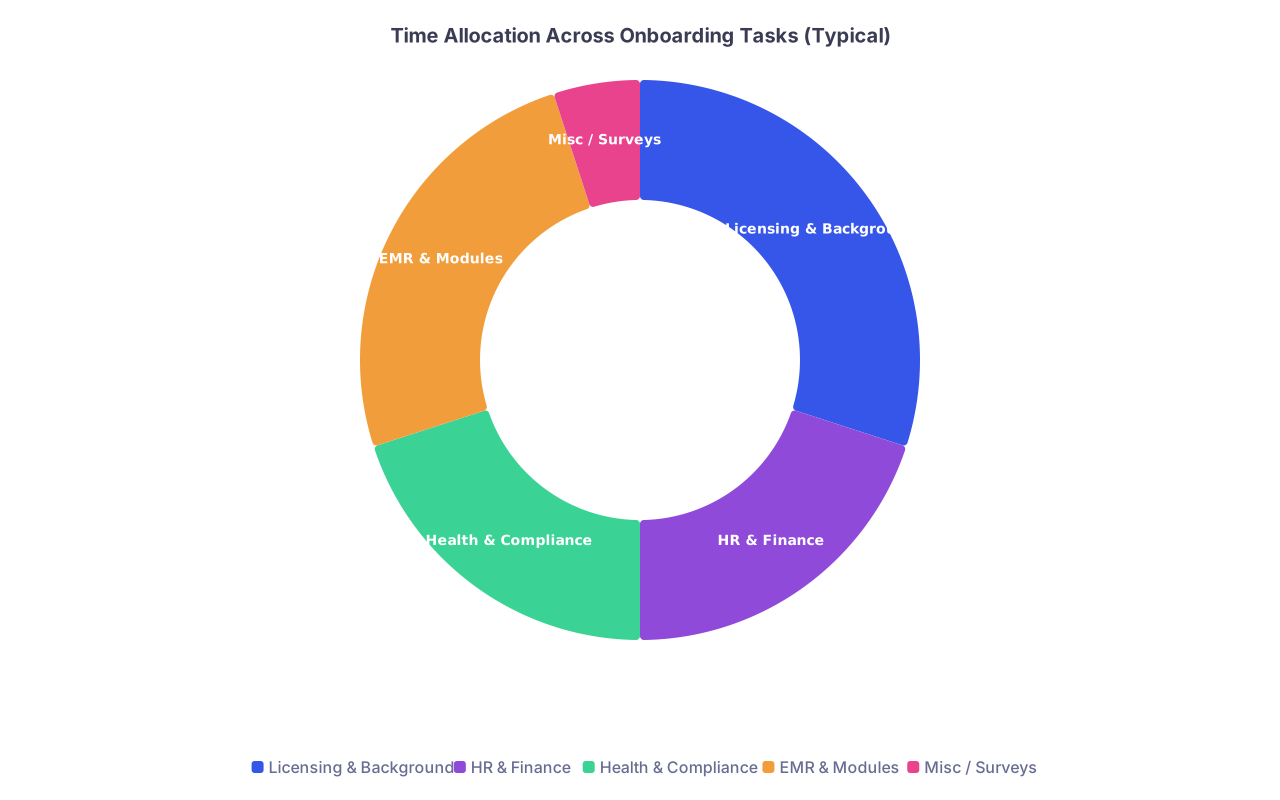
| Category | Value |
|---|---|
| Licensing & Background | 30 |
| HR & Finance | 20 |
| Health & Compliance | 20 |
| EMR & Modules | 25 |
| Misc / Surveys | 5 |
Week 5: Logistics, Housing, and Life Infrastructure
By now, the mandatory paperwork should be mostly under control. Time to triage your actual life.
1. Move and Housing
Residents who ignore housing until June end up with:
- Overpriced apartments
- Painful commute
- No parking
Basic system:
- Confirm your start date and orientation dates.
- Define when you must be physically present in your new city.
- Back‑plan from that date:
- Housing decision > 4–6 weeks before move
- Movers or rental truck > 3–4 weeks before move
- Utility setup > 1–2 weeks before move
If your program offers:
- Moving stipend
- Temporary housing
- Parking subsidy
Find out:
- Application process
- Required documentation (lease, receipts)
- Reimbursement rules and deadlines
Put each of those as separate line items in your spreadsheet under “Finance.”
2. Banking, Insurance, and Personal Admin
You are about to start making regular income and working long hours. Set your systems now.
- Bank:
- Confirm direct deposit details.
- Consider opening a separate “Tax / Emergency” savings bucket.
- Insurance:
- Figure out when your residency health plan begins.
- Make sure you are covered in the gap period (parental plan, marketplace, short‑term).
- Mail and address changes:
- USPS change of address.
- Update address for:
- Licensing board
- Bank
- Credit cards
- Med school / alumni office (for final documents)
None of this is glamorous. It is what makes everything else work.
Week 6: Clean‑Up Week – Catch, Confirm, Close Loops
You want one full week where your job is not “start something new” but “make sure nothing is broken or missing.”
1. Run a Full System Check
Go line‑by‑line through your spreadsheet.
For each item:
- Status “Not started”:
- Ask: Is this mandatory? Is there a deadline? If yes, schedule action this week.
- Status “In progress”:
- Ask: What is the bottleneck? You? An external office? Missing upload?
- Take a specific next step:
- Call
- Resend document
- Status “Submitted”:
- Check if you have confirmation of receipt.
- If no, send a short confirmation email.
You are looking for silent failures: documents lost, portals that did not save, unread faxes.
2. Email Templates That Save Time
You do not need polished prose. You need clarity.
Example – Checking license status:
Subject: Training License Application Status – [Your Name]
Dear [Licensing Board Contact / Office],
I am an incoming [Specialty] resident at [Hospital/Program], with a start date of [Date]. I submitted my training license application on [Date] and would like to confirm that my application is complete and in process.
Name: [Full name]
Last 4 of SSN: [XXXX]
DOB: [MM/DD/YYYY]Are there any outstanding items or documents needed from me or my medical school?
Thank you,
[Name]
Example – Verifying HR onboarding:
Subject: Onboarding Documents Received – [Your Name, PGY1]
Hi [HR/GME contact],
I wanted to confirm that my onboarding items have been received and are complete for my July [X] start:
- Contract – signed [Date]
- HR forms (I‑9, W‑4, direct deposit) – submitted [Date]
- Background check / drug screen – completed [Date]
- Occupational health clearance – [in progress/completed]
If anything is missing or still needed, please let me know.
Best,
[Name]
Simple. Clear. Hard to ignore.
Week 7–8: Orientation, Final Tasks, and Mental Prep
You will start getting orientation schedules, scrub fitting appointments, parking instructions, and other late‑cycle logistics.
1. Orientation Week Triage
Treat orientation communications just like you treated early onboarding:
- Add each requirement to your spreadsheet:
- In‑person days
- Online pre‑work
- Any forms to bring (I‑9 documents, IDs)
- Plan your week as if it were a real rotation:
- Where you need to be
- When
- What to bring
You do not want to be “that intern” who shows up without ID, late, and with incomplete modules.
2. Build Your Residency Starter Packet
By now your files are scattered between portals, emails, and folders. You want a condensed “grab bag” of the essentials you might need quickly.
Create a single PDF bundle or folder with:
- Copy of your:
- Training license
- Contract
- Immunization summary
- TB test result
- Fit test clearance if you have it
- Contact sheet with:
- Program coordinator
- GME office
- HR
- IT help desk
- Occupational Health
- Your parking pass, badge office info, and orientation agenda
Keep this:
- In your cloud drive (offline available)
- On your phone (PDF viewer)
- Optional: printed in a slim folder for orientation week
You will not need all of it. But when someone at Occ Health asks “Do you have that TB result?” and you can pull it up in 10 seconds, you look like you have your life together. Because you do.
Visual: The Triage Flow You Will Use Every Week

| Step | Description |
|---|---|
| Step 1 | New Email or Task |
| Step 2 | Defer or Ignore |
| Step 3 | Add to Sheet with Due Date |
| Step 4 | Add to Sheet Without Date |
| Step 5 | Do This Week |
| Step 6 | Schedule Within 2 Weeks |
| Step 7 | Save Proof and Mark Submitted |
| Step 8 | Mandatory? |
| Step 9 | Hard Deadline? |
| Step 10 | Long Processing Time? |
If you follow that logic every time something new hits your inbox, nothing truly important falls through.
Common Failure Patterns (And How This System Prevents Them)
I keep seeing the same avoidable disasters:
License not issued by start date
- Cause: Application delayed while student focused on EMR modules or low‑stakes forms.
- Fix in this system: License triaged as Week 1–2 “long‑processing” item, school documents requested immediately.
No first paycheck
- Cause: Direct deposit or I‑9 done late, HR cutoff missed.
- Fix: HR tasks assigned Week 3 with explicit confirmation step.
Not cleared by Occ Health
- Cause: Assumed vaccines from med school “would transfer.” They do not, unless you move them.
- Fix: Health requirements given specific Week 2–4 actions with upload + appointment scheduling.
Losing bonus / reimbursement
- Cause: Missed tiny line about “form must be submitted within X days” for relocation or signing bonus.
- Fix: Contract and HR docs read once and all financial items pulled out as separate spreadsheet tasks.
You are applying hospital‑level triage logic to your own life. That is what separates “constantly behind” from “quietly in control.”
Quick Reality Check: What Each Week Really Looks Like
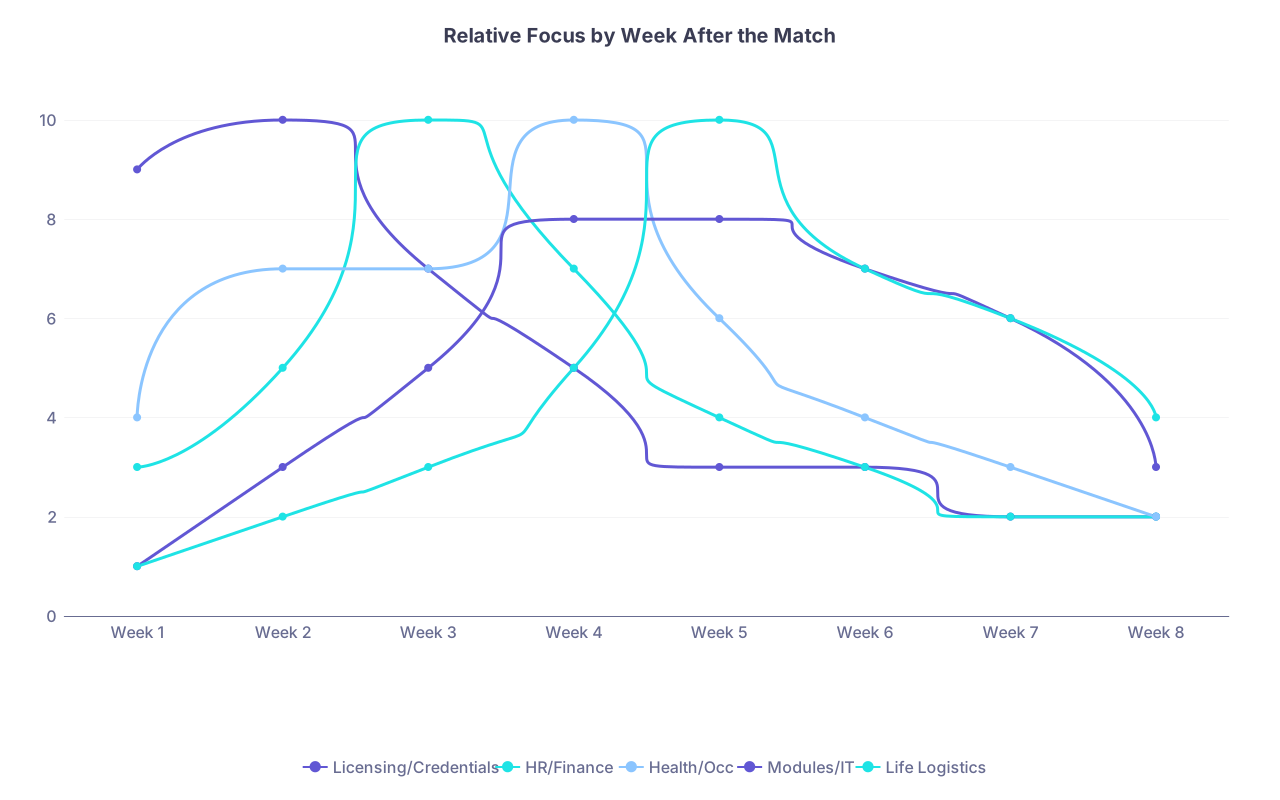
Here is a rough week‑by‑week emphasis map so you are not guessing where to put your energy.
| Category | Licensing/Credentials | HR/Finance | Health/Occ | Modules/IT | Life Logistics |
|---|---|---|---|---|---|
| Week 1 | 9 | 3 | 4 | 1 | 1 |
| Week 2 | 10 | 5 | 7 | 3 | 2 |
| Week 3 | 7 | 10 | 7 | 5 | 3 |
| Week 4 | 5 | 7 | 10 | 8 | 5 |
| Week 5 | 3 | 4 | 6 | 8 | 10 |
| Week 6 | 3 | 3 | 4 | 7 | 7 |
| Week 7 | 2 | 2 | 3 | 6 | 6 |
| Week 8 | 2 | 2 | 2 | 3 | 4 |
(Scale 1–10, higher means that category deserves more attention that week.)
This is not rigid. It gives you a sense of where priorities should roughly shift over two months.
How To Recover If You Are Already Behind
If you are reading this in May or June and feeling sick because half of this should already be done, do not spiral. Triage harder.
- Stop everything and build the spreadsheet today.
- Dump every pending onboarding email into it.
- Mark three things:
- Has a hard external deadline?
- Requires another institution or office?
- Blocks your ability to start (license, Occ Health, HR)?
- Order of rescue:
- Training license + background check
- HR / I‑9 / direct deposit
- Occ Health (vaccines, TB, drug screen)
- Mandatory modules before orientation
- Everything else
Then block off 2–3 focused work sessions and attack these in that order. You can still pull this back from the edge.
Two Small But Powerful Habits
These look trivial. They are not.
- When you finish any major task:
- Immediately save the confirmation.
- Update the spreadsheet.
- Add a one‑line note: “Completed, confirmation #XXXX”.
- When you get any new onboarding email:
- Star/flag it.
- Within 24 hours, convert it into a spreadsheet task (even if you do not do the task yet).
Those two habits keep your system airtight without much mental load.
Final Thoughts
The paperwork surge after the Match is not optional. But the chaos is.
Three key points to walk away with:
- Treat onboarding like triage, not a to‑do list. Long‑processing and hard‑deadline items come first, always.
- Build a simple control system: one spreadsheet, one folder, and a weekly review. That system does the memory work so you do not have to.
- Front‑load licensing, HR, and health clearance by Week 4. If those are solid, everything else becomes mild annoyance instead of career‑threatening disaster.
You can walk into orientation with your paperwork done, your paycheck set, and your brain free to focus on what actually matters: learning how to be a doctor, not how to chase a missing TB result.