
You have two offers in your inbox. One is from a large hospital system with a shiny signing bonus and a “competitive” benefits package. The other is a private group that throws around phrases like “eat what you kill” and “partnership potential.” HR has sent you PDFs that are 20 pages too long and 5 details too short.
You keep thinking: “Which one is actually better over 3–5 years? And what about moonlighting options?”
This is where most physicians and advanced practice clinicians guess. Or chase the biggest salary number. And then regret it 18 months later when they realize the disability policy is garbage and there is a tail coverage time bomb buried on page 14.
You are not going to do that.
You are going to build a benefits comparison spreadsheet that turns fuzzy language into hard numbers and clear trade-offs. Then you will be able to say, “Offer A is worth roughly $32,000 more per year when you include benefits, but Offer B gives me far more schedule flexibility and moonlighting upside.”
Let’s build that tool.
Step 1: Set up the skeleton of your spreadsheet
Open Excel, Google Sheets, or Numbers. Do not overthink the software. Use what you can manipulate quickly.
You want a single sheet with:
- Each row = a benefit or compensation component
- Each column = one offer (plus one extra column for “Notes”)
Basic structure:
- Column A: Category / Item (e.g., Base Salary, 401(k) Match, etc.)
- Column B: Offer 1
- Column C: Offer 2
- Column D: Offer 3 (if needed)
- Column E: Standardized Value (annual $ value)
- Column F: Notes / Assumptions
Then add some section headers in Column A to group things:
- Cash Compensation
- Retirement & Equity
- Insurance & Protection
- Time Off & Schedule
- Moonlighting & Extra Income
- Professional Support
- Risk / Contract Landmines
- Intangibles (scored, not priced)
You can bold these section headers and leave Columns B–F blank on those rows. That gives you visual structure so you do not get lost.
Here is a simple view of what you are aiming for:
| Row Type | Column A (Item) | Column B (Offer 1) | Column C (Offer 2) | Column E (Std. Value) |
|---|---|---|---|---|
| Section Header | Cash Compensation | |||
| Data Row | Base Salary | |||
| Data Row | Signing Bonus | |||
| Section Header | Retirement & Equity | |||
| Data Row | 401(k) Match |
You will fill values and formulas as we go.
Step 2: List everything that actually moves the needle
Most offers list the obvious:
- Base salary
- Signing bonus
- “Full benefits”
That is not enough. You need to force each offer to answer the same questions, line by line.
Start filling Column A with specific items under each section.
A. Cash compensation
Under “Cash Compensation” in Column A, create these rows:
- Base salary (year 1)
- Base salary (year 2, if guaranteed)
- Productivity bonus structure (RVU or collections)
- Quality bonus / incentive pay
- Call pay (if separate)
- Shift differentials (nights/weekends, if relevant)
- Signing bonus
- Relocation allowance
- Loan repayment (employer or program-based)
- Stipends (medical director, leadership roles)
Do not let “RVU-based” stay vague. You want:
- RVU target (per year)
- Dollars per RVU
- Threshold for bonus
- Historical average RVUs for current docs (if they stonewall you on this, that is a red flag)
You will not be able to perfectly model productivity, but you can at least create a “realistic” and “optimistic” scenario. We will get to that.
B. Retirement & equity
Under “Retirement & Equity”:
- 401(k)/403(b) match – % of salary and cap
- Non-elective retirement contribution (some hospitals give 5–10% whether you contribute or not)
- Pension (rare but huge if present; vesting schedule matters)
- Profit-sharing contributions
- Equity or partnership buy-in timeline
- Estimated equity value at partnership (if private group)
- Employer HSA contributions (if on HDHP)
C. Insurance & protection
Under “Insurance & Protection”:
- Health insurance: employer premium share for you
- Health insurance: employer premium share for dependents
- Health plan type (PPO vs HMO vs HDHP)
- Dental insurance: employer-paid portion
- Vision insurance: employer-paid portion
- Life insurance (baseline + optional buy-up; what is covered by employer)
- Short-term disability: coverage %, waiting period
- Long-term disability: coverage %, own-occupation or not, covered by employer or you
- Malpractice coverage:
- Claims-made vs occurrence
- Who pays tail if you leave?
- Tail cost estimate (get a real number)
The malpractice / tail issue is frequently the most expensive “hidden” factor in compare-and-regret stories. I have seen tail quotes of $70k–$120k for some subspecialties. That dwarfs a signing bonus.
D. Time off & schedule
Under “Time Off & Schedule”:
- Vacation/PTO days (separate from CME)
- CME days
- CME stipend (annual)
- Holidays (paid days off vs part of PTO pool)
- Average weekly hours (clinical + admin)
- Clinic or shift schedule (e.g., 7-on/7-off, 4x10, 5x8)
- Call burden (nights per month, weekends per month)
- Telemedicine / remote work options
Time is money. But also burnout. You are going to assign a dollar value to some of this later.
E. Moonlighting & extra income
Given the category (moonlighting and benefits), you need a clean section here.
Under “Moonlighting & Extra Income”:
- Moonlighting allowed within system? (yes/no; internal rates)
- Moonlighting allowed externally? (yes/no; restrictions)
- Non-compete radius and scope (clinics, telemed, locums)
- Typical internal moonlighting rate (per hour or per shift)
- Average available moonlighting shifts per month (ask current docs, not just HR)
- Extra duty rates (admin time, committee work, supervision of APPs or residents)
This is where offers that look “average” on paper can blow past competitors. A stable 7-on/7-off hospitalist job that tolerates external locums can support very aggressive moonlighting. A similar job with a broad non-compete and “no external clinical work” clause quietly caps your upside.
F. Professional support
Under “Professional Support”:
- Licensing and DEA fees covered
- Board certification / MOC fees covered
- Medical staff dues
- Professional society memberships
- Protected admin time (hours/week, realistic or fantasy?)
- Scribe or documentation support
- APP support (ratio, experience level – you do not need an exact formula here but document it)
G. Risk / contract landmines
Under “Risk / Contract Landmines”:
- Non-compete: radius and duration
- Non-solicit clauses (patients, staff)
- Termination without cause notice period
- Guaranteed term vs “at will”
- Tail coverage responsibility (repeat it here; highlight it)
- Bonus or relocation clawbacks (how long must you stay to keep them?)
You are not assigning dollar amounts to every one of these, but you want them visibly compared.
H. Intangibles (scored, not priced)
Create lines like:
- Location desirability (1–10)
- Academic vs community (based on your preference)
- Teaching/research opportunities (1–10)
- Culture fit (your subjective score after visits/calls)
- Leadership development potential
You will score these later. They are not fluff. People leave jobs over these more than over a $10k salary difference.
Step 3: Standardize everything into annual dollar values
Now the hard part. Turning apples and oranges into something you can actually compare.
You will create an annual dollar value column (Column E) that translates as much as possible into “effective yearly compensation.”
A. Convert retirement benefits
Example formula structure (assuming salary is in B2 and match % is in B10):
- Cell B10 (Offer 1 401(k) match): “Up to 6% match”
- Cell E10 (Std. Value):
=MIN(0.06*B2, match_cap)if there is a cap, or just=0.06*B2
Do the same for any:
- Non-elective contributions
- Profit sharing (if they give a percentage, use that; if not, ask for last year’s range and use the midpoint)
B. Convert health insurance support
Health insurance gets messy quickly, but here is a workable approach:
Ask for monthly premium for each plan option for:
- Employee only
- Employee + spouse
- Employee + family
Ask what portion the employer pays (dollar or %).
You then calculate:
- Employer-paid annual premium for your expected coverage level
- Example: Employer pays $900/month towards family plan → $10,800/year
Drop that in Column E as the standardized value.
If one employer pays 100% of your premium and the other pays 50%, the difference can easily be $5–10k per year. That matters more than a 1–2% RVU bump for most primary care and hospitalist roles.
Do the same type of conversion for:
- Dental: employer-paid share × 12
- Vision: same
- Life / disability: if the employer is paying the full premium, get a quote (from any online broker) for what that policy would cost you personally, and use that annual premium as the “value.”
C. Convert PTO and schedule to money (yes, really)
This part is uncomfortable for some people, but it clarifies trade-offs quickly.
Calculate your daily rate:
- Daily rate ≈
Base salary ÷ 260(workdays per year) - Or, for shift-based work,
Base salary ÷ number of shifts per year
- Daily rate ≈
Value vacation/PTO:
- If Offer 1 gives 20 PTO days and Offer 2 gives 30, and your daily rate is $2,000:
- Extra 10 days ≈ $20,000 difference in “time value”
- If Offer 1 gives 20 PTO days and Offer 2 gives 30, and your daily rate is $2,000:
Value CME days + stipend:
- CME days: same daily rate method
- CME money: just add the stipend directly ($3k vs $5k per year, etc.)
Now, do not confuse this with actual cash. You are not being paid extra for more PTO. You are assigning a consistent dollar metric to time off so you can say, “Offer B is $15k lower in cash, but I get the equivalent of $20k more in protected time.”
That is a very different conversation than “Offer B pays less.”
D. Convert moonlighting potential
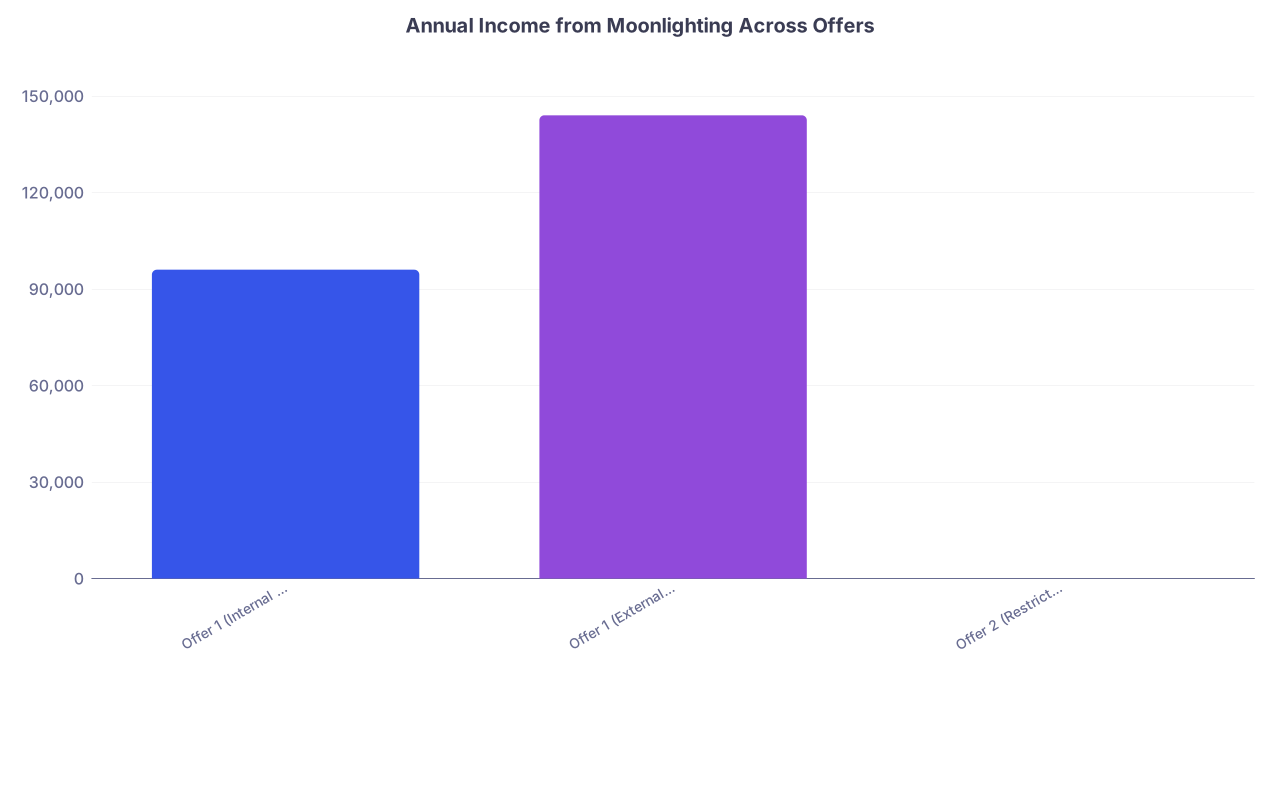
Here is where a simple chart helps you see why some jobs are far more lucrative long-term.
Assume you can realistically do 4 extra shifts per month in Offer 1 at $200/hour for 10-hour shifts, and Offer 2 effectively blocks external moonlighting.
| Category | Value |
|---|---|
| Offer 1 (Internal Allowed) | 96000 |
| Offer 1 (External Allowed) | 144000 |
| Offer 2 (Restricted) | 0 |
Example math:
- Internal moonlighting: 4 shifts/month × 10 hours × $200 = $8,000/month → $96,000/year
- If they allow external locums at $250/hour and you think you could add 2 more similar shifts, that is another $48,000/year.
You do not need a perfect prediction. You need a reasonable scenario.
In your sheet, create rows like:
- “Realistic annual moonlighting potential”
- “Aggressive annual moonlighting potential”
And use formulas:
=shifts_per_month * hours_per_shift * rate_per_hour * 12
This is where you can quickly see that a “meh” base salary with liberal moonlighting might be functionally $100k/year higher than a restrictive “big name” job.
E. Spread signing bonuses and clawbacks over time
If one offer has a $50k signing bonus with a 3-year commitment, and the other has $20k over 2 years:
- Effective annual value =
bonus_total ÷ commitment_years - Offer 1: $50k ÷ 3 ≈ $16,667/year
- Offer 2: $20k ÷ 2 = $10,000/year
Also add a row for “Repayment risk (if leaving early)” in the Risk section, with a note on how much you would owe if you bail at 12 or 24 months.
F. Assign a rough value (or at least flags) for tail coverage
If malpractice is claims-made and you are responsible for tail:
Get an actual quote or estimate. The recruiter often “does not know,” but your specialty society or existing colleagues probably do.
Assume you stay 3–5 years, then leave.
Annualize the cost:
- Tail cost ÷ expected years of service
- Example: $90,000 tail after 3 years → $30,000/year risk
Put that as a negative value in Column E:
- “Tail coverage (expected annualized cost)” = -$30,000
If the employer pays all tail, put $0 and highlight that as a positive factor.
This one line can flip which offer is truly “better.” I have watched it happen, especially in OB/GYN, emergency medicine, and certain surgical subspecialties.
Step 4: Create a top-line comparison section
Now that you have standardized values, you need a summary at the top of the sheet.
At the very top (rows 1–10), build something like this:
- Row 1: “Base salary (year 1)” – directly reference your detailed row
- Row 2: “Average annual bonus (est.)” – your realistic productivity + quality bonus estimate
- Row 3: “Value of retirement contributions” – sum of all retirement-related standardized values
- Row 4: “Value of insurance benefits” – sum of health/dental/vision/life/disability employer-paid amounts
- Row 5: “Value of PTO + CME time” – the time-off valuation we calculated
- Row 6: “Realistic moonlighting potential”
- Row 7: “Annualized signing bonus value”
- Row 8: “Annualized cost/benefit of malpractice tail” (negative if you pay)
- Row 9: “Other employer-paid professional expenses” (licensing, boards, CME money)
- Row 10: “Total effective annual compensation” – sum of rows 1–9
Then use SUM formulas for each offer’s column.
This is your real comparison. The number that matters.
Make sure you keep Column F (Notes) populated with your assumptions:
- “Assumes 3,500 RVUs/year at $50/RVU beyond threshold”
- “Assumes 4 internal moonlighting shifts/month at $200/hr”
- “Assumes family coverage level on PPO plan”
Step 5: Add a simple scoring model for intangibles
Not everything belongs in dollars. Some things are preferences, but those preferences should still be explicit.
Under your “Intangibles” section:
Decide on 5–7 factors that matter to you most:
- Location / family proximity
- School quality for kids
- Academic vs community environment
- Collegiality / culture (your gut from site visit, calls)
- Teaching / research opportunities
- Leadership / growth potential
- Schedule fit with your life (e.g., 7-on/7-off vs clinic)
Score each 1–10 for each offer. Put scores in Columns B–D.
Add weights in a separate column if some are more important. For example, Location (weight 3), Culture (weight 3), Research (weight 1), etc.
Calculate a weighted total score for each offer.
This is not pseudo-science. It is you being honest about trade-offs. If Location is a 3/10 for Offer A and a 9/10 for Offer B, you will feel that every day you commute or every holiday flight you book.
You can even add a small summary table for clarity:
| Factor | Weight | Offer 1 Score | Offer 2 Score |
|---|---|---|---|
| Location | 3 | 4 | 9 |
| Culture | 3 | 7 | 8 |
| Teaching | 1 | 9 | 3 |
| Schedule Fit | 2 | 6 | 8 |
Step 6: Visualize the trade-offs
Once the data is in, a couple of simple visualizations make patterns obvious.
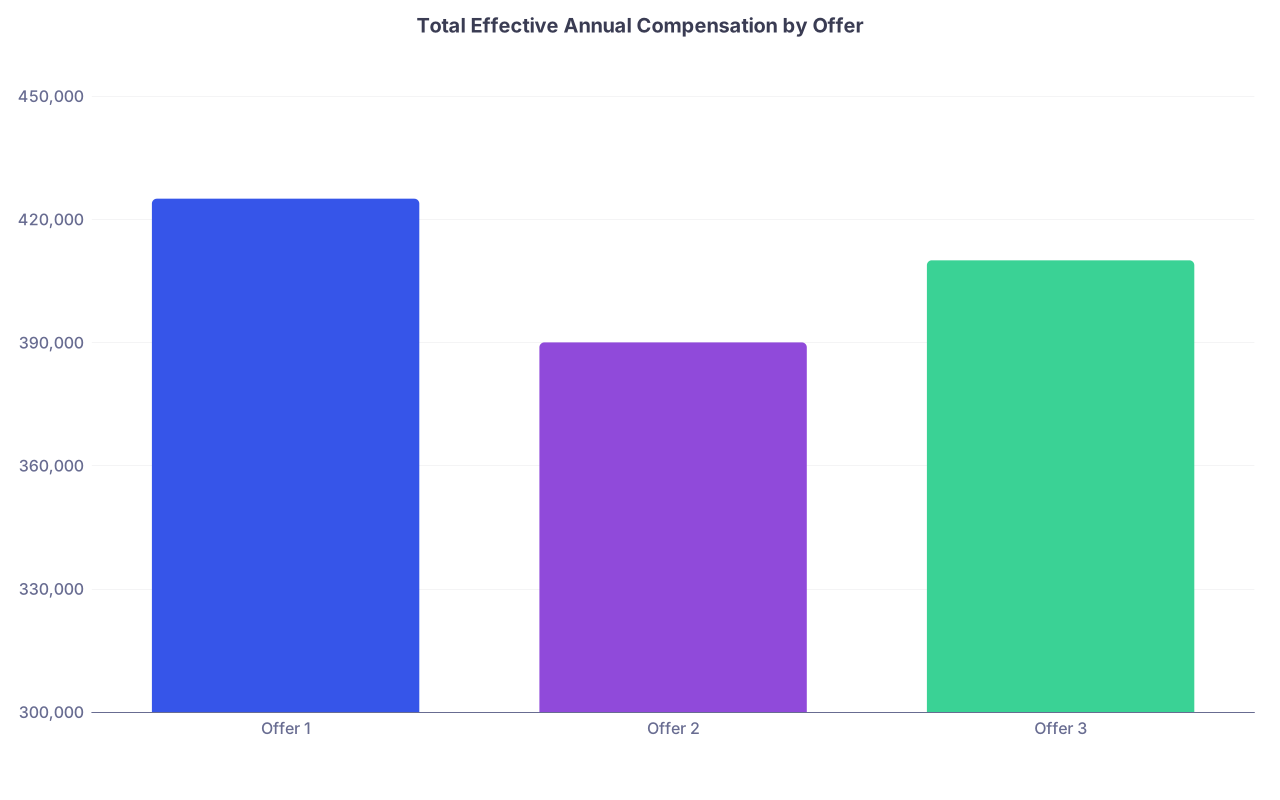
First, graph total effective annual compensation for each offer:
| Category | Value |
|---|---|
| Offer 1 | 425000 |
| Offer 2 | 390000 |
| Offer 3 | 410000 |
Then you might create a stacked bar chart to see composition (salary vs benefits vs moonlighting). Even without going fancy, color-coding cells (base salary one color, retirement another, etc.) helps your brain.
You are looking for things like:
- Offer 1 has higher base, but Offer 2 has dramatically better retirement + insurance and no tail risk.
- Offer 3 has the lowest base but the highest moonlighting potential and lighter schedule.
Step 7: Apply it specifically to moonlighting and future flexibility
Since your category is “Moonlighting and Benefits” and “Future of Medicine,” you should explicitly test a few scenarios.
Create a second sheet or section called “Scenarios.”
Scenarios to model:
- No moonlighting – You do nothing extra. Just base + contract bonuses.
- Moderate moonlighting – 2 extra shifts/month.
- Aggressive moonlighting – 4–6 extra shifts/month, plus some holiday coverage.
- Telemedicine side work – if allowed (check non-compete language carefully).
For each scenario, calculate total income for each offer. Then compare.
You will see patterns like:
- Offer A is best if you want to do no moonlighting and prioritize benefits.
- Offer B jumps ahead if you are willing to work moderate moonlighting.
- Offer C caps you entirely—so if you care about diversifying income (telemed, locums, future private projects), that is a hard limit.
Also look at future-proofing:
- Non-compete clauses that block telemedicine or any practice in a broad radius are not just about your next job—they can kneecap future ways of practicing as medicine moves more remote and digital.
- Employer ownership of your “inventions” or side projects (yes, some systems still sneak this in) can block you from building products, courses, or non-clinical businesses later.
Flag these in your Risk section. Use color. Red for “this will choke your future options.”
Step 8: Pressure-test your assumptions with real people
Once your spreadsheet is built and populated:
- Send just the structure (blank or de-identified) to a trusted colleague already working in a similar setting. Ask: “Am I missing any big-ticket items?”
- For each offer, speak with at least 1–2 current clinicians not chosen by HR. Verify:
- Realistic RVU/collections numbers
- Actual availability of moonlighting shifts
- Culture, schedule creep, and burnout risk
Update your Notes column as they talk. I have seen more than one “no call” job quietly become “call every 5th night” in year two.
If you really want to be ruthless, build a “Reality Adjustment” row:
- “Reality adjustment factor” = reduce expected bonus or moonlighting by 20–30% if current docs sound burned or skeptical.
Better to be pleasantly surprised than trapped.
Step 9: Decide with both numbers and gut aligned
By now, you will have:
- A top-line effective annual compensation across offers
- A breakdown showing where each offer wins (salary vs benefits vs moonlighting)
- A risk section that highlights tail coverage and non-compete toxicity
- An intangible score that forces you to be honest about life outside work
Here is how I recommend making the final call:
Rank offers purely by total effective annual compensation. Ignore your feelings for one minute. Look at the math.
Rank offers purely by intangible score. Which one supports the life you say you want?
Compare those two rankings. If the same offer is on top both times, your answer is obvious.
If they differ, ask yourself explicitly:
- “How much money am I willing to give up per year for the better lifestyle/culture/location?”
- “Is that gap $10k? $30k? $60k?”
Put that number on the sheet. Do not keep it vague in your head.
Often you will realize that you are willing to trade $15–20k per year for a dramatically better location or culture, but not $60k. Once you quantify it, the choice usually snaps into focus.
And yes, this system also helps in negotiations. If you can say to HR:
“Your base salary is competitive, but when I factor in retirement contributions, tail coverage, and realistic schedule, your total package is about $30k/year below my other offer,”
you are having a different level of conversation than, “Could you bump the salary a bit?”
Your next step today
Do not wait until contracts hit your inbox.
Open a new spreadsheet now and:
Create the section headers and row list for your comparison tool. List every category I just walked through, even if you do not have numbers yet.
That way, when the next recruiter says, “We offer a very competitive benefits package,” you can reply with: “Great. I have a standard comparison sheet I use. Please fill in these specific items.”
You stop reacting to offers and start evaluating them on your terms.