
Your side hustle is only real if it can survive your worst call month.
That is the bar. Not “when you have time,” not “on an easy elective.” If your business only functions on clinic weeks and dies every time you hit nights or ICU, you do not have a business. You have an expensive hobby.
Let me show you how to fix that.
You are in medicine, so let’s be blunt about constraints:
- You will have stretches where you are cognitively useless outside of work.
- Your schedule will be unpredictable and often inhumane.
- Patients and program directors do not care about your Shopify store, your consulting clients, or your Substack.
So your only option is this:
Design your side hustle like an unattended ICU pump: safe defaults, automatic alarms, minimal fiddling, and it keeps running when no one is looking.
Step 1: Choose the Right Kind of Side Hustle (or Adjust the One You Have)
Some side hustles simply do not survive Q4 call, no matter how much you “optimize.” You cannot automate being physically present.
If you are still at the “what should I do” stage, or you are willing to pivot, aim for businesses that:
- Do not require you live on your inbox.
- Can batch work ahead.
- Have delivery that is digital, async, or leveraged.
Here is the reality of common physician side hustles during tough rotations:
| Side Hustle Type | Survives Tough Rotation? | Automation Potential |
|---|---|---|
| Locums / PRN shifts | Poor | Low |
| 1:1 coaching/consulting | Fair with systems | Medium |
| Online courses / digital | Excellent | High |
| Niche content (blog/YouTube/Substack) | Good | High |
| E-commerce (dropshipping, merch) | Fair | Medium-High |
| Real estate management | Depends on property mgr | Medium |
If you already have a side hustle, do not scrap it. Just classify it honestly:
- High-touch, synchronous (coaching calls, live seminars)
- Medium-touch, async (copywriting, content, freelance work)
- Low-touch, scalable (courses, memberships, affiliate, digital products)
Your goal is to push your business as far to the “low-touch, scalable” end as possible before your next bad month.
Ask yourself:
“If I could not touch this for 14 days except for 15 minutes every 3–4 days, what breaks?”
Write the answer down. That is your automation road map.
Step 2: Build the Minimum Viable Automation Stack
Do not fall into the trap of tool-collecting. Most residents I see flounder not from lack of software, but from having 11 logins and no system.
You need a lean stack that does four jobs:
- Capture leads and traffic while you are on service.
- Deliver value or product automatically.
- Collect payments without manual invoicing.
- Notify you only when human judgment is required.
The essential stack (keep it boring)
You can swap platforms, but these categories are non-negotiable:
Home base / website
- Examples: Squarespace, Webflow, Carrd, Ghost, simple WordPress.
- One clear offer. One main call-to-action. No “link in bio chaos.”
Email service provider (ESP)
- Examples: ConvertKit, MailerLite, Beehiiv, Substack (for simple).
- Must handle:
- Automated sequences
- Tagging / segmentation
- Basic analytics
Payment + product delivery
- Examples: Stripe + Gumroad, Stripe + Lemon Squeezy, Podia, Kajabi.
- Must:
- Auto-send receipts and access links
- Handle VAT/sales tax if needed
- Integrate with your ESP
Automation glue
- Examples: Zapier, Make (Integromat), Pabbly.
- Purpose: When X happens (email signup, payment, form submission), then Y occurs (tag, email sequence, Slack alert).
Task and knowledge management
- Examples: Notion, Todoist, ClickUp.
- One place only. This is where you park ideas when on call and process them later.
If you cannot describe how each tool supports 1 of those 5 buckets, kill it.
Step 3: Turn Your Hustle Into Flows, Not Tasks
You do not automate “stuff.” You automate flows.
Think like you are writing order sets, not one-off orders. Same principle.
There are three critical flows every side hustle needs to survive a brutal month:
- Lead flow
- Sales flow
- Operations flow
Let us build each.
3.1 Lead Flow: People Discover You While You Are in the OR
Leads are anyone who raises their hand with an email address, DM, or form. On a tough rotation, you will not be “networking” or posting daily.
You need:
One or two evergreen traffic channels
- SEO blog posts
- Evergreen YouTube videos
- 2–3 high quality, pinned social posts that always link to your lead magnet
One simple lead magnet
- Example for physicians:
- “Template: Part-time Telemedicine Negotiation Email”
- “7 Email Scripts for Setting Boundaries with Patients as a Resident”
- “High-Yield ICU Survival Checklist for New Interns”
- Example for physicians:
One automated welcome sequence
Implementation (concrete steps)
Create a basic landing page:
- Headline: “Get [very specific result] in [timeframe] without [annoying thing].”
- Subheadline: One sentence about who it is for.
- Form: Name + Email. Nothing else.
- Deliverable: PDF, short video, or Notion template.
In your ESP, create a 5–7 email welcome sequence:
- Email 1 (immediate): Deliver the lead magnet. Ask one reply-friendly question.
- Email 2: Short story of how you solved the problem the magnet addresses.
- Email 3: One tactical tip or mini framework.
- Email 4: Soft pitch of your paid offer (course, consult, product).
- Email 5–7: Rotate:
- Case study
- FAQ or objection handling
- Direct ask to book/buy or join waitlist.
Hook it up:
- New signup on the landing page → added to ESP → tagged → starts sequence.
- Use Zapier/Make if your website and ESP are not native friends.
Now, your “top of funnel” runs while you are rounding.
Step 4: Sales on Autopilot (Without Being Spammy or Dumb)
Sales is where most physician side hustles fall apart during tough rotations.
What I usually see:
- Half-written Stripe links in random emails.
- Invoices being sent manually on post-call days.
- Calendly links thrown around with no vetting of who is booking.
You do not have the bandwidth for that.
4.1 Productized offers beat custom everything
If your offer changes every time someone asks, you cannot automate. You need productized services or fixed offers:
- “90-minute CV and personal statement review – $X – includes [specific deliverables].”
- “30-day mini-course on building a research CV as a premed.”
- “Template pack: 12 physician contract negotiation scripts.”
Each productized offer must answer:
- What is included?
- Who it is for?
- How is it delivered?
- What happens after they buy?
Write that down on one internal “spec sheet” (Notion page or Google Doc). That spec will drive your automation.
4.2 Basic automated sales flow
Here is the minimal structure that survives a tough ICU block:

| Step | Description |
|---|---|
| Step 1 | Visitor on site |
| Step 2 | Signup for lead magnet |
| Step 3 | Welcome email sequence |
| Step 4 | Nurture content |
| Step 5 | Sales page |
| Step 6 | Checkout + payment |
| Step 7 | Automated delivery email |
| Step 8 | Tag as customer + upsell sequence |
| Step 9 | Interested? Click sales link |
| Step 10 | Buys? |
Implementation checklist:
Sales page (simple, one goal)
- Use whatever your website platform offers.
- Must include:
- Problem → Solution
- Who it is for
- What is inside
- Clear price
- Clear “Buy” button
Checkout
- Single Stripe/Gumroad/Podia link tied to that specific offer.
- No manual invoice.
- Payment triggers:
- Welcome/delivery email
- Tag as “customer”
- Optionally, start upsell sequence.
Delivery
- For digital:
- Instant access page or download link.
- Login instructions if course/membership.
- For services:
- Auto-email with:
- “Here is what to expect”
- Scheduling link (if you must do calls)
- Prep form or intake questionnaire.
- Auto-email with:
- For digital:
Upsell / retention
- After delivery email, wait 3–7 days, then send:
- “How is it going?” check-in.
- Invite to next step:
- 1:1 call
- Advanced product
- Membership.
- After delivery email, wait 3–7 days, then send:
If you do nothing else, building this basic sales pipeline will keep revenue ticking while you are knee-deep in admissions.
Step 5: Time-Boxed Operations – Build a “While I Sleep” Routine
Automation does not mean zero human involvement. It means as little as possible, at predictable times, for the highest leverage tasks.
On a bad rotation, assume you have:
- 2–4 hours total on your “Golden Day” before the rotation starts.
- 2–3 micro-windows per week (15–30 minutes each).
- One slightly functional post-call day every two weeks, at best.
You design your operations around those constraints.
5.1 The Golden Day: Pre-rotation setup
The day or weekend before a brutal month is not for “getting ahead on notes.” It is for preloading your business.
Here is what you do in that 2–4 hour block:
Check all automations once
- Test newsletter signup → ensure sequence starts.
- Test purchase → ensure delivery email goes out.
- Check that your main lead magnet link from social actually works.
Schedule content
- If content is part of your growth:
- Batch 2–4 short posts (Twitter, LinkedIn, Instagram).
- Batch 1–2 emails that are not time-sensitive.
- Use built-in schedulers or tools like Buffer/Later.
- If content is part of your growth:
Define “critical alerts only”
- Set up filters:
- Payment failures → flagged or forwarded.
- High-ticket consult inquiries → forwarded to a special folder.
- Everything else can wait.
- Set up filters:
Make a “During Rotation” operating note
- One page with:
- What you absolutely must check weekly (e.g., Stripe payouts, ESP errors).
- What you will ignore until the rotation ends.
- Emergency kill switches (pause ads, close Calendly, etc.).
- One page with:
That operating note becomes your brain when you are sleep-deprived.
5.2 Micro-windows: 15-minute maintenance protocol
During the rotation, you only follow a checklist. No “What should I work on?” There is no cognitive capacity for that.
Example 15-minute protocol (3x/week):
Open your notification hub (email/Slack/Notion).
Triage in this order:
- Payment / access problems → fix now (max 10 minutes).
- High-value inquiries (speaking gig, big contract) → acknowledge, promise detailed reply after [date].
- Everything else → star/label for end-of-rotation.
Glance at:
- New sales count since last check.
- ESP health (no major bounce or spam issues).
- Site uptime (if you use an uptime monitor).
Then close it. You are done.
If you cannot get it done in 15 minutes, your business is too complex for your current stage.
Step 6: Automate Customer Support Without Being a Robot
You need to protect your reputation. Word gets around fast in small professional circles. “He never responds after I pay” will kill your side hustle faster than any call month.
But you also cannot be on standby for every “I cannot find the download” email.
Here is how you set support on rails:
6.1 Preempt 80% of questions
Every time someone emails you with:
- “How do I access…”
- “Where is the link…”
- “Can I reschedule…”
Ask yourself: Could this have been prevented with one line of copy or a short FAQ?
Concrete moves:
Add a “Start Here” section at the top of every delivery email:
- Access link
- How long access lasts
- Where to ask for help
Create a mini FAQ on your sales page:
- How is it delivered?
- Refund policy?
- Time commitment?
Build canned replies for:
- Access issues
- Refunds or “this is not what I expected”
- Scheduling/rescheduling
Store those canned snippets in:
- Gmail templates
- TextExpander
- Notion copy bank
So that even post-call you can respond in 30 seconds.
6.2 Use conditional auto-replies
Set one business email with clear auto-response rules.
Example auto-reply text that does not make you sound checked out:
“Thanks for reaching out. I am currently on a heavy clinical rotation and check this inbox twice per week.
For access issues: Please check the original delivery email titled ‘[Product Name] – Access Inside’.
If you still cannot access your purchase, reply with ‘URGENT ACCESS’ in the subject line so I can prioritize your message.”
Then, use filters:
- Subject contains “URGENT ACCESS” → Mark as important.
- Everything else → Labeled for later.
You have now triaged support before you even see it.
Step 7: Protect Your Clinical Performance and Ethics
Automation is not a workaround for your training obligations. Your program director will not care how “passive” your income is if it starts to interfere with patient care or duty hours.
Be bluntly honest about boundaries:
- No client calls between 6 AM and 7 PM on inpatient days.
- No “quick DM check” in the middle of rounds.
- No posting from the nurse’s station. Ever. You know better.
Concrete guardrails:
Calendly windows:
- If you must take calls, restrict to:
- 1–2 evenings per week on lighter days.
- One weekend morning block every other week.
- Add buffer times so you are never hopping from a code to a Zoom.
- If you must take calls, restrict to:
Phone hygiene:
- Turn off notifications for:
- Social media
- ESP
- Payment platforms
- Leave on:
- System “high priority” alerts you set up (see below).
- Turn off notifications for:
Conflict of interest:
- Absolutely no clinical data, images, or case details in your content that could identify patients or institutions.
- If your hustle is directly tied to medicine (coaching premeds, consulting, medico-legal), check your contract and institutional policies. Get this wrong once and you will remember it forever.
You are building something that is supposed to outlast residency. Do not sabotage that by being reckless.
Step 8: Set Up “Only Wake Me If the Patient Is Crashing” Alerts
Most notifications can wait. A few cannot. That is where smart automation comes in.
Use your automation tool (Zapier/Make) plus email filters or Slack to configure:
8.1 Critical alerts that justify interrupting your day
Examples:
Payment processor issues
- Stripe payouts failing
- Chargeback received
- Subscription tool outage
Product access failures
- Your course platform is down
- Link to core deliverable returning 404
High-value opportunities
- Inbound from:
- Professional org
- Media request
- Large contract potential (hospital, tech company)
- Inbound from:
Implementation:
- Create a separate email (e.g., business-alerts@…).
- Route these automated alerts there.
- On your phone, allow only that inbox to send push notifications.
Everything else gets checked in those 15-minute windows.
Step 9: Use Data, Not Vibes, to Decide What to Automate Next
After one or two tough rotations with an automated setup, you will have real data.
Look at three metrics:
Traffic → Lead
- % of visitors who join your email list.
- If this is low (<1–2%), improve your lead magnet and landing page before fiddling with advanced automations.
Lead → Customer
- % of people who buy within 30 days of joining.
- If this is low, your sales sequence or offer positioning needs work.
Customer Support Load
- How many support emails per 10 customers?
- High volume = poor onboarding or unclear expectations.
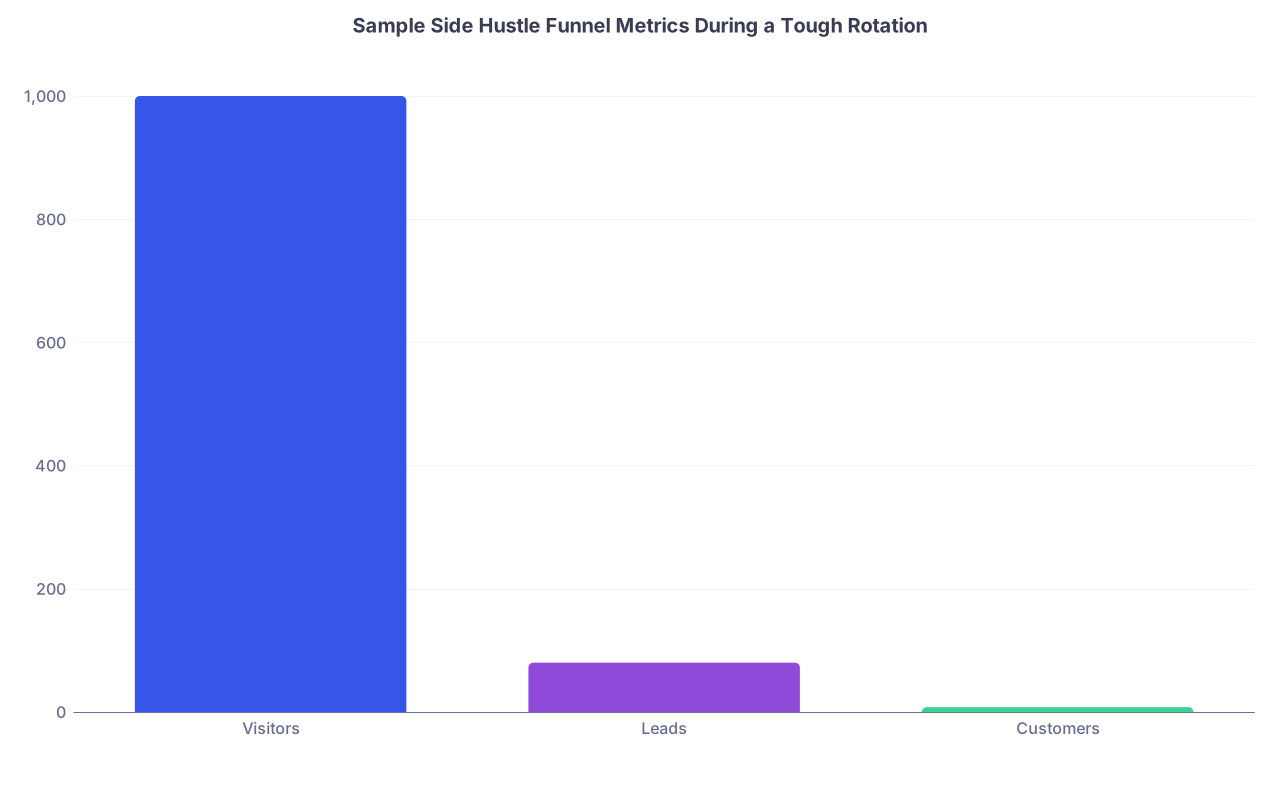
| Category | Value |
|---|---|
| Visitors | 1000 |
| Leads | 80 |
| Customers | 8 |
Translate that:
- 1000 visitors
- 8% opt-in to email
- 10% of leads buy
- Overall 0.8% visitor-to-customer
You do not need perfection. You need “good enough to justify continuing.”
Automation priorities, in order:
- Plug leaks that generate repetitive support work.
- Improve the onboarding and email sequences that run unattended.
- Only then, consider adding new products or complex funnels.
Complexity is the enemy of survivability during bad months.
Step 10: Build in a “Post-Rotation Reset” Ritual
The rotation will end. You will crawl out the other side, mildly traumatized and oddly proud. Do not just stumble forward.
Use one 60–90 minute block to debrief your business performance.
Checklist:
Review metrics for the last 4–6 weeks
- New subscribers
- Sales and refunds
- Support tickets
Identify friction points that hit you while exhausted
- Where did you curse your past self?
- “Why is this email so unclear?”
- “Why did three people ask how to log in?”
- These become your next improvement tasks.
- Where did you curse your past self?
Update your operating note
- Refine the “During Rotation” checklist.
- Add new canned responses.
- Note any tools that failed you or were overkill.
Decide on one small upgrade
- Example upgrades:
- Add 2 more emails to welcome sequence.
- Record a short onboarding video.
- Simplify pricing or combine overlapping products.
- Example upgrades:
You are training your business the same way you are training yourself: stress exposure → adaptation → stronger baseline.
Example: A Realistic Automation Setup for a Resident
To make this concrete, here is a stripped-down system a PGY-2 could actually manage.
Scenario: She runs a tiny brand that helps premeds with nontraditional backgrounds apply to med school.
Core offer: $79 mini-course + optional $249 1-hour strategy session.
Tools
- Website: Squarespace
- Email: ConvertKit
- Course hosting: Podia
- Payments: Stripe via Podia
- Automation: Native integrations (no Zapier yet)
- Scheduling: Calendly (only opens 2 blocks/week)
Automations
- Squarespace form → adds email to ConvertKit list → triggers 6-email welcome sequence.
- Podia purchase → tags buyer in ConvertKit → sends access email + adds to 3-email onboarding sequence.
- Calendly booking → auto-confirmation, reschedule link, and automated reminder 24 hours before.
Pre-rotation (Golden Day)
- Test all forms and one purchase.
- Schedule 3 Twitter threads and 2 LinkedIn posts pointing to her lead magnet.
- Update Gmail auto-responder with:
- Expected response window.
- What to do for urgent access issues.
During rotation
- 3x/week, 15 minutes:
- Check Stripe and Podia dashboard for failed payments or access issues.
- Reply to “URGENT ACCESS” emails.
- Bookmark all non-urgent items.
Post-rotation
- New subs: 55
- New course sales: 7
- New 1:1 calls: 2
- Support emails: 4 (all variations of “where is the login?”)
She spends 45 minutes fixing the onboarding email to make the login link and instructions painfully obvious. Next month, support emails drop to 1.
This is what “automation” actually looks like in residency. Not some mythical fully passive empire. Just a simple, resilient system that does not fall apart when your attending decides to round twice a day.
Do Not Wait for the “Right Time”
There is no “after residency” switch where life suddenly becomes spacious and predictable. Attendings do not magically have free evenings. They just have different constraints and more control.
You build a resilient side hustle by designing for your worst months, then letting the easy ones feel like a luxury.
Three core points to remember:
- If your business cannot survive a bad rotation, it is built wrong, not doomed.
- Automate flows, not random tasks: leads, sales, and support on rails.
- Protect your time and reputation first; the side hustle must fit inside medicine, not compete with it.
You do this right, and your side hustle will not just survive your next ICU month. It will come out of it slightly bigger, slightly cleaner, and a lot more independent of your daily mood and call schedule.