
It is Sunday night. You open MedHub/New Innovations and see the problem in black and white: 86 hours this week. Again. Your notes from Thursday are still unsigned. Friday’s discharges are half done. And you have that sick feeling that you are one compliance audit away from a Very Serious Conversation.
You are not lazy. You are not disorganized. You are in residency. The system is designed to eat every scrap of time you do not fiercely protect.
Let me be direct: you will not “find time” to keep up with notes or stay under 80 hours. You have to design a weekly workflow that forces it to happen.
Here is exactly how to do that.
Step 1: Get Real About Your Actual Time Use
Before you fix anything, you need to know where your hours actually go. Not where you think they go.
For one week, you are going to track your work like a QI project.
1. Do a one‑week time audit
On your phone (Notes app or a simple spreadsheet), create 4 buckets:
- Pre‑rounding / Rounds
- Direct patient care (orders, talking to patients, procedures, calls)
- Documentation (notes, discharge summaries, messages, orders clean‑up)
- Administrative / “Everything else” (teaching, meetings, sign‑out, walking, waiting)
Every few hours, jot down rough estimates. Ten second entries:
- “0600–0730: pre‑rounding 1.5h”
- “0730–1030: rounds 3h”
- “1030–1130: notes 1h”
- “1130–1300: orders/calls 1.5h” etc.
You are not building a time‑motion study for the NEJM. You just need a usable map.
After 5–7 days, you will see:
- Where your documentation time actually lives
- What hours are consistently dead (e.g., 3–4 pm lull, 11 am lull between cases)
- Where you are hemorrhaging minutes (social media scrolls, random hallway chats, aimless EMR wandering)
Now you can design a weekly workflow that works with reality instead of fantasy.
Step 2: Set Non‑Negotiable Weekly Targets
Residents get crushed because everything is vague:
- “I will try to leave on time.”
- “I will catch up on notes after sign‑out.”
- “I will watch my hours this month.”
That is how you end up logging 90+ hours and finishing notes on post‑call days.
You need clear numerical targets.
A. Hard work‑hour boundaries
Assuming ACGME 80‑hour limit:
Target: ≤ 75 hours/week (average)
Why 75 and not 80? Because things happen—codes, admissions spikes, disaster days. You want a buffer.Daily soft caps (for in‑house rotations):
- Typical day: ≤ 12.5 hours in hospital
- Call/long day: allowed to exceed, but log accurately
- Post‑call: out by your program’s required time (usually by 10–12 hours after shift start)
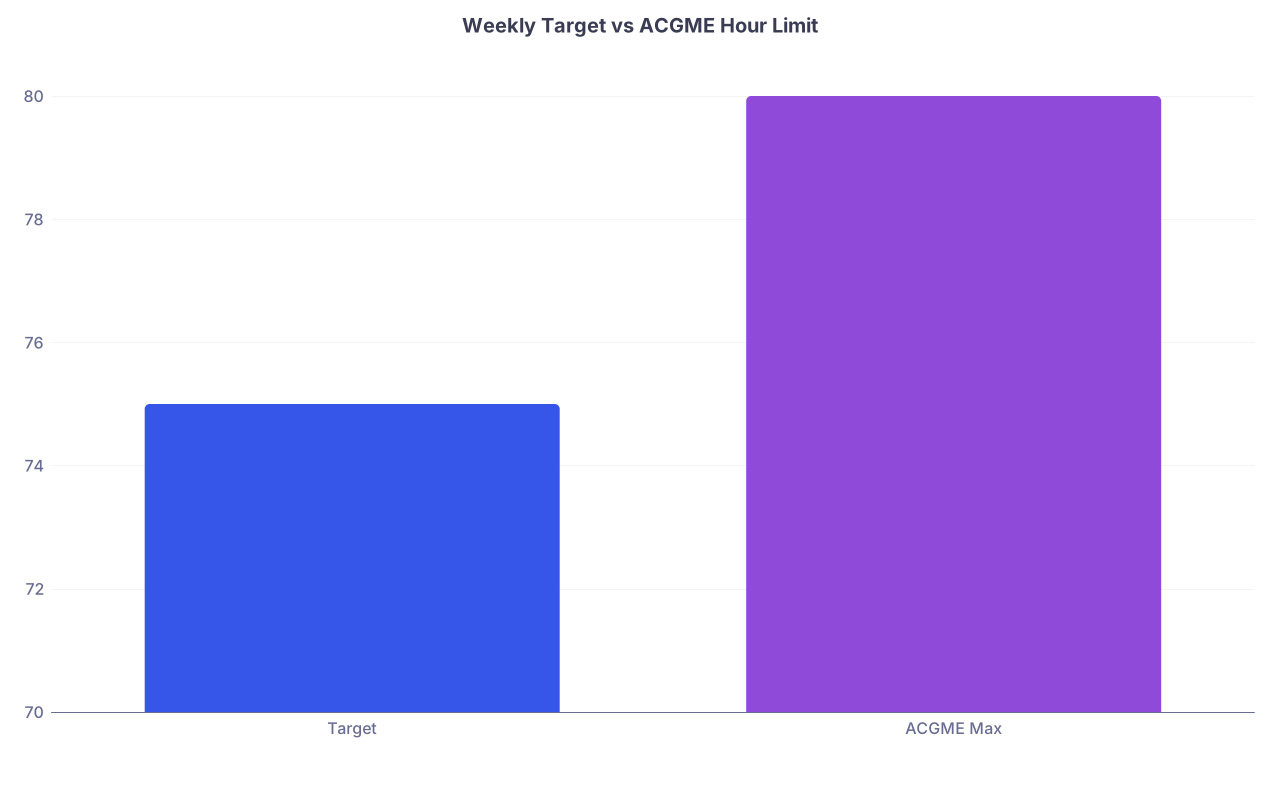
| Category | Value |
|---|---|
| Target | 75 |
| ACGME Max | 80 |
B. Documentation targets
These are the numbers that matter if you do not want to drown in notes:
- Zero unstarted daily notes by 15:00 (3 pm)
- All daily progress notes completed and signed before sign‑out on > 80% of days
- Discharge summaries:
- Goal: Started the day before discharge
- All discharge summaries completed within 24 hours of discharge
If you are regularly leaving with 5 unfinished notes at 7 pm, your system is broken, not your work ethic.
Step 3: Build a Weekly Template that Forces Compliance
Now the actual design. You are going to create a standard “default week” for a typical ward/clinic rotation. You will adjust for nights and ICU later.
Think of your week as a set of repeating blocks, not an amorphous blob of “work.”
1. Daily time blocks
Here is a sample structure for inpatient wards (modify times to match your hospital):
| Time | Block |
|---|---|
| 06:00–07:00 | Pre‑rounding / first notes |
| 07:00–09:30 | Rounds |
| 09:30–10:00 | **Notes Block 1** |
| 10:00–12:00 | Orders / admissions |
| 12:00–12:20 | Lunch + micro‑notes |
| 12:20–14:30 | Patient care / tasks |
| 14:30–15:00 | **Notes Block 2** |
| 15:00–17:00 | Clean‑up / discharges |
| 17:00–17:30 | **Notes Block 3** + sign‑out prep |
Those bolded “Notes Blocks” are not suggestions. Treat them like conferences. You show up. You do not blow them off because “I will just catch up later.”
During each notes block:
- No social media
- No email
- No “quick chat” with co‑residents unless it is about patients
- You are either typing a note, editing a note, or preparing a template for a note
Three 20–30 minute focused blocks per day will do more than two hours of scattered documentation.
2. Weekly pattern
Now stretch this out over 7 days with your expected schedule:
- Identify:
- Which days are short (clinic, admin, post‑call)
- Which are long (call days, heavy admit days)
- Which are “catch‑up chances” (post‑call morning, lighter weekend day)
On paper or in a note, map your week like this:
- Monday: Wards, 06:00–18:00
- Tuesday: Wards, 06:00–18:00
- Wednesday: Wards, 06:00–18:00
- Thursday: Long call 06:00–21:00
- Friday: Post‑call, 06:00–11:00
- Saturday: Day off
- Sunday: Wards, 06:00–18:00
Now you build weekly rules:
- No carrying over notes from Mon–Wed into the next day
- Allow rare carry‑over on long call Thursday but mandatory clean‑up Friday post‑call before leaving
- Sunday afternoon: 30‑minute look‑ahead session to prevent Monday chaos
You are creating a predictable pattern your brain can lean on instead of improvising under fatigue.
Step 4: Note‑Taking and EMR Workflow That Actually Works
The resident who “keeps up with notes” does not type faster. They capture information smarter and avoid double work.
1. Use templates ruthlessly (but intelligently)
You should have:
- 1–2 robust H&P templates
- 1–2 progress note templates (medicine, surgery, pediatrics versions as needed)
- 1 discharge summary template with:
- Hospital course by problem
- Key meds
- Follow‑up
- Pending labs
Do not stuff them with junk. Aim for:
- Pre‑written section headers
- Prompts for data you always forget (code status, diet, PT/OT recs, pending studies)
- SmartLinks/SmartPhrases/TextExpander shortcuts for vitals, labs, imaging
Set up 5–10 high‑yield shortcuts:
.dailynote– full structure of your daily note.hx– structured HPI with prompts.dischargecore– baseline discharge framework.negros– your standard set of pertinent negatives for ROS in your specialty
Spend one hour setting these up and you will save dozens of hours over a month. This is not an exaggeration. I have watched interns go from 10–15 minutes per note to 4–6 just by templates and shortcuts.
2. Document in “micro‑chunks” all day
The residents who drown in notes usually do this:
- Collect data all morning
- Round
- Do tasks all afternoon
- At 5–7 pm, sit down to write 8–12 notes from scratch
That is a guaranteed way to blow your work‑hour cap.
Instead, you write in micro‑chunks:
Pre‑round: open today’s note for each patient and drop in:
- Overnight events
- Vital trends
- New imaging/labs
- Your interim assessment
During rounds:
- Quickly type the new plan in the note as the attending talks (if culture allows, and it often does)
- Or at worst, immediately after leaving each room, jot 1–2 free‑text lines in the note with the planned changes
Between patients / during lulls:
- Turn those bullet points into full sentences
- Use your SmartPhrases to expand structured parts
By the time you hit your 14:30 Notes Block, each note is 60–80% done. You just clean up and sign.
3. Stop writing novels
Attending wants clear, accurate, defensible notes. Not literary fiction.
Ask yourself for each section:
- “Does this sentence add new information or clarity?”
- If not, delete it or never type it.
Common over‑documentation sins:
- Re‑stating the entire hospital course daily
- Writing full mini‑consult notes into every progress note
- Re‑documenting every lab value in prose that is already in flowsheets
- Copy‑pasting walls of text you never edit
Write for:
- Your post‑call self
- The cross‑cover who will see the note at 2 am
- The consultant who wants to know “What changed today?”
Clear, focused, short. That saves time and is actually safer.
Step 5: Protecting Your 80‑Hour Cap With Systems, Not Wishes
You will not stay under 80 hours by “trying harder.” You need a structure.
1. Build your weekly hours dashboard
Once a week (I recommend Friday post‑call or Saturday on your day off), open your duty hour system and:
- Log missing shifts for the current week
- Look at your rolling 4‑week average if your program tracks that
- Note:
- Your total hours
- Any days > 16 hours (for call)
- Any 24‑hour rule issues (if in ICU/OB etc.)
If you are trending above 80:
- Identify which days were the problem (maybe post‑call creep, maybe “just finishing notes” late)
- Decide concrete changes for the coming week:
- Hard out‑the‑door time on post‑call
- Offloading low‑yield tasks to night float or day team
- Using a senior to help you on chronically overloaded days
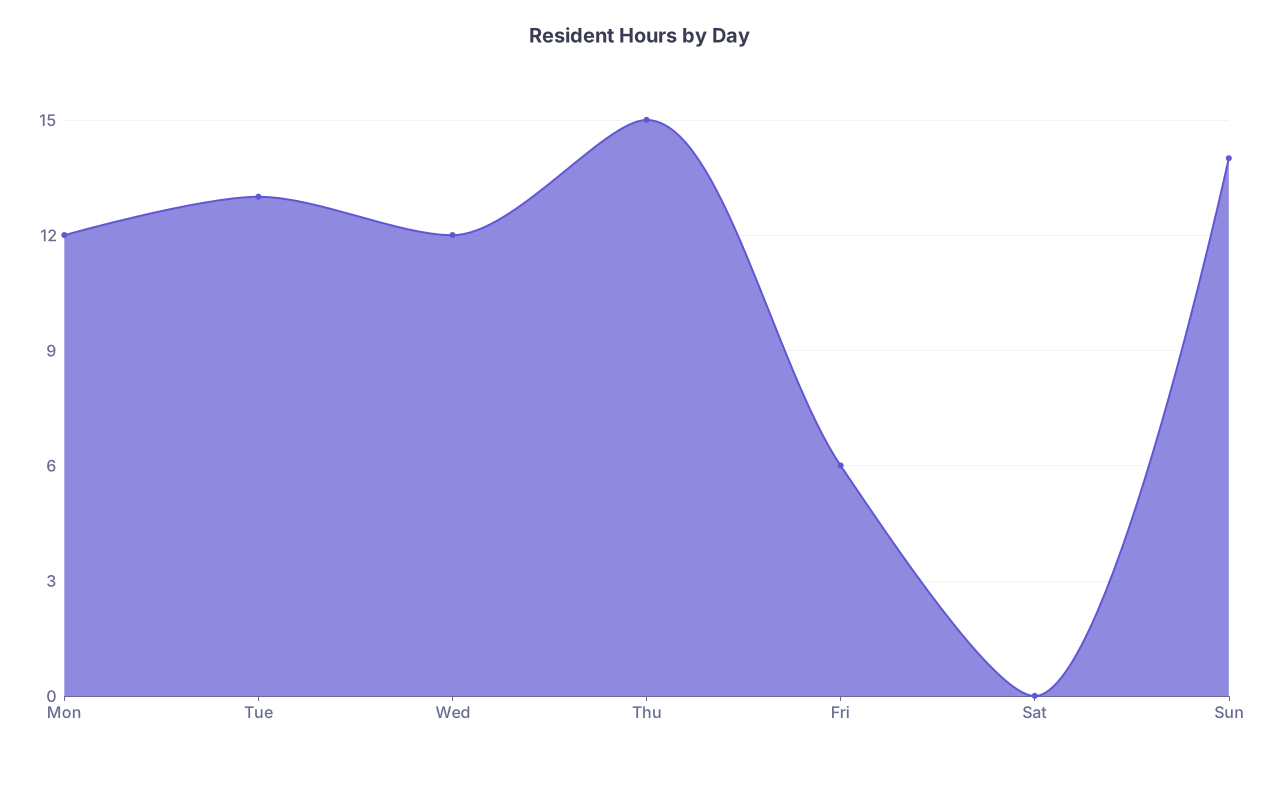
| Category | Value |
|---|---|
| Mon | 12 |
| Tue | 13 |
| Wed | 12 |
| Thu | 15 |
| Fri | 6 |
| Sat | 0 |
| Sun | 14 |
2. Know your “red line” times
You must decide in advance:
- The latest time you can stay on a regular day without breaking your weekly cap
- The line where “I am being a team player” turns into “I am violating ACGME and my own sanity”
For example:
- If your normal day starts at 06:00, and you are often there past 19:00:
- Draw a hard line at 18:30 for regular days
- At 18:00, ask yourself:
- “What absolutely must be done by me?”
- “What can appropriately be handed off to night float?”
If you consistently blow your red line, that is a systems problem. Bring it to your chief or PD with specific examples, not vague complaints.
Step 6: Weekly Reset Ritual (Non‑Negotiable)
One of the most effective habits I have ever seen in residents who stay sane: a 30–40 minute weekly reset.
Pick a consistent time. Sunday late afternoon or evening works for most.
During your reset:
Check duty hours
- Log anything missing
- Confirm you are on track for the 80‑hour rule
Review the coming week’s schedule
- Rotations
- Clinic days
- Call nights
- Conferences or mandatory sessions
Plan documentation focus points
- Which days are likely to be heaviest? Mark them.
- Where will you place your 2–3 Notes Blocks on each day?
Tidy your EMR “inbox”
- Clear old results, messages, low‑priority tasks
- Create a single “To Address on Monday” list if needed
Optimize one thing
- Add one new SmartPhrase
- Clean up one bloated template
- Identify 1–2 repetitive tasks you can shortcut
This is not busywork. This is how you control the week before it controls you.
Step 7: Adjusting for Different Rotations
Wards and clinic are one thing. ICU, nights, and surgical services are beasts of their own. You still use the same principles—time blocks, micro‑documentation, weekly targets—but you adjust the details.
A. ICU
Reality: more patients per resident, higher acuity, dense notes.
Adjustments:
- Cut your note template down to what is truly critical for that service (vent settings, pressors, sedation, I/O, drips, labs that matter)
- Use problem‑based daily assessment with bullet‑style structure rather than long prose
- Build 2 shorter Notes Blocks:
- One mid‑morning post‑rounds
- One late afternoon pre‑sign‑out
- Pre‑build “common problem” sub‑templates (ARDS, septic shock, DKA, GI bleed) that you can drop into assessments and tweak
B. Nights
Nights can tempt you to procrastinate all writing until dawn when things slow down. That backfires.
Adjustments:
“Document as you go” after each admission. Before you see the next one:
- H&P mostly done
- Key orders in
- Initial assessment at least skeletonized
If your night system includes cross‑cover notes:
- Use extremely lean, focused documentation
- Template for “Overnight events” with concise structure
You should not be leaving sign‑out at 08:30 with hours of charting still undone.
C. Surgical services / OR‑heavy rotations
Common trap: you disappear into cases all day, then stagger out with a full list of patients and no notes done.
Adjustments:
Pre‑round notes:
- In the morning, open a quick progress note for each patient and pre‑load:
- Vitals
- Overnight events
- Labs/imaging
- During any OR downtime (positioning, prep, waiting for room turnover), flesh out assessments and plans
- In the morning, open a quick progress note for each patient and pre‑load:
For brief post‑op notes:
- Have a canned PACU/post‑op template that takes under 2 minutes to complete
If you are in a 12+ hour OR day, the only way your notes get done is in micro‑chunks in turnover time or immediately pre/post‑case.
Step 8: Communication Habits That Save You Hours
A lot of time is lost not to the EMR, but to humans.
1. Use tight, structured sign‑out
A clean sign‑out prevents “just one more thing” pages that keep you late.
- Standard format:
- ID + hospital day
- Active problems
- What you actually want covered vs what you will finish
- Clear “If X, then Y” plans for predictable issues
If the night team trusts your sign‑out, they page you less at 19:30 for things you “forgot to mention.” That is time back.
2. Push back (professionally) on creep
You have to learn the phrase:
“I can do X or Y safely before I hit my duty hour limit, but not both. Which is higher priority for you?”
Said to:
- Overenthusiastic attending at 18:15 who wants a full re‑work of all notes
- Senior who keeps stacking non‑urgent tasks at the end of your shift
- Team that treats “staying late” as default, not exception
You are not refusing work. You are asking for prioritization within legal and safe boundaries.
Step 9: A Simple Weekly Workflow You Can Start Using Tomorrow
Let me stitch this into something concrete.
Daily (ward day) protocol
Pre‑round (06:00–07:00)
- For each patient:
- Open today’s progress note
- Load vitals/labs
- Type 2–3 bullet points of overnight events and your impression
- For each patient:
Rounds (07:00–09:30)
- During or immediately after each patient, type the core of today’s plan into the assessment section
- Use SmartPhrases to speed ROS and exam sections
Notes Block 1 (09:30–10:00)
- Goal: bring each note to 60–70% completeness
- No distractions; set a 25‑minute timer if you need to
Midday (10:00–14:30)
- Orders, patient care, consults
- When you finish a task for a patient, flip to their note and add 1–2 lines if anything meaningful changed
Notes Block 2 (14:30–15:00)
- Goal: bring at least 50% of your list to “ready to sign”
- Start with the patients most likely to be discharged or transferred
Late afternoon (15:00–17:00)
- Discharge work, follow‑up calls, consult coordination
- Do not start anything new after 16:30 that could be safely left for night team or tomorrow without risk
Notes Block 3 + sign‑out prep (17:00–17:30)
- Finish and sign remaining notes
- Build clean, structured sign‑out
- Hard stop at your red‑line time
After leaving
- Log your duty hours entry on your phone before you forget
- Do not remote‑in for more notes unless there is truly no alternative. If that is happening regularly, your system is broken and you need help.
Weekly protocol
Friday post‑call or Saturday:
- Review duty hours
- Note any days where you went over your daily red line
- Ask: what caused it, and what can I change next week?
Sunday reset (30–40 minutes):
- Check schedule and call
- Sketch where your Notes Blocks will go each day
- Clear EMR inbox of noise
- Add or refine 1–2 templates/SmartPhrases
FAQ (Exactly 4 Questions)
1. What if my team culture expects everyone to stay late, even if my notes are done?
Then you have a culture problem, not a documentation problem. Start by quietly controlling what you can: finish your notes earlier, keep your patient care tight, and leave within a reasonable window once your work is truly complete. If someone questions you, be matter‑of‑fact: you finished your notes, updated your list, gave a clean sign‑out, and you are at risk of crossing your duty hour limits. If the culture still punishes you, bring specific examples to chiefs or your program director. Vague “we work too much” complaints go nowhere. Concrete “I was done with work but pressured to stay 90 more minutes” conversations get attention.
2. I am a slow typer and that seems to be my main bottleneck. What can I do?
You do not need to become a court stenographer, but you do need basic efficiency. Two practical fixes: (1) Spend 10–15 minutes a day for a few weeks on a free typing trainer to get yourself to a comfortable 50–60 words per minute. That is enough. (2) Lean heavily on templates, SmartPhrases, and voice recognition if your EMR has it. I have worked with residents who “could not keep up” until they adopted 8–10 high‑yield SmartPhrases; their documentation time dropped by 30–40% almost overnight.
3. My attendings demand long, detailed notes. How do I reconcile that with staying under 80 hours?
You clarify expectations and structure your note so “long” does not mean “rambling.” Ask directly: “For daily notes on this service, what do you consider absolutely essential?” Then build a template that hits those points succinctly. Use headers and bullets where allowed to speed both writing and reading. If an attending insists on absurd, repetitive documentation that is clearly driving you over duty hours, you document your actual hours honestly and escalate the issue with specific examples. ACGME supports compliance; programs are required to respond to systematic violations.
4. What if I fall behind despite all these systems—do I stay late to catch up or leave and finish later?
If this is an occasional bad‑volume day, you may stay a bit late to finish critical notes and log the real hours. That is life. If it is happening multiple times a week, you do not silently “donate” your time. You (1) log your true hours, even if they are over 80, and (2) talk to your senior or chief about workload and workflow. Repeatedly staying hours late off the clock to “catch up” is how burnout and safety issues happen. The correct move is to use the data to push for redistribution of patients, better staffing, or attending support—not to hide the problem with your unpaid labor.
Open your next week’s schedule right now. Pick one typical ward day and block three 20–30 minute “Notes Blocks” into it—by alarm on your phone if needed. Tomorrow, treat those blocks like mandatory conferences and see how different your evening feels.