
It’s 10:47 pm on a Thursday. You just signed your last note, you’re half-zombie, and your senior mutters on the way out, “Don’t forget to log your hours.” You click into New Innovations (or MedHub, or whatever cursed portal your program uses), mechanically punch in “6 am – 6 pm” for the week, hit submit, and go home.
Three months later you’re sitting in the PD’s office during a “routine review.” Except this routine review includes: printed EMR access logs, badge swipes, and your duty hour report side by side. The numbers do not match. At all.
Welcome to the world of duty hour audits. Residents do not get burned because they worked hard. They get burned because their documentation is sloppy, inconsistent, or obviously fake.
Let me walk you through the landmines so you do not become the example everyone whispers about next year.
The Biggest Lie: “It’s Fine If I Just Round My Hours”
Here’s the most common, career-risking mistake: habitual rounding.
You know the pattern:
- Always “6 am – 6 pm”
- Always “7 am – 7 pm”
- Never a minute early, never a minute late, apparently living inside a perfectly rectangular schedule that doesn’t exist in real life.
On audit, this pattern screams one thing: fabricated documentation.
Programs and accrediting bodies do not expect perfection. They do expect plausibility. Real life looks messy:
- Some days you’re 5:38 am to 6:19 pm.
- Some nights you leave 30 minutes early.
- Some days you get slammed and stay 2 hours late.
If your duty hour log is mathematically optimized but clinically impossible, you’ve just handed auditors a reason to dig deeper.
The safer move:
- Log your real arrival and departure within about 10–15 minutes accuracy.
- Don’t copy-paste the same time block every day “for convenience”.
- Accept that your log will look a little ugly. That’s what makes it believable.
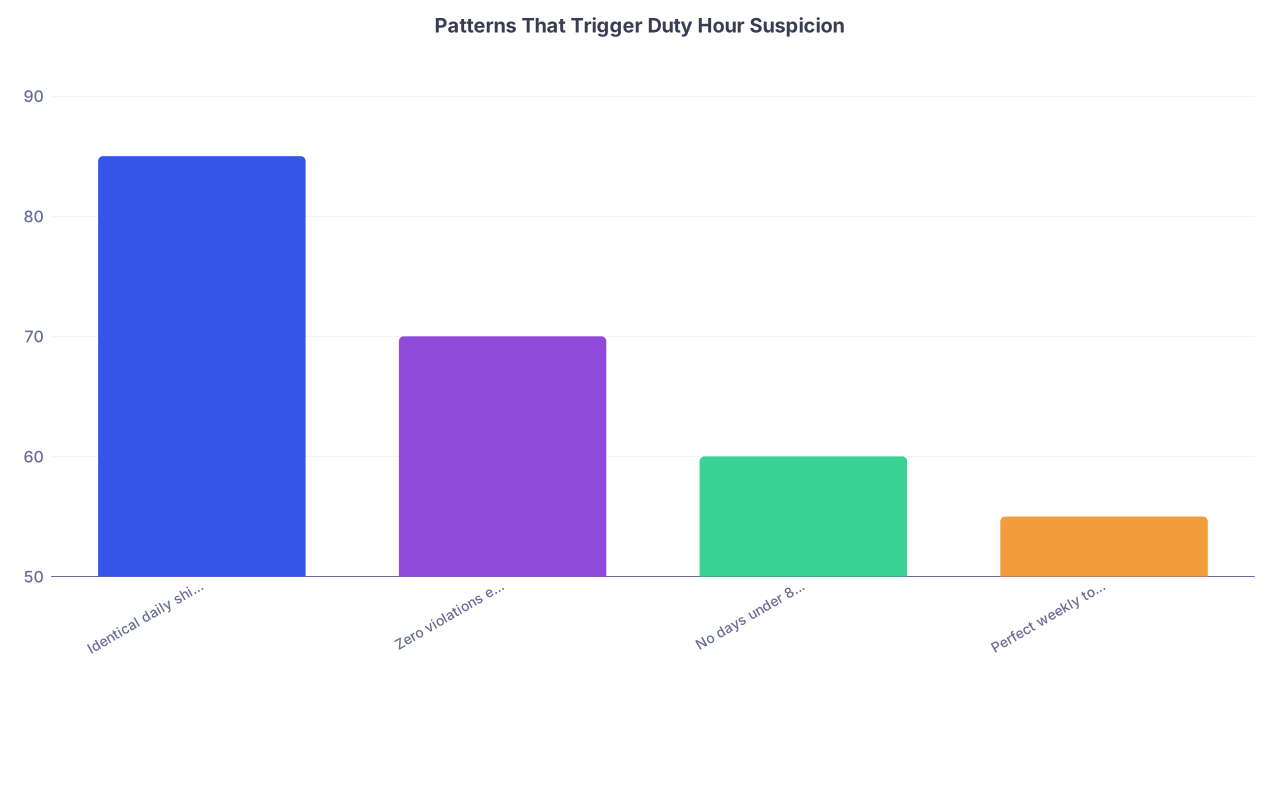
| Category | Value |
|---|---|
| Identical daily shifts | 85 |
| Zero violations ever | 70 |
| No days under 8 hrs | 60 |
| Perfect weekly totals | 55 |
Those percentages are roughly how often I’ve watched each pattern trigger “we should look closer at this resident’s logs.” Not official numbers. Just the reality of how faculty think.
Mistake #1: Ignoring the Digital Paper Trail
If you take nothing else from this, understand this: your duty hour log is not the only record of your presence.
You are leaving footprints everywhere:
- EMR login and logout timestamps
- Badge swipe data to enter the hospital, units, or call rooms
- Pager / secure chat message timestamps
- OR case logs and anesthesia records
- Dictation / note timestamps
- Even consult pages from other services
When an audit happens—internal or external—someone is going to compare these.
The classic ways residents get burned:
- Logging that they left at 6 pm, but EMR shows orders at 9:42 pm.
- Reporting “day off” while badge swipe shows them entering the hospital twice.
- Saying they were off-duty at home while responding to pages in the EMR for hours.
Here’s the problem: once they show that your documentation is unreliable in a few places, they start doubting all of it.
How to avoid this mess:
- If you stick around to “help out” after signing out, include that time in your duty hours. Yes, even “just 30 minutes.”
- If you log in from home to write notes, that counts. Do not pretend it doesn’t.
- If you come in on your day off for something “quick,” that’s hours. Document them.
The dangerous belief is: “If I don’t log it, it doesn’t exist.” That’s how you end up accused of falsifying records when the EMR proves otherwise.
Mistake #2: Under-Reporting to “Protect the Program”
I’ve heard this line more times than I can count:
“I didn’t want to get the program in trouble, so I just logged less.”
Let me be blunt: under-reporting duty hours is one of the fastest ways to harm both yourself and your program.
Here’s how this plays out:
- Culture forms where everyone quietly under-reports.
- PD happily tells ACGME, “We have no duty hour violations.”
- A resident complains anonymously to the GME office or ACGME.
- A focused review or site visit happens. Auditors pull EMR / rotation schedules / call schedules.
- Massive discrepancy between reported hours and reality appears.
- Program gets hammered not for “long hours,” but for “lack of honest reporting” and “poor oversight.”
You know who becomes the poster child in those moments? The resident whose documentation looks the most obviously fake.
Protect yourself:
- Log your actual hours, including violations.
- If your senior says, “Don’t log that, it looks bad,” that’s a red flag, not a suggestion.
- If your program leadership unofficially pressures you to “just keep it under 80,” document that pattern (screenshots, emails) in case this blows up later.
Under-reporting does not make you a team player. It makes you the person holding the bag when someone finally speaks up.
Mistake #3: Not Understanding What Counts as “Work”
Residents get burned constantly because they underestimate what actually counts as duty hours.
You’re making a mistake if you’re not counting:
- Pre-rounding at home: reviewing labs, imaging, and notes before you set foot in the hospital.
- Remote EMR work: finishing notes or placing orders from home.
- Required conferences or didactics outside your usual shift times.
- Mandatory simulation, bootcamps, or retreats on “off days”.
- Travel time from home to a different training site (if you’re required to go there, that’s duty time from departure to arrival).
Where people get especially exposed:
- Logging “day off” while attending a mandatory half-day simulation.
- Saying you left at 5 pm but finishing notes from 7–8 pm at home.
- Being on jeopardy / back-up, getting called in, and only logging the time in the building, not the obligated availability period.
Do not try to game the definition. ACGME has published guidance on what counts as duty hours. Your GME office usually has it in writing. If you ignore that and invent your own rules, you’re gambling with your integrity.
Mistake #4: Inconsistent Stories Across Systems
Most residents think auditors only see the duty hour system. Wrong. During a serious review, this stuff gets compared:
| Data Source | What They Look For |
|---|---|
| Duty Hour Logs | Reported start/end times |
| EMR Timestamps | First/last activity per day |
| Badge Swipes | Building/unit entry times |
| Call Schedules | Expected shifts/coverage |
| OR / Case Logs | Case start/stop vs. hours |
Where you get nailed is when your story shifts between systems.
Examples I’ve actually seen:
- Resident logs “took post-call day” but appears as primary surgeon on a case that afternoon.
- Duty log shows “24h call” but EMR messages clearly show them working 28–30 hours.
- Multiple residents on the same team logging completely different shift structures for identical rotations.
You do not need perfect precision. But you need internal consistency. If you log:
- Arrive 6:30 am, leave 7 pm
then your EMR activity should roughly bracket that, not blow past it by 3 hours.
When your story doesn’t match the electronic record, guess what gets believed? Not you.
Mistake #5: Copying What Everyone Else Does
“I just put what my senior told me to put.”
That sentence will not protect you in a disciplinary meeting.
There’s a dangerous herd behavior that crops up:
- The senior says, “We all log 6–6. It’s what everyone does.”
- Interns follow along because they don’t want to rock the boat.
- Year after year, the pattern persists.
- Then during a site visit, the ACGME field rep interviews a cross-section of residents, pulls logs, and realizes the entire program has been fabricating hours.
Mass problem. But they still call residents in one by one.
You can learn from peers, but do not copy-paste their bad habits:
- If your actual days differ from the “standard shift,” log what you actually worked.
- If everyone is logging fewer than 80 hours but you are routinely over, do not falsify to match them.
- If your chief explicitly tells you to lie, that’s a GME-level problem, not something you quietly go along with.
You’re responsible for what you submit under your name. “Everyone else does it” won’t save you.
Mistake #6: Letting Back-Logging Destroy Your Memory
Another way residents get burned: logging two weeks at once on a Sunday night.
You think you remember. You don’t.
Patterns I’ve watched:
- People forget which day they stayed for a late family meeting.
- The 28-hour call that bled into the next afternoon gets logged as “24 and out by noon.”
- That “quick” Sunday morning rounding you did for 3 hours on your week off never gets recorded.
Then during an audit, they pull one specific day:
- “You said you left at 6 pm. Here’s a discharge summary at 8:57 pm. What happened?”
You honestly don’t remember. You weren’t lying; you were guessing backwards.
The fix is boring but effective:
- Log daily or every 2–3 days maximum.
- If your system lets you, jot short notes like “family mtg late” or “stayed for code till 8:30” to remind yourself.
- Set a recurring calendar alert to update your duty hours.
You avoid looking dishonest simply by not relying on your memory to reconstruct chaos.
Mistake #7: Misunderstanding “At-Home” Requirements
At-home call and remote duties are where people get unnecessarily exposed.
Common errors:
- Not logging time spent actively working from home (notes, phone calls, pages).
- Treating “at-home call” as zero hours unless physically in the hospital.
- Ignoring stretches where they were required to stay within 30 minutes of the hospital and taking that as “off time.”
Here’s what usually counts:
- Time actually spent on patient care tasks at home (document it).
- Time on required phone calls, virtual family meetings, telehealth visits.
- For some specialties, long stretches of high-volume at-home call do count heavily; programs are supposed to monitor this.
Don’t make the mistake of pretending you weren’t working just because you were in pajamas. If your brain and attention are being used for the hospital, that’s work. Audit teams know this and they will ask.
Mistake #8: Treating Duty Audits as “No Big Deal”
I’ve watched residents stroll into duty hour review meetings like it’s a quick chat. Then walk out blindsided by formal letters and “professionalism concerns.”
What can actually happen if your documentation is judged unreliable:
- Formal remediation plans (yes, for documentation and professionalism).
- Delayed promotion to the next PGY year.
- Mandatory monitoring of your logs with extra meetings.
- In serious or repeated cases, non-renewal of contract.
Programs get in trouble with accrediting bodies for duty hour issues, but residents can individually get tagged for dishonesty. And that label follows you in letters.
Do not make these mistakes:
- Going into a meeting unprepared (“I don’t know, I just guessed my hours” is a terrible line).
- Changing your story mid-meeting when they show you logs.
- Blaming everything on “the system is confusing” when you’ve been using it for 18 months.
If you’re called in:
- Ask in advance what specific concerns they’re reviewing.
- Pull your own duty logs and quickly scan for obvious patterns (identical days, missing days, impossible weeks).
- Be honest if you back-logged or guessed—but emphasize you’re ready to correct the process now.
- Ask for clear guidelines: “What do you want me to count as duty hours so I can document accurately?”
Showing you’re serious and coachable beats doubling down on a flimsy story.
What “Good” Duty Documentation Actually Looks Like
No, “good” does not mean perfect or violation-free. “Good” means:
- Honest
- Plausible
- Internally consistent
- Correlated with other systems within a reasonable margin
In practice, that usually looks like:
- Some days shorter, some days longer.
- Occasional logged violations during heavy rotations or bad weeks.
- Days off that are truly off, not full of log-ins and badge swipes.
- At-home work recorded when significant.

| Step | Description |
|---|---|
| Step 1 | Work Day Starts |
| Step 2 | Arrive or Log In |
| Step 3 | Clinical Work and EMR Use |
| Step 4 | Leave Hospital or Log Off |
| Step 5 | At Home Work? |
| Step 6 | Track Time Spent |
| Step 7 | End of Day |
| Step 8 | Include in Duty Hours |
| Step 9 | Log Hours Within 2 Days |
If your pattern roughly follows that flow, you’re in a safe zone. If your pattern is “make everything look neat and 80 or less,” you’re setting yourself up.
Practical Habits That Keep You Out of Trouble
Let’s keep this very simple. Here are habits that prevent 90% of audit disasters:
- Log frequently. Every day or every 2–3 days max. Don’t reconstruct weeks.
- Be roughly accurate. Within 10–15 minutes. Not fantasy-shift accurate.
- Include at-home work. Notes, calls, telehealth, actual patient care = hours.
- Accept real violations. When you truly go over, document it. Programs can fix patterns. They can’t fix lies.
- Ignore peer pressure to falsify. If someone tells you to under-report, that’s their problem. Don’t make it yours.
- When in doubt, ask in writing. Email GME or your chief: “Should I count X as duty hours?” Save that response.
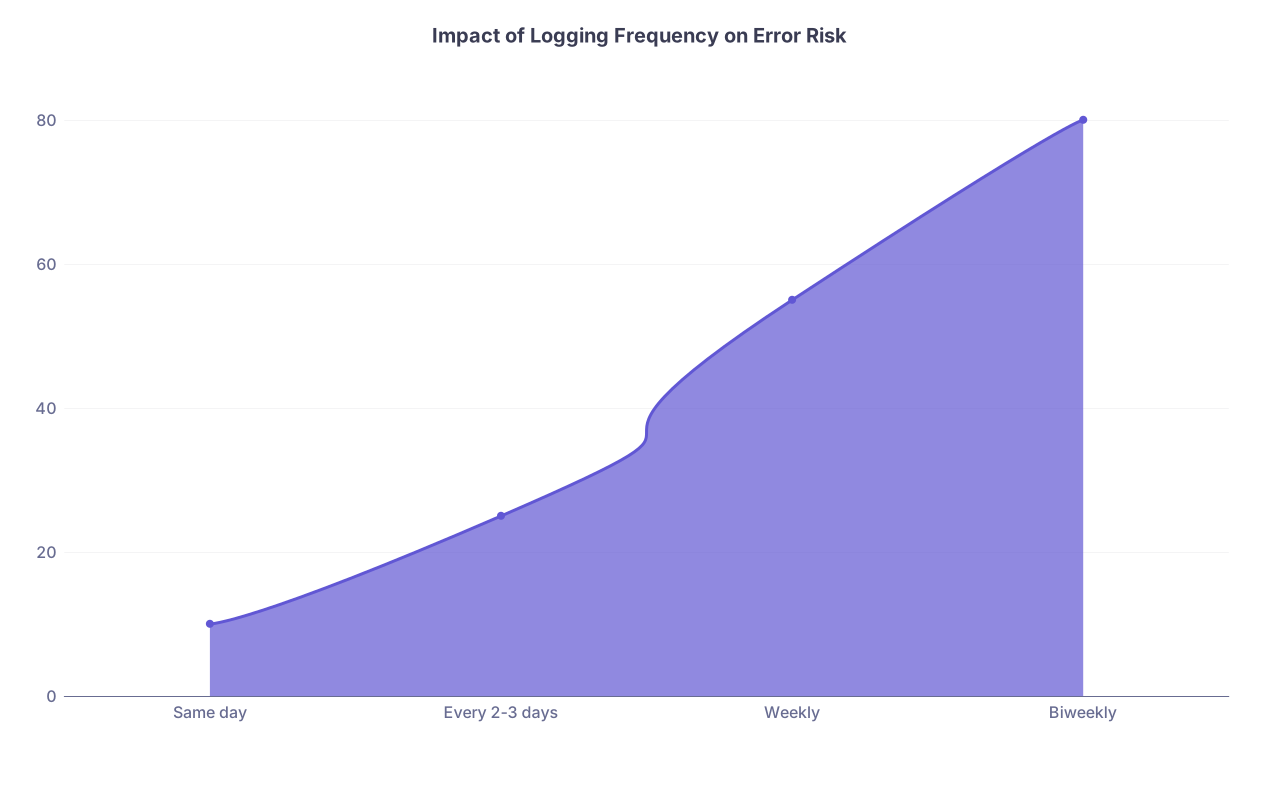
| Category | Value |
|---|---|
| Same day | 10 |
| Every 2-3 days | 25 |
| Weekly | 55 |
| Biweekly | 80 |
Those numbers are how I’d rank the relative risk (not exact statistics) of your logs looking inaccurate or fabricated. The less often you log, the more likely you are to look unreliable.
Culture Problems vs. Your Own Integrity
One more thing. Sometimes the problem isn’t you. It’s the program’s culture.
Red flags:
- Chiefs explicitly telling interns: “Never log more than 80. Fix it.”
- Seniors mocking people who report violations as “weak.”
- PDs saying in town halls, “We’re proud to have zero violations,” while everyone routinely stays late.
- Residents informally agreeing: “We just don’t report.”
You cannot fix a broken culture by yourself. But you can:
- Protect your own honesty and documentation.
- Quietly keep your own notes or evidence if pressure becomes extreme.
- Use anonymous channels (GME ombuds, ACGME surveys) if needed.
You worked too hard to get here to let someone else’s anxiety about accreditation drag your name into a documentation scandal.


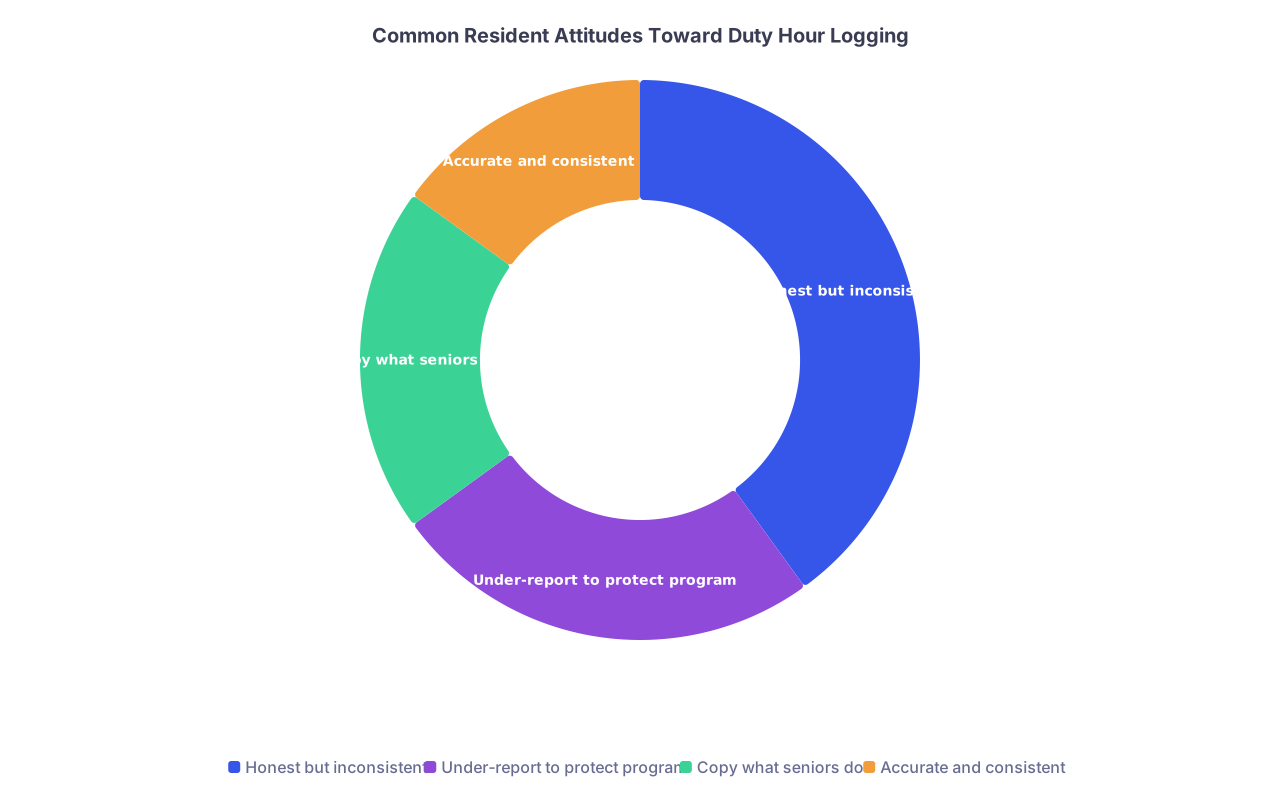
| Category | Value |
|---|---|
| Honest but inconsistent | 40 |
| Under-report to protect program | 25 |
| Copy what seniors do | 20 |
| Accurate and consistent | 15 |

| Step | Description |
|---|---|
| Step 1 | Resident Concern |
| Step 2 | Talk to Chief |
| Step 3 | PD Meeting |
| Step 4 | GME Office |
| Step 5 | Institutional Review |
| Step 6 | ACGME Involvement |