
Most residents do inbox management completely backwards – and it quietly wrecks their days.
Let me be direct. Your EMR inbox (Epic In Basket, Cerner Message Center, whatever flavor of dysfunction you have) will shape your stress level more than any single attending. If you let it own you, you will always feel behind, miss important labs, and make sloppy refill decisions at 11:45 pm. If you learn to own it, your workdays get lighter, your nights get quieter, and your patients are safer.
This is not “be more organized” nonsense. This is specific, tactical, button-level workflow design for:
- Labs
- Patient/provider messages
- Medication refills
…under real residency constraints: cross-cover, post-call brain fog, 20 open charts, and a pager that will not shut up.
1. Core Principles: How Residents Should Think About the Inbox
Stop treating the inbox as a random stream of tasks. It is three very different jobs jammed into one screen:
- Surveillance (labs, imaging, critical values)
- Triage and communication (messages)
- Medication safety and logistics (refills)
Each of those needs its own mental “mode” and rules. Mixing all three every time you click into your inbox is the fastest way to miss something important and stay at work 60–90 minutes longer than needed.
Let me break down the overarching rules first.
1.1 Time-block, do not graze
The worst pattern I see in interns: click inbox 25 times a day “just to check.” Each time, they:
- Read a few messages
- Half-answer one
- Get distracted
- Leave 3 things “for later”
By 5 pm, their brain is fried and the inbox is still full.
A better default for most rotations:
- 2–3 scheduled inbox blocks per day
- Each block with a specific purpose (e.g., “labs and critical stuff only” at 11:00; “messages and refills” at 15:30)
- Outside those blocks, you only respond to:
- STAT/critical values from lab/pager
- Direct messages from your attending / rapid response issues
You want to reduce context switching. Reviewing labs and renewing refills use totally different mental circuits. Do not mix them casually.
1.2 Triage everything into 3 categories
When you open the inbox, your first job is not “answer everything.” Your first job is classify:
- Needs action now (safety, time-critical, or will cause downstream chaos later today)
- Needs action today but not this moment
- Needs delegation or deferral (RN, front desk, attending, clinic RN pool, etc.)
You should be ruthless about #3. Residents who try to personally solve every administrative message burn out early.
1.3 Work from high-risk to low-risk, not from top to bottom
The EMR default sort order is not your friend. You always start with:
- Abnormal labs/imaging that could change management today
- Medication refills with safety implications (controlled substances, anticoagulants, high-risk meds)
- Time-sensitive logistics (today’s appointment questions, home health orders that expire)
- Routine questions, informational messages, bureaucratic junk
Residents constantly do the reverse because routine messages are quicker and more “satisfying.” That is how you end up missing a potassium of 2.8 or a troponin bump that came in at 16:30.
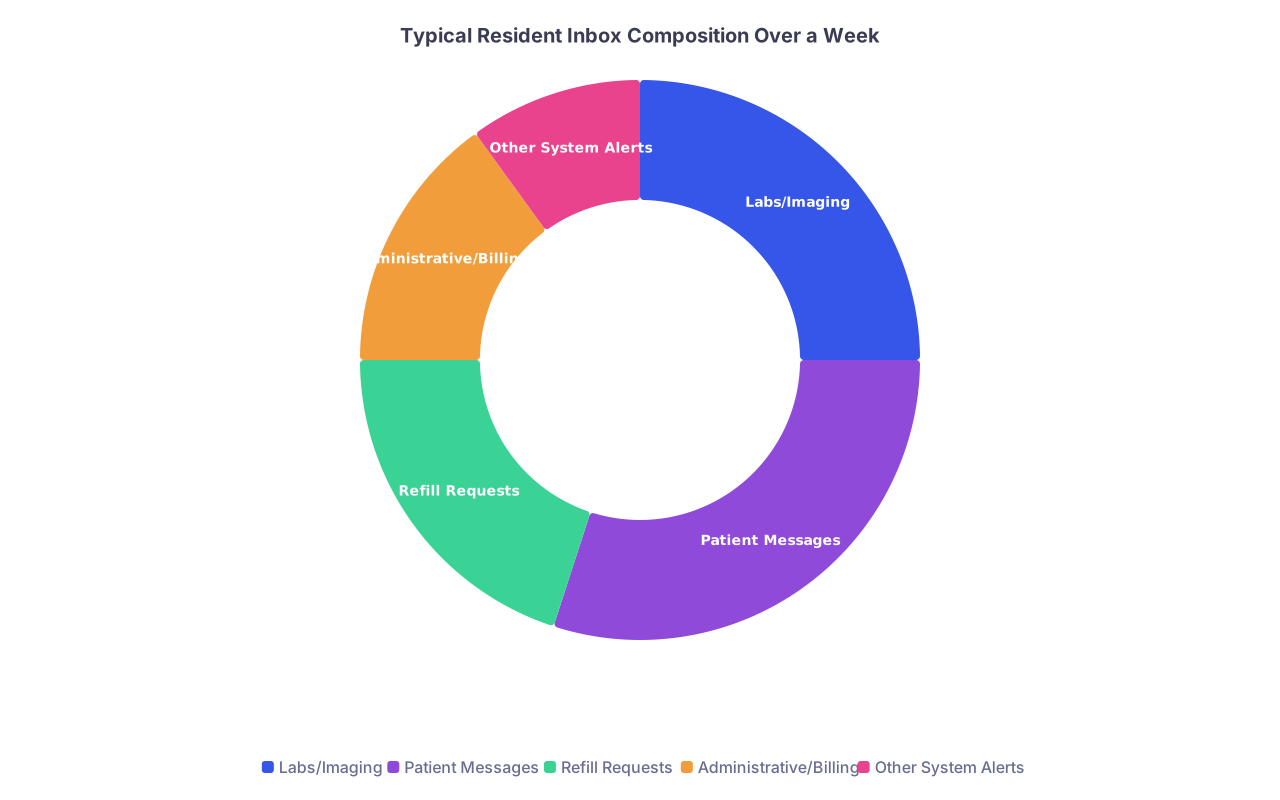
| Category | Value |
|---|---|
| Labs/Imaging | 25 |
| Patient Messages | 30 |
| Refill Requests | 20 |
| Administrative/Billing | 15 |
| Other System Alerts | 10 |
2. Labs: Surveillance Without Drowning
Labs are where you hurt people if you are sloppy. The good news: residents can create a consistent, safe pattern that takes minutes, not hours.
2.1 Build a mental hierarchy of urgency
Not every abnormal lab is an emergency. You should have a hardwired priority scheme in your head. For outpatients:
Highest tier – same-day action expected
- Critical values called from lab (K, Na, Hgb, Plt, INR, etc.)
- New troponin elevations
- Severe renal function changes (Cr doubling, eGFR crash)
- Dangerous drug levels (phenytoin, lithium, digoxin, VPA)
- Positive cultures with no treatment yet (blood, CSF, some urine in high-risk patients)
Middle tier – action within 24–48 hours
- Moderately abnormal electrolytes
- Worsening anemia, thrombocytopenia, LFT elevations
- HbA1c significantly above target
- Thyroid abnormalities
Low tier – trend follow-up / routine follow-up
- Mildly abnormal but stable labs
- Screening tests that can be discussed at follow-up
If your EMR lets you filter or color-code, exploit it. For example, in Epic:
- Use the Results tab and sort by “Severity”
- Use “Abnormal only” filters when time is tight
- Use preference lists for common result actions (e.g., quick phrases or smartphrases for follow-up notes/messages)
2.2 Standardize your response patterns
Most residents waste time “re-inventing” language for every abnormal lab. Create mental (or written) templates for:
Mild abnormal, no change in management:
- Document in chart: brief result note linked to the result
- Patient message: reassurance + plan + when to recheck
- Example: Slightly low WBC in a stable young patient on no myelosuppressive meds.
Moderate abnormal, outpatient adjustment needed:
- Place order (dose change, recheck lab, imaging)
- Brief chart note on reasoning
- Patient message explaining what you changed and why
Severe abnormal, potential admission or urgent workup:
- Call the patient (not just message)
- Decide: ED vs urgent clinic vs stat imaging
- Document phone call with clear risk/benefit discussion
- Notify attending if grey-zone decision
Have 2–3 stock phrases for each category. Use smartphrases aggressively. This is not about being lazy; it is about consistency and safety.
2.3 Link every major result to a “next step” before you close it
One of my rules: I do not click “Done” on a significant lab until one of these is true:
- New order placed (med adjustment, repeat lab, imaging, referral)
- Task sent (RN to call patient, scheduling to book follow-up)
- Follow-up visit already on the books and I explicitly note “discuss at visit on [date]”
If you find yourself thinking, “I’ll remember to deal with this on Monday,” you are lying to yourself. Monday-you will hate Friday-you for that lie.
2.4 Inpatient vs outpatient lab strategy
On inpatient rotations, most important labs are seen in the “Results Review” section, not the inbox. But the inbox still matters for:
- Late-arriving results after discharge
- Outpatient labs on clinic patients while you are on wards
- Cross-cover results when you are on nights
Practical approach:
- During inpatient months with clinic sessions: do a quick, focused outpatient labs check at the start of your clinic half-day and a second 5–10 minute pass at the end of the day
- For post-discharge labs (e.g., warfarin INR checks you ordered): set specific reminders or delegate to a nurse pool to monitor and notify you only if out of specified range
Your goal is to prevent two things:
- Being paged at 2 am for a “bad outpatient lab no one saw”
- Real clinical deterioration that was visible in your inbox for days

3. Messages: Controlling Chaos and Setting Boundaries
Patient and provider messages are where residents drown. Why? Because the system treats every message as equal, and residents don’t.
You have to enforce order.
3.1 Classify messages by type of work, not by sender
Every message is one of these:
- Clinical decision required (symptoms, side effects, new issue)
- Clarification/education (how to take med, what test means)
- Logistics (forms, appointment timing, insurance issues)
- Misrouted / not your job (specialist question, RN-level triage)
When you open your “Messages” basket, you want to:
- Sort/filter by type if possible (Epic pools help; ask your clinic how messages are routed)
- Batch manage: all logistics first (easy wins), then clarification, then deep-clinical issues last when you have maximal attention
3.2 Hard rules that save your sanity
I use and teach these rules:
Do not manage new, complex problems entirely by message. If a patient sends a 3-paragraph novel of symptoms, you either:
- Convert to a video/phone visit
- Book an in-person slot
- Or if concerning, send to ED/urgent care
Messages are terrible for nuanced diagnosis.
Do not refill and up-titrate controlled or high-risk meds solely based on message text. You need at least a brief synchronous conversation or documented visit in most cases (and often PDMP check).
Do not do psychotherapy via the inbox. Supportive language is fine; ongoing counseling by message is not sustainable and not safe.
3.3 Create scripts for common situations
Real residents waste absurd time writing from scratch. You should have go-to patterns for:
“This should be a visit”
- “Thank you for the detailed message. This concern is complex enough that I want to discuss it in more depth in a visit so we can safely make a plan. I have asked our scheduling team to contact you to arrange an appointment within the next [time frame]. If your symptoms worsen before that, please [ED/urgent care instructions].”
Symptom update that does not change management
- Acknowledge, normalize, define red flags, give specific follow-up timing.
Angry/frustrated patient about wait times or system issues
- Validate experience, clarify what you can and cannot do, give one concrete thing you will do next (e.g., message scheduler, route to attending, mark as urgent).
Requests clearly outside your scope (e.g., “Can you change the surgeon’s post-op restrictions?”)
- “This decision needs to be made by your surgeon because they know the details of your surgery. I recommend you send this question to them directly through the portal or call their office. If they want my input, I am happy to discuss the medical side.”
Use smartphrases and tweak, do not rewrite.
3.4 Handle intra-team messages like a professional
You will also get messages from:
- Attendings
- RNs
- Consultants
- Admin staff (forms, letters, refills routed to you)
Golden rules:
- Close the loop the same day on anything that directly affects patient care today. Even if the answer is “I will review this and respond by tomorrow,” send that.
- If you disagree with an attending’s ask (e.g., they want a questionable refill), respond briefly in the EMR but escalate via page/phone for the actual discussion. The record should reflect a coherent plan, not a debate thread.
- For nurse messages that are actually purely nursing interventions, send back with a polite “Nursing to manage, no provider orders needed” and teach patterns over time. Good RNs will quickly learn your style and reduce unnecessary messages.

| Step | Description |
|---|---|
| Step 1 | Open Inbox Block |
| Step 2 | Check Severity |
| Step 3 | Safety Checklist |
| Step 4 | Classify |
| Step 5 | Delegate or Quick Handle |
| Step 6 | Same Day Action |
| Step 7 | 24-48 hr Plan |
| Step 8 | Document and Trend |
| Step 9 | Refill with Duration |
| Step 10 | Visit Needed or Deny |
| Step 11 | Convert to Visit |
| Step 12 | Manage by Message |
| Step 13 | Message Type |
| Step 14 | Appropriate to Refill |
| Step 15 | New Complex Problem |
4. Refills: Where Residents Quietly Take on Huge Liability
Refills feel like “easy clicks.” They are not. This is where residents overprescribe, continue bad regimens for years, and accidentally approve dangerous combinations.
The fix is not to be paranoid. It is to have a checklist.
4.1 Before you refill, you answer 5 questions
Every time. Controlled or not.
Do I know who this patient is?
- Have I seen them or at least reviewed enough of the chart to understand their problem list and meds?
- If you truly do not know them and cannot safely judge, route to the PCP/attending or clinic refill pool with that statement.
When was their last relevant visit?
- For chronic meds, was there a visit within an appropriate interval (often 6–12 months, shorter for high-risk meds)?
- If not, you may give a short bridge refill and require follow-up.
Are monitoring labs/imaging up to date?
Examples:- ACEi/ARB, diuretics: BMP in last year or sooner if dose changes or CKD
- Statins: baseline and periodic LFTs depending on your institution
- DM meds: HbA1c within required interval
- Methotrexate: CBC, CMP at appropriate spacing
If not updated, you either: - Order labs now and give a short bridge
- Or require labs before refill if risk is high
Is the dose and indication still appropriate?
Check:- Age changes (geriatric patients still on huge benzo doses)
- Kidney/liver function changes
- Duplicate therapies (two SSRIs, two ACEi, multiple PRNs that stack sedation)
Does this need conversation/visit?
If dose escalation, new symptom management, psychiatric meds changes, or controlled substance patterns look off, convert to visit.
4.2 Concrete refill decision patterns
Let’s make this less theoretical.
Example 1: Lisinopril 10 mg daily, 90-day refill request
- Last visit: 5 months ago, doing well, BP goal reached
- Labs: BMP 3 months ago, Cr stable, K normal
Decision: Approve 90 days + 1 refill. Note: “Patient at goal, labs up to date.”
Example 2: Metformin 1000 mg BID, 90-day refill
- Last visit: 18 months ago
- Labs: Last HbA1c 9.2 two years ago, no recent creatinine
Decision: 30-day bridge, labs ordered (BMP, HbA1c), message: “I have sent a short refill. We need updated labs and a visit to manage your diabetes safely.”
Example 3: Alprazolam 1 mg TID PRN, early refill by 10 days, this is third early refill
- PDMP: Multiple prescribers or high recent volume
Decision: Do not auto-refill by message. Require phone or in-person visit, possibly attending involvement. Document concern. This is liability land.
4.3 Use refill durations strategically
Residents tend to blindly approve whatever duration pharmacy requests. That is lazy and sometimes dangerous.
Use shorter durations when:
- You are not convinced the monitoring is adequate
- You are inheriting a questionable med and want time to reassess
- The clinical scenario is evolving (post-discharge meds, new antihypertensive, new psych med)
Use longer, stable durations when:
- Problem is chronic and stable
- Monitoring is clearly in place
- PCP/attending has an established long-term plan
You are not a vending machine. Duration is a clinical decision.
| Medication Class | Typical Stable Visit Interval | Lab/Monitoring Check | Refill Duration (if stable) |
|---|---|---|---|
| ACEi/ARB | 6–12 months | BMP yearly | 90 days + 1–3 refills |
| Thiazide diuretics | 6–12 months | BMP yearly | 90 days + 1–2 refills |
| Metformin | 3–6 months | HbA1c q3–6 mo | 30–90 days |
| Statins | 6–12 months | LFTs per protocol | 90 days + 1–3 refills |
| SSRIs/SNRIs | 3–6 months initially, then 6–12 months | Clinical only (± labs) | 30–90 days |
5. Building a Daily Inbox Routine That Actually Works
Theory is nice. Residency is messy. You need a routine that survives post-call days and 24-hour call weekends.
Here is a structure I have seen work for most residents in ambulatory-heavy blocks. Adjust for your clinic/EMR, but keep the logic.
5.1 Morning (before first patient / sign-out)
5–10 minutes, max.
- Filter by critical / abnormal labs and imaging.
- Manage only:
- Things that could acutely worsen today if you ignore them
- Anything the lab called you about overnight that needs follow-up (antibiotic prescription, admission, ED referral).
- Do not touch routine messages or refills unless your clinic expects it and you have time. Protect your morning diagnostic bandwidth.
5.2 Midday (between patients or early afternoon)
This is your “heavy lift” block: 20–30 minutes if possible.
Order of work:
Labs and imaging in full (non-critical but relevant)
- Use your templates
- Place new orders
- Message patients briefly when indicated
Refill requests
- Apply your checklist
- Use shorter durations if unclear
- Document your reasoning on borderline cases
High-priority patient messages
- Symptom changes, safety concerns, time-sensitive issues for today/tomorrow
If you cannot finish, make a concrete plan for the remaining messages (“I will do the rest between 16:30–17:00”).
5.3 Late afternoon / pre-departure check
10–20 minutes.
Goals:
- Empty critical/safety items completely
- Reduce tomorrow’s chaos by clearing simple tasks now:
- Form signatures that take 30 seconds
- Stable refills that you already understand
- Short reassurance messages
Hard boundary: If there is a pile of non-urgent wellness messages that will keep you 45 minutes past shift, stop. Your wellness matters too. You can finish those early tomorrow unless your clinic has explicit same-day policies.
5.4 Post-call and inpatient-heavy months
If you are on nights or wards with minimal clinic:
- Do one brief outpatient inbox check on days you are reasonably awake (post-call afternoon might not qualify).
- Prioritize only:
- Abnormal labs on high-risk outpatients
- Refills that could disrupt chronic care (insulin, anti-epileptics, anticoagulants)
- Messages clearly marked as urgent by RNs/front desk
Negotiate with your program/clinic director if the expectation is unreasonable when you are on heavy inpatient months. Some systems will allow cross-coverage of outpatient inboxes; others will not unless you push.
6. EMR Tricks, Delegation, and Protecting Your Brain
The inbox is not only about clinical judgment. It is being able to survive your EMR.
6.1 Learn your EMR’s inbox shortcuts cold
Every EMR has a handful of time-saving features most residents never learn because “no one taught me.” Fix that.
Ask your superuser or IT:
- How to create and use smartphrases/smarttexts for messages
- How to set or modify filters in your In Basket / Message Center
- How to route messages to:
- RN pools
- Scheduling
- Billing/authorization
- How to bulk-close:
- FYI messages
- Non-clinical notifications
Spending 30–45 minutes with a power user early in PGY-2 can save you dozens of hours over residency.
6.2 Delegate appropriately, not begrudgingly
Residents who try to “be nice” and do everything themselves just get crushed.
Delegation rules:
- Nursing pool: symptom triage when clear protocols exist (triage chest cold vs ED-level chest pain, etc.), routine BP logs, home monitoring.
- Front desk/scheduling: visit conversions (“Needs visit in 1–2 weeks for X”), cancel/reschedule logistics.
- Case management/social work: DME forms, home health, complex social barriers. You still sign, but they can prep and push.
- PCP/attending: medication/plan decisions you fundamentally disagree with or that fall outside your training/scope.
Write clear, specific tasks when you delegate. “RN – please call patient, review these symptoms, advise per protocol, and update me if [red flag] present.”
6.3 Protect your cognition
You are not a machine. Inbox work done when you are exhausted is where errors creep in.
Practical strategies:
- Avoid complex refill decisions after 21:00 unless truly urgent. If you absolutely must, double-check with attending or leave yourself a chart note to review again the next day.
- For tricky cases (borderline abnormal labs, psych meds with safety concerns), send yourself a “to-do” link or add to a personal worklist instead of forcing a rushed decision.
- Do not let the inbox be your “bedtime scroll.” Answering portal messages in bed at midnight is a recipe for resentment and mistakes. If your institution expects that, you need a conversation with leadership.
FAQ (Exactly 5 Questions)
1. How many times per day should a resident realistically check the inbox?
For most ambulatory-heavy blocks: two solid sessions (midday and late afternoon) and one brief morning critical-lab check is optimal. On inpatient-heavy months, one focused block daily or every other day for outpatient work, prioritizing only high-risk issues, is acceptable if your clinic leadership agrees. Constant “graze checking” 15–20 times a day is the worst pattern.
2. What do I do if my clinic culture expects same-day response to all messages?
You still time-block. You just compress the delay. For example: set policies with staff that urgent messages are “flagged” and paged if needed, and all other messages will be handled during two predictable daily windows. Document your response times over a few weeks; most leadership cares more about consistency and safety than about whether you answer in 30 minutes vs 3 hours.
3. How can I push back safely on unsafe or inappropriate refill requests?
Use structured language in the chart and in messages: state clearly what is missing (e.g., monitoring labs, recent visit, PDMP consistency) and what you are willing to do (short bridge, require visit, discuss with attending). Always route complicated disagreements to your attending and document the plan. Do not just silently deny; explain your reasoning briefly.
4. What if I inherit a panel with years of bad prescribing (benzos, opioids, huge polypharmacy)?
You do not have to fix everything by portal message. Start by stabilizing obvious safety risks with short refills, then schedule visits explicitly for medication review. In those visits, frame it as “cleaning up and updating medications for your safety,” and taper or modify gradually. Use attending support and, where available, pain/addiction or geriatric consults.
5. How do I keep inbox work from bleeding into my home life?
Set explicit personal rules: no inbox after a certain time on clinic days unless on call, no portal work in bed, and no “just one more message” on days off. Use your EMR’s mobile app only for true emergent notifications if allowed. If your service demands constant off-hours inbox work, bring actual data (time spent, volume) to your PD or clinic director and negotiate coverage or workload adjustments.
Key points, briefly:
You control inbox chaos by separating labs, messages, and refills into distinct workflows with clear rules. You protect patients and yourself by using standardized checklists and scripts instead of improvising each time. And you protect your brain by time-blocking, delegating aggressively, and refusing to let the EMR invade every hour of your life.