
You are on hour 26 of a 28‑hour call. Sign‑out starts in 12 minutes. Your list is 32 patients deep, your co‑intern just told you there is a new GI bleed in bed 18, and the night float is the PGY‑1 who has never met half of your service. If your handover template is weak, people are going to get missed, labs will not be followed up, and someone will get a 3 a.m. "What was the plan here?" page that could have been avoided.
Designing your own handover template is not a nerdy side project. It is survival. And it is patient safety, with your name attached to it.
Let me break this down specifically.
Why Your Handover Template Matters More Than Your Memory
Verbal sign‑out feels reassuring. You think you remember all the sick patients, all the follow‑ups, all the "I will check this later" items. You do not. No one does at 2 a.m. three admissions in.
The three predictable failure modes I see in bad handovers:
- Omitted tasks
- Omitted risk
- Omitted context
You cannot solve these with "try harder" or "just double check." You solve them with structure. A good template forces your brain into a checklist whether you like it or not.
The goal is not a pretty list. The goal is this:
If you get hit by a bus at 18:59, can someone who has never seen your patients safely cover them overnight using only your handover?
If the answer is no, your template is wrong.
Core Principles Before You Touch Excel or EPIC
Before you start drafting boxes and columns, anchor on a few non‑negotiables. These come from watching residents in IM, surgery, peds, and OB wreck themselves with pretty but useless lists.
1. Task‑orientation beats prose
Narrative handovers ("Patient is a 56‑year‑old man admitted with…") look impressive and are almost useless for night coverage. Night float needs:
- What can go wrong tonight
- What they must do tonight
- What they can ignore until morning
Your template must push you toward tasks and contingencies, not storytelling.
2. One source of truth per patient
The resident sin: post‑its, pager notes, the EMR "sticky note", and a separate Word document. Then wonder why the 4 p.m. plan is different in five places.
Your template must be the single operational source of truth for:
- Active issues
- Overnight watch points
- Pending tasks
Anything that matters tonight lives there. If it is only in the note, it is functionally invisible.
3. The right level of granularity
Common mistake: either microscopic (12 fields no one fills out after 10 a.m.) or vague ("F/U labs"). You want fields that compress information without stripping meaning.
Example of too granular: separate columns for "code status," "goals of care conversation completed," "healthcare proxy name," “preferred language” on a night float list. That belongs in the EMR, not your sign‑out.
Example of too vague: a single "Plan" column where people write “monitor,” “optimize,” or just "see note."
We will fix this.
4. Forced prioritization
If your list displays patients alphabetically or by room without any visual priority, you are building in omissions. Your template needs a quick glance triage: sick vs. stable, new vs. old, task heavy vs. quiet.
The Minimal Non‑Negotiable Fields (And The Ones You Think You Need But Do Not)
Let us get concrete. I will start with internal medicine flavor, then note how to tweak for other specialties.
At minimum, every patient row should have:
- Patient identifier (Name + MRN or at least bed/room + first name)
- Age + primary problem shorthand (e.g., "67M – CHF exacerbation")
- Code status (in a compact, highly visible way)
- Brief clinical summary (one line, past‑focused)
- Active overnight issues (problem‑oriented)
- Anticipatory guidance / what could go wrong
- Task list with explicit owner/timeframe
- Dispo trajectory (if relevant tonight)
Let me detail each and why it prevents misses.
Identifier: Enough to not confuse patients
You do not need full demographics. You do need enough to avoid mixing up:
- Two "Mr. Smiths" on your list
- The two 24‑year‑old DKA patients in different rooms
Something like: "Smith, John – 54M – 421B – MRN ****1234" is sufficient.
Pitfall: using only bed numbers. Beds change. And float residents do not remember names by bed; they remember clinical stories.
One‑line identity and problem framing
This is the "anchor" line. Good formatting:
"54M, COPD, pHTN – admitted 1/4 with acute on chronic hypoxic resp failure, now improving on 3L NC."
Rules:
- Age + key comorbidities + reason for admission
- Max 1–2 clauses. Not a history section.
Everyone reading should immediately know: sick lungs, likely to decompensate, chronic baseline issues.
Code status and goals of care – visible, not buried
You want this extremely compact but impossible to miss. I like:
- Column: "CS" with values: FC / DNR / DNI / DNAR‑CCA / Comfort
- If your EMR does not match exactly, mirror local nomenclature.
Put this near the left edge. People scan left → right. Do not tuck code status at the far right.
Omission this prevents: chest compressions on a patient with a documented DNR whose code status never made it to the list.
The Heart Of The Template: Problems, Guidance, Tasks
This is where most residents screw up. They merge everything into one muddy "assessment/plan" column and hope it works. It does not.
Split this into three separate cognitive buckets:
- Clinical summary (past and current state)
- Overnight risk/contingency (future‑oriented)
- Concrete tasks (action‑oriented)
1. Clinical Summary (State, not story)
Purpose: give enough background so that new provider is not lost, without rewriting your H&P.
Format guideline: one to two sentences past‑ and present‑focused.
Example good:
"Day 3 sepsis 2/2 pyelo; source controlled s/p stent, on CTX. Now off pressors, stable on floor; WBC trending down, Cr plateaued at 2.0."
Avoid:
"Admitted with fevers, chills, lower back pain for 2 weeks, found to have pyelo, seen by urology…" → no one has time to parse this at midnight.
The omission it prevents: inappropriate escalation because the night resident thinks "new sepsis" when it is actually resolving.
2. Overnight Risk / Anticipatory Guidance
This is the most neglected but most valuable field.
Question you answer here: "What is most likely to go wrong tonight, and what should the covering provider do if it happens?"
Examples:
- "High risk for recurrent hypotension; if MAP <60, give 250 cc LR bolus x1, recheck, call if still 60."
- "New upper GI bleed; if large melena or SBP <90, type and screen already sent, transfuse for Hgb <7 or hemodynamic instability, GI aware."
- "Delirious, pulled IV 3x today; okay to use soft restraints if needed, sitter ordered but may not be available."
If you put nothing here, the implicit message is: no special overnight risk. Which is often false.
Omissions this prevents:
- Night resident paralyzed with "I do not know what the day team wanted"
- Over‑ or under‑reacting to predictable events (delirium, tachycardia, mild hypotension)
3. Task List – The Engine For Preventing Forgotten Work
Tasks should never live embedded in prose. They should live in a dedicated, scannable structure.
Best setup: 2–3 related columns.
- "Task" – what exactly
- "When" – timing (now / before midnight / 4 a.m. / pre‑round)
- "Status" – not done / in progress / done
Example entries:
- Task: "Recheck BMP"; When: "22:00"; Status: "pending"
- Task: "Follow up CT chest read"; When: "Anytime overnight"; Status: "not done"
- Task: "Transfuse 1u PRBC if Hgb <7 after 02:00 CBC"; When: "After labs"; Status: "conditional"
Bad version: writing "F/U CT" in the plan and assuming someone remembers when / why.
You want tasks to be filterable or at least easily scannable across the whole list. So when night float arrives, they can ask: "Show me only active tasks" and work through them.
Visual Priority And Risk Flagging
When people are tired, color and symbols matter more than text density.
You want some kind of "acuity / priority" field. Simple, but consistent.
Options:
- A "Level" column: 1 (watch closely) / 2 (medium) / 3 (stable)
- Or even letters: H (high‑risk) / M (medium) / L (low)
Rules:
- Every patient gets a level. Force yourself to choose.
- High‑risk patients must be obvious at a glance (bold, color, or positioned at top).
If your EMR list cannot sort, hack it with prefixes. For example:
- "1 – Smith, John"
- "2 – Patel, Rohan"
So alphabetical still respects priority.
Why this matters: On a cross‑cover night, you do not want your sick GI bleed sandwiched between two quiet cellulitis patients with equal visual weight.
Specialty‑Specific Tweaks
Internal Medicine / Wards
You care about:
- Overnight vitals thresholds
- Lab follow‑ups (electrolytes, hemoglobin, cultures)
- New consults and their recommendations
Fields that help:
- "Next critical lab" (e.g., "22:00 BMP" / "02:00 CBC")
- "Consults pending" with explicit expectations: "Cards to see in AM; no need to page overnight unless chest pain."
Surgery
For surgery, the omission disasters are usually:
- NPO status confusion
- DVT ppx and antibiotics timing
- Drain/output mismanagement
- Post‑op vitals / labs
Your template should add:
- Operative status: "Pre‑op / Post‑op day X / Non‑op"
- Diet / NPO specifics: "NPO after midnight for OR; allows meds with sips"
- Tubes/lines: "JP x2, Foley, NG, Chest tube" with quick outputs if actively managed
- "Critical post‑op orders": e.g., "No NSAIDs," "Maintain SBP <140 – nicardipine gtt OK."
Pediatrics
Key omissions here:
- Weight‑based dosing context
- Parent communication issues
- Social work / CPS involvement
Add:
- Weight (kg) in a dedicated field
- "Parental concerns / expectations": brief note if relevant ("Mom very anxious; wants update if any changes.")
- "Safety / social" flag for special circumstances.
OB/GYN, ED, subspecialties
The pattern holds: preserve the core (summary, risks, tasks) and swap details:
- OB: gestational age, G/P, fetal status last documented, labor phase, critical labs (Rh, GBS, etc.)
- ED sign‑out: disposition path (admit vs. obs vs. discharge), key unresolved diagnostics, time‑sensitive imaging or consults.
Implementation: Paper, Excel, EMR, or Hybrid?
You can build the perfect template in your head. If it does not live where you actually work, it is worthless.
| Format | Pros | Cons |
|---|---|---|
| EMR tool | Auto-updated data, shareable | Often rigid, limited fields |
| Excel/Sheets | Highly customizable | Version control, printing hassle |
| Word doc | Easy to start, free-form | Gets messy, hard to sort/filter |
| Paper list | Fast annotations, visual | No backup, easy to lose |
Most residents end up with some ugly hybrid. That is fine. But you want to minimize fragmentation.
If your EMR has a built‑in sign‑out tool
Epic, Cerner, etc. usually have:
- Customizable columns
- SmartPhrases or macros
- Role‑specific views
What to do:
- Strip out cosmetic columns (attending name in 3 places, full address, etc.).
- Add your core fields: brief summary, overnight risk, tasks.
- Set default sort by acuity then room.
And then actually use it as the canonical list. Do not keep a separate shadow Word document with "the real" sign‑out.
If you are stuck building your own (Excel/Google Sheets)
Keep it lean:
Columns, in order, something like:
- Priority (1/2/3)
- Room
- Name
- Age/sex
- One‑liner/primary problem
- Code status
- Brief summary
- Overnight risk / "if‑then"
- Tasks
- Task timing
- Task status
- Dispo trajectory (Tomorrow? Likely home vs. SNF?)
Lock row 1 as header, freeze top row, use filters so night float can quickly filter by "Task status = not done".
Print one updated copy before sign‑out if your hospital culture still uses paper on rounds.
Process, Not Just Template: How To Use It So Omissions Actually Drop
You can have the best template in the world and still omit half the important things if your process is sloppy.
Here is a very practical flow:

| Step | Description |
|---|---|
| Step 1 | Start of Day |
| Step 2 | Pre-rounds - Update list |
| Step 3 | Midday - Add new issues |
| Step 4 | 3 PM - Convert plans to tasks |
| Step 5 | 5 PM - Review high risk patients |
| Step 6 | 6 PM - Print or finalize handover |
| Step 7 | Verbal sign-out with template open |
Morning: Foundation
During or immediately after pre‑rounds:
- Update the "brief summary" and "overnight risk" based on what actually happened.
- Clear completed tasks (mark as done, or delete).
This is maintenance. If you skip this, it snowballs.
Afternoon: Taskification
The subtle but powerful habit: every time you say to yourself "We will follow up X later" during daytime work, you immediately enter it as:
- A task
- With timing
- With any threshold that would change management
Example: "Check if urine culture resulted" becomes:
- Task: "Review urine culture"
- When: "Before midnight"
- Risk/Guidance: "If resistant to CTX, page ID on‑call; if sensitive, no change."
This is exactly where omissions usually occur: tasks surfacing in your head but never making it to a trackable location.
Pre‑sign‑out: The 10‑minute audit
You should have a fixed routine, not vibes.
Filter or visually scan only patients with:
- Priority 1 or 2
- Any "not done" task
For each, ask:
- If something bad happens at 2 a.m., will night float know what to do or who to call?
- Are there any time‑sensitive labs or consults that could realistically result overnight?
Make sure each critical item has:
- An explicit "if‑then"
- Appropriate escalation threshold
This is where the majority of omissions get caught.
Example: Two Versions Of The Same Patient
Let me show you what a bad vs. high‑quality entry looks like.
Version 1 – Common but weak
- Name: Sanchez, Maria – 68F – 514A
- Admit: PNA
- Code: FC
- Plan: Doing ok, on 4L, abx, monitor, f/u CXR and labs.
Problems:
- "Monitor" means nothing
- No sense of trend
- No overnight threshold
- "f/u CXR and labs" – when? why? what will change?
Version 2 – Structured, omission‑resistant
- Name: Sanchez, Maria – 68F – 514A – 1 (high)
- Problem: Day 2 CAP with COPD, on 4L NC; admitted with sepsis and hypoxia, now hemodynamically stable.
- Code: FC
- Brief summary: S/p 3L IVF in ED, started CTX/azithro; lactate cleared, BP stable; WBC 17 → 13; remains on 4L (baseline 2L at home).
- Overnight risk:
"High risk for worsening hypoxia due to underlying COPD. If sat <88% on 6L NC or RR >30, place on HFNC per protocol and page MICU fellow. Re‑check VBG if increased work of breathing." - Tasks:
- "22:00 BMP – watch Cr (1.1 → 1.5 this AM); if >1.8, hold evening lasix and page day team via secure chat."
- "Result 20:00 CXR – already ordered; if new effusion, do not tap overnight unless unstable; just treat symptoms."
Night float now has clear guardrails. That is the point.
Use Simple Visuals To Support Your Brain
Two quick tools you can add without turning your sign‑out into a circus:
- Color / symbols for key statuses
- A simple distribution of your patient acuity
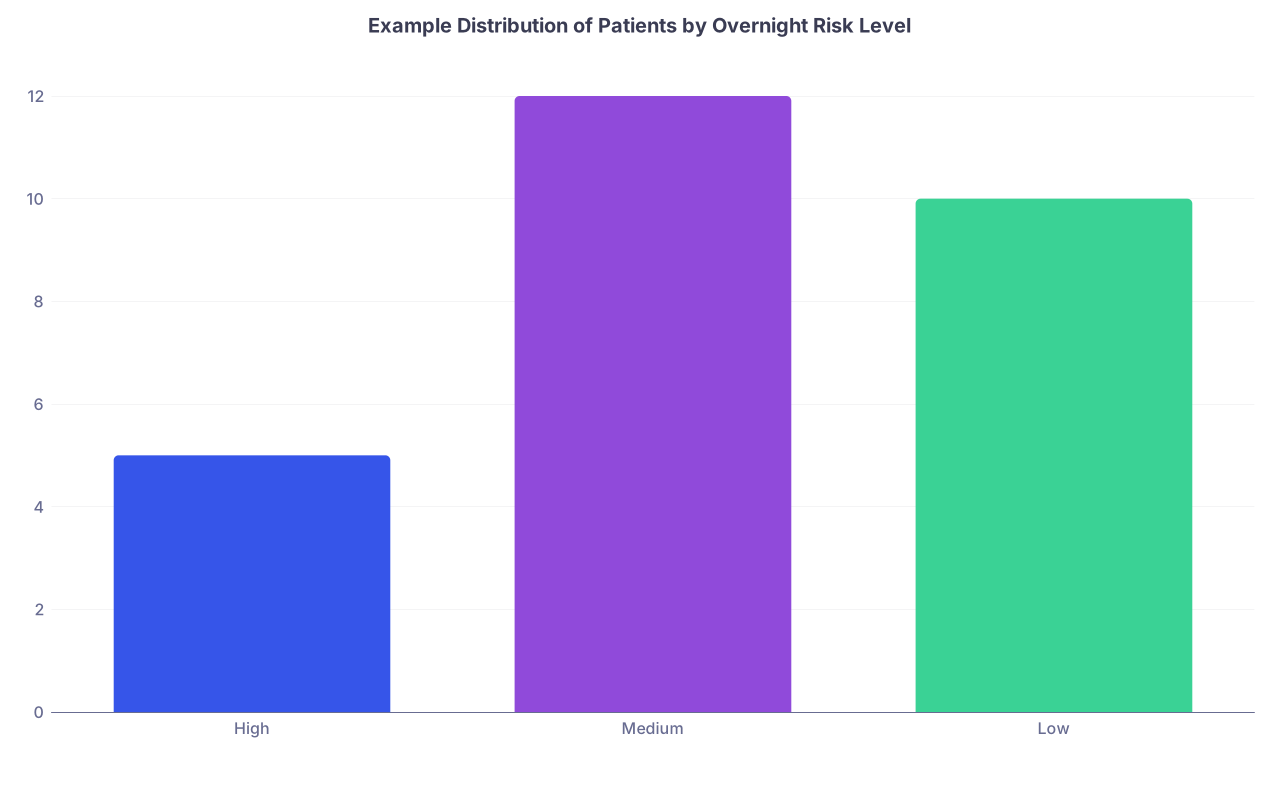
| Category | Value |
|---|---|
| High | 5 |
| Medium | 12 |
| Low | 10 |
Looking at this, the night resident instantly knows: "I have 5 people I truly need to worry about." That changes how they structure their night.
You can mimic this informally: quick count of priority‑1 patients written at top of the list. I have seen residents write "5 HOT, 10 WARM, 12 COLD" in big letters. Crude, but very effective.
Common Template Mistakes That Drive Omissions
I am going to be blunt. I see these constantly.
Over‑templating
Residents build 20‑column spreadsheets, use them properly for 2 days, then abandon half the fields. Dead columns create a false sense of completeness. If you never fill in "consults" column, remove it.Tiny fonts and dense pages
A sign‑out that requires squinting or scrolling sideways is guaranteed to be underutilized. If night float cannot quickly scan, they will not. You want white space and short entries.No ownership on tasks
On busy teams, "Task" should sometimes have "Owner": NF vs. cross‑cover vs. night float intern. If that is overkill institutionally, fine. But at least indicate urgent vs. "if time."Treating sign‑out as a legal note
Your overnight handover is not your billing or medico‑legal document. It is an operational safety tool. It should not be written like an H&P. If you are trying to defend a case, you will look at the chart, not the Excel sheet.Not archiving critical issues
If something terrifying happened (e.g., anaphylaxis, rapid response, ICU downgrade issues), keep a one‑line memory of it in the summary for a while. Clearing everything nightly can erase important context for future nights.
Building And Iterating: Make It A 2‑Week Project, Not A 2‑Hour One
Design your template like you would iteratively manage a QI project, not like you are cramming for a shelf.
Step 1 – Draft a minimal version
Basic columns only: ID, summary, code, risk, tasks.
Step 2 – Use it ruthlessly for one week
Every time you think, "Where do I put this?" decide if it is important enough to earn a new field.
Step 3 – Post‑call review
After a brutal night, ask the night float one focused question:
"What, if anything, did you wish had been in the sign‑out that was not?"
Step 4 – Add or remove exactly one thing at a time
Do not re‑engineer daily. Make small adjustments, then live with them for several days.
Step 5 – Lock it for the block
Once it feels right, keep the structure stable for at least a 2‑4 week block. Muscle memory matters.
FAQs
1. Should I include detailed medication lists in my handover?
No. Duplication of the MAR or medication list is asking for mismatch errors. The only meds that belong on your sign‑out are:
- Non‑standard or high‑risk agents (e.g., insulin protocols, anticoagulation peculiarities)
- Time‑critical doses that matter overnight (e.g., "Give vancomycin after level at 02:00")
Everything else, the covering resident can see in the EMR.
2. How much history is enough in the “brief summary”?
If your summary takes more than two sentences, it is too long. You want:
- Why they are here right now
- What has changed since admission in 1–2 key trends (vitals, labs, symptoms)
- Any major decisions already made (e.g., "family declined intubation")
If night float needs more, they can read the note. The sign‑out is not the chart.
3. Do I really need a separate “overnight risk” section if I have tasks listed?
Yes. Tasks are what must be done. Risk/anticipation is what might happen. They are different cognitive domains. A patient can have zero tasks but enormous risk ("POD0, high risk for bleed or hypotension"). If you merge them, risk gets buried under “check labs” noise.
4. How do I handle frequent bed/room changes without breaking my template?
Use room as a helpful but non‑primary identifier. Keep name and MRN as the true anchor. If your EMR auto‑updates rooms in the sign‑out list, great. If not, update rooms once before sign‑out, not continuously through the day. Do not rebuild your list every time transport moves someone.
5. What is the one field you would add if I am forced to keep my hospital’s terrible canned template?
If your institutional sign‑out is rigid and bloated, fight to carve out one free‑text field labeled something like "Overnight watch / if‑then". Use that field religiously for your highest‑risk patients. Even a single, well‑used anticipatory guidance box can cut down a shocking amount of overnight chaos.
Key points:
- A good handover template is task‑ and risk‑oriented, not narrative‑oriented.
- Separate summary, overnight risk, and explicit tasks. Do not dump everything into one “plan” column.
- Embed prioritization and clarity into the layout so that a stranger could safely cover your patients at 3 a.m. with just that list.