
The biggest mistake students make after the Monday Match email is pretending they still have a normal week. You do not. Your next six hours will shape your chances on Friday.
You just learned one of two things:
- You are matched.
- You are not matched and are entering SOAP.
This guide is for both. Same clock, different moves. I will walk you through a 6‑hour block starting the moment you open that email—what to say, who to call, what to sign, and when to stop and sleep.
We will work in tight segments: first 30 minutes, then hour‑by‑hour up to hour 6.
0:00–0:30 — The Email Hits: Triage, Not Panic
At this point you should have the email open and the result in front of you.
If you MATCHED
Do not start texting everyone. You have work to do.
First 10 minutes:
- Confirm the result:
- Screenshot the email.
- Save it to a clearly labeled folder:
Match_Year/Official_Emails.
- Take 3 slow breaths. You are in. The rest of the week is logistics and emotions, not survival.
Next 20 minutes:
- Immediate communications:
- Send a very short update to:
- Your advisor
- Any mentor who wrote a strong letter
- Your school’s Dean of Students or match coordinator
- Template text:
“I wanted to let you know that I matched this morning. Thank you for your support this year. I will share details on Friday after the official release.”
- Send a very short update to:
- Do not:
- Post on social media.
- Hint about where you matched.
- Start speculating in group chats. You do not know the program yet. Do not jinx it and do not leak.
If you did NOT match (SOAP)
You have now entered a professional emergency. The next 6 hours are critical.
First 10 minutes:
- Let yourself react—but set a timer for 5 minutes.
- Then move.
Next 20 minutes:
- Notify your people:
- Message your advisor:
“I did not match. Can we talk in the next hour to plan SOAP strategy? I am available now.” - Email your Dean/Student Affairs:
“I’m in the unmatched group and ready to participate in SOAP. Please let me know the next steps and available support.”
- Message your advisor:
- Pull up ERAS:
- Log in and ensure you can access your application.
- Confirm you have an updated CV and personal statement in the system.

| Step | Description |
|---|---|
| Step 1 | Open NRMP Email |
| Step 2 | Notify advisor |
| Step 3 | Contact dean and advisor |
| Step 4 | Secure email, brief update |
| Step 5 | Open ERAS, prepare SOAP |
| Step 6 | Matched? |
At 0:30, you should have:
- Your status clear.
- Key faculty aware.
- Your application platform open. Now the real timeline starts.
0:30–1:30 — Hour 1: Calls and Coordination
This is your highest‑leverage phone time. Use it.
For Matched Students
Your goal in this hour: coordinate logistics and protect your week.
At this point you should:
Check for school communications
- Read any official email from:
- Office of Student Affairs
- Match Day organizers
- Add key events to your calendar:
- Any mandatory meetings
- Match Day ceremony time
- Deadlines for surveys or forms
- Read any official email from:
Schedule one call with your main advisor (15–20 minutes) Topics to cover:
- Contingencies:
- “If it is my top 3, here’s how I am thinking about housing.”
- “If it is a more distant program, I will need help with relocation planning.”
- Professional expectations:
- How and when to email PDs after Friday.
- What to do if you are unhappy with the result.
- Contingencies:
Block off the rest of your week
- Put these on your calendar:
- Friday: 8:00–5:00 matched‑day window blocked. No clinic, no favors.
- Saturday/Sunday: “Family/Travel/Decompress” hold.
- If you are on rotation:
- Email your attending:
“I matched this morning. I will be at the Match ceremony on Friday at [time]. Happy to plan ahead so patient care is not disrupted.”
- Email your attending:
- Put these on your calendar:
For SOAP Candidates
Your goal this hour: build your SOAP war room.
At this point you should:
Get on the phone with your advisor or dean Ask very specific questions:
- “What specialties and programs are realistic for me in SOAP given my scores and red flags?”
- “Which personal statement should I use or adapt for SOAP?”
- “Who can review my revised PS and program list today?”
Define your target list
- As soon as the list of unfilled programs is available (check with your school, do not leak it), you should:
- Filter by:
- Specialty (pragmatic, not fantasy)
- Geography you would actually move to
- Visa status, if relevant
- Filter by:
- Your advisor should help you sort:
- “Automatic yes”
- “Maybe if needed”
- “No, even in emergency”
- As soon as the list of unfilled programs is available (check with your school, do not leak it), you should:
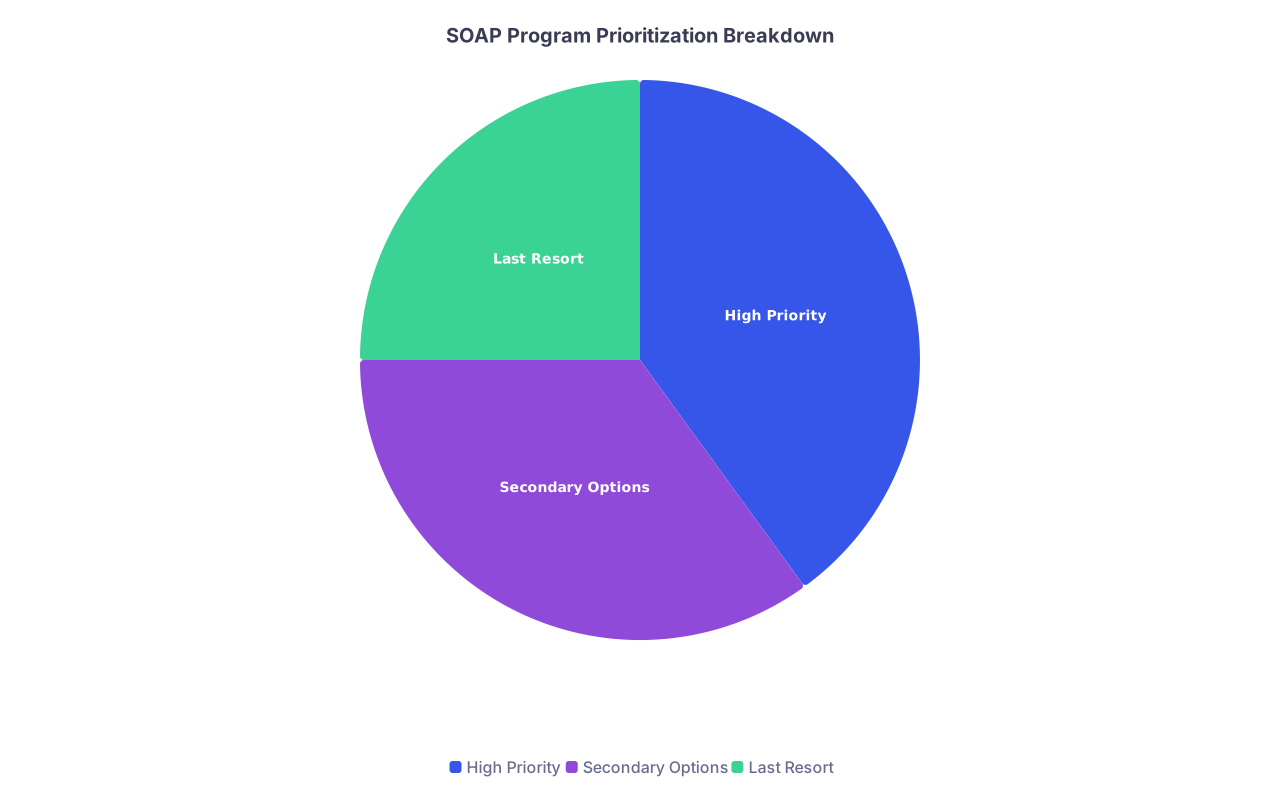
| Category | Value |
|---|---|
| High Priority | 40 |
| Secondary Options | 35 |
| Last Resort | 25 |
- Assign roles
If you are in a supportive school, use them:
- You:
- Edit personal statement(s)
- Finalize ERAS information
- Advisor/Dean:
- Suggest programs
- Practice phone etiquette for SOAP interviews
- Admin support:
- Help track deadlines and offers
- You:
By 1:30, SOAP students should have:
- A draft target program list.
- A clear plan for personal statement edits.
- At least one advisor committed to helping.
1:30–2:30 — Hour 2: Paperwork and Digital Clean‑Up
This hour is about documents, platforms, and eliminating landmines.
Shared tasks for BOTH groups
At this point you should open a simple folder system, both physical and digital:
Digital folders:
Match_Year/Official_EmailsMatch_Year/Residency_DocumentsMatch_Year/PersonalMatch_Year/Financial_Aid_and_Contracts
Physical folder (if you like paper):
- Print only the essentials:
- NRMP confirmation
- ERAS application summary (PDF)
- Any contract templates your school provides as examples
| Document Type | Where to Store |
|---|---|
| NRMP Match Status | Official_Emails folder |
| ERAS Application PDF | Residency_Documents folder |
| CV (updated) | Residency_Documents folder |
| Personal Statement | Residency_Documents folder |
| ID/Passport copy | Personal folder |
If Matched
Your paperwork goal now: be ready when the actual program name drops Friday.
In this hour:
Confirm your legal name and contact info everywhere
- ERAS
- NRMP
- School portal
- Email signature
- Voicemail greeting
Programs do call. You do not want a chaotic “Hey, you’ve reached… uh… yeah.”
Make a “Residency Onboarding” checklist You will not complete it now, but set it up:
- License/credentialing documents you will likely need:
- Birth certificate or passport copy
- Social Security card
- Vaccination records
- TB test results
- ACLS/BLS certification
- Start a simple spreadsheet:
- Columns:
Program,Contact,Document Requested,Date Sent,Notes
- Columns:
- License/credentialing documents you will likely need:
If in SOAP
Your paperwork right now is not about July 1. It is about looking hirable in the next 24–72 hours.
In this hour:
Refine your ERAS application
- Remove:
- Obvious typos
- Unnecessary fluff in experiences
- Add or update:
- Recent sub‑I comments (translated into bullet points, not quoting attendings)
- Any new presentations or case reports
- Remove:
Edit your personal statement(s) fast but intelligently
- You may need:
- 1 SOAP‑focused IM/FM statement
- 1 SOAP‑focused prelim/transition year statement
- Do not rewrite from scratch. Instead:
- Tighten your core story into 3–4 sharp paragraphs.
- Remove specialty‑specific lines that no longer match.
- You may need:
Prepare for electronic submission windows
- Confirm with your dean:
- Who actually clicks submit during SOAP.
- What exact time windows you are allowed to apply.
- Confirm with your dean:
By 2:30, you should:
- Have organized documents.
- Cleaned up your application presence.
- Reduced future chaos by about 50%.
2:30–3:30 — Hour 3: Strategic Communication (and Boundaries)
This is the hour where people start texting: “Well?? Did you match?? Tell us!!”
If you are not careful, you will drown in other people’s emotions.
For Matched Students
Your communication now is selective.
At this point you should:
Draft a neutral group message for family/friends
- If you want to keep the program secret until Friday:
- “I matched! I’ll find out and share where on Friday. Thank you all for the support.”
- If your family is intense, set boundaries:
- “I matched and will be focused on school commitments this week. I’ll call you all Friday after the ceremony.”
- If you want to keep the program secret until Friday:
Silence or mute high‑drama group chats
- You do not need:
- Speculation about where people think they matched.
- Gossip about programs, attendings, or class rank.
- You do not need:
Send targeted gratitude messages (optional, but smart)
- Short texts to:
- That one attending who advocated for you.
- A resident who practiced interviews with you.
- Keep it simple:
“I matched this morning and wanted to thank you for your support this year. I’ll let you know where after Friday.”
- Short texts to:
For SOAP Candidates
You must protect your mental bandwidth now.
Decide who gets the real story People who should know you are in SOAP:
- Advisor(s)
- Closest family member(s)
- One or two trusted classmates at most
Script for family:
- “I did not match into a position yet, but there is a structured process this week called SOAP where many people secure spots. I am working closely with my school on this and will update you after this phase.”
Set expectations with friends/classmates
- Put a status in your main chat:
- “I am going off grid today to focus on logistics. Thinking of all of you.”
- You do not owe anyone details.
- Put a status in your main chat:
Stay off social media
- You do not need to watch curated joy while you are in crisis.
- Delete the apps for the week if needed. I have watched students spiral online instead of editing applications.
By the end of Hour 3, you should have:
- Controlled who knows what.
- Reduced notification noise.
- Preserved emotional energy for the moves that matter.
3:30–4:30 — Hour 4: Calls that Actually Matter
This is where you make or schedule the more substantive calls.
Matched: Planning and Professionalism
At this point you should consider:
Career/financial planning call (20–30 minutes) If your school offers it, schedule with:
- Financial aid counselor
- Career services Discussion points:
- Loan repayment strategy starting PGY‑1
- Budget for moving and deposits
- Timeline for contracts and licensing
Clarify expectations for Match Day behavior Quick email or message to Match coordinator:
- Dress code
- Arrival time
- Whether you can bring extended family
- Any speaking or student rep roles
Prepare a short, professional self‑introduction You will use this Friday in emails or calls to your future program:
- “My name is [Name], I am a fourth‑year at [School], and I’m very excited to have matched at [Program] in [Specialty]. I’m looking forward to working with you and starting in July.”
Write it now. Refine it later.
SOAP: Interview and Contact Prep
This hour makes people or breaks them in SOAP.
At this point you should:
Rehearse SOAP‑style phone interviews These tend to be:
- Short (10–20 minutes)
- Direct, sometimes rushed
- Focused on: “Why here? Why now? Are you workable?”
Have an advisor or trusted friend run:
- 3 rapid‑fire scenarios for different specialties
- Common questions:
- “Tell me about yourself”
- “Why this specialty, especially in SOAP?”
- “What happened this cycle?”
Create a one‑page “Program Snapshot” template For each program you may contact:
- Program name
- Location
- Program features that match you (community, patient population, size)
- 2–3 talking points for “Why us”
- Space to write who you talked to and when
Align your story Your narrative needs to be:
- Honest but controlled.
- Consistent across calls and emails.
Example framing:
- “I was targeting highly competitive [X] programs, and while I received interviews, I did not secure a spot. I have strong clinical evaluations and would be grateful for the opportunity to contribute as a [SOAP specialty] resident.”
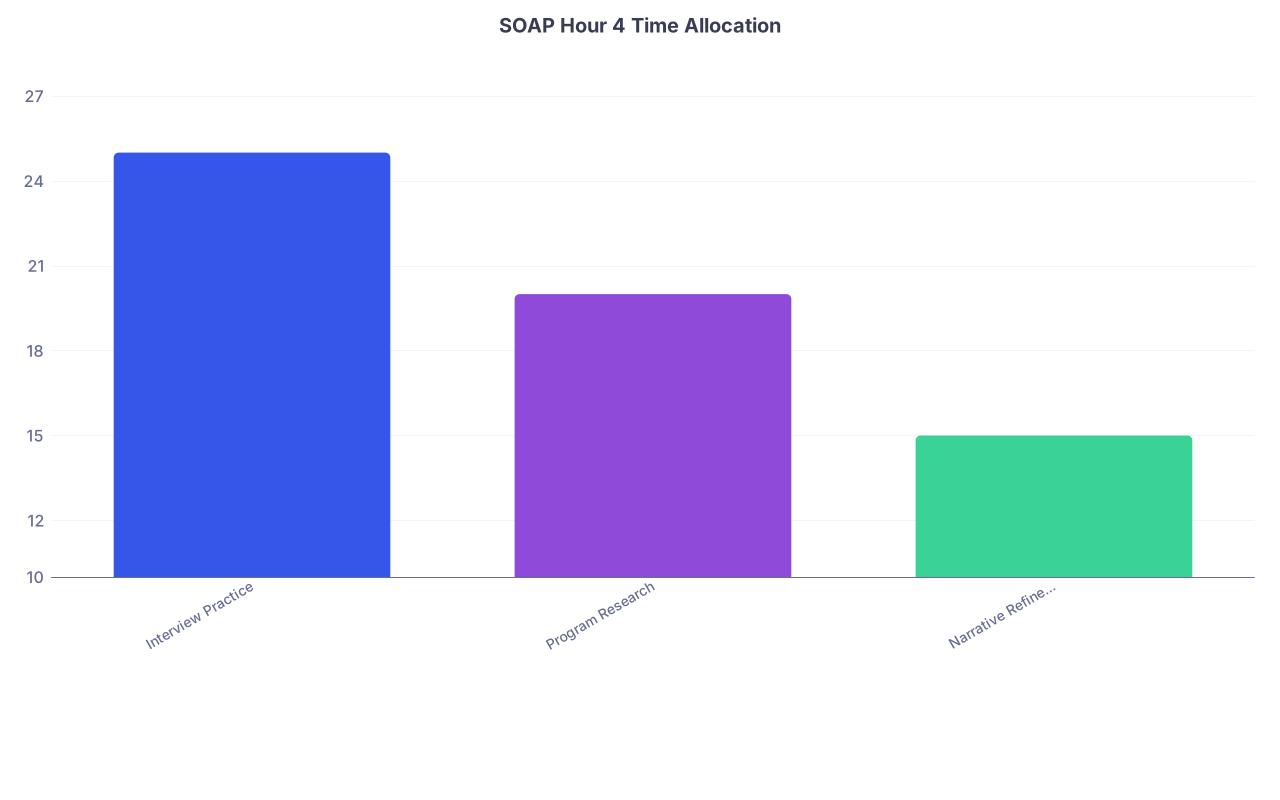
| Category | Value |
|---|---|
| Interview Practice | 25 |
| Program Research | 20 |
| Narrative Refinement | 15 |
By 4:30, SOAP students should:
- Have practiced a few runs of phone interviews.
- Built a reusable template for rapid program research.
- Refined their “what happened?” explanation.
4:30–5:30 — Hour 5: Systems, Not Scrolling
You are getting tired now. This is where people make dumb mistakes—like texting programs from a personal number at 11 PM or sending sloppy emails.
We shift to systems work.
Both groups: Build simple tracking tools
At this point you should create a basic tracking sheet (Google Sheet, Excel, whatever you like):
Core columns:
- Program
- City
- Specialty
- Contact name
- Contact email/phone
- Action taken (email, call, application)
- Date
- Response
- Next step
| Column Name | Purpose |
|---|---|
| Program | Identify residency program |
| Specialty | Know which PS/version applies |
| Contact Name | Who you spoke or wrote to |
| Action Taken | Email, call, interview, none |
| Next Step | Follow up date or pending item |
If Matched
Use Hour 5 to:
Collect contact data for your ranked programs
- You will only need one of them Friday, but it is easier to do now:
- Program director email
- Program coordinator email
- Program website URL
- You will only need one of them Friday, but it is easier to do now:
Draft a generic “Thank you / excited to join” email shell You will fill in the actual program name Friday:
- Subject: “Excited to Match at [Program Name]”
- Body:
- 2–3 sentences:
- Express gratitude.
- Confirm excitement.
- Offer any needed documents promptly.
- 2–3 sentences:
Check your professional online presence
- LinkedIn (if you use it): update med school, year, and interest.
- Confirm nothing obviously unprofessional is public.
If in SOAP
Use Hour 5 to:
Finalize your official SOAP program list hierarchy With your advisor if possible:
- Tag top priorities in your sheet.
- Note any absolute no‑go programs (for personal or professional reasons).
Standardize your outreach templates You might not send these yet, but you want them ready:
- “Expression of interest” email to programs that will accept contact.
- Subject: “SOAP Applicant – [Your Name], [School]”
- 3–4 sentences:
- Who you are.
- Why you are interested in them specifically.
- Core strengths.
- Attach ERAS AAMC ID.
Clarify the rules SOAP rules are strict.
- Re‑read:
- NRMP SOAP guidelines.
- School’s “what you may and may not do” guidance.
- Ask if unsure:
- “Am I allowed to contact program coordinators directly?”
- “Can I email PDs before offers?”
- Re‑read:

| Step | Description |
|---|---|
| Step 1 | Identify Program |
| Step 2 | Do not contact |
| Step 3 | Prepare template email |
| Step 4 | Personalize with program details |
| Step 5 | Send and log in tracker |
| Step 6 | SOAP Rules Allow Contact? |
5:30–6:00 — Hour 6: Wind‑Down, Reset, and Sleep Plan
You cannot grind your way through an entire Match week. People try. They crash. Then they cry on Friday for all the wrong reasons.
This last 30 minutes is not about perfection. It is about protecting the rest of your week.
For Everyone (Matched or in SOAP)
At this point you should:
Review what you actually accomplished in 6 hours Do a quick checklist:
- Advisor notified
- Dean/Student Affairs looped in (especially SOAP)
- ERAS and NRMP information verified
- Document folders created
- Personal statement(s) at least in workable draft form
- Contact tracker created
- Social/media boundaries set
Write down tomorrow’s top 3 tasks Limit it to three. Example:
Matched:
- Clarify Friday logistics with school.
- Start list of possible housing in cities of top 3 programs.
- Draft text/email to send family when program releases.
SOAP:
- Final review and polishing of personal statement.
- Confirm SOAP application submission timing with school.
- Practice 2 more mock phone interviews.
Plan your sleep and food Night before Match Monday is usually awful. Today is not. You can still salvage this.
Minimum:
- Decide:
- Bedtime.
- No‑screens cutoff (at least 30–60 minutes before).
- Prep:
- One decent meal now or soon.
- Snacks for tomorrow that are not energy drink + vending machine.
- Decide:
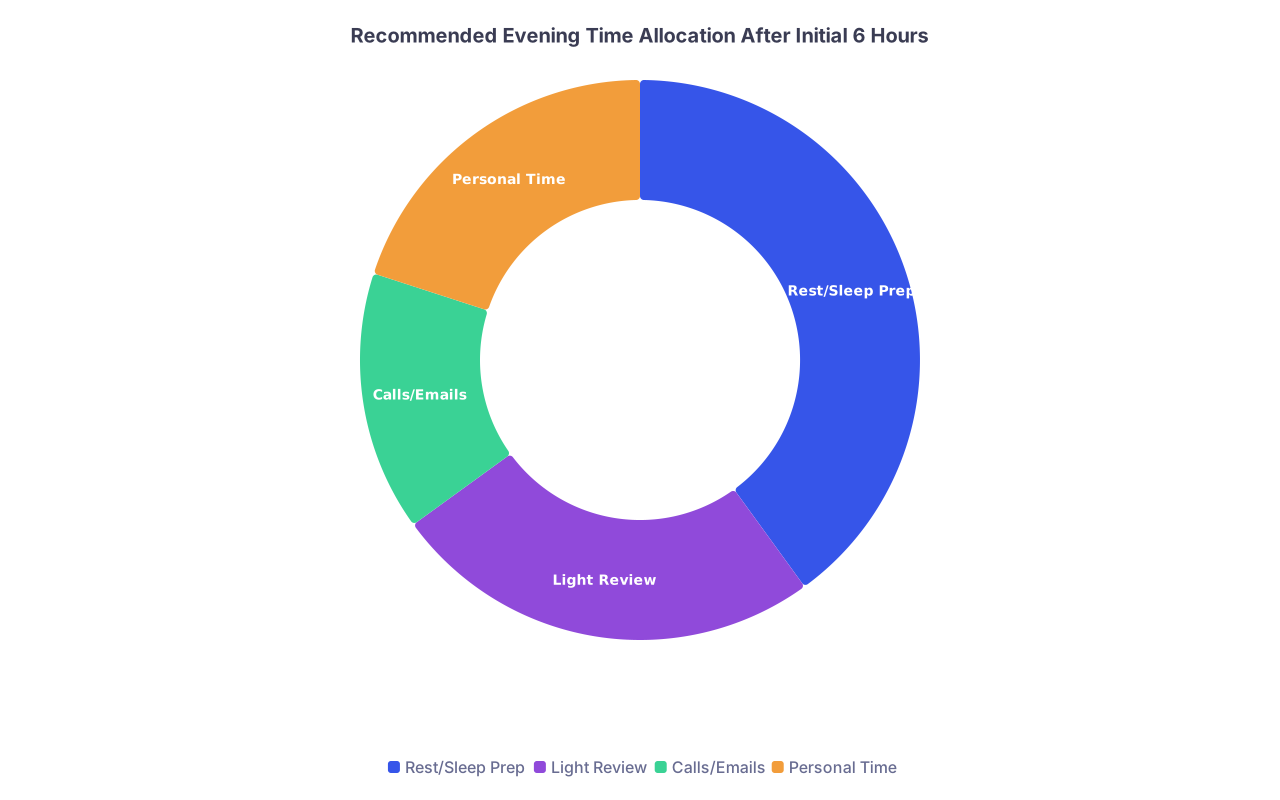
| Category | Value |
|---|---|
| Rest/Sleep Prep | 40 |
| Light Review | 25 |
| Calls/Emails | 15 |
| Personal Time | 20 |
Do one grounding thing I have watched students go straight from “You did not match” into 48 hours of chaos with no pause. The ones who pause do better.
Options:
- 10–15 minute walk.
- Short workout.
- Talk with one trusted person about anything but Match.
- Journal 5–10 lines about what you are feeling—then close the notebook.

Quick 6‑Hour Summary Timeline
Here is the whole thing in one visual block.
| Step | Description |
|---|---|
| Step 1 | Open NRMP Email |
| Step 2 | Notify advisor |
| Step 3 | Contact dean and advisor |
| Step 4 | Secure email, brief update |
| Step 5 | Open ERAS, prepare SOAP |
| Step 6 | Matched? |
You are now six hours past the email. Either you are securely matched and set up to handle the week like a professional, or you are in SOAP with a concrete plan instead of blind panic.
Your next step today: set a 25‑minute timer, open your ERAS application, and clean up one section (experience descriptions or personal statement). When the timer ends, stop and write tomorrow’s top three tasks on a sticky note.