
You just matched this morning. Group chat is blowing up, your family wants FaceTime screenshots, someone’s already making custom badge reels with your program logo. Meanwhile your email is still signed “MS4,” your CV says “Expected graduation: 2024,” and your LinkedIn headline is… who knows, probably “Medical Student” from two years ago.
Here’s the question in your head:
Do you need to update your CV and LinkedIn today—as in right after Match Day—or can it wait?
Let me give you the straight answer, then we’ll get into the details.
No, you don’t need to update them immediately that same day.
Yes, you should update them within 1–2 weeks.
And yes, there are a few things you absolutely should not do right away.
The Short Answer: Timing and Priorities
Think of Match Day like a status change, not a full rebrand.
Here’s the practical timing:
- CV – Update within 1 week
- LinkedIn – Update within 1–2 weeks
- ERAS / official application – Leave alone; it’s done
- Email signature / other bios – Within 1–2 weeks
No program director is sitting there on Monday checking if you updated LinkedIn. You’re not on some invisible professionalism timer.
But over the next couple of weeks, you will:
- Sign onboarding paperwork
- Start getting emails from future co-residents
- Potentially hear from faculty who might write future letters or involve you in projects
- Maybe start moonlighting networking (research, fellowship, side gigs, teaching, etc.)
At that point, having a stale CV or “MS4” LinkedIn profile starts to look lazy.
So: celebrate Match Day. Enjoy the weekend. Then fix your documents.
What To Update On Your CV (And When)
Your CV matters more than LinkedIn right now. Any time someone serious asks “Can you send me your CV?”—they’re not talking about your profile page.
Here’s what I recommend:
Within 3–7 days after Match Day
Open your CV and fix these items in one sitting:
- Add your residency position
Under Education or Training:
- Internal Medicine Resident, PGY-1, [Program Name], [Institution]
Start: July 2025 (Matched)
You can label it as “Matched – starts July 2025” or “Incoming PGY-1” until you actually start.
- Update your medical school dates and status
If you haven’t already:
- Change “Expected graduation: [Month Year]” to either:
- “Anticipated graduation: May 2025” (before graduation), or
- “MD, May 2025” (once you actually graduate)
- Update your header/contact block
If you’ll be staying in the same city or moving soon, you can:
- Keep your current address for now (no one really cares)
- Keep your same email, but make sure it’s professional
- If you know your institutional email already, you can add it as “effective July 2025”
- Clean up now-obvious clutter
You’re about to be a physician. Some things that were fine as an MS2 now look childish:
Good to remove or shorten:
- Very old non-medical awards (high school, random college honors)
- Detailed descriptions of unrelated jobs (pizza delivery, barista) unless you’re using them to tell a specific story
- Excessive length on minor roles (“Volunteer, Student Fair 2017 – helped with setup and teardown…”)
Leave the significant things: leadership, major jobs, meaningful work.
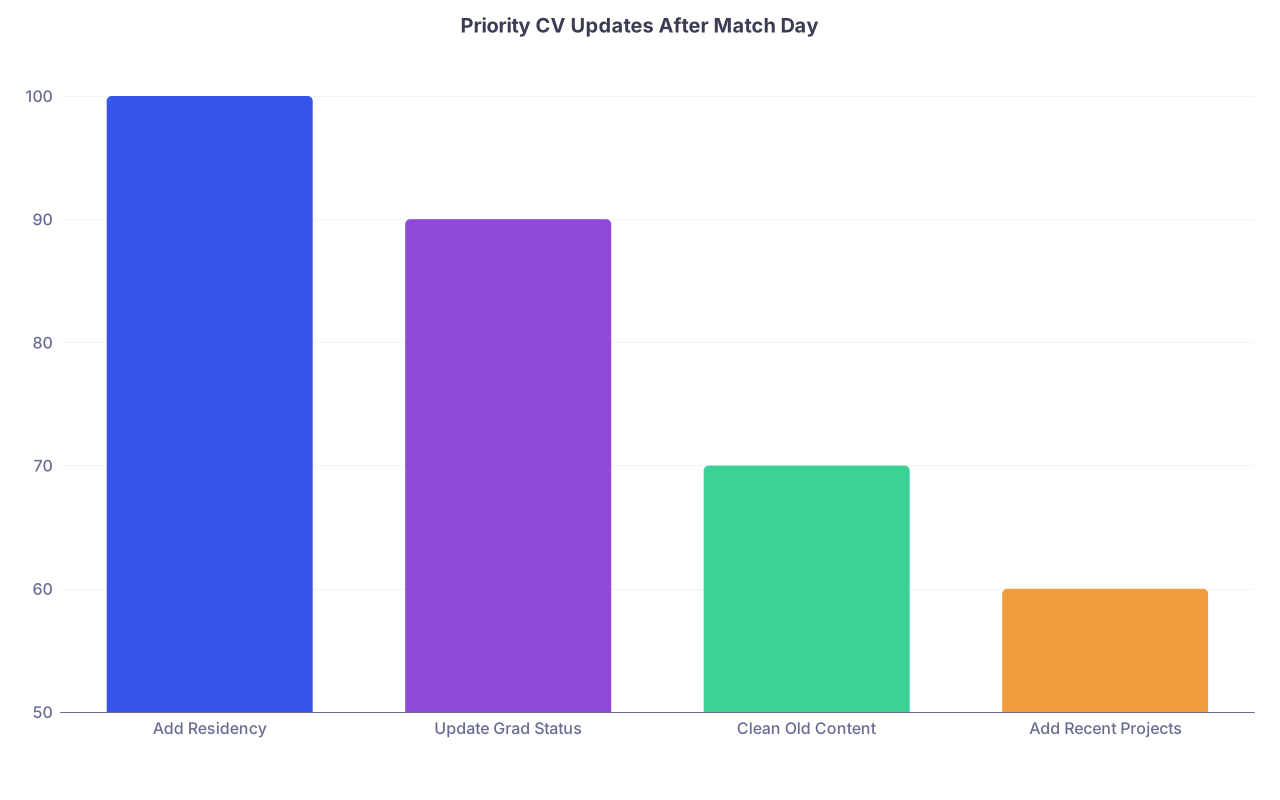
| Category | Value |
|---|---|
| Add Residency | 100 |
| Update Grad Status | 90 |
| Clean Old Content | 70 |
| Add Recent Projects | 60 |
What can wait until closer to July
You don’t need to stress over these on Match weekend:
- Reformatting your entire CV “to look like an attending”
- Adding a detailed “Career Interests” section
- Rewriting every bullet point
Those can wait until you’re:
- Applying for a research position within residency
- Going for a chief year
- Preparing fellowship applications
For now, your CV just needs to not be wrong. That’s the bar.
What To Update On LinkedIn (And Why It Actually Matters)
Let me be blunt:
No program is ranking you based on your LinkedIn. That ship already sailed.
But LinkedIn does matter for:
- Networking with alumni and physicians in your specialty
- Research and academic connections
- Industry stuff later (pharma, consulting, medtech, side gigs, speaking)
- Reputation checks—yes, people do search you
So no, you don’t need a perfectly optimized LinkedIn on Match Day. But having one that still says “M2 at [School]” six months into intern year looks unserious.
Within 1–2 weeks after Match Day, do this:
- Update your headline
Change it from generic “Medical Student” to something clear:
- “Incoming Internal Medicine Resident at [Institution] (PGY-1 starting July 2025)”
- “Matched Anesthesiology Resident – [Program], starting July 2025”
- “Future Family Medicine Resident at [Hospital], MS4 at [School]”
- Add your residency position in Experience
Under Experience:
- Title: “Incoming Resident Physician – Internal Medicine (PGY-1)”
- Company: “[Hospital or Health System Name]”
- Dates: “July 2025 – Present” (you can even set it to future and let LinkedIn mark it)
- Description: One or two lines max: “Categorical internal medicine residency. Clinical interests: [e.g., cardiology, med ed].”
If you feel weird adding it before you actually start, you can:
- Put it in the “About” section first: “Matching into [Specialty] at [Program], starting July 2025.”
- Add the Experience entry on or after your actual start date. Completely fine.
- Update your education status
- Set your MD end date to your actual graduation month/year
- If you’re still pre-graduation, you can leave end date in the future or tag it as “Expected [Month Year]”
- Fix your photo and URL if needed
Look, if your photo is a blurry cropped pic from a wedding, fix it.
Use:
- A simple, clean headshot (can be a decent smartphone photo with good lighting and plain background)
- Professional but not stiff expression
- No scrubs and stethoscope glamour shot required, but it’s acceptable if done cleanly
Clean URL:
- Change it from
/in/firstname-lastname-29482949to/in/firstname-lastname-mdor something similar.

What You Absolutely Should Not Do Right After Match
This is where people get themselves in trouble.
1. Don’t lie about your status
You are not “Internal Medicine Attending, Mayo Clinic” when you just matched categorical IM. Obviously.
But there are subtler mistakes:
- Listing your residency as already in progress months before you start, without clarifying
- Claiming future titles (“Chief Resident 2027–2028”) that haven’t happened
- Overstating roles (“Cardiology Fellow” when you just intend to do cards someday)
You don’t need to play games here. “Incoming Resident Physician” is accurate and totally acceptable.
2. Don’t blast confidential details
Some programs are picky. Avoid:
- Posting your contract publicly
- Sharing screenshots of internal program emails
- Over-sharing about program weaknesses, call schedules, or internal drama
Celebrate, post your match graphic, tag your program—that’s all fine. Just don’t treat residency like a fan blog.
3. Don’t promise more than your CV shows
If your LinkedIn “About” section reads like you discovered a new specialty every six months, it looks flaky.
Keep it focused:
- “Interested in academic internal medicine, with focus on medical education and quality improvement”
- Or even simpler: “Interests include [X, Y, Z].”
Your CV and LinkedIn should roughly align. If your CV has zero research but your headline screams “Physician-Scientist,” that disconnect is obvious.
How Match Day Changes Your “Professional Story”
Here’s the bigger picture.
Before Match, your story is:
“I’m a medical student trying to prove I deserve a spot.”
After Match, your story becomes:
“I’m a physician in training on a specific path. Here’s what I’m building toward.”
Your documents should shift from “application mode” to “career mode.”
That means:
- Less emphasis on every little thing you ever did
- More clarity on direction: interests, early niche, where you’re headed
- A tone that sounds like a junior colleague, not a premed applicant

| Step | Description |
|---|---|
| Step 1 | Pre Match - Medical Student |
| Step 2 | Matched MS4 |
| Step 3 | Incoming Resident |
| Step 4 | Early PGY-1 |
| Step 5 | Proving potential |
| Step 6 | Program fit and transition |
| Step 7 | Building network and niche |
| Step 8 | Fellowship or career positioning |
Think of your CV and LinkedIn as tools for that new phase. Not just “things I had to make for ERAS.”
Quick Framework: What To Do This Week vs. Later
If you want a simple checklist, use this.
| Timeframe | CV Must-Do | LinkedIn Must-Do |
|---|---|---|
| Match weekend | Nothing required | Nothing required |
| Within 3–7 days | Add residency, update MD status | Update headline, add residency note |
| Within 2 weeks | Remove obvious clutter | Fix photo, update education dates |
| Before July 1 | Final check for accuracy | Add residency as active position |
If you stick to that, you’re fine.
Common Edge Cases (That People Don’t Ask Out Loud)
“What if I’m SOAPing and not sure where I’ll end up?”
You do nothing until it’s settled.
- If you SOAP into a spot: treat that as your match and follow the same process.
- If you go unmatched: you don’t pretend otherwise. You keep LinkedIn as “Medical Student,” graduate, and then your story becomes about your next concrete step (research year, prelim year, non-clinical job, etc.). You still want an accurate, current CV.
“What if I change specialties later?”
Happens all the time.
Your documents should always show:
- What you actually did (current and prior training)
- What you’re aiming for now (interests and direction)
No need to scrub history. Just be honest. Fellowship directors and future programs respect clarity more than revisionist history.
“What if I’m doing a prelim year and reapplying?”
Then your headline and CV should say so:
- “Preliminary Surgery Resident at [Hospital], reapplying to Anesthesiology for 2026 start” (this kind of nuance may go on your CV and in your About section, not necessarily as your visible headline)
- CV: list the prelim year clearly in Training.
Visual: How Your Identity Shifts Online
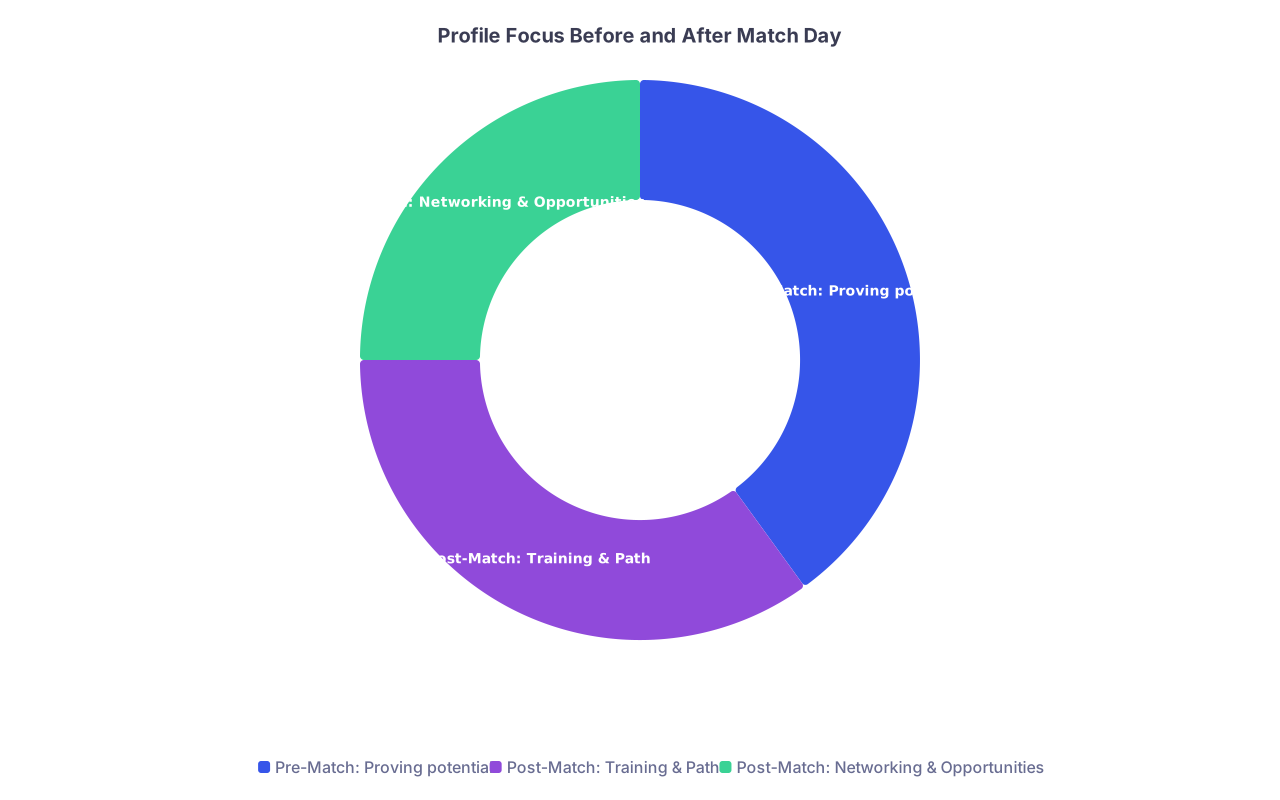
| Category | Value |
|---|---|
| Pre-Match: Proving potential | 40 |
| Post-Match: Training & Path | 35 |
| Post-Match: Networking & Opportunities | 25 |
That’s really the core: you’re moving from “pick me” to “here’s who I am becoming.”
FAQ: CV and LinkedIn After Match Day
1. Should I list myself as “MD” on LinkedIn right after Match Day?
Not yet, unless you’ve actually graduated. Match Day doesn’t give you the degree; graduation does. You can update your headline to “Incoming [Specialty] Resident” but keep your name without “MD” until your degree is officially conferred. Once you graduate, go ahead and add “MD” and update your education end date.
2. Is it unprofessional to wait a month before updating anything?
It’s not a crime, but it’s sloppy. Within 1–2 weeks is a good target. If you wait a month, you’re still okay, but the first time someone asks for your CV and it’s clearly outdated, you’ll feel it. Fixing this now takes 30–45 minutes and saves you that awkwardness later.
3. Do program directors or attendings actually look at my LinkedIn?
Some do, some don’t. I’ve seen fellowship directors Google applicants and click LinkedIn more than they care to admit. It’s not the primary evaluation tool, but it’s a quick way for people outside your immediate program (consulting, industry, speaking, side gigs) to check who you are. Treat it as a clean business card, not a CV replacement.
4. Should I include my Match result as a “post” on LinkedIn?
If you want. A simple, professional post is fine: “Grateful to have matched into [Specialty] at [Program]. Excited to start in July.” Tagging your school and program is optional but common. Don’t overdo the hashtags, don’t overshare about rank lists or other programs, and don’t talk trash. Keep it short and positive.
5. Do I need different versions of my CV now (academic vs non-academic)?
Not right away. One solid, accurate CV is plenty for early residency. Later—when you’re targeting fellowship, research-heavy roles, or non-clinical work—you can spin off tailored versions (academic CV, industry resume, etc.). For now, just get one up-to-date CV that clearly shows your education, training, experiences, and interests.
Key points to walk away with:
- You don’t need to update CV and LinkedIn on Match Day itself, but you should do it within 1–2 weeks.
- Priorities: make your CV factually correct with your residency info; then clean up LinkedIn to say “Incoming Resident” with accurate dates.
- Don’t lie, don’t overreach, and remember: your story just shifted from “pick me” to “here’s the physician I’m becoming.” Build your documents around that.