
Match Day from another time zone is a trap for the unprepared.
The reveal itself is stressful enough. Add a 10–12 hour time difference, unstable Wi‑Fi, and confused loved ones blowing up your phone—now you are playing on “hard mode.”
You can do this cleanly. But it requires you to stop pretending you are in the same situation as everyone in Boston or Chicago and start treating this like what it is: a logistics problem with emotional consequences.
I am going to walk you through how to engineer Match Week and Match Day from overseas so that:
- You do not miss critical emails.
- You do not screw up NRMP/ERAS communication.
- You manage sleep, internet, and emotions in a way that keeps you functional.
- Your family is looped in without making things worse.
1. Know the Exact Times That Actually Matter (Not “Sometime Monday”)
Most people vaguely know “emails go out Monday” and “Match Day is Friday.” That is how they miss things.
You are overseas. Precision is mandatory.
Core NRMP Events (US Eastern Time) – Typical Cycle
Use this as your baseline. Then convert everything to your local time and write it down. Not in your head. On paper and in your calendar.
| Event | Typical Day | Time (US ET) |
|---|---|---|
| Did I Match? Email (NRMP) | Monday | 10:00 AM |
| SOAP Begins (if unmatched) | Monday | 10:00 AM |
| SOAP Offer Rounds | Mon–Thu | Various blocks |
| Final SOAP Round Ends | Thursday | PM (varies) |
| Match Day Results (Program/Location) | Friday | 12:00 PM |
NRMP sometimes shifts exact minutes year to year, but the structure is similar. You must:
- Check the current year’s NRMP calendar (not last year’s).
- Convert each time to your local time zone using a reliable tool (timeanddate.com, Google “10am ET in [your city]”).
- Double-check daylight saving transitions.
If you are in Europe or the Middle East, your DST may change on a different week than the US. I have seen people miscalculate by one hour because of this. That can be the difference between being awake and being in the shower when your life-changing email arrives.
Build a Personal Time Zone Map
Make a simple one-page reference, then tape it near your desk.
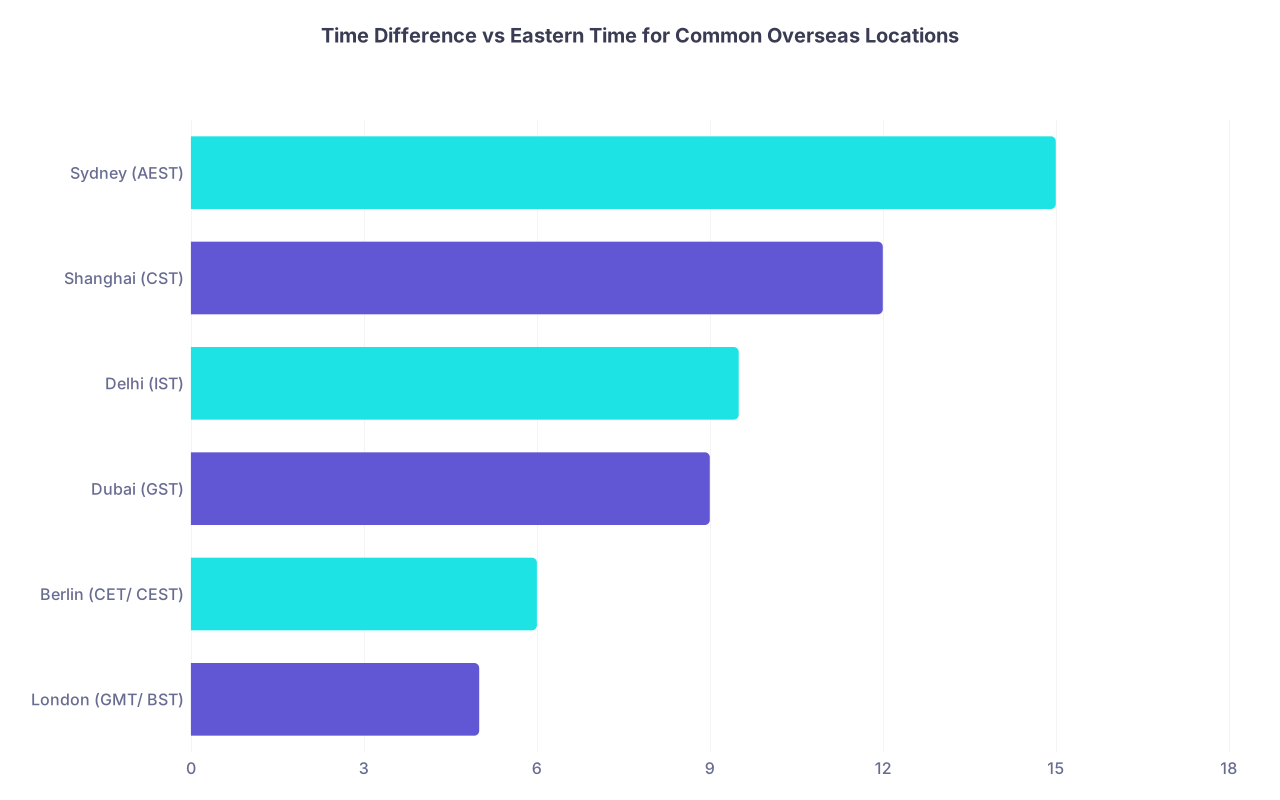
| Category | Value |
|---|---|
| London (GMT/ BST) | 5 |
| Berlin (CET/ CEST) | 6 |
| Dubai (GST) | 9 |
| Delhi (IST) | 9.5 |
| Shanghai (CST) | 12 |
| Sydney (AEST) | 15 |
These are approximate offsets from US Eastern Standard Time; DST will shift details. Do not trust memory. Trust conversion tools.
Your job:
- Create calendar entries for every critical event.
- Name them with both ET and your local time.
Example: “DID I MATCH EMAIL – 10:00 ET / 16:00 Berlin time” - Turn on reminders 24 hours, 1 hour, and 10 minutes prior.
If you are on a rotation or in clinic overseas, block those times off as “non-negotiable unavailability” with your supervisor now, not the week before.
2. Engineer Redundancy: Email, Wi‑Fi, and Backup Access
The worst case scenario is not “I did not match.” It is “I actually matched, but I thought I did not because I missed the email and my internet dropped.”
You solve this with redundancy.
Step 1: Clean Up and Harden Your Email
You should be checking:
- The email address registered with NRMP
- The email registered with ERAS / MyERAS
- Any institutional address your school uses for official communication
Protocol:
- Log in to NRMP. Verify your primary email. Update if needed.
- Add a backup secondary email (Gmail, Outlook) if your primary is institutional and unreliable.
- In your email settings, create filters:
- “NRMP,” “National Resident Matching Program,” “ERAS,” your med school dean’s office
- Mark as Important, Starred, move to a special “MATCH” label/folder, never send to spam.
- Turn on push notifications for those accounts on your phone.
Test it. Have a friend email you with “TEST – MATCH CRITICAL” subject line from another time zone and make sure:
- Your phone lights up immediately.
- You see it on desktop.
- It does not land in junk.
If you are not getting a notification within seconds, fix that now. Not Match Week.
Step 2: Multiple Internet Paths
If you are in a major city with reliable broadband, fine. Still have a fallback.
If you are in a region with shaky infrastructure, you absolutely cannot rely on one connection.
Concrete setup:
- Primary: Home Wi‑Fi or student housing network.
- Backup 1: Hotspot via your phone with a local SIM that has at least several GB of data available. Test hotspot performance on video calls and email.
- Backup 2: A physical location that has consistently strong internet:
- Co‑working space
- Hotel business center
- University campus building / hospital workroom
Visit that backup location at the same time of day you will need it. Sit down, run a speed test, open your email, log in to NRMP and ERAS. Make sure you can access everything.
And then write down:
- Address
- How long it takes to get there
- Whether it is open 24/7 or at your needed hours
If your Match email lands at 11 PM local time and your home Wi‑Fi dies, you do not want to be Googling cafes that may or may not be open.
Step 3: Account Access and Devices
Minimum setup:
- Laptop: Logged into NRMP, ERAS, personal + school email. Passwords stored in a secure but accessible way (password manager or written in a safe place).
- Phone: Email apps signed in, two-factor authentication (2FA) set up. Ensure SMS 2FA will work where you are (US phone numbers sometimes have issues with international SMS).
If your 2FA goes to a US phone number that does not receive texts overseas, swap to app-based 2FA (Google Authenticator, Authy, Microsoft Authenticator) before you leave or as soon as you can.
Also: back up your phone. If it dies or gets stolen during Match Week, you do not want your access tied to that single device.
3. Set a Match Week Schedule That Respects Your Body Clock
You cannot control when NRMP hits send. You can control how destroyed you feel when it happens.
Map the Events onto Your Real Life
Example: You are in Dubai (typically 9 hours ahead of ET).
- “Did I Match?” Email: 10:00 AM ET → 7:00 PM Dubai
- Match Day Results: 12:00 PM ET → 9:00 PM Dubai
This is actually favorable—both hits are in the evening.
But if you are in Sydney (often 15–16 hours ahead):
- “Did I Match?” Email: 10:00 AM ET → 2:00–3:00 AM next day Sydney
- Match Day Results: 12:00 PM ET → 4:00–5:00 AM next day Sydney
That is brutal. But it is predictable.
Build a plan for:
- Sleep
- Food
- Work/clinical obligations
- Social support
Sleep Strategy: Two Options
You are not trying to optimize REM cycles. You are trying to avoid being a zombie.
If the reveal hits in the middle of your night, you have two basic approaches:
Stay up deliberately
- Nap 90–120 minutes in the early evening.
- Light snack, hydration.
- Stay up through the reveal, debrief with whoever you trust, then sleep later in the morning or early afternoon.
- Warn your clerkship/residency/rotation supervisor that you will be nonfunctional for certain hours.
Sleep, then wake for the reveal
- Go to bed earlier than usual.
- Set multiple alarms for 30–45 minutes before the email time.
- Prepare everything (laptop open, logins saved) before you sleep.
- After the reveal, decide: go back to sleep or stay up. Plan this ahead of time so you are not debating at 4:30 AM.
Either way: the week before, shift your schedule slightly toward the Match timing so it is less of a shock. You do not need perfection; you need “not wrecked.”
4. Decide How You Want to Experience the Reveal (and Control the Room)
Most US students are in big rooms, balloons, champagne, school photographers. You are overseas. That can be an advantage.
You actually get to design your own Match Day environment.
Pick Your Setting Intentionally
Ask yourself:
- Do I want to be alone when I open the email?
- Do I want one or two trusted people with me?
- Do I want a live video call with family back home, or will that amplify stress?
There is no right answer. There is only what will make you feel less like you are performing and more like you can actually process the result.
Common setups I have seen work well:
Quiet Solo + Scheduled Call
- You open the email alone.
- You give yourself 15–30 minutes to breathe and feel.
- You then call your partner/family/friends with the news.
- This helps if you are emotionally private or not sure how you will react.
One Person In the Room, Others on Standby
- A close friend, partner, or roommate sits with you.
- Phone notifications off except for one channel (e.g., your partner).
- Family and group chats muted until you are ready.
Small Watch Party if the Time is Civilized
- This works when the reveal coincides with evening in your time zone.
- Two or three friends, snacks, stable Wi‑Fi.
- You still set rules: no live posting to social media until you say so.
What you should not do: leave it entirely to chance and end up opening the email in a noisy hospital hallway between cases because “that was when it came in.” Plan your space.
5. Coordinate With Your Medical School and Program Directors
Being overseas can create a weird communication gap with your home institution. Fix that before Match Week.
Before Match Week, Email These People
- Your dean of student affairs or equivalent
- Your home institution’s Match advisor
- Any away-site supervisor if you are on an overseas rotation
Keep it short, precise, professional.
Example email to your dean:
Subject: Match Week – Overseas Time Zone and Availability
Dear Dr [Name],
I will be in [City, Country], which is [X] hours ahead of Eastern Time, during Match Week.
I have confirmed that I will be available at the following local times for NRMP Match events:
– Did I Match email: [Local time]
– SOAP (if needed): [Local time windows]
– Match Day results: [Local time]If the school has any planned communications or virtual events, I would appreciate the details so I can plan accordingly from my time zone.
Best regards,
[Your Name], MS4
This does three things:
- Signals you are organized and serious.
- Gives them a chance to tell you about events or expectations.
- Puts your time zone on their radar.
If the school is doing a Zoom Match ceremony, ask:
- Will it be recorded?
- Will I be called out by name?
- Do they expect you to be live on video?
Then decide realistically if joining live at 3:00 AM your time is worth it.
6. The SOAP Problem When You Are Overseas
If you do not match, SOAP is intense even when you live in Philadelphia. From a 10+ hour time difference, it can be chaos unless you design for it.
SOAP (Supplemental Offer and Acceptance Program) runs overwhelmingly on US working hours. That might hit your late night or early morning.
Build a SOAP Contingency Plan Now, Before You Need It
You do not jinx yourself by planning. You protect yourself.
Your SOAP prep checklist:
- Know the SOAP timeline this year. NRMP publishes specific hours for:
- Application periods
- Offer rounds
- Block your schedule.
- If SOAP hours are 10:00–18:00 ET, and you are +8 hours, that is 18:00–02:00 local.
- You must be reachable and functional during those windows.
- Pre‑draft key materials:
- Updated CV as PDF.
- Generic but strong personal statement that can be quickly tailored by specialty.
- Short email template to send to potential programs if appropriate (depending on your med school’s guidance).
- Clarify decision-makers.
- If you have a partner, kids, or financial constraints, who needs to be part of a “Do I accept this SOAP offer?” conversation?
- How quickly can you reach them in the middle of their day or your night?
Set up a literal SOAP command center:
- One folder on your desktop with CV, PS, transcripts, anything you might need.
- One notebook or document to track:
- Programs you applied to in SOAP
- Offers received
- Deadlines to accept/decline
If SOAP hits, your time zone will already be working against you. The more you automate decision-making and organization in advance, the better.
7. Managing Family and Friends Across Time Zones
Your family will likely be in one time zone, your friends in another, you in a third. That can turn Match Day into a communication circus if you let it.
Decide Your Communication Policy Before Match
Literally write down answers to:
- When will I tell people the “Did I Match” result?
- Immediately?
- After an hour?
- Only after speaking to my partner or closest friend?
- Which channel will I use?
- One family WhatsApp group?
- Individual calls?
- No group text until I am emotionally ready?
Then tell them your plan. Script it once and send to the main players:
“Match Week timing is messy from my time zone.
– I will get the ‘Did I Match’ email at [local time], which is [their time].
– I will send an update in this group within [X] minutes/hours after I see it.
– Please do not call or spam me during that window; I need space to process.I promise I will let you know as soon as I am ready.”
If someone ignores this and blows up your phone, mute them. You are allowed to protect your headspace on that day.
8. Psychological First Aid: Before and After the Email
Overseas, you can feel disconnected from the standard Match Day emotional ecosystem. That can either reduce pressure or make you feel isolated.
You need a mini mental health protocol.
Before the Reveal
- Name your worst fear in writing.
Example: “I will not match and everyone will think I am a failure.” Then answer it rationally: “If I do not match, plenty of strong applicants also do not match. There is SOAP. There is next year. It will be awful, but not permanent.” - Set a 3-sentence self-talk script for opening the email.
Something like:
“I did the best I could with the information and resources I had. This result is data, not a verdict on my worth. I can handle whatever is on that screen.” - Pick one calming activity for the hour before.
Walk. Short workout. Quiet music. Do not sit refreshing your inbox for 59 minutes straight.
After the Reveal: Two Paths
If you matched:
- Take 5–10 minutes alone before you start broadcasting to the world. Let it sink in.
- Write down:
- Program name
- City
- Any immediate logistics (visa, housing, moving) that will matter later—but do not act on them now.
- Then share the news however you planned.
If you did not match / partially matched:
- Do not make any life decisions in the first 24 hours. No “I will quit medicine” declarations at 3:00 AM.
- Reach out to:
- Your dean/advisor—ask for the earliest possible meeting about SOAP or reapplication.
- One person you trust emotionally. Tell them clearly whether you want advice or just listening.
- Eat something. Shower. Move your body. It sounds trivial until you are in it and realize you have been staring at a wall for two hours.
You are not weak for struggling. Even from the comfort of the US, Match Day destabilizes people. Add time zones and distance, and you have a legitimate psychological stress test.
9. Logistics After You See Your Match (Especially for International Placement)
If you are an overseas student matching to the US, you have the standard visa / moving issues. That is a separate long topic.
But even if you are just physically overseas during the reveal and matching within the US, you still need to:
- Confirm the official offer.
- Read every email from the program in full.
- Note any deadlines for paperwork, onboarding, or responses.
- Check your institution’s requirements:
- Some schools want post-Match surveys or paperwork.
- Start a basic move-planning file. Not acting on it, just capturing:
- Program city
- Start date
- Contact info for GME office
You might be jet-lagged when you fly back. Capture details while you are still clear.
10. Build a Simple, Written Match Week Plan
You do not need a 20-page binder. You need one page that tells you what to do without thinking.
Your Match Week one-pager should include:
Key Times (Local and ET)
- Did I Match email: [ET] / [Local]
- SOAP windows: [ET] / [Local]
- Match Day reveal: [ET] / [Local]
Locations
- Primary: [Apartment / student housing address]
- Backup: [Café X, coworking space Y] with open hours and travel time
Devices and Access
- Laptop: [Yes/No] logged in to NRMP, ERAS, email
- Phone: Email apps OK, 2FA method confirmed
- Internet: Primary + backup hotspot confirmed
People and Communication
- Who is with me for the reveal?
- Who do I text/call first if I match?
- Who do I text/call first if I do not match?
SOAP Contingency
- Quick summary of SOAP time windows in local time
- Where my CV/PS are stored
- Name/number of advisor to contact Monday if unmatched
Stick this one-pager on the wall next to your workspace. When your brain goes foggy from adrenaline, you can just follow the script.
11. Visualizing the Overseas Match Day Flow
Here is how the whole process looks when you treat it like an engineered system instead of “hope for the best”:

| Step | Description |
|---|---|
| Step 1 | Check NRMP calendar |
| Step 2 | Convert ET to local times |
| Step 3 | Create calendar entries |
| Step 4 | Harden email and notifications |
| Step 5 | Set up internet backups |
| Step 6 | Plan sleep and schedule |
| Step 7 | Decide reveal setting |
| Step 8 | Communicate plan to family and school |
| Step 9 | Process result and inform others |
| Step 10 | Activate SOAP contingency |
| Step 11 | Review program emails and next steps |
| Step 12 | Contact advisor and apply through SOAP |
| Step 13 | Did I Match email |
12. A Quick Example Scenario (So You Can Model Your Own)
Let me model this for a hypothetical student:
- US citizen
- Caribbean medical school
- Currently on rotation in London
- London usually 5 hours ahead of US ET (but DST can shift this to 4)
Steps:
- Looks up NRMP times:
- Did I Match: Monday 10:00 AM ET
- Match Day: Friday 12:00 PM ET
- Converts:
- Monday 10:00 AM ET → Monday 2:00 PM London (if 4-hr difference) or 3:00 PM (if 5 hr). Confirms exact via Google for that specific date.
- Friday 12:00 PM ET → Friday 4:00 or 5:00 PM London.
- Schedules:
- Blocks Monday 1:30–3:00 PM and Friday 3:30–5:30 PM off her clinical calendar.
- Tells consultant: “I have US residency Match communications at these times; I will step out briefly.”
- Tech:
- Laptop in her flat with US NRMP logins saved.
- Phone with Gmail + school Outlook + local UK SIM hotspot.
- Backup café 2 blocks away with strong Wi‑Fi, tested.
- Reveal plan:
- Opens both Monday and Friday emails alone in her flat.
- Calls her parents in New York 30 minutes after each result.
- SOAP contingency:
- If unmatched Monday, meets with dean via Zoom Monday evening London time.
- Has SOAP materials ready in a folder.
Notice what is not happening: no panicked rushing on Match Day, no “Why is everyone posting results, I have not seen my email yet,” no missed communication because she was scrubbed into a case.
She front-loaded the work. You can do the same.
13. Final Checks 48 Hours Before Match Week
Two days before Monday:
- Reconfirm NRMP times and your local conversions.
- Test:
- Email notifications on laptop and phone.
- Internet speed and hotspot.
- NRMP and ERAS logins.
- Re‑read your one-page plan.
- Tell the one person who needs to know: “Here is exactly where I will be and when.”
Then stop fiddling with the system. You prepared. Let it run.
Key Takeaways
- Time zones are not a minor annoyance on Match Day; they are a systems problem. Solve them with precise time conversions, calendar entries, and backup internet/notification plans.
- Design your Match Week environment on purpose—where you will be, who will be with you, how you will sleep, and how you will communicate results—so emotions do not get hijacked by logistics.
- Build a clear SOAP contingency and a one-page written plan; if things go sideways, you will not have to improvise in the middle of the night from another continent.


