
The worst thing you can do the hour you match is celebrate and “figure the rest out later.”
You have leverage, deadlines, and moving parts that start shifting immediately on Match Day. If you do not capture them that first hour, you will miss details, lose time, and create chaos for Future You.
Here is how to build a real residency prep to‑do list in that first hour after you match—step‑by‑step, no fluff, no generic “get organized” nonsense.
Step 0: Set Up Your System Before You Touch Anything
You are not just making a random list. You are building a command center.
Do this in the first 5–10 minutes.
Create one master document
- Google Doc, Notion page, or Word file saved to cloud.
- Title it:
Residency Prep – [Your Name] – [Program] – [Year]. - This is where every task, link, contact, and deadline lives.
Create four sections in that doc
- Program & Administration
- Money, Housing, and Moving
- Licensure, Paperwork, and Compliance
- Personal Life, Skills, and Sanity
Open one simple task manager
- Apple Reminders, Todoist, TickTick, Notion tasks—anything.
- You need:
- Due dates
- Reminders
- Recurring tasks (for things like monthly budgeting or check-ins)
Create three tags or lists
Today (Match Week)This MonthBefore Residency Start
You will dump tasks into the doc, then convert them into dated tasks in the app.
Do not try to be clever. Just get the structure up.
Step 1: Capture the Non‑Negotiables from the Program
The hour you match, you will get some version of: “Congratulations! Formal email to follow.” Then the firehose of actual requirements begins.
Your job: turn every vague message into a concrete task with a deadline.
1.1. Start a “Program Requirements” mini‑checklist
Create this header in your doc:
Program & Administration – Immediate Tasks
Under it, add empty checkboxes for:
- Offer/Welcome email received and saved as PDF
- Onboarding portal link saved
- HR contact info recorded
- GME office contact info recorded
- Program coordinator contact info recorded
- First day / orientation date (even if tentative) recorded
- Required documents list copied into this doc
Now, as soon as the program email lands, you do three things.
- Save the email
- PDF it or “Print to PDF” and drop it into a folder named:
Residency – [Hospital Name] – Onboarding
- PDF it or “Print to PDF” and drop it into a folder named:
- Copy-paste all bullet points and requirements into your doc
- Do not trust yourself to find that email weeks later.
- Turn vague language into tasks
- “Will need to complete pre-employment screening” →
- Complete pre-employment screening (labs, physical) – by: [DATE if given]
- “You will receive a packet in the mail” →
- Watch for onboarding packet in mail – set reminder 7 days from now
- “Will need to complete pre-employment screening” →
You are building a translation layer: email → concrete checklist.
Step 2: Build the Core To‑Do List Framework
Now that your system is ready, you create the skeleton of your list. Then you fill in details over the next 24–48 hours.
2.1 The four main categories you must include
Use this exact structure in your doc:
- Program & Administration
- Money, Housing, and Moving
- Licensure, Paperwork, and Compliance
- Personal Life, Skills, and Sanity
Under each, create subsections: “Now (Match Week)”, “Next 30–60 Days”, “Before Start Date.”
Step 3: Program & Administration Tasks – Hour 1 Build
You just matched. Before you start texting everyone, you need clarity on what this program expects from you.
3.1. Immediate program-facing tasks (Match Week)
Add these under Program & Administration – Now (Match Week):
- Confirm match acceptance (if your program requires a reply)
- Add Program Coordinator email + phone to contacts
- Add GME office email + phone to contacts
- Create folder structure on your computer:
Residency/01_Program_DocsResidency/02_LicensureResidency/03_Moving_and_HousingResidency/04_Finances
- Ask (or confirm from email) key dates:
- Orientation date(s)
- Official start date
- Expected arrival window for onboarding information
If the email is vague, send this exact one‑paragraph reply:
Thank you very much for the welcome and I am excited to be joining the program. To help with planning, could you please confirm the tentative dates for resident orientation and the official start date, and whether there are any time-sensitive onboarding tasks I should prioritize this month?
That one message prevents weeks of low‑grade anxiety.
3.2. Build a “Program Snapshot” in your doc
Still within that first hour, add a top‑section “Program Snapshot”:
- Institution:
- Program:
- City/State:
- Program Director:
- Program Coordinator:
- GME contact:
- Orientation date (tentative):
- Start date:
- Contract status: (Not received / Received / Signed)
- Onboarding portal: [link]
You will fill this in as info arrives. This becomes your quick reference for every call or form.
Step 4: Money, Housing, and Moving – Get the Big Rocks on Paper
Match Day is emotionally huge. But logistically, it is about three things: where you will live, how you will pay for it, and how you will physically get there.
You do not solve them all in an hour. You just build the scaffolding of decisions.
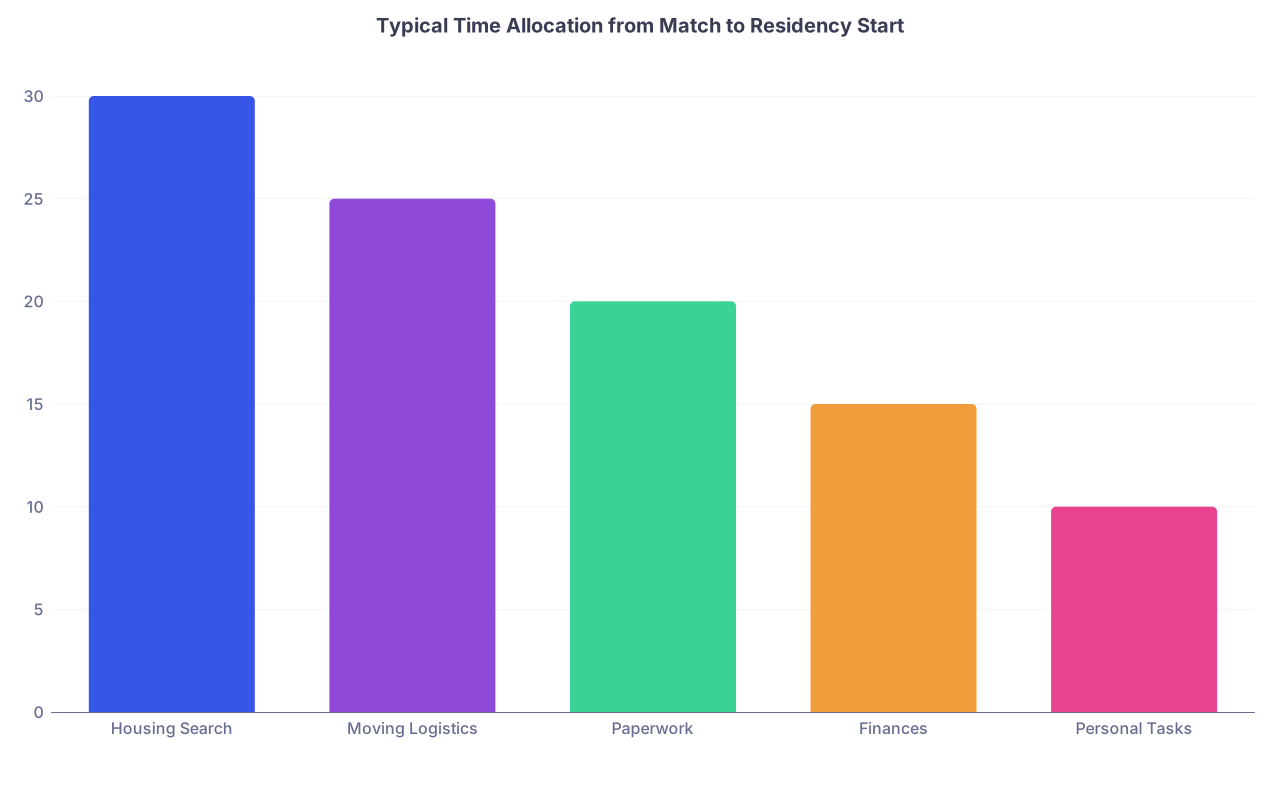
| Category | Value |
|---|---|
| Housing Search | 30 |
| Moving Logistics | 25 |
| Paperwork | 20 |
| Finances | 15 |
| Personal Tasks | 10 |
4.1. Money snapshot (Match Week)
Under Money, Housing, and Moving – Now (Match Week):
- Look up PGY‑1 salary on program or GME website
- Estimate monthly take-home pay (use any online paycheck calculator for that state)
- List monthly non-negotiables:
- Loan payments (or when they come due)
- Car payment
- Insurance (health, car, renters)
- Existing rent (and end date)
- Create simple “Residency Moving Budget” (rough, not perfect):
- Travel to new city
- Moving truck / shipping
- Initial deposits (rent, utilities)
- Furniture basics
You are not solving. You are exposing reality early, when you can still make rational decisions.
4.2. Housing framework
Under Money, Housing, and Moving – Now (Match Week):
- Decide: Rent alone / roommates / hospital housing (if offered)
- Check program/Facebook/WhatsApp resident groups for housing threads
- Identify 1–2 neighborhoods within 20–30 minutes of hospital
- Note any parking constraints (if it is a dense urban program)
Then under Next 30–60 Days:
- Schedule dedicated housing search window (e.g., “Housing deep dive: Saturday 9–12”)
- Shortlist 10–15 possible places (Zillow, apartments.com, residency Facebook groups)
- Plan scouting trip or virtual tours if moving cities
You do not book an apartment the hour you match. You create the pipeline that leads to a good choice.
Step 5: Licensure, Paperwork, and Compliance – The Boring Stuff That Can Delay Your Start
Everyone underestimates this piece. Then they are frantically chasing immunization records and faxing forms two days before orientation.
You are going to list it all now, then chip away.
| Item | Who Handles It First | Typical Deadline Window |
|---|---|---|
| State training license | You + Program | 2–3 months pre-start |
| Credentialing paperwork | Program/GME | 1–2 months pre-start |
| Drug screen + physical | Employee health | 1–2 months pre-start |
| Immunization records | You / Student health | ASAP once requested |
| Background check | External vendor | Within days of request |
5.1. Immediate documentation inventory
Under Licensure, Paperwork, and Compliance – Now (Match Week):
- Create folder:
Residency/02_Licensure/Personal_Docs - Locate and save PDFs of:
- Passport or government ID
- Social Security card (if applicable)
- Vaccination record (from student health)
- Medical school diploma status (if available) or expected date
- USMLE/COMLEX score reports (Step 1, Step 2, Level equivalents)
- Write down where your physical documents are (drawer, safe, etc.)
You are making it so when the program says “Upload X, Y, Z” you do it in 5 minutes, not 5 days.
5.2. Build a “Licensure and Credentialing Tracker”
In the same doc, add a mini-table or bullet list:
- State training license – Status: Not started / Submitted / Approved
- Hospital credentialing packet – Status: Not received / In progress / Submitted
- Drug screen – Status: Not scheduled / Scheduled / Completed
- Employee physical – Status: Not scheduled / Scheduled / Completed
- Background check – Status: Not started / In progress / Cleared
This is overkill for some programs. But I have watched residents show up late to orientation because their license or credentialing was not cleared. You do not want to be that person.
Step 6: Personal Life, Skills, and Sanity – Protect Yourself Early
Residency will expand to fill every inch of your life if you let it. Your Match‑Day list should include the personal structures that prevent that.
6.1. Personal life logistics (Match Week)
Under Personal Life, Skills, and Sanity – Now (Match Week):
- Tell core people you matched and where (family, partner, key friends)
- If you are in a relationship: set a “Residency planning talk” for within 7 days
- If you have kids / dependents: list childcare/school implications and timeline to address
- List any major life commitments already on calendar:
- Weddings
- Vacations
- Exams
- Family events
You need visibility on conflicts early so you can negotiate days off with your program later, not after the schedule is locked.
6.2. Health and mental health
Same section, add:
- Identify current PCP / therapist and whether you will keep or switch when you move
- Refill chronic meds to cover at least 2–3 months into residency
- Book last appointments near your med school city if moving (dentist, eye, PCP)
Again: this is scaffolding. You will turn these into tasks with dates later.
Step 7: Turn the Master List into Concrete, Dated Tasks
So far you have a well‑structured doc, not an operational plan. Now you connect it to reality.

| Step | Description |
|---|---|
| Step 1 | Match Result |
| Step 2 | Create Master Doc |
| Step 3 | Extract Program Requirements |
| Step 4 | Build Four Category List |
| Step 5 | Assign Deadlines |
| Step 6 | Add to Task App |
| Step 7 | Weekly Review |
| Step 8 | Update as New Info Arrives |
7.1. Assign rough due dates in three waves
Go through your doc and mark each task mentally as:
- Within 1 week
- Within 1 month
- Before start date
Do it fast, do not overthink. Then:
- Tag “Within 1 week” items as Today / This Week in your task manager with actual dates.
- Tag “Within 1 month” items with approximate dates and at least one reminder.
- Tag “Before start date” with a reminder for two months before your start date to review and finalize.
Example conversions:
- Doc:
[ ] Create Residency folder structure→ Task app: “Create residency folder structure” – Due: Match Day + 1 day - Doc:
[ ] Begin housing search shortlist→ Due: This Saturday 10 AM - Doc:
[ ] Licensure – Research state requirements→ Due: Next weekend
This is where your list becomes a working system, not a wish list.
Step 8: Use a Simple Timeline to Avoid Panic
Everyone underestimates how compressed the months between Match and residency feel. You need a visual sense of that runway.
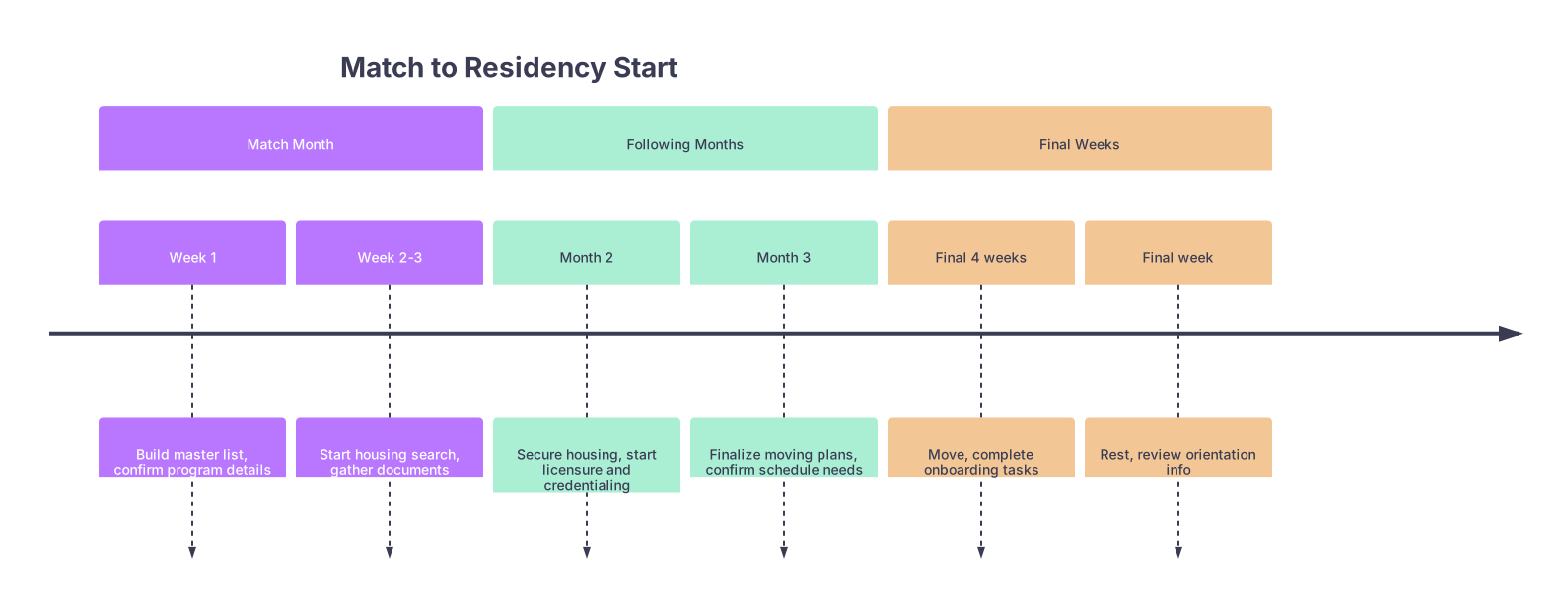
| Period | Event |
|---|---|
| Match Month - Week 1 | Build master list, confirm program details |
| Match Month - Week 2-3 | Start housing search, gather documents |
| Following Months - Month 2 | Secure housing, start licensure and credentialing |
| Following Months - Month 3 | Finalize moving plans, confirm schedule needs |
| Final Weeks - Final 4 weeks | Move, complete onboarding tasks |
| Final Weeks - Final week | Rest, review orientation info |
That is the macro view. Your to‑do list just plugs into that.
Step 9: Add a “Questions for Program” Section Right Now
You will not think of everything today. But you will start noticing gaps as you calm down.
Create a section at the bottom of the doc:
Questions for Program / Coordinator
Seed it with common ones:
- What is the exact first day I am expected in person?
- Is there recommended or subsidized housing?
- When will we receive the rotation schedule?
- How do we request specific days off (for weddings, exams, etc.)?
- Which EMR is used, and will there be training before using it on patients?
Whenever you feel anxious about something program-related, you dump it here. Then every 1–2 weeks, you batch these into a polite, focused email or ask during any scheduled calls.
Step 10: Add “Skill Prep” Without Overdoing It
Some people overcompensate and build insane “clinical knowledge bootcamps” for the months before residency. That is how you burn out before you even start.
Your Match‑Day list should capture focused, realistic prep.
Under Personal Life, Skills, and Sanity – Before Start Date:
- Review core emergencies for my specialty (e.g., for IM: sepsis, DKA, GI bleed, ACS, stroke)
- Learn or review EMR basics if access is provided early
- Set up 2–3 go‑to resources:
- Specialty handbook (e.g., “Pocket Medicine” for IM)
- Anki deck or qbank if useful
- One trusted website or app (e.g., UpToDate, specialty guidelines)
Keep it modest. Residency is where you learn; you just want to avoid being completely disoriented.
Step 11: Build a One‑Page “Residency Start Checklist”
From your full doc, you will eventually assemble a tight, one‑page, high‑impact list you can glance at in May/June.
You can sketch the structure now, even if many items are TBD:
Residency Start Checklist
- Housing:
- Lease signed
- Move-in date confirmed
- Parking figured out
- Program:
- Orientation details confirmed
- First‑day instructions saved
- Required readings / modules done
- Licensure & Credentialing:
- State training license approved
- Hospital credentialing cleared
- Drug screen and physical completed
- Life:
- PCP / therapist plan in new city
- Med refills stocked
- Backup alarm and commute tested
You will keep filling this in as months go on. It becomes your “did I forget anything critical?” filter.
Step 12: Make Your Plan Future‑Proof with Weekly Reviews
Your to‑do list will be obsolete in two weeks if you never touch it again. Programs send new instructions, HR changes timelines, housing falls through.
So you add one recurring task right now:
Task app:
“Residency Prep – Weekly Review” – recur weekly, 20–30 minutes.
During that review you:
- Open your master doc and update statuses
- Check email for new onboarding info
- Move anything stuck into a new due date
- Add new questions to the “Questions for Program” section
This is boring, which is why almost nobody does it. But the residents who do are calm in June, not scrambling.
Example: What Your Hour‑One To‑Do List Might Look Like
Just to make this concrete, here is a sample snapshot of what your doc might contain 60 minutes after matching:
Program & Administration – Now (Match Week)
- Save welcome email as PDF
- Fill in Program Snapshot header
- Add coordinator and GME contacts to phone
- Reply to program confirming acceptance and asking for key dates
- Set bookmark for onboarding portal
Money, Housing, and Moving – Now (Match Week)
- Look up PGY‑1 salary and estimate take-home pay
- List current lease end date and penalties
- Decide preferred living situation (solo vs roommates vs hospital housing)
- Block 2 hours this weekend for initial housing search
Licensure, Paperwork, and Compliance – Now (Match Week)
- Create Licensure folder and collect:
- ID, vaccine records, score reports
- Start Licensure and Credentialing Tracker (blank statuses)
Personal Life, Skills, and Sanity – Now (Match Week)
- Call partner/family with final program info
- List major events already on calendar this summer
- Refill chronic meds if <2 months remaining
Then you open your task app and assign dates to all of the above.
That is what “using the hour after you match well” actually looks like.
Quick Reference Table: What Actually Needs Doing When
| Timeframe | Core Focus Area | Key Actions |
|---|---|---|
| Match Week | Clarity & Capture | Build master list, save emails, basic money and housing snapshot |
| 1st Month Post-Match | Infrastructure | Housing search, document gathering, licensure research |
| 2–3 Months Pre-Start | Execution | Licensure submission, credentialing, finalize move |
| Final Month | Finalization & Rest | Complete modules, confirm details, move, recharge |
FAQs
1. How detailed should my Match Day to‑do list actually be?
Detailed enough that you never have to re‑think the same problem twice. If you see an item like “Housing,” that is useless. You want “Shortlist 10 apartments,” “Schedule scouting trip,” “Confirm lease dates.” You can start broad in the first hour, but within the first week, each major category should be broken down into specific actions you could complete in 30–60 minutes.
If you find yourself rewriting the same mental note—“remember to check licensure requirements” or “need to email coordinator”—it belongs as a concrete, one‑line task with a due date. Your brain is for decisions and problem‑solving, not storage.
2. What if my program has not sent much information yet?
Then your Match‑Day job is to control what you can and set traps for the rest. You still:
- Build your master doc and sections.
- Start your documentation inventory (ID, vaccines, scores).
- Set a follow‑up reminder for 7–10 days: “If no onboarding info by now, email coordinator.”
- Begin your housing and money snapshot since those do not depend on the program.
You are not behind just because the program is slow, as long as you are prepared to move quickly once information arrives. The residents who get burned are the ones who wait passively and then try to do everything in the last two weeks.
Open a blank document right now and type the four headers: “Program & Administration,” “Money, Housing, and Moving,” “Licensure, Paperwork, and Compliance,” and “Personal Life, Skills, and Sanity.” That is your starting line. Fill each with three concrete tasks today, then assign dates.


