
What do you do when you’re the float resident and three different attendings all think you “own” their patients?
Being the float resident on multiple teams is one of those jobs nobody really explains to you. Suddenly you’re on cards for a few hours, covering a medicine attending’s list, admitting to the night float queue, and someone from surgery just said, “Hey, you’re covering our post-ops too, right?”
You’re not crazy. The setup is.
Let’s get specific about how to survive this without losing patients, missing critical labs, or having three attendings all yelling your name at 11:00.
Step 1: Get Control Of The Chaos Before It Starts
The biggest mistake I see: float residents show up, open the EHR, and just start clicking. They hope the system will somehow tell them which patients are theirs.
Do not do that.
You need a 30–45 minute “set-up” block at the start of your float time. Even if it is interrupted, you protect this time like your job depends on it. Because it does.
A. Build a master “Float List” – not negotiable
You want a single source of truth: your float list.
Use your EHR’s patient list function. If you don’t know how to make a custom list, find the intern who lives in the chart and ask them. Or the ward clerk. Someone knows.
On that list, you need:
- All patients you are responsible for, regardless of team.
- Clear labels for which team/attending each belongs to.
- A visual cue for “high-risk / needs eyes today.”
The structure I like:
- Name / Room
- Team (e.g., Cards A, Med B, Surg Blue)
- Attending
- Level of responsibility (“Primary today,” “Cross-cover,” “New admit,” “Procedures only”)
- Priority flag (RED = sick/unstable, YELLOW = watch, GREEN = stable)
You cannot hold this in your head. I’ve watched really smart seniors try. By 2 p.m., they’re mixing up which patient is on which service, and that’s how errors happen.
| Column | Purpose |
|---|---|
| Name / Room | Find patient fast |
| Team | Which service owns the patient |
| Attending | Who you answer to on that case |
| Responsibility | Primary vs cross-cover |
| Priority Flag | Triage your limited time |
If your EHR can’t show all of this, put what you can there and keep the rest in a paper or digital “brain” (more on that later).
B. Clarify your role with each team—explicitly
You assume everyone’s on the same page. They aren’t.
At the very start of your block, for each team you’re covering, ask the senior or attending:
- “For today, am I primary on these patients, or just cross-cover?”
- “What are you expecting from me: just orders and issues, or am I doing notes and family updates too?”
- “Who’s writing the discharge summaries?”
- “If there’s a change of plan, who do I call first?”
You sound like you’re over-communicating. You’re not. You’re building boundaries.
Write the answers directly on your float list. If you don’t, by midday you’ll forget which attending said what.
Step 2: Build A Patient-Tracking System That Survives Interruptions
As float, your entire day is an interruption. You start three tasks and finish none because:
- Rapid response on someone not even on “your” team
- ED page for an admit
- Nurse asking about a sliding scale on a different patient
- Attending wants “quick bedside rounds” on yet another list
If you don’t have a system that tolerates being dropped mid-task, stuff will fall through the cracks.
A. The two-level system: Macro list + micro “brain”
You need both, no exceptions:
Macro: The master float list in the EHR
– Who exists, what team they’re on, basic status.Micro: Your real-time “brain” for the next 1–2 hours
– What exactly you need to do, in what order.
Your brain can be:
- A folded piece of paper with columns.
- A small notebook.
- A tablet or phone notes app (only if your hospital is okay with that).
What matters: you can edit it in 3 seconds while someone’s talking to you.
Structure your brain by time blocks, not by team. Example:
07:30–09:30
- Cards A – See 412B (NSTEMI, rising troponin). Check AM labs, repeat EKG.
- Med B – 520A (new fever, check blood cultures, talk to ID).
- ED admit – 6F, SOB, CTPE pending. Decide admit vs obs.
09:30–12:00
- Cards A – Rounds with attending.
- Surg Blue – Follow up H/H on 308C, adjust transfusion plan.
- All – sign med rec on pending discharges.
Every time someone pages you, you add to the CURRENT time block or the NEXT one. Not just “I’ll remember.” You won’t.
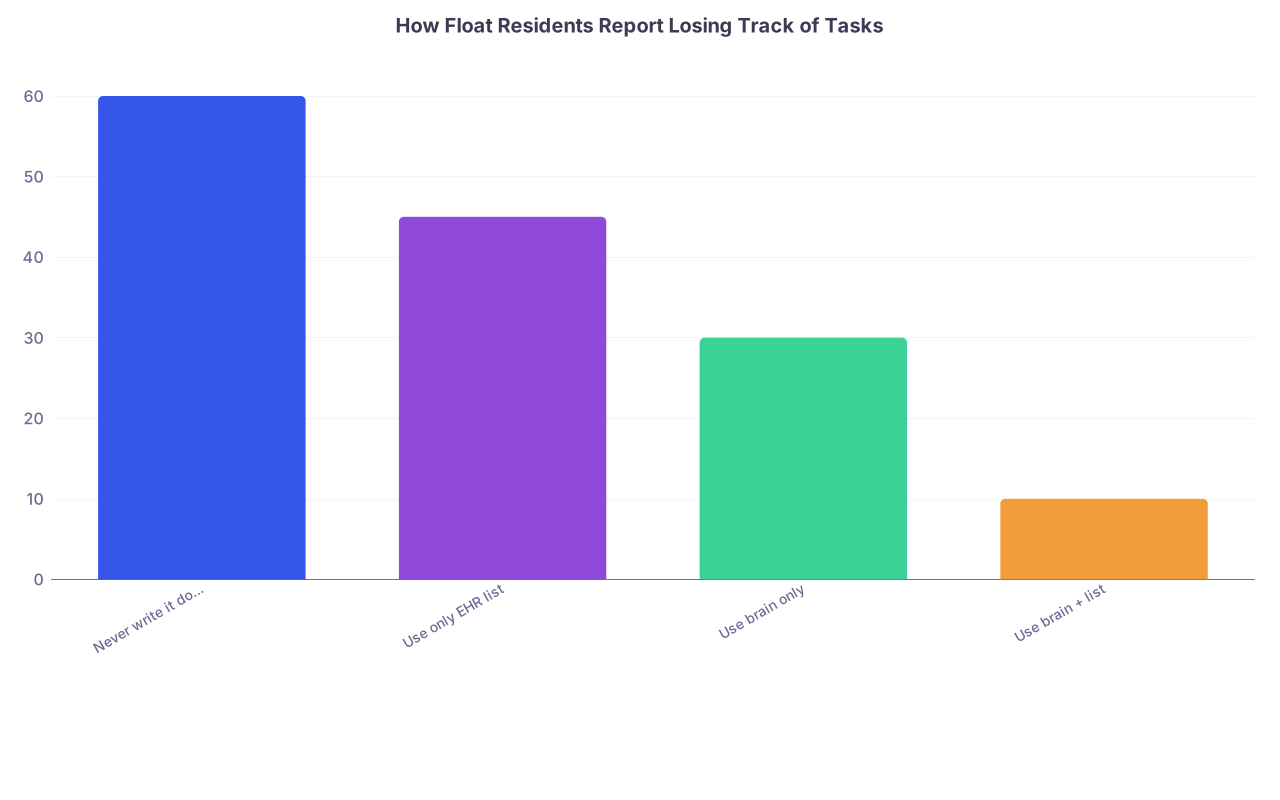
| Category | Value |
|---|---|
| Never write it down | 60 |
| Use only EHR list | 45 |
| Use brain only | 30 |
| Use brain + list | 10 |
(Interpretation: more structure = fewer dropped tasks. Not rocket science.)
B. The “interruption drill”
Here’s the mental script you need every time you’re interrupted mid-task:
- Pause.
- On your brain, quickly mark what you were doing:
- Circle the box
- Add “IP” (in progress)
- Or write “STOPPED at [time]” next to it.
- Ask: “Is this new thing more urgent than what I’m doing?”
If yes:
- Shift your focus.
- Add the new task at the top of your current block with a star: “*STAT – 412B hypotensive, see now.”
If no:
- Tell them explicitly:
“Finishing X right now. I’ll get to this in about 20–30 minutes unless they acutely worsen. Call me back if that happens.” - Then write it down anyway.
Most float errors are “I never went back to finish what I started” errors. The interruption drill is how you reduce that.
Step 3: Tame The Handoffs – Both Inbound And Outbound
The fastest way to lose track of patients is sloppy sign-out. As float, you’re getting sign-out from multiple people and giving it back to multiple people. High risk for confusion.
A. Standardize what you accept from each team
When a team signs out to you, don’t just let them talk at you. Direct the structure:
“Let’s do each patient: ID, diagnosis, active issues, what you need from me, and what would make you want a call overnight or today.”
For each patient, you want:
- One-liner: “68M with HFrEF, new AF with RVR, now rate-controlled on dilt gtt.”
- Today’s goal(s): “Wean off gtt to PO, diurese another 2L, watch renal function.”
- Specific watch items: “If HR >120 for 15 minutes, or SBP <90, call attending.”
- Pending results: “CTA chest pending – if positive, start heparin and call cards.”
Everything they say that implies a task goes on your brain. Not just “okay, I know that.” Write it.
B. Build a tiny sign-out template (use it all day)
You should have a simple, repeatable structure. Something like:
- ID / Room
- Team
- Dx
- Today’s plan (2–3 bullets max)
- Watch for / call for
- Tasks for ME (checkboxes)
You can keep this in a Word doc, a note, or scribbled on paper. But you want the same pattern every time. It makes you faster and cuts down on “wait what was I supposed to do for this guy?”
Step 4: Decide Who To See First – Triaging Multiple Teams
You’ve got fifteen patients across 3–4 services. You can’t see everyone at 8 a.m. So who actually gets you first?
A. Use a brutal, honest priority system
This is not about fairness. It’s about safety.
Rank patients by:
- Unstable or likely to crash:
- Recent rapid response or ICU transfer
- Rising oxygen needs
- New chest pain, neuro changes, hypotension
- Time-sensitive management:
- Active infusions that need transition
- New positive critical labs (K 6.2, Hgb 6.1, troponin bump)
- Procedures scheduled that require pre-op checks
- Discharges that are ACTUALLY going home soon:
- Waiting only for one thing you can control (e.g., med rec, final imaging read, home O2 order)
- Stable chronic issues:
- Glycemic control tweaks
- Med optimization
- Follow-up on non-critical labs
Your float list should reflect this priority with a simple flag or order. If you have to bail on the bottom 30% of the list because something explodes, fine. At least you hit the right 70%.
B. Ignore the volume trap
Some attendings will try to pull you to “their” patients first: “Can we just quickly round on our whole list?” Translation: ignore everyone else.
Your answer (politely but firmly):
“I’ve got a couple of high-risk patients on other teams I need to see right now. I can join you at around 10:30 after I’ve seen them and checked their labs. If anything is unstable, I’ll page you immediately.”
You’re not their private resident. You’re the float. Your responsibility is to the sickest patients across all services, not the loudest attending.
Step 5: Make The EHR Work For You (Not The Other Way Around)
Most people use the EHR as a passive problem list. You don’t have that luxury. You need it to be a control panel.
A. Create service-based and master lists
Ideal setup:
- One master “Float – All” list (everything on your plate)
- Sub-lists by team:
- “Float – Cards A”
- “Float – Med B”
- “Float – Surg Blue”
You round or review by priority on the master list. When one attending grabs you, you shift to that team list so you can see just their patients quickly.
If your EHR allows, add:
- Custom columns: Team, Attending, Priority.
- Color-coding based on service or priority.
If it doesn’t, that’s where your paper/digital brain fills the gaps.
B. Use EHR flags, not just memory
Whenever you:
- Order a test that needs follow-up
- Start a new medication that needs a level or lab
- Ask a consultant to weigh in
Set reminders where you can:
- Sticky notes / flags in the chart.
- Add “Follow-up” items in the task section.
- Put “CHECK X RESULT BY [TIME]” on your brain.
If the EHR has a “recent results” or “my open orders” dashboard, use it once mid-day and once late afternoon to catch dangling tests.
Step 6: Communication Scripts That Keep You Out Of Trouble
As float, you’re constantly “the middle person.” The risk is you end up being responsible for something nobody clearly asked you to do or the primary team assumes you did.
You fix that with precise language.
A. With nurses
Nurses will quickly figure out whether you’re reliable. If they think you are, they will feed you information that saves your skin.
Answer pages with:
- Acknowledge the concern specifically:
“You’re right, that blood pressure is low given his baseline.” - Give a clear plan and timeline:
“I’ll come see him within 10 minutes. If SBP drops under 85 again before I’m there, please call me straight back.” - Close the loop:
“I put in the fluid bolus and changed the parameters. I’m writing a quick note now; if he doesn’t improve in 30–60 minutes, we may need to escalate.”
When they see you don’t vanish, they’ll call you early. Early calls keep patients off rapid response.
B. With attendings and seniors
Always frame what you’re doing across teams:
“Here’s where I’m at:
- Just saw your 412B and adjusted diuretics.
- About to go see a hypotensive patient on Med B.
- Then I’ll circle back to your 520A to prep for discharge paperwork.
Anything you want moved up or down on that order?”
You’re reminding them: you’re not just on their service. You’re triaging across patients.
Step 7: End-Of-Day: How To Hand Back A Messy Day Cleanly
The last 30–45 minutes of your float block are sacred. No, you won’t always get them. But aim for it.
A. Close your loop checklist
Run through your master float list and ask for each patient:
- Have I:
- Addressed the urgent issues?
- Placed all necessary orders?
- Checked any critical or time-sensitive results?
- Communicated major changes to nurses and, if needed, families?
If no, fix it or clearly hand it off.
Then update your sign-out for each team:
- One-liner
- What changed while you were covering
- What is pending and who is following it
- What would make you want the next person to be called
B. Handing off to multiple teams without sounding lost
When you’re signing back to multiple teams, keep it exact and consistent:
“For your list, the main updates:
- 412B: Diuresed net –1.5L, creatinine stable. Plan unchanged. Needs follow-up BMP tomorrow morning.
- 520A: Fever to 38.5, cultures sent, CXR with new infiltrate. Started ceftriaxone and azithro, called ID, they’ll see in the morning. If hypotensive or tachycardic, would escalate care.
- 308C: Hgb dropped to 7.1, transfused 1 unit, stable now. Just needs morning CBC follow-up.”
If you’re not sure who’s supposed to follow something, speak it out loud:
“I started this, but I’m not certain if you want to own the follow-up or if night float should. What do you prefer?”
Then write down whatever they say.
Visual: Your Float Day At A Glance

| Step | Description |
|---|---|
| Step 1 | Arrive |
| Step 2 | Build master float list |
| Step 3 | Clarify role with each team |
| Step 4 | Morning priority block - see sickest |
| Step 5 | Handle interruptions |
| Step 6 | Midday re-triage and task check |
| Step 7 | Afternoon wrap up tasks |
| Step 8 | Prepare multi-team sign out |
| Step 9 | Hand off and leave |
Common Pitfalls And How To Dodge Them
Let me be blunt about where float residents get burned.
Believing “I’ll remember that”
You won’t. You’re not special. Write it down.Letting one attending monopolize your time
You’re covering multiple lists. If you don’t assert that, others will assume you’re free labor.Not clarifying who owns follow-up
You order a CT, leave, no one checks it until the next day with a missed PE. Fix: for every order, decide “me” or “team X” owns the follow-up.Doing tasks in the order they came, not by priority
That’s how you end up refilling stool softeners while someone’s quietly getting hypoxic down the hall.No end-of-day pause
Walking out without checking your list one last time is how you find out on M&M that you “never followed up the critical lab” that actually resulted at 4:45.
Sample Mini-Template You Can Steal Today
If you want something to print or copy into a note app, here’s a simple version.
Top of page:
Date: _______ Block: _______ Services: ____________________
Then repeated sections per patient:
Name / Room: ___________
Team / Attg: ___________
One-liner: ______________________________________
Today goals:
Watch / Call for: ________________________________
My tasks:
- Labs to check: __________________ time: ____
- Imaging / studies: _________________________
- Consults: _________________________________
- Dispo items: ______________________________
Notes: _________________________________________
You don’t have to use this exact format. But have something deliberate, not just freeform scribbles on scrap paper.
FAQ (Exactly 4 Questions)
1. What if I literally don’t have time to see everyone on my list?
Then you document your triage. On your brain or in a quick note, indicate who you prioritized and why (unstable, time-sensitive, etc.). Communicate to the primary teams: “I wasn’t able to see X and Y today; they remained clinically stable by vitals and labs, and I focused on A and B who had acute issues.” It’s not ideal, but it’s reality. Safety and sound judgment beat fake completeness.
2. Should I write full progress notes as a float, or just event notes?
Depends on your institution and what the team wants, but in general: if you are essentially acting as the primary that day (rounding, changing plans, doing family updates), write a brief progress or “covering” note. If you’re just responding to a discrete issue (hypotension, arrhythmia, acute mental status change), a focused event/brief note is fine. Ask upfront, then be consistent.
3. How do I handle getting conflicting instructions from different attendings?
Name the conflict out loud. “Dr. A wants aggressive diuresis on this patient, but Dr. B is concerned about renal function and prefers a slower approach. You’re both on services I’m covering today—how do you want me to prioritize?” Usually one will defer or you’ll get a joint plan. If you can’t resolve it, pick up the phone and get them on a three-way call or loop in your chief. Don’t quietly guess between two attendings with opposite plans.
4. Is it safer to over-call overnight/next shift when I’m unsure, or will I just annoy people?
Call. Every time you have that “this could be nothing, but if I’m wrong it’s bad” feeling, you call. You’re not judged on how “low maintenance” you are; you’re judged on whether your patients are safe. The chiefs and attendings who matter would rather you wake them once too often than once too few. Just make sure when you call you have a succinct one-liner, vitals trend, and a concrete question.
Key Takeaways
- Build a master float list and a real-time brain; don’t trust your memory.
- Ruthlessly prioritize across teams by acuity, not by who yells loudest.
- Close loops: clarify roles, track pending results, and protect your end-of-day review.