
The way most residents “optimize” their workflow is broken.
You don’t need another productivity app. You need a quarterly reset.
Every 3 months, the ground under you shifts—new rotation, new team, new call schedule, new expectations. If you’re not deliberately rebooting your systems each quarter, they rot. What worked on wards will fail in the ICU. Your clinic workflow will not save you on nights.
This is your playbook for resetting your resident life every 3 months—month-by-month, then week-by-week, then day-by-day.
The 3‑Month Cycle: What You Do Each Quarter
Think in 3‑month blocks. Not a year. A year is fantasy in residency.
At the start of each quarter (say Jan–Mar, Apr–Jun, Jul–Sep, Oct–Dec), you’ll run the same sequence:
- Week 0–1: Debrief + Design
- Week 2–4: Implement + Adjust
- Month 2: Deepen + Automate
- Month 3: Protect + Prepare for Next Quarter
We’ll walk through exactly what you do in each window.
Week 0–1: The 2‑Hour Quarterly Debrief
At this point you should block off one protected 2‑hour window. Seriously protect it—post‑call morning, half‑day off, quiet weekend night. Phone on DND.
You’re going to do three things: review, redesign, and re‑commit.
Step 1: Quick Autopsy of the Last 3 Months (30–40 minutes)
Pull out:
- Last quarter’s call schedule
- A sample week of notes / patient lists
- Your duty hours log
- Any evals you’ve gotten (even the vague ones)
Then ruthlessly answer:
- What consistently ran late? (Notes, sign‑out, pre‑rounds, discharges)
- Where did you feel stupid or behind? (ICU vent settings, chemo protocols, OB triage)
- When did you feel actually okay or even efficient?
- What cost you the most energy? (Pages? Poor sign‑out? Chaotic clinic? Sleep?)
Make a brutal but short list under 3 headings:
- Keep: things that worked (e.g., “one master task list”, “template PM progress note”)
- Change: things you’ll adjust (e.g., “change pre‑round route”, “stop checking email in bed”)
- Kill: habits or tools to drop (e.g., “bullet journal that I never open”, “3 separate to‑do apps”)
Write them down. On paper or one simple digital note. Not buried in a random folder.
Step 2: Define Your Next Quarter’s Load (20–30 minutes)
Now look forward.
You’re going to plan this specific quarter, not some vague “I’ll be better this year” nonsense.
List your upcoming rotations and major obligations:
- Rotations (e.g., MICU → wards → night float)
- Standing clinics
- Exams (Step 3, in‑service, boards)
- Research / QI deadlines
- Life events (weddings, moves, family stuff)
Then create a simple load snapshot:
| Month | Main Rotation | Call/Nights | Key Focus |
|---|---|---|---|
| Month 1 | MICU | Q4 call | Survival + learning vents |
| Month 2 | Wards | Q5 call | Discharge efficiency |
| Month 3 | Clinic-heavy | No call | Research + Step 3 prep |
At this point you should decide: What is the “theme” of this quarter?
Examples:
- “ICU quarter: survival, vents, and sleep”
- “Clinic quarter: continuity, notes, and board prep”
- “Research quarter: writing and Step 3”
Pick one primary professional focus and one personal focus. That’s it.
Step 3: Rebuild Your Core Systems (60 minutes)
You’re going to rebuild 4 systems:
- Task capture
- Calendar
- Notes/templates
- Learning plan
System 1: Task Capture – One In, One Out
You get crushed by tasks because they scatter—sticky notes, text messages, EHR flags, random brain memory.
At this point you should pick ONE master capture tool:
- Physical: small pocket notebook with date + bullet list
- Digital: simple app like Apple Notes, Google Keep, or Todoist
- EHR task list if it’s actually usable (many aren’t)
Rules for the next quarter:
- Every task goes there. Order, callback, follow‑up imaging, forms, everything.
- No second system. If you “just remember it,” you’re lying to yourself.
System 2: Calendar – The Non‑Negotiable Skeleton
Use one calendar only. Phone or paper—doesn’t matter. Your brain needs one source of truth.
During your reset, plug in for the whole quarter:
- All rotation dates and locations
- Call schedule / nights
- Clinic blocks
- Known deadlines (research abstracts, evals, conference submissions)
- Personal non‑negotiables (weddings, vacations, family visits)
Then add two standing repeating blocks per week:
- 30–60 min for admin (call backs, emails, forms)
- 30–60 min for learning (questions, reading)
Do not make them aspirational. Put them where they’re actually possible.
System 3: Note & Sign‑out Templates
Residents waste a staggering amount of time reinventing the same note every day.
During your quarterly reset:
- Open your EHR and build/update:
- 1–2 progress note templates per major rotation
- 1 admission H&P structure
- 1 discharge summary skeleton
- Build or refine sign‑out templates:
- Surgery: post‑op issues, drains, antibiotics, f/u imaging
- ICU: vents, sedation, pressors, lines
- Medicine: active problems, dispo plan, contingency plans
Spend 20–30 minutes now to save 20–30 minutes every day.
System 4: 3‑Month Learning Plan
You won’t read “a chapter a night.” Stop lying.
Instead, do this:
- Pick one primary resource for this quarter:
- Example: UWorld + Onlinemeded for Step 3
- ICU quarter: Marino + 10 questions a day
- OB quarter: APGO videos + one guideline per week
- Set a hard, realistic weekly target:
- “70 questions/week” or “3 guideline summaries/week”
Then use a simple tracker—checkbox grid on paper or one digital note.
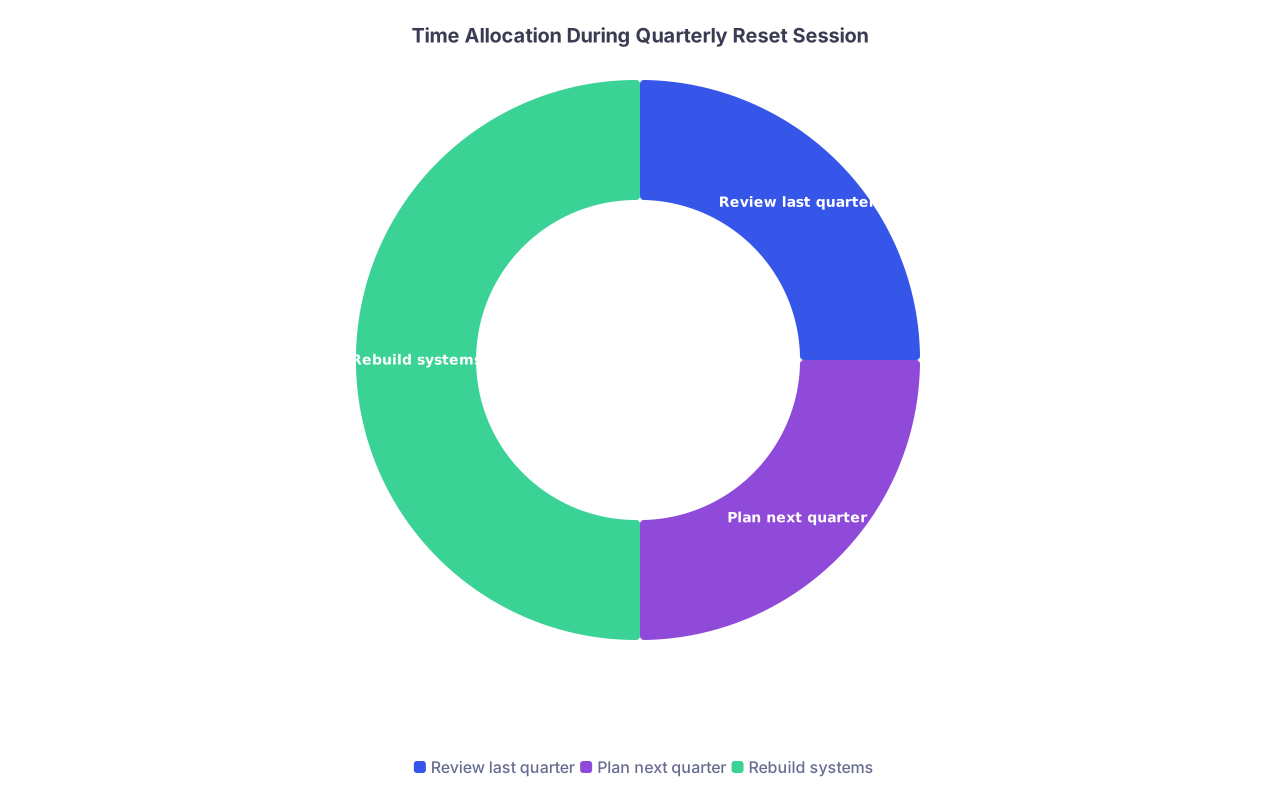
| Category | Value |
|---|---|
| Review last quarter | 30 |
| Plan next quarter | 30 |
| Rebuild systems | 60 |
Month 1: Implement and Survive (Week‑by‑Week)
Month 1 is about getting your feet under you with the new rotations and the new systems.
Week 1: Setup in the Wild
At this point you should:
- Test your task capture in real time on rounds
- Use your new note templates at least once per patient
- Check your calendar every morning before leaving home
End of Week 1, spend 15–20 minutes:
- What’s annoying or slow about your new setup?
- Are you over‑templating and spending time correcting junk text?
- Does your master task list feel too cluttered or too empty?
Tweak, don’t scrap. Example: adjust your note template sections, split your task list into “AM/PM”, or add a mini “sign‑out checklist” space.
Week 2: Fix the Bottlenecks
Patterns show up by Week 2.
Common Week‑2 pain points I’ve watched residents hit:
- Pre‑rounds are taking too long
- Notes aren’t done before noon conference
- Sign‑out is chaotic and gets interrupted 10 times
- You keep missing one type of task (follow‑up labs, imaging)
At this point you should do:
1. A one‑day time audit (painful but priceless)
On one representative day, jot down time blocks:
- 05:30–06:00 commute
- 06:00–07:15 pre‑rounds
- 07:30–09:30 rounding
- 09:30–11:30 orders + admits
- 11:30–12:00 conference
- 12:00–16:00 notes, follow‑ups, new admits
Mark:
- Where did you get stuck?
- Where were you doing nurse/secretary work you could have delegated?
- Where did your attention drift uselessly (scrolling, wandering, chatting)?
2. Install one constraint per problem
Examples:
- Pre‑rounds: “Max 5 minutes per patient; focus on vitals, overnight events, and one focused exam point.”
- Notes: “Write a skeleton in the chart while rounding on each patient.”
- Sign‑out: “Start drafting sign‑out by 14:00, not 16:30.”
Week 3–4: Stabilize the Routine
By the end of Month 1 you should have:
- One master task list you consistently use
- A realistic, used calendar (not fantasy blocks)
- Note templates that fit 80% of patients
- At least 50–70% completion of your weekly learning goal
If not, you don’t redesign everything. You re‑scale.
Example:
- Planned 100 questions/week, did 30? New target: 40–50/week, but non‑negotiable.
- Planned 60‑minute reading blocks, kept getting interrupted? New target: 25‑minute blocks right after sign‑out, 2x/week.
Month 2: Deepen and Automate
Month 2 is where you move beyond survival and start building actual efficiency and buffer.
Week 5–6: Turn Routines into Checklists
At this point you should convert messy mental workflows into clean checklists.
Common ones:
Admission checklist
- H&P started
- Problem list with priorities
- Initial orders placed
- Family updated
- Follow‑up labs/imaging ordered
Discharge checklist
- Med rec with indications
- Follow‑up appointments booked
- Pending labs documented
- Clear return precautions
Clinic day checklist
- Pre‑chart top 3 complex patients
- Pull labs/imaging for high‑risk follow‑ups
- Post‑clinic: close all notes, send MyChart messages, reconcile meds
Write them once. Use them daily. That “I’ll just remember” bravado is why people get burned by missed follow‑ups.
Week 7–8: Strengthen Learning + Feedback Loops
You’ve stabilized. Now you improve.
At this point you should:
Ask for targeted feedback once or twice this month.
- “Hey, on ICU notes and presentations, what’s one thing I should change?”
- “On rounds, do you want more data or more synthesis from me?”
Align learning with your actual patients.
- After a code: read one high‑yield ACLS topic.
- After a weird complication: 10‑minute literature search, 1–2 bullet summary saved in a personal “pearls” file.
Tighten your question bank usage.
- If your week is brutal: do 5–10 questions/day, not none.
- Track your actual weekly numbers against your 3‑month plan.
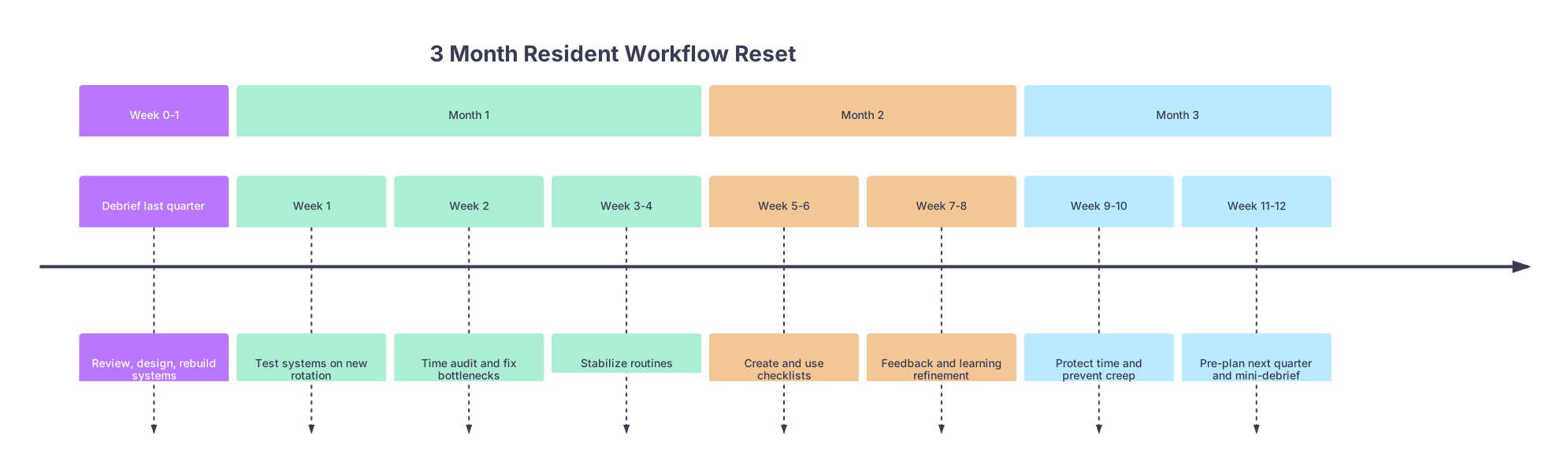
| Period | Event |
|---|---|
| Week 0-1 - Debrief last quarter | Review, design, rebuild systems |
| Month 1 - Week 1 | Test systems on new rotation |
| Month 1 - Week 2 | Time audit and fix bottlenecks |
| Month 1 - Week 3-4 | Stabilize routines |
| Month 2 - Week 5-6 | Create and use checklists |
| Month 2 - Week 7-8 | Feedback and learning refinement |
| Month 3 - Week 9-10 | Protect time and prevent creep |
| Month 3 - Week 11-12 | Pre-plan next quarter and mini-debrief |
Month 3: Protect and Prepare
Month 3 is dangerous. You’re tired. Systems drift. But this is where you either arrive at the next quarter burned out or 60% loaded and ready.
Week 9–10: Guardrails and “No” Rules
At this point you should:
Re‑look at your calendar for this month.
- Are extra “nice to have” things creeping in? Extra committees, teaching, research tasks that don’t fit this quarter’s theme?
- Say no or “not this quarter” to anything that doesn’t match your priority.
Re‑check your duty hours trend.
- Are you consistently running 30–60 minutes over because you’re doing non‑physician work?
- Identify 1–2 tasks/week you will delegate or push back on (faxing, scheduling, non‑urgent forms during peak admit times).
Install one non‑negotiable off switch.
- “Laptop closed by 22:30 on non‑call nights.”
- “No charting in bed.”
- “One totally off‑medicine half‑day every week.”
Yes, even on ICU. You’ll be better for it.
Week 11–12: Mini‑Debrief + Pre‑Load Next Quarter
By the last 2 weeks, you start the next reset early, not in a panic on day one of your new block.
At this point you should spend 30–45 minutes on:
A quick written check‑in:
- What actually improved this quarter?
- Where did you still bleed time or energy?
- What part of your system never got used? (Kill or fix it.)
Preview the next 3 months:
- Look at the next quarter’s rotations, call schedule, and major deadlines.
- Identify your next quarter’s theme (e.g., “research and Step 3”, “OR skills”, “clinic efficiency”).
Pre‑load key changes:
- New note templates for the next main rotation (e.g., OB H&P, surgical post‑op note)
- Adjust learning plan (swap ICU reading for surgery resources, etc.)
- Schedule any major deadlines or exam dates now.
You’re not starting from zero each time. You’re carrying forward the 60–70% that works and swapping out what doesn’t fit the new quarter.
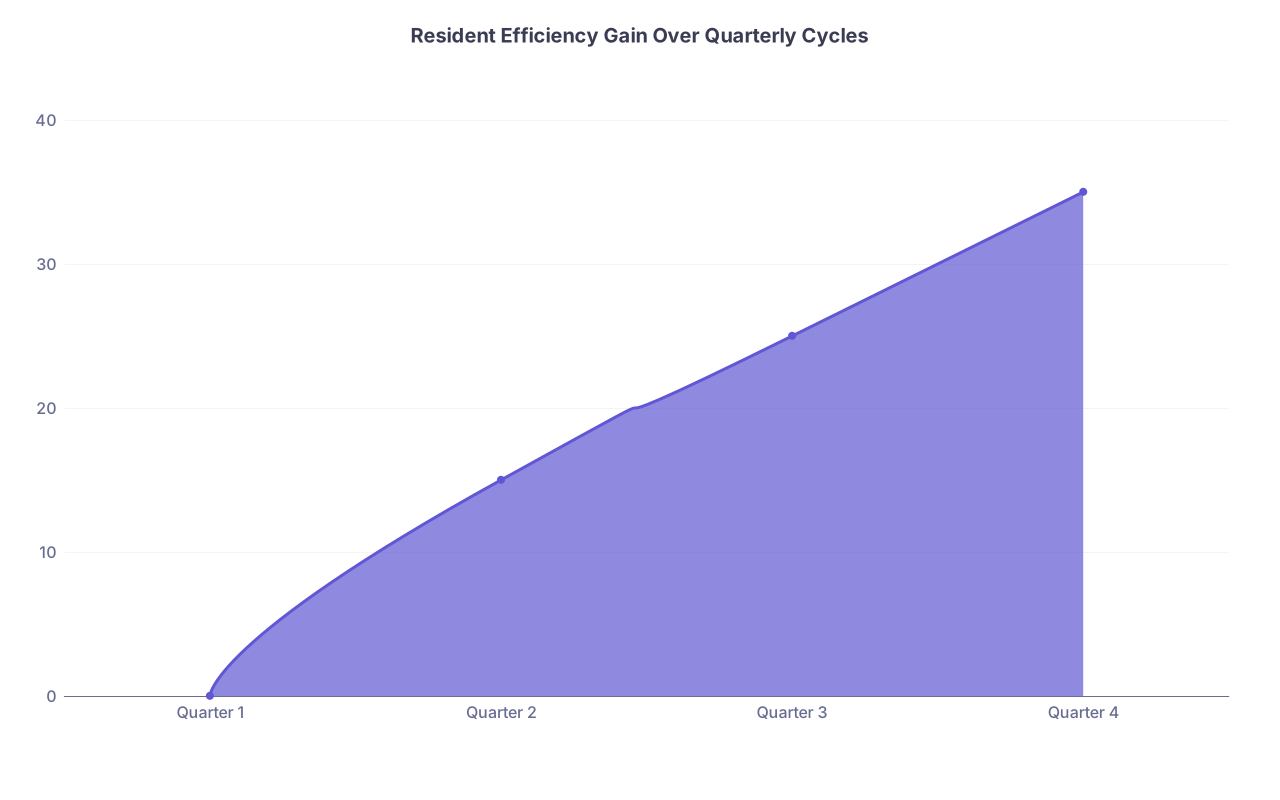
| Category | Value |
|---|---|
| Quarter 1 | 0 |
| Quarter 2 | 15 |
| Quarter 3 | 25 |
| Quarter 4 | 35 |
Daily and Weekly Micro‑Resets That Make the Quarter Work
The quarterly reset is the backbone. But the day‑to‑day discipline keeps it alive.
Daily: 5‑Minute Open and 5‑Minute Close
At this point you should treat each day as a mini reboot.
Morning (before you leave or as you start pre‑rounds):
- Glance at:
- Today’s calendar
- Yesterday’s unfinished tasks
- Decide the one thing that must be done before you leave the hospital. Just one.
End of day (yes, even post‑call if you can stand it for 2 minutes):
- Cross off or move incomplete tasks
- Add any “follow‑up later this week” items to your task list
- Jot one line: “If I had to redo today, I’d change X.”
That single sentence trains your brain for the next day without dwelling.
Weekly: 20–30 Minute “Friday Reset”
Pick a consistent time. Post‑call Friday afternoon, or Sunday night if your schedule is wild.
At this point you should:
- Scan the upcoming week:
- Calls
- Clinics
- Known nightmares (short staff, big OR days, admit days)
- Decide:
- Where your learning blocks fit (specific day/time)
- One personal non‑work thing that’s non‑negotiable (gym, dinner, sleep‑in morning)
Then briefly update:
- Your master task list (clear the junk you’ll never do)
- Any checklists that need tweaking based on this past week

What This Looks Like in Real Life: A Sample Quarter
Let’s make this concrete.
You’re a PGY‑2 in internal medicine.
Quarter: Jan–Mar
Rotations:
- Jan: MICU (Q4 call)
- Feb: Wards
- Mar: Clinic + electives, low call
Your Quarterly Plan
- Quarter theme: ICU survival and discharge efficiency
- Personal theme: Protect sleep and one weekly social thing
Week 0–1:
- Debrief: Last quarter, you always finished notes at 19:00, never did consistent questions, and forgot 2 follow‑up labs that attending caught.
- Design:
- One task app (Todoist)
- ICU note template with checkboxes: vents, pressors, sedation, lines, cultures
- Weekly plan: 50 questions/week in Feb–Mar, none expected during brutal ICU weeks except 5/day post‑call
Month 1 (MICU):
- Week 1–2: Test templates, time audit shows you’re wasting 40 minutes between 06:00–07:30 in ICU checking things twice.
- Fix: Structured pre‑round pattern room by room, use a paper pre‑round checklist.
- Week 3–4: Notes consistently done by 16:00. You’re still not doing questions; that’s fine—ICU quarter theme is survival.
Month 2 (Wards):
- Week 5–6: Build and use discharge checklist. Time from “dispo decision” to discharge summary drops from 60 to 25 minutes.
- Week 7–8: Hit 40–50 questions/week, tie cases directly to your question review.
Month 3 (Clinic/Electives):
- Week 9–10: Calendar locked with research writing times and Step 3 date. One full day off each week protected.
- Week 11–12: Mini‑debrief shows:
- Huge gain in discharge efficiency
- Still weak in complex ICU physiology
- Next quarter theme: “ICU and step up care knowledge gaps” even if rotations aren’t ICU
This is how residents quietly separate themselves—not with mythical 5‑year life plans, but by running tight 3‑month cycles.

Simple Tools to Anchor the System
You don’t need a fancy setup. You need consistency.
Here’s a stripped‑down default:
| Need | Simple Tool |
|---|---|
| Task capture | Pocket notebook |
| Calendar | Default phone app |
| Notes/templates | EHR macros/templates |
| Learning plan | One note + question bank |
If you’re spending more time customizing apps than closing charts, you’ve already lost.

The Three Things That Actually Matter
Strip this whole system down and you’re left with:
- Every 3 months, stop and reset on purpose—review, redesign, and recommit your systems to the next rotation reality.
- Run one simple, unified workflow—one task list, one calendar, a few good templates, and a realistic learning plan.
- Protect tiny rituals—daily 5‑minute open/close and a weekly 20–30 minute reset so the quarter doesn’t drift.
Do this for one year—four quarters—and you will not be the same resident.