
The way most residents limp into July carrying three years of digital clutter is a liability, not a badge of honor.
If you’re about to move from PGY-1 to PGY-2 (or PGY-2 to PGY-3, etc.), you’re not just leveling up your responsibilities. You’re also dragging along thousands of notes, emails, and half-finished lists that will either help you move faster—or quietly sabotage you.
Let’s fix that. On a timeline. Step by step.
4–6 Weeks Before July: Set Up the System You Wish You Had
At this point you should stop thinking “I’ll clean this up when things slow down.” They won’t. You need a light, realistic plan that fits into a resident schedule.
Step 1: Choose Your Core Tools (1 evening, 30–45 minutes)
At this point you should decide where future you will actually live:
- One note system (max two):
- Example: OneNote or Notion or Apple Notes + a small paper notebook.
- One task manager:
- Examples: Todoist, Things, Microsoft To Do, or even a well-structured Notes list.
- One email triage method:
- Typically: Outlook or Gmail with a folder/tag system you stick to.
Stop hopping between six apps. It’s killing your retrieval speed.
Create this minimal backbone:
- Notes app:
- Notebook/space: “Residency”
- Subsections:
- “Cheat Sheets”
- “Teaching & Pearls”
- “Procedures”
- “Admin / Program”
- “Career / Fellowship”
- Task app:
- Project/labels:
- “This Week – Clinical”
- “Admin / Program”
- “Personal”
- “Follow-up / Reading”
- Project/labels:
You’re not organizing old stuff yet. You’re building containers that old stuff can flow into.
3–4 Weeks Before July: High-Level Map and Big Trash
Now you create the map of your chaos and take out the obvious trash.
Step 2: Inventory Your Digital Mess (1–2 short sessions)
At this point you should quickly map where your information currently hides:
- Email accounts:
- Hospital email, personal Gmail/Outlook, program-specific.
- Note sources:
- EMR scratchpads, OneNote, Apple Notes, Notion, Google Docs, random Word files.
- List sources:
- iPhone Reminders, task apps you abandoned, paper lists, whiteboard snapshots, text messages to yourself.
Open a plain note and write a quick “Info Map”:
- “Clinical pearls – scattered: OneNote ‘General’, iPhone Photos, random PDFs”
- “Admin stuff – Outlook inbox, Downloads folder, text from chief, WhatsApp thread”
- “Teaching slides – Email attachments, Desktop folder ‘Talks’, hospital shared drive”
This isn’t organizing. It’s reconnaissance.
Step 3: Brutal First-Pass Deletion (two 20-minute blocks)
At this point you should do the easiest, most satisfying cleanup: trash obvious junk.
Block 20 minutes twice this week. Set a timer. Move fast.
Focus on:
- Email:
- Delete:
- Old cafeteria menus
- “Thanks!” / “Got it” replies
- Expired meeting invites
- Old shift swap threads that resolved months ago
- Mass-unsubscribe from newsletters you never open.
- Delete:
- Files:
- Delete:
- Duplicate slide decks
- Old board review PDFs you’ll never touch again
- Outdated program policies replaced by new versions
- Delete:
- Photos:
- Delete:
- Blurry whiteboard pictures
- Duplicate EKG snapshots you never refer to
- Random screenshots of memes
- Delete:
If you ask “Will anyone die or get in trouble if I delete this?” and the answer is no, it can probably go.
2–3 Weeks Before July: Clinical Notes and Pearls
This is the gold. Your brain in written form.
At this point you should start curating the stuff that actually makes you better at your job.
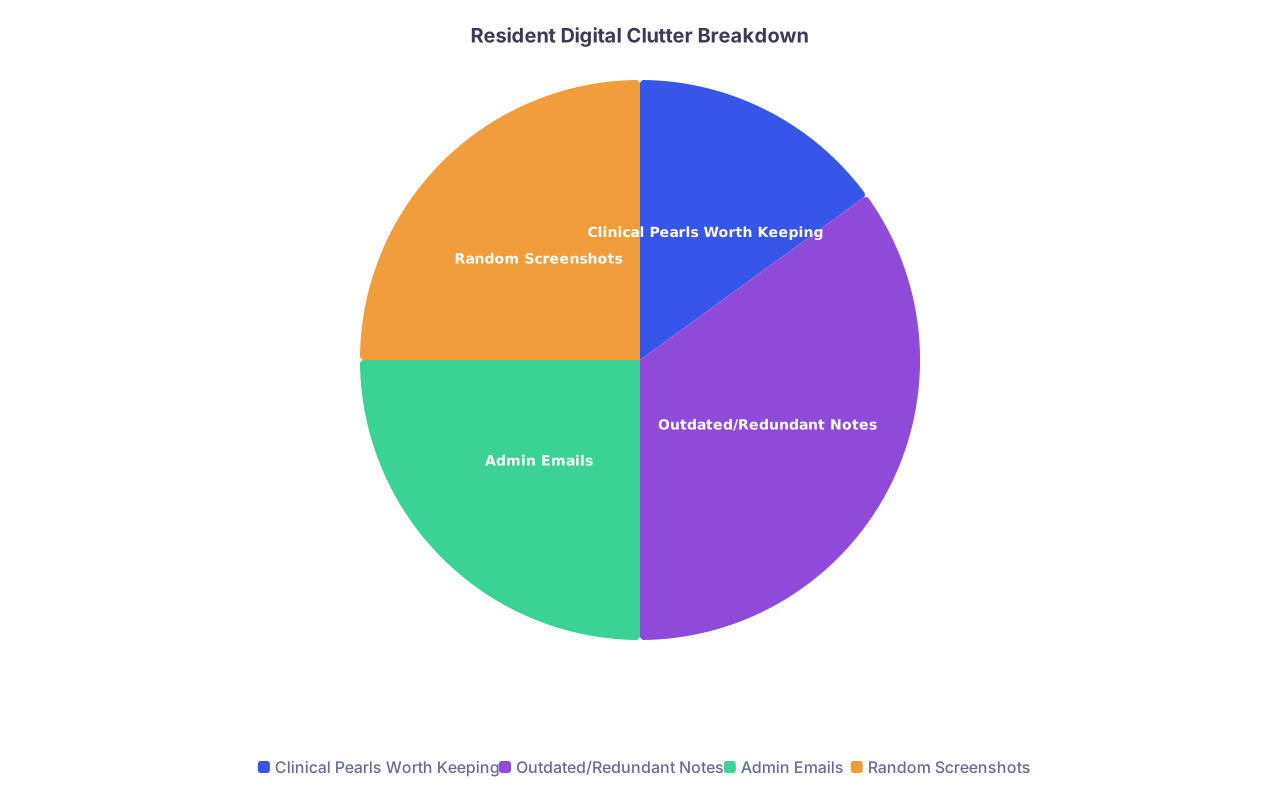
| Category | Value |
|---|---|
| Clinical Pearls Worth Keeping | 15 |
| Outdated/Redundant Notes | 35 |
| Admin Emails | 25 |
| Random Screenshots | 25 |
Step 4: Consolidate Clinical Pearls (2–3 sessions of 30 minutes)
Goal: one main, searchable “residency brain” instead of 14 partial versions.
Create structure in your notes app:
- Clinical:
- Cards/pages by topic:
- “CHF exacerbation”
- “DKA management”
- “Seizure workup”
- “Pre-op eval”
- Cards/pages by topic:
- Call / Night Float:
- “Common overnight issues”
- “Cross-cover scripts”
- Procedures:
- “Intubation”
- “Central line”
- “LP”
- Clinical:
Pull from scattered sources:
- EMR “personal” macros
- Old rotation notebooks
- Photos of whiteboards or attendings’ notes
- Typed lists saved in email drafts or random docs
For each useful nugget:
- Drop it into a topic note.
- Use short, quick headings:
- “Initial orders”
- “Red flags”
- “Dispo criteria”
- “One-liner explanation”
You’re not writing UpToDate. You’re building a fast trigger for 3 a.m. brain fog.
Step 5: Kill Redundant and Outdated Clinical Notes (same sessions)
At this point you should stop hoarding every half-baked note you ever wrote.
As you migrate:
- Delete:
- Old guidelines superseded by new ones
- Rotations from institutions you’ll never work at again with different protocols
- Overly long “novel” notes you never reference
- Keep:
- Attendings’ one-liners that stuck
- Quick algorithms you actually use
- Local workflow quirks (e.g., “CT abdomen after hours needs attending approval first”)
If you wouldn’t pull it up on a busy call night, it’s not worth keeping.
10–14 Days Before July: Email Reset and Admin Sanity
At this point you should stop letting your inbox set your priorities.
You’re about to get more responsibility. You need a system that surfaces the right things, not everything.
Step 6: Build a Simple Email Folder/Label System (1 session, 30 minutes)
Keep it stupid-simple. For most residents, this works:
- Action
- Waiting / Follow-up
- Reference – Admin
- Reference – Education
- Reference – Program
- Archive (or just let “All Mail” serve that purpose)
Now create 3 rules for yourself:
- No using the inbox as a to-do list.
- No more than 50 messages in the inbox at any time by July 15.
- Anything needing more than 2 minutes moves to:
- Your task manager (for action)
- Calendar (if time-bound)
- “Waiting / Follow-up” (if you’re waiting on someone else)
Step 7: Triage the Inbox in Phases (3–5 short chunks)
You are not going to “clean the inbox” in one hero session. Do it like this:
Phase 1: Bulk Archive (15–20 minutes)
Sort by sender or subject.
- Mass-archive:
- Old listserv digests
- Completed committee emails
- Past conference announcements
Use search:
- “before:2023/01/01” then quickly scan and archive 90% of it.
Phase 2: Admin + Program (20–30 minutes)
At this point you should make sure nothing important for the PGY upgrade falls through.
Search these terms, then file appropriately:
- “Schedule”
- “Orientation”
- “Credentialing”
- “Compliance”
- “Duty hours”
- “Rotation”
- “Block”
- “Contract”
Create a short note: “PGY Upgrade – Admin To-Do” and list concrete tasks you see in emails (e.g., “Upload BLS card by June 30”, “Sign new contract in portal”).
Phase 3: Education + Career (20 minutes)
Search for:
- “Grand Rounds”
- “Lecture”
- “Conference”
- “Abstract”
- “Poster”
- “Fellowship”
- “Mentor”
File:
- Slide decks → Reference – Education
- Important threads with mentors → Reference – Career (or similar)
- Dead opportunities / past deadlines → Archive
7–10 Days Before July: Lists, Tasks, and Loose Ends
You probably have 14 different “to-do” universes. Time to collapse them.
Step 8: Centralize All Task Sources (1 focused hour)
At this point you should bring everything into a single “inbox” list in your task app or one master note.
Pull from:
- Old task apps (Asana, Todoist, Reminders, etc.)
- Paper lists
- Sticky notes
- Notebooks
- Screenshots in your photo roll
- “To self” emails
- Notes titled “To Do”, “Don’t forget”, etc.
Dump them verbatim into one long capture list.
Then process:
- Delete:
- Already done
- No longer relevant
- Vague things like “read more about sepsis” (replace with a specific task or let it go)
- Clarify:
- Convert “check fellowship” → “Email Dr. Smith about pulm fellowship by July 10”
- Categorize:
- Clinical
- Admin / Program
- Teaching / Academic
- Personal
Now you’ve got reality in one place.
Step 9: Create Your “PGY Upgrade” Checklist (30 minutes)
You want to hit July 1 without scrambling.
Make a short, focused checklist split into two buckets:
Must-be-done-before-July:
- Sign new contract
- Complete hospital modules
- Update pager/phone contacts
- Confirm new rotation schedules
- Save new call schedules locally
- Check vacation blocks are correctly entered
Nice-to-have-before-July:
- Update personal “cheat sheets” for new responsibilities (e.g., ICU, senior resident tasks)
- Clean up locker and work bag
- Refresh procedure notes
- Create quick scripts for common senior tasks (sign-out format, cross-cover expectations, consult structures)
Put specific dates next to anything with real deadlines.
Last 5–7 Days of the Year: Physical + Digital Workspace Reset
At this point you should be shifting from “clean-up” to “reset.”
You’re building default environments that support your new role.

Step 10: Physical Space Sprint (30–45 minutes)
You don’t need a Pinterest desk. You need a functional one.
- Empty your bag/locker/desk onto a surface.
- Make three piles:
- Keep – in regular use
- Archive – might need once a year
- Trash – you know the drill
- For “Archive”:
- Label a single folder or small box: “Residency Archive – PGY1”
- Toss in:
- Old handouts you might reference
- Evaluations you want to keep
- Letters/forms not needed daily
For “Keep,” intentionally choose:
- 1 small notebook or index card stack
- 1 pen color for notes, 1 for urgent tasks
- A few key printed cheats (codes, emergency protocols, pager numbers)
Everything else is friction.
Step 11: Digital Home Screen Reset (20–30 minutes)
At this point you should be able to find your key tools in 2 taps, half-awake.
On your phone:
- First screen only:
- EMR app (if allowed)
- Task manager
- Notes app
- Calendar
- Hospital communication app (Teams/WhatsApp/etc.)
- Move social media and distractions to a back page or into a “Later” folder.
On your laptop:
- Desktop:
- 1 folder: “Residency – Active”
- Inside:
- “Slides & Teaching”
- “Admin & Program”
- “Research”
- Create a “Year-End Archive – PGY1” folder and drag old, resolved stuff in.
You want to stop spending mental energy just remembering where things live.
Last 72 Hours: The Rapid Review and Future-Proofing
Now you’re not really cleaning anymore. You’re tuning the system and rehearsing with it.
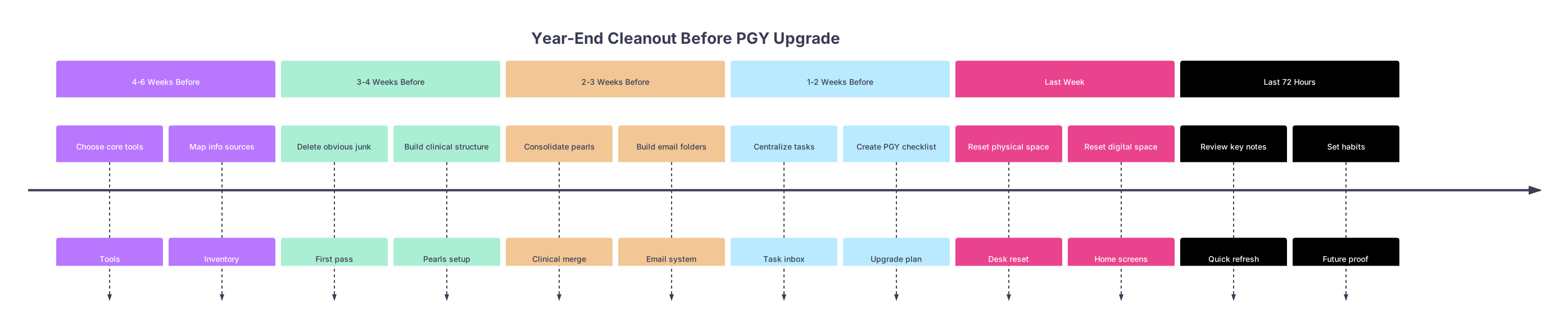
| Period | Event |
|---|---|
| 4-6 Weeks Before - Choose core tools | Tools |
| 4-6 Weeks Before - Map info sources | Inventory |
| 3-4 Weeks Before - Delete obvious junk | First pass |
| 3-4 Weeks Before - Build clinical structure | Pearls setup |
| 2-3 Weeks Before - Consolidate pearls | Clinical merge |
| 2-3 Weeks Before - Build email folders | Email system |
| 1-2 Weeks Before - Centralize tasks | Task inbox |
| 1-2 Weeks Before - Create PGY checklist | Upgrade plan |
| Last Week - Reset physical space | Desk reset |
| Last Week - Reset digital space | Home screens |
| Last 72 Hours - Review key notes | Quick refresh |
| Last 72 Hours - Set habits | Future proof |
Step 12: 1-Hour Clinical Pearl Review (Day -3 or -2)
At this point you should walk through your consolidated pearls as if you were coaching your intern.
In one uninterrupted hour:
- Skim:
- Top 10 bread-and-butter topics for your specialty
- Cross-cover notes / overnight issues
- Procedures you’ll be expected to supervise soon
- As you read, mark:
- “Update later” sections (but don’t fix now)
- Gaps (e.g., “Need IA dosing cheat for X antibiotic”)
This pass isn’t for new studying. It’s for knowing what tools you now have.
Step 13: Micro-Automations and Shortcuts (30 minutes)
These small moves save you hours across the year.
- Create:
- Text snippets for common notes (e.g., discharge instructions, sign-out structure).
- Email templates:
- “Schedule request”
- “Consult follow-up”
- “Thank you for teaching / mentorship”
- Save:
- Key phone numbers and paging codes in:
- A pinned note
- Favorites in your phone
- Key phone numbers and paging codes in:
- Pin:
- Your “PGY Upgrade Checklist” and “Overnight Cross-Cover” note in your app.
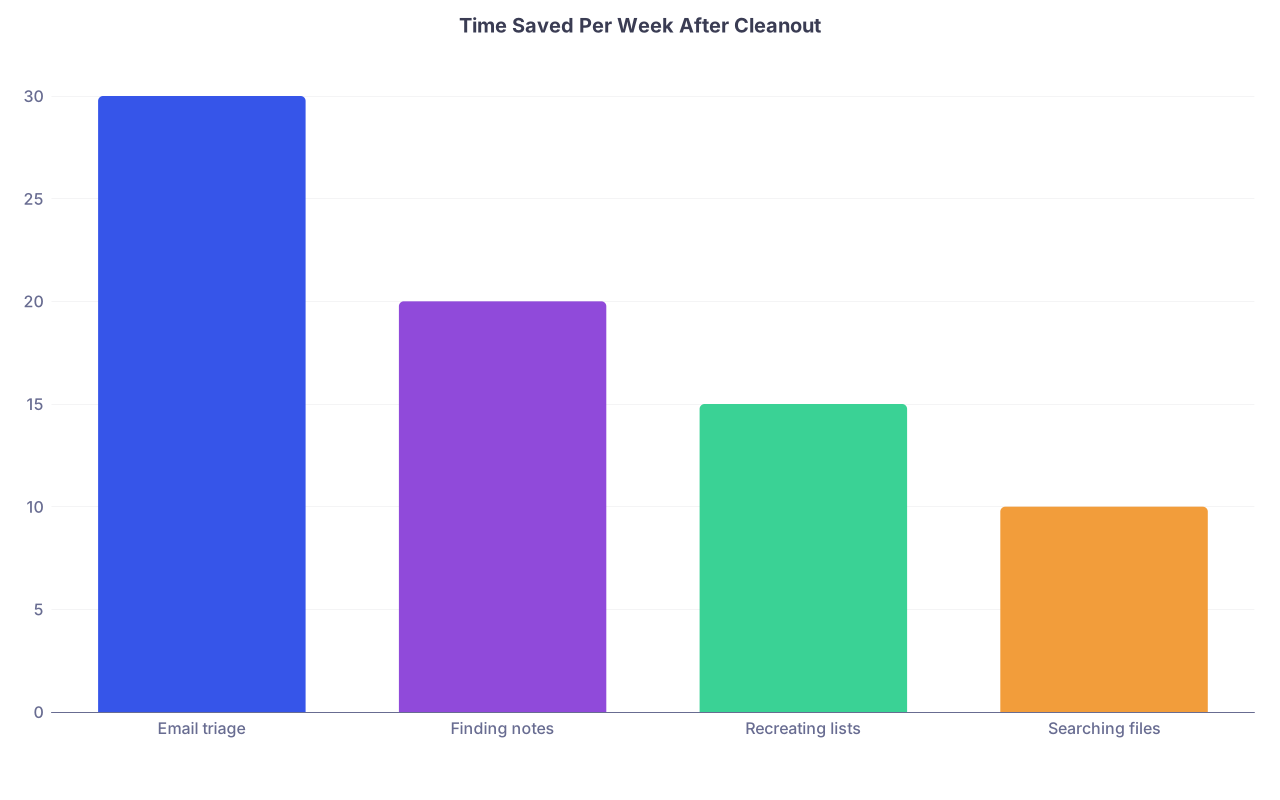
| Category | Value |
|---|---|
| Email triage | 30 |
| Finding notes | 20 |
| Recreating lists | 15 |
| Searching files | 10 |
Even saving 15–20 minutes a day compounds into real sleep and actual breaks.
First 7–10 Days as New PGY: Lock in Habits
The cleanout only matters if you keep the system light.
At this point you should stop tinkering with structure and just use what you built.
Step 14: Daily 5-Minute Reset
At the end of each shift (or as you sign out):
- Inbox:
- Move anything actionable → task app or “Action” folder.
- Tasks:
- Check off what got done.
- Move leftover items to specific days, not “later.”
- Notes:
- Drop any new pearls into the right topic file immediately.
- Don’t maintain random floating notes—file or delete.
Five minutes. Set a timer. Then leave.
Step 15: Weekly 20-Minute Review (Choose a Consistent Day)
Pick a relatively stable time—maybe post-call afternoon, or one weekend block.
Each week:
- Scan:
- Upcoming PGY-specific responsibilities
- Admin deadlines
- Teaching commitments
- Glance through:
- One or two clinical topic notes (whatever you struggled with that week)
- Archive:
- Finished mini-projects (e.g., QI meeting notes, completed committee tasks)
You’re adjusting the system with real data from your actual schedule, not imaginary future productivity.
| Time Before PGY Upgrade | Primary Focus Area | Main Actions |
|---|---|---|
| 4–6 weeks | Tools & Mapping | Choose apps, map info sources |
| 3–4 weeks | Junk Deletion & Structure | Trash obvious clutter, set clinical sections |
| 2–3 weeks | Clinical & Email | Consolidate pearls, build email folders |
| 1–2 weeks | Tasks & Checklists | Centralize to-dos, create PGY upgrade list |
| Last week | Physical & Digital Reset | Clean desk/bag, simplify screens and folders |
| First PGY week | Habits | Daily 5-min reset, weekly 20-min review |

If you remember nothing else:
- Decide on one home for notes, one for tasks, and a simple email structure—then force everything into those lanes.
- Do the cleanout in small, time-boxed phases: trash first, then consolidate pearls, then reset your spaces.
- Lock it in with a 5-minute daily reset and a 20-minute weekly review so your PGY upgrade starts faster, cleaner, and a lot less chaotic.