
The thing you’re scared of is not irrational. Residents do forget orders and tasks—and sometimes it matters.
That’s exactly why you need systems that assume you’re going to mess up… and catch you anyway.
You’re not crazy for thinking, “What if I forget to restart anticoagulation?” or “What if I meant to order that CT and never clicked submit?” I’ve watched senior residents—good ones—go pale when they realize an order was never placed. The difference between people who implode and people who survive isn’t genius memory. It’s systems.
Let’s build you some.
The ugly truth: your brain alone is not enough
You’re going to be:
- Post‑call and half‑conscious
- Juggling cross‑cover pages like it’s a cruel game show
- Interrupted mid‑order by a nurse, then a page, then a family member, then a code
And in that chaos, your working memory is a joke. If your current “system” is “I just remember things” or “I star them in my head,” you will drop things. Everyone does.
Here’s the mental shift you need:
Assume Future You is exhausted, distracted, and kind of dumb. Design around that person, not Ideal You on a good night with eight hours of sleep.
The goal isn’t to never forget. The goal is to forget…and still have backups that catch it.
Core principle: everything becomes a visible, trackable item
If a thought enters your brain—“I should order…” “I need to call…” “I’ll check that imaging…”—and it doesn’t get captured somewhere outside your head within 10–20 seconds, consider it gone.
So the rule is:
If it matters and takes more than 30 seconds, it must live in a system. Not in your memory. In a system.
Different people’s systems look different, but the good ones all share the same features:
- Easy to add things on the fly
- Easy to see what’s still open
- Easy to review before you go home / sign out
Let me walk through concrete setups you can copy, then we’ll deal with the nightmare scenarios running in your head.
System 1: The “live task list” you actually use
This is the backbone. You need an always‑open, always‑visible list for your current patients and tasks.
Old school? A folded piece of paper.
Semi‑modern? A Word/Excel/Notepad file.
Digital nerd? A notes app on your phone (if your hospital allows it and it’s de‑identified).
What matters is how you use it.
The basic layout
| Column | Purpose |
|---|---|
| Patient | Name/room/MRN identifier |
| Task | What exactly needs to happen |
| Due | Timeframe (now, AM, PM, later) |
| Status | Open, in progress, done |
Nothing fancy. What matters is that “Task” is specific:
Bad: “Follow up labs”
Good: “Follow up BMP for K repletion ordered 09:00”
And you treat this document as sacred. It stays open on your workstation. You don’t close it “just for a second.” You don’t write tasks on random scraps that never make it there.
The reflex you want is:
Page comes in → you acknowledge → you immediately add it to your list before doing anything else.
You can even say out loud: “Got it, I’m writing that down now.” Nurses actually like hearing that.
System 2: The 3 critical pause points that save you
Even with a list, things slip. The missing piece is deliberate “sweeps” where you stop and hunt for mistakes on purpose.
You need three daily checkpoints.
1. Mid‑shift “am I losing control?” sweep
Somewhere in the middle of the chaos—maybe around 11am on days, or 9pm on nights—you do a 5‑minute reset.
You:
- Open your list
- Open your EHR orders/results
- Ask, patient by patient: “What was I supposed to do for this person today?”
This is when you catch the “oh my god, I never ordered that CT” mistakes. If you only ever discover those at sign‑out, you’re dead.
2. Pre‑sign‑out sweep (non‑negotiable)
Right before you give sign‑out, you do another sweep. This one is harsher.
For each patient, you ask:
- Were there any tests/consults I meant to order but don’t see in the chart?
- Are there any “follow up X” items with no result yet?
- Is there anything I’m emotionally uncomfortable about but pretending is fine?
Do not rush this because you feel guilty keeping the cross‑cover waiting. Five extra minutes here beats “root cause analysis meeting next week.”
3. “About to leave the hospital” paranoia sweep
This is the one tired residents skip, then regret.
You’ve signed out, but before you physically walk out the door you do a 1–2 minute panic‑check:
- Any unread critical messages in the EHR?
- Any stat orders pending that haven’t been acknowledged by nursing?
- Any new results on “scary” patients—those on pressors, funky vitals, new O2 needs?
You’re not re‑rounding. You’re just asking, “Will I wake up at 3am thinking about something I could have checked right now?”
Sometimes the answer is yes, and you stay 5 more minutes. Annoying, but you sleep better.
System 3: EHR hacks to keep yourself from forgetting
Your EHR is either your enemy or your safety net. Might as well weaponize it.
Use order sets and favorites
Make “favorites” for your most common, easy‑to‑forget stuff:
DVT prophylaxis, bowel regimen, sliding scale insulin, daily labs.
That way, when you’re reordering a bundle, you don’t have to remember each line item—it’s all there. Less room for “I meant to restart their home med but forgot.”
Exploit reminders and flags
Some systems let you:
- Flag charts
- Add alerts or “sticky notes”
- Create personal task lists in the EHR
If your EHR has any of that, use it ruthlessly for things like:
- “Follow up CT head result”
- “Check blood culture at 48 hours”
- “Reassess need for foley tomorrow”
If it doesn’t, your own external list becomes that system. But don’t rely on “I’ll just remember to check it later.” You won’t.
System 4: The sign‑out that actually protects you
Bad sign‑out is vague:
“Stable. Follow up stuff. CT pending.”
Good sign‑out is specific and designed to catch missed tasks.
Use the classic “If X, do Y” structure:
- “If CT abdomen shows obstruction, call surgery.”
- “If K still <3.5 on repeat BMP, give another 40 mEq PO.”
- “If no stool overnight and still distended, page me / consider KUB.”
This does two things:
- Forces you to think: did I actually order the CT / repeat BMP / KUB?
- Gives cross‑cover a clear algorithm instead of psychic guessing.
Also, if there’s something you were supposed to do but time ran out (like a family meeting, or a nonurgent med rec), say that explicitly:
“Did not reconcile home meds today, needs full med rec tomorrow.”
That’s not failure. That’s transparency. And it lowers the chance of stuff vanishing into the void.
System 5: Protecting against the nightmare “I harmed someone” scenario
Let’s talk about what’s actually haunting you.
The fear isn’t just “I’ll forget a task.” It’s “I’ll forget something, a patient will be harmed, and it will be 100% my fault.”
Here’s the uncomfortable reality:
Yes, your mistakes can hurt people.
No, you are not single‑handedly responsible for preventing every bad thing in the hospital.
Your job is not perfection. It’s high‑reliability plus honesty.
The safety net is layered: nurses, pharmacists, seniors, attendings, the EHR itself. You are one layer. Important, but not the only one.
What you can do:
- Build your own systems so you miss fewer things
- Speak up when you realize you missed something, even if it’s embarrassing
- Learn from close calls instead of trying to repress them
I’ve seen residents order the wrong dose of insulin, forget to restart ACE inhibitors, omit DVT prophylaxis on surgical patients. Nurses caught some. Pharmacy caught some. Sometimes nobody caught it until the next day.
The residents who survived weren’t the flawless ones. They were the ones who said, “I screwed this up, here’s what happened, and here’s the checklist I’m adding so I don’t do it again.”
That’s how you gradually build your paranoid but effective brain.
System 6: The “paranoia checklist” for high‑risk stuff
There are a few categories where forgetting really matters and your anxiety isn’t overblown:
- Anticoagulation / antiplatelets
- Antibiotics
- Pressors / drips
- Oxygen / vent changes
- New neuro deficits
- Post‑op orders
For these, it’s worth having your own tiny checklist you glance at whenever you admit someone or change care plans.
Something like:
- DVT prophylaxis ordered?
- Antibiotic start/stop times clear?
- Restarted necessary home meds (beta blockers, antiepileptics, etc.)?
- Daily labs needed or can I cut some?
- Foley/lines really necessary?
Keep that on your sign‑out sheet, your notebook, or even taped inside your badge holder. It’s not cute. It’s survival.
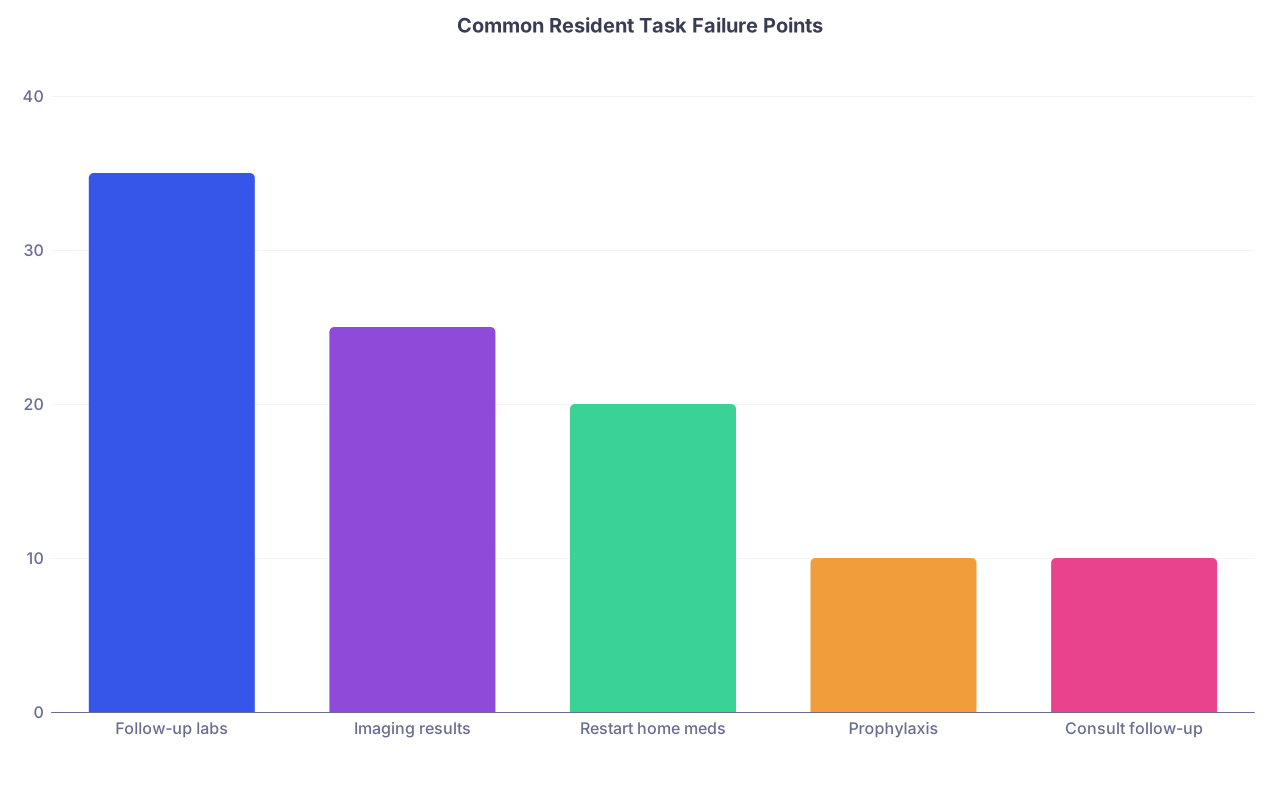
| Category | Value |
|---|---|
| Follow-up labs | 35 |
| Imaging results | 25 |
| Restart home meds | 20 |
| Prophylaxis | 10 |
| Consult follow-up | 10 |
How to handle it when you do forget something
Because you will.
Say you realize at 6pm that you never placed the CT order you promised at 10am. What now?
- First, fix the thing. Put in the order. Call the nurse. Do the immediate repair.
- Then, tell someone appropriate. Senior, attending, or both depending on severity.
“I realized I meant to order X this morning and didn’t. I’ve placed it now; here’s what I’m watching for.” - Ask, quietly but directly: “What should I do differently next time to avoid this?”
Not the self‑flagellating, “I’m terrible, I’m so sorry” performance. Just: what system failed, and what needs to exist now?
Maybe the answer is: “Add a mid‑day checklist for all pending imaging on new admits.”
So you do that. And you write it down. And you actually use it.
That’s how your personal safety net gets tighter with each screw‑up. If you just feel bad and then keep doing the same thing, you’ve wasted the pain.

| Step | Description |
|---|---|
| Step 1 | Task arises |
| Step 2 | Write on live list |
| Step 3 | Place order or action |
| Step 4 | Add to follow up column |
| Step 5 | Mark done |
| Step 6 | Mid shift sweep |
| Step 7 | Pre sign out sweep |
| Step 8 | Leave hospital check |
| Step 9 | Completed? |
Time and cognitive load: why this actually helps, not hurts
You might be thinking, “Great, more checklists, more steps, more ‘systems’ on top of my 80‑hour week.”
But here’s the messed up thing: living in constant “did I forget something?” terror drains a shocking amount of bandwidth.
Being able to say, “If it’s not on my list, it doesn’t exist” is strangely calming. It means when you leave, you’re not trying to mentally replay 40 interactions from the day. You’re asking a much simpler question:
“Did I do my sweeps? Did I clear my list as best I could, and sign out the rest honestly?”
That doesn’t erase anxiety. But it can turn the 3am spiral from “I probably missed something catastrophic and don’t even remember what” into “If something was pending, it’s on sign‑out and someone is watching it.”
You deserve that much peace.
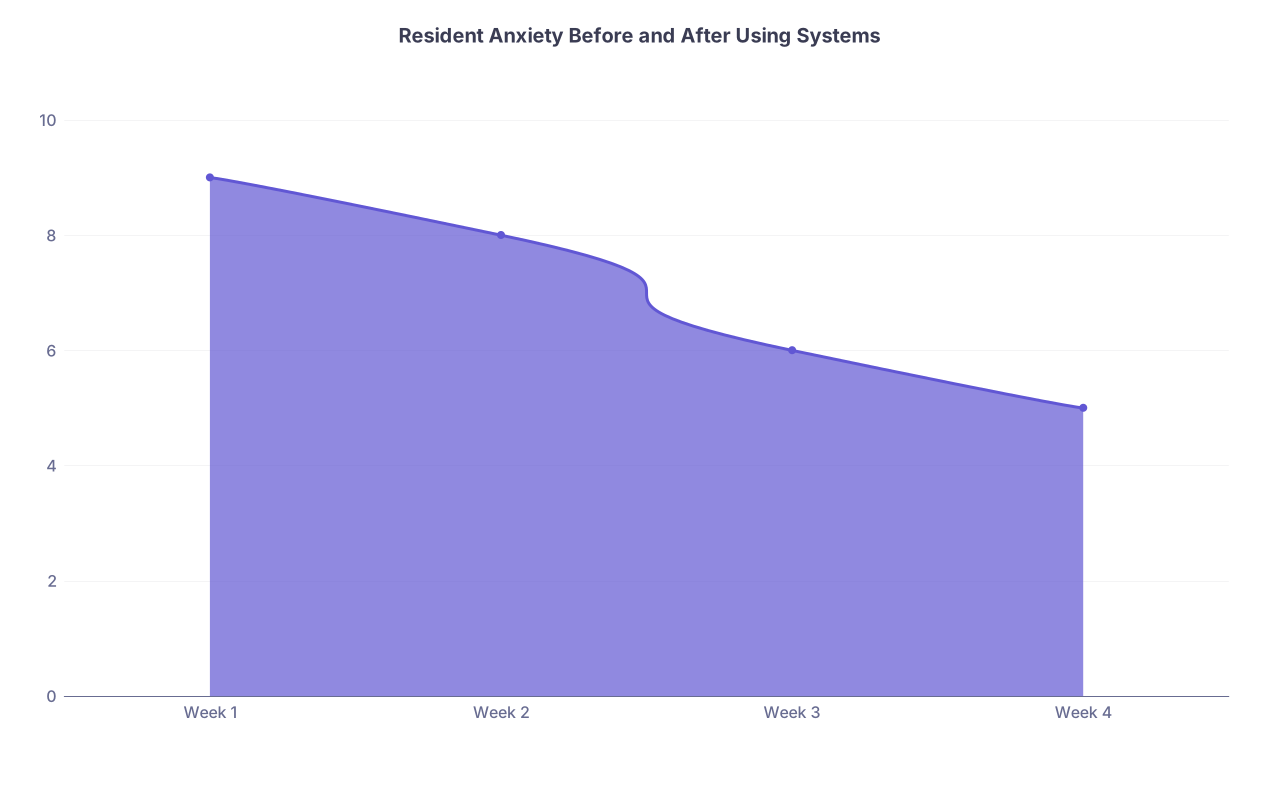
| Category | Value |
|---|---|
| Week 1 | 9 |
| Week 2 | 8 |
| Week 3 | 6 |
| Week 4 | 5 |
Putting this into practice without overwhelming yourself
Don’t try to build a perfect system overnight. That’s another trap—“If my system isn’t flawless, I might as well keep winging it.”
Pick one thing to implement this week:
- Either: A simple always‑open task list with 3 columns
- Or: A strict pre‑sign‑out sweep ritual
- Or: A tiny high‑risk checklist taped to your ID
Run it for a week. Tweak it. Then add the next layer.
Over time, you’ll have a setup that’s yours. Not generic, not Instagram productivity nonsense. Yours. Tuned to your rotations, your EHR, your bad habits, your anxieties.
And your brain will still be scattered and tired and interrupted constantly. But you’ll have scaffolding holding everything up.
That’s the entire game.


FAQ: Forgetting Orders and Tasks as a Resident
1. What if I forget something huge and a patient is harmed? Will I get kicked out of residency?
Worst‑case thinking here is brutal. Could something bad happen? Yes. Does one mistake automatically mean you’re done? Almost never. Programs look at patterns and honesty. If you own the mistake, help fix it, and put real systems in place so it doesn’t repeat, most attendings see that as growth, not grounds for exile. Silent, repeated, same‑type errors are what destroy trust. Not a single screw‑up you handle transparently.
2. Isn’t writing everything down slower than just doing it immediately?
Sometimes. But the problem is you can’t always do it immediately—because the phone rings, a rapid is called, a nurse stops you. Capturing tasks is insurance against those interruptions. Also, once you get used to it, jotting “CT abd/pelvis – order + f/u result” on your list takes seconds. Compare that to the time cost and emotional cost of realizing at 10pm you never ordered that CT.
3. What if my senior thinks I’m being neurotic with all these lists and checks?
Honestly? Most good seniors will be relieved you have a system. The ones who sneer and say “Just remember it” are either lying about their own systems or relying heavily on nursing and luck. You don’t have to make a spectacle of your checklists. Just quietly use them. When your sign‑out is consistently clear and your follow‑through is solid, people stop questioning how you got there.
4. Is it okay to use my phone for lists, or is that unprofessional?
Depends on your hospital’s policy and culture. Some places are fine with de‑identified notes; others are strict. If you do use your phone, never include names, MRNs, room numbers—just initials or “A1,” “B2” tagged to your printed list. If the culture is very anti‑phone, stick to a folded paper or a small notebook. The key is that it’s something you can keep on you and update constantly, not a giant binder you abandon on a random workstation.
5. How do I stop obsessing hours after I leave the hospital about what I might have forgotten?
You probably won’t totally stop—that’s kind of baked into this life. But you can blunt the edge. Build those sweeps into your day and treat them as your “contract” with yourself: “I did my mid‑day, pre‑sign‑out, and pre‑leave checks.” When the 2am spiral starts, you can at least say, “If something was hanging, it’s on sign‑out and someone’s watching it.” That’s not perfect comfort, but it’s miles better than just hoping your memory didn’t glitch.
6. What’s one concrete habit I can start tomorrow to make the biggest difference?
Start the always‑open task list and enforce one rule: no task lives only in your head for more than 15 seconds. Code, cross‑cover, clinic—doesn’t matter. If you agree to do something that isn’t literally happening right now, it gets written. Then, before sign‑out, you go line‑by‑line through that list. That one habit, consistently executed, catches a shocking number of near‑misses.
Open whatever you currently use for your sign‑out or task list—paper, Word, Notes, whatever—and add three columns: “Task,” “Due,” and “Done.” For your next shift, force yourself to put every non‑instant task in there and do one deliberate sweep before sign‑out. See what you catch.