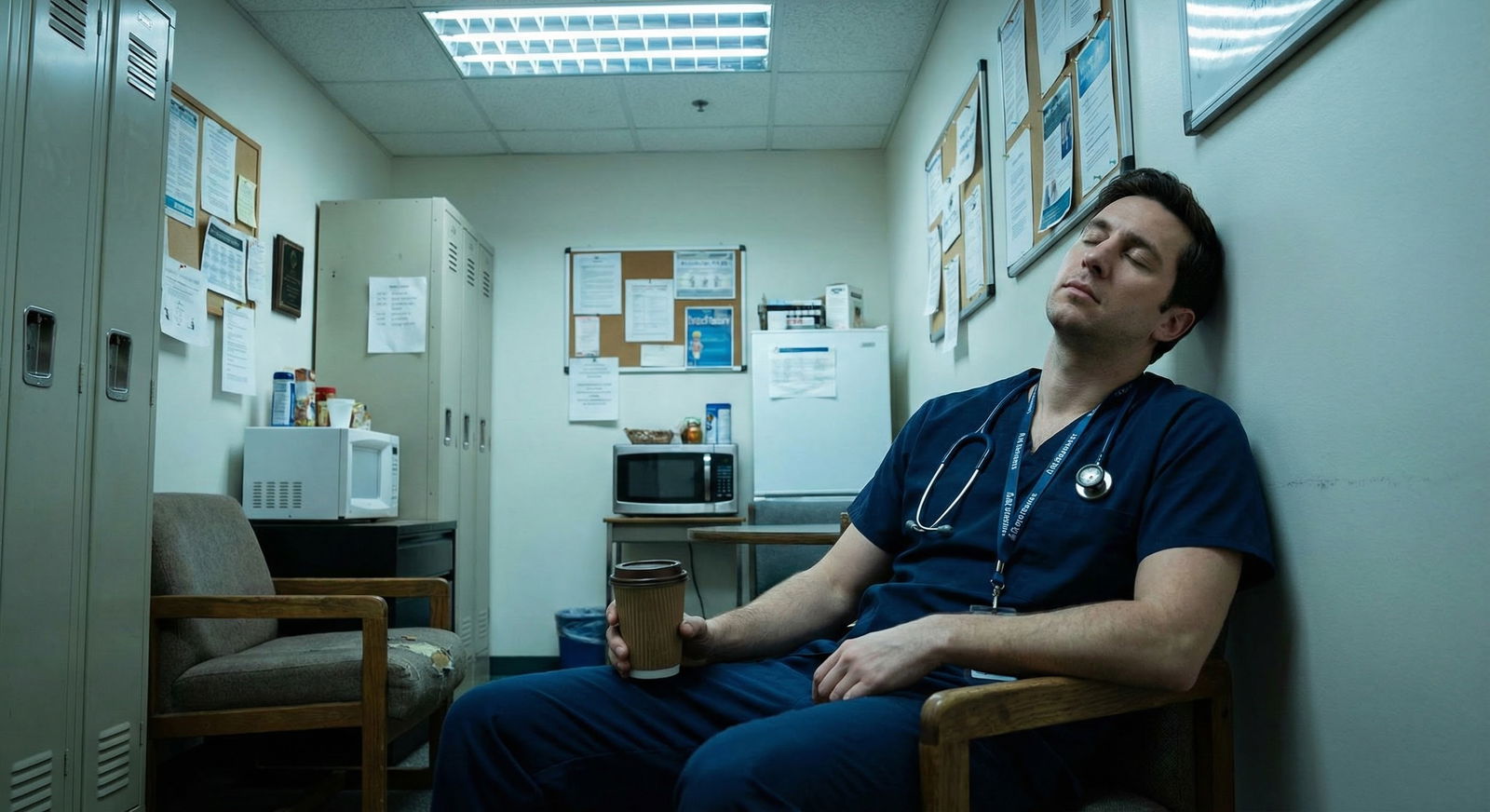
What do you do when everyone else is going home, sign-out is done, and you’re still sitting there drowning in notes?
Let’s fix that.
You’re not slow. You were never actually taught how to document efficiently. Most residents learn documentation by osmosis from whoever happened to be on service, which is a terrible system. The good news: once you put real structure and a few rules around how you chart, your note time can drop by 30–50% without making your attendings mad or putting you at medicolegal risk.
Here’s how.
Step 1: Decide What “Good Enough” Actually Means
You’re wasting time because you don’t know where to stop.
A safe, efficient note in residency does three things:
- Shows you knew what was going on with the patient.
- Shows you thought about the big dangers.
- Makes clear what you plan to do and who’s doing it.
It does not need:
- Every lab value since admission
- Copy-pasted CT scan narratives from 3 days ago
- Paragraphs of “patient was seen and examined…” fluff
Use this simple test for any daily progress note:
- If another resident picked up this chart cold at 3 a.m., could they:
- Understand why the patient is in the hospital?
- Name the top 1–2 active problems?
- Know the plan for the next 12–24 hours?
If yes, it’s good enough. Stop writing.
Step 2: Use Rigid, Repeatable Note Templates (But Keep Them Short)
Your notes should look the same every time. Not because you’re lazy, but because your brain needs a pattern to work fast.
Create one main template per setting:
- Inpatient progress note
- Admission H&P
- Discharge summary
- Consult note
- ED note (if applicable)
Then strip them down. Most people’s templates are bloated.
Here’s a clean inpatient progress-note skeleton that actually saves time:
- One-line summary
- Overnight events / subjective
- Objective (vitals, brief exam, key data)
- Assessment & Plan by problem
Stop there. You don’t need 20 headers.
Example one-line summary:
- “65M with COPD, HFpEF admitted for acute on chronic hypoxic respiratory failure due to pneumonia, now improving on day 3 of antibiotics.”
That one line, if you keep it updated daily, will:
- Orient cross-cover instantly
- Help you write discharge summaries faster
- Help your brain focus the rest of the note
Build this template into your EMR “dot phrases” or smart phrases.
| Smart Phrase Name | Purpose |
|---|---|
| .oneliner | One-line summary template |
| .inptprog | Daily inpatient progress note |
| .hpgen | General admission H&P |
| .dcsummary | Discharge summary skeleton |
| .consultnote | Standard consult structure |
Make them once, aggressively prune them, and stop re-creating notes from scratch.
Step 3: Stop Rewriting Data the EMR Already Shows
This is where residents lose hours.
You don’t need to re-document:
- Complete vital ranges for the last 24 hours if they’re in a flowsheet
- Every lab trend since admission
- Imaging results copy-pasted verbatim
Use “data pointers” instead of recreating the chart.
Examples:
- “Vitals: Stable, afebrile, sat >94% on 2L NC.”
- “Labs: Cr 1.3 (1.4), WBC 11 (13), Hgb 9.2 (9.4) – full labs reviewed in EMR.”
- “Imaging: CXR 1/6: RLL infiltrate, unchanged from 1/5 – see report for details.”
You’re signaling: “I looked. I understood. Here’s the relevant part.”
That’s all billing and medicolegal standards actually care about.
Step 4: Front-Load Thinking, Back-Load Typing
Most people do it backwards: they open the note and stare at the cursor, then slowly think while typing.
Flip it:
- Scan chart first (2–3 minutes max):
- Overnight events
- Vitals trends
- New labs
- New imaging
- Decide your top 3 problems and plan in your head (or quickly jot on paper).
- Then open the note and just pour it out.
You think faster than you type. Separate the thinking from the typing and your note time collapses.
If you’re on a busy inpatient service, try this pattern:
- Pre-rounds: jot a 2–3 word plan for each key problem on your patient list.
- After rounds: when you open the chart, you’re not inventing the A/P, you’re just translating shorthand into sentences.
Step 5: Use Problem-Based A/P for Everything
Long paragraphs of mixed issues are impossible to skim and painful to write.
Use a problem-based assessment and plan for every complex patient. It feels slower at first; in reality, it saves you time and cognitive load, especially after day 2–3 of an admission.
Simple format, reusable:
- “# Problem – short assessment sentence
– Plan line 1
– Plan line 2
– Cont / reassess by X”
Example:
- “# Sepsis due to pneumonia – improving, afebrile, WBC downtrending
– Continue ceftriaxone + azithro, day 3/5
– Wean O2 as tolerated, goal >92%
– Repeat CBC in a.m., consider transition to oral if remains stable”
Now you can update that problem in 10 seconds each day instead of rewriting a narrative note.
Step 6: Stop Over-Examining Stable Patients
You’re not doing a board exam every morning. You’re trying to be safe and efficient.
For stable floor patients:
- Do a targeted exam that matches the active issues.
- Document only what matters.
Example for a pneumonia patient on day 4:
- “GEN: Comfortable, no distress.
CV: RRR, no murmurs.
RESP: Mild crackles RLL, improved from yesterday; no increased work of breathing.
EXT: No edema.”
That’s fine. You don’t need “normocephalic, atraumatic, PERRL, MMM…” unless there is a neuro/ENT issue or acute change.
For unstable/ICU patients, yes, do more. But don’t let your ICU template bleed all over floor notes.
Step 7: Batch Tasks and Notes Together
Context switching kills your speed. Jumping between:
- Writing notes
- Answering pages
- Calling consults
…makes each task take longer.
You won’t get perfect blocks in residency, but you can usually do mini-batching:
- After rounds, do:
- Orders for all patients
- Pages/consult calls
- Then sit and write notes in one focused chunk
If you’re on a massive service, batch by group (“I’ll finish the four new admits first, then the five follow-ups”).
Avoid: writing half a note, getting interrupted, coming back and re-reading the whole thing to remember what you were doing. That double-work is where you lose time.
Step 8: Ruthlessly Reuse and Refine Your Own Work
Your best templates aren’t the generic ones in the EMR. They’re the good notes you’ve already written.
When you write a really clean:
- Sepsis note
- Chest pain admission
- Stroke consult
- COPD exacerbation admission
…save the assessment/plan section as a condition-specific dot phrase and tweak it next time.
Example:
.ap_sepsiswith bullets for:- Source control
- Cultures
- Antibiotics (with placeholders)
- Fluid resuscitation
- Pressors (if ICU)
- Lactate trend
- Disposition / monitoring
You’re not cloning blindly; you’re starting from a high-quality skeleton and editing to fit the patient.
This is how you avoid “blank page syndrome” with complex cases and cut cognitive load when you’re exhausted at 2 a.m.
Step 9: Use Voice Tools Where They Actually Help
Voice recognition is polarizing. Some residents swear by it; others hate it. The trick is using it strategically, not for everything.
Where speech shines:
- Long H&Ps with detailed histories
- Complex discharge summaries
- Narrative parts of consult notes
Where typing is still faster:
- Short progress notes
- Routine daily A/P updates
- Checkboxes / structured fields
If your hospital has Dragon or similar:
- Dictate the subjective and assessment/plan.
- Type the objective with smart phrases and quick edits.
And for the love of your future self: proofread quickly. Voice errors can make you look careless (“no chest pain” turning into “chest pain” is how people get yelled at).
Step 10: Build a Same-Day, No-Backlog Rule
This one’s harsh, but it works.
Never leave a shift with more than 1 note incomplete (and ideally zero).
- Always take 2–3x longer when done later
- Are less accurate
- Turn into late-night “charting parties” that ruin your week
Make this rule for yourself:
- “If the patient is still on my list, I write their note today. No exceptions, unless there’s an emergency.”
You’ll start protecting note time during the day more aggressively when you know you’re not “allowed” to dump it all on post-call you.
Step 11: Get Explicit About What Your Attendings Want
Unpopular opinion: some documentation stress is self-inflicted because residents are guessing what attendings want and overshooting.
Fix that with a 2-minute conversation:
- “Dr. Smith, I’m trying to get faster with notes without sacrificing quality. For daily progress notes, what do you actually care about seeing?”
- Then shut up and listen.
Common answers I’ve heard:
- “Clear one-liner, concise problem-based A/P, and documentation of big decisions/discussions. I don’t need all vitals and labs re-listed.”
- “Just make sure disposition and barriers are clear.”
- “Focus on thought process; templates can handle the rest.”
Once you know what this attending values, you can stop doing the extra 20% they don’t read.
Step 12: Protect Your Brain with Simple Habits
There’s a point in residency where you’re not slow; you’re just fried.
A few small habits that actually help documentation speed:
- Type faster. Sounds dumb, but increasing your typing speed by 20–30% is like finding free time every day. There are free trainers; 10 minutes a day for a couple weeks pays off.
- Use dual monitors if available. Chart on one side, write notes on the other. Less clicking, more flow.
- Turn off non-essential notifications while in a “note sprint.” Ask your team to call for anything urgent; most pages can wait 5–10 minutes.
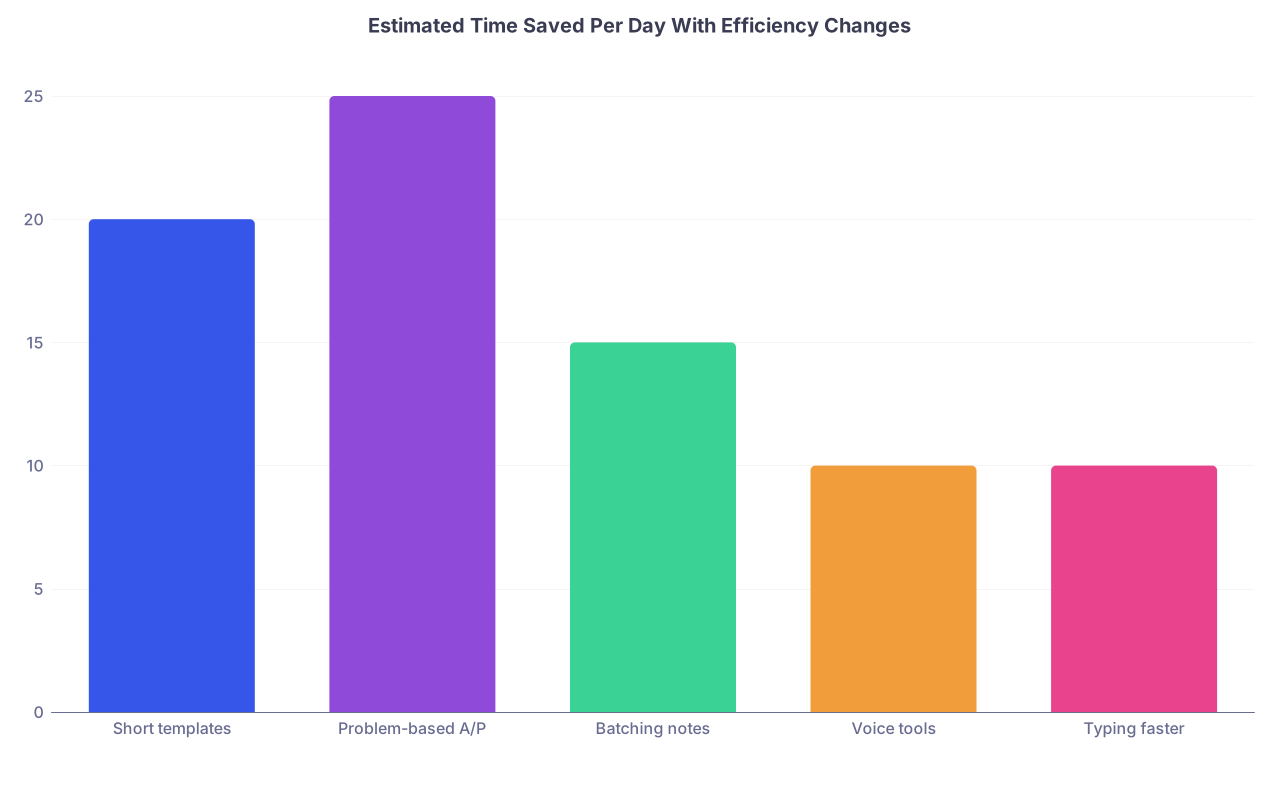
| Category | Value |
|---|---|
| Short templates | 20 |
| Problem-based A/P | 25 |
| Batching notes | 15 |
| Voice tools | 10 |
| Typing faster | 10 |
Even if those numbers are rough, the direction is right. These changes stack.
Example: Turning a 20-Minute Note into a 6-Minute Note
Let’s walk one through.
Old way:
- Open chart, start note from scratch
- Scroll labs while typing them into the note
- Copy-paste yesterday’s imaging again
- Write a rambling paragraph “patient was seen, appears comfortable…”
- Freestyle the assessment and plan as you type
- Get interrupted 3 times, re-read what you wrote each time
New way:
- Scan chart and your pre-round scribble:
“COPD exac – better, wean O2. Diuresis slower. Recheck BMP.” - Open
.inptprogtemplate. - Update one-liner:
“68F with COPD and HFpEF admitted for COPD exacerbation with hypoxia, now improving on day 3 of steroids and nebs.” - Subjective: 2–3 sentences, no fluff.
- Objective: brief vitals, major exam changes only.
- A/P: update 2–3 problem blocks with bullets. Don’t re-write stable, unchanged problems—just “No change, continue current management.”
Whole thing: 5–7 minutes once you’re used to it.
Simple Workflow Diagram You Can Copy

| Step | Description |
|---|---|
| Step 1 | Pre round |
| Step 2 | Review vitals labs imaging |
| Step 3 | Write quick problem list and plan on paper |
| Step 4 | See patient targeted exam |
| Step 5 | After rounds batch orders and calls |
| Step 6 | Open note template |
| Step 7 | Update one liner and subjective |
| Step 8 | Add focused objective |
| Step 9 | Problem based assessment and plan |
| Step 10 | Sign note same day |
It’s not fancy. It just works if you actually stick to it.
Quick Comparison: Inefficient vs Efficient Progress Notes
| Aspect | Inefficient Note | Efficient Note |
|---|---|---|
| Structure | Free text, variable each day | Same short template every time |
| Data | Re-lists full vitals and labs | Summarizes key changes |
| Exam | Full head-to-toe on every patient | Targeted to active problems |
| A/P | Long narrative paragraphs | Problem-based bullets |
| Time per note | 15–25 minutes | 5–8 minutes |
You want to be in the right-hand column. Consistently.
FAQs
1. How long should a daily progress note actually take?
For a typical floor patient: 5–8 minutes once you’ve got your templates and patterns down.
ICU patients or very complex cases might be closer to 10–12 minutes, but if you’re spending 20+ minutes on every note routinely, something in your workflow is broken.
2. Is copy-forward safe, or will it get me in trouble?
Copy-forward is fine if you aggressively edit and never leave outdated info. What burns people is “CXR from 1/3” still being in the note on 1/7 with different results in the chart. Use copy-forward for structure, then:
- Delete old imaging/labs
- Update assessment sentences
- Make sure plans and dates match reality
If you can’t verify it in <10 seconds, don’t copy it.
3. What absolutely must be in my note for billing and legal safety?
Non-negotiables:
- You saw and examined the patient (document a brief exam).
- You reviewed key data (labs/imaging as relevant).
- Your clinical reasoning (why you think X and are doing Y).
- The plan, with enough detail that another clinician could follow it.
You don’t need every data point written out, but your note should clearly show thought process and next steps.
4. How do I handle attendings who want super detailed notes?
You have two choices:
- Ask them exactly what they want and build a separate template just for them.
- Give them what they want on their service, and default to your leaner style everywhere else.
Don’t let one documentation-heavy attending dictate your entire residency note style.
5. How can I stop staying 1–2 hours late every day just to finish notes?
Three big levers:
- Lock in a same-day, no-backlog rule and protect 1–2 dedicated blocks on your schedule just for notes.
- Short, standardized templates with problem-based A/P.
- Batch work: finish orders and calls, then sit down and sprint through notes without constant task-switching.
You won’t eliminate all late days (it’s residency), but you can chop that extra hour down to 15–20 minutes most days.
6. Is voice recognition really worth learning?
If you do a lot of admissions, consults, or long narrative notes: yes, for most people it’s worth it.
If your work is mostly short progress notes with heavy templating, the return is smaller. Try it on a few complex H&Ps and discharge summaries—if it cuts those from 25 minutes to 10–15, keep it.
7. What’s the fastest way to start improving tomorrow?
Do three things:
- Build or clean up one short progress-note template today.
- Use a problem-based assessment and plan for every inpatient tomorrow.
- Commit to zero backlog—no notes carried into the next day.
You’ll feel the difference within one call cycle.
Key takeaways:
- Short, standardized, problem-based notes are both safer and much faster.
- Stop rewriting what the EMR already shows; focus your time on assessment and plan.
- Protect same-day note completion and batch your work—you’ll get your evenings back a lot more often.