
You are three months into intern year on a busy inpatient service. Your senior shows up 15 minutes late to rounds every day, never writes things down, keeps “the list” in their head, and waves off your questions with “yeah yeah, I’ll take care of it.” Orders get placed late. Discharges drift into the evening because no one actually knew the plan. You’ve already had one near-miss on a lab that wasn’t followed up.
You’re starting to realize something uncomfortable: if you rely on your senior’s system, you are going to hurt someone or burn out. Or both.
This is where you are: stuck under a disorganized senior, responsible for real patients, with your name on notes and orders. You cannot fix them. You can build your own safety system around them.
Here is exactly how to do that.
Step 1: Accept the Reality And Define Your Goal
First thing: stop waiting for your senior to transform into the attending you wish you had. They are who they are. Some seniors are brilliant but scattered. Some are lazy and scattered. Some are just drowning and never learned systems.
Doesn’t matter which you’ve got. The effect is the same: dropped balls, fuzzy plans, last-minute chaos.
Your actual goal is not “fix my senior.” Your goal is:
- Keep patients safe
- Keep yourself out of trouble
- Learn as much as possible without burning out
Once you see it that way, your strategy changes. You’re not just “helping” a disorganized senior. You’re building a parallel safety net that quietly catches what they drop.
Say that to yourself clearly: “I’m responsible for building my own safety system.”
Now we get concrete.
Step 2: Build a Ruthless Tracking System (Independent of Your Senior)
You need a system that does not depend on anyone else’s memory, whiteboard, or vibes. Paper, digital, doesn’t matter—what matters is that it’s:
- Fast in real time
- Reviewable later
- Standardized enough that you never “forget to track” something
The Minimum Architecture
For every patient you touch, you must consistently track:
- Active problems / diagnoses
- Today’s to‑dos (by time-sensitivity)
- Contingencies (“if X then Y”)
- Critical follow-ups (labs, imaging, consult recs, cultures)
- Safety checks (DVT ppx, code status, antibiotics stop date, lines/tubes)
Most residents screw up #4 and #5. That’s where misses live.
Here’s a simple structure that works with almost any service.
| Field | Purpose |
|---|---|
| Patient ID/Room | Identify quickly on the fly |
| Active Problems | High-level thinking anchor |
| Key Data | Last vitals, creatinine, Hgb, etc. |
| Today To-Dos | Tasks with checkboxes |
| Must-Follow Items | Labs, imaging, cultures, consults |
| Safety Checklist | Lines, ppx, code, abx end date |
I’ve seen this done three main ways: pocket notebook, laminated sheet + pencil, or digital note in the EMR. Pick one. Commit. Do not keep a hybrid mess “in my head plus random sticky notes.” That’s how misses happen.
If your senior never has a reliable list, you still do. You round with your list. You sign out with your list. You leave with your list checked.
Step 3: Convert Chaos into a Personal “Command Center”
Now you need a way to see the whole service at a glance: who is sick, who needs what, what’s pending.
This is your “command center.” You don’t ask your senior “what’s going on with 834 again?” every hour. You already know.
Here’s what this looks like in practice.
Create a One-Page Service Overview
On the back of your patient list (or top of your EMR note), maintain a tiny table:
| Patient | Status | Today Priority | Key Pending Item |
|---|---|---|---|
| 8-34 A | Unstable | High | CT angio result |
| 8-36 B | Stable | Medium | PT eval |
| 9-12 C | D/C ready | High | SNF acceptance |
| 9-14 D | Stable | Low | Repeat BMP 16:00 |
You update this twice a day: pre-round and post-round. Takes 3–5 minutes. Saves you hours of flailing.
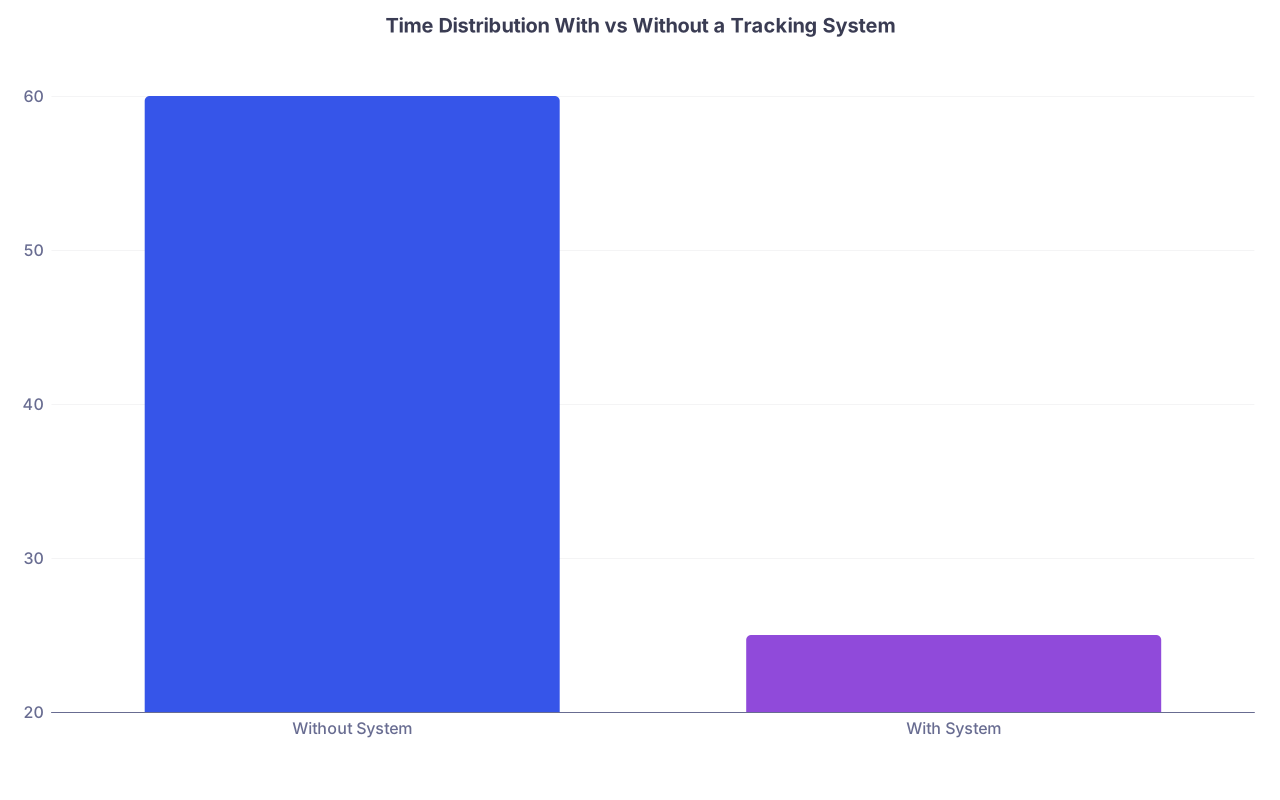
| Category | Value |
|---|---|
| Without System | 60 |
| With System | 25 |
That’s the difference I’ve watched in real interns: an hour per day wandering and re-asking questions vs 20–30 minutes of targeted review and proactive action.
Color or Symbol Coding (Even if Just in Your Head)
Use something fast and consistent:
- Asterisk (*) or highlight for unstable/sick
- Exclamation mark (!) for time-sensitive items
- Triangle (Δ) for pending results that will change management
Example in your notes:
- 8-34 A* – septic shock, pressors
- ! Repeat lactate by 13:00
- Δ Blood cultures drawn 06:00
It seems trivial. It’s not. It trains your brain to scan for danger and deadlines.
Step 4: Create a Daily Safety Loop (Morning, Midday, Evening)
You’re not going to “remember” everything because you’re a good person. You’re going to remember because there’s a loop.
Think like this: morning build → midday update → evening close.
Morning: Build and Prime
Before rounds:
Print/update your list
For each patient, write:
- Today’s anticipated main goal (e.g., “wean O2,” “SNF dispo,” “rule out PE”)
- One or two likely orders/labs you’ll need
Pre-mark “must follow” items you already know about:
- Cultures from yesterday
- Imaging ordered overnight
- Abnormal labs from 04:00 draw
That way, on rounds, you’re not just passively writing down what the senior says. You’re comparing what you planned vs what the attending wants, and adjusting your list in real time.
Midday: The 10-Minute Audit
Sometime between 13:00 and 15:00, you stop. Sit. Open your list.
For each patient, run through:
- Are all “today” orders actually in and executed?
- Any results back that I haven’t looked at?
- Any consults placed that I haven’t heard from?
- Any discharges that are getting delayed for dumb reasons?
You will catch things here that no one else has noticed. The CT that’s been “pending” for 6 hours because transport never picked up the patient. The potassium that came back 2.8 and no one called. The troponin that was ordered “just to be safe” and is now sitting elevated in the chart with no one aware.
This is your defensive line.
Evening: Close the Loop Before Sign-Out
Before you sign out, you run a closing checklist:
For each patient, ask:
- Any critical results (labs, imaging, cultures) still pending that might return overnight?
- Did I clearly tell the night resident what to watch for?
- Are there any loose orders that will trigger problems (e.g., Q2 hour labs that aren’t needed, tele that can be discontinued)?
If your senior is the type to give vague sign-out like “they’re fine, just call me if anything happens,” your sign-out will not be. You’ll cover:
- What might happen
- What’s pending
- What the night person should do before calling
You’re not doing this because you’re neurotic. You’re doing it because this is how you stop stupid 3 a.m. disasters.
Step 5: Protect Yourself with Documented Clarity
Disorganized seniors are famous for fuzzy verbal plans. “Just keep an eye on him.” “If it gets worse, we’ll scan.” “Order some labs.”
That is how you end up holding the bag when something goes wrong and the chart is silent.
Your protection: concrete, documented plans that match what you understood.
In Your Notes
In your daily note (or at least once per day), include a clear plan that reflects the team’s decisions:
- “Plan: If fever >38.5 again, will obtain repeat blood cultures and escalated coverage per sepsis protocol.”
- “Plan: If abdominal pain worsens or exam changes, will obtain CT A/P to evaluate for perforation.”
You’re not inventing medicine. You’re writing down what attendings and seniors say in real words instead of the shorthand they use in the hallway.
If your senior says something vague, push gently:
“So if she spikes again, what’s our next step—re-culture and broaden, or re-exam first?”
Then write that down.
If you’re overruled or someone chooses a riskier path, you document what was decided. Not in a passive-aggressive way. Just in clear medical language that matches the conversation. When cases are reviewed later, that matters.

In Your Own Prep Notes
In your personal tracking, use explicit triggers:
- “If net IO > +2L by 17:00 → page senior about diuresis.”
- “If K < 3.0 → replete per protocol + repeat BMP.”
You’re building mental pathways ahead of time, so at 16:59 you’re looking at net IO and not “oh yeah I was supposed to check that.”
Step 6: Communicate Upward Without Starting a War
Here’s the tightrope: you need to build your own system without alienating your senior or making them defensive. You are not there to expose them. You are there to protect patients and yourself.
A few scripts that work:
When your senior is scatterbrained with priorities:
- “To make sure I don’t miss anything, can I read back what I have as priorities for this afternoon?”
Then list them. Calmly. They’ll often correct or add things. You now have written priorities that they implicitly endorsed.
When you notice something undone:
- “I saw the CT from this morning is still pending. I can call radiology to check status if that would help.”
You’re not saying “you forgot.” You’re saying “I’m on it.”
When you need clarity for sign-out:
- “For 8-34, if her map stays low despite the fluids, do you want me to call you first or the ICU fellow?”
You’ve now forced them to pick a plan without framing it as “you didn’t give me one.”
If your senior truly borders on unsafe, that’s a different issue. But most are just disorganized. If you approach with “I’m trying to keep us from dropping anything,” they usually appreciate it.
Step 7: Handle High-Risk Situations with Extra Structure
Some situations are so failure-prone that with a disorganized senior you must double down.
New Admissions
Disorganized seniors are notorious for half-started admissions: someone orders labs, no admission orders, H&P half-written, no clear problem list.
Your move:
- For every admission you touch, you build:
- Problem list with an assessment for each
- Initial plan with contingencies
- Required admission orders (tele, diet, DVT ppx, code status, home meds)
If your senior wants to “do the orders later,” you can say:
“I can start the basic admission orders and mark them ‘for your review’ so at least they’re in.”
Then you track the admission as a separate to‑do until it’s truly complete: H&P done, orders in, home meds reconciled, code status clarified.
Hand-Offs and Post-Call Days
If your senior is post-call and foggy, assume details are wrong or missing. Your safety move:
- During morning sign-out, you keep your own list and write down:
- Unresolved pendings from overnight
- Any patients with overnight changes but no clear day plan yet
Then during pre-rounds, you patch holes:
- Confirm labs were drawn
- Check imaging status
- Clarify plans with the attending on rounds if needed
Again, you’re not saying “my senior botched this.” You’re functioning like an adult clinician who knows night coverage is messy.

| Step | Description |
|---|---|
| Step 1 | Start of Day |
| Step 2 | Update Patient List |
| Step 3 | Pre Rounds Review |
| Step 4 | Team Rounds |
| Step 5 | Enter and Confirm Orders |
| Step 6 | Midday 10 Min Audit |
| Step 7 | Follow Up Pending Results |
| Step 8 | Prepare Clear Sign Out |
| Step 9 | End of Day |
Step 8: Use the EMR as a Second Brain, Not a Black Hole
If your senior is disorganized, you cannot afford to let the EMR be just “where notes go.” It has to be an active part of your safety system.
A few specific habits:
- Use result filters and favorites. Build a quick filter for “today’s labs” and “today’s imaging” for your patients. Check it morning, midday, evening.
- Flag critical labs or put them on a personal watchlist. Many systems let you favorite or star certain results. Use that for K, Cr, lactate, troponin, etc on your sickest patients.
- Use the “sticky note” or summary feature. Many EMRs have a problem summary you can edit—keep the real current plan there in 3–4 bullets.
And do not assume your senior has even looked at half the results. If something looks bad, you speak up—even if their style is “I’m sure it’s fine.”
Script:
“Hey, just saw Ms. L’s lactate came back 4.2, higher than this morning. Want me to grab repeat vitals and see her now?”
You’re not “overreacting.” You’re doing your job.
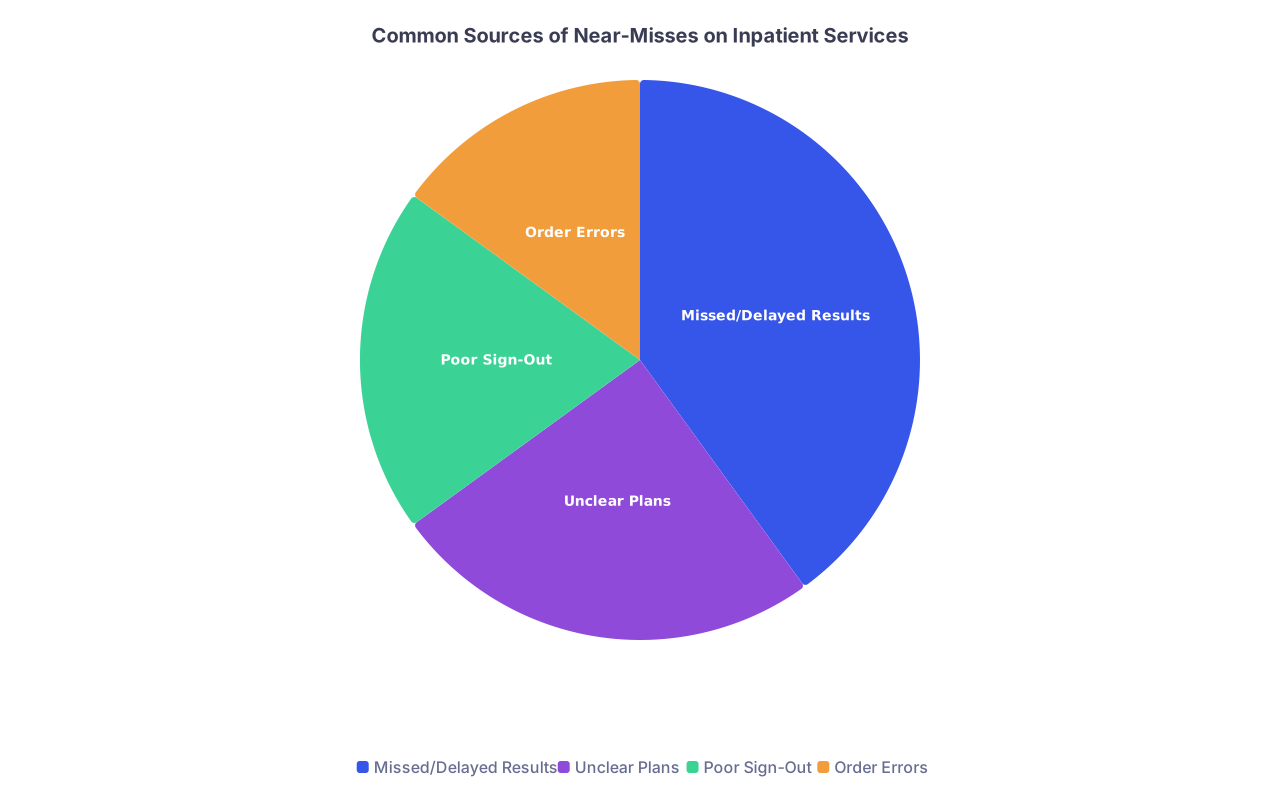
| Category | Value |
|---|---|
| Missed/Delayed Results | 40 |
| Unclear Plans | 25 |
| Poor Sign-Out | 20 |
| Order Errors | 15 |
The biggest category I’ve seen repeatedly in M&M: missed or delayed results. Lab or imaging that was back, no one acted.
Your personal system is specifically designed to crush that 40%.
Step 9: Know When to Escalate Above Your Senior
There is a line between “my senior is disorganized” and “my senior is unsafe.” If patient safety is clearly at risk and your senior won’t act, you go up the chain. Period.
Red flags that should push you to attending/fellow/charge RN:
- Senior refuses to see a clearly decompensating patient
- Senior blows off critical lab/imaging results as “nah, we’ll see tomorrow”
- Senior explicitly tells you not to document something significant
- Senior is impaired (intoxicated, asleep and unreachable, etc.)
How you escalate matters:
- Start with: “I’m concerned about X because Y, and I’m not sure our current plan addresses it. Can I get your input?”
- Frame around the patient, not “my senior sucks.”
Example to the attending: “I wanted to run something by you—Ms. T in 8-34 had her BP drop to 80/40 with lactate 4.2. We gave a bolus but she’s still hypotensive. I’m not convinced she’s stable for the floor.”
Let people be mad later if they want. Your primary duty is to the patient and your license, not your senior’s ego.
Step 10: Protect Your Brain and Your Time
One more thing no one tells you: working under a disorganized senior is cognitively expensive. You’re not just thinking about medicine; you’re also tracking their chaos. That’s exhausting.
So you need a few personal rules:
- Decide in advance when you’ll stop “fixing” optional things. You’re not there to redesign the entire service. You’re there to prevent harm. Prioritize tasks that affect safety and learning, not cosmetic perfection.
- Build micro-breaks into your day. That 10-minute midday audit? Also a chance to breathe, drink water, and re-center.
- After shift, spend 5 minutes asking: “What almost went wrong today? Did my system catch it?” Then tweak. One small adjustment per week is enough.

You’re not going to make this perfect. Every service has entropy. But if you build a simple, reliable system around a disorganized senior, you stop the worst errors and you train yourself to think like an attending.
And when you become the senior, you’ll already have the skeleton of a system your own interns can trust.
Your Next Step Today
Pick one piece of paper—literally one—and design your own daily patient template on it with:
- Patient ID/room
- Active problems
- Today’s to‑dos
- Must-follow items
- Safety checklist
Tomorrow, use that as your single source of truth for every patient you see. By the end of the day, circle any item that would have been missed without it.
That’s your safety system starting to work. Keep building from there.