
The unspoken rule of residency is simple: if you cannot control your inbox, your inbox will control you. And it will wreck you.
Everyone talks about procedures, notes, codes. Almost no one tells you the truth about the one thing that will quietly eat your time, your focus, and your reputation: your EMR and email inboxes.
Program directors do not lecture about this. Attendings rarely spell it out. But when doors close and committees talk about “that intern we don’t quite trust,” inbox behavior is one of the patterns they bring up. I’ve sat in those rooms. I’ve heard the phrases: “Always behind on results,” “Messages sit for days,” “Patients fall through the cracks.”
So let’s cut the nonsense and talk about how this actually works.
What Your Inbox Really Signals to Attendings
Your inbox is not a benign to-do list. It’s a live audit of how safe you are as a physician.
Attendings look at three things when they decide whether they can trust you with more autonomy:
- Do you know what’s going on with your patients clinically?
- Do you follow through?
- Do you close loops?
Your inbox shows all three. Mercilessly.
The quiet reality:
- Your EMR logs exactly how long messages, results, and refill requests sit untouched.
- Your clinic director and sometimes your PD can see panel-level metrics: overdue results, unaddressed high-risk labs, refill turnaround times.
- Colleagues absolutely notice when they inherit your patients and find 200+ unread results.
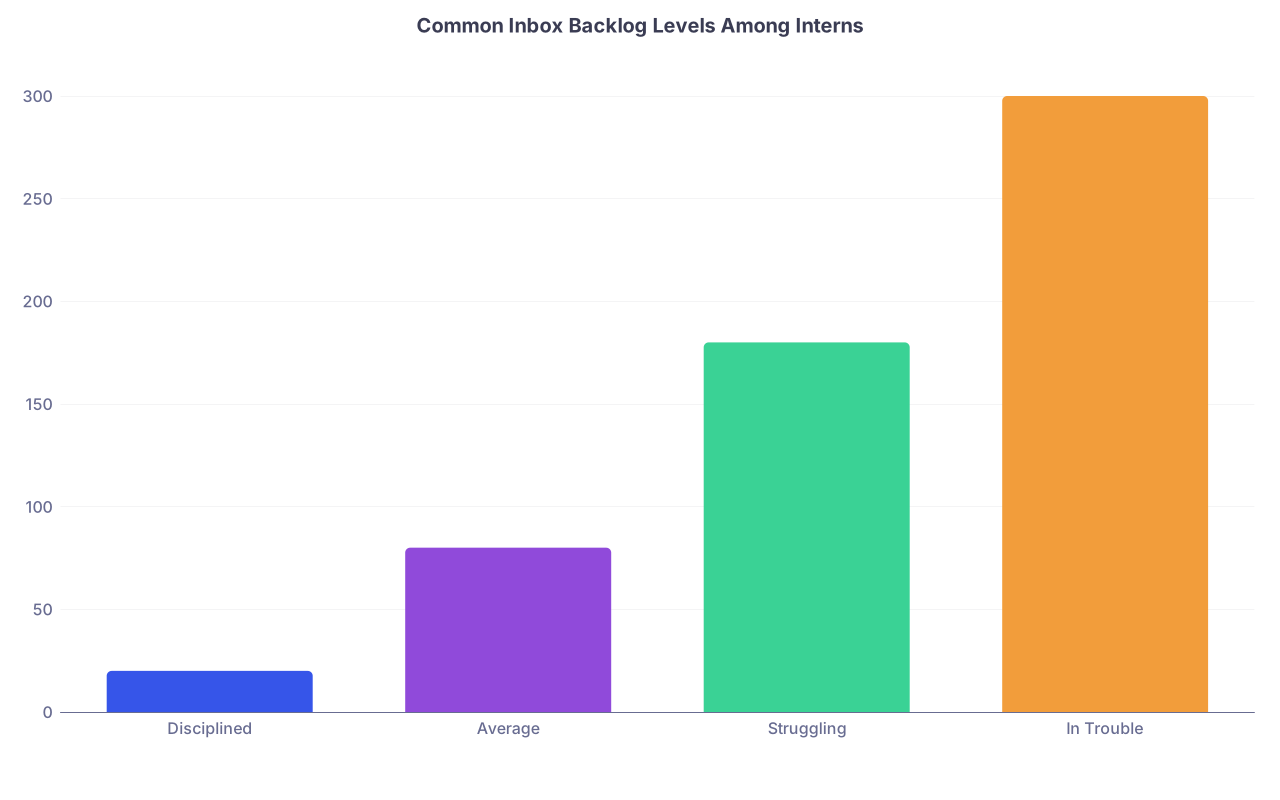
| Category | Value |
|---|---|
| Disciplined | 20 |
| Average | 80 |
| Struggling | 180 |
| In Trouble | 300 |
Here’s what different inbox patterns actually say about you in the eyes of faculty:
- 20–50 items, mostly new: “On top of things. Normal flow.”
- 80–150 items, many older than 48 hours: “Disorganized. Needs close supervision.”
- 150+ items, some >1 week old: “Unsafe. Systems problem… but also their problem.”
Nobody writes that in your evaluation as bluntly as I just did, but that’s the conversation.
I’ve watched an otherwise solid intern get blocked from moonlighting because the clinic director quietly told the PD, “I don’t trust their outpatient follow-up. Their inbox is always a disaster.” That never shows up on the Milestones. But it shows up in whether they let you operate, staff you more independently, or pick you for chief.
The Intern’s Real Enemies: Volume, Fragmentation, and Denial
Your problem isn’t that you’re lazy. It’s that the system is built to drown you.
A typical intern on a busy IM or FM service:
- Pre-rounds
- Notes
- Orders
- Family calls
- Cross-cover
- Discharges
- Admissions
- Teaching
- And then inbox. Maybe. If you’re not already post-call and half-dead.
The true enemies are:
Volume
Even “easy” clinics generate a ridiculous number of clicks. Lab results, imaging, patient messages, refill requests, FYI notes from specialists, paperwork tasks. A light clinic half-day can generate 30–60 unique inbox items. Heavy clinics double that. Then add inpatient messages.Fragmentation
Results land at 3:12 a.m.
Consultants send FYIs at 10:48 p.m.
Nurses send secure chats, then follow it with an inbox message, then a page if you miss both. Everything’s asynchronous. Everything breaks your flow.Denial
The most common intern strategy? Pretend the inbox is tomorrow’s problem. Until “tomorrow” is 3 weeks later and you’re staring at 300 items you cannot process safely in one sitting.
Let me be blunt: you cannot outwork this with brute force and good intentions. You need a system. And you need it early.
The 3 Inbox Rules Interns Don’t Get Told
There are three unspoken rules the senior residents who “always seem on top of things” are following. They rarely explain them explicitly; they just act like it’s obvious. It isn’t.
Rule 1: “Touch Once” Is Survival, Not a Productivity Slogan
On a surgical service, you don’t open the wound three times to finish one closure. You set up, you close, you move on. Inbox is the same.
The worst intern habit: opening a result, thinking “I’ll come back to this,” then letting it fade into the pile. That result just became cognitive clutter. And risk.
When you open something, your default should be:
- Read
- Decide
- Act
- Document
- Close / route
All in one go.
If you truly cannot finish it (needs attending input, needs more data), you do two things immediately:
- Add a brief internal comment or quick note to self: “Will discuss with Dr. Smith at noon; likely start ACEi if okay.”
- Route it or task it appropriately so it doesn’t just sit buried.
The attendings who watch this stuff can spot the “decisive” interns versus the “open and procrastinate” crowd in about a week. The decisive ones get more trust.
Rule 2: There Are Only Four Possible Actions
I’ve seen residents sink themselves because they treat every inbox item as unique and complicated. It’s not. You only have four options, and you should be ruthless about them:
Done by you
- You can resolve it fully. Order, call, document, close.
- This includes simple lab follow-up, routine refills with clear parameters, and basic symptom management.
Delegated appropriately
- Nursing question that doesn’t require MD thought? Route to RN pool with a short note.
- Paperwork that your coordinator usually handles? Forward and move on.
- Standing order protocols? Let the system work.
Escalated / co-managed
- Uncertain med change in a fragile heart failure patient? Route to attending with a concise summary and your proposed plan.
- Malignant pathology on a patient you barely know? Loop in PCP and relevant specialist with a suggestion, not just “FYI please advise.”
Deferred with a clear trigger
This is the one interns screw up. “Deferred” is not “ignored indefinitely.” It means:- You add a quick note documenting your thought process: “Borderline K+, repeat in 3 days; if >5.5 will adjust ACEi.”
- You actually place the follow-up order, reminder, or task.
Every inbox click should move an item into one of those four categories. If you stare at something for 45 seconds thinking “not sure,” you’re wasting time. Decide which of the four it is, act, and get out.
Rule 3: Time-Blocking Is Non-Negotiable
The residents whose inboxes implode all say the same thing: “I do it when I have time.”
You will never “have time.” You have to claim it.
The unspoken expectation at most programs: you’ll touch your inbox at least twice a day on weekdays and once per weekend day for high-risk items, even on inpatient months. Nobody writes that in your schedule, but attendings judge you like it’s written in stone.
Here’s what a workable pattern looks like:
Morning (5–10 minutes)
Quick high-level scan:- Critical labs
- New imaging with likely management impact
- Urgent patient messages (“new chest pain,” “short of breath,” “post-op fever”)
Mid/late afternoon (20–40 minutes)
This is your “operation block”:- Work through everything in order
- Follow your four-action rule
- Close as many loops as possible
Weekend quick check (5–15 minutes)
Not to clear everything. Just to prevent landmines:- Critical results
- Time-sensitive symptom messages
- Refill requests that, if delayed, will blow up your Monday

| Step | Description |
|---|---|
| Step 1 | Start of Day |
| Step 2 | 5 min urgent inbox scan |
| Step 3 | Pre-rounds and patient care |
| Step 4 | Midday quick check 5 min |
| Step 5 | Afternoon 20-40 min inbox block |
| Step 6 | End of Day - inbox triaged |
Is this annoying? Yes. Is it optional if you want to be seen as safe? No.
EMR Tricks People Rarely Teach Interns
Every EMR has quirks, but the principles are the same. The seniors who look “fast” have just learned to weaponize the system.
Let me walk through the patterns I’ve seen work across Epic, Cerner, and a couple of homegrown disasters.
Templates and SmartPhrases Are Not Just for Notes
You should have:
- A quick phrase for “normal lab” follow-up with built-in education
- One for “slightly abnormal but stable – continue plan, recheck”
- One for “please schedule follow-up visit/telehealth in X weeks for this issue”
Example for stable mild anemia follow-up (yes, you adapt to your style):
“Lab shows mild anemia, stable compared to previous results. No urgent changes needed today. We will continue current plan and recheck in X weeks/months. Call clinic sooner if you notice worsening fatigue, shortness of breath, dizziness, or bleeding.”
You insert, tweak one line, send. Fifteen seconds instead of two minutes.
Same for refill responses:
“Medication refilled for X months. Please keep your scheduled appointment on [date] so we can review how this medicine is working and if any changes are needed.”
Get 5–10 of these dialed in by the end of your first clinic month and your inbox time drops dramatically.
Filters, Pools, and Routing: Use Them Aggressively
The quiet interns who drown are the ones who let everything get dumped into “Me – Unread.”
You should learn, from day one of clinic, how your program expects you to use:
- Pool messages (nurse triage, admin, refill pool)
- Result routing rules (who gets pap smears, mammo, colonoscopy results, etc.)
- Surrogate / coverage setup when you’re on vacation or off-service
And then you adjust it. Politely. But firmly.
You do not need to see every faxed “physical therapy completed” note. Those can go to a pool. You do need to see new imaging and abnormal labs, always.
I’ve watched an intern cut their inbox by 30% in one week just by meeting with the clinic nurse lead and saying, “Show me exactly what should go directly to me versus the pool.” Ten-minute conversation. Huge impact. Nobody told them to do it; they just got tired of drowning.
High-Risk Items That Must Never Sit
There are certain inbox items that, when ignored, create lawsuits and “root cause analysis” meetings with too many suits in the room.
Those items buy you instant negative reputation if mishandled. Attendings remember them for years.

Red-Flag Categories
Critical result notifications
Pathology, radiology, labs flagged as critical.
If the system flags it as critical and you don’t act within a reasonable time frame, everyone suddenly cares about your inbox habits.New cancer or life-altering diagnoses
That radiology result with “suspicious for primary malignancy.”
That HCV, HIV, or new severe cardiomyopathy echo.
These are not “send MyChart message and walk away” results.Post-op or recently discharged symptom messages
“New shortness of breath,” “wound leaking,” “fevers and chills,” “I can’t keep food down since discharge.”
These are call-the-patient or escalate-now scenarios, not “I’ll batch this with the rest during my afternoon block.”Controlled substance refills
These are landmines. Systems watch them. Pharmacies log them. PDs hear about patterns.
You need your team’s exact policy burned into your brain and you follow it consistently.
If you develop a reputation for never letting these sit, attendings trust you more with almost everything else. It’s pattern recognition.
Balancing Patient Safety with Self-Preservation
Here’s the tension nobody manages well early on: you need to be safe and responsive, but you also need to not destroy your own life by being on a 24/7 inbox leash.
The answer is structure and boundaries, not martyrdom.
Set Reasonable Response Windows
Most programs quietly consider a business-day response within 24–48 hours acceptable for non-urgent patient messages and routine results.
That means:
- You are not morally obligated to answer every FYI before midnight the same day.
- You are expected not to let non-urgent stuff age into weeks.
Your goal: a system where, on any random day, if your PD clicked into your inbox view, they’d see:
- Most items from the last 24 hours
- Almost nothing older than 3–4 days
- High-risk results clearly addressed or in progress
That’s it. That’s the bar.
Use Your Team, But Don’t Hide Behind Them
The worst look: interns who quietly forward everything to the attending without comment.
If you route something up the chain, you attach:
- Brief context: “56M with HFpEF, baseline Cr 1.1, now 1.5 after recent diuretic increase.”
- Your actual thought: “Recommend holding HCTZ, recheck BMP in 3 days; okay?”
This shows two things: you’re thinking, and you’re not just dumping liability upward.
Make it a goal by mid-year: any time you escalate an inbox item, your attending sees you already have a proposed plan. That’s when trust starts to build in a tangible way.
What Inbox Mismanagement Does to Your Reputation
Let me be direct, because sugarcoating this is useless.
I’ve sat in resident eval meetings where nobody cares what your raw Step score was anymore. They care about:
- “Do they close the loop on tests they order?”
- “Do patients complain that no one calls them back?”
- “Do we get refill crisis calls from pharmacies for their patients?”
| Inbox Pattern | How Faculty Interpret It |
|---|---|
| Low backlog, timely responses | Organized, safe, reliable |
| Moderate backlog, random clean-up | Disorganized but salvageable |
| Frequent delayed high-risk results | Poor judgment, unsafe |
| Constant refill crises and complaints | Systems liability, red flag |
| Relies on others to clean inbox | Lacks ownership, not ready for autonomy |
I’ve seen borderline residents saved by one thing: every attending says, “They’re always on top of their patients. Never have to chase them to follow lab results or call families.” That buys you grace when your notes are slow or your knowledge is still catching up.
I’ve also seen smart, likeable interns quietly blacklisted from competitive fellowships at their own institution because the whisper is, “They’re a mess in clinic. The inbox is always behind. Patients fall through the cracks.”
Nobody tells you that in feedback form. But it affects who writes you strong letters. Who advocates for you in selection meetings. Who answers the phone when a fellowship director calls and asks, “Would you take them again?”
A Practical Starting Plan for New Interns
If you’re thinking, “My inbox is already a disaster,” here’s how you reset without setting yourself on fire.
Step 1: Hard Reset and Triage
Choose one protected block. Post-call afternoon. Half-day off. Whatever.
Your goal in that block is not perfection. It’s to:
- Sort by oldest first
- Quickly close anything truly outdated (“normal result from 3 months ago”) with a brief note if needed
- Identify and handle any still-active high-risk items
- Use your four actions rule to move everything else along
Yes, it’s painful. Yes, you’ll be embarrassed by some old stuff you find. Don’t dwell. Fix and move forward.
Step 2: Build the Minimal Toolkit
By the end of the week, you should have:
- 5–10 SmartPhrases for common result/reply patterns
- A clear understanding with your nurse/MA team of what must go to you versus the pool
- Your daily time blocks chosen and communicated to yourself like they’re actual orders
Write them down. Seriously. On a post-it on your workstation: “AM scan / PM 30 min inbox.”

Step 3: Audit Yourself Weekly
Once a week, for 5 minutes:
- Sort your inbox by age
- Note how many items >3 days old
- Glance through whether any high-risk stuff is sitting
If that number starts climbing, you don’t wait until next month to fix it. You tighten your time blocks, refresh your templates, and—if needed—you ask a senior or clinic director for 10 minutes of targeted help.
The intern who says, “Hey, I’m noticing my inbox gets out of hand on inpatient months; can you walk me through how you handle it?” earns a lot more respect than the one who waits until the clinic director calls them in for a “pattern of delayed responses.”
What Comes Next
Once you get through the intern year, the stakes get higher, not lower. Your panel grows. Your autonomy increases. Your name appears on more lab requisitions and imaging orders.
But. If you build these habits now—touch once, four actions, time-blocked reviews—you aren’t scrambling as a PGY-2. You’re just refining.
Eventually, you’ll be the senior people think of as “on top of everything.” The one the program leans on. The one they actually choose for chief, for leadership, for competitive fellowship letters.
And then you’ll be the one in the closed-door meeting saying, “We can’t graduate someone who still lets critical results sit in their inbox.”
With these rules wired into how you practice, you’ll survive the chaos of residency without being owned by your EMR. The next battlefield is different: signing your own patients out safely, night float communication, and how you handle cross-cover disasters at 3 a.m. But that’s a story for another day.