
The way most residents handle email is broken—and it’s quietly wrecking their productivity and focus.
You’re not drowning because you have email. You’re drowning because of a few specific habits that turn a basic communication tool into a 24/7 anxiety machine. I’ve watched residents miss consults, botch handoffs, and screw up documentation not because they were lazy, but because their inbox was running them instead of the other way around.
Let’s go through the landmines one by one so you don’t repeat the same mistakes.
Mistake #1: Treating Email Like a Pager
The biggest mistake? Using your inbox like it’s a second pager.
If you’re reflexively checking email every few minutes on your phone, you’re doing deep damage to your attention. I’ve seen interns:
- Glance at an “urgent” admin email while pre-rounding
- Get irritated and distracted
- Forget to re-check vitals or follow up on a lab they just saw
Not because they’re incompetent. Because their brain got yanked out of clinical mode into admin mode mid-task.
Here’s the trap:
Most residency-related emails feel urgent. Very few actually are.
Common offenders:
- “Please complete this compliance module by the end of the month”
- “Town hall meeting tomorrow at noon”
- “New rotation schedule posted”
- “Reminder: Fill out your duty hours”
None of those justify checking email 30+ times per day.
Don’t make this mistake:
Stop real-time checking.
Turn off push notifications for email on your phone. Yes, really. You need your pager and secure messaging to be interrupt-driven. Your email? Not so much.Create fixed email windows.
On typical days, something like:- Once pre-rounds are done and notes are in (late morning)
- Once in the late afternoon / pre-sign-out
- Once in the evening (if needed)
On call-heavy or ICU days, you might cut that to once or even skip a day and catch up on your golden day.
Tell people how you use email.
Add a short line to your signature:
“Resident physician – I check email 1–2 times per day. For urgent clinical issues, please page or message via [system].”
You are not obligated to let your inbox interrupt you like a code blue. Treat it that way and you’ll work like you’re in permanent arrhythmia—fast, erratic, and ineffective.
Mistake #2: One Giant, Untouched Inbox
If your inbox is 9,746 unread emails deep and you’re just “searching as needed,” you’re living dangerously.
I’ve seen these go wrong in real time:
- Missed rotation change emails
- Missed board exam registration deadlines
- Missed “credentialing documents incomplete” messages
- And the favorite: “You are on jeopardy call tomorrow” → not seen → disaster
You can’t rely on search if you never separate signal from noise.
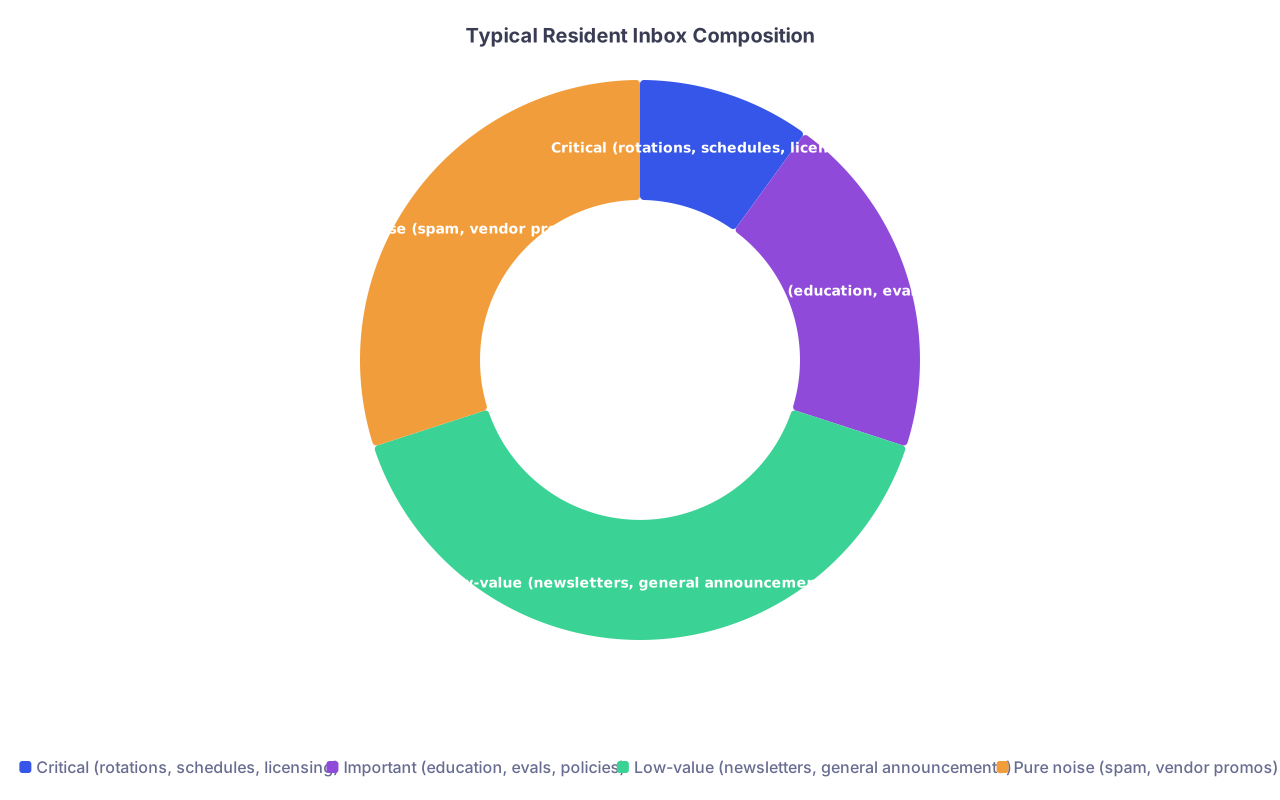
| Category | Value |
|---|---|
| Critical (rotations, schedules, licensing) | 10 |
| Important (education, evals, policies) | 20 |
| Low-value (newsletters, general announcements) | 40 |
| Pure noise (spam, vendor promos) | 30 |
Most residents let all four of those categories sit in one undifferentiated pile. Then they scroll or search and hope they don’t miss anything.
Don’t make this mistake: Build minimal, functional structure.
You do not need a 40-folder system. You do need a skeleton that keeps you safe:
1. “Action – This Week” folder or label
Anything that:- Requires a response
- Requires a form
- Requires completion within 7–10 days
Lives here until it’s actually done.
2. “To Read – Nonurgent” folder
Grand rounds announcements, educational resources, newsletters. Stuff that’s “nice if I see it” but not critical.
This is your guilt-free zone. If you never open it during a rough month, fine.3. “Reference – Residency Admin” folder
- Contract
- GME policies
- Rotation manuals
- Vaccination/occupational health info
Anytime you get something you might need in a panic later, drag it here.
4. “Schedules – Rotations and Call” folder
Every schedule email gets filtered or moved here. Non-negotiable.
Then use simple rules/filters to auto-file:
- Subject contains “Grand Rounds,” “Journal Club,” or “Newsletter” → To Read – Nonurgent
- From GME office with “policy” or “update” → Reference – Residency Admin
- From chief residents with “schedule,” “call,” “jeopardy,” “vacation” → Schedules – Rotations and Call
Spend 30 minutes once setting this up. It’ll save you from the “I never saw that email” conversation you do not want to have with your PD.
Mistake #3: Using Your Inbox as a To-Do List
This one is brutal and almost universal.
Residents leave emails “unread” or starred because:
- “If it’s unread, I’ll remember to do it.”
- “I’ll just keep it at the top until I handle it.”
Result:
- Important tasks buried under new messages
- Constant re-reading of the same 15 emails you still haven’t handled
- Mental clutter every time you open your inbox
Your email is a terrible task manager. It wasn’t designed for it. Treating it like one guarantees things fall through the cracks.
Don’t make this mistake: Separate tasks from email.
Pick one place—just one—to track tasks:
- A simple note app
- A paper list in your white coat
- A Trello board if you’re fancy
- The Reminders app on your phone
Then follow this very boring but very effective rule:
When you open an email, ask one question:
“Is there an action I need to do that takes more than 2 minutes?”
- If no → handle it now (reply, file, delete)
- If yes →
- Extract the task into your task system (“Finish ACLS module – due 5/30”)
- Include the key details (link, deadline)
- Then archive or file the email. Don’t leave it sitting.
I’ve watched residents spend 20 minutes “sorting email” and leave with:
- Same number of unread messages
- No clear list of what actually needs doing
- Higher anxiety
Stop letting your inbox pretend it’s a to-do app. It’s not.
Mistake #4: No Priority Triage System
Not all emails are equal. But if you treat them like they are—opening and responding in the order they appear—you will:
- Waste time on low-value admin noise
- Miss or delay responses to important messages
- Build a reputation as “hard to reach” for the stuff that actually matters
Here’s what efficient residents do differently: they apply a quick triage system. Literally 30–60 seconds per email batch.
Don’t make this mistake: Use a dumb “oldest first” approach.
Instead, think like this every time you open your inbox:
Scan subjects and senders first.
Do not start opening everything. Just scan.Mentally tag each new email as:
- Critical – time-sensitive, with real consequences
- Schedule changes
- Licensing, credentialing, visa issues
- PD/associate PD messages to you personally
- Important – matters but not urgent
- Evaluations
- Educational opportunities you care about
- Committee/leadership stuff
- Low-value – useful only if time allows
- Newsletters
- General announcements
- Noise – unsubscribe material, spam
- Critical – time-sensitive, with real consequences
Handle in this order:
- Critical → Important → Low-value → Ignore/Unsubscribe
| Priority | Example Subject Line |
|---|---|
| Critical | "Schedule update – you are covering nights next week" |
| Critical | "Action required today – license paperwork incomplete" |
| Important | "360 evaluation for ICU rotation due in 5 days" |
| Low | "GME newsletter – wellness events this month" |
| Noise | "Upgrade your scrubs – vendor promotion" |
Most residents do the reverse. They click the easy, low-stakes emails first because they’re less emotionally loaded. That’s how you end up answering a wellness survey while missing a schedule change that ruins your weekend and angers your chief.
Build the habit: scan → triage → act in priority order.
Mistake #5: Writing Overlong, Overcomplicated Replies
You don’t have time to be Tolstoy on email. But a lot of residents write:
- Paragraphs of backstory
- Apologies stacked on apologies
- Vague responses that generate more questions
I’ve seen emails like:
“Hi Dr. X, sorry for the delay, yesterday was really hectic and I was on a 28-hour shift and then post-call, and I’m not actually sure what the right answer is, but I think maybe I can probably get to this sometime next week if things calm down…”
That sort of reply just creates more email.
Don’t make this mistake: Use tight, structured responses.
Three simple rules:
Lead with the answer.
Not context. Not apology. Answer.- “Yes, I can attend.”
- “No, I’m post-call that day.”
- “I’ve completed the module.”
- “I don’t know the answer; here’s who might.”
Use single-screen emails.
If your reply doesn’t fit comfortably on one phone screen, it’s probably too long for routine resident-level stuff.Give clear options instead of open loops.
- Bad: “Let me know what works.”
- Better: “I’m free Wed 1–3 or Thu 9–11. Do either work?”
Short, decisive emails reduce your own volume. Every vague answer invites three more messages.
Mistake #6: Mixing Personal and Professional Accounts
This one gets people in real trouble.
If you’re forwarding residency emails to your personal Gmail because it’s “easier,” here’s what can go wrong:
- Lost messages when filters break or change
- Privacy issues if your personal account isn’t secured
- Missing institutional requirement emails that never forward correctly
- Violating policies about where PHI or semi-sensitive info can live
Also: if anything ever becomes a legal or formal issue, you do not want critical program communication only on your personal phone.
Don’t make this mistake: Keep a clean separation.
You don’t need a complex system. Just:
- Use your institutional email for:
- Schedule
- PD, chiefs, GME
- Patient-related or rotation-related info
- Evaluations and official documentation
- Use personal email for:
- Board prep services
- Journal subscriptions
- Networking and non-hospital professional stuff
Access your institutional email through the official app or webmail. If you really must see everything in one place, use a secure mail client that can show both accounts separately, not auto-forward.
And if you’re already forwarding? Stop. Clean it up now before it bites you.
Mistake #7: Letting Newsletters and Listservs Take Over
Residency programs love email lists. Departments love newsletters. Journals love TOC alerts. Before you know it, half your inbox is stuff you never asked for.
Residents get stuck because:
- They’re afraid unsubscribing looks unprofessional
- They think, “I might read these on a lighter month” (they won’t)
- They’ve lost track of what they’re even subscribed to
Don’t make this mistake: Be ruthless with subscriptions.
Once a month (set a repeating reminder), do a 10–15-minute “unsubscribe sweep”:
- Search “unsubscribe” in your inbox
- Scan from common offenders:
- Journals you never open
- Hospital-wide newsletters you ignore
- Vendor promotions
- Unsubscribe aggressively
For things you might want but not right now:
- Filter to “To Read – Nonurgent” instead of your main inbox
That keeps your day-to-day email sane.
Mistake #8: Ignoring Email During Critical Transitions
Residents often under-check email at exactly the wrong times:
- Rotation switches
- Just before and after vacations
- End of year / promotion transitions
- Before starting fellowship or moonlighting
That’s when schedules, credentialing, and requirements change—and when missing an email can actually derail you.
Don’t make this mistake: Change your email habits during high-risk weeks.
During:
- The week before a new rotation
- The first week of a new rotation
- Two weeks before licensing/board/deadline-heavy periods
Do this:
- Check email slightly more often (2–3 quick scans per day)
- Search by key senders:
- Chiefs
- Program director
- GME office
- Credentialing office
This isn’t about being “always on.” It’s about not finding out on Monday morning that you were supposed to start nights Sunday.
Mistake #9: Not Protecting Your Off-Time From Email
If you let email bleed into every free moment, residency will feel like it never stops. Some residents do this to themselves:
- Checking email in bed “just to see”
- Responding on post-call days when they’re foggy and half-conscious
- Answering admin emails on vacation “to be a team player”
You’re not scoring points for responsiveness at 11:30 pm. You’re just teaching everyone that your boundaries are optional.
Don’t make this mistake: Define your off-limits zones.
Pick a few rules for yourself:
- No email after a set time (e.g., 9 pm) unless you’re on nights
- No email on post-call days until you’ve slept
- No email during the first and last hour of your “golden day”
If something is truly urgent, it won’t come as an email. It’ll come as a page or call.
Mistake #10: Never Archiving or Deleting Anything
Some residents are digital hoarders. Their entire residency life is one bottomless inbox with 20,000+ messages—no archiving, no deleting, just endless scrolling.
Problems:
- Search gets slower and noisier
- More visual clutter → more stress
- Harder to see what’s new vs what’s old
Don’t make this mistake: Use archive like a broom.
When an email is:
- Handled
- No longer actionable
- Not something you need to reference regularly
Hit archive. Not delete (unless it’s true garbage). Archive.
That gets it out of your way without losing it forever. And you stop re-reading old noise every time you open your inbox.
A Simple, Safe Resident Email Workflow
Put this all together, and a sane pattern looks like this:
- Turn off push notifications for email on your phone.
- Check email 1–3 times daily, depending on the day.
- Each time you open your inbox:
- Scan senders/subjects
- Tag mentally: Critical / Important / Low / Noise
- Handle in that order
- For each email:
- If ≤2 minutes → act, then file/archive
- If >2 minutes → extract a task to your task list, then file/archive
- Use 4–5 simple folders/labels:
- Action – This Week
- To Read – Nonurgent
- Reference – Residency Admin
- Schedules – Rotations and Call
- (Optional) Teaching/Research
- Monthly:
- Unsubscribe from junk
- Tidy any lingering “Action – This Week” items
You’ll still get too much email. You won’t let it run your life.
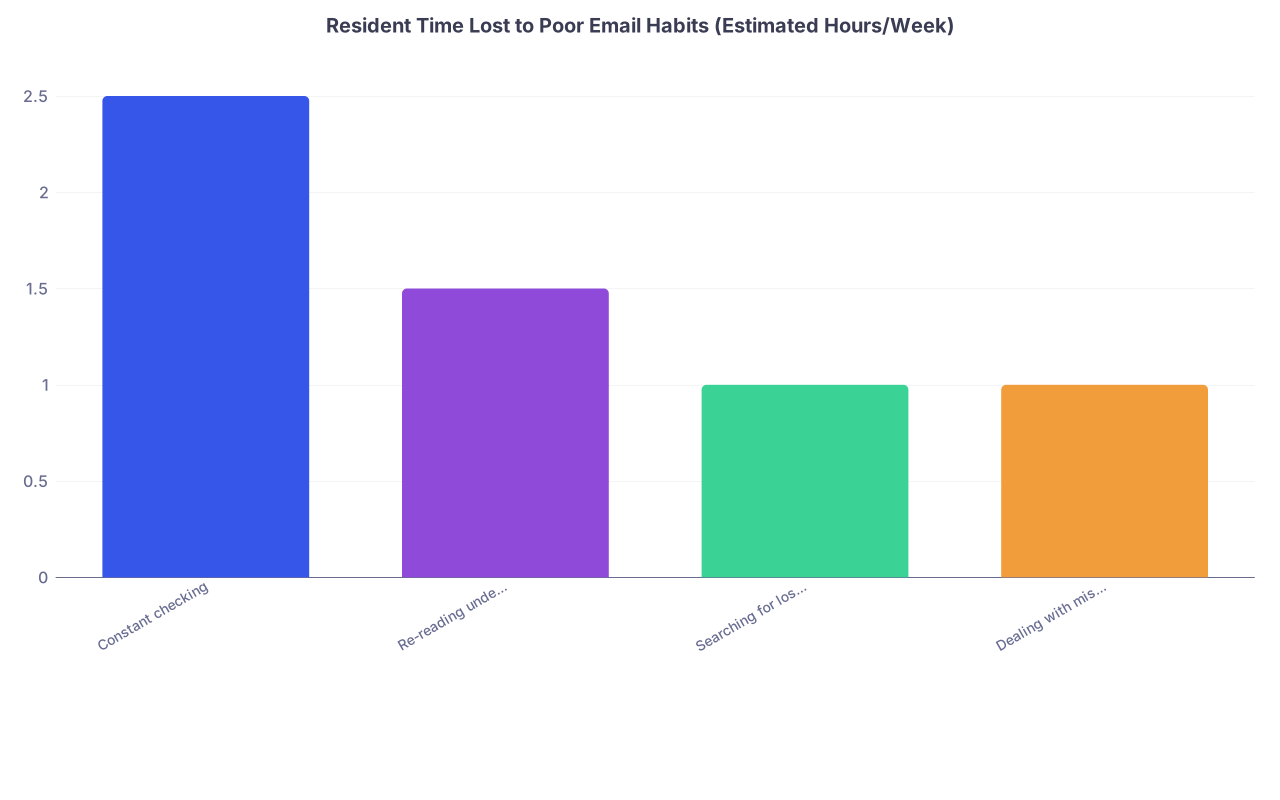
| Category | Value |
|---|---|
| Constant checking | 2.5 |
| Re-reading undecided emails | 1.5 |
| Searching for lost info | 1 |
| Dealing with missed messages | 1 |
That’s ~6 hours a week you could reclaim just by fixing bad inbox habits. Almost an entire post-call day.
FAQ (Exactly 5 Questions)
1. What if my program director expects instant responses to email?
Most think they do, but they really expect reasonable responsiveness during the workday. If someone truly needs real-time access to you, they should page or message you through the clinical system. If you’re worried, you can say: “I check email between cases and after rounds; for urgent issues, please page me.” Set expectations instead of silently suffering.
2. Is it unprofessional to unsubscribe from department or hospital newsletters?
No. It’s unprofessional to miss critical emails because they’re buried under ten versions of “Wellness Wednesday.” Keep only what directly affects your training, patient care, or evaluations. If something is truly mandatory, they’ll usually find multiple ways to tell you (and won’t rely on one low-open-rate newsletter).
3. How do I handle emails that feel important but have no clear action?
Decide: is this reference or noise? If it might matter later (policy changes, rotation expectations), file to “Reference – Residency Admin” or “Rotation – X.” If it’s just FYI fluff, archive it. The worst habit is leaving these to rot in your inbox where they clutter everything and never become clearer.
4. What about resident group email chains that blow up with 30 replies?
Mute or archive once the part that affects you is done. If you must stay in the loop, skim once per day rather than reading every reply in real time. And don’t add to the chaos with unnecessary “Thanks all” or “Got it” replies unless there’s real value.
5. How can I start fixing my inbox if it’s already a complete disaster?
Don’t try to clean 10,000 emails one by one. Do this instead:
- Create a folder called “Inbox – Old Stuff”
- Select everything older than 7–14 days and move it there in bulk
- From today forward, apply the new system to all incoming mail
If something from the past matters, you’ll search and find it. You’re not a professional email cleaner—you’re a resident. Protect your time and start fresh.
Bottom line: Stop treating email like a crisis channel, stop using your inbox as a to-do list, and build minimal structure. Do that, and you take back your attention—and a surprising chunk of your week.