
The average resident task board is a graveyard of forgotten to‑dos. You can do better than that.
If your current “system” is a half‑erased patient list, sticky notes on a WOW, and random texts from your senior, you are bleeding time and missing stuff. Not because you are lazy. Because the system is garbage.
Let me show you how to build a resident task board that actually moves work. One that survives the chaos of sign‑out, cross‑cover, and three consults hitting at once.
Step 1: Decide What the Board Is For (and What It Is Not)
Most residents skip this part. Then they wonder why the board turns into a mess.
Your task board has one primary job:
Make sure the right person does the right task at the right time with as little mental overhead as possible.
It is not:
- A full patient list
- A documentation log
- A billing tool
- A gossip board
- A place where tasks go to die
You need to explicitly define:
- Scope
- Only actionable items that require follow‑through.
- No “FYI”, no completed H&Ps, no “interesting CT finding” comments.
- Timeframe
- Task board covers today and the next 24 hours only.
- Long‑term follow‑ups live in your EMR reminders, a separate long‑term list, or a continuity clinic system.
- Users
- Who uses this board? Team only? Including night float? Including nursing?
- If nights use it, you must design for clarity in the worst‑case scenario: overcaffeinated cross‑cover at 3 a.m.
Make a one‑sentence rule and say it out loud during rounds:
“This board tracks only tasks that must be done before or by next sign‑out.”
If a task does not fit that, it does not go on the board. Hard line.
Step 2: Choose the Right Physical (or Digital) Platform
You do not need a fancy software subscription. You need something your team will actually touch 20 times a day.
Here is how the common options compare.
| Platform | Best For | Pros | Cons |
|---|---|---|---|
| Whiteboard | Inpatient teams | Fast, visible | Not portable |
| Magnets/Post-its | Larger teams | Easy assignments | Can fall off |
| EMR Task List | Orders/follow-ups | Integrated with chart | Often clunky |
| Digital Kanban (Trello, etc.) | Rotations with computers at every desk | Remote access | Requires buy-in |
| Hybrid (Whiteboard + EMR) | Most residency services | Redundancy, flexibility | Slightly more upkeep |
My bias: Use a physical whiteboard for real‑time work + EMR reminders for anything beyond 24 hours. That combination hits the sweet spot.
If you go physical:
- Get a whiteboard big enough to see from across the room.
- Use thin markers or small magnets so you can fit at least 15–20 patients.
- Keep a dedicated eraser and marker set taped or tied to the board. If people have to hunt for a marker, the board dies.
If your program already pushes a digital Kanban:
- Fine. But print a compact daily snapshot for the workroom or display it on a dedicated screen.
- Do not rely on “click in three menus” during a code or rapid response.
Step 3: Use a Simple, Kanban‑Style Layout
Complicated layouts kill boards. You want something your sleep‑deprived brain can parse in 2 seconds.
Use a 3‑ or 4‑column Kanban layout. That is it.
Core Columns
- TO DO – Tasks not yet started.
- IN PROGRESS – Someone is actively working on it.
- DONE – Completed today (we will talk about when to erase).
- OPTIONAL: PENDING – For stuff waiting on someone else (e.g., “CT to be read”, “Outside records faxed”).
Simplified visual:

| Step | Description |
|---|---|
| Step 1 | TO DO |
| Step 2 | IN PROGRESS |
| Step 3 | PENDING |
| Step 4 | DONE |
Do not create 10 micro‑columns like “Waiting for lab”, “Waiting for imaging”, “Waiting for callback #2”. That sounds organized and behaves like glue.
Your patient‑specific context belongs in the task card itself, not in the column structure.
Step 4: Define Exactly What Goes on a Task Card
Here is where most resident boards blow up. Someone writes “f/u labs” and three hours later nobody knows which labs, for which patient, or by when.
Every task card needs four elements. Non‑negotiable.
Patient identifier
- Use: First name + last initial or room number + initials, per your hospital privacy rules.
- Example: “612B – J.S.” or “Mrs. R (DKA)”.
Action verb + specific target
- Start with a verb: “Call”, “Order”, “Reassess”, “Discontinue”, “Clarify”.
- Example: “Call daughter re: SNF choice”, “Reassess pain and titrate PCA”.
Trigger or timing
- When can or must this be done?
- Example: “after 1500 BMP”, “before 1700 sign‑out”, “after MRI result”.
Owner
- The person or role responsible.
- On a whiteboard, use initials (e.g., “MS3”, “JH”, “NF” for night float) or colored magnets by role.
Bad card:
“f/u labs”
Good card:
“612B – J.S. – Review 1500 BMP and call nephrology if K > 5.5 – JH”
Yes, it takes 10 more seconds. Those 10 seconds save multiple pages and “did anyone do this?” conversations later.
Step 5: Color, Symbols, and Priority That Make Sense at 3 a.m.
A rainbow‑explosion board looks impressive. But if nobody can remember what yellow‑with‑two‑dots means post‑call, it is useless.
Use a minimal visual language:
Color by urgency, not by patient.
- Red: Must be done before next sign‑out / time‑critical.
- Yellow: Important but can wait several hours.
- Green or plain: Routine, can be batched.
Simple symbols
- Asterisk (*) for tasks to discuss with attending.
- “!” marked in a corner for safety‑critical (e.g., anticoag management, code status talks, discharge med rec).
- Small “N” for night tasks.
That is it. Resist the urge to invent 12 symbols.
If you want to see this concept as rough proportions of task types across a typical day:
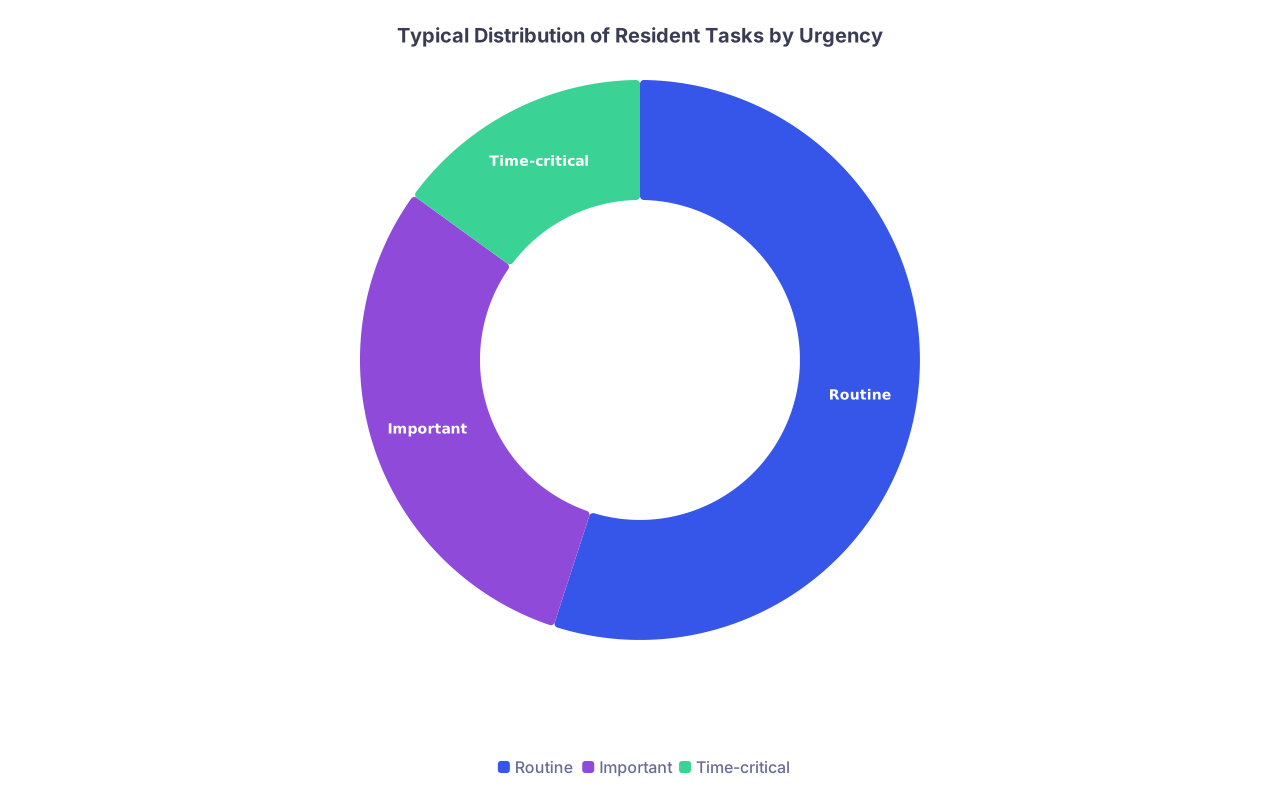
| Category | Value |
|---|---|
| Routine | 55 |
| Important | 30 |
| Time-critical | 15 |
The point: Most tasks are routine. The board’s job is to keep the 15% that can hurt people from getting buried.
Step 6: Build Task Creation Into Your Daily Workflow
A board that relies on “whenever I remember, I will write it down” is already dead.
You need fixed points in the day when tasks move from brain/notes into the board.
Minimum:
Pre‑rounds or preround huddle (5 minutes)
- Each team member quickly dumps:
- “What tasks are already queued from overnight?”
- “What yesterday’s tasks are still in PENDING or TO DO?”
- Senior: “If it is not on the board, it does not exist.”
- Each team member quickly dumps:
During attending rounds
- Whenever the attending says “Let us follow up that CT” or “Make sure to call the PCP”:
- Someone explicitly says: “Add that to the board as a red task.”
- You can either:
- Write directly on a portable mini whiteboard and then copy, or
- Star it in your paper list and batch‑add at the next break.
- Whenever the attending says “Let us follow up that CT” or “Make sure to call the PCP”:
Midday reset (1–2 minutes)
- Usually right after lunch or post‑noon conference.
- Move cards:
- TO DO → IN PROGRESS for stuff you are actively doing.
- IN PROGRESS → PENDING or DONE as appropriate.
- Create any new tasks that came from new consults/admissions.
Pre‑sign‑out cleanup (5–10 minutes)
- Before evening sign‑out, not during.
- Senior and intern stand together at the board:
- “Let us go patient by patient.”
- Confirm what is done, what is left, what becomes night float work.
You are not adding new meetings. You are hard‑wiring the board into things you are already doing, just more intentionally.
Step 7: Assignment Rules – Who Owns What
Ambiguous ownership is how tasks die quietly.
Make these rules explicit on day 1 of the rotation:
- Default: The intern owns floor tasks. Students own data‑gathering tasks. Senior owns coordination/escalation tasks.
- The person who first writes the task on the board assigns an owner immediately.
- No card is allowed to sit in TO DO without initials.
- When nights pick up a task, they mark it with “NF” or their initials. When they hand it back, they reassign.
For bigger teams, a quick reference of role responsibilities helps:
| Task Type | Usual Owner |
|---|---|
| Routine labs, imaging f/u | Intern |
| Social work / PT/OT calls | Intern/MS |
| Discharge med rec | Intern |
| Family updates | Senior/Intern |
| Consultant-to-consultant coordination | Senior |
If your team is short‑staffed, adjust. But keep the concept: every task has a clear owner.
Step 8: Integrate the Board With Sign‑Out (Both Day and Night)
Your handoff process is where the task board either proves its value or becomes yet another artifact nobody trusts.
Here is a simple protocol that works:
Evening Sign‑Out
- Start at the board, not in the EMR.
- Go patient by patient in a fixed order (e.g., by room number).
- For each patient:
- “Open tasks for today” = cards still in TO DO or IN PROGRESS.
- Explicitly label:
- Which tasks must be done tonight.
- Which can safely wait until morning.
- Move overnight tasks into a visible, consistent area:
- Either a small “NIGHT” section on the board, or
- Mark with “N” in a corner and cluster near each other.
Night float should be able to walk in and know within 60 seconds:
- Which patients are “quiet”.
- Which patients have actual work left.
- Which tasks will get them paged again if they are not done.
Morning Sign‑In / Cross‑Cover Debrief
2–3 minutes. That is all.
- Nights walk through:
- Which NIGHT‑marked tasks they completed.
- Which they did not and why (“family unavailable”, “MRI delayed”, “lab machine down”).
- Day team:
- Move remaining overnight tasks to TO DO, adjust owner and urgency.
This loop builds trust in the board. If tasks are consistently updated between day and night, people stop re‑writing to‑dos in four places.
Step 9: Decide When to Erase “DONE” Tasks
Some teams erase as soon as something is done. Others leave completed tasks visible all day.
Here is the rule I recommend:
- Keep DONE tasks visible until the next major transition of care:
- For day team: Until evening sign‑out.
- For nights: Until morning check‑in.
Why?
- It lets you audit your own work:
- “We said we would do these eight things. We did seven. Why not the eighth?”
- It shows attendings and consultants that work is actually happening.
- It gives students a sense of progress instead of endless grinding.
- Take 1–2 minutes and hard reset:
- Erase all DONE tasks from that block.
- Move legitimate long‑term items into EMR reminders or a long‑term list.
- You start the next block with a clean TO DO / IN PROGRESS / PENDING view.
Step 10: Keep It HIPAA‑Safe and Politically Survivable
You do not want your board to be the reason administration suddenly bans whiteboards.
Some basic guardrails:
- No full names if your institution forbids it. Room number + initials or MRN‑fragment only.
- No diagnoses you would not want read aloud in the hallway (e.g., “new HIV dx”, “suspected abuse”).
- No commentary. No sarcasm. No “noncompliant”, “annoying”, “borderline”. You know better.
- Position the board away from patient/family sight lines when possible.
Translate vague requests into neutral, task‑focused language:
- Instead of: “Difficult family – attending wants update”
- Use: “Call daughter with 1500 update – per attending”
If someone from compliance ever looks at your board, they should see a safe, efficient tool, not a lawsuit waiting to happen.
Step 11: Adapt for Different Rotations Without Reinventing Everything
You do not need a whole new system for ICU, wards, and consults. You need small tweaks.
Wards / General Inpatient
- Heavy on:
- Follow‑up labs
- Imaging
- Discharge planning
- Family updates
Board emphasis:
- Color‑coded urgency.
- Clear discharge‑related tasks (e.g., “Print Rx and send to SNF – red”).
ICU
ICU work is more protocolized and time‑based.
Adjust by:
- Adding time‑blocks inside TO DO:
- E.g., subrows: “0800–1200”, “1200–1600”, “1600–2000”.
- Grouping tasks by:
- Vent changes
- Drip adjustments
- Sedation checks
- Family conferences
Example ICU tasks:
- “Bed 5 – SAT/SBT at 0900 – Intern”
- “Bed 2 – Recheck lactate at 1400 and call attending if > 4 – NF”
Consult Services
You may not have a stable workroom board. Go digital or portable.
- Use:
- A small portable whiteboard.
- Or a shared Trello / digital Kanban board.
- Columns:
- NEW CONSULTS
- SEEN – PLAN PENDING
- PLAN COMMUNICATED
- F/U TASKS
Track communication explicitly:
- “Return call to primary team with recs – before 1700.”
- “Update cardiology about echo result.”
Whatever the rotation, keep the same core logic: clear action, owner, and timeframe.
Step 12: Make the Culture Match the Board
A beautiful board will fail if:
- The senior never looks at it.
- The attending undermines it with random side channels.
- Everyone defaults to “just text me”.
You fix that by making the board the single source of truth for tasks on your team.
Some ways to enforce that:
- As senior, say:
- “If you want something done today, say it out loud and we will put it on the board.”
- “If it is not on the board, I will assume it is not real.”
- During rounds, physically stand near the board when possible.
- When someone pages you with a new task:
- Acknowledge it.
- Write it on the board.
- Tell them: “Got it, adding to our task board now.”
This is how you push back gently against chaos. Not with speeches. With consistent behavior.
Implementation Blueprint: First 7 Days
If your team has never used a real task board, here is a simple rollout plan.
Day 1: Build the skeleton
- Draw columns: TO DO, IN PROGRESS, PENDING, DONE.
- Agree as a team:
- What identifiers to use.
- Color code for urgency.
- Owner initials or magnet scheme.
- Use it lightly for the remainder of the day to avoid overwhelming people.
Day 2–3: Force task clarity
- Every time someone says a vague task, push:
- “OK, what exactly is the action, and by when?”
- Senior checks the board at midday and pre‑sign‑out with the team.
Day 4–5: Add night integration
- Create a small NIGHT section or marking system.
- Ask night float explicitly:
- “Was the board useful? What was confusing?”
Day 6–7: Refine, not reinvent
- If something is not working, tweak:
- Too many colors? Drop half.
- PENDING column useless? Redefine or eliminate.
- Lock in a simple “board rules” list (3–5 bullets) and tape it next to the board.
You are not trying to build the perfect system. You are trying to build one your exhausted team will actually use.
Quick Example: What a Functional Board Looks Like at 3 p.m.
Imagine you walk into the workroom and glance at the board. Here is what you should see:
TO DO
- 612B – J.S. – Call daughter with SNF options before 1700 – Intern (yellow)
- 510A – R.K. – Order PT/OT eval for dispo planning – MS3 (green)
IN PROGRESS
- 434 – M.L. – Review 1500 BMP, replete K if < 3.5 – NF (red)
- 429 – T.P. – Dictate DC summary, send scripts to pharmacy – Intern (yellow)
PENDING
- 402 – C.D. – Await MRI brain, then discuss with neuro – Senior (yellow, “N” for night if MRI late)
- 612B – J.S. – Await SNF fax – Intern (green)
DONE
- 510A – R.K. – Clarified DNR status with patient and son – Senior (red “!”)
- 434 – M.L. – Spoke with ID about narrowing abx – Intern
From that single view, you know where to jump in if a new admission hits, where nights will get burned, and which patients are close to discharge.
That is the point.
FAQs
1. What if my attending or senior refuses to use a task board and just wants everything in the EMR?
You do not need their permission to improve your own workflow. Start small:
- Create a personal mini‑board at your workstation with the same structure.
- Use it to run through tasks at sign‑out and prerounds.
- When people see that you are consistently on top of things, you can say:
- “This board has helped me stop missing labs and callbacks. Want me to set one up for the team?”
If they still say no, keep your personal system. Residency is survival. Use the tools that protect you and your patients, even if they live only at your desk.
2. How do I keep the board from becoming extra work instead of saving time?
Two rules:
Never double‑document the same level of detail.
- The EMR holds full notes and data.
- The board holds only short, actionable phrases and timing.
- If you are copying paragraphs from EMR to board, you are doing it wrong.
Tie updates to things you already do.
- Add tasks right after rounds, not randomly through the day.
- Update statuses at midday and pre‑sign‑out, not every 5 minutes.
If you feel like the board is “extra work,” you are probably using it as a second chart instead of a surgical to‑do list. Strip it back to actions, owners, and deadlines. That is all you need.
Key points to walk away with:
- A resident task board that works is brutally simple: clear columns, clear owners, and time‑bound tasks only.
- Build board use directly into your existing routines—rounds, midday check‑ins, and sign‑out—or it will die.
- Protect the board’s purpose: today’s actionable work. Everything else belongs somewhere else.