
Your scattered sticky notes are not “quirky.” They are a liability.
If you are in residency and your life is running on half-legible Post-its, random notebook pages, and half-finished apps, you are making your job harder than it has to be. And you are increasing your risk of dropped tasks, angry attendings, and 2 a.m. “oh no” moments.
I am going to walk you through how to fix this. Not in theory. In a way you can implement this week on a real inpatient service with cross-cover, consults, and serial interruptions every three minutes.
This is about building one reliable, low-friction resident system to replace the chaos.
1. The Brutal Truth: Why Your Current System Fails
Let me be blunt: most residents’ “systems” are just piles.
- Piles of sticky notes on a workstation.
- Piles of index cards in a white coat.
- Piles of text messages and half-read EMR inbox alerts.
- Piles of “I’ll remember that” (you will not).
Here is what I see over and over:
- A yellow Post-it with “Mrs R – CT chest?” stuck to the workstation monitor you used in the morning. You are on a completely different floor now.
- A census scribbled on a folded progress note with four different colored pens, none of which correspond to anything logical.
- A to-do list in three places: on your hand, in your phone Notes app, and on the back of a sign-out sheet.
That scattered system fails for four very predictable reasons:
No single source of truth
You never actually know if you are looking at the full list. There is always the feeling something is missing. Because something usually is.No clear capture method
Every new task has to fight through your fatigue and decide where to go: sticky, phone, random margin, “I’ll remember”. You add friction to every single interruption.No status tracking
“Did I order that CT or just think about ordering it?” is a daily question. You have no standard way of marking “planned,” “ordered,” “done,” or “waiting on someone else.”No review habit
You check things when you happen to look at them, not with intention. That is how 3 p.m. tasks die quiet deaths and resurrect as 8 p.m. disasters.
You do not fix this with a new app. You fix it by deciding, very explicitly, how information moves through your day.
2. The Core Idea: One System, Three Surfaces
You are not going to operate with one single object all day. That is fantasy. You are moving constantly, gloved, getting interrupted, away from a computer, on a different floor. So you build one system that lives across three “surfaces” that all talk to each other.
Here is the structure I recommend:
Surface 1: Master List (single source of truth)
- Where: EMR note, spreadsheet, OneNote, Notion, or a physical binder—choose ONE.
- Purpose: Master patient list + task status + plan. This is the canonical version.
Surface 2: Pocket Tool (capture on the move)
- Where: Small pocket notebook or a very strictly used notes app (e.g., Apple Notes, Google Keep, or Todoist).
- Purpose: Rapid capture of tasks and quick notes when EMR is not available.
Surface 3: Shift Snapshot (what you see at a glance)
- Where: Daily printed rounding list with a structured layout or a daily digital view (if your EMR does this well).
- Purpose: Today’s working copy with only what matters for this shift.
Everything you write or tap must ultimately flow into and be reconciled with your Master List. That is your non-negotiable rule.
3. Build Your Master List: The Non-Negotiable Backbone
You cannot “just mentally track” 10–20 patients and 50–100 micro-tasks. You need structure.
3.1 Pick the Home for Your Master List
I do not care if you are analog or digital as long as you are consistent.
Common successful setups:
| Option | Best For |
|---|---|
| EMR patient list note | Inpatient, computer-heavy services |
| Excel/Sheets file | Rotations with lots of repeat tasks |
| OneNote/Notion | Tech-comfortable residents |
| Paper binder | Paper-preferring, EMR-limited setups |
Pick one and commit for at least 4 weeks. Constantly switching platforms is just another form of avoidance.
3.2 Minimal Columns / Fields You Actually Need
Whether digital or paper, your master list for each patient should have:
- Patient name / Room
- Diagnosis / “Why here”
- “Today’s priorities” (2–4 bullets)
- Task status markers
- Follow-up dates / time-specific items
- Dispo / big-picture notes
Do not build a monster template you never update. You want lean and sustainable.
Example digital columns (for an Excel/Sheets master list):
- Patient
- Room
- Main Problem
- Today Key Tasks
- Orders Placed (Y/N)
- Waiting On (test/consult/etc.)
- Dispo Plan
- Follow-up Time (e.g., “reassess 1500”)
You update this master list during:
- Pre-round chart review
- After rounds
- Before and after long procedures
- End-of-day sign-out prep
This is the only place you trust as being complete.
4. Your Pocket Tool: Replace Chaos with a Standard Capture
You are in a patient room, gloved, family asking questions. A nurse pokes their head in: “Can you also change Mr. K to q6 vitals and add a stool softener?” You are not at a computer. If you do not capture it instantly, it is gone.
You need a single default capture spot.
4.1 If You Use Paper
Use:
- One small, durable, numbered pocket notebook.
- Same pocket every day.
- Front section for running tasks.
- Back section for “scratch” (phone orders, vitals jotted, etc.).
Rules:
- Every new task goes on the next free line.
- Always include patient identifier (room or name) + short action.
- “412 – change vitals q6 + stool soft”
- “389 – recheck K after lytes back”
- No more random scraps, loose sheets, or sticky notes. If you need a quick scrap, tear from the notebook.
4.2 If You Use Your Phone
Choose one app, preferably:
- Apple Notes
- Google Keep
- Todoist / Microsoft To Do
Create a single note or list called “INBOX – [Your Name]”.
Rules:
- Every new item goes into this inbox list first.
- Prefix with patient room or last name.
- No other random notes apps, no texting yourself, no emailing your own Gmail with tasks. All capture goes to one inbox.
This pocket tool is not your master list. It is a holding zone for everything your brain would otherwise drop.
5. The Shift Snapshot: What You Actually Look At All Day
Your brain cannot hold the entire master list continuously. Nor should it try.
You need a daily snapshot that shows:
- Today’s patients.
- Today’s non-negotiable tasks.
- Quick boxes or markers to check as you go.
For most inpatient residents, this is a printed rounding list that you modify. If your EMR is good with custom patient lists, you can do this view digitally, but physical often wins for speed and scribbling.
5.1 Simple, Battle-Tested Layout
On your daily list, create sections like:
Patient block
- Name / Room
- Key problems
- Space for “Today” bullets
-
- Small checkboxes or shorthand next to each “Today” item.
Time-specific line
- e.g., “AFTERNOON:” with blank space for timed tasks (CT review, call family, recheck labs).
Some residents overcomplicate this with seven colors and icons. Do not. You are tired and interrupted. You need:
- Black or blue pen.
- Maybe one highlighter color for “critical” items.
Your rule: If it is on the Shift Snapshot, it came from (or will flow back to) the Master List.
6. The 5 Critical Habits That Make the System Actually Work
The structure alone does nothing without habits. Here are the five I push residents to implement.
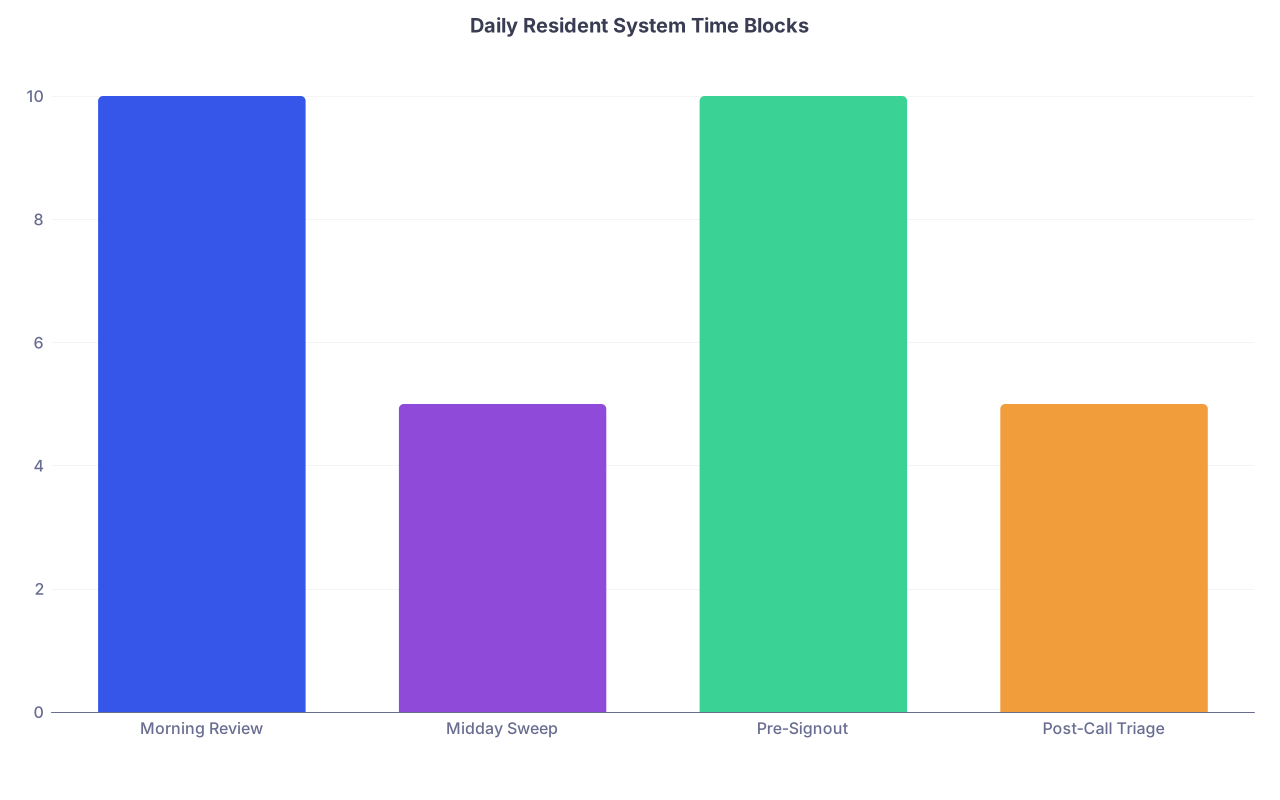
| Category | Value |
|---|---|
| Morning Review | 10 |
| Midday Sweep | 5 |
| Pre-Signout | 10 |
| Post-Call Triage | 5 |
Habit 1: Morning Master Review (10 minutes)
Before you see a single patient:
- Open your Master List.
- Update overnight admits and discharges.
- For each patient, write 2–4 “Today” priorities:
- “Wean O2 if sat > 93”
- “Discuss OR timing with surgery”
- “Clarify code status with family”
Transfer only those “Today” priorities to your Shift Snapshot. Not every historical detail. Just what matters today.
This is your first defense against random, unprioritized work.
Habit 2: Single-Point Capture All Day
During the chaos:
- Any new task you hear and cannot do immediately:
- Goes into the pocket notebook or the digital inbox list.
- One line. One task. Always with patient and action.
Examples:
- “504 – f/u MRI result before d/c”
- “Tele cross-cover – evaluate chest pain”
Do not think. Do not decide where to write it. You already decided: that one capture spot.
Habit 3: Midday 5-Minute “Inbox Sweep”
Sometime between late morning and early afternoon, when chaos dips slightly:
- Pull out your pocket tool.
- For each line:
- If it is done already → mark as done and ignore.
- If still pending → add to:
- The Master List “Today” column, and/or
- Your Shift Snapshot under the correct patient.
Then draw a line at the bottom of what you processed. Everything below that is new.
Takes 3–5 minutes. Saves you from the 7 p.m. “oh no, I had a note about that somewhere.”
Habit 4: Pre-Signout Reconciliation (10 minutes)
Before you give sign-out, you do one last pass:
Open Master List.
Pull out Shift Snapshot and pocket tool.
For each patient:
- Confirm all “Today” items are either:
- Completed, or
- Marked explicitly as “to be signed out / overnight” with clear instructions.
- Confirm all “Today” items are either:
Any stragglers in the pocket notebook / inbox:
- Either get done now or
- Get transferred to:
- Master List for tomorrow, or
- The written sign-out / EMR handoff.
Then you close the loop: the pocket tool is empty of uncaptured tasks for that day.
Habit 5: Post-Call Triage (5 minutes)
When you are post-call and your brain is soup:
- You will have random notes, half-scribbled reminders, maybe some margin notes on your call sheet.
- Before you leave, stand or sit somewhere quiet for five minutes:
- Gather all paper and open your pocket tool.
- Transfer anything still relevant into:
- Master List or
- A “Post-call to do” list for your next working day.
You are allowed to be tired. You are not allowed to leave uncaptured clinical debris behind you.
7. Task Status: Stop Guessing What Is Actually Done
Half of resident stress is not knowing where things stand. Not the work itself. The uncertainty.
Build a simple status language and use it everywhere.
Here is a compact set that works:
- Empty box
☐→ Not started - Diagonal slash
/→ Ordered / initiated, awaiting result - X
☒→ Completed - Circle
○→ Waiting on someone else (consult, family, procedure) - Arrow
→→ Deferred to tomorrow / next shift
You use this:
- On your Master List “Today” entries
- On your Shift Snapshot
- Next to tasks in your pocket notebook (until you transfer them)
Example on your snapshot for one patient:
- ☐ Reassess pain after new regimen @ 1500
- / CT Abdomen ordered – follow result
- ○ GI consult – waiting note
- ☒ Spoke with daughter, updated plan
Now, when your attending asks, “Did we follow up that CT?” you are not guessing. You can see where in the pipeline it is.
8. Handling Interruptions, Pages, and Chaos Without Dropping Things
The mix of constant interruptions + poor systems is deadly. Residents blame the chaos, but usually the chaos just exposes the lack of structure.
Here is a stepwise way to handle most interruptions:
Hear the request. Clarify once.
- “So you are asking for…?”
- Make sure you know what and for whom.
Decide: Can I do it in < 60 seconds?
- If yes, and you are not in the middle of something critical, just do it now.
- If no, or if you are in the middle of something important, go to step 3.
Capture it instantly.
- Pocket notebook / inbox list.
- Patient + action + any necessary timing.
- Example: “Nurse Lisa – 410 – replete K if < 3.5”
Mark in your head when you will process it.
- “I will sweep all of these after finishing this progress note” or “before 1500 vitals review.”
Return to your original task.
- Your brain will try to keep the new task in working memory. Do not let it. You “offloaded” it into your system—trust the system.
This offload-and-return pattern is what converts chaos into queue.
9. Digital vs Paper: What Actually Works for Residents
There is no universal winner, but there are clear patterns.

When Paper Wins
- You are frequently away from computers.
- Your EMR is slow and clunky.
- You think better when scribbling and drawing arrows.
- You want zero tech failure risk.
In that case:
- Master List: Binder with one page per patient.
- Pocket Tool: Small notebook.
- Shift Snapshot: Printed list + pen.
When Digital Wins
- Your EMR allows quick patient list notes.
- You type faster than you write.
- You switch computers often but your account follows you.
- You want searchability over months.
In that case:
- Master List: EMR list note or spreadsheet.
- Pocket Tool: Single “Inbox” note or To-Do app.
- Shift Snapshot: EMR printout or filtered digital view.
What you must not do: half-paper, half-digital without strict boundaries. That is how you end up with sticky notes + Notes app + Word doc + sign-out tool. Disaster.
Pick one backbone and make everything else serve it.
10. A Realistic Day Using This System
Let me show you how this actually plays out on a brutal ward day.

| Step | Description |
|---|---|
| Step 1 | Morning Master Review |
| Step 2 | Create Shift Snapshot |
| Step 3 | Rounds and Tasks |
| Step 4 | Pocket Capture During Day |
| Step 5 | Midday Inbox Sweep |
| Step 6 | Update Master List |
| Step 7 | Pre Signout Reconciliation |
| Step 8 | Clean Pocket Tool |
06:00 – Pre-rounds
- Open Master List (digital sheet).
- Update 14 patients with today’s priorities.
- Print Shift Snapshot with those 14 entries.
- Put pocket notebook in coat.
07:30 – Rounds
- During walk rounds, attending adds:
- “Check CK on 508 this afternoon.”
- “Wean 512’s oxygen; if on RA and comfortable, consider discharge.”
- You write these fast in your pocket notebook, not the EMR.
- On the move between rooms, you transfer key ones onto the Shift Snapshot.
11:15 – Midday Dip
- Take 5 minutes at a workstation.
- Open pocket notebook.
- You see 9 tasks noted during morning chaos.
- 3 are already done (you ordered the labs or made the calls). Mark them as done.
- 6 get added to the Master List and Shift Snapshot for those patients.
- Draw a line under the processed list.
14:30 – Labs / Imaging Flood
- Pages coming in about abnormal labs.
- For each that needs non-immediate action:
- Capture in pocket notebook with patient + specific follow-up (recheck, adjust meds, call attending, etc.).
- When you sit again at 15:00, you process the newest batch into your Master List.
17:00 – Pre-Signout
- Open Master List and Shift Snapshot side by side.
- Ensure all boxes are either checked, slashed, circled, or arrowed.
- For everything arrowed (→), you put clear, concise items into your written or EMR handoff.
- Final check of the pocket notebook. Nothing left unprocessed.
18:00 – Leave
- Your white coat pockets have:
- One notebook with today’s pages mostly checked off and reconciled.
- No random stickies.
- Your Master List is up to date.
- Your sign-out is clean and actually reflects reality.
You go home tired, not haunted.
11. Common Pitfalls (and How to Avoid Them)
You will try to implement this and run into some classic mistakes. Fix them early.
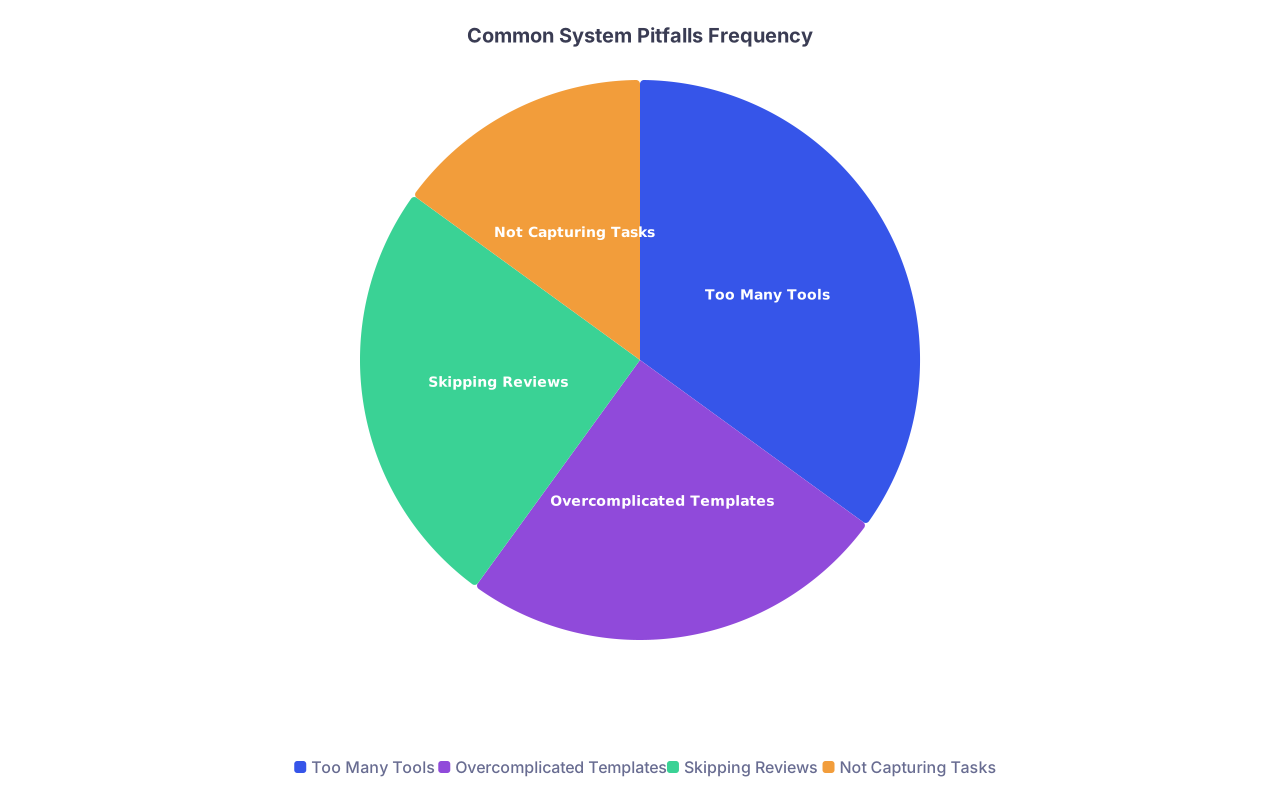
| Category | Value |
|---|---|
| Too Many Tools | 35 |
| Overcomplicated Templates | 25 |
| Skipping Reviews | 25 |
| Not Capturing Tasks | 15 |
Pitfall 1: Tool Creep
- You start with a notebook and Master List.
- Then add a new app someone recommended.
- Then a whiteboard in the workroom.
- Now you are split across four places again.
Fix: Hard rule: new tool only replaces an existing one. It never just adds.
Pitfall 2: Over-Engineering the Template
- You color-code by organ system.
- You have separate symbols for “lab pending” vs “study pending” vs “consult pending”.
- It looks beautiful and you stop using it on day 3 because it is too much work.
Fix: Strip it down to the minimum that you will maintain on the worst call night of your life. That is your real system.
Pitfall 3: Skipping the Reviews
- You capture tasks but never do the midday sweep.
- Pocket notebook becomes a graveyard of forgotten tasks again.
Fix: Tie reviews to existing anchors:
- Midday sweep right after you eat something.
- Pre-signout recon before you open the sign-out tool.
Pitfall 4: No Buy-In From Co-residents
- You are trying to be organized.
- Your co-intern keeps handing you sticky notes with “important” things.
Fix: Set a boundary:
- “Can you text that to me or tell me now so I can put it in my list? I am not using random stickies anymore; I lose them.”
- Then immediately capture it yourself into your system.
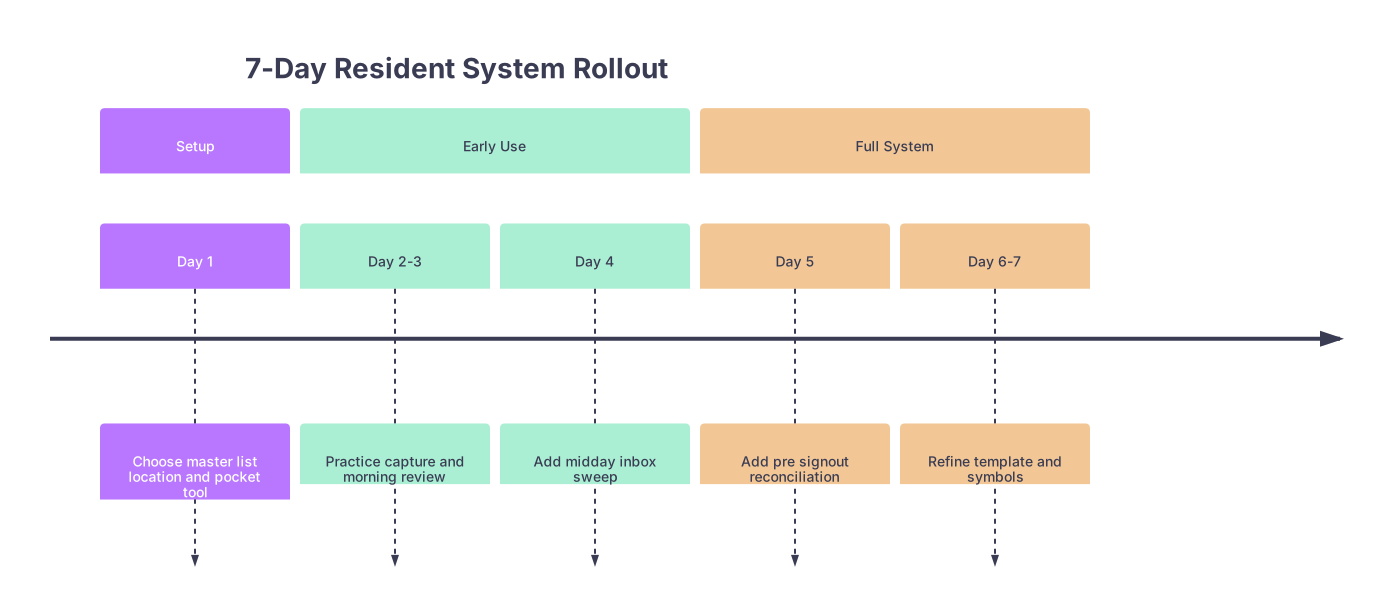
12. Make It Stick: A 7-Day Implementation Plan
Do not “plan to do this soon.” You will forget and default back to chaos.
Here is a simple 1-week rollout:
| Period | Event |
|---|---|
| Setup - Day 1 | Choose master list location and pocket tool |
| Early Use - Day 2-3 | Practice capture and morning review |
| Early Use - Day 4 | Add midday inbox sweep |
| Full System - Day 5 | Add pre signout reconciliation |
| Full System - Day 6-7 | Refine template and symbols |
Day 1:
- Choose Master List location.
- Get pocket notebook or set up single digital inbox.
- Print or design your Shift Snapshot.
Day 2–3:
- Do Morning Master Review and use the Shift Snapshot.
- Practice capturing every new task in your pocket tool.
Day 4:
- Add the midday 5-minute sweep.
- Start using simple status symbols.
Day 5:
- Do full pre-signout reconciliation.
- Aim to leave no uncaptured tasks.
Day 6–7:
- Adjust columns/fields that are clearly useless.
- Remove any features you are not actually using.
By the end of 7 days, the system will feel more automatic and far less effortful.
FAQ (Exactly 4 Questions)
1. What if my attending uses a completely different system and expects me to follow it?
Adapt the front-end, preserve your back-end. If your attending likes structured note cards, use those as your Shift Snapshot, but still maintain your own Master List (digital or binder) and pocket capture. After rounds, transfer from their format into your system. You can mirror their style without giving up your single source of truth.
2. How do I handle tasks that belong to other team members (nurses, consultants, etc.)?
Track them, but mark them clearly as “waiting on.” Use the ○ symbol next to items you delegated or requested from others. On your Master List or Shift Snapshot, write “○ Cardiology recs” or “○ Nurse to draw 2 p.m. troponin.” You are not micromanaging; you are building a reliable record so you can follow up when things stall, which they often do.
3. Is it realistic to maintain this system on ICU or night float when things are insane?
Yes, with a stripped-down version. In brutal environments, you prioritize capture + minimal review: one pocket notebook, very short Master List entries, and status marks. Your Shift Snapshot may be just a quickly annotated patient list. The rule holds: everything gets captured somewhere and you do one reconciliation before sign-out or handoff, even if it is just 5 focused minutes.
4. I keep starting systems and abandoning them. How do I make this one stick?
Stop chasing perfect and commit to good enough for 30 days. Promise yourself you will not change platforms for a month. Use the smallest possible template, and measure success only by one metric: “Did I drop fewer balls this week?” Once you feel the relief of not scrambling to remember seventeen loose tasks, the system will reinforce itself.
Open your white coat right now and look at what is in your pockets. Pick up every random sticky note, index card, and folded scrap. Tonight, transfer the genuinely important items into a single pocket notebook or digital inbox, and throw the scraps away. That is your first move from scattered noise toward a system you can trust.