
The worst patient list you will ever inherit is not unsafe by accident. It is unsafe by design.
Someone built it piece by piece with rushed sign-outs, lazy shortcuts, and zero ownership. Then they handed it to you at 6:45 a.m. and said, “You’ll figure it out.”
You will. But not by “working harder.” You need a system.
Below is exactly how to regain control when you inherit a disorganized, bloated, or downright dangerous list—step by step, in the order I have seen actually work on real services with 20–30 patients and nonstop pages.
Step 1: Admit the List Is the Problem, Not You
The first mistake residents make: they internalize the chaos.
You get a list with:
- Duplicated names
- Cryptic abbreviations like “CT? abnl – f/u”
- Old to-dos from three hospital days ago
- Labs from last week clogging the note section
And you think, “I’m terrible at this. I can’t keep up.”
No. You inherited a broken tool.
You cannot safely run a service off a list that:
- Does not reflect reality
- Buries critical tasks in noise
- Fails to show “who is sick and what must be done today”
So the first mental shift:
The job right now is not to “catch up on everyone.”
The job is to fix the tool so you can safely and quickly catch up on everyone.
You will spend 30–60 minutes restructuring. That time is not optional overhead; it is your risk mitigation and sanity protection.
Step 2: Do a Rapid Triage of the Entire List
Before you touch formatting, you need a mental map of who is dangerous, who is stable, and who is on the edge.
You are not doing full chart reviews yet. You are doing a 60–90 second scan per patient.
For each name on the list:
- Glance at:
- Most recent progress note
- Latest vitals trend
- Active orders / code status
- Problem list or assessment section
- Ask yourself:
- Sick now? Potential to crash?
- Discharge in 24–48 hours?
- Something time-sensitive today?
Then, assign each patient a category. I like a simple three-tier system:
- Red – Unstable or high risk
- Recent rapid response, ICU downgrade, pressors yesterday, new O2 needs, GI bleed, sepsis, chest pain, questionable airway, etc.
- Yellow – Stable but active issues
- Titrating diuresis, new antibiotic start, unclear diagnosis, pending major imaging, new anticoagulation, etc.
- Green – Stable, discharge or nearly there
- Medically ready or close, placement issues, social work hold, simple med optimization.
If your EHR allows, use color flags or icons. If not, use a capital letter or symbol in the name column (e.g., “R”, “Y”, “G”).
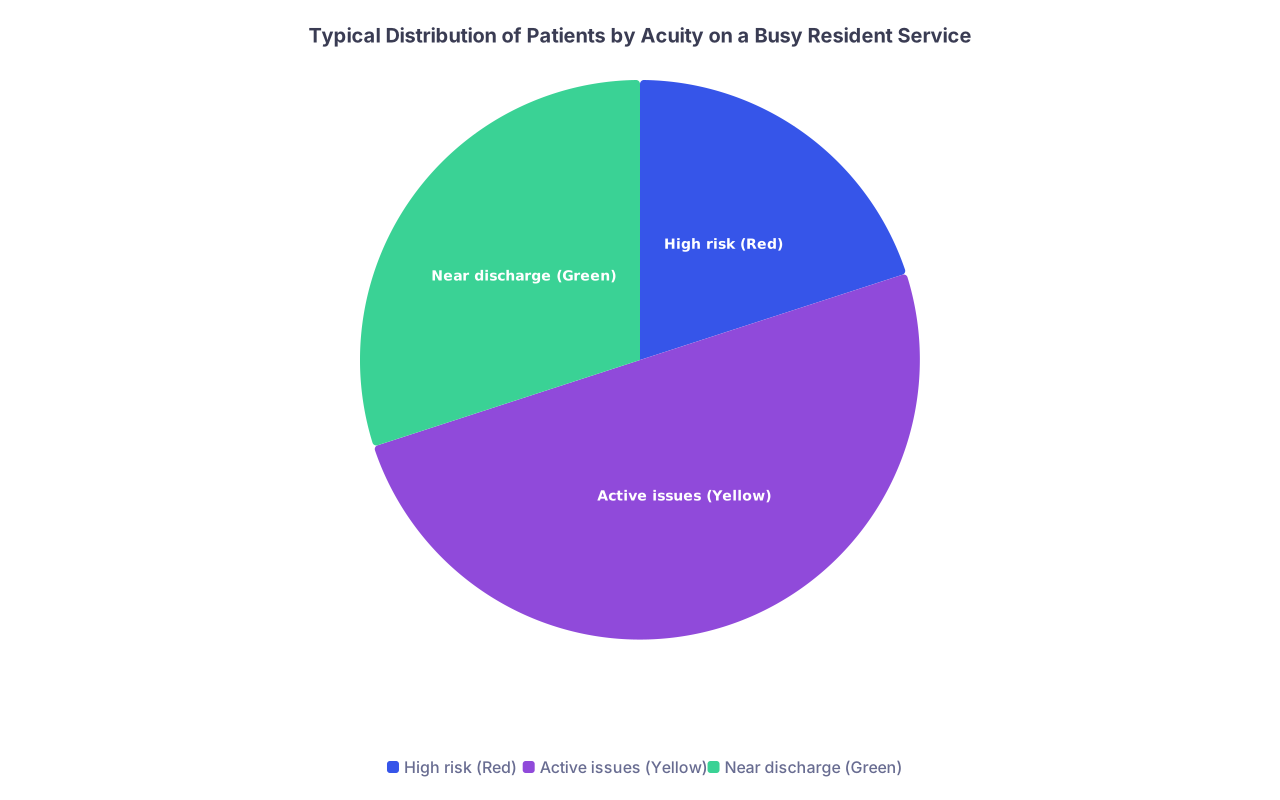
| Category | Value |
|---|---|
| High risk (Red) | 20 |
| Active issues (Yellow) | 50 |
| Near discharge (Green) | 30 |
This first pass has one goal: know who you must see first and who cannot wait.
You now have:
- A visual sense of danger
- A rough mental priority for prerounds and updates
- A way to not get sucked into discharge planning while your GI bleed is dropping their hemoglobin again
Step 3: Strip the List Down to the Skeleton
Your list is probably bloated with junk. Historical comments. Labs from last week. Notes like “family updated Sunday” that are now meaningless.
You cannot build order on top of garbage. You need to strip it.
For each patient, your list should only carry 3 categories of information:
Identity / Orientation
- Name
- MRN / room
- Service / attending
- Code status (short: “Full,” “DNR,” etc.)
One-line summary
- Why are they here, what is the key problem now, and what is the main risk?
- Example:
- “72F w/ HFrEF, ADHF on IV diuresis, new AKI”
- “45M w/ EtOH pancreatitis, improving pain, watching TG and PO tolerance”
- “60M w/ pneumonia on 2L O2, day 3 ceftriaxone, risk of worsening resp status”
Today’s tasks and must-not-forgets
- Only tasks due today or absolutely pending
- No old labs, no resolved CTs, no “consider” from 4 days ago
Delete everything else.
If your list contains:
- Old labs: “Na 129 -> 133 -> 138” from admission
- Old imaging: “CT 11/21 negative PE”
- Ancient discussions: “Palliative to see Monday” (and today is Thursday)
Move those into the chart if needed. Not your working list. The list is a daily tactical tool, not a historical archive.
Step 4: Rebuild the Columns to Match How You Actually Work
Most disorganized lists are built for documentation, not real-world workflow.
You do not need a “Hgb trend” column. You need a “What do I need to do today?” column.
Here is a structure I recommend, and I have seen it save residents on medicine, surgery, and subspecialties:
| Column | Purpose |
|---|---|
| Room / Bed | Rapid mental geography, rounding sequence |
| Name / MRN | Identification |
| Service / Attg | Who ultimately owns decisions |
| Code / Isolation | Safety snapshot |
| Acuity Flag | Red / Yellow / Green |
| One-liner | Why here + main risk |
| Active Issues | 2–3 bullet problems max |
| Today’s Tasks | Concrete, checkable actions |
Ignore perfection. Get this framework set up fast.
How to rewrite one-liners fast
Residents freeze here. They think each one-liner must be a polished note. Wrong.
Use a simple pattern:
[Age][sex] with [brief PMH] admitted for [primary problem] now [current status / risk].
Examples:
- “82F w/ dementia, CAD, HFpEF admitted for HF exacerbation, now euvolemic, working on diuresis transition and SNF”
- “50M w/ DM2, CKD5 admitted for sepsis 2/2 foot cellulitis, on day 2 vanc/zosyn, watching renal function, possible debridement”
You can do each in 15–20 seconds. Rewriting them forces you to mentally own the patient’s story.
Step 5: Create a Real “Today’s Tasks” System
The majority of resident stress is not from knowing medicine. It is from keeping track of 100 small things that will hurt someone if forgotten.
A chaotic list hides those tasks.
You need a reliable, visual, binary system: task either exists or is done. No gray zone.
Rules for the “Today’s Tasks” column
Every item must have a verb and a target
- Bad: “Labs”
- Good: “Check morning BMP, call nephro if Cr > 2.0”
- Bad: “Cards?”
- Good: “Page cardiology re: anticoag plan after TTE”
Every task must be due today
- If it is not today, put it on a separate “Future items” note or calendar, not on the main list
- Example: “Needs screening colonoscopy eventually” does not belong here
When completed, mark clearly
- Strike-through, “DONE,” or move it off the list
- Your brain should not have to re-interpret what is finished
If something is critical, tag it
- Use an asterisk or “#” at the start:
- “* Recheck K after replacement by 1400, call if > 5.5”
- “# Consent for surgery before 1100”
- Use an asterisk or “#” at the start:
Limit per-patient tasks
If a patient appears to have 15–20 tasks, that is usually a documentation problem. You are mixing:
- True actions
- Passive watches
- Vague ideas
Consolidate:
- Instead of:
- “Check Hgb”
- “Trend BPs”
- “Assess stool”
- “Watch for bleeding”
- Use:
- “Monitor for GI bleed: daily CBC, vitals q4h, notify GI if Hgb drop >2 or melena”
You just turned four vague items into one clear plan.
Step 6: Decide Your Rounding and Work Sequence Intentionally
Once the list is cleaned and rebuilt, you decide your day. Not the other way around.
You now have acuity flags and a working tasks column. Use them.
Set your rounding order
Rough rule I use:
Red patients first
- Especially:
- Overnight events
- New O2 needs
- Rapid response yesterday
- Unclear code status on unstable patients
- Physically see them early, review labs at bedside if needed, and write or at least draft your assessment.
- Especially:
Yellow patients next
- Focus on:
- Pending big decisions (surgery vs med management, anticoagulation, step-down vs floor)
- Diagnostic uncertainty where your plan might change in the next 6–12 hours
- Focus on:
Green / discharge-ready patients last
- Discharges take brain space but usually not immediate lifesaving decisions
- Yes, there are exceptions when discharge has hard constraints (e.g., transport at 10:00), but do not default to “do all discharges first” if you have unstable patients.

| Step | Description |
|---|---|
| Step 1 | Start of Day |
| Step 2 | Scan overnight events |
| Step 3 | Flag Red Yellow Green |
| Step 4 | See Red patients |
| Step 5 | Update list tasks for Red |
| Step 6 | See Yellow patients |
| Step 7 | Plan and order time sensitive work |
| Step 8 | See Green patients |
| Step 9 | Finalize discharges and notes |
The point is this: once the list is rational, follow it deliberately. Do not keep all this in your head.
Step 7: Build a Micro-Handoff for Yourself
You know handoff to night float is critical. You probably put effort into giving them a clean sign-out.
Do the same for daytime-you.
At two key points:
- Mid-morning (after seeing Reds and most Yellows)
- Mid-afternoon (before the 4–6 p.m. craziness)
Stop for 3–5 minutes and do a self-handoff via your list:
Ask:
- For each red/yellow patient:
- What is still pending that could hurt them if I forget?
- Any callbacks I am waiting for? (consults, imaging, labs)
Update the “Today’s Tasks” column accordingly:
- Add explicit callbacks:
- “Follow up CT chest read – change abx if new infiltrate”
- “Re-page GI if no response by 1500”
- Clean out completed items.
This is how you avoid the classic 19:30 realization: “We never actually ordered the TTE for the guy with syncope.”
Step 8: Handle Legacy Chaos Without Blowing Up the Team
You are not working in a vacuum. You inherited this list from someone who might still be on your team. Or from a culture that has always done it this way.
If you silently nuke everything, you:
- Lose historical context you might actually need
- Alienate teammates who feel you are trashing their work
There is a better way.
Stepwise cleanup protocol
Duplicate the list first
- If your EHR allows, create “My Patient List – [Your Name]” and move your patients there
- Use that as your working copy; keep the original as reference for 24–48 hours
Announce your intent briefly and calmly
- “Hey, this list is pretty cluttered. I am going to clean up the one I use so tasks and acuity are clearer, but I will keep the original view for anyone who likes it.”
Preserve any non-obvious but important info
- Example:
- Complex family dynamics
- Key outside providers
- Long-running specialty plans
- Move this to the chart (e.g., a “Service Sticky Note” or problem list) instead of the active list
- Example:
Invite one simple shared convention
- For example:
- “Let us try using R / Y / G flags for acuity and a ‘Today’s Tasks’ column with verbs.”
- Do not force a full redesign on day 1. Just nudge one or two habits.
- For example:
Step 9: Use the List as Your Real-Time Control Panel
A good list is not static paper. It is your cockpit dashboard.
During the day, keep updating it in real time:
- When a new lab comes back that changes the plan:
- Update the “Active Issues” briefly
- Update or add a task if something must happen today
- When a consult is called:
- Add: “Await recs from nephro – adjust diuresis after call”
- After the recs, mark the old task as done, add the new orders/tasks
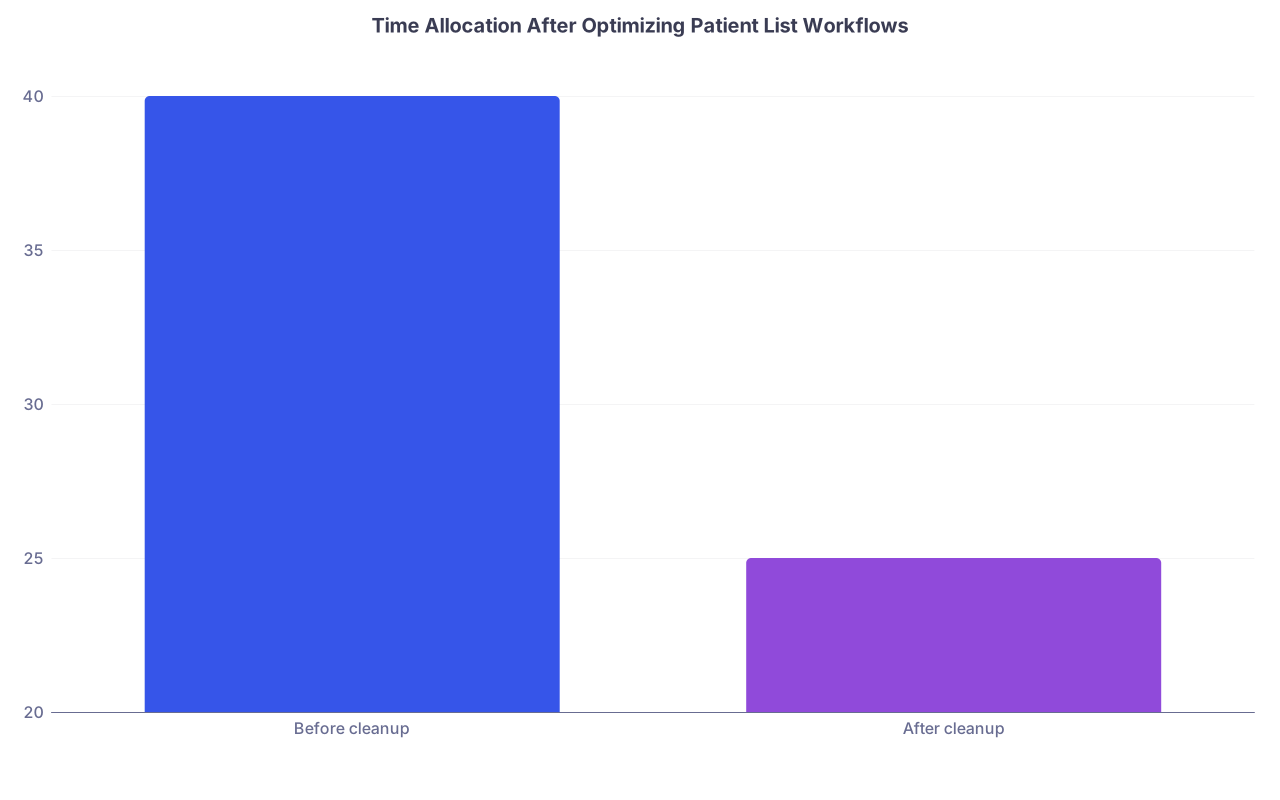
| Category | Value |
|---|---|
| Before cleanup | 40 |
| After cleanup | 25 |
(Think: “minutes per patient per day spent just finding info and tasks.” You can cut it dramatically.)
You want the list to answer, at any moment:
- Who is sickest?
- What is not done yet?
- What will make this evening or night call miserable if I miss it?
If your list cannot answer those three in 10 seconds, keep refining it.
Step 10: Handoff With Precision, Not Apology
By the time you sign out, your list should be the cleanest it will be all day. Not the worst.
Night float is not impressed by your survival story. They care about:
- Who might crash
- What tasks they must complete
- What they can safely ignore until morning
Use the structure you built:
For each patient in sign-out, give:
- One-liner (admission reason + key risk)
- Overnight risk
- Concrete overnight tasks
Example using your cleaned list:
- “Bed 412, 72F with HFrEF admitted for ADHF, diuresing, now net –3L, still on 2L O2. Red flag for hypotension on diuresis, last BP 100/60. Overnight:
- Please recheck BMP at 0200, call cardiology if Cr > 2 or K < 3.5.
- If SBP < 90, hold next lasix dose and call us.”
Your list already has:
- Acuity flag: Red
- One-liner
- Today’s tasks (some of which extend overnight)
You are now handing off a decision-ready summary, not a wall of garbage text.
Step 11: Protect Yourself from Blame When the List Was Unsafe
Let me be blunt: bad lists hurt patients. And residents get blamed.
You cannot control the system, but you can document your process.
When you inherit something especially awful:
- Fix it as above
- But also quietly protect yourself:
- Write clear daily notes with:
- Assessment of acuity
- Explicit plans and contingency (“If X, then Y”)
- Time-stamp key decisions (“Discussed with attending at 10:32, plan for CT and NPO after midnight”)
- Write clear daily notes with:
If something later goes wrong, you want it crystal clear that:
- You knew who was high risk
- You used a consistent system
- You communicated your plan and handoffs responsibly
This is not paranoia. It is professionalism in a chaotic environment.
Quick Example: Transforming a Garbage List
Let me show you one patient before/after.
Before:
- Name: “Jones, M.”
- Room: 512
- Comment: “PNA? CHF? ask cards. family upset. BP low yesterday. Na 129, 133, 135. CT chest 11/23. PT/OT. D/c planning. SSI. K 3.4 yesterday. page SW re dispo. Palliative maybe. O2 2L.”
Looks thorough. It is useless.
After 60–90 seconds of work:
- Room: 512
- Name: “Michael Jones”
- Service / Attg: “GMED / Dr. Lee”
- Code: “Full”
- Acuity: Red
- One-liner:
- “68M w/ HFrEF and COPD admitted for acute hypoxic resp failure from PNA vs CHF, now on 2L O2, borderline BPs, risk of worsening resp status.”
- Active Issues:
- “1) PNA vs CHF – on ceftriaxone/azithro, IV lasix, watching volume and O2 need.”
- “2) Borderline hypotension – SBP 90–100 on diuresis.”
- “3) Complex dispo – likely needs rehab, family distressed.”
- Today’s Tasks:
- “Recheck BMP at 1400, replace K if < 4.0.”
- “Assess volume status on rounds: JVP, crackles, edema; adjust lasix dose.”
- “Update family after attending rounds, clarify rehab vs home.”
- “If SBP < 90, hold lasix and call attending.”
Now the list tells you the story and the plan in under 15 seconds.
Long-Term: Turn Your Personal System into a Team Standard
Once you prove to yourself this works, you can gradually standardize it:
- Share your template with interns and students
- Pre-populate columns in your EHR list views
- On a new rotation, propose: “Can we try labeling acuity and using a Today’s Tasks column? It has helped me avoid misses.”
You will not convert everyone. Some seniors are married to their 4-point-8-font Excel sheets.
But your goal is not to win an argument. Your goal is to:
- Reduce missed tasks
- Lower your cognitive load
- Keep patients safer
And frankly, to get out on time occasionally without the constant anxiety that you forgot something big.