
You are not burned out because residency is “hard.” You are burned out because your workday never actually ends. The note follows you home.
Let us fix that.
You need a repeatable, stupidly simple workflow that makes it hard to leave with unfinished notes and easy to walk out knowing: I am done for today. Not “mostly done.” Not “I’ll finish from bed.” Done.
This is exactly what I am going to give you: a concrete, step-by-step system you can run every single day to close all your notes before you leave the hospital.
The Core Principle: Decide Your “Shutdown Time” Before Your Day Starts
Every note-closing system that works rests on one rule:
You must pick your “shutdown time” at the start of the day.
Not “whenever things slow down.” Not “after the last thing happens.” Those are code words for “I’ll be here forever.”
Choose:
- A hard out (for example, 6:30 pm)
- Or a range (for example, between 6:00–6:30 pm)
This gives your brain a deadline. Deadlines create focus. No deadline, and you will casually chat, add 16 unnecessary labs, and then be staring at 8 open notes at 7:45 pm.
Here is the mindset shift:
Your job is not just “take care of patients.”
Your job is “take care of patients and close the loop in the chart before you go home.”
If you do not include documentation as part of the workday, you will always be doing “fake half-days” at home on your couch.
Step 1: Build a Daily Note Tracker You Can Actually Use
Do not rely on “I’ll remember” or whatever clunky EHR worklist your hospital uses. You need a single place where you track every note for the day.
Keep it painfully simple. Two good options:
- Index card / folded sheet in your pockets
- One note in your EHR (scratch note, SmartPhrase list, or personal “to-do” note)
Your tracker has three columns:
| Column | Purpose |
|---|---|
| Patient | Patient name / bed / MRN last 3 |
| Note Type | H&P, Progress, Consult, Discharge, Procedure |
| Status | Empty, “D” for drafted, “R” for ready to sign, “✔” for signed |
Example:
- Smith, John – Progress – ✔
- Nguyen, T – H&P – ✔
- Bed 5 – Consult – D
- Bed 12 – Discharge – (blank)
You update this in real time:
- New admit → add row with “H&P”
- New consult → add row with “Consult”
- Patient going home → add “Discharge” to that row (or a new row if separate)
Why this works:
- You never waste time hunting through the chart thinking “Did I already write for bed 5?”
- You actually know the size of your documentation workload at any moment.
If you are more digital:
- Some residents use a pinned note in the EHR, or a “.TODAYNOTES” SmartPhrase they keep open and edit.
- Only rule: It must be visible and quick. If it takes 10 clicks to find, you will not use it.
Step 2: Use the 3 Note Buckets – So You Know What To Do When
Stop treating all notes the same. They are not.
Divide your notes mentally (or literally in your tracker) into three buckets:
Bucket 1 – Time‑sensitive
- Discharge summaries that must be done before patient leaves
- Transfer notes required before moving levels of care
- Consult notes that others are waiting on to make decisions today
Bucket 2 – Moderate‑priority
- Daily progress notes
- Routine consult follow-ups
- Procedure notes that affect billing but not urgent care (e.g., paracentesis)
Bucket 3 – Low‑priority (but still must be done today)
- H&Ps on stable obs admits already seen and tucked in
- Admission notes for patients who already got verbal sign‑out, with good provisional plans in place
- Any late add-on trailing documentation
Your sequence across the day will be:
- Early day: handle Bucket 1 as they appear
- Midday: start turning over Bucket 2 during lulls
- Final 60–90 minutes: aggressively clear what is left from all three
This is how you avoid 9 open notes at 7 pm. You are bleeding them off, on purpose, all day.
Step 3: Morning Setup – Templates, SmartPhrases, and Defaults
If you are still free-typing entire notes in PGY-2, that is self-sabotage. The goal is consistent, safe shorthand, not Pulitzer‑level prose.
Spend 20–30 minutes on one of your lighter days creating:
One standard progress note template per service
- Problem list format
- Pre‑filled headers (Subjective / Objective / Assessment / Plan)
- Standard sections for your specialty (vents, drips, lines, feeds, etc.)
A consult note template
- Why consulted / specific question
- Targeted HPI structure
- Focused ROS + exam relevant to your service
- Clear recommendation block at the top (referring teams love this)
A discharge summary skeleton
- Admission reason
- Hospital course by problem
- Discharge meds / followup
- “If X happens, do Y” bullet for the outpatient team
SmartPhrases / dot phrases for common situations
- “.AFIBPLAN” – for standard rate control, anticoagulation discussion, etc.
- “.SEPSISBUNDLE” – for initial resuscitation, lines, cultures, abx plan
- “.NEUROEXAM”, “.ABDOMENEXAM”, “.TRAUMAEXAM”
Once built, you just edit. You are no longer inventing every note from scratch.
This alone can cut note time by 30–50 percent. Which turns “impossible to finish by 6:30” into “tight but absolutely doable.”
Step 4: The Midday Reset – 2 Mini Checkpoints That Save Your Evenings
Here is where most residents lose their day:
They document in a vague, reactive way. Some notes at 10, some at 2, no pattern, then chaos at 6.
Do this instead:
Midday Checkpoint #1 – Late Morning (10:30–11:00)
You ask yourself two questions:
- “How many notes do I owe right now?” (Check your tracker)
- “Which of these can I draft or finish in the next 30–45 minutes?”
Then you:
- Close your door (if you have one), or sit at a corner station.
- Put on headphones if that helps.
- Hammer out 2–3 easy notes: stable progress notes, simple consults, started discharges.
You do not need to sign everything. Drafts count, if they are 80–90 percent done.
Midday Checkpoint #2 – Early Afternoon (2:30–3:00)
Same drill:
- Scan your tracker
- Bucket 1: Are there any discharge / transfer / must-finish-now notes? Do those first.
- Bucket 2: Draft more progress or consult notes.
Your goal by 3 pm:
- No more than 3–4 notes left unstarted for the day.
If you are sitting on 8–10 at 3 pm, your evening is gone. Admit that and change behavior earlier next time.
These two checkpoints are non-negotiable on typical ward days. Yes, some days explode with codes, RRTs, new admits. Fine. But most days? You have pockets. This tells you exactly how to use them.
Step 5: The Last 90 Minutes – A Hard, Structured Shutdown Routine
This is where everything comes together.
You picked your “shutdown time” already. Let us say it is 6:30 pm. You start your shutdown workflow at 5:00 pm. Not 6:10. 5:00.
Here is the playbook.
5:00–5:05 – Quick Triage
- Pull up your note tracker
- Cross-check it with the EHR patient list
- Mark which notes are:
- Already signed (✔)
- Drafted (“D”)
- Not started (blank)
You should now see exactly what remains:
- For example: 2 progress notes drafted; 1 consult not started; 1 discharge not started.
5:05–5:30 – Finish All “Drafted” Notes First
This is low-friction work. You are just:
- Skimming the day’s vitals / labs
- Updating the plan details
- Making sure your exam is not obviously copied forward blindly
- Signing
You get quick wins and shrink your list fast.
5:30–6:10 – Power Through Remaining Notes, Easiest First
This is where people mess up. They start with the complicated train-wreck H&P and get stuck. Do the opposite.
- Start with short, simple progress notes
- Then consults
- Then H&Ps and discharges that require more narrative
Why easiest first?
- You build momentum
- You reduce your cognitive load
- You avoid ending with 3 full-length notes unfinished
While you write:
- Close email
- Close social media
- Stop “just checking the labs” obsessively
- Ignore anything that is not patient care or notes
If you pick up a late task or a nurse question, handle it, then sit back down and resume.
6:10–6:20 – Final Cross‑check and Cleanup
Go back to your tracker:
- Every line should now be ✔ or intentionally deferred.
If something is truly not done, you decide consciously:
Ask yourself:
- “Is this legally / clinically risky to delay?”
- “Would I be embarrassed explaining to my attending tomorrow why it is not done?”
If yes → finish it now.
If truly no risk and your hospital allows short delays (for example, some ED admits’ full H&P within 24 hours):
- Jot it deliberately on tomorrow’s first‑thing task list.
- Ideally add a stub H&P with a safety summary in the chart.
Then do a quick EHR outbox check:
- Make sure no notes are “unsigned” or “pending co-sign” you forgot.
Once done:
Log out. Walk away. Do not reopen at home.
Step 6: Reduce the Friction – Typing Speed, Phrases, and Voice Tools
If documentation is slow and painful, you will procrastinate it. That is human. Reduce friction.
A. Learn to Type at 70–80+ WPM (Yes, Seriously)
You can go from 40 to 80 WPM in 3–4 weeks of focused practice:
- Use free trainers like Keybr or TypingClub for 10–15 minutes a day
- Focus on accuracy first, then speed
This is one of the highest ROI skills in modern medicine. It halves the time for most notes.
B. Aggressively Use SmartPhrases / Macros
Stop reinventing text. Use:
- Overviews: “.SEPSISADMIT”, “.DKAPLAN”, “.CHFEXACERBATION”
- Exam templates: “.NEUROFULL”, “.ICUROUNDS”
- Standard counseling blocks: “.CODESTATUSDISCUSSION”, “.ACP”
Good rule:
Anything you type more than three times a week should become a phrase.
C. Consider Voice Recognition (If Your System Supports It)
Many hospitals have Dragon or built‑in EHR dictation:
- Ideal for long H&Ps, consults, or complex hospital courses
- Be careful with errors; always read your final paragraphs
I have seen residents cut admission H&P time from 40 minutes to 15 with well‑tuned voice macros.
Step 7: Handle the Worst Offenders – Discharges and Consults
You already know which notes wreck your evening.
Discharge Summaries
Problem: You wait until the patient is literally leaving, then start from zero.
Fix:
- Build the discharge summary as you go.
- On day 2 or 3 of admission, paste in your running hospital course from progress notes.
- Update it every couple of days, just a few lines.
By the time they discharge:
- You are editing, not creating.
- You can finish in 5–10 minutes.
Also:
- Use a discharge template that mirrors what outpatient docs actually want: problem-based course, followup, warnings.
Consult Notes
Problem: You get called at 4:30 for a new consult. If you accept it and also sit on 5 unfinished notes, you are doomed.
Fix:
- Before you leave for the consult, look at your note list.
- Ask: “Can I realistically finish this consult note and all current notes before my shutdown time?”
If no:
- Negotiate.
- “I’m finishing up for the day, can this safely wait for the night resident / morning team?”
- Many “routine” consults can.
If yes:
- See the consult.
- Chart the consult immediately after seeing the patient, before you return to the chaos of your main service.
You will not remember the nuances at 7 pm. And you will resent every word you type.
Step 8: Make This a Team Culture, Not a Solo Hero Move
You can be efficient on your own, but you will be much more effective if the team is aligned.
Simple moves:
Shared expectation with co-residents:
“Let us try to have the bulk of notes done by 4 pm. Shutdown routine starting at 5.”Talk to attendings:
“I am working on closing all my notes before leaving. Are you okay if I occasionally step away from rounds for 15 minutes midafternoon to finish discharges / time-sensitive notes?”
Many will say yes. The few who say no will at least understand what you are doing.Normalize note time as real work time
Do not apologize for sitting down and saying, “I need 20 minutes to finish these notes so I am not charting from home.”
That is responsible, not lazy.
A Visual: Example Resident Evening Note Load vs. Workflow
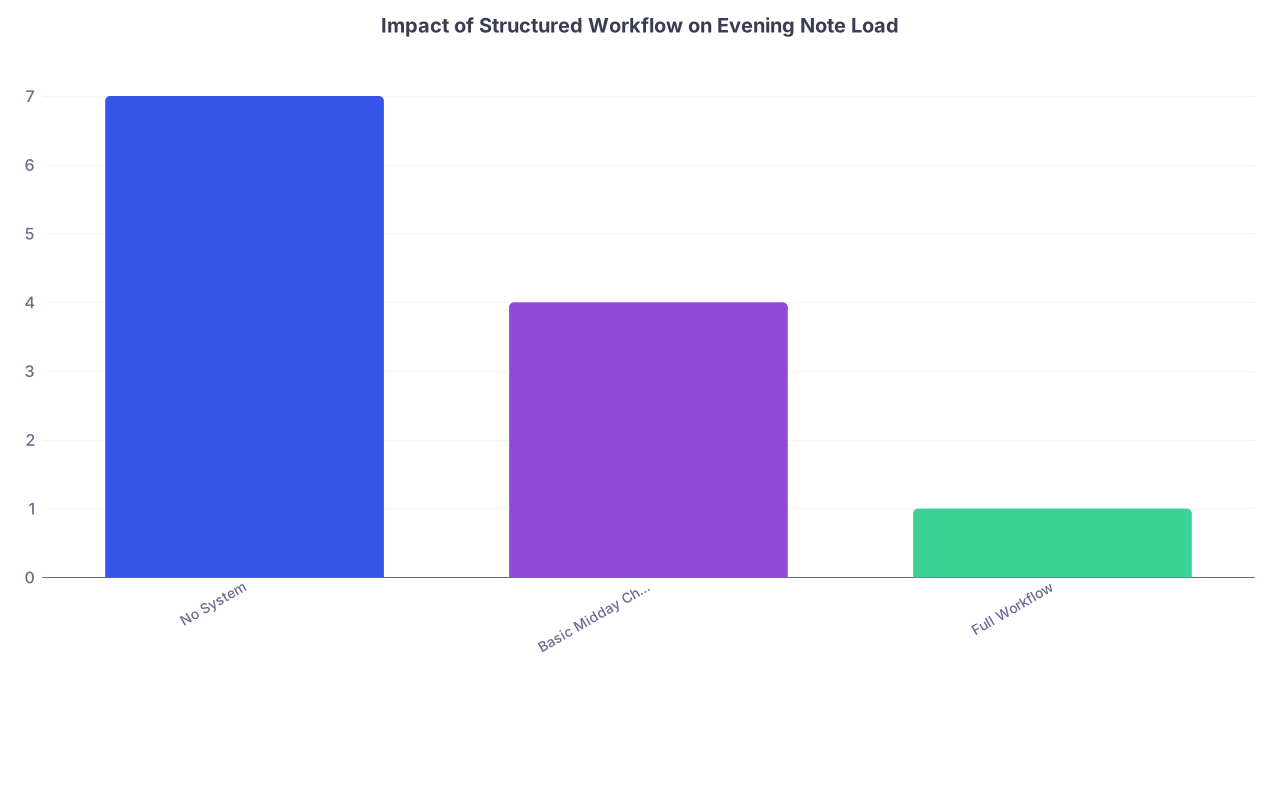
| Category | Value |
|---|---|
| No System | 7 |
| Basic Midday Checkpoints | 4 |
| Full Workflow | 1 |
Rough idea:
- No system → you walk into 6–8 notes at 5 pm
- Basic checkpoints → maybe 3–5
- Full system → ideally 0–2
You feel that difference in your bones.
A Sample Day: How This Actually Looks Hour by Hour
Let me make this concrete. Internal medicine ward day, PGY-2.
- 6:30–7:00: Pre-round, quick notes on acute overnight changes only. Jot all required notes on your tracker.
- 7:30–10:00: Rounds. Quick in-room edits on your progress note templates (exam, plan). No full narratives yet.
- 10:30–11:00 (Checkpoint 1):
- You have 8 patients, so 8 progress notes.
- 3 need potential discharge summaries.
- You finish 3 progress notes and start 1 discharge summary.
- 11:00–2:00: New admit, one consult, a couple of routine updates. Add each note to your tracker as they appear. Copy in appropriate templates as stubs as soon as you accept them.
- 2:30–3:00 (Checkpoint 2):
- Tracker shows: 5 progress done, 3 progress drafts, 1 consult draft, 1 new H&P, 2 discharge summaries in progress.
- You finish 2 more progress notes + the consult.
- 3:00–5:00:
- A discharge is confirmed for one patient, you update and finish that summary.
- You admit one more stable patient; you create an H&P skeleton with template.
- 5:00–6:10 (Shutdown):
- Finish all drafted progress notes.
- Complete 2 H&Ps (one from earlier, one new).
- Finalize second discharge summary.
- Check tracker: all notes ✔.
You leave at 6:20. No laptop. No “I’ll just log in after dinner.”
Simple Flow for Your Brain
Sometimes a picture helps anchor the habit:

| Step | Description |
|---|---|
| Step 1 | 5 pm - Start Shutdown |
| Step 2 | Review Note Tracker |
| Step 3 | Finish drafted notes first |
| Step 4 | Sort remaining by difficulty |
| Step 5 | Recheck tracker |
| Step 6 | Do easiest remaining notes |
| Step 7 | Log out and leave |
| Step 8 | Any drafted notes? |
| Step 9 | Any notes left? |
Run this every day. No improvising.
Building This Into Habit, Not Heroics
A system only works if you actually use it when you are tired and annoyed.
Three ways to make it stick:
Anchor it to specific times
- Create calendar reminders or phone alarms:
- 10:30 – “Checkpoint 1 – Notes”
- 2:30 – “Checkpoint 2 – Notes”
- 5:00 – “Shutdown – Notes”
- Create calendar reminders or phone alarms:
Track your wins
For one month, every day, jot down:- Time you left the hospital
- Number of notes left to finish at home
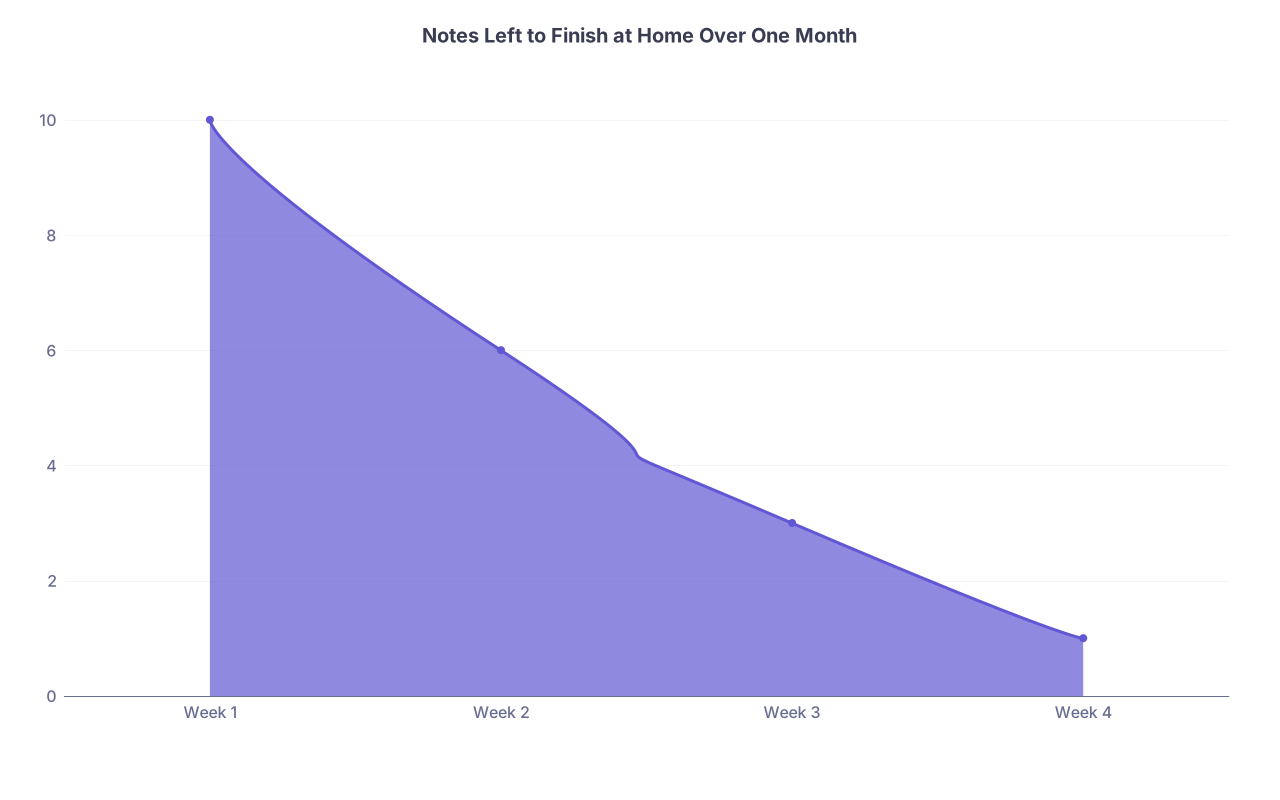
Notes Left to Finish at Home Over One Month Category Value Week 1 10 Week 2 6 Week 3 3 Week 4 1 Watching that number drop is very motivating.
Have a default line for protect-your-time moments
For example, to nurses or colleagues when you are mid-shutdown:- “I will take care of that right after I finish these notes; trying to avoid charting from home.”
Most people respect that.
- “I will take care of that right after I finish these notes; trying to avoid charting from home.”