
The way most residents handle a backed‑up inbasket is broken. You cannot “just work harder” and brute-force your way through months of chaos.
You need a system.
Below is a structured, step‑by‑step protocol to clean up months of messy inbasket messages without burning a full week of your life or missing critical patient issues.
Step 0: Before You Touch a Single Message
You do not start by clicking the first unread message. That is how you waste three hours and make no visible dent.
You start by boxing the problem in.
0.1 – Define your constraints
Write these down on a sticky note or in a notepad:
- How many total messages are there?
- How much time per day can you realistically spend on cleanup? (15, 30, 60 minutes?)
- By what date do you need this mess under control? (e.g., “In 21 days my rotation changes and I need this sane by then.”)
If you have 900 messages and can give it 30 minutes/day, you are not “getting to zero” in two days. That fantasy is why most people quit halfway.
0.2 – Get attending / program cover for the high‑risk part
If your inbasket has been neglected for months, you must assume some messages could be delayed labs, ABN results, or refill requests on dangerous meds.
Do this:
- Tell your attending or chief:
“I have a large backlog in my inbasket from prior months. I am working through it systematically this week. For any time‑sensitive critical results that pop up, I may need quick help.” - If available, get a covering senior or co‑resident to:
- Help you quickly scan for critical labs / imaging on day 1
- Agree to be your backup for anything emergent while you clean
This does two things:
- Clinically protects you.
- Lowers your anxiety so you can think instead of panic‑clicking.
Step 1: Set Up Your Inbasket “Command Center”
You cannot manage chaos from inside chaos. You need structure around your screen.
1.1 – Create temporary working folders / filters
Use whatever your system calls them (folders, filters, workqueues, labels). The names matter less than the categories.
Create:
- 1 – CRITICAL (anything time‑sensitive, high risk)
- 2 – ACTION TODAY (non‑critical but should be done in the next 24 hours)
- 3 – ACTION LATER (important but can safely wait days to weeks)
- 4 – FYI / INFO ONLY (no action required, but might need reviewing)
- 5 – DONE / ARCHIVE (completed and filed)
If your EHR does not allow custom folders, you simulate with:
- Flags / stars (e.g., red = critical, yellow = today, blue = later)
- Smart phrases in comments (e.g., “@@TODAY@@”, “@@LATER@@”) then search/filter
- Task routing to yourself with different tags
The goal: every message lives in a single category. No orphans.

| Step | Description |
|---|---|
| Step 1 | Open Oldest Unsorted Message |
| Step 2 | Move to CRITICAL |
| Step 3 | Move to ACTION TODAY |
| Step 4 | Move to ACTION LATER |
| Step 5 | Move to FYI |
| Step 6 | Go to next message |
| Step 7 | Critical risk? |
| Step 8 | Needs action? |
1.2 – Prepare a quick‑action template list
You will not “think from scratch” for 800 messages. You will reuse language.
Create 5–10 smart phrases / templates for:
- Refill approved, stable (e.g., “Chronic med, stable parameters, refill sent. Follow up at next visit.”)
- Refills denied / modified with explanation
- Routine lab follow‑up, normal
- Lab follow‑up, mild abnormal, non‑urgent plan
- “This result has already been addressed in visit on [date]”
- Routing to RN or MA with clear instructions
- “Closing this message – issue addressed in more recent encounter / duplicate”
This alone will literally save you hours.
Step 2: Global Triage Before Detailed Work
You do NOT start doing detailed chart reviews on message #1. That is like cleaning your closet by individually folding every sock before deciding what to throw away.
First pass is triage only.
2.1 – Pull quick data on the beast you’re dealing with
If your EHR allows sorting and grouping, use it.
- By type (labs, imaging, patient messages, refill requests, administrative)
- By age (oldest first)
- By sender (patients vs staff vs system)
Look at the counts and write them down.
| Message Type | Count |
|---|---|
| Lab Results | 320 |
| Refill Requests | 210 |
| Patient Messages | 180 |
| Imaging Reports | 90 |
| Admin/Other | 200 |
This gives you a sense of where you will get the most impact.
2.2 – Do a “Critical Risk Sweep” (30–60 minutes max)
Goal: identify any potentially dangerous items hiding in the pile.
For 30–60 minutes, do only this:
- Filter/Sort by type:
- Labs and imaging first
- Then messages with subjects like “STAT”, “Critical”, “Abnormal”, “ED”, “Hospital”
- For each:
- Glance subject + key results
- If clearly critical or could be (e.g., K 6.2, troponin, critical imaging):
- Open chart quickly
- Check if issue already addressed in a later note or encounter
- If addressed → mark as DONE / “addressed in encounter [date]”
- If not addressed → move to CRITICAL and deal same day (see Step 4)
- Also sweep refill requests for:
- Anticoagulants
- Anti‑arrhythmics
- Insulin
- Controlled substances
Flag any dangerous delays into CRITICAL.
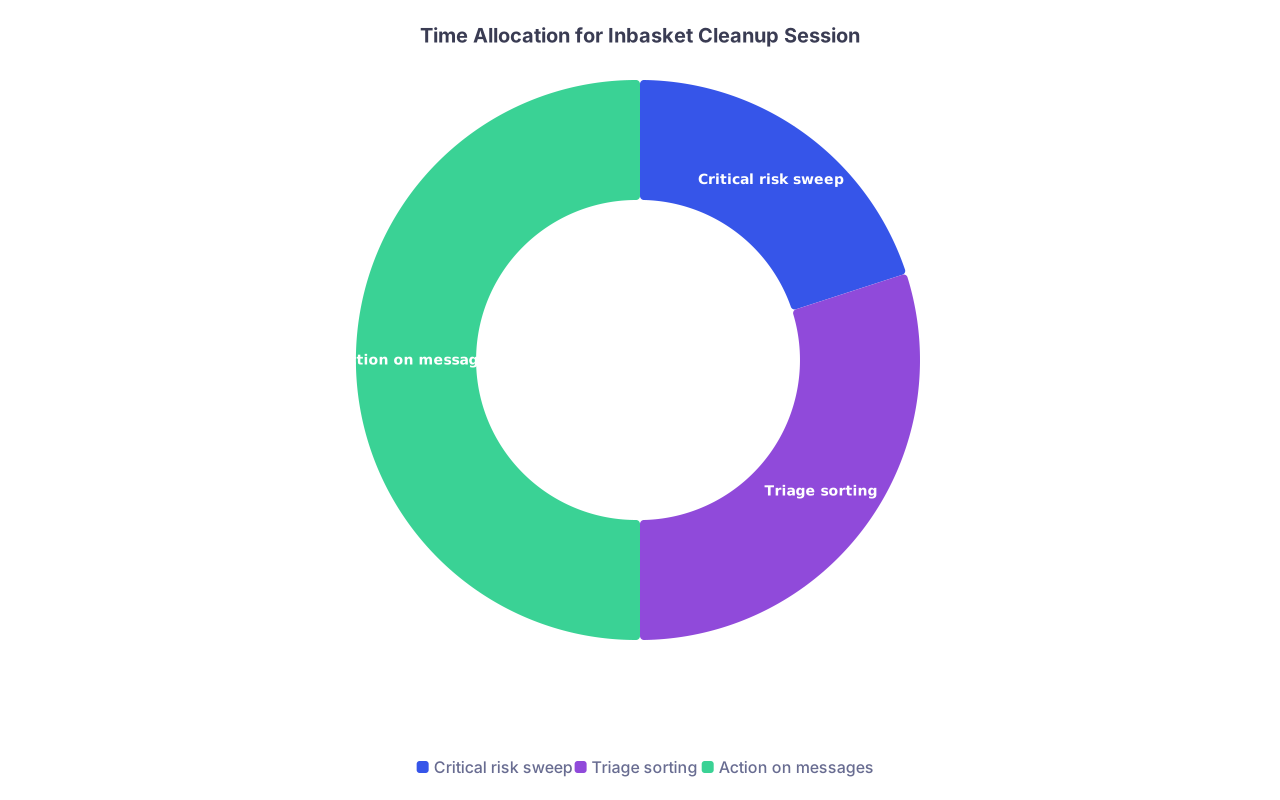
| Category | Value |
|---|---|
| Critical risk sweep | 20 |
| Triage sorting | 30 |
| Action on messages | 50 |
You are not fixing everything yet. You are just making sure nothing catastrophic is hiding.
Step 3: Triage Everything into Buckets
Now you sort the entire backlog into your 4 buckets. This is mechanical. Fast. No perfection.
3.1 – The 10‑Second Decision Rule
For each message, you get 10–15 seconds to decide its bucket. That is it.
Ask:
- Is there any chance delayed action here could seriously harm someone?
- Yes → CRITICAL
- Does this clearly require an actual action from me?
- Yes, and should be within 24 hours → ACTION TODAY
- Yes, but can safely wait days to weeks → ACTION LATER
- No action required / already handled / pure FYI?
- → FYI / INFO ONLY
If you cannot decide quickly, default to ACTION TODAY or LATER (not FYI).
Batch aids:
- Use multi‑select on obvious FYI messages (e.g., “appointment scheduled”, “routing information”).
- Bulk move them to FYI.
- Do the same for obvious low‑risk labs (e.g., A1c trend in known diabetic, already seen recently).
3.2 – Stop after you have full categorization
You are done with triage when:
- Every old message lives in exactly one folder or has one clear flag.
- You have some counts like:
- CRITICAL: 12
- ACTION TODAY: 80
- ACTION LATER: 420
- FYI: 300
You now have a map of the problem. That alone will make you feel less buried.
Step 4: Handle the Critical and Time‑Sensitive Safely
This is where your license lives. You take this part seriously and systematically.
4.1 – Work through the CRITICAL list first
For each CRITICAL item:
- Open the message + chart.
- Check:
- Any encounters after the date of the result?
- Any telephone encounters referencing the issue?
- Any documentation from consultants?
- Decide:
- Already addressed → document “Reviewed, addressed in [note date]. Closing.”
- Not addressed → act now.
“Act now” means:
- Call the patient (or have staff call) for:
- Dangerous labs (high K, critical INR, etc.)
- Concerning imaging (new malignancy suspicion, acute PE, aortic findings)
- Document:
- Your interpretation
- What you told the patient (or attempted contact)
- The plan (ER, sooner visit, med change, repeat labs)
If you cannot handle it alone (e.g., critical echo in a complex cardiology patient), pull in your attending. Briefly. Not with an essay.
4.2 – Close the loop on each critical item
Do not leave half‑done critical messages open “to finish later”. If you took an action:
- Route a summary to your attending if needed.
- Close the message as DONE.

By the end of this step, you should have zero items left in CRITICAL.
Step 5: Build a Daily Cleanup Schedule That You Can Actually Keep
Now comes the grind: ACTION TODAY and ACTION LATER. If you try to crush them all in one insane weekend, you will fail and resent everyone.
You treat this like a long‑term quality improvement project.
5.1 – Decide your daily minimum
Pick a daily non‑negotiable number of messages to fully complete, in addition to same‑day fresh messages. Example:
PGY‑2 on wards:
- 10 old messages per day on weekdays
- 20 per day on one lighter weekend day
PGY‑3 in clinic block:
- 25 old messages per day, 5 days per week
Use math:
If you have 500 “ACTION LATER” items and you clear 20/day:
- 500 ÷ 20 = 25 days to zero.
That is manageable.
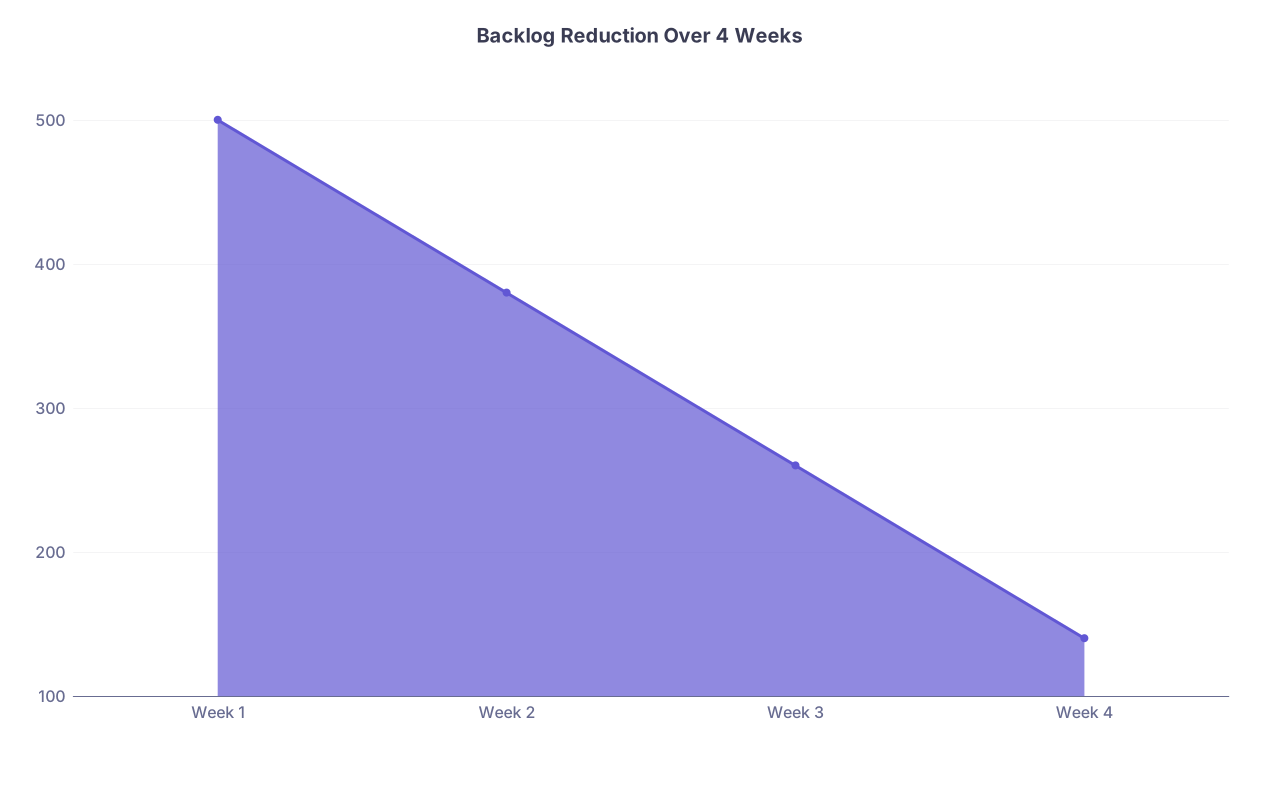
| Category | Value |
|---|---|
| Week 1 | 500 |
| Week 2 | 380 |
| Week 3 | 260 |
| Week 4 | 140 |
5.2 – Anchor it to something you already do
Inbasket cleanup should not float in your day. It should be attached to an existing habit:
- “First 20 minutes after sign‑out in the evening.”
- “Right after lunch, before I open Epic for afternoon clinic.”
- “First 15 minutes of my post‑call afternoon.”
Put it in your calendar. Set an alarm if you must. This is not optional while the backlog exists.
5.3 – Protect a no‑interruption block
During your daily cleanup block:
- Close email, messaging apps, and irrelevant browser tabs.
- If on a busy service, tell your co‑resident:
- “I am doing 20 minutes of backlog cleanup. Text me only for urgent things.”
- Put your phone face down.
You are not antisocial. You are protecting patient care from death by a thousand “quick questions.”
Step 6: Work Smart Through Each Message Type
You do not handle a refill the same way as a patient essay or a 3‑page imaging report. You need patterns.
6.1 – Refills
Refills are often the largest and most repetitive part of a backlog. You make rules.
Sample protocol:
- Sort refills by medication or patient if possible.
- For chronic stable meds (e.g., lisinopril, metformin):
- Check last visit date and BP / labs as relevant.
- If stable and seen in last 6–12 months, use your “refill approved” template.
- For higher‑risk meds (opioids, benzos, anticoagulants):
- Check PDMP (if required), last visit, relevant labs, contracts.
- If criteria met → limited refill + clear follow‑up plan.
- If not met → use “refill denied / modified” template and offer a visit or call.
This is where templates save you. Twenty consistent, safe refills with three clicks each beats twenty bespoke novels.
6.2 – Labs and imaging
For non‑critical items (already out of CRITICAL):
- Group by patient if you can. Handle all pending results for one patient in one pass.
- Check if the patient has a recent or upcoming visit:
- If visit within last week, see if the result is already discussed.
- If upcoming visit soon, you may choose to:
- Document interpretation now and send brief message.
- Or note: “Will review in detail at visit on [date].”
Pattern your responses:
- Normal:
- “Your [test] came back normal. No changes to your current plan.”
- Mildly abnormal, non‑urgent:
- “Your [test] is slightly outside the normal range but not concerning at this time. We will monitor and discuss at your next visit on [date].”
- Abnormal, needs adjustment:
- Brief explanation
- Specific change (med dose, repeat test)
- How to follow up if symptoms or concerns
6.3 – Patient messages
This is where you can lose entire evenings if you are not structured. Most problems:
- Long messages that actually need a visit
- Back‑and‑forth that should be a phone call
- Emotional venting that you feel obligated to “fix” in writing
You need a hard rule:
If a patient concern requires >2 back‑and‑forth messages or complex decision‑making → convert to a visit or phone encounter.
Response pattern:
- Acknowledge
- Safety screen (any red flags that should go to ER or urgent evaluation)
- Offer a specific next step:
- “This is best addressed in a visit so we can examine you and review in detail. I recommend scheduling a visit within [time frame].”
Use templates for:
- Converting to visit
- Addressing non‑urgent administrative requests
- Setting expectations for message use and response times (if your system allows it)
6.4 – Administrative / FYI items
Be ruthless here.
- If truly FYI and outdated (e.g., appointment that already happened, routing info from months ago):
- Mark DONE with no extra thought.
- If related to quality metrics / reminders:
- Glance for anything urgent.
- Otherwise, defer until more pressing clinical backlog is under control.
You are allowed to prioritize real patient safety over some random “health maintenance reminder” from 7 months ago.
Step 7: Standardize Documentation So You Can Prove You Did the Work
Residents underestimate this. When leadership asks, “What did you do about these old messages?” hand‑wavy answers are not enough.
You build a traceable pattern.
7.1 – Use a consistent closing note style
For any old items (especially >30–60 days):
Include in your message note:
- That the result/message was reviewed on [today’s date].
- Whether it had been previously addressed.
- What action you took now.
- If no action taken, why it is safe to defer.
Example language:
- “Result reviewed on 1/6/2026. Issue addressed at visit on 12/2/2025. No further action required.”
- “Message reviewed on 1/6/2026. Symptoms resolved per later message on 11/15/2025. Closing thread.”
- “Result reviewed on 1/6/2026. Mild potassium elevation, stable trend. Counseling and plan documented in note on 1/4/2026.”
7.2 – Keep a simple log while backlog is large
For 2–4 weeks, maintain a short, private log (even a single Word or Notepad file):
- Date
- Number of old messages processed
- Notes on any significant findings (e.g., “Found old critical INR, already handled in ED.”)
Nothing fancy. This is just your “audit trail” and sanity check.
Step 8: Fix the System That Let This Happen
Cleaning up is phase one. Preventing another avalanche is phase two. Otherwise, you will be right back here after your next ICU month.
8.1 – Identify why the backlog formed
Be honest with yourself. Common causes I see:
- No protected time in your day for inbasket.
- Clinic templates overloaded; you leave each day behind.
- No clear rules on what staff handles vs what you handle.
- You are perfectionistic and write paragraph‑long essays for every lab.
Write out your top 2–3 root causes.
8.2 – Implement guardrails
Concrete fixes:
- Hard daily cap:
- “I do not leave until I am at zero CRITICAL and ACTION TODAY, and I have done my X backlog items.”
- Team rules:
- Ask your clinic manager: “Can RNs handle normal labs with standard templates? Can MAs close pure scheduling messages without routing them to me?”
- Shorter default responses:
- No more novels for normal labs.
- No more long back‑and‑forth for complex problems; convert to visits.
| Problem | Guardrail Example |
|---|---|
| No fixed time for inbasket | 20 min blocked after last clinic patient |
| Overloaded clinic templates | Reduce by 1–2 patients per half‑day if possible |
| Staff routing everything to you | Create RN/MA protocol for what they can close |
| Perfectionism | Use 3–4 sentence max for routine labs/messages |
8.3 – Get leadership buy‑in if volume is unsafe
If the volume is truly unsustainable, bring data:
- Screenshots of inbasket counts
- Rough daily incoming volume
- Time requirements to address safely
Ask for:
- Temporary relief in patient load
- Nurse/MA protocol updates
- Protected admin time
Be clear: “At this volume, I cannot safely manage these messages without additional support or schedule adjustment.”
Step 9: Psychological Survival While You Do This
Yes, this is about time and workflow. But also about your brain.
9.1 – Manage guilt without paralyzing yourself
You will find old messages that should have been addressed earlier. You will feel lousy. That is normal.
Your job now is to:
- Take ownership.
- Fix what can still be fixed.
- Change your system so it does not repeat.
Rumination helps no one. Concrete actions do.
9.2 – Build small wins into each day
Do not wait until “zero backlog” to feel better. Track daily wins:
- “Cleared all CRITICAL; zero now.”
- “Backlog down from 520 to 430.”
- “All refills now updated through this month.”
This combats the constant sense of drowning.
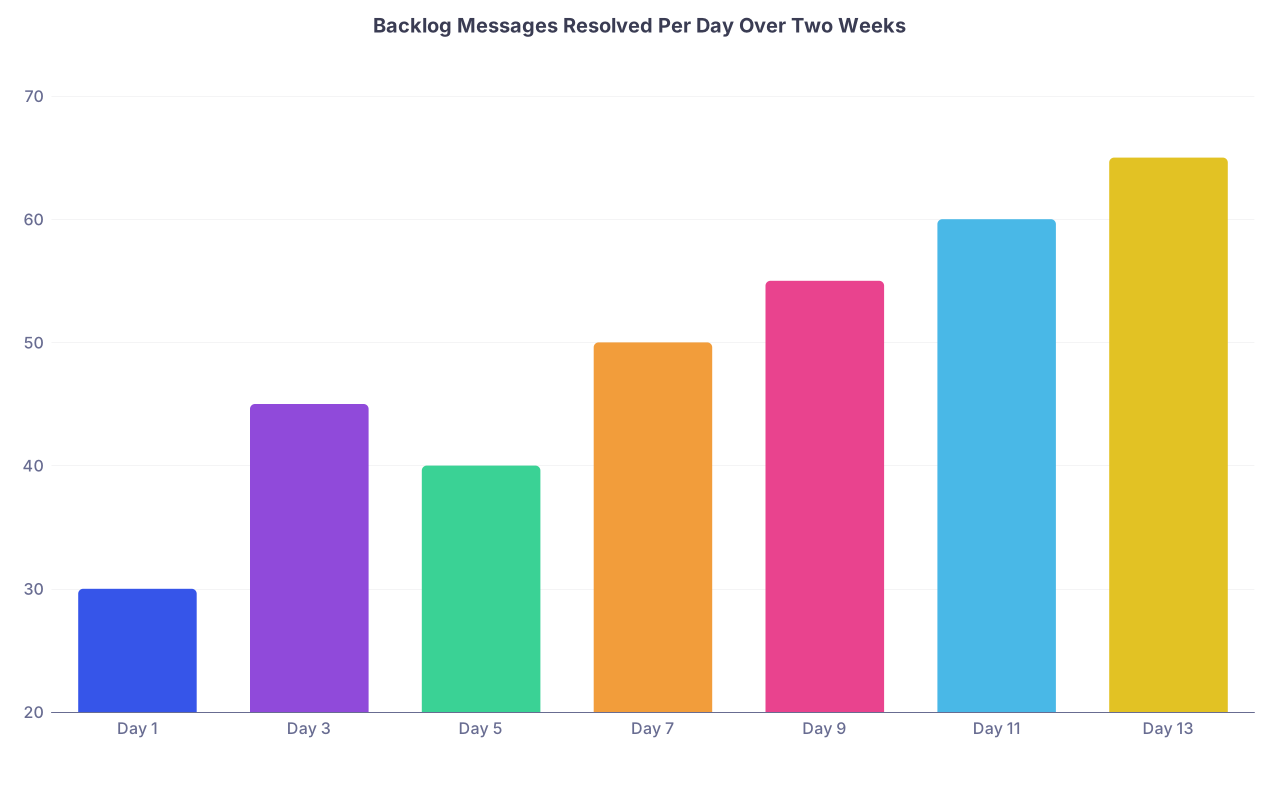
| Category | Value |
|---|---|
| Day 1 | 30 |
| Day 3 | 45 |
| Day 5 | 40 |
| Day 7 | 50 |
| Day 9 | 55 |
| Day 11 | 60 |
| Day 13 | 65 |
9.3 – Do not do this alone if you are collapsing
If this backlog is part of larger burnout (chronic exhaustion, emotional numbing, dread every morning), you need broader support:
- Talk to a trusted attending or program director.
- Use resident wellness resources if your institution has them.
- Ask peers how they handle their inbaskets; steal their workflows shamelessly.
This is survival, not a personality contest.

Frequently Asked Questions
1. What if my backlog is truly massive (like 1,500+ messages) and I feel like I will never catch up?
You treat it exactly like an ICU list: triage, categorize, and tackle the most dangerous items first.
Condensed plan:
Day 1–2:
- Critical sweep for labs/imaging/refills.
- Pull out and handle anything with real harm potential.
- Close clearly outdated and already‑addressed FYI items in bulk.
Day 3 onward:
- Set a realistic daily quota (20–40 old messages/day).
- Anchor a protected 20–30 minute block in your schedule.
- Handle messages in thematic batches (all refills, all simple labs, etc.), not random order.
Leadership:
- Bring your program a screenshot and concrete plan.
- Say: “I am doing [X messages/day] and started [date]. I expect to be at zero by [date]. I need protected time to make this safe.”
You are not expected to magically erase 1,500 messages overnight. You are expected to create a defensible, systematic plan and follow it.
2. How do I balance new daily messages with this old backlog without drowning?
You split your work into two distinct layers:
Same‑day obligations:
- Zero CRITICAL by end of day.
- Reasonable handling of fresh ACTION TODAY items (e.g., 10–20 depending on volume).
- This is your “daily safety floor.”
Backlog quota:
- Fixed number (say 15–25) of old messages per day.
- Done during your protected inbasket block, not ad‑hoc between pages.
If the day explodes (codes, cross‑cover madness), you protect the daily safety floor and allow yourself to miss that day’s backlog quota. Then:
- Tag the day as an outlier in your log.
- Make it up with a slightly larger quota later or an extra weekend block.
That is how real clinicians handle real‑world chaos: minimum safety standards plus flexible backlog work, not fantasy “inbox zero” every single day.
Open your inbasket right now and do a 30‑minute critical risk sweep plus folder triage. No deep work, no perfection. Just get everything into CRITICAL, ACTION TODAY, ACTION LATER, or FYI. Once that map exists, the rest of this protocol becomes doable instead of overwhelming.