
The way most residents handle pages is broken. Random. Reactive. And it burns people out faster than any 28‑hour call.
You do not need more resilience. You need a system.
This is a step‑by‑step triage and response protocol you can run half‑asleep at 3 a.m. If you adopt it, you will miss fewer critical issues, stop feeling constantly behind, and actually get through a call night without wanting to throw your pager into the nearest sharps container.
Step 1: Build Your Paging “Control Panel” Before the Chaos
If your system only works when you are fully rested and calm, it is worthless. You need something that works on post‑call brain.
Set this up before your next heavy call or admit shift.
A. Standardize your capture tools
You need one place where every page goes. Not three. One.
Use:
- A folded index card you keep in your pocket, or
- A small notebook dedicated only to pages, or
- A single “Pages” note on your phone (if hospital policy allows, and never with PHI)
What you write down for each page:
- Time
- Caller / service / extension
- Patient ID: at least name + bed or last name + MRN tail
- One‑line reason for page
- Priority box: [STAT / URGENT / ROUTINE / FYI]
Example entry:
- 22:14 | RN Sarah 5E x4721 | Gomez, M. 5-12 | New chest pain 7/10, HR 120 | STAT
This alone will reduce your anxiety. Your brain stops trying to cache 12 half‑remembered tasks.
B. Decide your personal escalation ladder
Write a tiny cheat sheet (back of badge, inside notebook):
- STAT = stop what you are doing, address now
- URGENT = within 15–30 minutes
- ROUTINE = within 1–2 hours or batch with other tasks
- FYI = no action now, just log
You will use this constantly.
Step 2: Use a Script for the First 10 Seconds of Any Page
Most residents lose control in the first 10 seconds. The nurse starts talking, you are still finishing a note, you catch half the story, then you are already behind.
You need a hardwired opening script.
When you answer, do this every time:
Identify yourself clearly
- “This is Dr. Lee, medicine resident covering 5E and 5W.”
Identify the caller and patient early
- “Hi, who am I speaking with? And which patient are we talking about?”
Ask for the reason for page in one line
- “Can you give me the main concern in one sentence first?”
Examples:
- “New chest pain in 5-12 Gomez.”
- “BP 82/48 on Ms. Patel.”
- “Family wants an update before they leave.”
- Internally tag the priority
- STAT / URGENT / ROUTINE / FYI
If STAT → you switch into emergency triage mode (next section).
If not → you slow the call down and gather structured info.
Step 3: Run Every Page Through a Rapid Triage Filter
You need one mental algorithm you use for every clinical page. Here it is.
A. The “Is Someone Crashing?” filter (3 questions)
While the caller is talking, you are silently asking yourself three things:
Airway/breathing:
- Any mention of:
- Stridor
- Agonal breathing
- Oxygen sat dropping / cannot maintain sats
- Patient unresponsive or very drowsy
- Any mention of:
Circulation:
- Any mention of:
- SBP < 90
- MAP < 65 (ICU/stepdown)
- HR > 130 or < 40
- New chest pain, syncope, massive bleeding, arrhythmia
- Any mention of:
Mental status:
- Any mention of:
- Sudden confusion
- Unresponsive / difficult to arouse
- New seizure
- Any mention of:
If yes to any of these: this is STAT. You stop everything else and handle this first. Even if you owe someone two call‑backs to “review labs” or “clarify diet orders.”
B. The “Can this kill them in the next hour?” list
If not acutely crashing, scan for:
- New fever in neutropenic patient
- Suspected stroke (face droop, speech slur, weakness)
- New focal neuro deficit with headache / trauma
- Chest pain in anyone with CAD risk, recent surgery, or chemo
- GI bleed: melena, hematemesis, bright red blood with instability
- Suspected sepsis signs: fever + hypotension / tachycardia + altered mentation
If yes → URGENT. You address within 15–30 minutes, usually by going to bedside.
If no → it drops into ROUTINE or FYI.
Step 4: Use a Structured Information Template (So You Do Not Miss Key Data)
Do not say, “What are the vitals?” and then try to piece things together. You will forget something, especially at 03:47.
Use a simple structure. For most floor pages, use this:
S – Situation
B – Background
A – Assessment (your data check)
R – Recommendation / Plan
And you drive it, not the nurse.
Example script:
- “Okay, so situation: what is the main concern right now?”
- “Give me quick background: reason for admission and major issues?”
- “Let us get data: last set of vitals, oxygen requirement, mental status, urine output if relevant.”
- “Any recent changes in meds or events? Any rapid response criteria triggered?”
If they are not sure, you can say:
- “Can you please get a full set of vitals and repeat the blood pressure while we talk?”
- “Put the pulse ox on and tell me the reading with and without oxygen.”
You are buying real data, not vibes.
Step 5: Decide Management Level: Phone Order vs Bedside vs Escalate
You do not physically go to every patient for every page. That is how you burn out and still miss the sick ones.
Use this 3‑tier decision rule:
Tier 1: Phone‑safe issues (no immediate bedside needed)
These are problems you can reasonably handle with chart review + clear orders:
- Mild pain needing scheduled PRN
- Nausea / constipation management
- Sliding‑scale insulin dosing for expected glucoses
- Routine med reconciliation questions
- Diet changes (clear to full, NPO after midnight, etc.)
- Non‑urgent lab follow‑up (“K is 3.3, no arrhythmia, stable vitals”)
Protocol:
- Confirm vitals are stable and there is no concerning trend.
- Give clear, specific orders:
- “Give 4 mg IV Zofran now, then 4 mg every 8 hours PRN if nausea persists.”
- “Give 40 mEq oral KCl now, repeat BMP in the morning.”
- Repeat back the order and have them read it back.
- Document later in a quick note or order-specific comment if the action is significant.
Tier 2: Must‑see issues (go to bedside within 15–60 minutes)
Go in person for:
- Any new chest pain
- Increase in oxygen requirement or new desaturations
- Acute change in mental status
- SBP < 90 or new tachycardia in a previously stable patient
- New or worsening shortness of breath
- Significant bleeding
- Uncontrolled pain despite appropriate meds
- Any time the nurse says, “I am really worried about this patient”
On the way or right before you walk in:
- Skim the last note / problem list
- Check most recent labs
- Note code status and goals of care
- Pull up MAR for recent meds (opiates, sedatives, antihypertensives)
At bedside, repeat your own ABCs and vitals. Never trust a 2‑hour‑old set on a sick patient.
Tier 3: Escalate immediately (senior, attending, rapid response, or code)
Trigger escalation without delay when:
- You have any doubt about airway or breathing
- SBP persistently < 90 despite a bolus, or MAP < 65 in sick patients
- Sustained HR > 140 or new arrhythmia with instability
- Suspected stroke within tPA/EVT window
- Status epilepticus or repeated seizures
- Massive bleed, hematemesis, or bright red blood with hypotension
- Septic picture with poor perfusion
You do not get points for silently struggling through this alone.
Your internal rule:
If you are standing in a room thinking, “If this goes south, I am screwed,” you call for backup now. Not after your third NS bolus fails.
Step 6: Batch and Sequence Your Tasks So You Stop Feeling Behind
The other source of overwhelm: 17 open loops in your head.
You need a simple task management protocol for pages.
A. Sort pages into four buckets
On your page log, mark each item:
- “N” – Now (STAT / most URGENT)
- “S” – Soon (handle in next 30–60 min)
- “L” – Later (before end of shift)
- “D” – Delegate (to nurse, intern, other service, consult)
Example:
- N: “22:14 Gomez – chest pain”
- S: “22:20 Patel – K 2.9, asymptomatic”
- L: “22:33 Lee – family wants update”
- D: “22:40 Lab – wrong tube drawn, recollect in AM”
You always finish all “N” items before you touch “L” stuff.
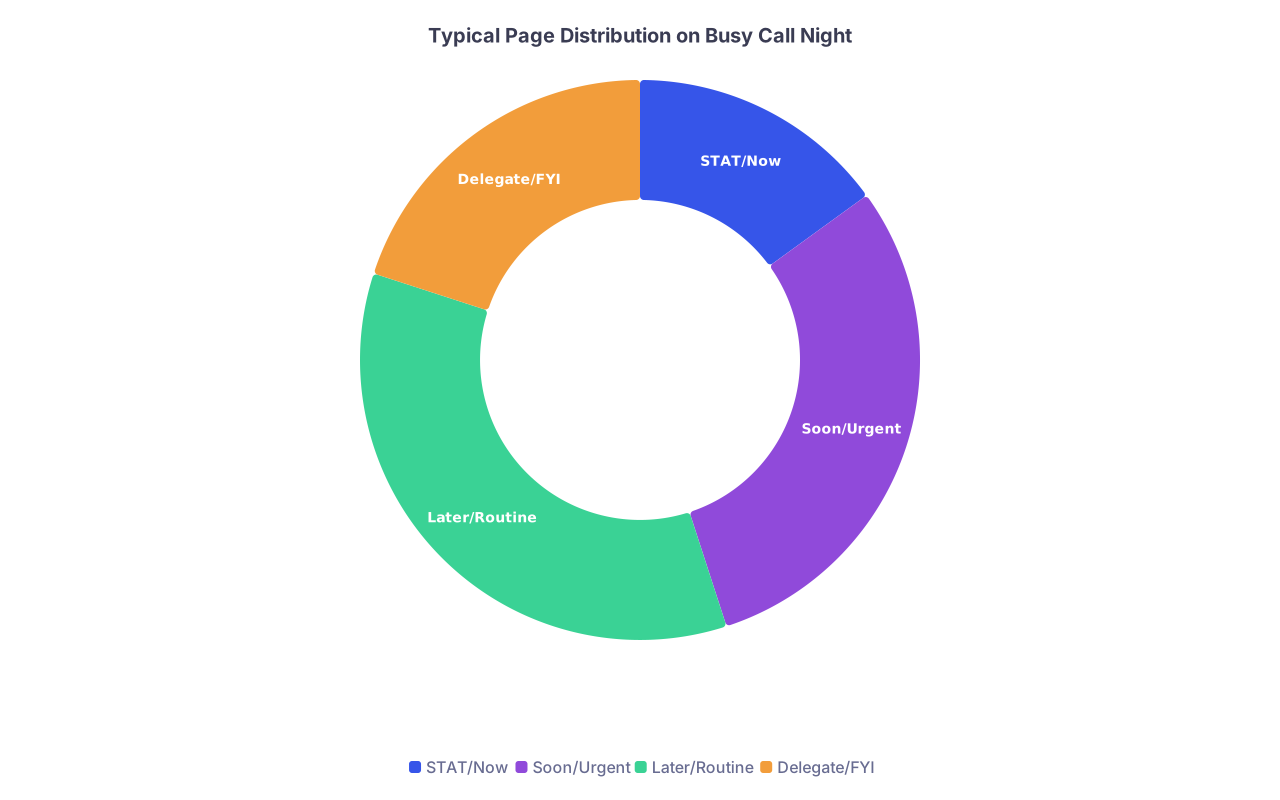
| Category | Value |
|---|---|
| STAT/Now | 15 |
| Soon/Urgent | 30 |
| Later/Routine | 35 |
| Delegate/FYI | 20 |
B. Route your movement logically
When you have multiple bedside issues:
- List rooms you must see: “5-12, 5-18, 5-21”
- Rank by acuity: who is most unstable or most potentially unstable?
- Walk the floor in a sane loop, not ping‑ponging between ends of the unit.
Do a “mini‑round” as you go: if you are already at 5‑18 for chest pain, quickly glance at the patient in 5‑19 you got a “mild pain” page on that you handled by phone earlier.
Step 7: Develop Standard Micro‑Protocols for Common Pages
You should not be reinventing the wheel for the top ten issues you get paged about.
Build micro‑protocols. Write them out once in your own words. Keep them in your notebook.
Example: “Patient in pain”
Ask:
- Location, onset, character, radiation, severity now vs before
- Vitals: any tachycardia, hypotension, fever, desat?
- Is this expected (post‑op) vs new / unusual?
Check:
- Last pain med, route, and effect
- Renal/hepatic function if considering opioids or NSAIDs
Decide:
- If red flags: go see patient
- If typical and stable: titrate existing regimen or add non‑opioid option
Orders:
- Pre‑built ladder (for example)
- Step 1: Acetaminophen scheduled
- Step 2: Low‑dose PO opioid PRN
- Step 3: IV opioid for breakthrough with monitoring
- Pre‑built ladder (for example)
Same idea for:
- Hypertension
- Hyperglycemia
- Mild hypoglycemia
- Low urine output
- Fever on the floor
- Nausea/vomiting
- Insomnia / agitation
You want your brain to say, “Oh, this is bucket X, I know the 4‑step play.”

Step 8: Control Nonclinical Pages Without Being a Jerk
Some pages are clinically irrelevant but still land on you:
- “Family wants update now.”
- “Pharmacy needs clarification on a nonurgent med.”
- “Dietary wants to confirm a lactose intolerance.”
- “Transport asking about discharge time.”
You cannot ignore these, but you also cannot let them derail care for sick patients.
Use simple scripts.
For families when you are slammed
- “I will absolutely update you. I am currently managing an urgent situation. I can come by in about an hour, or I can call you if you prefer. Which is better?”
Then you write it down in your “Soon” or “Later” list.
For nonurgent clarification
- “Is the patient stable and comfortable right now?”
- If yes:
- “Let me finish something time‑sensitive, and I will put in the order within the hour.”
- If no:
- “Okay, I will look at this next right after I address a more urgent situation.”
- If yes:
Most reasonable staff understand when you signal priorities clearly.
Step 9: Use a Simple Handoff for Pending Pages
Nothing creates chaos like inheriting a mess of unresolved pages at sign‑out.
You need a clear micro‑handoff system for “page debt.”
Before sign‑out:
- Go through your page log.
- Circle any item that:
- Still needs action, or
- Might generate repeat pages
For each circled item, write a one‑liner:
- “Gomez 5-12 – chest pain at 22:14, trop sent, EKG okay, repeat trop at 04:00, call cards if uptrending or pain returns.”
- “Patel 5-09 – K 2.9, 40 mEq PO given at 23:00, repeat BMP 05:00; if K < 3.0 again, consider IV replacement.”
At sign‑out, present:
- The patient
- What triggered pages
- What you already did
- What still needs to be done
- Explicit “call me / attending” triggers
This prevents the night float or day team from being blindsided and angry at 03:00 for something you knew was coming.

| Step | Description |
|---|---|
| Step 1 | Page received |
| Step 2 | Log page details |
| Step 3 | STAT response bedside |
| Step 4 | Gather structured info |
| Step 5 | Urgent bedside eval |
| Step 6 | Phone order or defer |
| Step 7 | Call senior or rapid |
| Step 8 | Implement plan |
| Step 9 | Document and update log |
| Step 10 | Crashing or unstable? |
| Step 11 | Potentially life threatening? |
| Step 12 | Need escalation? |
Step 10: Protect Your Own Cognitive Bandwidth
Being overwhelmed by pages is not only about volume. It is about mental load.
You can reduce that load with a few hard rules.
A. Never multitask on two clinical decisions at once
If you are:
- Responding to a STAT page, or
- Placing a risky order, or
- Writing a code or rapid note
And another page comes in?
- Silence/vibrate is fine for 1–2 minutes.
- Or answer and say:
- “I am currently at a sick patient’s bedside. Is this an emergency?”
- If yes → give minimal immediate direction, then go.
- If no → “I will call you back in a few minutes once I am out of the room.”
- “I am currently at a sick patient’s bedside. Is this an emergency?”
Trying to process two serious issues simultaneously is how mistakes happen.
B. Have pre‑decided “default” actions
For recurring borderline situations, decide once:
- “If SBP 160–180, asymptomatic, no end‑organ damage → observe, adjust in the morning.”
- “If glucoses 200–250 in stable patient overnight → follow sliding scale, no extra calls to endocrine.”
Write your own defaults with your seniors or attendings. Then stick to them unless there is a specific reason to deviate.
Step 11: After-Action Review: 5 Minutes to Get Better Each Week
You do not improve your paging management just by suffering through it. You improve by reflecting.
Once a week (post‑call, or Friday afternoon), do a 5‑minute review:
Pick 1–2 call nights.
Look at your page log.
Ask:
- Which pages caused you the most stress?
- Which ones bounced back multiple times (repeat pages for same problem)?
- Which ones you escalated too late or too early?
For each pain point, write one change:
- New micro‑protocol
- New script
- Better threshold for escalation
- A pre‑emptive order you will start using (e.g., PRN bowel regimen, sleep aid, pain ladder)
You are building your own resident “playbook.” That playbook is how senior residents look calm while you feel underwater. They are not smarter. They just have scripts and patterns burned in.

Sample Mini Playbook: Top 5 Annoying but Fixable Page Types
To show you what this looks like in practice, here is a tight playbook for five extremely common pages.
| Page Type | First Question | Default Next Step |
|---|---|---|
| High BP (e.g., 180/95) | Any symptoms or neuro change? | If asymptomatic, confirm reading, adjust PO meds if needed, avoid aggressive IV unless clear indication |
| Low urine output | Vitals and I/Os trend? | If stable, bolus 250–500 mL and reassess; if hypotensive or septic, go see patient and escalate early |
| Mild hypoglycemia (60-70) | Symptoms? Eating? | Give PO carbs if awake, recheck in 15 min; if NPO or symptomatic, IV dextrose and assess insulin regimen |
| New fever | Neutropenic or device lines? | If neutropenic or unstable, STAT evaluation and cultures; if stable, ordered cultures/UA/CXR per protocol |
| Insomnia/agitation | Pain, dyspnea, delirium? | Treat underlying (pain, urinary retention, hypoxia) first; then consider low-dose sleep aid if safe |
You can and should build your own version tailored to your service.
Step 12: Use Tech and Environment to Your Advantage
A few small operational tweaks reduce paging chaos more than you think.
Whiteboard or shared list with nurses
- Note patients with: DNR, high fall risk, agitation, difficult families
- Proactively see these patients early in the shift. Prevents half the “problem” pages later.
Status updates
- Tell unit charge RN when you are going to be tied up in a code or procedure:
- “I will be in 5-22 for the next 30 minutes; for any crashing patient, please call rapid directly and then me.”
- Tell unit charge RN when you are going to be tied up in a code or procedure:
Smart use of order sets
- Use admission order sets that include:
- Bowel regimen
- Nausea PRNs
- Pain ladder PRNs
- Sleep PRN if appropriate
- This alone can cut your routine symptom pages dramatically.
- Use admission order sets that include:
Visual priority cues
- If your hospital uses a secure chat system, ask nurses to flag STAT items with a consistent tag or phrase.
- If not, agree on words like “I am very concerned” to signal higher urgency vs “just updating.”
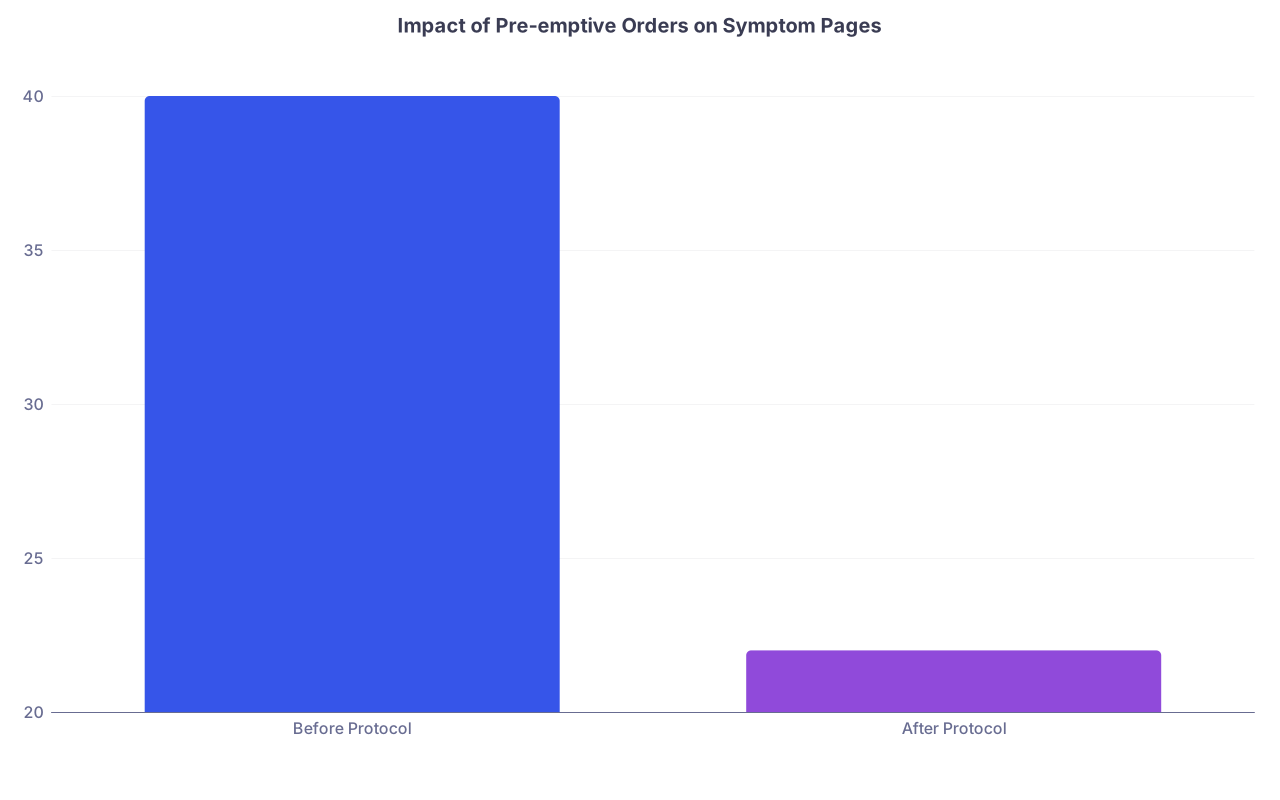
| Category | Value |
|---|---|
| Before Protocol | 40 |
| After Protocol | 22 |
The Bottom Line
You will never eliminate pages. But you can absolutely stop being controlled by them.
Three key points to lock in:
- Run every page through a simple system. Log it, triage it (STAT / URGENT / ROUTINE / FYI), and decide: phone order, bedside, or escalate. No improvisation.
- Standardize your responses to common problems. Build micro‑protocols for pain, fever, BP, glucose, urine output, and insomnia. Use them until they are automatic.
- Protect your attention and time. Do one critical thing at a time, batch routine issues, and use clear scripts with nurses and families so urgent care always comes first.
You are not going to “rise to the occasion” on call. You are going to fall to the level of your systems. So build better systems now.