
The belief that a brutal, chaotic call night is just “how residency is” is lazy and wrong. Chaos on call is usually a systems problem—and systems can be fixed in real time if you know exactly what to do.
You do not need another feel‑good post about “self‑care on call.” You need a protocol. Something you can run at 2:37 a.m. when three pagers are going off, two nurses are glaring at you, and your senior is scrubbed in a case.
Here it is: a 5‑step rescue protocol to stabilize a chaotic call night while it is happening.
The 5‑Step Call Night Rescue Protocol (Overview)
When your night is going off the rails, you run this. In order. Every time:
- Stabilize yourself and your information flow.
- Sort and rank everything that’s hitting you.
- Execute in focused “sprints” instead of random task-hopping.
- Communicate like air traffic control, not a victim.
- Reset the board every 60–90 minutes.
This is not theory. This is the pattern I have watched successful residents run—intentionally or accidentally—on MICU call, trauma nights, cross‑cover, you name it.
Let’s break it down step by step.
Step 1 – Stabilize Yourself and Your Information Flow
You cannot control the ED. You cannot control admission volume. You can control how information hits your brain.
The first 3–5 minutes after you realize, “This is getting out of control,” are critical.
1A. Physically reset
You do not have 20 minutes for mindfulness. You have 60–90 seconds.
Do this:
- Plant your feet. Sit or stand still. Do not walk and think.
- Take 3 slow breaths. In for 4, hold for 4, out for 6. It sounds cliché. It drops your heart rate enough to stop the mental static.
- Say in your head (or quietly out loud):
“I will handle one thing at a time. Nothing gets better if I panic.”
Then move straight to the information reset.
1B. Stop the random page ping‑pong
The biggest driver of chaos is uncontrolled input. Four pagers. Phone calls. Hallway questions. All at once.
You need a single funnel.
Designate one primary channel (as much as your setting allows):
- On many services: your pager or the hospital messaging app.
- Tell nurses who are peppering you in person: “Page me with anything new, even if we just talked about it. I am tracking everything from pages.”
Create an immediate “capture space”:
- One side of scrap paper or a small notebook.
- Or a simple note on your workstation computer.
- This is not for beautiful documentation. This is your temporary radar screen.
Start a running “chaos list”: Every time something comes in (page, call, “quick question”), write:
- Room / Patient initials
- One‑line problem
- Time paged
Example:
- 412B – J.S. – HR 140 fever 101.8 – 23:14
- ED – new admit DKA – 23:20
- 3N – K.B. – pain uncontrolled – 23:21
Now you see the storm instead of feeling it.

| Step | Description |
|---|---|
| Step 1 | Chaos hits |
| Step 2 | Stop and breathe 3 times |
| Step 3 | Create chaos list |
| Step 4 | Sort & rank tasks |
| Step 5 | Run focused work sprint |
| Step 6 | Communicate updates |
| Step 7 | Reset board in 60-90 min |
Step 2 – Sort and Rank: What Actually Matters First
Residents get crushed on call not because they are slow, but because they are doing tasks in the wrong order.
You need a fast triage method you can run in under 2 minutes.
2A. Use a strict 4‑tier urgency system
Look at your chaos list and assign each item one of four levels:
- RED – Immediate / life‑threatening (now, within 5–10 min)
- Possible stroke, chest pain, new O2 requirement, hypotension, mental status change, sepsis flags.
- ORANGE – Serious but stable (within 30–60 min)
- High fevers in stable patients, rising creatinine, concerning labs without active decompensation, significant pain not yet addressed.
- YELLOW – Can wait (within 2–4 hours)
- Non-urgent medication questions, discharge planning, routine order clarifications, home med reconciliations for stable patients.
- GREEN – Can be batched / delegated
- “Can you renew routine meds?”, diet changes in stable patients, sleep meds, paperwork, non-urgent consult notes.
Mark them next to each line on your chaos list: R, O, Y, or G.
This is your triage map.

2B. Decide the next three actions, not the whole night
Do not plan the whole shift. Your brain does not have that bandwidth when you are tired.
From your list:
- Pick all REDs. If you have more than one:
- Ask yourself: “Which of these could kill someone in the next 10 minutes?”
- That is #1. The second worst is #2. The rest wait until those are handled.
- Then pick one ORANGE that you will handle right after the REDs.
- Everything else is deliberately ignored for the next block of time.
You now have:
Next actions list:
- R1
- R2 (if present)
- O1
That is your universe for the next 20–40 minutes.
Step 3 – Execute in Focused “Sprints,” Not Random Task-Hopping
Most residents stay in perpetual “reactive mode.” Constantly answering the loudest thing instead of the most important thing.
You are going to work in tight, focused sprints.
3A. The 30–45 minute sprint rule
Commit to short blocks:
- 30–45 minutes of intense, focused work on the 2–4 highest priority tasks.
- Then a 5-minute reset to:
- Update the chaos list.
- Re-triage anything new.
- Quickly message / text updates as needed.
During the sprint:
- Ignore routine pages unless:
- They clearly sound like they belong in RED or ORANGE.
- Or you are specifically expecting something time‑critical (e.g., post‑tPA CT result).
You are not being irresponsible. You are being structured. You will catch those pages during the reset interval and re‑rank them.
3B. The “one touch” rule for each patient
When you hit a room or chart, aim to solve as much as you can in one pass:
Before you walk into a room (or call a nurse):
- Skim vitals, last note, meds, relevant labs.
- Ask yourself:
- What is the obvious next danger I need to rule out?
- What can I decide now to avoid a second page in an hour?
Example:
- Page: “412B – J.S. HR 140, fever 101.8.”
- Instead of:
- Go, eyeball the patient, give 500 mL bolus, Tylenol, walk away.
- Then get paged again for persistent tachycardia, then again for new O2 requirement.
Run one-touch thinking:
- Go in with:
- Rough plan: sepsis eval vs volume status vs arrhythmia.
- Orders you are ready to place:
- Labs (CBC, CMP, lactate, blood cultures if warranted, UA if source unclear).
- Fluids vs diuresis plan, EKG, consider CXR, O2 as needed.
- Clear “if-then” instructions to the nurse:
- “If MAP drops below 65 despite bolus, page me STAT.”
- “If O2 sat under 92, increase O2 and page.”
You cut down on repeat interruptions and stabilize the situation more effectively.
| Priority Level | Examples |
|---|---|
| RED | Hypotension, new O2 need, chest pain, acute neuro change |
| ORANGE | High fever in stable patient, K+ 2.9, Na+ 122, Hgb 6.8 (hemodynamically stable) |
| YELLOW | Mild tachycardia in otherwise stable, med reconciliation, stable low Hgb trend |
| GREEN | Sleep aid request, diet change, routine lab timing, non-urgent note |
Step 4 – Communicate Like Air Traffic Control
On a bad call night, communication either saves you or buries you.
If you sound uncertain, people will keep pinging you. If you project control, they will give you some space.
4A. Use the “3‑part update” with nurses
When you respond to a page, give:
- What you did / decided right now.
- What to watch for.
- When they will hear from you again (or need to call you).
Example script:
- “For 512A, I have ordered labs, fluids, and a CXR. Please give the first bolus now.
If MAP drops below 65 or the O2 sat goes under 92, page me STAT.
Otherwise, I will check back on labs and vitals in about 45 minutes.”
That kind of clarity does three things:
- Reduces repeat pages for “just checking.”
- Gives nurses confidence you have a plan.
- Protects the patient with explicit safety triggers.
4B. How to ask for help without sounding lost
If you are drowning, hiding it is dangerous. But there is a smart way to escalate.
Page or call your senior with this format:
- Situation in one sentence.
- Your triage summary.
- What you have already done.
- What you are asking for.
Example:
“Hey, this is night float on 3N. I have had a surge of issues in the last 30 minutes—two probable sepsis cases and a new GI bleed.
I have triaged: 402 and 416 are my REDs, 420 (GI bleed) is my next ORANGE.
I have already seen 402, started sepsis workup, given fluids, and she is stable for now.
I could use help seeing 416 in person while I start managing 420, or I need your input on whether to move one of these to the ICU now.”
You are not saying, “I can’t handle it.” You are saying, “Here is the current board, here is my plan, here is where backup would have the most impact.”
Seniors and attendings respond very differently to that.
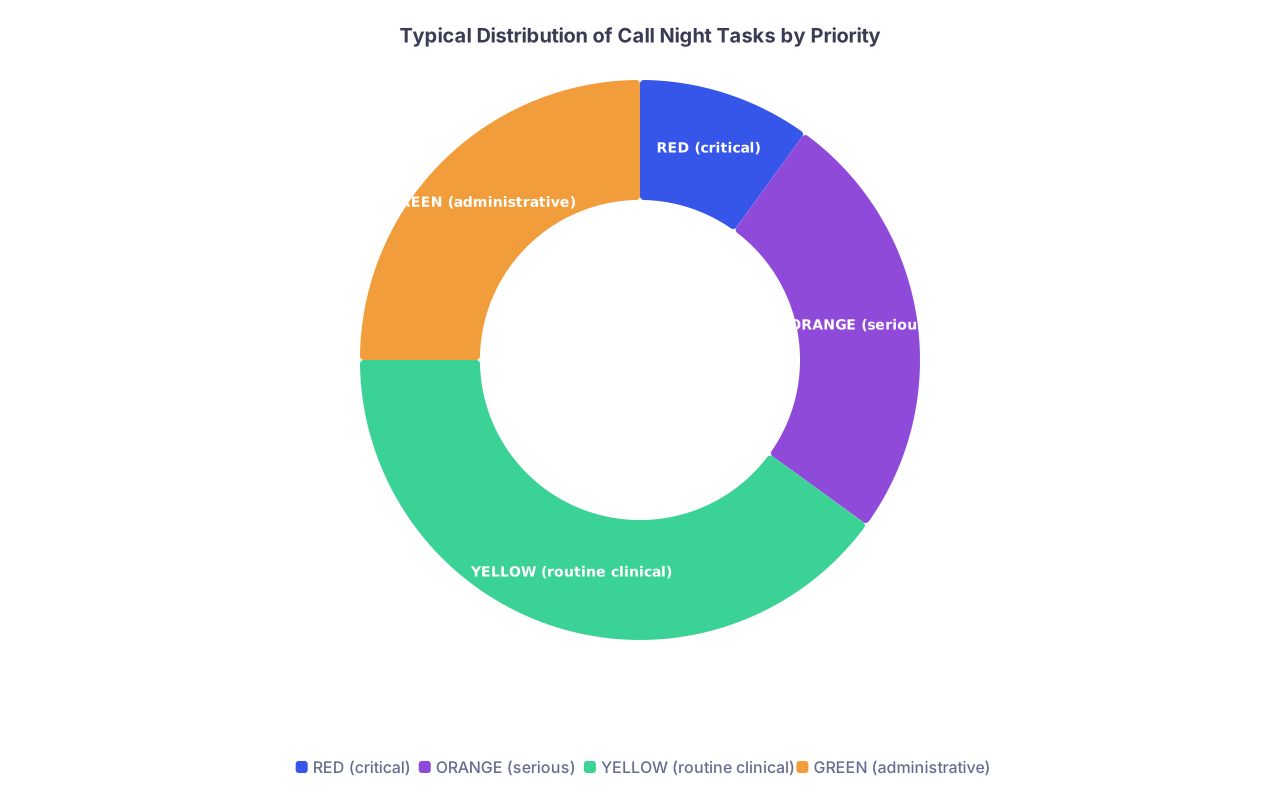
| Category | Value |
|---|---|
| RED (critical) | 10 |
| ORANGE (serious) | 25 |
| YELLOW (routine clinical) | 40 |
| GREEN (administrative) | 25 |
4C. Communicate boundary conditions to everyone
When it really hits the fan, you can explicitly state your constraints.
To a nurse:
- “I am currently in 410 managing an unstable patient and will be here for about 15 minutes.
For the next 15 minutes, page me only for emergencies – anything life‑threatening. I will then call the desk for non‑urgent issues and catch up.”
To the ED:
- “I can accept this patient, but I am physically tied up in a decompensating patient for the next 20–30 minutes.
If they acutely worsen, activate rapid response / code and then page me STAT. Otherwise, I will place preliminary orders now and see them as soon as I am free.”
You are not being difficult. You are practicing damage control.
Step 5 – Reset the Board Every 60–90 Minutes
If you do not periodically zoom out, you will miss the slow disasters: the sodium quietly dropping, the creatinine climbing, the borderline vitals trending down.
Every 60–90 minutes, no matter how ugly it is, run a “board reset.”
5A. The 6‑minute board reset ritual
Find a workstation. Open your chaos list. Set a mental timer for 6–8 minutes.
Do this:
- Scan your chaos list vs what is actually done.
- Cross out completed tasks.
- Star any RED/ORANGE items you have not touched yet.
- Check vitals and trends on your highest‑risk patients.
- Anyone with:
- Hypotension
- New O2 requirement
- HR > 120
- Fever > 38.5 with borderline pressures
- Anyone with:
- Look at new labs for three categories:
- Electrolytes: K+, Na+, Mg2+, Ca2+.
- Renal: Creatinine going up, urine output going down.
- Heme: Hgb drops, Plt critically low, coags if bleeding risk.
- Quickly assign new R/O/Y/G rankings to anything new that popped up.
- Decide the next sprint’s top 3 actions.
This is 6–8 minutes that feel “unproductive” in the moment but save you from 2–3 hours of later disaster management.
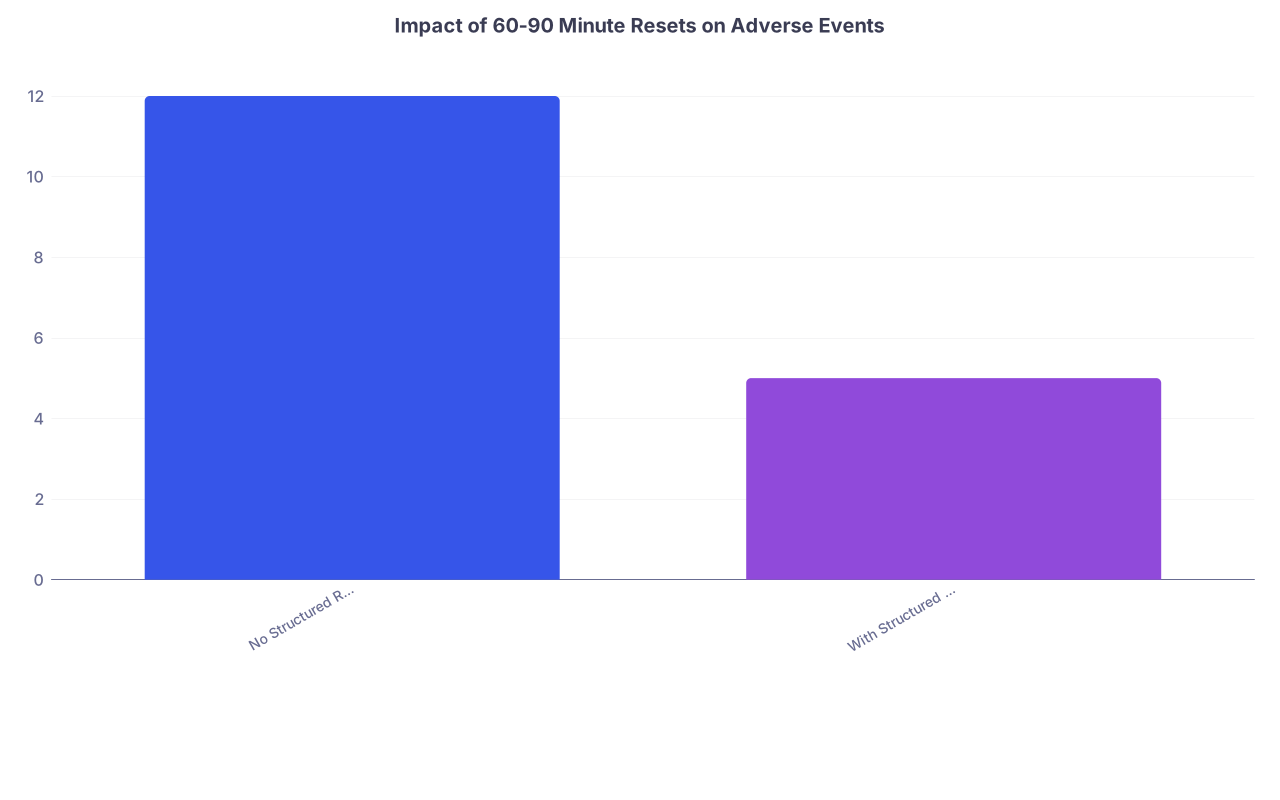
| Category | Value |
|---|---|
| No Structured Reset | 12 |
| With Structured Reset | 5 |
5B. A word on documentation during chaos
You still need notes. You still need orders to be clean. But if you insist on perfect documentation in the middle of a disaster night, you will fail both the patient and yourself.
Use a two‑phase documentation approach:
Phase 1 – Minimal safe documentation (during chaos).
- For each major event:
- Brief event note or addendum:
- “2330 – Called to bedside for hypotension. Vitals… Impression… Interventions… Plan…”
- Brief event note or addendum:
- That is it. No novel‑length prose.
- For each major event:
Phase 2 – Expansion / proper notes (as chaos eases or post‑call).
- Use your Phase 1 entries as skeletons.
- Flesh out H&P or progress notes with fully structured documentation.
This protects you medico‑legally and clinically without freezing your throughput.
Putting It Together: A Real‑World Example
Let’s run the protocol through a real scenario.
You are on night float cross‑cover for two medicine floors.
23:05 – Current situation:
- You are in 508 evaluating a patient with chest pain.
- Your pager goes off three times in 2 minutes.
- A nurse grabs you in the hall for “a quick question.”
You feel the chaos rising.
Run Step 1
- You finish the critical part of your chest pain eval (ask the key questions, check vitals, place initial orders, give nitro if appropriate, ECG, etc.).
- Step into a corner, plant your feet, 3 breaths.
- Pull out paper. Start chaos list from the backlogged pages + hallway request.
Chaos list:
- 512C – “HR 135, BP 88/50” – 23:04
- 3N – “Pt vomiting blood” – 23:05
- 4S – “Pt requesting sleep meds” – 23:06
- Hall – “We are out of D5 ½ NS on the floor; what fluids can I use instead?” – 23:06
Run Step 2
Triage:
- 512C – R (hypotension + tachycardia)
- 3N – R (hematemesis until proven otherwise)
- 4S – G
- Hall fluids question – Y (not life‑threatening if handled within an hour)
Next three actions:
- See 512C now.
- Then 3N hematemesis.
- During a reset after those two, handle fluids + sleep meds.
Run Step 3
Sprint 1 (30–40 minutes):
- 512C:
- Quick chart review on the way.
- Bedside eval: vitals, exam.
- Start workup: labs, maybe lactate, type and screen if needed, EKG if indicated, fluid resuscitation or other targeted therapy.
- Give nurse clear if‑then instructions.
- 3N hematemesis:
- On approach: review last Hgb, meds (blood thinners?), prior GI history.
- Bedside: confirm active bleeding, stabilize airway/breathing/circulation.
- Start: IVs, fluids, consider PPI, type and cross, GI consult if indicated, ICU transfer consideration.
- Again, clear parameters for escalation.
Sprint done. You have not yet answered the sleep med or fluids question, but your sickest patients are being stabilized.
Run Step 4
Communicate:
- To 512C nurse:
- “Labs and fluids ordered. Call me STAT if MAP < 65 despite bolus, O2 sat < 92, or mental status worsens. I will recheck labs and vitals in about 30–45 minutes.”
- To 3N nurse:
- “I have started GI bleed management and called GI. If bleeding worsens or vitals drop—MAP < 65, HR > 120—page me STAT. I will monitor trends over the next hour.”
Quick one‑liner to your senior:
“Had two near-simultaneous R‑level issues: hypotension in 512C and new hematemesis on 3N. Both are now stabilized with initial management started. I will reassess in 30–45 minutes and call you if either looks ICU‑level; just keeping you in the loop.”
Run Step 5
Board reset (about 30–40 minutes in):
- Sit down, cross off completed items.
- New items added since:
- 4S – sleep med (still G).
- Hall fluids question (Y).
- New page: “524 – temp 38.4, BP OK, HR 105” – O.
- Quick labs / vitals check:
- 512C: BP stable, HR improving.
- 3N: Hgb slightly down, vitals stable; GI consult pending.
- Next sprint:
- Manage 524 fever (O).
- Answer fluids question (Y).
- Then sleep med (G).
You are still busy. But you are no longer chaotic. That is the difference.
Advanced Tactics When It Is Truly Out of Control
Sometimes the volume is so bad that even your best system will feel like sandbags against a flood. That happens.
Here are a few higher‑level moves for those nights.
1. Proactively cluster care with nurses
Tell the charge nurse:
- “For the next hour, I am working through rooms 500–520. Can you have any non‑urgent issues from those rooms batched so I can address them while I am already there?”
You reduce “while you are here…” chaos by making it intentional.
2. Protect 5‑minute documentation windows
After a run of RED/ORANGE cases, explicitly carve 5 minutes to:
- Put in minimal event notes.
- Double‑check any high‑risk orders.
Say:
- “I am going to be at the workstation for the next 5 minutes to finish orders and quick event notes on the two unstable patients. If anything is life‑threatening, page me STAT; otherwise I will be back on the floor immediately after.”
You are reducing your future risk—both for patient safety and for getting destroyed in morning sign‑out.
3. Use other humans as force multipliers
On some services, you have options residents do not use enough:
- Pharmacist: “I have five complex med recs pending. Which ones can you help prioritize or auto‑update?”
- Respiratory therapy: “I am getting slammed. Can you proactively check these three patients with borderline O2 needs?”
- Charge nurse: “Can you help me identify the three sickest patients so I make sure they are on my frequent‑check list?”
Your job is not to be superhuman. It is to direct limited resources intelligently.
FAQ – Exactly 3 Questions
1. What if my senior or attending thinks I am “too slow” because I am not answering every page instantly?
If you are using a clear triage system and can articulate your priorities, most reasonable seniors will back you. When questioned, explain succinctly: “During that 30‑minute window, I had two unstable patients I was actively managing. I prioritized them and then worked through the non‑urgent pages. Here is my triage list and what I did for each.” That level of structured thinking is much harder to attack than random apologizing.
2. How do I balance learning (doing full workups, reading) with survival on brutal call nights?
On truly chaotic nights, survival wins. Your primary job is to keep patients alive and not miss disasters. Treat deep learning as a luxury add‑on when bandwidth allows: between sprints, quickly read one UpToDate paragraph relevant to a case you just handled. Do not sacrifice safe throughput to chase textbook perfection at 3 a.m. You will have quieter shifts for more thoughtful reading and reflection.
3. What if the culture on my service is “just suck it up and take every page as it comes”?
That culture is common and counterproductive. You do not need permission to run an internal system. You can still:
- Keep your own chaos list.
- Quietly triage in your head.
- Communicate priorities clearly when needed.
You can also test this: on one bad night, use this 5‑step protocol and compare your sign‑out quality and missed issues versus a night you just “reacted.” The difference will speak louder than any argument. If it works, stick with it—even if nobody explicitly endorses it.
Open your next call schedule and pick the next brutal night. On that night, carry a small notepad, and the first moment you feel things slipping, start a chaos list and run Steps 1–3 for just one hour. Prove to yourself that your night feels different when you are running the system instead of letting the system run you.